Trackpad trouble shows up in two flavors, and each one wants a different fix. Some shoppers own a MacBook whose built-in trackpad has cracked, ghost-clicked, or gone fully unresponsive, and the question becomes which replacement part actually fits their exact model year. Others want an external trackpad to pair with a desktop Mac or a docked laptop, where gesture support and pressure sensitivity drive the decision. I pulled together options for both camps, focused on compatibility, real-world install expectations, and the gesture experience that makes a trackpad feel worth using in the first place.
The Choices Worth Comparing

Willhom 923-00541 Trackpad for MacBook Pro 15″ A1398

Willhom 923-00518 Trackpad for MacBook Pro 13″ A1502

Apple Magic Trackpad White Multi-Touch

HAWSON A1502 Trackpad with Flex Cable

HAWSON A1706 Trackpad with Flex Cable
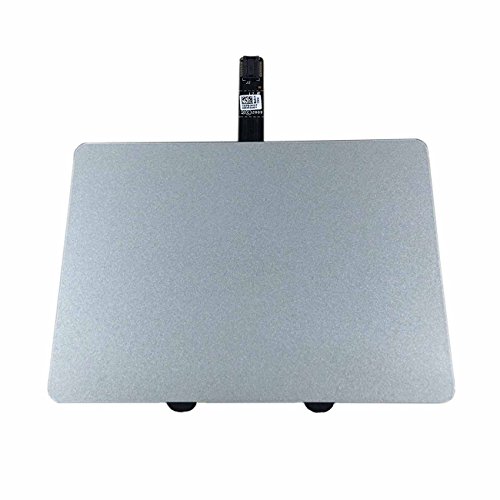
Willhom A1278 Trackpad with Cable
The Details Behind The Selections
Mid-2015 MacBook Pro 15″ owners chasing a direct-fit replacement tend to land on this Willhom part, and the part number 923-00541 lines up cleanly with the A1398 chassis for that model year. The trackpad ships alone, so anyone whose original flex cable still works can skip paying for one they do not need. Compared to the A1502 part covered next, this one is a wider panel built for the 15″ deck, which is a meaningful difference if the model identifier is uncertain.
For someone comfortable opening the lower case and reseating a ribbon cable, the install looks manageable with a standard pentalobe and Torx driver set. I would plan on cleaning the old adhesive off the battery bay before pressing the new panel down, because grit under the surface is a common cause of the click feeling uneven after a swap.
Where It Excels
- Direct fit for the 15″ A1398 Mid-2015 model, so no guessing about part variants
- Trackpad only, which keeps the cost down for people who do not need a new cable
- Restores the original multi-touch feel without forcing a full top case replacement
- Common pick among DIY repair communities, which means install videos are easy to find
Things To Consider
- Flex cable is not included, so a torn original cable means an extra part to source
- Third-party trackpads may not match the original click firmness exactly
- Adhesive strips typically need to be reused or repurchased separately
Who Should Grab It
Owners of a Mid-2015 15″ MacBook Pro whose trackpad has visible cracks or dead zones and who already have a working flex cable on hand.
Where Another Pick Suits Better
Anyone working on an A1502 13″ Early-2015 should skip this and look at the Willhom 923-00518 trackpad, which is built for that smaller chassis.
Willhom’s 923-00518 covers the 13″ MacBook Pro Retina A1502 from Early 2015, which makes it a focused option for a model that is now a decade old and worth keeping alive. The listing matches the MacBookPro12,1 identifier with part numbers MF839LL/A, MF841LL/A, and MF843LL/A, so it is worth confirming the model number printed on the underside of the laptop before ordering. A clean install of this part essentially returns the click-and-glide feel to factory condition for most users.
The work is not difficult, but the ribbon cable is delicate, and forcing it is the kind of mistake that turns a trackpad swap into a logic board story. For most people with a steady hand and an iFixit-style guide open on a second screen, the job runs under an hour.
Notable Upsides
- Exact match for the A1502 Early 2015 family, including the three sub-models
- Lightweight part that does not add bulk to the existing top case
- Printed part numbers cross-checked against the original for confidence
- Sensible choice for a repair on a laptop that is past the official service window
Points To Note
- Flex cable is not in the box, which complicates repairs where the cable is the actual failure
- Some users report slight click-feel differences compared to the OEM part
- Double-sided adhesive is usually a separate purchase
Made For
Owners of the 13″ A1502 Early 2015 who already have a healthy flex cable and want a targeted, low-cost trackpad replacement.
Reach For A Different Pick When
Repair techs who want the cable bundled in should consider the HAWSON A1502 trackpad with flex cable, which ships as a more complete kit.
For shoppers who do not want to crack open a laptop at all, the Apple Magic Trackpad is the cleanest answer in the lineup. The white surface is edge-to-edge glass, and beneath it sit pressure sensors that read the difference between a tap and a firm press, which is what enables Force Touch gestures on the desktop. It connects wirelessly and recharges over a cable, so there is no battery routine to manage beyond the occasional top-up.
What separates this from a basic external trackpad is the depth of the gesture library: two-finger scrolling, pinch-to-zoom, three-finger swipes for Mission Control, and pressure-based lookups all carry over from the built-in experience. If a workflow already leans on those gestures on a MacBook, the Magic Trackpad slots in without forcing anyone to relearn their setup. The honest read is that no third-party option replicates the full Apple gesture set this cleanly, and that is the reason the part keeps showing up on desk setups.
Everyday Wins
- Full Multi-Touch and Force Touch gesture support mirrors the MacBook built-in feel
- Rechargeable battery removes the cost and waste of disposable cells
- Large surface makes long, fast scroll swipes and big pinch gestures comfortable
- Wireless setup keeps the desk clean and lets the trackpad park anywhere within range
Honest Caveats
- Higher cost than any internal replacement part in this roundup
- Takes a couple of charging cycles to learn the indicator light behavior
- Glass surface tends to show fingerprints under direct desk lighting
Key Specs
Right Fit For
Desktop Mac users, docked MacBook owners, and anyone who wants the full Apple gesture vocabulary on a desk without opening a laptop.
Look Elsewhere When
Shoppers with a cracked MacBook trackpad who just need a working internal part should ignore this pick and grab a model-specific replacement like the Willhom 923-00541.
HAWSON’s take on the A1502 trackpad ships with the flex cable pre-attached, which removes one of the most stressful steps from a MacBook trackpad repair. The flex cable is the thin printed strip that carries the click and touch signals from the panel to the logic board, and a torn original cable is exactly why many people need a trackpad in the first place. Having it bundled means the swap stays a single-part job in most cases.
The part uses the same 821-00184-A reference that owners see when they crack open their laptop for diagnosis, and the listing cross-references the same 923-00518 and 923-01376 APN numbers tied to the A1502. HAWSON notes each unit is tested before shipping, which is a nice quality-of-life detail on a category where dead-on-arrival parts are a real headache.
What Helps Most
- Flex cable included, so there is no second-order hunt for a matching ribbon
- Tested before shipping, reducing the chance of a dead panel on first power-up
- Cross-references several APN numbers for easier model verification
- Sensible pick when the original cable is the suspected point of failure
Less Ideal Details
- Costs more than the cable-less Willhom version, which matters for tight budgets
- Bundled cable length is fixed, so careful routing still matters during install
Whose Shelf It Belongs On
Repair tinkerers and small repair shops handling A1502 swaps who would rather buy one complete kit than chase a separate cable.
Consider Something Else When
Budget-focused DIYers with a working original cable should pick the Willhom 923-00518 trackpad instead and skip the bundled cable they do not need.
The A1706 generation is where the MacBook Pro trackpad started overlapping with the Touch Bar era, and the cosmetic match starts to matter more because the panel sits visibly under the keyboard deck. HAWSON ships this part in Space Gray to match the factory finish, which keeps a repaired laptop looking original instead of patchy. The flex cable is in the box, so the install mirrors the A1502 HAWSON experience from the previous pick.
Compatibility locks to the 13″ A1706 from 2016 and 2017, so double-check the model identifier printed on the bottom case. The trackpad replacement on this generation is the kind of repair that pays off, because a working click on a 2016-era machine keeps the whole laptop feeling current.
What Works In Its Favor
- Space Gray finish matches the original A1706 chassis color
- Bundled flex cable simplifies the swap into a single-part job
- Pre-shipping testing cuts down on dead-on-arrival surprises
- Strong fit for a generation where replacement parts are getting harder to find
Worth Bearing In Mind
- Only fits the 13″ A1706, so it is easy to order the wrong part by mistake
- Premium over the cable-less option, which matters if the original cable is fine
Best Suited To
Owners of a 13″ MacBook Pro A1706 from 2016 or 2017 who want a color-matched, cable-included trackpad and prefer a single-part install.
Not Your Match When
Shoppers working on the older A1502 should pick the HAWSON A1502 trackpad instead, since the A1706 part will not physically fit that chassis.
The A1278 MacBook Pro 13″ Unibody covers four model years, from Mid 2009 through Mid 2012, and replacement parts for that run keep getting thinner as time passes. This Willhom kit ships the trackpad and the cable together, which is a real convenience on a laptop where the cable route is fiddly. The listing explicitly excludes 2008 and the MacBook Air line, so the A1278 identifier printed on the underside of the machine is the thing to verify first.
For a laptop that is mostly a garage, school, or travel beater today, a working trackpad keeps the whole machine usable. The honest trade-off is that this generation is well past Apple’s official service window, and the value of the repair depends on how much life is left in the rest of the hardware.
The Value In It
- Single kit covers both the panel and the cable for a complete fix
- Supports a long list of A1278 sub-models from 2009 to 2012
- Helpful for keeping older workhorses alive past official support
- Marketed as 100% new, so it arrives as a clean replacement rather than a pull
Points To Keep In Mind
- Will not fit the 2008 A1278, which is a common point of confusion
- Older chassis may need a careful battery check before opening the case
- Click feel can vary slightly from a late-2012 OEM panel
Who Will Love This
Vintage MacBook owners running an A1278 from 2009 to 2012 who want a clean, all-in-one trackpad and cable replacement for a beloved older machine.
Swap It Out When
Anyone with a Mid-2015 A1398 should reach for the Willhom 923-00541 trackpad instead, since the A1278 part is built for an earlier generation entirely.
What Matters Most Before Choosing Trackpads For Mac
Confirm The Exact Model Identifier First
Every internal trackpad on this list is model-specific, and the wrong part can fit close enough to look right while clicking unevenly or refusing to register. The model number is printed on the underside of every MacBook, and the identifier in macOS under “About This Mac” matches it. Cross-check that number against the ASIN listing before ordering, because A1502 and A1706 look similar in photos but use entirely different cables and chassis cutouts.
Match The Cable Situation To The Failure
A trackpad that clicks but does not register touch often points to a cable issue, not a panel issue, and a trackpad-only order will not fix that. Kits that include the flex cable, like the HAWSON A1502 and the Willhom A1278, handle the worst-case scenario in one shipment. Cable-less options like the Willhom 923-00518 make more sense when the original cable has been inspected and confirmed healthy.
Decide Between Repair And External
The Apple Magic Trackpad is the only pick on this list that does not involve opening a laptop, and it earns its place by giving a desktop or docked setup the same gesture vocabulary the user already trusts. A repair part is the right call only when the built-in panel is the actual problem. Mixing the two categories usually ends with a buyer paying for the wrong solution.
Watch For Cosmetic Fit On Later Generations
The A1706 in particular needs a color-matched panel to keep the deck looking consistent, because mismatched gray tones stand out under office lighting. The Willhom A1278 part covers four model years, so a careful identifier check matters even when the laptop looks familiar.
Smart Considerations Across These Picks
Where Shoppers Go Wrong
The most common mistake is trusting photos over identifiers, which leads to a part that looks right but does not seat properly. Another trap is buying a trackpad-only replacement when the cable is the actual failure, which means ordering twice and waiting for the second part to arrive. Skipping the battery disconnect before lifting the trackpad is the kind of shortcut that turns a clean swap into a service ticket, and it is worth budgeting the extra ten minutes for.
Where The Extra Money Goes
Premium internal parts tend to bundle the flex cable, ship pre-tested, or color-match a specific chassis, and any one of those can be the difference between a smooth afternoon and a frustrating weekend. The Apple Magic Trackpad sits in a different tier because it adds an entire pressure-sensitive surface, rechargeable power, and wireless pairing to a setup that would otherwise need a mouse. Paying more earns something tangible in both cases, but only if the rest of the machine is worth investing in, which is a real judgment call on a 2012-era A1278.