Setting up a home recording space is rarely just about the computer itself. The monitor, the headphones, the microphone, the controller, all of them shape how a session actually feels when you’re tracking vocals at midnight or sketching beats between meetings. The right mix of gear turns a cluttered desk into a workflow that disappears into the background, leaving only the work.
I’ve focused this roundup on the accessories and recording tools that pair naturally with a studio computer, because a great machine needs the right companions. Microphones, monitors, MIDI surfaces, and wireless capture tools all matter once you start building a real setup. Each pick below fits a different creator profile, from bedroom producers to podcasters running a dual-PC workflow.
A Snapshot Of The Selections

Akai MPK Mini MK3 MIDI Controller + M-Audio SP2 Sustain Pedal Bundle

MAONO PD100W Wireless Dynamic Microphone for PC

MAONO Wave T5 Wireless Lavalier Microphone

MAONO MH601 Wired Studio Headphones

MAONO MH700 Wired Studio Headphones

HyperX QuadCast USB Condenser Microphone

MAONO PD200W Hybrid Wireless Podcast Microphone
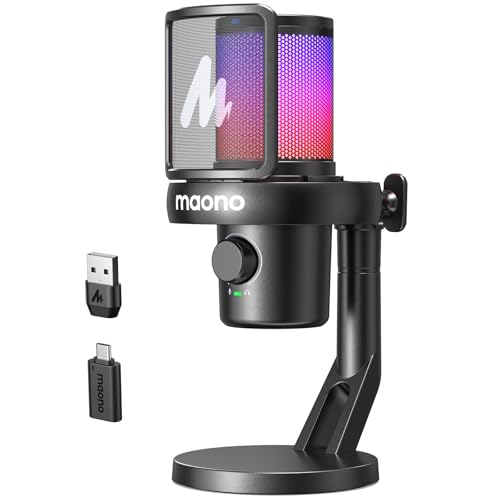
MAONO DM40 Wireless Condenser Microphone

Akai Professional APC40 MKII USB MIDI Pad Controller

MAONO Wave T5 Wireless Lavalier for iPhone/Android
A Breakdown Of The Leading Choices
This bundle anchors the start of the list because it answers a real question for first-time producers: what do I actually plug in on day one. The MPK Mini MK3 packs 25 velocity-sensitive mini keys, eight drum pads, and eight assignable knobs into a unit small enough to live next to a laptop without crowding the desk.
Power comes from USB, so there’s no wall wart to hide. The included M-Audio SP2 sustain pedal rounds out the package for anyone tracking piano parts or sketching string ideas, and it adds a tactile layer the pads alone can’t deliver. For someone building a first home studio computer setup, this is a low-friction entry point.
Where It Helps
- 25 velocity-sensitive mini keys give playable expression in a footprint that fits any desk
- Eight drum pads and eight knobs map directly to most DAWs, shortening the learning curve
- USB-powered design means one cable to the computer, no extra power brick to manage
- The included sustain pedal adds piano-style control without buying a second accessory
Things To Consider
- Mini keys feel tight for anyone with larger hands or longer practice sessions
- Lightweight construction means it shifts around on the desk during heavier pad performances
Who It Suits Best
First-time producers sketching beats and learning a DAW from scratch.
Reach For A Different Pick When
Performers running Ableton Live should look at the Akai Professional APC40 MKII instead.
A dynamic mic is the right starting point for untreated rooms, and cutting the cable changes how a desk feels during a long stream. The PD100W runs over a USB-C receiver, which means no XLR interface, no dangling cord, and one less thing to snag when you reach for a coffee.
Dynamic capsules reject more room noise than condensers do, so nearby hum from a PC tower or an air vent stays out of the take. The wireless angle appeals most to creators who switch between sitting and standing, or anyone who films with a second camera and wants the mic free to move.
Bright Spots
- Wireless USB-C receiver removes cable clutter from the recording area
- Dynamic capsule pattern naturally rejects background hum and keyboard noise
- Clean desktop footprint suits minimalist streaming setups
- Quick to relocate for guests or off-camera voice work
Points To Note
- Wireless convenience depends on battery habits, owners commonly report needing routine charging
- Dynamic capsules capture less detail than the HyperX QuadCast condenser for soft vocals
Made For
Streamers and podcasters recording in shared spaces with ambient noise.
Consider Something Else When
Voice actors wanting pristine vocal detail will prefer the HyperX QuadCast.
Lavalier systems used to mean tangled bodypack cables and dead transmitter batteries mid-shoot. The Wave T5 skips both problems by clipping a near-weightless mic to a collar and pairing it with whatever phone or camera you already own.
The form factor matters more than the spec sheet suggests. Run-and-gun shooters, on-location interviewers, and tutorial creators who move between setups all benefit from gear that disappears into the shot. Pair it with a phone and the studio computer is suddenly optional.
Strong Points
- Clip-on wireless form factor frees both hands for demonstrations and gestures
- Cross-device compatibility covers iPhone, Android, cameras, and PC
- Compact carry size fits in a pocket alongside phone mounts and gimbals
- Cleaner dialogue capture than built-in camera or phone microphones in most indoor scenes
Worth Noting
- Lavalier placement changes tone, and beginners may clip the mic too close to the mouth
- Wireless range holds in open spaces but tightens around thick walls and crowded venues
Best Suited To
Mobile content creators filming tutorials, interviews, or travel content.
A Better Fit Elsewhere
Studio-bound vocalists will get fuller sound from the MAONO PD200W.
Closed-back headphones solve a problem open-back designs cannot: they keep the mic from bleeding into the take. The MH601 is a wired, closed-back pair that costs less than a dinner out and still delivers a workable monitoring picture for tracking and casual mixing.
For a first studio computer setup, the wired design feels right. No battery to forget, no Bluetooth codec to troubleshoot, just plug in and listen. The padded ear cups also help during long edit sessions when fatigue usually starts with the headband.
Key Advantages
- Closed-back design prevents audio bleed into a live microphone during vocal takes
- Wired connection means zero charging and zero latency for monitoring
- Comfortable cushioning supports multi-hour tracking and editing sessions
- Entry-level price keeps first-time setup costs manageable
Soft Spots
- Entry-level driver tuning lacks the detail for critical mix decisions
- Cable is non-detachable, so wear at the jack ends the headphones’ useful life
The Right Fit
Beginner podcasters and DJs who need isolation without a premium spend.
Skip It When
Mixing engineers chasing flat reference sound should choose the MAONO MH700.
The MH700 sits above the MH601 in MAONO’s line, and the difference shows up in frequency response. The wider range reaches deeper into the bass and extends further into the high end, which matters when you’re trying to spot problems in a mix before they reach a listener.
The 50mm driver design also helps the stereo image feel wider, useful for producers checking panning decisions across headphones rather than speakers. The included 3.5mm to 6.35mm adapter means it pairs with audio interfaces, mixers, and guitar amps alike.
What Works In Its Favor
- Wider frequency response captures more of the audible spectrum for accurate mixing checks
- 50mm dynamic drivers deliver a fuller stereo image during headphone mixing
- Adapter included for use with pro audio gear that uses the larger 6.35mm jack
- Closed-back isolation still prevents mic bleed during tracking
Honest Caveats
- Heavier build than entry-level pairs, which can press on the headband during very long sessions
- Still a wired connection, so mobility is limited to the cable length
Quick Facts
Who Will Love This
Home studio producers mixing on headphones and tracking vocals regularly.
Where Another Pick Suits Better
Creators prioritizing portability should check the MAONO PD100W instead.
The QuadCast has earned its place in countless bedrooms and Twitch setups for one reason: it works. USB plug-and-play, four polar patterns, and a tap-to-mute sensor take the friction out of recording without locking anyone into a specific platform.
A polar pattern controls which directions the microphone listens from. Having four of them, including cardioid, bidirectional, and omnidirectional, lets one mic handle solo podcasts, two-person interviews, and roundtable chats without swapping hardware.
Everyday Wins
- Four polar patterns cover solo, interview, and group recording scenarios
- Built-in shock mount reduces desk thumps and keyboard vibrations
- Tap-to-mute sensor with LED indicator prevents accidental hot-mic moments
- Cross-platform compatibility supports PC, Mac, and consoles
Trade Offs
- Condenser capsule picks up more room noise than dynamic alternatives like the MAONO PD100W
- Larger desk footprint than a compact lavalier or handheld dynamic option
Perfect Match For
Cross-platform creators who switch between streaming, podcasting, and gaming on the same rig.
Look Elsewhere When
Mobile-first creators should reach for the MAONO Wave T5 lavalier.
The PD200W answers a question many home studios hit after a year or two: should I go wireless, USB, or XLR. Hybrid designs like this one let you try all three without buying three microphones. That flexibility matters when a setup is still evolving.
The dynamic capsule keeps the noise floor low in untreated rooms, and the cardioid pickup focuses on the voice in front of the mic. For a studio computer that doubles as a streaming and recording hub, the connection flexibility pays off every time the workflow shifts.
Practical Advantages
- Three connection modes (wireless, USB, XLR) cover beginner and pro workflows in one unit
- Dynamic capsule handles untreated rooms better than most condenser designs
- Cardioid pickup focuses on the speaker and reduces side noise
- Companion software allows EQ and noise cancellation tweaks per environment
Points To Note
- Adding XLR requires a separate audio interface, raising the real-world cost
- Wireless mode battery needs managing for long streaming sessions
Feature Snapshot
Built With In Mind
Home studios growing from a single USB setup toward a more professional interface.
Swap It Out When
A pure plug-and-play streamer may prefer the HyperX QuadCast’s simplicity.
The DM40 leans into the software side of modern recording. Custom EQ, three-level noise cancellation, and AI voice change functions live in the companion app, and for streamers that means the microphone does more than capture audio, it shapes the sound.
Wireless operation runs up to 40 hours on a charge according to the manufacturer, which covers a full week of typical streaming sessions. For a creator who treats the studio computer like a control center, having tonal tools baked into the mic setup reduces the plugin juggling.
Well-Handled Touches
- Custom EQ settings let streamers tune tone without external plugins
- Three-level noise cancellation adjusts to different room conditions on the fly
- AI voice change tools add character for gaming and entertainment content
- Long wireless runtime supports multi-day use without constant recharging
Trade-Offs To Consider
- Condenser design picks up more ambient sound than dynamic alternatives in loud rooms
- Best features depend on installing the companion software, which adds setup time
Whose Shelf It Belongs On
Streamers and gaming creators wanting flexible tone shaping in one unit.
Another Choice May Suit
Voice actors focused on natural vocal tone should pick the MAONO PD200W.
Trackpads get old fast when a session turns into a live performance. The APC40 MKII exists for producers who want their hands on dedicated buttons, faders, and a clip-launch matrix instead of menu diving. It integrates tightly with Ableton Live, which is the DAW it was designed around.
Compared to the MPK Mini MK3 earlier in this list, the APC40 MKII trades portability for direct control. The 5×8 RGB pad grid shows clip status at a glance, and the dedicated mixer section replaces dozens of mouse movements per session.
A Favorable Mix
- Clip-launch matrix with RGB feedback shows track state without looking at the screen
- Dedicated faders and knobs map to mixer, instrument, and effect parameters in Ableton
- USB bus power keeps cable management simple on a packed studio desk
- Construction is built for repeated live use rather than occasional studio tinkering
Practical Considerations
- Best experience lives inside Ableton Live, limiting value for users of other DAWs
- Larger footprint than the MPK Mini MK3, so it needs dedicated desk real estate
Right Fit For
Live performers, beat makers, and producers working primarily in Ableton Live.
Not Your Match When
Beginners learning a DAW from scratch should start with the MPK Mini MK3.
This second Wave T5 variant on the list is tuned for phone creators. It pairs with iPhone 15, 16, and 17 series plus recent Android phones, which covers the majority of mobile-first content creators working outside a traditional studio.
For a creator whose studio computer is more of an editing bay than a live capture hub, the lavalier form factor makes more sense than a desktop mic. Light, clip-on, and almost invisible on camera, it removes one more obstacle between an idea and a finished take.
What Helps Most
- Phone-first compatibility covers current iPhone generations and modern Android handsets
- Lightweight lavalier form factor stays hidden in clothing and on-camera setups
- Wireless design lets creators move freely without cable restrictions
- Quick pairing reduces setup time for short-form and social content workflows
Room For Improvement
- Lavalier placement affects tone consistency, requiring some trial and error by the wearer
- Limited use case for stationary studio recording compared to desktop condenser options
Who Should Grab It
Phone-first creators capturing short-form video and social content on the go.
A Better Fit Elsewhere
Desktop streamers anchored to a studio computer should pick the HyperX QuadCast.
What To Weigh Before Buying Studio Recording Gear
Match The Gear To Your Real Workflow
A producer who lives inside Ableton needs a different toolset than a podcaster who only opens their DAW once a week. MIDI controllers like the Akai MPK Mini MK3 shine for hands-on beat making, while wireless lavalier systems suit creators who never sit still. Start by naming the activity that takes up most of your recording time, then prioritize gear that supports that specific motion.
Pay Attention To Connection Standards
USB, USB-C, XLR, and wireless all have trade-offs. USB and USB-C offer plug-and-play simplicity for most home studio computers. XLR adds professional flexibility but requires an audio interface. Wireless removes cable clutter but introduces battery management. Pick a connection type that matches how often you want to reconfigure your setup.
Closed-Back Headphones And Untreated Rooms
Closed-back headphones, like both MAONO models in this list, keep audio from leaking into a live microphone. For most home setups without acoustic treatment, closed-back designs solve a problem open-back headphones cannot. The trade-off shows up in long-term comfort, so padded ear cups and adjustable headbands matter more than spec sheets suggest.
Microphone Type Shapes The Sound
Dynamic microphones reject more room noise and suit untreated spaces, while condenser microphones capture more detail and work better in acoustically treated rooms. The HyperX QuadCast and MAONO DM40 lean condenser, and the PD100W and PD200W lean dynamic. The honest read is that beginners usually get cleaner results from a dynamic mic until they treat their room.
Key Considerations Across These Picks
Where Shoppers Go Wrong
Jumping into a condenser microphone before treating a room is one of the most common slip ups. The mic picks up everything, including the computer fan, the street noise, and the neighbor’s dog. Pairing a dynamic mic with closed-back headphones solves most home studio problems without acoustic panels.
Another trap is buying a MIDI controller with too many features for your current skill level. The MPK Mini MK3 covers most beginners, while the APC40 MKII rewards producers who already work in Ableton daily. Matching complexity to experience keeps gear from sitting unused in a closet.
When Paying More Pays Off
Higher-tier models like the MAONO PD200W and MH700 spend the extra budget on flexibility and frequency response. The PD200W’s three connection modes mean it survives a workflow upgrade, and the MH700’s wider frequency response catches mix problems the MH601 might miss. The upgrade payoff shows up when the setup grows beyond its first configuration.
Frequently Asked Questions
What Computer Specs Matter Most For Studio Recording?
A fast multi-core processor, at least 16GB of RAM, and a solid-state drive handle most home recording sessions. Audio plugins and virtual instruments are CPU-hungry, so processor strength usually matters more than graphics performance.
Do I Need An Audio Interface For Home Recording?
A USB microphone works fine for solo podcasts and streaming. An audio interface becomes valuable when adding XLR microphones, instruments, or multiple input sources at once.
How Many Microphones Does A Home Studio Need?
Most beginners start with one versatile microphone. Two microphones open up interview setups and stereo recording, but a single dynamic or condenser covers the majority of solo creators.
Should I Buy Closed-Back Or Open-Back Headphones?
Closed-back headphones suit tracking and recording because they prevent sound from leaking into a live microphone. Open-back headphones work better for critical mixing in quiet, private spaces.
Is A MIDI Controller Necessary For Music Production?
A MIDI controller speeds up beat making and virtual instrument performance, but it is not required. Many producers start with just a computer and mouse before adding hardware like the MPK Mini MK3 or APC40 MKII.
The Takeaway
A studio computer is only as useful as the gear connected to it. The right microphone, headphones, and controller turn a capable machine into a workspace that disappears into the background. Match each pick to your actual workflow, and the setup will pay off every time you sit down to record.