Keyboards take a beating. Coffee drips, dust bunnies migrate between keys, kids grab them with sticky fingers, and pets shed directly into the gaps. A good protector extends the life of a keyboard without getting in the way of typing. I pulled together seven options that cover the most common shapes and use cases, from ergonomic desktop boards to laptop bodies that need shell coverage. Each pick below pairs with a specific model, so matching is the first thing to check before anything else.
The Choices Worth Comparing
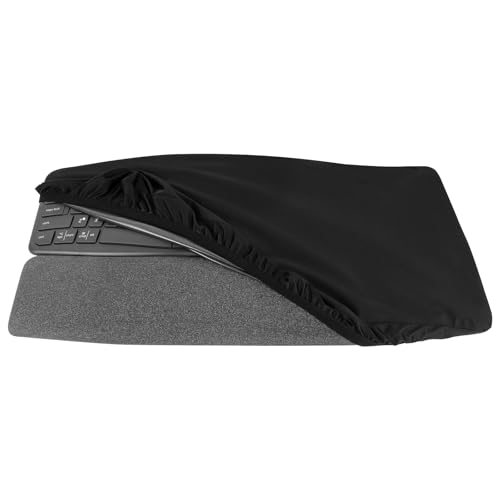
Geekria Keyboard Dust Cover for Logitech ERGO K860

Batianda Heavy Duty Case for MacBook Air 13 2015-2017

Batianda Heavy Duty Case for MacBook Pro 13 2022 2020

Batianda 4-in-1 Ultimate Case for MacBook Pro 13 2022 2020
Batianda Heavy Duty Case for MacBook Air 13 2018-2020
Batianda Extreme Heavy Duty Case for MacBook Air 13.6 2026-2022

Batianda Ultimate Custom Name Case for MacBook Air 13 2018-2020
More Details On Our Top Picks
The Geekria cover is built for a single board, the Logitech ERGO K860, and that focus shows. Split and curved ergonomic keyboards have unusual footprints that generic dust covers simply do not fit, so a tailored sleeve solves a real frustration. The exterior is a soft, skin-friendly fabric, while an inner silicone layer handles splashes. I would lean on it in a home office where coffee, snacks, and a curious cat all live within reach of the desk.
What makes it a smart buy is the balance of soft touch outside and waterproofing inside. Ice-silk style fabric stretches to follow the wave of the K860, so the cover lays flat without bunching in the center gap. It slides on in seconds and pulls off for a quick wipe. The honest read is that the cover protects against dust and small splashes, not full immersion, so dumping a mug is still a bad idea.
Notable Upsides
- Tailored cut that follows the curved, split shape of the K860
- Inner silicone layer that catches splashes before they reach the keys
- Stretchy fabric that stays smooth over the hump without bunching
- Removes in seconds for a quick wipe or shake-out
Things To Consider
- Only fits the Logitech ERGO K860, nothing else
- Won’t survive a full spill, only light splash protection
- Fabric exterior can collect lint in dusty rooms
Who It Suits Best
Owners of the Logitech ERGO K860 who want a snug, low-profile cover that follows the board’s unusual shape.
Where Another Pick Suits Better
Laptop users who need shell coverage should look at the Batianda Heavy Duty Case for MacBook Air 13 2015-2017 instead.
The Batianda case targets a specific slice of users: anyone still running a 13-inch MacBook Air from 2015 through 2017. Finding accessories for older Airs is genuinely annoying, since most third-party shells focus on the Retina redesign that arrived in 2018. This case fills that gap with a hard shell that snaps over the lid and base, leaving all the ports and vents accessible.
The grey finish keeps the look understated, and the shell adds grip to a laptop that famously slid off slick surfaces. I would recommend it for students dragging an older Air between classes or home offices where the laptop doubles as a second screen. The trade-off is real though: a hard shell adds a small amount of bulk and weight, and older Airs run warm, so airflow matters.
What Pays Off
- Fits the pre-Retina 13-inch Air that most accessory makers ignore
- Hard shell protects the lid and base from scratches in a backpack
- Neutral grey finish that hides scuffs over time
- Cutouts line up with the older Air’s port layout
Worth Noting
- Adds a small amount of bulk compared to running the laptop bare
- Hard shell can trap heat during long rendering or video sessions
Key Specs
Made For
Owners of a pre-2018 MacBook Air 13 who want a proper shell rather than a generic sleeve.
Consider Something Else When
If you carry a newer MacBook Air 13 (2018 onward), skip this and go straight to the Batianda Heavy Duty Case for MacBook Air 13 2018-2020.
Batianda positions this shell as a “hybrid fortress,” pairing a scratch-resistant matte polycarbonate back with a thick TPU (thermoplastic polyurethane, a rubbery plastic that absorbs shock) bumper around the edges. The combination handles both scuffs and drop impact, which is what most 13-inch Pro owners actually worry about. Compared to the older Air case in pick 2, this one leans harder into protective engineering rather than just a hard shell.
Deep Teal is a refreshing break from space grey and silver, and the matte finish helps hide fingerprints. It suits commuters, café workers, and anyone whose laptop lives in a shared backpack with notebooks and cables. The honest caveat: heavier protection means more weight in the bag, and a snug fit is essential, so model year really does matter here.
Notable Gains
- PC back resists scratches from zippers and cables in the bag
- TPU bumper soaks up impact at the corners where drops usually land
- Matte finish keeps fingerprints off the lid
- Color choice adds personality without going loud
Trade Offs
- Heavier than a thin plastic skin
- Must match the exact 2020 or 2022 Pro 13 model year
- Dark colors can show lint along the seams
Right Fit For
MacBook Pro 13 owners from 2020 or 2022 who carry their laptop daily and want drop-rated corner protection.
Not Your Match When
Anyone who wants a built-in stand or screen film should look at the Batianda 4-in-1 Ultimate Case for MacBook Pro 13 2022 2020 instead.
The 4-in-1 Ultimate case takes the hybrid armor approach from pick 3 and adds an ergonomic stand plus a screen cover, turning a simple shell into a full workstation setup. That’s a real shift in use case: this is for someone who works away from a desk as much as at one. The “tank structure” PC and TPU build handles bumps, while the kickstand lifts the screen to a more comfortable angle during long writing sessions.
Black is a safe color choice for shared offices. I would recommend it to remote workers who split time between kitchen tables, coworking spaces, and client sites. The trade-off shows up in the carrying weight: more pieces mean more to keep track of, and the screen film needs occasional cleaning to stay clear.
The Helpful Details
- Built-in stand supports better posture on flat surfaces
- Screen cover adds a layer against keyboard marks when closed
- Same hybrid armor construction as the simpler Pro 13 case
- One package replaces separate stand and sleeve purchases
Minor Gripes
- More pieces to keep organized in a bag
- Screen film can collect smudges during daily open-and-close cycles
Best Suited To
MacBook Pro 13 (2020 or 2022) users who need a portable workstation, including stand and screen protection, in a single bundle.
Look Elsewhere When
If you mainly work at a fixed desk and just want drop protection, the simpler Batianda Heavy Duty Case for MacBook Pro 13 2022 2020 is a lighter carry.
For the 2018-2020 Retina MacBook Air 13, Batianda brings the same hybrid PC-and-TPU recipe used on the Pro 13. That keeps the case lineup consistent for shoppers who own multiple Apple devices. Lavender Gray is a softer, more interesting color than typical silver or grey, and it plays well in home offices where the laptop sits on display.
Compared to the 2015-2017 Air case in pick 2, this one absorbs shock better at the corners. It fits students, writers, and anyone who treats their Air as a primary machine. The honest read: the snug fit means double-check the model number on the underside of the laptop before ordering, since the 2018 redesign has a slightly different footprint than older Airs.
Features That Help
- Reinforced TPU corners handle the most common drop angles
- Matte PC back resists scratches and fingerprint smudges
- Lavender Gray offers a fresh break from typical neutrals
- Vent cutouts preserve airflow during everyday tasks
Honest Caveats
- Must match the 2018-2020 Air 13 specifically, not earlier or later models
- Color can look different under warm versus cool lighting
Quick Facts
Who Will Love This
Daily commuters and students with a 2018-2020 MacBook Air 13 who want drop protection and a softer color palette.
A Better Fit Elsewhere
Newer Air 13.6 owners should look at the Batianda Extreme Heavy Duty Case for MacBook Air 13.6 2026-2022, which is built for the redesigned chassis.
The Extreme case is the flagship of the Batianda Air lineup, and the spec sheet explains why. The backplate uses a honeycomb “X-Frame” pattern that disperses impact energy across a wider area, a concept borrowed from aerospace panels. A rubberized anti-slip stand sits at the base, so the laptop stays put on smooth café tables or tray tables during travel. It is the heaviest case in this roundup by design, since extra material equals extra protection.
I would lean toward this case for field workers, frequent flyers, and anyone who treats their Air as a true travel machine. Navy Blue is a confident, professional color that works in client-facing settings. The trade-off is weight, and users who carry their laptop all day may notice the difference over a thinner shell.
The Upside
- Honeycomb X-Frame back handles impact better than a flat panel
- Rubberized stand keeps the laptop stable on slick surfaces
- Heaviest-duty construction in the Batianda Air lineup
- Professional Navy Blue finish suits business settings
Points To Keep In Mind
- Noticeably heavier than the standard Air cases
- Honeycomb texture can collect dust in the grooves over time
Feature Snapshot
Perfect Match For
Travel-heavy MacBook Air 13.6 owners from 2022 onward who want maximum drop and slip protection.
Reach For A Different Pick When
If a thinner carry matters more than maximum protection, the Batianda Heavy Duty Case for MacBook Air 13 2018-2020 keeps weight down.
The Custom Name case wraps the same hybrid armor from pick 5 with a UV-printed personal label on the lid. UV printing (a process that cures ink with ultraviolet light) bonds the design directly to the matte surface rather than sitting on top as a sticker, so it resists fading through daily open-and-close cycles. For gift shoppers, new grads, and anyone who wants their laptop to feel like theirs, that personalization matters.
It suits back-to-school gifting, corporate giveaways, and shoppers who want a recognizable mark on a shared workspace. The honest trade-off: custom printing adds production lead time, and the printed area is limited by the lid size, so the name needs to be short to look right.
Good Reasons To Consider
- UV-printed name resists fading better than a sticker would
- Same hybrid PC and TPU protection as the standard Air 13 case
- Easy way to identify a laptop in shared spaces or travel
- Works well as a graduation or corporate gift
Practical Considerations
- Custom orders take longer to ship than off-the-shelf cases
- Long names get cramped on the 13-inch lid
- Personalized cases are usually non-returnable once printed
Who Should Grab It
Gift shoppers and students with a 2018-2020 MacBook Air 13 who want a personalized look without giving up real protection.
Swap It Out When
Anyone who changes laptops often should pick the non-customized Batianda Heavy Duty Case for MacBook Air 13 2018-2020 for easier resale.
Picking a Keyboard Protector That Actually Fits
The right protector starts with a model number, not a brand. Keyboards and laptops are cut to specific footprints, and a mismatch of even a few millimeters means loose corners or blocked vents. Always check the underside of a laptop or the model sticker on a desktop keyboard before ordering.
Material comes next. Silicone and TPU absorb impact and shrug off spills, while hard polycarbonate shells fend off scratches but transfer shock directly. A hybrid build, like the Batianda cases, splits the difference and tends to suit most real-world carry. For fabric dust covers, look for a stretchy outer layer paired with a waterproof inner liner.
Think about daily habits. A stationary desktop keyboard only needs a basic dust cover, while a laptop in a daily backpack benefits from corner reinforcement. Stand and screen-film add-ons make sense for mobile workers, but add weight that stationary users do not need.
Finally, color and finish affect long-term satisfaction more than people expect. Matte surfaces hide fingerprints, dark colors hide scuffs, and lighter colors show wear faster. Pick a finish that matches how often you actually clean the case, not just how it looks on day one.
Key Considerations Across These Picks
Common Shopping Slip Ups
The single biggest mistake is trusting a model name without checking the year. MacBook Air and Pro generations look similar but use different cutouts, and a 2017 case simply will not click onto a 2020 machine. Always cross-reference the model number printed on the bottom of the laptop.
Another trap is buying based on protection claims without considering weight. Heavier-duty cases add real grams to a bag, and over the course of a workday those grams become uncomfortable. Match the case to the actual risk: a desk-bound laptop does not need the same armor as one that travels.
Where The Extra Money Goes
Higher-tier cases cost more for engineering that you can actually see and feel. Honeycomb backplates, reinforced TPU corners, and integrated stands all require more material and tighter mold tolerances. The payoff is longer case life and better drop performance, which matters more for frequent travelers than home users.
For shoppers who carry lightly, a mid-tier hybrid shell offers most of the same protection at a lower cost. The jump to flagship Extreme cases only pays off when the laptop genuinely takes abuse.
Frequently Asked Questions
How do I know which keyboard protector fits my device?
Check the exact model number on the bottom of laptops or the back of desktop keyboards, then match it to the case listing. Manufacturer compatibility lists usually show year ranges, and a 2018 model rarely fits the same shell as a 2022 model.
Will a hard shell case make my laptop overheat?
Quality shells include vent cutouts that match the laptop’s cooling design. For most everyday tasks like browsing, writing, and video calls, temperatures stay normal. Heavy sustained workloads like video rendering may run warmer with any case on, so remove the shell for long heavy sessions.
Are silicone keyboard covers safe for the keys?
Soft silicone covers protect against dust and crumbs, and they generally do not damage keycaps. The catch is that trapped moisture underneath can leave marks, so lift the cover occasionally to let the keyboard breathe.
Do I need a screen cover with my laptop case?
A separate screen film helps if keys press against the display when the laptop is closed, which is a common issue with clamshell designs. Many 4-in-1 bundles include this layer; if you type hard, it is worth having.
Can I personalize a case without losing protection?
Yes. Customization through UV printing, like the Batianda Custom Name case, prints directly onto the protective shell rather than adding a separate layer. The underlying armor stays the same, only the finish changes.
Wrap Up
A keyboard protector earns its place by fitting the device it covers and matching the way you actually use it. The picks above cover ergonomic desktop boards, several MacBook generations, and a personalized option for gifting. Match the model number first, then choose the level of armor your daily routine needs, and the rest falls into place.