Anyone who has ever tallied a long column of receipts or punched figures into a budget spreadsheet knows the top-row number keys feel slow and cramped. A dedicated numeric keypad restores that rhythm, adds document navigation, and frees the left hand to fly across the alpha keys. I put together this lineup for accountants, engineers, spreadsheet power users, and anyone who simply wants a more comfortable way to enter digits at a desk or on the go.
The Lineup, Simplified
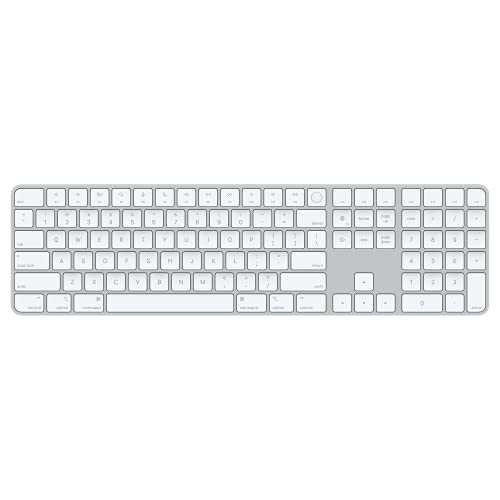
Apple Magic Keyboard with Touch ID and Numeric Keypad
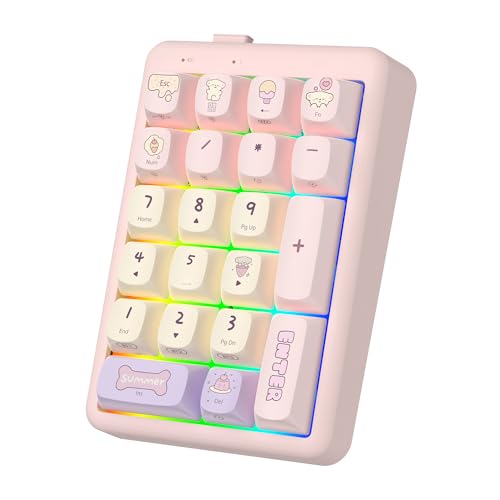
FOPATO Wireless Mechanical Numpad Numeric Keypad
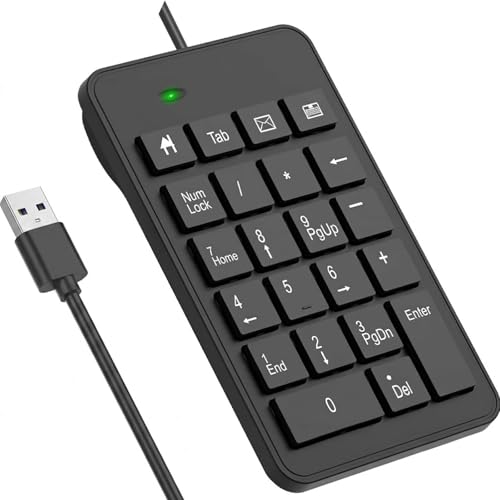
LOONASA Wired 23 Key USB Numeric Keypad

LOONASA Wired USB-C Numeric Keypad 23 Keys
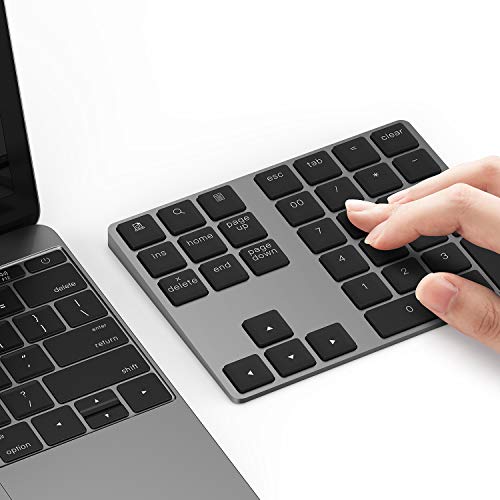
Lekvey Aluminum Bluetooth Numeric Keypad

BOYI TD21 Hot Swap Numpad Mechanical Keypad

Lekvey Bluetooth Number Pad with 28 Keys

Lekvey Wireless Numeric Keypad and Mouse Combo

LOONASA Wireless Number Pad with Battery 23 Keys
The Strengths Of Each Pick
For anyone deeply committed to the Mac ecosystem, this Apple keyboard feels less like an accessory and more like a natural extension of the machine. Bluetooth pairing is automatic on any Mac running Apple silicon, so the keypad is ready to use within seconds of unboxing. The rechargeable internal cell, charged through the included USB-C to Lightning cable, runs for roughly a month between top-ups depending on workflow.
The full numeric layout includes dedicated document navigation controls and full-size arrow keys, which is something many smaller pads skip. Touch ID adds a layer of fast, secure login that wired aftermarket keypads cannot replicate. For Mac accountants and spreadsheet professionals, the seamless fit and low-friction charging routine are worth the investment.
What Works In Its Favor
- Automatic pairing with Mac Apple silicon devices keeps setup to a single click
- Touch ID fingerprint unlock integrates with system login and supported apps
- Rechargeable battery lasts about a month under typical use
- Full-size arrow keys and document navigation controls feel natural during long sessions
- Low-profile key design delivers a quiet, comfortable typing surface
Things To Consider
- Designed exclusively for Macs with Apple silicon and macOS 11.4 or later
- No wireless receiver for non-Apple laptops, limiting cross-platform flexibility
Made For
Mac-based finance professionals and dedicated Apple silicon households who want a native keypad with biometric login built in.
Where Another Pick Suits Better
Anyone using Windows or Linux on a laptop daily will find the Lekvey Aluminum Bluetooth Numeric Keypad a more flexible match thanks to broader OS support.
This FOPATO pad stands out by offering three connection paths in a single chassis: Bluetooth 5.2, a 2.4GHz wireless dongle, and a wired USB option. The hot-swappable mechanical switch socket lets users swap key feel without soldering, which is unusual at this category level. It’s built for shoppers who like to tinker but still want something that works out of the box.
For programmers and accountants who bounce between a desktop tower, a personal laptop, and a work-issued device, the ability to jump between paired machines saves the hassle of replugging. Compared to the Apple Magic Keyboard up top, this one is far more platform-agnostic, trading native pairing for flexibility.
What It Does Well
- Triple-mode connectivity covers Bluetooth, 2.4GHz dongle, and wired use
- Hot-swappable mechanical switches accommodate most 3-pin and 5-pin alternatives
- Mechanical key feel suits long-form data entry and creative shortcuts
Honest Caveats
- Mechanical switches are louder than membrane or scissor designs, which may bother shared offices
- Slightly heavier chassis than slim membrane pads, so travel weight matters
Right Fit For
Multi-device power users who want one keypad that follows them across a desktop, a laptop, and a tablet.
Skip It When
Quiet shared offices are the priority, in which case the LOONASA Wired 23 Key USB Numeric Keypad offers a much gentler typing footprint.
Sometimes the simplest tool is the right tool. This 23-key wired keypad from LOONASA plugs into any USB-A port and is recognized immediately, no drivers or battery charging required. The oversized print on each keycap is a thoughtful touch for anyone reviewing figures in low light or sharing the pad with colleagues.
Compared to the Lekvey Bluetooth Number Pad earlier in this list, this unit is stripped of wireless frills, which keeps the price approachable for home offices and student budgets. The shorter key travel reduces finger fatigue over long reconciliation sessions, a practical detail for bookkeepers.
Bright Spots
- Plug-and-play USB connection requires no setup or charging routine
- Big-print keycaps improve visibility in dim offices and shared spaces
- Extended 23-key layout supports faster data entry than a 17-key pad
Soft Spots
- Cable length and position may require adjustment on crowded desks
- Lacks wireless flexibility for laptop users who roam between rooms
Best Suited To
Accountants and office administrators who run the same workstation daily and prefer a no-fuss wired connection.
Look Elsewhere When
Frequent travel is part of the workflow, in which case the LOONASA Wireless Number Pad with Battery 23 Keys delivers the same key count without a tether.
Modern laptops have shifted almost entirely to USB-C, and this LOONASA keypad meets that shift head-on. The 23-key extended layout matches the wired USB-A sibling, but the cable terminates in a USB-C connector that plugs directly into MacBooks, Surface devices, and contemporary ultrabooks without a dongle.
The build mirrors the standard wired version closely, meaning a similarly short key travel that helps during long data entry marathons. Shoppers who already rely on USB-C hubs will appreciate one less adapter on the desk.
A Strong Showing
- Direct USB-C connection eliminates the need for an adapter on modern laptops
- Extended 23-key layout speeds up accounting and spreadsheet workflows
- Compact housing travels well in a laptop bag alongside chargers
Points To Note
- Wired-only design means no flexibility for cable-free desk setups
- Not compatible with older machines that lack a USB-C port without an adapter
Perfect Match For
Owners of MacBooks, Surface Pros, and other USB-C laptops who want a clean, dongle-free number entry solution.
Consider Something Else When
Bluetooth portability is more important than cable simplicity, in which case the Lekvey Aluminum Bluetooth Numeric Keypad offers wireless freedom with a premium feel.
The Lekvey aluminum pad is the choice for anyone who cares how a desk accessory looks next to a MacBook. At roughly 0.46 pounds and about 0.47 inches thick, the chassis has the cool, solid feel of Apple’s own keyboards and an ergonomic tilt that keeps the wrist neutral during extended work.
Bluetooth 5.0 connectivity pairs quickly with Mac and PC laptops alike, and the rechargeable cell trims the cable clutter that the wired LOONASA options require. It is a polished companion to a slim laptop on a clean desk.
Everyday Wins
- Aluminum body delivers a sturdy, premium feel that matches MacBook finishes
- Slim, lightweight form factor travels easily in a laptop sleeve
- Ergonomic tilt supports comfortable wrist alignment during long sessions
Points To Keep In Mind
- Aluminum body can show fingerprints and micro-scratches more visibly than plastic
- Smaller key count than the 23-key LOONASA pads, which may matter for heavy data entry
Quick Facts
Whose Shelf It Belongs On
Style-conscious MacBook owners who want a slim aluminum keypad that visually echoes the laptop on their desk.
A Better Fit Elsewhere
Heavy spreadsheet crunchers should consider the Lekvey Bluetooth Number Pad with 28 Keys, which offers a denser layout for more aggressive entry sessions.
The BOYI TD21 speaks directly to a hobbyist crowd that enjoys customizing gear as much as using it. The 21-key PCB is fully programmable, the switches are hot-swappable with no soldering required, and the keycaps are made from PBT plastic that resists shine over years of use. RGB backlighting adds a layer of style that office-bound pads rarely include.
Triple-mode connectivity covers Bluetooth 5.0, a 2.4GHz dongle, and a wired USB-C cable. That same trio found on the FOPATO pick earlier, though BOYI’s offering leans harder into the enthusiast aesthetic. Programmers and gamers who already invest in mechanical keyboards will feel right at home.
Well-Handled Touches
- Hot-swappable switches allow tactile customization without soldering tools
- PBT keycaps resist the greasy shine that ABS keycaps develop over time
- RGB backlighting adds visibility and a personal aesthetic touch
- Three connection modes cover almost every desk and travel scenario
Worth Bearing In Mind
- Customization features add complexity that everyday users may not need
- Mechanical noise level can be distracting in quiet shared environments
Built With In Mind
Mechanical keyboard enthusiasts, programmers, and gamers who treat a numpad as an extension of a custom setup.
Another Choice May Suit
Office workers after a quieter, more conservative pad should look at the LOONASA Wired USB-C Numeric Keypad 23 Keys for a calmer daily driver.
Where many keypads stick to 17 or 21 keys, this Lekvey model pushes the count up to 28, including a calculator shortcut key and dedicated navigation cluster. The expanded layout removes the need to reach across the keyboard for PgUp, PgDn, Home, or End during long spreadsheet reviews.
Bluetooth connectivity keeps the desk tidy and works across Mac, PC, and most tablets with a Bluetooth profile. Compared to the smaller aluminum Lekvey pad earlier, this one trades aesthetic minimalism for functional density, which accountants tend to appreciate.
Everyday Perks
- 28-key layout includes dedicated Tab, ESC, and arrow keys for streamlined navigation
- Calculator shortcut key speeds up quick math during spreadsheet reviews
- Bluetooth pairing works across macOS, Windows, and iPadOS environments
Less Ideal Details
- Larger footprint than compact 17-key pads, which may crowd smaller desks
- Plastic chassis feels less premium than the aluminum Lekvey alternative
Feature Snapshot
Who Should Grab It
Spreadsheet-heavy analysts and bookkeepers who want navigation keys without sacrificing a wireless desk.
Not Your Match When
Desk space is at a premium, in which case the slim Lekvey Aluminum Bluetooth Numeric Keypad offers a tighter footprint.
This combo solves a problem many laptop owners forget about: when you add an external numpad, the laptop’s trackpad becomes the only pointing device, which can feel clumsy on a hotel desk. Lekvey bundles the wireless numpad with a compact mouse, giving travelers a complete input solution in one purchase.
The wireless connection handles both peripherals through a single receiver on most setups, keeping USB ports free. For remote workers splitting time between a home office and a coworking space, the portability factor is meaningful.
Strengths Worth Knowing
- Combined keypad and mouse reduces the number of accessories to pack
- Wireless design keeps the workspace free of cable clutter
- Compact form factor fits hotel desks and shared workstations
Trade Offs
- Mouse may not match the precision of a dedicated ergonomic model for design work
- Shared receiver means losing one dongle disables both peripherals
Perfect Match For
Remote workers, frequent travelers, and hybrid employees who need a full input setup that fits in a laptop bag.
Reach For A Different Pick When
A high-precision mouse is already in use, in which case the BOYI TD21 Hot Swap Numpad offers richer keypad features on its own.
For shoppers who want zero setup time, this LOONASA option arrives with batteries included and a wireless dongle ready to plug in. The 23-key layout mirrors the wired siblings in this lineup, so the typing experience stays familiar while the cable disappears.
Wireless freedom is the headline benefit. A home accountant who moves between a desk and a couch for budget reviews will not have to reposition a tethered pad. Compared to the Lekvey combo pick, this unit stays focused on number entry without bundling extra accessories.
Reasons It Performs
- Batteries ship in the box for immediate use out of the package
- 23-key extended layout supports a wide range of accounting tasks
- Wireless connection removes cable drag on the desk
Practical Considerations
- Battery replacement adds an occasional maintenance step versus a rechargeable cell
- Wireless receiver occupies a USB port that some slim laptops cannot spare
Technical Highlights
Who Will Love This
Shoppers who want a ready-to-go wireless keypad without the wait for a rechargeable unit to top up.
Swap It Out When
Rechargeable convenience matters more than battery swaps, in which case the Lekvey Aluminum Bluetooth Numeric Keypad offers a built-in cell.
Matching the Right Keypad to the Way You Actually Work
Wired versus wireless is the first fork in the road. Wired pads deliver plug-and-play reliability and never need charging, which is why office-based accountants often gravitate toward them. Wireless pads trade a small charging or battery routine for a cleaner desk and easier laptop travel, which suits remote workers and students.
Key count matters more than most shoppers expect. A standard 17-key pad handles basic entry, but the 23-key and 28-key layouts include Tab, ESC, Backspace, and navigation keys that speed up spreadsheet work considerably. Mechanical switches give a tactile feel that typists enjoy, though the noise may not suit shared offices.
Compatibility is the next filter. Apple silicon owners get the smoothest experience with the Magic Keyboard, while Windows and mixed-platform users should look to Bluetooth or multi-mode wireless options. USB-C laptops benefit from a direct-connect cable, though Bluetooth pads with rechargeable batteries cover modern machines just as well.
Finally, ergonomics and footprint shape daily comfort. Slim aluminum pads pair nicely with thin laptops but have smaller key counts, while extended-layout plastic pads offer more keys at the cost of desk space. A wrist tilt or riser helps during long reconciliation sessions, so shoppers logging hours of entry benefit from trying a unit at a desk before committing.
Key Considerations Across These Picks
Pitfalls Shoppers Hit
A common misstep is buying a 17-key numpad and expecting it to handle full spreadsheet navigation. Without Tab, ESC, or arrow keys, users end up reaching back to the main keyboard, which defeats the purpose of an external numpad for heavy data work.
Another trap is ignoring the connection type. A wired USB-A pad is useless on a modern ultrabook that only ships USB-C ports, while a Bluetooth pad can drain the host laptop’s battery faster during long pairing sessions. Matching the connection to the actual machine prevents both frustration and adapter clutter.
Where The Extra Money Goes
Higher-tier keypads tend to invest in better materials, longer battery life, and richer switch options. Aluminum bodies cost more than plastic but stay rigid over years of travel. Hot-swappable mechanical switches add a layer of customization that budget membrane pads cannot match.
The upgrade is worth it for users who type numbers daily for hours. For occasional tax season crunches or quarterly reviews, a budget-friendly wired option delivers nearly all the functional benefit at a fraction of the cost. Choosing based on frequency of use keeps spending aligned with real workflow needs.
Frequently Asked Questions
Do I need a wireless numeric keypad if my laptop already has a built-in number row?
For short bursts of entry, the number row works fine. For sustained data entry, a dedicated keypad restores the tactile grid layout and dramatically reduces finger travel. Most accountants and analysts find the upgrade worthwhile within a week of regular use.
Will a Bluetooth numeric keypad work with a desktop PC?
Yes, as long as the desktop has Bluetooth built in or a USB Bluetooth adapter installed. Pairing typically takes less than a minute, and the connection stays stable across most modern desktops. Wired options remain the simpler path for tower PCs without Bluetooth.
How long do rechargeable numeric keypads typically last on a single charge?
Battery life varies by model and usage, but most rechargeable pads run for several weeks between charges under typical office use. Heavy backlighting or RGB features drain cells faster, so users who enable those effects should expect more frequent charging cycles.
Are mechanical numeric keypads louder than standard membrane pads?
Yes, mechanical switches produce more audible click and clack than quiet membrane designs. In open offices or shared study spaces, that noise can bother nearby coworkers. Membrane or scissor-switch pads are the gentler choice for quiet environments.
Can I use a numeric keypad with a tablet or iPad?
Most Bluetooth keypads pair with iPadOS and Android tablets that support external Bluetooth keyboards. The entry experience is smoother with a dedicated pad, especially for spreadsheet apps and accounting tools where grid navigation matters.
Closing Remarks
A good numeric keypad is one of those quiet upgrades that pays back every single day at the desk. The right pick depends on how often you enter numbers, how portable the setup needs to be, and whether wireless freedom or wired certainty matters more. Match the keypad to the workflow, and the rest of the day gets noticeably easier.