A flaky power supply is the kind of problem that hides behind a hundred different symptoms: random reboots, fans that stutter, drives that vanish mid-transfer, or a board that refuses to POST at all. I spend a lot of time inside custom rigs and single-board computers, and the difference between guessing and actually diagnosing almost always comes down to having the right tool on the bench. This list covers dedicated PSU diagnostic testers, plus a few of the power supplies themselves that pair naturally with one. You get clearer answers, faster troubleshooting, and a lot less hair-pulling.
A Side-By-Side Look

CanaKit 3.5A Raspberry Pi 4 Power Supply (USB-C)

CanaKit 3.5A Raspberry Pi 4 Power Supply with PiSwitch

EVGA 500 BR 80+ Bronze 500W Power Supply

CORSAIR HX1000i 80+ Platinum Modular PSU
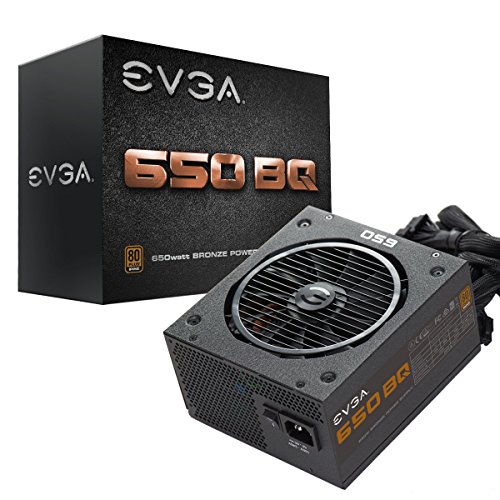
EVGA 650 BQ 80+ Bronze Semi-Modular PSU

Geekworm 20W 5V 4A USB-C PSU

Kingwin Digital PSU Tester with LCD
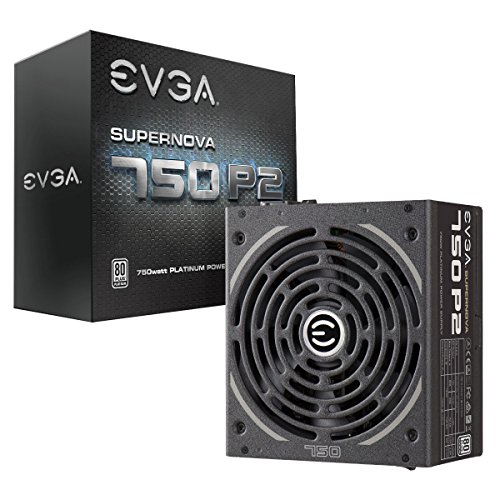
EVGA SuperNOVA 750 P2 Platinum PSU

Mean Well LRS-350-15 Enclosed DC PSU
A Closer Look At Each Pick
The CanaKit 3.5A USB-C adapter is the kind of accessory most Pi 4 owners buy once and forget about, in a good way. Where generic phone chargers often fall short on the Pi 4’s appetite for stable current, this unit is engineered specifically for that board. The integrated noise filter cleans up ripple, which matters when peripherals like SSDs or camera modules are attached and sensitive to voltage fluctuation.
For anyone running a headless media server or a small home automation hub, the five-foot 18 AWG cable gives plenty of reach between outlet and desk. It runs cool even under sustained load and the UL listing adds a layer of confidence. Compared to the CanaKit PiSwitch version reviewed next, the trade-off is the absence of a hardware power button.
A Strong Showing
- Engineered specifically for Raspberry Pi 4 power requirements
- Built-in noise filter for cleaner voltage output
- Thick 18 AWG cable reduces voltage drop over distance
- UL Listed for safety compliance
Small Limitations
- No hardware power switch for safe shutdowns
- Bulkier brick than typical phone chargers
Who It Suits Best
Tinkerers and hobbyists running a Raspberry Pi 4 as a lightweight server or retro gaming console.
Skip It When
You prefer a built-in power switch; the CanaKit 3.5A Raspberry Pi 4 Power Supply with PiSwitch adds that toggle without changing the core power design.
If the previous CanaKit adapter is a “set it and forget it” solution, this version is the same hardware with a small but meaningful upgrade. The PiSwitch inline button sits along the cable and gives you a clean way to cut power without yanking the USB-C connector from the board. For anyone who frequently swaps SD cards or reflashes OS images, that switch is the difference between graceful shutdowns and SD card corruption.
The electrical side is identical to the standard model: 3.5A output, noise filtering, and a thick 18 AWG cable. What you’re really paying for is workflow. The PiSwitch feels solid in hand and clicks with a satisfying tactile response. It threads neatly into a crowded desk setup, which matters in workshops where you might toggle power on several Pi boards in a row.
What Makes Sense
- Inline PiSwitch adds safe power cycling
- Same 3.5A capacity and noise filtering as the base model
- Reduces wear on the Pi 4’s USB-C port over time
Honest Caveats
- Slightly more desk clutter from the inline switch
- Adds a small premium over the no-switch version
Feature Card
Made For
Bench testers and Pi 4 owners who frequently reboot or swap storage cards.
Consider Something Else When
Your Pi sits in a finished case behind a TV; the standard CanaKit 3.5A Raspberry Pi 4 Power Supply (USB-C) without the switch is cleaner for permanent installations.
The EVGA 500 BR is the kind of no-fuss ATX (Advanced Technology eXtended, the standard desktop PSU form factor) power supply that makes sense for a first build or a budget office PC. 500W is more than enough headroom for a modest CPU and a single entry-level GPU. The 80 Plus Bronze rating means it hits roughly 85 percent efficiency under typical loads, which keeps both heat output and electricity waste reasonable.
Protection circuits are the part of the spec sheet most newcomers ignore. The 500 BR includes OVP (over voltage), UVP (under voltage), OCP (over current), OPP (over power), SCP (short circuit), and OTP (over temperature). For a first builder, those safeguards quietly save you from a fried motherboard when something goes wrong elsewhere in the case.
Key Advantages
- 500W handles mainstream builds with room to spare
- 80 Plus Bronze rated for solid efficiency
- Comprehensive suite of protection circuits
- EVGA’s three-year warranty covers early failures
Trade-Offs To Consider
- Non-modular cables mean more cable management work
- Not intended for high-end gaming GPUs drawing 300W+
Right Fit For
First-time builders and budget shoppers assembling an everyday desktop.
Reach For A Different Pick When
You’re planning a workstation with multiple drives or a high-TDP graphics card; the CORSAIR HX1000i gives you the wattage and modular cabling that a heavier build demands.
The CORSAIR HX1000i is what you reach for when the build itself has crossed into workstation or enthusiast territory. 1000 watts with 80 Plus Platinum efficiency means tighter voltage regulation and noticeably less waste heat spilling into your case. The fully modular cabling uses flat black low-profile connectors that disappear into the back of a clean build.
The digital monitoring side is the genuine differentiator. Tight voltage control helps when running memory-sensitive workloads or overclocked CPUs, where small fluctuations can crash a long render. Zero RPM fan mode keeps the unit silent at low to medium loads, which matters in a quiet home office where a whirring PSU can dominate the background.
Notable Gains
- 80 Plus Platinum efficiency reduces heat and noise
- Fully modular cabling improves airflow and aesthetics
- 1000W supports multi-GPU or heavily overclocked systems
- Zero RPM fan mode for silent idle operation
Practical Considerations
- Overkill for typical home or office PCs
- Larger physical footprint than mid-range units
Feature Card
Built With In Mind
Content creators, engineers, and enthusiasts running power-hungry workstations or multi-GPU configurations.
Not Your Match When
You’re assembling a budget or mid-range build; the EVGA 500 BR 80+ Bronze 500W Power Supply covers that workload at a much lower cost.
The 650 BQ sits comfortably in the sweet spot for most gaming and productivity PCs. 650W covers a mid-tier GPU plus an overclocked six-core CPU without breaking a sweat, and 80 Plus Bronze efficiency keeps running costs predictable. The semi-modular layout means the 24-pin motherboard and 8-pin CPU cables stay attached while peripheral leads plug in only when you actually need them.
What makes this unit especially relevant to a testers list is the included power-on self-tester. Before installing the PSU into a case, you can confirm basic functionality without a motherboard in the loop. That saves real time when diagnosing a system that won’t POST, since you can isolate the power supply as the culprit in under a minute.
Why It Works Well
- Bundled self-tester speeds up bench diagnostics
- 650W covers mainstream gaming builds comfortably
- Semi-modular cabling reduces case clutter
- 140mm fan with near-silent operation under typical loads
Possible Compromises
- Bronze efficiency trails Platinum units in energy waste
- Not enough headroom for dual high-end GPUs
Best Suited To
Gamers and PC hobbyists who want one PSU that handles both everyday use and the occasional troubleshooting session.
Look Elsewhere When
Your workload involves sustained high-current draws or you want Platinum efficiency; the EVGA SuperNOVA 750 P2 Platinum PSU fills that role with more headroom.
The Geekworm 20W USB-C adapter targets the single-board computer crowd that wants one PSU to cover several projects. Beyond the Raspberry Pi 4 in its 1GB through 8GB variants, the unit also powers NASPi enclosures, several Geekworm expansion boards, and a handful of Orange Pi models. That kind of cross-compatibility is genuinely useful for a hobbyist with a stack of boards on the shelf.
The 5V 4A output matches the Pi 4’s needs precisely. The 1.2-meter cable is shorter than CanaKit’s offering, which is the main compromise. For setups where the outlet is right behind the desk, that length is fine. For ceiling-mounted camera rigs or projector setups, you’ll likely need an extension.
Reasons It Performs
- Works with Raspberry Pi 4 and multiple SBCs
- UL Listed 5.1V 4A USB-C output for stable current
- Universal 100-240V input for international travel
Details To Watch
- 1.2m cable is shorter than competing adapters
- Designed primarily for Pi 4, less ideal for older Pi models
Feature Card
Who Should Grab It
SBC enthusiasts who rotate between Raspberry Pi 4 projects and Orange Pi builds on a single bench.
A Better Fit Elsewhere
You need a longer reach or a built-in power switch; the CanaKit 3.5A Raspberry Pi 4 Power Supply with PiSwitch covers both.
The Kingwin tester is the closest thing to a dedicated diagnostic tool in this lineup, and the LCD readout is what sets it apart from cheaper LED-only units. Instead of guessing whether a rail is alive, you get actual voltage numbers on screen. For diagnosing a PSU that boots the system but causes instability, that’s the difference between hours of swap-testing and a five-minute answer.
Connector coverage spans ATX, ITX (a smaller motherboard form factor that uses the same power standard as ATX), IDE, SATA, and BTX connectors, so the tester works on legacy hardware as well as modern builds. The aluminum housing feels sturdy on a workbench. Plug in the 24-pin and a SATA lead, and the unit powers up the supply without needing a motherboard attached.
Strengths Worth Knowing
- LCD displays real voltage readouts, not just pass/fail LEDs
- Broad connector compatibility across PSU generations
- Solid aluminum housing for bench durability
- Compatible with ATX, ITX, IDE, SATA, HDD, and BTX standards
A Few Limitations
- Doesn’t load-test the PSU under stress
- Requires manual interpretation of voltage drift over time
Feature Card
Who Will Love This
PC builders and repair techs who troubleshoot dead or unstable systems and need real voltage data on the spot.
Swap It Out When
You only need a quick on-off check on a new PSU; the EVGA 650 BQ 80+ Bronze Semi-Modular PSU ships with a basic self-tester that’s faster for that narrower job.
The SuperNOVA 750 P2 is the unit I reach for when silence and efficiency matter equally. The 80 Plus Platinum rating pushes efficiency into the 92 to 94 percent range depending on line voltage, which translates into measurably less waste heat. Over years of daily use, that gap adds up in cooling costs, especially in a system that runs 24/7.
The EVGA ECO Mode fan control is genuinely useful. Under low to medium loads, the fan stops spinning entirely. For someone running a recording rig in a quiet room, the absence of constant PSU hum is immediately noticeable. Fully modular cabling rounds out a clean build, and the included self-tester gives a fast confidence check before the unit ever touches a case.
What It Does Well
- 80 Plus Platinum efficiency at 92-94 percent typical loads
- Fully modular cabling reduces case clutter
- ECO Mode delivers true zero-RPM silent operation
- Japanese capacitors for long-term reliability
Less-Strong Areas
- Price premium over Bronze-tier alternatives
- ECO Mode may delay fan response under sudden load spikes
Perfect Match For
Quiet-build enthusiasts and professionals running always-on workstations who value low noise and long-term efficiency.
Another Choice May Suit
You’re on a tighter budget or running a single mid-range GPU; the EVGA 500 BR 80+ Bronze 500W Power Supply handles that workload for far less.
The Mean Well LRS-350-15 is a different animal from the ATX units above. It outputs 15V DC at 23A for industrial and electronics bench work, not ATX computer rails. If you build 3D printers, run LED arrays, or prototype robotics, that 15V rail is a workhorse supply that handles motors, controllers, and high-current loads without complaint.
The enclosed chassis and 30mm low-profile design slip into a 1U rack or sit on a shelf without dominating the workspace. Universal AC input via switch selection means it adapts to either 115V or 230V shop power. The 86 percent efficiency rating is honest for an industrial unit, and it tends to run cool even under sustained draw, depending on ventilation in your enclosure.
Everyday Advantages
- 350W continuous output for demanding DC loads
- 15V at 23A suits motors, LEDs, and embedded controllers
- Compact 30mm profile fits tight workshop layouts
- UL safety compliance for industrial environments
Where It May Fall Short
- Not compatible with ATX motherboards out of the box
- Lacks the diagnostic readouts of a dedicated PSU tester
Feature Card
Whose Shelf It Belongs On
Makers, technicians, and lab builders who need a reliable 15V DC rail for prototyping or production equipment.
Where Another Pick Suits Better
Your work revolves around a standard ATX desktop; the EVGA 650 BQ 80+ Bronze Semi-Modular PSU is purpose-built for that role.
What To Weigh Before Choosing Computer Power Supply Testers
Match the Tester to Your Power Supply Type
A diagnostic tool only helps if it speaks the same connector language as your hardware. ATX, ITX, SATA, and legacy Molex/IDE leads all live in different ecosystems. Confirm the connector set before buying; a tester that ignores a rail you depend on won’t catch the failure you’re hunting. For Raspberry Pi projects, a separate USB-C adapter review matters more than a 24-pin tester.
Decide Between Basic Self-Testers and LCD Diagnostic Units
Basic self-testers confirm a power supply spins up. LCD diagnostic tools, like the Kingwin model above, give you voltage readouts in real time. The choice depends on whether you’re verifying a new PSU works or chasing a flaky rail in an existing build. For intermittent reboots or unexplained shutdowns, the diagnostic tier earns its place.
Factor in Your Build’s Wattage and Connector Layout
Wattage headroom matters more than people expect. A PSU running above 80 percent of its rated capacity wastes more energy as heat and shortens component life. Match the unit to your system with at least 25 to 30 percent headroom. Modular cabling isn’t required, but it makes installation and airflow noticeably cleaner in tight cases.
Key Considerations Across These Picks
Mistakes Worth Dodging
A common slip is buying a wattage rating that only covers the current build, with no room for a future GPU upgrade. Under-speccing today becomes tomorrow’s instability. Another trap is ignoring connector types; modular cables from one brand often do not match another brand’s PSU, even when the pinout looks similar.
Where The Extra Money Goes
Premium-tier PSUs spend the difference on Japanese capacitors, tighter voltage regulation, and Platinum-rated efficiency. That translates into cooler operation, longer component life, and quieter fans under low loads. For a workstation that runs daily, the upgrade usually pays back in reduced hassle. For a casual home PC, a Bronze unit covers the basics honestly.
Frequently Asked Questions
What exactly does a PSU tester check?
A power supply tester checks whether the unit’s voltage rails are within spec. It plugs into the PSU’s main connectors without needing a motherboard and confirms each line delivers its rated voltage under load.
Do I need a tester for a brand new PSU?
For a brand new unit, a basic self-tester confirms it powers on before you commit to installation. For diagnosing an older or unstable PSU, an LCD tester gives you actual voltage data instead of a simple pass or fail result.
Can a tester damage my power supply?
Used correctly, a tester draws minimal current from the rails during diagnostics. The risk of damage is low as long as you connect the 24-pin and any required peripheral leads before powering on.
Are all PSU testers compatible with every connector?
No. Some testers only cover ATX and SATA, while others add IDE and BTX support. Check the connector list against the leads on the power supplies you plan to diagnose before purchasing.
Is a higher wattage PSU always better?
Not necessarily. An oversized PSU runs less efficiently at low loads. Match the wattage to your components with a sensible margin, and you get better efficiency and less waste heat overall.
The Takeaway
The right tool turns a frustrating power supply mystery into a five-minute answer. Pick the unit or tester that matches the connectors and workloads you actually run, and the diagnostic side of PC building becomes a lot less mysterious. Start with what your bench needs today, and leave room to grow into the more capable tier when your builds demand it.