Cybersecurity in 2026 rarely means installing a single antivirus and calling it a day. Threats now span firmware, networks, cloud identity, AI pipelines, and the people running them. A layered setup that mixes software, hardware, and serious reading tends to hold up best.
I pulled together ten items that cover different layers of that stack: deep-dive technical books, a managed switch, a fast SSD for forensic images, a laptop, an executive playbook, and one tiny hardware oddity. Each pick solves a different problem, and the best choice depends on what kind of defender you’re trying to be.
A Side-By-Side Look

The Ghidra Book: The Definitive Guide
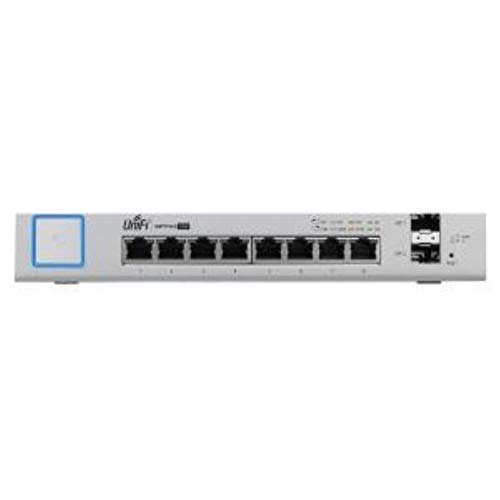
Ubiquiti UniFi Switch 8-Port 150W

Samsung 870 QVO 1TB SATA SSD

Apple 2025 MacBook Air 13-inch M4

Nmap Network Scanning Official Guide

Visible Ops Cybersecurity

Scaling AI Governance Playbook

CRU WiebeTech Mouse Jiggler

Ethical Hacking Hands-On Introduction

Practical Malware Analysis Guide
What Each Pick Brings To The Table
Ghidra, the software reverse engineering suite released by the NSA, is free, powerful, and notoriously dense to learn on your own. Chris Eagle’s book walks through how the tool actually fits together, from loading a binary to navigating disassembly (the human-readable translation of compiled code) and rebuilding program logic.
For analysts working on unfamiliar malware samples or proprietary firmware, this is the kind of reference that pays for itself the first time it saves a day of head-scratching. It assumes some comfort with assembly language, so beginners may want to pair it with a gentler intro.
Reasons It Performs
- Covers Ghidra’s full workflow from setup through advanced scripting, which matters because most free tutorials only skim the surface.
- Real reverse-engineering examples let you follow along with actual binaries instead of toy code.
- Explains how to extend Ghidra with custom scripts, a real-world ownership benefit when in-house tools need automation.
- Authoritative: written by someone deeply familiar with both the tool and the underlying analysis concepts.
Some Limits To Know
- Steep learning curve for readers without an assembly background, so expect to reread early chapters.
- Older Ghidra versions are covered more thoroughly than the newest features, which means checking release notes separately for recent additions.
- Pure reference tone, with little hand-holding for complete newcomers to reverse engineering.
Key Product Details
Right Fit For
Analysts and researchers who already work with disassemblers and want a structured deep dive into Ghidra specifically.
Look Elsewhere When
A total beginner to reverse engineering should start with Ethical Hacking: A Hands-on Introduction to Breaking In instead, which builds foundations first.
Network security depends on what you can actually see on the wire, and a managed switch is the quiet hero of that setup. The Ubiquiti UniFi Switch 8-Port delivers eight Gigabit RJ45 ports (standard 1 Gbps Ethernet jacks for wired devices) plus two 1G SFP fiber uplinks (small form-factor pluggable slots that accept fiber modules for long-distance or noise-immune backbone links), all manageable from the UniFi Controller.
For a home lab or small office running UniFi access points and cameras, having Power over Ethernet (PoE) on tap means fewer bricks and cleaner cable runs. It feels less like a “security tool” and more like the foundation underneath one, which is exactly the point.
Advantages To Know
- 150W PoE budget powers access points, IP cameras, and VoIP phones from a single device, simplifying physical installs.
- SFP uplink slots let you bridge to a fiber backbone or another switch without choking the copper ports.
- Centralized management through UniFi Controller means VLANs (virtual LANs, which segment a physical network into isolated logical groups) and port isolation are configured in one place, useful for quarantining IoT devices.
- Silent, fanless operation in most environments, a real-world ownership benefit for offices next to desks.
Trade-Offs To Consider
- Requires the UniFi Controller software, which adds setup complexity if you aren’t already in the ecosystem.
- Eight copper ports can feel cramped once you add a few APs, a NAS, and lab gear; you may outgrow it fast.
- Ubiquiti’s cloud account story has wobbled in recent years, so the controller-only path is the safer route.
Made For
Small businesses and homelab builders running UniFi gear who want a clean, PoE-ready backbone with proper VLAN control.
Skip It When
You need more than a handful of ports and want Layer 3 routing built in, where a larger UniFi or MikroTik switch makes more sense.
Security work generates a lot of data: packet captures, memory dumps, forensic images, virtual machine snapshots. The Samsung 870 QVO packs all of that onto a 1TB SATA SSD (solid-state drive that uses the SATA III interface, a common laptop-and-desktop connection that tops out around 6 Gbps) without taking up a drive bay, and at SATA III speeds it keeps up with most workflows.
QLC NAND (quad-level cell flash memory that stores four bits per cell, trading some endurance for higher density) means write endurance is the honest trade-off here, but for write-heavy-but-not-permanent storage, that’s usually fine. Compared to the spinning drives it likely replaces, the difference in scan and load times is night and day.
A Few Strong Suits
- 1TB capacity in a 2.5-inch form factor fits anywhere a laptop drive goes, which matters for portable forensic rigs.
- SATA III sequential speeds up to 560 MB/s read and 530 MB/s write, fast enough for most analyst workflows.
- QLC design trades some endurance for capacity, useful for storing large disk images rather than primary OS duties.
- Broad compatibility with desktops and older laptops makes it a painless upgrade.
Points To Keep In Mind
- QLC NAND endurance is lower than TLC drives, so avoid using it for write-heavy database or log-collector roles.
- SATA speed ceiling limits performance versus NVMe (Non-Volatile Memory Express, a faster interface that talks directly to the PCIe bus) options in newer systems.
- Sustained write speeds drop once the SLC cache fills, which matters for multi-hundred-gigabyte transfers.
Best Suited To
Analysts who need affordable, roomy storage for forensic captures, VM libraries, and reference data sets.
Another Choice May Suit
Hardcore malware analysts who hammer on large samples daily should pair this with an NVMe drive like the Samsung 980 or 990 series for primary tooling.
Plenty of security pros carry a laptop to client sites, conferences, and incident bridges. The 2025 MacBook Air with M4 keeps that workload honest: 16GB of unified memory, the Secure Enclave (a dedicated hardware chip that isolates keys, Touch ID data, and encrypted storage from the main processor) for keychain and FileVault, and Apple’s M4 silicon doing the heavy lifting without a fan screaming.
The 13.6-inch Liquid Retina display is easy to live with on long days, and up to 18 hours of battery life means leaving the charger at the hotel is a real option. macOS also gives you a Unix-flavored environment that runs most open-source security tooling without complaint.
Practical Advantages
- 16GB unified memory handles multiple VMs and analysis tools side by side without choking.
- Touch ID plus Secure Enclave keeps credentials and disk encryption hardware-isolated, which matters on travel.
- Fanless thermal design means silent operation in libraries, client offices, and quiet SOCs (security operations centers where analysts monitor alerts).
- Long battery life covers a full workday without a charger, useful on-site or during travel days.
Less Ideal Details
- 256GB base storage fills up fast once you add VM libraries, so configure up if you can.
- Port selection is limited, and dongle life is the trade-off for the thin chassis.
- Some Windows-only enterprise security tools require a VM or alternative, which adds friction.
Feature Snapshot
Whose Shelf It Belongs On
Mobile consultants and analysts who travel often and need a secure, quiet workstation that lasts through a full client engagement.
Swap It Out When
You depend on specific Windows-only tools like certain EDR agents (endpoint detection and response software that monitors devices for threats) or forensic suites, where a Windows laptop is the simpler pick.
Nmap is the kind of tool that shows up everywhere, from internal audits to red team engagements. Gordon “Fyodor” Lyon’s official guide is the book that explains not just which switches to type, but why scanning works the way it does, from raw packet crafting to version detection.
For defenders, understanding how Nmap sees your network changes how you segment and monitor it. The writing assumes some networking comfort, but readers without it can pick up the basics while learning the tool, since the early chapters build foundations before going deep.
The Upside
- Authoritative source, written by Nmap’s creator, which matters when documentation drifts and forums disagree.
- Covers the full toolkit, including Ncat, Ndiff, and Nping, useful beyond a single command.
- Includes real-world scanning recipes you can adapt directly to your own environment.
- Reference depth that scales from beginner to power user, which most other Nmap books skip past.
Trade-Offs To Consider
- Older editions predate some newer Nmap scripting engine features, so check release notes for recent additions.
- Reading cover to cover is a commitment, and the book rewards patience.
- Print length makes it more of a desk reference than a beach read.
Right Fit For
Network defenders, sysadmins, and aspiring pentesters who want one authoritative reference on Nmap rather than scattered blog posts.
Not Your Match When
You want a quick-start pamphlet for running scans this afternoon; an online cheat sheet will get you there faster.
Most breaches aren’t about missing tools. They’re about missing process: change control gaps, undocumented assets, and incident response playbooks that nobody has actually walked through. Visible Ops Cybersecurity tackles that gap head-on, focusing on the operational discipline that turns a pile of products into an actual security program.
Scott Alldridge writes for managers and technical leads, so expect frameworks rather than code samples. The Kindle format makes it easy to search and reference on the job, which matters when you’re the one writing the new runbook.
Key Advantages
- Practical, process-first approach that complements the more technical books earlier in this list.
- Frameworks for change control, asset inventory, and incident response, useful for maturing programs quickly.
- Addresses AI oversight as part of the leadership picture, keeping the book relevant to 2026 programs.
- Short, digestible chapters that fit into a busy manager’s calendar.
Practical Considerations
- Less useful for purely technical readers who want hands-on examples, since the focus stays at the program level.
- Kindle-only availability means no physical reference copy to lend across teams.
- Frameworks require tailoring to your org, so expect homework before applying.
Who Should Grab It
Security managers, IT directors, and team leads building or repairing the operational backbone of a security program.
Reach For A Different Pick When
Your goal is hands-on technical depth; the Ghidra Book or Practical Malware Analysis deliver that more directly.
AI risk has moved out of the research lab and into the boardroom. Sol Rashidi’s playbook is built for executives who need to govern AI deployments without slowing the business to a crawl, blending governance frameworks with security thinking in language that doesn’t assume a PhD.
The book covers model risk, data lineage, and accountability structures that actually work in mid-to-large organizations. It pairs naturally with Visible Ops Cybersecurity; together they cover both classic security operations and the newer AI governance layer.
What Earns Its Place
- Written for executives by a practitioner, which keeps the language grounded in real org dynamics.
- Frames AI security as a governance problem, not just a technical one, matching how regulators and auditors now view it.
- Useful templates for risk registers and oversight committees, saving weeks of policy drafting.
- Forward-looking enough to remain useful as AI regulation evolves through 2026 and beyond.
Things To Weigh Up
- Executive tone means little for hands-on engineers building models day to day.
- Some frameworks assume a certain organizational maturity that smaller teams will need to adapt down.
- Fast-moving AI regulation means some specifics may shift faster than the book can update.
Who Will Love This
Executives, board members, and senior leaders who need a credible starting framework for AI governance without a research-paper reading list.
A Better Fit Elsewhere
Hands-on AI security engineers may prefer online resources and tool-specific docs over an executive-level playbook.
The CRU WiebeTech Mouse Jiggler is a tiny USB device that nudges the cursor every so often, just enough to keep a workstation awake. For forensic examiners and incident responders, that solves a real headache: long-running acquisitions or triage scripts getting interrupted by a screensaver or, worse, a password prompt mid-task.
It’s not glamorous, and it’s definitely not for everyone. But in a forensics kit or a SOC running extended queries, it’s the kind of gadget that quietly prevents a frustrating restart at the worst possible moment.
What Works In Its Favor
- Plug-and-use design with no drivers or software to install, which matters when working on locked-down machines.
- Prevents accidental lockouts during long forensic acquisitions, a real-world ownership benefit for analysts on tight deadlines.
- Compact enough to live in a laptop bag or response kit without taking up space.
- USB interface works across Windows, macOS, and Linux, useful for diverse lab environments.
Potential Compromises
- Niche use case, so casual shoppers gain little from owning one.
- Some corporate endpoint policies flag USB HID devices (human interface devices like mice and keyboards), which can complicate deployment.
- Physical wear on the USB connector is a realistic long-term concern with daily plugging and unplugging.
Perfect Match For
Forensic investigators and incident response teams running multi-hour jobs where any sleep or lock state would derail the work.
Where A Sibling Pick Shines
General office users chasing better security will find more value in the MacBook Air M4 or the UniFi switch on this list.
Daniel Graham’s book does something rare in the offensive security space: it treats beginners as adults. The labs walk through Metasploit (a widely used open-source framework that bundles exploits, payloads, and post-exploitation tools into one toolkit), reverse shells, and common attack chains without assuming you already live in a terminal.
For someone stepping from help desk or sysadmin work into a security role, this is a friendly on-ramp. It’s less authoritative than the Ghidra Book or Practical Malware Analysis, but it covers more ground for someone who hasn’t yet picked a specialty.
The Value In It
- Hands-on labs reduce the gap between reading and doing, which matters more than another theory book.
- Covers Metasploit reverse shells and embedding payloads in everyday files, useful for understanding real attack chains.
- Readable tone that respects beginners without dumbing the material down.
- Wide scope covers network, web, and basic exploitation, helping newcomers choose a direction.
Where It Is Less Suited
- Not deep enough to substitute for specialty references once you focus on reverse engineering or malware analysis.
- Some lab environments assume a virtualization setup that beginners may need to learn separately.
- Ethical and legal framing is light, so readers need to bring their own judgment about scope and authorization.
Best Suited To
Career-changers and IT generalists moving into offensive security who want a guided, lab-driven introduction before specializing.
Consider Something Else When
You’re already comfortable with Linux, scripting, and basic exploits; Practical Malware Analysis is a sturdier next step.
When a suspicious binary lands on your desk, “Practical Malware Analysis” is the book many analysts actually open. Sikorski and Honig walk through static and dynamic analysis techniques, from basic PE parsing (inspecting the Portable Executable file format that Windows uses for executables, DLLs, and drivers) to behavioral analysis in isolated sandboxes.
The companion labs include real (but defanged) malware samples, which makes the book work as a self-contained training course. It demands more setup than most reads, so bring patience and a clean virtual machine.
What It Does Well
- Comprehensive coverage of both static (examining code without running it) and dynamic (running code in a safe environment and watching what it does) malware analysis techniques.
- Real-world lab binaries, defanged for safety, give muscle memory you cannot get from theory alone.
- Widely cited in the industry, which matters when interviewing or collaborating with other analysts.
- Pairs naturally with the Ghidra Book for analysts working both static and reverse engineering workflows.
Honest Caveats
- Lab setup is involved; expect to spend a weekend getting your environment right before chapter one makes sense.
- Older examples use Windows tooling that has evolved, so some commands need adaptation for current versions.
- Heavy reading load, more textbook than trade paperback.
Technical Highlights
Right Fit For
SOC analysts, incident responders, and researchers who handle suspicious binaries and want a structured methodology rather than ad-hoc tooling.
Look Elsewhere When
You’re brand new to security; Ethical Hacking: A Hands-on Introduction to Breaking In builds the foundations first.
Picking A Setup That Holds Together
Match The Tool To The Layer You’re Defending
Before picking any one item, decide which layer of your security work needs reinforcement. Hardware-layer folks, especially those running labs or responding to incidents, will feel the MacBook Air M4 and the Mouse Jiggler pulling weight immediately. Network defenders get the most from the UniFi Switch and the Nmap guide. Code and binary analysts live inside the Ghidra and Practical Malware Analysis worlds. The executive view needs both Visible Ops and the AI Governance playbook.
Skill Level Should Drive The Choice
A career-changer will get more from a hands-on lab book like Ethical Hacking than from a dense reference like Practical Malware Analysis. A seasoned reverse engineer may already own the Ghidra Book and now needs the AI Governance playbook to support leadership conversations. Match the depth to where you actually sit on the learning curve.
Build A Reference Shelf You Can Actually Use
The books in this list pair well together. Nmap, Ethical Hacking, and the Mouse Jiggler cover the network and operational layers. Practical Malware Analysis and the Ghidra Book cover code-level analysis. Visible Ops and the AI Governance playbook cover the program and leadership view. Spread your reading rather than buying three books that all cover the same angle.
Consider Hardware That Complements The Books
Books teach methodology, but real analysis happens on actual machines. The UniFi switch helps you build a defensible network segment to scan and learn on. The Samsung 870 QVO gives you roomy, fast storage for captured samples. The MacBook Air M4 travels well and runs most open-source tooling natively. Pair reading with the right hardware, and skills stick faster.
Key Considerations Across These Picks
Common Buying Slip Ups
The most common trap in this category is collecting books without finishing them. I see plenty of security professionals with a half-read library and out-of-date tooling. Pick one book at a time, finish the labs, then move on. Hardware is similar: a managed switch does nothing if VLANs are never configured. Tools demand follow-through.
Where The Extra Money Goes
Higher-tier picks like the MacBook Air M4 and the larger-capacity 870 QVO buy headroom, specifically, more memory, more storage, and more battery. For solo learners, base configurations are fine. For professionals running multi-tool workflows daily, the upgrade pays off in fewer bottlenecks and longer useful life. Books, by contrast, deliver almost the same value regardless of edition, so grab whatever printing is current and readable.