A computer tower is the kind of purchase that quietly shapes daily life for the next five to seven years. The right one disappears into the routine: it boots quickly, handles whatever the household throws at it, and never gets in the way. The wrong one shows up as constant stuttering, fans that spin up during a video call, or storage that runs out before the second year is over. I put this list together to cut through the noise for shoppers who want a tower that actually fits how they live and work, not just what’s trending in spec sheets.
For most households, the priorities are straightforward: enough processing headroom for the next several years, graphics that match the real workload (not just gaming fantasies), and storage that won’t feel cramped in 2027. Some people also need a tower that lives comfortably in a shared space, which is why one pick on this list is a rolling stand rather than a PC. The goal here is a confident shortlist, not a parts catalog.
A Fast Comparison Of The Options

STORMCRAFT Sirius AI Gaming Desktop, Intel i5 14400F, Arc B570 10GB GDDR6, 16GB DDR4 RGB, 1TB NVMe SSD

HP OmniDesk Desktop PC, AMD Ryzen 5 8500G, Radeon 740M, 16GB DDR5, 1.5TB Storage

EUREKA ERGONOMIC Height-Adjustable PC Stand with Wheels, 2-Tier Steel Frame

CyberpowerPC Gamer Xtreme VR Gaming PC, Intel i5-10400F, GTX 1660 Super 6GB, 500GB NVMe SSD

Dell Tower Desktop, Intel Ultra 7 265F, RTX 5060, 32GB DDR5, 2TB Storage, Win 11 Pro
Dell Tower Desktop, Intel Ultra 7 265F, RTX 5060, 64GB DDR5, 1TB Storage, Win 11 Pro
Dell Tower Desktop, Intel Ultra 7 265F, RTX 5060 8GB GDDR7, 64GB DDR5, 2TB Storage
Dell Tower Desktop, Intel Ultra 7 265F, RTX 5060, 64GB DDR5, 4TB Storage, Win 11 Pro
HP OmniDesk Desktop PC, AMD Ryzen 5 8500G, Radeon 740M, 32GB DDR5, 3TB Storage
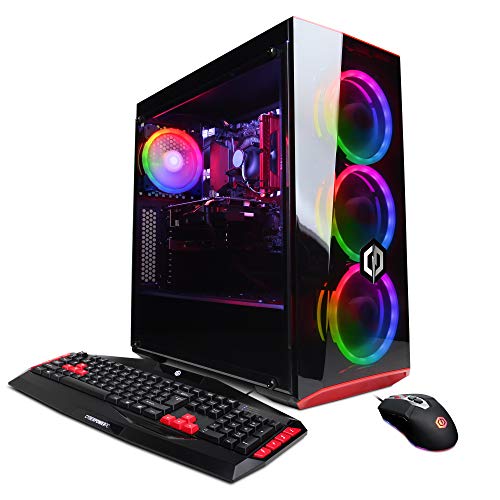
CyberpowerPC Gamer Xtreme VR Gaming PC, Intel i5-9400F, GTX 1660 6GB, 120GB SSD plus 1TB HDD
Taking A Closer Look At The Options
The STORMCRAFT Sirius lands first because it threads a needle many household towers struggle to find: 1440P-capable gaming without paying for a card most families won’t fully use. The 14th-gen Intel Core i5-14400F is a 10-core, 16-thread chip that handles streaming, homework apps, and a Discord call all at once without breaking stride.
Paired with an Intel Arc B570 carrying 10GB of GDDR6 VRAM (the dedicated video memory that matters most in modern games), this tower pushes smooth framerates at 1440P in titles most households actually play. The 16GB of DDR4 RGB memory gives the build some visual flair in a darkened room, and the 1TB NVMe SSD (a fast solid-state drive that boots Windows in seconds) means storage isn’t an immediate worry.
Benefits That Matter
- The 10-core CPU holds up well under simultaneous game streaming, browser tabs, and chat apps during long sessions.
- 10GB of GDDR6 VRAM keeps frame rates steadier at 1440P than 8GB cards manage in heavier textures.
- RGB memory adds personality without raising heat or noise in a typical bedroom setup.
- The 1TB NVMe SSD means most households won’t think about storage for the first 18 to 24 months.
Things To Consider
- The i5-14400F lacks integrated graphics, so any future GPU failure leaves the system unable to output to a monitor until repaired.
- The included 16GB of DDR4 is the comfortable minimum for 2026 gaming; owners who multitask heavily may want to add a second stick within the first year.
Feature Snapshot
Right Fit For
Gaming households stepping up from console-level play who want 1440P performance without overspending on parts they’ll never push.
Where Another Pick Suits Better
Shoppers who don’t game at all should look at the HP OmniDesk with Ryzen 5 8500G, since its integrated Radeon graphics handle office and study work without the cost of a dedicated card.
The HP OmniDesk with Ryzen 5 8500G is the kind of tower that makes a home office feel intentional. Its integrated Radeon 740M graphics support up to four monitors at once, which is the real selling point for anyone running spreadsheets, chat windows, a video call, and a reference browser tab on the same desk.
The Ryzen 5 8500G is a 6-core, 12-thread chip that boosts up to 5GHz under load. That headroom matters during long video calls while a backup render or compile runs in the background. With 16GB of DDR5 memory (the current generation of faster system RAM) and a 1.5TB split between a 512GB SSD and a 1TB HDD, the system boots fast and still has room for project archives.
The Practical Payoff
- Quad-monitor support turns a single screen into a real productivity dashboard for spreadsheets, calls, and reference docs.
- DDR5 memory at this tier is uncommon and leaves more upgrade room a few years down the line.
- Wi-Fi 6 (the current fast wireless standard) plus Bluetooth 5.4 keeps the desk cable-light.
- The included wireless keyboard and mouse eliminate two extra purchases during setup.
Points To Keep In Mind
- Integrated Radeon 740M graphics handle light gaming and creative work but aren’t built for AAA titles at high settings.
- The 512GB portion of the SSD fills up faster than people expect once Windows updates and Office cache files accumulate.
Made For
Remote workers and hybrid students who need a reliable multi-monitor setup for spreadsheets, research, and long video calls.
Consider Something Else When
Households wanting genuine 1440P gaming on the side should look at the STORMCRAFT Sirius instead, which pairs a dedicated GPU with a similar-class CPU.
The EUREKA ERGONOMIC PC stand earns its spot because the most overlooked part of owning a home tower is where it actually lives. In apartments and shared rooms, floor placement collects dust, blocks airflow, and forces awkward crouching to reach rear ports. This stand solves all three at once.
The frame uses durable steel and supports a full-size ATX case, which is the standard mid-size tower format used by most PCs on this list. Six manual height gears adjust from roughly 23 to 33 inches in two-inch steps, so the tower can sit lower under a desk for a cleaner floor or higher next to the desk for easy cable access. The included wheels roll smoothly on hardwood and low-pile carpet.
What Pays Off
- Lifting the tower off the floor noticeably reduces dust intake, which extends fan and filter life in most households.
- The six-gear adjustment range covers both under-desk and beside-desk positions without tools.
- The 2-tier upper shelf works as a spot for a printer or external drive, which keeps the workspace from spreading out.
- Wheels lock in place once parked, so the tower doesn’t drift during cable swaps.
Honest Caveats
- This is a stand, not a PC; shoppers looking to buy a computer itself should pair it with another pick on this list.
- Owners commonly report that very wide aftermarket cases with extra-large fans can crowd the frame, so measuring the tower first matters.
Best Suited To
Apartment dwellers and anyone with a tower currently sitting on carpet who wants better airflow, easier port access, and a cleaner floor.
Skip It When
Shoppers who only need the PC itself should skip this and pick the Dell Tower with Ultra 7 265F for a balanced everyday rig.
The CyberpowerPC Gamer Xtreme VR with the i5-10400F has been a household favorite for casual gaming for a few generations now, and the GTX 1660 Super 6GB version earns its place by handling the most popular competitive and co-op games at 1080P without drama. It’s the kind of PC that a parent and a teenager can both use without arguing about settings.
The 6-core, 12-thread i5-10400F runs at a 2.9GHz base clock and pairs naturally with the GTX 1660 Super for balanced 1080P performance. The 500GB NVMe SSD boots Windows quickly and loads games in seconds, while the 8GB of DDR4 handles everyday multitasking. Wi-Fi is built in, so the rig drops onto a home network without an adapter.
Positive Points
- The GTX 1660 Super 6GB is the sweet-spot card for popular esports and co-op titles at 1080P.
- 500GB of NVMe storage is enough for a focused library of five to ten modern games.
- Built-in Wi-Fi means one less accessory to buy or set up.
Trade Offs
- The 10th-gen Intel chip is two generations behind current, so heavy multitasking feels tighter than on the Dell Ultra 7 picks.
- 8GB of DDR4 is the realistic minimum for modern gaming; owners often upgrade to 16GB within the first year.
- Owners commonly report that the included case fans run louder than premium chassis fans during long sessions.
Quick Facts
Whose Shelf It Belongs On
Casual gamers who play a handful of popular titles at 1080P and don’t want to think about overclocking or fine-tuning.
Look Elsewhere When
Anyone targeting 1440P or planning to stream should look at the STORMCRAFT Sirius, which offers a newer CPU and a more capable GPU.
The Dell Tower with the Intel Ultra 7 265F sits at the middle of the lineup for a reason: it’s the configuration where work and play stop feeling like trade-offs. The 20-core Ultra 7 265F handles serious multitasking with a max turbo of 5.3GHz, while the RTX 5060 GPU brings modern ray-traced graphics into a household budget.
With 32GB of DDR5 and a 2TB drive running Windows 11 Pro, this rig is set up for serious productivity. The Pro version of Windows unlocks BitLocker encryption (full-disk data scrambling that protects files if the tower is ever stolen) and Remote Desktop, which matters for anyone logging in from a laptop on the road.
Well-Handled Touches
- 20 CPU cores keep dozens of browser tabs, design files, and chat apps responsive without thermal throttling.
- RTX 5060 graphics handle modern games with ray tracing (real-time light simulation for cinematic visuals) at smooth framerates.
- 32GB of DDR5 is enough for current creative tools like Photoshop and DaVinci Resolve without slowdowns.
- Windows 11 Pro adds BitLocker and Remote Desktop, which matters for working professionals.
A Few Limitations
- The 265F chip lacks integrated graphics, so a GPU failure means no display output until the card is replaced.
- Dell tower cases run tighter than boutique builds, so adding a second large GPU later requires checking clearance.
Perfect Match For
Households that split time between serious work tasks and evening gaming, and want one tower that does both without compromise.
A Better Fit Elsewhere
Shoppers who already know they need 64GB of memory for 4K video work should jump straight to the Dell Tower with 64GB DDR5 instead.
The 64GB version of the Dell Ultra 7 265F tower targets a specific kind of shopper: people who run virtual machines (VMs), local AI models, or massive spreadsheets that swallow memory whole. Same processor and GPU as the 32GB model above, but the doubled memory changes the ceiling of what’s possible.
The 1TB storage feels modest next to the 2TB sibling just below it on this list, but it suits the workflow of someone who works from a fast internal SSD and keeps archives on an external drive. For creators running Adobe Premiere or After Effects with 4K timelines, 64GB of DDR5 is the realistic comfort zone.
What Helps Most
- 64GB of DDR5 means multiple virtual machines or browser-heavy research sessions run side by side without swap-file slowdowns.
- The Ultra 7 265F’s 20 cores stay cool under sustained compile or render jobs thanks to the tower’s airflow design.
- RTX 5060 accelerates CUDA-based creative apps (NVIDIA’s parallel-processing toolkit used by Premiere and Blender) measurably.
Possible Compromises
- 1TB of internal storage runs tight for households that keep large game libraries on the boot drive.
- The premium for 64GB over 32GB only pays off if the workload actually uses it; casual users leave headroom on the table.
Spec Overview
Who Should Grab It
Creators and developers juggling multiple VMs or working with 4K source files who want memory headroom without going full workstation.
Reach For A Different Pick When
Buyers who don’t run heavy creative suites should consider the HP OmniDesk with 32GB DDR5 instead, which delivers similar memory for far less cost.
The 2TB Dell Ultra 7 tower is the one I’d pick for a household that streams, games, and creates on the same machine. It adds a faster GDDR7 graphics card variant of the RTX 5060, which feeds the GPU more bandwidth for high-resolution textures and AI-enhanced rendering.
The Ultra 7 265F includes a dedicated NPU (neural processing unit, a chip built specifically to handle AI workloads like background blur and noise removal) that handles local AI tasks like background blur in video calls and speech cleanup without taxing the main CPU. For streamers and remote presenters, that offload shows up as smoother full-screen video.
What Works In Its Favor
- GDDR7 VRAM pushes more frames per second at high settings compared with the GDDR6 sibling models.
- The dedicated NPU keeps AI effects in video calls and streams from dipping CPU performance.
- 2TB of internal storage comfortably fits a large game library alongside work files.
- 64GB DDR5 supports AI-enhanced editing tools and large project files.
Details To Watch
- The performance gain over the 1TB sibling is real but modest for users who don’t run AI-accelerated apps.
- Higher sustained loads mean the case fans stay audible longer during renders.
Right Fit For
Pro creators and streamers who want AI-accelerated effects and enough storage to keep a working library on the boot drive.
Swap It Out When
Buyers focused purely on gaming should consider the STORMCRAFT Sirius, which puts the budget toward a faster GPU rather than memory and storage.
The 4TB Dell Ultra 7 tower is the one for households that treat storage like real estate: you can never have too much. For families keeping years of photos, video projects, and downloaded games on a single machine, 4TB removes the daily math of “do I really need this file?”
Beyond capacity, the same Ultra 7 265F processor and 64GB DDR5 pairing handles the same heavy creative workflows as the 2TB sibling. The 4TB capacity just gives owners a runway that covers multi-year archives without leaning on external drives or cloud subscriptions.
Notable Upsides
- 4TB of internal storage handles multi-year photo and video libraries without external drives.
- The Ultra 7 265F plus 64GB DDR5 keeps performance identical to the lighter siblings.
- RTX 5060 graphics make the rig usable for both creative work and after-hours gaming.
Worth Bearing In Mind
- A 4TB drive takes longer to back up than smaller SSDs, so an external backup routine matters more here.
- Buyers who don’t actually fill 2TB plus should save the cost difference and pick the 2TB model.
Key Attributes
Best Suited To
Families and content creators who keep large media libraries on a single tower and want years of breathing room.
Not Your Match When
Shoppers without a multi-terabyte archive should pick the HP OmniDesk with 3TB storage, which costs less and still leaves plenty of room.
The higher-storage HP OmniDesk with 32GB DDR5 and 3TB of space is the practical family tower: enough memory for a household running schoolwork, browsing, and video calls at the same time, plus storage that won’t feel cramped when everyone’s keeping their own files locally.
The same Ryzen 5 8500G and Radeon 740M combo handles productivity tasks with low power draw. The 2TB SSD plus 1TB HDD split is a smart layout: the SSD handles the operating system and active projects, while the HDD swallows archives and media that don’t need SSD speed.
Advantages To Know
- 32GB of DDR5 leaves real headroom for parents and kids sharing the same machine across the week.
- The 2TB SSD keeps boot and program launches fast; the 1TB HDD adds cheap capacity for media.
- Quad-monitor support helps in homework stations where multiple docs stay open at once.
- The included wireless keyboard and mouse reduce setup friction for less technical households.
Things That May Matter
- The Radeon 740M integrated graphics won’t handle modern AAA gaming; this rig is built for productivity, not play.
- HP’s BIOS update path is more locked-down than boutique brands, so advanced tweaking is limited.
Built With In Mind
Family households and students who share one tower across multiple users and need a balanced mix of speed and storage capacity.
Where A Sibling Pick Shines
Shoppers needing dedicated gaming performance should pivot to the STORMCRAFT Sirius, which trades integrated graphics for a proper GPU.
The CyberpowerPC Gamer Xtreme with the i5-9400F and GTX 1660 is the entry point for households curious about PC gaming but not ready to commit to a serious rig. It’s the tower I’d recommend for a first-time gamer who plays mostly indie titles, esports, or older AAA games.
The 6-core i5-9400F pairs fine with the GTX 1660 for 1080P in popular games, and the dual-drive layout is a familiar pattern: a small 120GB SSD for the operating system and a 1TB HDD for everything else. Wi-Fi is built in, and the included wireless peripherals keep setup simple.
A Few Highlights
- The GTX 1660 6GB handles 1080P esports and indie games at smooth framerates without breaking a sweat.
- A separate 1TB HDD means first-time owners have plenty of room for game installs.
- Built-in Wi-Fi keeps the desk clean and removes the need for an adapter.
Where It Is Less Suited
- The 9th-gen Intel chip is now several generations behind, so multitasking during streams or chat feels tighter than newer options.
- The 120GB SSD is small; Windows updates and a few modern games can fill it quickly.
- Owners commonly report that the 8GB of DDR4 needs an upgrade within months for smoother modern gaming.
Right Fit For
First-time gaming households and casual players who mostly run esports, indie titles, or older AAA games at 1080P.
Another Choice May Suit
Shoppers who can stretch the budget should pick the CyberpowerPC GXiVR8060A10 with the i5-10400F and GTX 1660 Super, which keeps the same GPU tier with a noticeably newer CPU.
What To Weigh Before Picking A Home Tower
The most useful exercise before buying a home tower is writing down what the machine actually has to do over the next three years. A tower that handles schoolwork, light photo editing, and after-hours indie gaming has very different priorities than one running virtual machines and 4K video timelines. Match the spec sheet to the workload, not to the brand.
CPU cores matter more than clock speed for anyone who keeps many browser tabs and apps open. Memory (RAM) is the second-most common bottleneck in real households: 16GB is workable in 2026, but 32GB gives real breathing room for the next several years of software updates. Storage type matters even more than capacity for daily feel; an NVMe SSD (a solid-state drive that uses the fast PCIe interface) makes Windows feel snappy in a way a traditional hard drive never does.
Graphics choices split into two camps: integrated graphics handle everyday work and light gaming while sipping power, and dedicated GPUs (graphics cards with their own processor and memory) unlock modern games and creative acceleration. Picking the wrong camp is the most common regret I see in home builds: households that bought a gaming GPU but only use the tower for email and spreadsheets, or households that bought integrated graphics and now want to play new releases.
Connectivity matters more than people expect. Wi-Fi 6 (the current-generation wireless standard) keeps a tower fast on a crowded home network, and Bluetooth 5.x makes adding wireless peripherals painless. A tower that supports multiple monitors is genuinely transformative for anyone who works from home, even if they only use two screens.
Things Worth Knowing Before You Commit
Mistakes Worth Dodging
The most common slip-up is buying more GPU than the household needs. A dedicated graphics card is the single most expensive component in most towers, and paying for one that only handles email and Netflix leaves real money on the table. The HP OmniDesk models with integrated Radeon graphics exist for exactly this kind of shopper.
Another trap is ignoring the case size and cooling. Towers stuffed with powerful components in tight cases tend to run hotter and louder, which shortens component life over years of use. Checking airflow and case clearance matters more for sustained workloads than for casual use.
A third is underestimating memory needs. The jump from 16GB to 32GB matters more for long-term satisfaction than picking between two CPUs that benchmark within a few percent of each other. Households that leave themselves with the minimum tend to feel the pinch within two years as software bloat grows.
What The Higher Tier Buys
The premium Dell towers on this list exist for a reason: faster CPUs with more cores, double or quadruple the memory, and storage that covers multi-year archives. The upgrade matters most when the household actually runs heavy workloads, like 4K video editing, local AI models, or running multiple operating systems at once.
For shoppers whose real use case is browsing, office work, and light creative tasks, the value lies in the lower tiers. Spending up pays off when the workload measurably benefits, not when a spec sheet looks more impressive on paper. The honest read is that 64GB of memory feels luxurious until the day a specific app actually needs it; for everyone else, 32GB is plenty in 2026.
Frequently Asked Questions
How Much RAM Do Home Towers Really Need In 2026?
For most households, 16GB handles browsing, office work, and light gaming comfortably. The jump to 32GB pays off when multiple apps stay open all day or when photo and video editing enters the routine.
Is An SSD Important For Home Use?
Yes. An NVMe SSD (a solid-state drive using the fastest PCIe connection) makes Windows boot in seconds and programs feel snappy in a way traditional hard drives cannot match, even at smaller capacities. Most picks on this list pair an SSD with a larger HDD for archive space.
Do I Need A Dedicated Graphics Card For Home Use?
Only for modern gaming, video editing, or running local AI models. Integrated Radeon graphics on the HP OmniDesk models handle office, study, and browsing without a dedicated GPU.
How Long Should A Home Tower Last?
A well-chosen mid-range tower typically serves a household for five to seven years before the CPU or memory starts feeling slow. Towers with upgradable memory and storage tend to age more gracefully because individual parts can be swapped as needs grow.
What Tower Size Works For Most Homes?
A standard mid-tower fits under most desks and supports full-size ATX components, which is the format used by most picks here. Mini-towers save space but limit future upgrades; full towers offer headroom but rarely earn their footprint in a household setting.
The Takeaway
The best home tower is the one that matches the actual workload without paying for components that sit idle. Shoppers focused on office and study should lean toward the HP OmniDesk models with Ryzen 5 processors. Households wanting 1440P gaming should consider the STORMCRAFT Sirius, while serious creators benefit most from the Dell Ultra 7 configurations with 64GB of memory. Match the spec to the routine, and the tower will fade into the background the way a good appliance should.