I wrote this guide for anyone staring down a laptop aisle and wondering whether spending less actually means settling for junk. After combing through the specs, build details, and everyday use cases, I found nine machines under typical budget territory that handle homework, hybrid work, light gaming, and family duty without forcing a real compromise on the basics.
The Lineup, Simplified
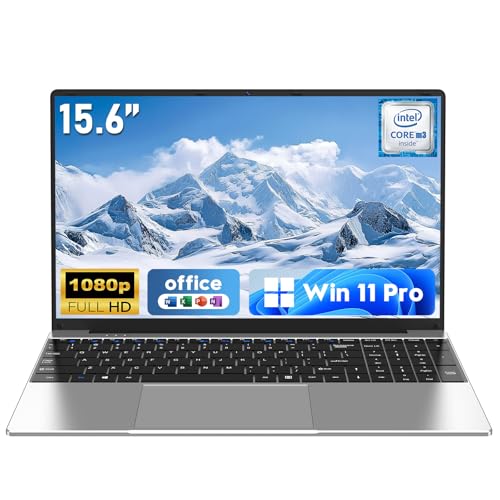
NAIKLULU Laptop Computer Win 11 Pro 15.6 Inch 16GB RAM 256GB SSD M3-6Y30

DEHEYA 15.6-inch Laptop 8GB DDR 256GB SSD AMD 3.2 GHz

STORMCRAFT Sirius AI Gaming Desktop Intel i5 14400F Arc B570 10GB

Dell 16 Plus Touchscreen Laptop Intel Core 7 150U 16GB DDR5 512GB SSD

PADIX 15.6 Inch Laptop N4020 4GB DDR4 128GB eMMC Windows 11
HP Victus 15.6″ Full HD 144Hz Gaming Laptop Intel Core i5-12450H RTX 3050

NAIKLULU Laptop Computer Win 11 Pro 15.6 Inch 8GB RAM 256GB SSD 4425Y
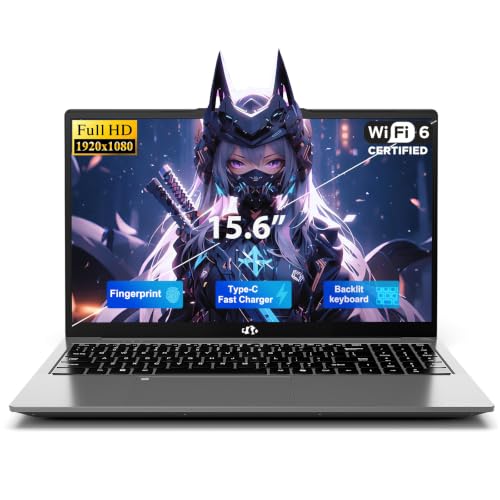
NIMO 15.6″ FHD Copilot AI-Laptop Intel 4 Cores 16GB RAM 512GB SSD Win 11

HP 17.3″ HD Laptop Intel Core i3-N305 32GB DDR4 1TB SSD Silver
Why These Options Stand Out
This 15.6 inch NAIKLULU leans into the textbook commuter profile: a slim clamshell with a Full HD 1920×1080 panel, 16GB of working memory, and a 256GB solid state drive tucked behind the keyboard. The M3-6Y30 chip is an older dual core, quad thread design clocked up to 2.2GHz, and the 7W thermal envelope means the chassis stays cool during long study sessions.
Daily document work, browser tabs, and video calls all sit comfortably inside its envelope. The 5000mAh battery lands around a four hour mark at full brightness, which holds up for a couple of classes between charges. Connectivity covers WiFi5 and Bluetooth 4.2, which is fine for most campus or home setups but lags current WiFi6 standards.
Benefits That Matter
- 16GB of RAM is generous for this tier and keeps multitasking fluid
- Full HD IPS class display keeps text sharp during long reading sessions
- 5000mAh battery is removable friendly design for off campus days
- Low power 7W chip keeps fan noise minimal in libraries
- Windows 11 Pro adds BitLocker and remote desktop for study workflows
Points To Keep In Mind
- The M3-6Y30 chip is an older architecture that lags behind modern Intel and AMD alternatives
- About four hours of runtime means carrying the charger for full days
- WiFi5 and Bluetooth 4.2 are a step behind newer wireless standards
Made For
High school and college students handling documents, research tabs, and streaming on a strict budget.
Skip It When
The DEHEYA 15.6-inch Laptop fits better for commuters who want a lighter chassis and longer battery life on the road.
Where the NAIKLULU is a study desk machine, the DEHEYA leans hard into the commute. The chassis weighs around 3.3 pounds and slips into a backpack without dragging down a shoulder, and the 10000mAh battery is the biggest cell in this lineup. The AMD processor climbs up to 3.2GHz, paired with Radeon R5 graphics and 8GB of DDR memory.
Storage starts at 256GB on the SSD but the slot expands up to 1TB, which is rare at this tier and a quiet win for anyone hauling media files. A numeric keypad sits on the deck, USB 3.0 and Type-C ports handle peripherals, and the cooling fan keeps things steady under sustained load. Travelers who live out of a bag get a machine that does not punish them for the weight.
What Makes Sense
- 3.3 pound chassis is friendly for daily backpack carries
- 10000mAh battery outlasts most competitors in this bracket
- SSD storage expands up to 1TB for media heavy users
- Numeric keypad helps anyone working with spreadsheets
- Independent cooling fan protects the chip during long sessions
Trade Offs
- 8GB of RAM caps multitasking once browser tabs climb
- WiFi5 and Bluetooth 4.2 trail newer wireless kits
- Plastic chassis tends to flex under pressure, a common issue in this category
Right Fit For
Mobile commuters, ride share drivers, and students who prize battery life and a light bag over raw horsepower.
A Better Fit Elsewhere
The NAIKLULU Laptop Computer is the smarter call for stationary desks where 16GB of RAM makes multitasking feel effortless.
The first desktop on this list changes the conversation. STORMCRAFT pairs a 14th gen Intel Core i5 14400F with an Arc B570 graphics card carrying 10GB of GDDR6 VRAM, which is enough horsepower for 1440p gaming in most modern titles. The processor brings 10 cores and 16 threads, reaching 4.7GHz when thermal headroom allows, and 16GB of DDR4 RGB memory handles the rest.
A 1TB NVMe SSD means load times shrink on big open world games. The “VR ready” framing points to headset compatibility for anyone exploring that side of the hobby. Compared to every laptop in this roundup, the Sirius trades portability for a chassis that stays cool under marathon sessions, with room to upgrade storage or memory down the road.
Positive Points
- 1440p capable Arc B570 graphics push modern games at solid frame rates
- 10 core, 16 thread CPU is overkill for everyday office work
- 1TB NVMe SSD keeps load times short and game libraries local
- Desktop form factor allows future memory and storage upgrades
- VR ready label opens the door to headset gaming out of the box
Soft Spots
- Desktop footprint demands a permanent desk spot, not a coffee table
- Intel Arc drivers mature quickly but lag Nvidia on day one launch support
- No monitor, keyboard, or mouse included, so peripherals add to the bill
Whose Shelf It Belongs On
First time PC builders and budget gamers ready to commit to a desk setup rather than chase laptop portability.
Swap It Out When
The HP Victus 15.6″ Full HD 144Hz Gaming Laptop makes more sense for gamers who travel and want a 144Hz panel in a clamshell.
Feature Snapshot
The Dell 16 Plus stands apart with a 16 inch FHD+ touchscreen driven by an Intel Core 7 150U, paired with 16GB of DDR5 memory and a 512GB SSD. DDR5 is the current generation of working memory, faster and more efficient than the DDR4 found elsewhere on this list, and the touchscreen layer adds real flexibility for sketching or tapping through slides.
Compared to the slimmer NAIKLULU and DEHEYA picks earlier, this Dell sits in productivity territory. The 16 inch panel gives documents and spreadsheets room to breathe, and the IPS display holds color when a few coworkers crowd around for a review. It is the most refined build in the lineup, with a clear step up in everyday responsiveness.
Practical Pluses
- DDR5 memory future proofs the build for upcoming software demands
- 16 inch FHD+ touchscreen aids creative work and note taking
- 512GB SSD doubles the storage of most budget peers
- Core 7 150U handles productivity apps without thermal throttling
Honest Caveats
- Larger 16 inch footprint reduces portability versus 14 inch ultrabooks
- Touchscreen layer can show glare in bright office lighting
- Higher spec commands a premium over entry level clamshells
Best Suited To
Hybrid workers and small business owners who treat their laptop as the primary workstation and want responsive memory and a roomy display.
Consider Something Else When
The HP 17.3″ HD Laptop is worth a look for shared family setups that need an even larger screen and 32GB of memory.
The PADIX is the floor of the lineup, and that is exactly why it earns a place here. An Intel Celeron N4020 chip, 4GB of DDR4 memory, and 128GB of eMMC storage run Windows 11 Home on a 15.6 inch FHD 1920×1080 anti-glare panel with micro-edge bezels. The processor is built for low power efficiency, sipping wattage so the chassis barely warms up.
Email, web browsing, online classes, and basic document editing sit squarely inside its strengths. eMMC storage is slower than a true SSD, which shows up during file transfers and large app launches. For households that need a second machine for a kid’s homework or a grandparent’s email, this is a sensible way to spend less without giving up Windows entirely.
Bright Spots
- Lowest entry point on the list, friendly for tight wallets
- FHD anti-glare panel keeps text readable in mixed lighting
- Cool running Celeron chip stays quiet during long browsing sessions
- Windows 11 Home ships preinstalled out of the box
Less Ideal Details
- 4GB of RAM bottlenecks once a dozen browser tabs open
- 128GB eMMC fills quickly with Windows updates and school files
- Celeron N4020 is slow on modern productivity apps compared to Core or Ryzen chips
Who Should Grab It
Light users who mainly check email, stream video, and handle basic schoolwork on a strict budget.
Not Your Match When
The NAIKLULU 4425Y version is a better fit if you want the same general use case but with more responsive memory for the long haul.
The HP Victus brings gaming laptop energy to the budget end. A 12th gen Intel Core i5-12450H climbs to 4.4GHz, paired with an NVIDIA GeForce RTX 3050 graphics card, 16GB of RAM, and a 1TB PCIe SSD. The 15.6 inch FHD IPS panel refreshes at 144Hz, which is the standout feature for anyone playing competitive shooters where every frame counts.
Compared to the STORMCRAFT desktop earlier, the Victus trades raw GPU muscle for portability and a high refresh display. RTX ray tracing is on the table, even if you dial settings down for steady frame rates. Wi-Fi 6 keeps wireless lag low for online matches, and the backlit keyboard is friendly for late night sessions in a dim room.
What Works In Its Favor
- 144Hz refresh rate gives competitive shooters smoother motion
- RTX 3050 enables ray tracing and DLSS support in modern titles
- 1TB PCIe SSD holds dozens of large game installs
- Wi-Fi 6 reduces lag spikes during online play
- Backlit keyboard helps in low light rooms
Where It May Fall Short
- Battery life is shorter than non-gaming laptops in this lineup
- Cooling fans ramp up audibly during heavy gaming sessions
- Plastic chassis shows fingerprints and scuffs over time
Built With In Mind
Esports players, casual gamers, and content creators who need a portable machine that handles games and editing software.
Another Choice May Suit
The STORMCRAFT Sirius AI Gaming Desktop is the smarter call for stationary setups where a full tower outperforms a thin laptop.
Quick Facts
This second NAIKLULU entry swaps the older M3 chip for an Intel 4425Y, paired with 8GB of RAM and a 256GB SSD. The 15.6 inch IPS panel keeps the FHD 1920×1080 resolution, and a 5000mAh battery powers daily use. The standout is the two year warranty paired with a 180 day free return and replacement window, which removes some of the risk from a budget laptop purchase.
A Mini HDMI port adds flexibility for older monitors and projectors in classrooms. Windows 11 Pro brings the same BitLocker and remote desktop benefits as the higher spec NAIKLULU earlier. Where the M3 version suits heavier multitasking, this 4425Y model targets buyers who want peace of mind over peak performance.
The Upside
- Two year warranty shields against early hardware failures
- 180 day return window gives room to live with the machine
- Mini HDMI port connects to legacy classroom displays
- Windows 11 Pro adds business friendly security features
- IPS panel offers wider viewing angles than older TN screens
Things To Weigh
- 4425Y chip is a step slower than the M3-6Y30 in the previous NAIKLULU
- 8GB of RAM is comfortable but limits heavy multitasking
- Battery life lands around four hours of mixed use
Who Will Love This
First time laptop shoppers and small offices that value warranty coverage and Windows 11 Pro security over benchmark numbers.
Reach For A Different Pick When
The NAIKLULU M3-6Y30 version makes more sense for multitaskers who run dozens of browser tabs at once.
The NIMO is the quiet overachiever of the bunch. An Intel Twin Lake N150 processor with four cores runs at 15W, climbing to 3.6GHz, and pairs with 16GB of RAM and a 512GB SSD on a 15.6 inch FHD panel. The low power draw keeps the chassis cool and the fan quiet during long workdays, which matters in shared offices and late night study halls.
Copilot integration signals current generation Windows 11 Home features, and the 8 second boot claim is a real perk for anyone bouncing between meetings. Compared to the older Celeron in the PADIX, the N150 handles 20 plus browser tabs and 1080p video calls without breaking a sweat, and the storage headroom outclasses most budget peers.
The Good Stuff
- 15W quad core chip keeps the laptop cool and quiet
- 16GB of RAM handles dozens of browser tabs simultaneously
- 512GB SSD doubles the storage of typical budget picks
- Fast boot times cut waiting at the start of each day
Some Limits To Know
- Intel N150 trails Core and Ryzen chips on heavy compute tasks
- No dedicated GPU limits gaming to casual or cloud based titles
- Plastic body is typical for the category and flexes under pressure
Perfect Match For
Remote workers and college students who run browser heavy workflows and want a machine that stays cool and quiet on the desk.
Where A Sibling Pick Shines
The Dell 16 Plus Touchscreen Laptop is the upgrade for productivity users who want a larger screen and DDR5 memory headroom.
Feature Rundown
The HP 17.3 closes the list with the largest screen and the most generous memory configuration. An 8 core Intel Core i3-N305 drives the machine, paired with 32GB of DDR4 RAM and a 1TB PCIe NVMe SSD. The 17.3 inch IPS anti-glare panel turns the laptop into a near desktop replacement, ideal for a shared family station or a homework desk where multiple users cycle through.
Wi-Fi 6 and Bluetooth handle current wireless standards, while Type-C and HDMI ports cover modern and legacy displays. A privacy camera shutter is a thoughtful detail for households worried about accidental video calls. Compared to the 15.6 inch picks earlier, the HP trades portability for screen real estate and storage headroom that almost no competitor matches at this tier.
Everyday Advantages
- 32GB of RAM is rare at this price point and future proofs multitasking
- 1TB SSD holds massive media libraries without external drives
- 17.3 inch IPS anti-glare panel eases eye strain during long sessions
- Privacy camera shutter blocks accidental video exposure
- Wi-Fi 6 keeps wireless speeds current with home routers
Factors To Consider
- 17.3 inch chassis is bulky for daily backpack commuting
- Core i3-N305 trails Core i5 and Core 7 chips on demanding apps
- Larger display draws more power, shortening unplugged runtime
Who It Suits Best
Families, college students in dorm rooms, and small business owners who want one machine to cover a household or a front desk.
Look Elsewhere When
The Dell 16 Plus Touchscreen Laptop is the better match for solo professionals who value a more portable form factor and DDR5 memory.
At A Glance
What Matters Most When Buying Computers For Cheap
Match The Processor To Your Workload
The processor, often called the CPU, is the brain of the machine, and it decides how fast apps open, how many tabs you can keep open, and how long the laptop stays useful. For email, web browsing, and basic schoolwork, a Celeron or Intel N-series chip is plenty. For spreadsheets with thousands of rows, light photo editing, or coding homework, an Intel Core i5 or AMD Ryzen 5 delivers a noticeable lift. Heavy multitasking with 20 plus browser tabs benefits from at least 16GB of RAM, paired with a recent generation CPU.
Storage Type Changes The Whole Experience
Solid state drives (SSDs) are faster and quieter than older spinning hard drives, and most modern budget laptops now include them. eMMC storage is a slower flash memory found in the cheapest laptops, fine for documents but sluggish with large files. A 256GB SSD is the practical floor for most users, and 512GB removes the constant juggling of which files to keep local. Some laptops in this roundup allow storage expansion later, which is a quiet win for anyone planning to grow into the machine.
Battery And Weight Decide Daily Portability
A 10000mAh battery is a big deal for commuters, while a 5000mAh cell is the realistic floor for a few hours between charges. Laptop weight matters even before battery does, since a 4 pound bag feels different by the third class of the day. A 3.3 pound chassis like the DEHEYA saves shoulders, while a 17.3 inch desktop replacement like the HP laptop at the end is happier in a single spot. Match the size and battery to your routine rather than chasing the largest screen possible.
Operating System And Warranty
Windows 11 Home covers most personal users, while Windows 11 Pro adds BitLocker encryption and remote desktop for anyone handling sensitive files. A two year warranty, like the one NAIKLULU includes on the 4425Y model, reduces the risk of buying unfamiliar brands. For shoppers nervous about reliability, warranty length often matters more than a faster CPU.
Picking The Right Lane On A Tight Budget
Where Shoppers Go Wrong
The most common slip is chasing the lowest sticker price without checking the storage type or RAM ceiling. A laptop that feels fast on day one can crawl a year later once Windows updates and browser cache pile up, and 4GB of RAM hits the wall faster than most first time shoppers expect. Skipping the warranty is another quiet risk, especially on less established brands, since a single failed component turns a bargain into a brick. Buyers who read the spec sheet closely, especially the SSD versus eMMC detail, tend to land happier.
When Paying More Pays Off
The jump from an entry level Celeron to a Core i5 or Ryzen 5 brings real, felt improvements in everyday speed. Stepping up to 16GB of RAM future proofs the laptop for the next several Windows releases. Touchscreens, DDR5 memory, and dedicated graphics are meaningful upgrades only for the workflows that need them, so the upgrade is worth it for creators, gamers, and multitaskers, but unnecessary for a single purpose homework machine. The honest read is that spending a bit more up front tends to extend the usable life of the laptop by a year or more.
Frequently Asked Questions
What Is A Good Cheap Computer For Students?
A 15.6 inch laptop with at least 8GB of RAM, an SSD instead of eMMC storage, and a recent Intel or AMD processor handles document editing, research tabs, and video calls comfortably. The NAIKLULU and NIMO picks both fit that shape for budget shoppers.
How Much RAM Do I Need On A Budget Laptop?
8GB is the practical minimum for everyday use, and 16GB is the sweet spot for multitaskers who keep many tabs and apps open at once. 4GB fills up fast once Windows updates and browser sessions stack up.
Are Cheap Laptops Good For Gaming?
Light and esports style games run on budget hardware, especially anything with a recent Intel Core or AMD Ryzen chip and a dedicated graphics card like the RTX 3050 in the HP Victus. Heavier modern titles need a desktop class GPU like the Arc B570 in the STORMCRAFT tower.
Is An SSD Better Than eMMC Storage?
Yes, an SSD reads and writes data noticeably faster than eMMC, which shows up in boot times, file transfers, and app launches. SSDs also tend to last longer under heavy daily use, making them the better long term value.
Should I Get Windows 11 Home Or Pro?
Windows 11 Home is fine for most personal and school use, while Windows 11 Pro adds BitLocker encryption and remote desktop for small business and IT workflows. Anyone handling sensitive files benefits from the Pro extras.
Wrap Up
Any of these nine machines handles the basics without forcing a real sacrifice, and the right pick depends on what fills your days. Students and remote workers will feel at home on the NAIKLULU or NIMO, while gamers should look at the HP Victus or STORMCRAFT tower. Take a breath, match the laptop to the workload, and the rest tends to fall into place.