Roblox runs on surprisingly modest hardware, but the gap between a tolerable experience and a smooth one is wider than most people expect. I keep an eye on what actually moves the needle, and the shortlist below leans on real specs, not vibes. Every machine here boots Windows out of the box, pairs a capable processor with a discrete graphics card (a dedicated GPU separate from the main CPU, with its own memory), and avoids the corners budget builders tend to cut.
The Choices Worth Comparing
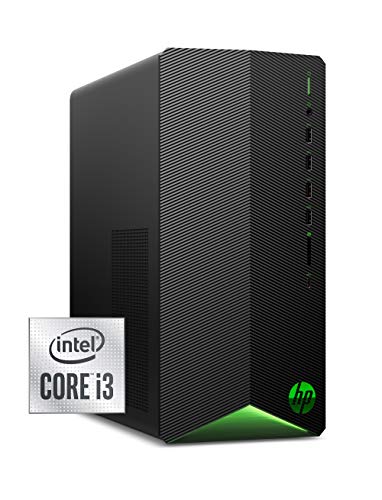
HP Pavilion Gaming Desktop GTX 1650 SUPER, i3-10100, 8GB DDR4
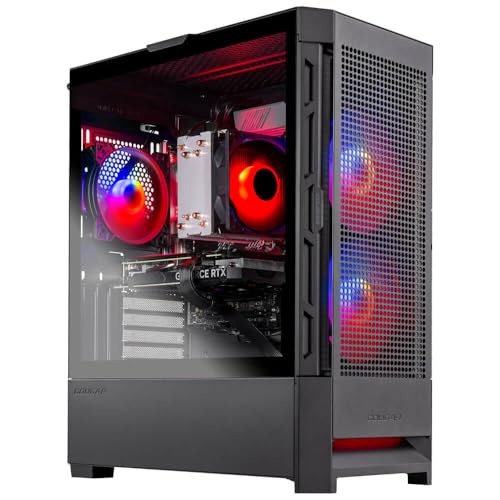
Skytech Gaming Nebula i5-13400F, RTX 4060, 16GB DDR4
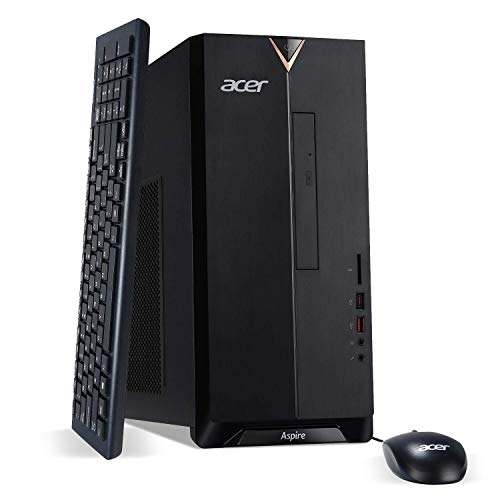
Acer Aspire TC-885-UA91 i3-9100, 8GB DDR4, 512GB SSD
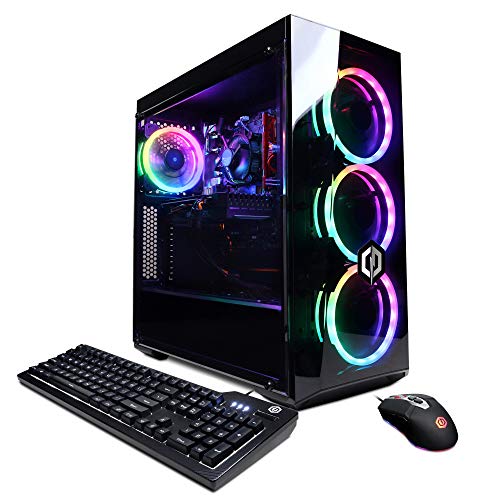
CyberpowerPC Gamer Xtreme VR i5-10400F, GTX 1660 Super

Lenovo ThinkCentre Tiny M70q i5-14400T, 16GB DDR5
Lenovo ThinkCentre Tiny M70q i5-14400T, 256GB SSD
Lenovo ThinkCentre Tiny M70q i5-14400T, 32GB DDR5

Skytech Archangel Ryzen 5 3600, GTX 1660 Super

Skytech O11 Vision Ryzen 7 9850X3D, RTX 5070 Ti

Skytech Nebula i3-12100F, RTX 3050, 16GB DDR4
Why These Options Stand Out
The HP Pavilion Gaming Desktop sits in that useful middle ground where Roblox runs without fuss and the tower still looks like a proper PC, not a beige office box. The compact tower design frees up desk space, and the included USB mouse and keyboard mean there’s nothing extra to buy on day one.
The pairing of a 10th generation Intel Core i3 with a GTX 1650 SUPER (a mid-tier graphics card from a few generations back) handles most Roblox experiences comfortably, and the 256 GB NVMe SSD (a fast solid-state drive that uses the PCIe interface for quicker load times than older SATA drives) keeps boot and game launch times snappy. Compared with the Acer Aspire further down the list, this machine trades a DVD drive for actual gaming graphics, which is usually the right call for anyone whose kid just wants to log into Adopt Me.
Reasons It Performs
- Discrete GTX 1650 SUPER graphics give Roblox noticeably more headroom than integrated chips (graphics built into the processor rather than a separate card).
- NVMe SSD means Roblox and the OS launch in seconds rather than the half-minute waits common with older hard drives.
- Compact tower fits on a small desk or shelf without dominating the room.
- USB mouse and keyboard are included, so there’s no hidden extras list to chase down.
Things To Consider
- 256 GB fills up quickly once Roblox, browser, and a few other apps share the drive.
- Owners commonly report the small case limits future graphics card upgrades to shorter, lower-power models.
Who It Suits Best
First-time Roblox households who want a name-brand tower without overspending on parts their kids won’t push.
Consider Something Else When
The Acer Aspire TC-885-UA91 is a smarter fit when Roblox play is occasional and a DVD drive still matters to the family.
The Skytech Gaming Nebula is the tower I’d point most families toward, because the Intel Core i5-13400F and RTX 4060 combo covers Roblox today and leaves real room for the more demanding games kids tend to graduate toward. The 1 TB NVMe SSD is generous enough that a full Roblox install plus a Steam library fits without an immediate upgrade.
Roblox is a light load for this hardware, so frames stay smooth even when the game world behind a popular server gets chaotic. Compare that with the HP Pavilion earlier, which leans on a much older GPU generation, and the difference shows up the moment Roblox Studio opens alongside a running session.
Noteworthy Benefits
- RTX 4060 brings modern feature support and enough muscle for Roblox plus heavier titles.
- 1 TB NVMe SSD handles Roblox, Windows updates, and a media library without constant cleanup.
- 16 GB of DDR4 RAM at 3200 MHz keeps browser tabs and Roblox Studio running side by side.
- 600 W Gold-rated PSU (power supply unit, rated for energy efficiency) leaves headroom for a future GPU swap.
Points To Keep In Mind
- Pre-built cooling is adequate for stock settings but can run warm under sustained loads.
- Some configurations ship without peripherals, so check the listing for keyboard and mouse inclusions.
Made For
Households that want one PC to handle Roblox today and other games a year from now without swapping parts.
Skip It When
The Lenovo ThinkCentre Tiny M70q with 32 GB DDR5 makes more sense for a bedroom desk where the tower itself needs to disappear.
The Acer Aspire TC-885-UA91 isn’t a gaming PC on paper, but Roblox is forgiving enough that this tower still earns a place on a shortlist. The 9th generation Intel Core i3-9100 pairs with integrated UHD 630 graphics, which is enough for Roblox at sensible settings, and the 512 GB SSD is a generous floor for a budget machine.
Ports are a quiet strength: USB 3.1 Type-C, multiple USB 3.1 and USB 2.0 ports, HDMI, and VGA cover older monitors and newer laptops without adapters. The included 8x DVD writer is the kind of detail only matters if the family still owns discs, but it’s there for them.
Where It Excels
- 512 GB SSD is unusually roomy for a budget desktop and trims waiting around for the OS to load.
- USB 3.1 Type-C plus HDMI and VGA covers modern and legacy displays in one box.
- Included USB keyboard and mouse mean no extra shopping on day one.
- Wi-Fi and Bluetooth built in, so no dongle sprawl on the desk.
Honest Caveats
- Integrated graphics handle Roblox fine but struggle the moment a more demanding game opens alongside it.
- Older 9th gen CPU platform limits meaningful future processor upgrades.
Best Suited To
Casual Roblox players on a tight budget who mostly play one game at a time.
Not Your Match When
The Skytech Gaming Nebula is the better fit for households planning to run Roblox alongside other games or streaming apps.
The CyberpowerPC Gamer Xtreme VR lands in the spot a lot of families end up shopping in: enough power for smooth Roblox without the sticker shock of a flagship build. The Intel i5-10400F is a six-core chip (meaning six independent processing units on one die) that handles Roblox and a browser full of guides at the same time.
Wi-Fi is ready out of the box, so the desk doesn’t sprout antennas. Where this machine differs from the Skytech Archangel later on is mostly the platform: similar graphics, slightly different CPU balance, and a price tag that tends to come in a touch lower.
The Value In It
- GTX 1660 Super with 6 GB of VRAM (video RAM dedicated to the graphics card) keeps frame rates steady even in busy Roblox servers.
- 500 GB NVMe SSD holds the OS, Roblox, and a healthy library of other games.
- Wi-Fi ready means no ethernet cable drama in a dorm or bedroom corner.
- Six-core i5-10400F handles Roblox Studio and gameplay running at once.
Room For Improvement
- 8 GB of RAM is the minimum comfortable amount; multitasking fills it faster than expected.
- Stock cooling is functional but tends to ramp up under longer sessions.
Quick Facts
Right Fit For
Students in shared rooms who want solid Roblox performance without giving up desk space or quiet operation.
A Better Fit Elsewhere
The Lenovo ThinkCentre Tiny M70q is a smarter pick when the desk is so small that even a mid-tower feels oversized.
The Lenovo ThinkCentre Tiny M70q is what I reach for when someone tells me their kid plays Roblox in a bedroom with no room for a tower. The 10-core Intel i5-14400T delivers modern performance at a lower power draw, and DDR5 RAM (the newest generation of system memory, faster than DDR4) gives the system extra breathing room compared with the CyberpowerPC earlier in this list.
Wi-Fi 6 is built in, and the case is small enough to hide behind a monitor or mount under a desk. Roblox loads fast and runs smoothly on the integrated graphics, assuming the resolution stays sensible.
Useful Strengths
- 10-core Intel i5-14400T chews through Roblox and browser tabs without breaking a sweat.
- DDR5 RAM at 16 GB is generous headroom for an office-style case.
- Tiny footprint frees the desk for a keyboard, mouse, and snack zone.
- Wi-Fi 6 future-proofs the network side as home routers get faster.
Trade Offs
- Integrated graphics mean visual settings in Roblox need dialing back for the smoothest frames.
- Mini cases limit any future GPU ambitions.
Perfect Match For
Dorm rooms and small bedrooms where desk space matters more than graphics horsepower.
Reach For A Different Pick When
The Skytech O11 Vision is worth the larger footprint for households planning to run Roblox alongside heavier games on the same machine.
The 256 GB version of the ThinkCentre Tiny M70q keeps everything I liked about the larger sibling and trims the storage down for tighter budgets. Roblox itself is a small install, so 256 GB still covers the OS, a browser, and a couple of other titles before anything needs to give.
The 16 GB of DDR5 RAM is the standout in this price band, and the 10-core i5-14400T keeps Roblox Studio responsive when a young creator is scripting and playtesting in the same session. For most households on a minimalist setup, the smaller drive is a reasonable trade-off.
Positive Points
- Same 10-core i5-14400T and DDR5 RAM as the larger M70q, so performance feels identical in everyday use.
- Tiny case disappears behind a monitor or under a desk.
- Wi-Fi 6 and Bluetooth covered without extras.
- DisplayPort and HDMI outputs handle dual-monitor setups for homework and Roblox side by side.
Less Ideal Details
- 256 GB fills up once Windows updates and a media library settle in.
- Integrated graphics cap how high visual settings can go in Roblox.
Whose Shelf It Belongs On
Minimalist bedroom setups where Roblox and schoolwork share the same compact machine.
Swap It Out When
The Lenovo ThinkCentre Tiny M70q with 1 TB SSD suits households planning to keep a growing game library locally.
The top-spec ThinkCentre Tiny M70q is the small-form-factor build I’d buy for a household where Roblox is one of several things the PC has to do. With 32 GB of DDR5 RAM and a 1 TB NVMe SSD, this machine handles Roblox, a streaming session, and a few browser tabs without the slowdowns the 8 GB systems tend to develop.
The integrated graphics still won’t power a heavy AAA title, but that’s not the brief here. For Roblox plus schoolwork plus a Discord call in the background, the headroom is real and noticeable.
Notable Gains
- 32 GB DDR5 is rare in mini PCs and gives long-term breathing room for multitasking.
- 1 TB NVMe SSD swallows a growing Roblox mod collection and media files without complaint.
- 10-core i5-14400T stays cool and quiet under typical Roblox and office loads.
- Tiny chassis keeps the workspace uncluttered.
Some Limits To Know
- No discrete GPU, so visual settings in Roblox need reasonable expectations.
- Mini form factor limits adding a real graphics card later.
Who Should Grab It
Streamers and content creators who run Roblox alongside OBS (Open Broadcaster Software, a tool for recording and streaming gameplay) and chat apps on the same desk.
Look Elsewhere When
The Skytech Gaming O11 Vision is the stronger match when a discrete GPU matters more than case size.
The Skytech Archangel stands out for shoppers who want a six-core AMD Ryzen 5 3600 in a gaming tower that doesn’t pretend to be an office PC. With 16 GB of DDR4 at 3200 MHz and a GTX 1660 Super with 6 GB of VRAM, Roblox runs without compromise and creative tools like OBS or basic video editing feel less like a struggle.
The included Wraith cooler (AMD’s stock CPU air cooler, named for its stealth-fighter styling) and RGB case fans give the build a bit of personality, which younger Roblox players tend to notice. Compared with the CyberpowerPC earlier, this machine leans AMD on the CPU side, which helps when background workloads pile up.
Standout Benefits
- Six-core Ryzen 5 3600 handles Roblox, Studio, and background apps without flinching.
- GTX 1660 Super 6 GB keeps frame rates stable even in crowded Roblox lobbies.
- 16 GB DDR4 at 3200 MHz gives quick memory response for multitasking.
- 500 GB SSD boots fast and loads Roblox in seconds.
Points To Note
- RGB fans add visual flair but don’t move air as quietly as larger aftermarket options.
- Stock cooling is adequate but owners commonly report it under sustained creative workloads.
Spec Overview
Built With In Mind
Roblox creators who split time between playing, building in Studio, and editing clips.
Where A Sibling Pick Shines
The HP Pavilion Gaming Desktop is the friendlier fit for a first-time buyer who just needs basic play without extra RGB.
The Skytech O11 Vision is the build I’d hand to someone who wants Roblox today and absolutely every other game tomorrow. The Ryzen 7 9850X3D with 3D V-Cache (extra SRAM stacked directly on the CPU die to accelerate gaming workloads) leans into gaming performance in a way most pre-builts don’t, and the RTX 5070 Ti with 16 GB of VRAM makes the case for buying once and not revisiting for a long time.
The 360mm AIO liquid cooler (an all-in-one water-cooling loop for the CPU, with a 360-millimeter radiator) keeps the Ryzen running cool even under heavier loads. For a family that wants one PC for Roblox, school, content creation, and the occasional blockbuster, this is the kind of headroom that pays off.
The Helpful Details
- Ryzen 7 9850X3D with 3D V-Cache accelerates game logic in a way standard CPUs can’t match.
- RTX 5070 Ti 16 GB handles Roblox and modern AAA games at high settings.
- 2 TB Gen4 NVMe SSD (a fourth-generation PCIe drive, doubling bandwidth over Gen3) stores libraries without compromise.
- 32 GB DDR5 at 5600 MHz is comfortable for streaming and creative apps.
Practical Considerations
- Mid-tower footprint demands real desk space or floor placement.
- 850 W PSU is robust, but household electrical circuits can struggle if a space heater shares the same outlet.
Built To Last
Future-proofed households planning to grow into heavier games, streaming, and creative workflows on the same machine.
Consider Something Else When
The Skytech Gaming Nebula is the more sensible call when Roblox is the priority and the budget needs to breathe.
The Skytech Gaming Nebula with an Intel Core i3-12100F and an RTX 3050 is the tower I think of when someone asks for “the Roblox PC that doesn’t cost what a Roblox PC used to.” The RTX 3050 with 6 GB of VRAM is the headline feature in this price tier, and it lets Roblox run at higher visual settings without the stutter integrated graphics tend to hit.
16 GB of DDR4 RAM is generous at this price and keeps background apps out of Roblox’s way. Compared with the Acer Aspire earlier, the Nebula trades the optical drive and VGA port for real gaming performance, which is the better swap for most households.
The Practical Payoff
- RTX 3050 graphics card handles Roblox at higher settings than integrated options manage.
- 16 GB DDR4 RAM keeps multitasking smooth without needing an immediate upgrade.
- 500 GB NVMe SSD boots and loads Roblox quickly.
- 600 W Gold PSU leaves room for a future GPU bump.
Possible Compromises
- Four-core i3 limits how much background work the CPU can juggle.
- Stock cooling is functional, though some owners add a second fan for quieter operation.
Who Will Love This
Frequent Roblox households that want a real graphics card without stepping up to a full gaming tower.
Not Your Match When
The Skytech Archangel is the smarter call for anyone planning to use Roblox Studio as a creative outlet alongside play.
Picking The Right Tower For Roblox Play
Roblox is unusually forgiving on hardware, but a few choices still make the difference between “it runs” and “it runs well.” The first decision is whether to lean on integrated graphics or step up to a discrete GPU (a separate, dedicated graphics card installed in the system). Integrated graphics handle Roblox at lower settings, while any modern dedicated card buys headroom for higher visual presets and the games that come after Roblox.
RAM matters more than people expect. 8 GB is the floor, but 16 GB is the real comfort zone for households where a browser, Discord, and Roblox Studio all run together. DDR5 (the newest memory standard) is faster than DDR4, though Roblox itself won’t max it out, so the upgrade is more future-proofing than immediate performance.
Storage type changes the feel of a PC every day. NVMe SSDs (drives that connect over the PCIe bus for much faster throughput than SATA-based SSDs) load Roblox and Windows noticeably faster than older hard drives. Capacity is a separate question: 256 GB works for Roblox alone, while 500 GB to 1 TB leaves room for other titles and media without immediate cleanup.
Case size is a lifestyle choice. Tiny desktops like the ThinkCentre Tiny M70q vanish behind a monitor, while mid-towers stay cooler under load and accept future GPU upgrades more easily. For a child’s bedroom or a dorm, the small case wins; for a shared family PC, the mid-tower usually does.
Finally, think about the path beyond Roblox. Kids graduate to heavier games fast, and a tower with a modern CPU and a real GPU today tends to stay useful longer than one stretched to its limits from day one.
Smart Considerations Across These Builds
Common Shopping Slip Ups
The most common Roblox PC mistake is buying a tower with integrated graphics when a dedicated GPU is available for a small step up. Another trap is underestimating RAM: 8 GB works for Roblox alone, but a browser full of game guides tips it over fast. Shoppers also tend to ignore the case size until the tower arrives and won’t fit on the shelf they cleared for it.
What The Higher Tier Buys
Stepping up to a tower like the Skytech O11 Vision buys meaningful future-proofing. Faster GPUs handle modern games at higher settings, DDR5 RAM extends the system’s useful life, and larger SSDs hold growing game libraries without forced cleanup. For households planning to keep the same PC for years, that headroom usually pays for itself the first time a heavier title comes home.
Frequently Asked Questions
Do I Need a Dedicated Graphics Card for Roblox?
Roblox can run on integrated graphics, but a dedicated GPU keeps frame rates smooth at higher visual settings and gives the system room for the games kids tend to move on to next.
How Much RAM Is Enough for Roblox?
16 GB of RAM is the comfortable sweet spot, especially for households that keep a browser and chat apps open alongside Roblox. 8 GB works for solo play but fills up fast.
Is an SSD Important for Roblox?
An SSD makes Windows boot faster and Roblox launch in seconds rather than the longer waits that come with older spinning hard drives. It’s a noticeable quality-of-life upgrade.
Can a Mini PC Handle Roblox?
Mini PCs like the Lenovo ThinkCentre Tiny M70q handle Roblox well, especially when paired with 16 GB or more of RAM. The trade-off is no room for a discrete GPU later.
Will These Towers Run Other Games Too?
Most picks here handle Roblox with room to spare, and the higher-end options like the Skytech O11 Vision are built to handle heavier modern games at high settings.
Wrap Up
Roblox doesn’t demand flagship hardware, but the right tower still makes daily play smoother and gives a household somewhere to grow. Match the case size to the room, the RAM to how many apps run at once, and the GPU to how far past Roblox you want to go. The shortlist above covers each of those tradeoffs honestly, so the choice comes down to the room and the budget rather than the spec sheet.