Picking the right computer for a small business feels different from buying one for personal use. The job is to keep invoices, dashboards, customer calls, and design files moving at the same time without the machine flinching. I picked eight options here that handle day-to-day operations, stay portable or compact enough for real offices, and offer honest storage and memory headroom. Whether someone operates from a kitchen counter, a co-working desk, or a client site, the list covers laptops and mini desktops that earn their place on a small business shelf.
A Snapshot Of The Selections

15.6 Inch Pink Laptop with Pentium Gold 6500Y 16GB 256GB

Lenovo ThinkCentre Tiny M70q Gen 5 16GB DDR5 512GB
Lenovo ThinkCentre Tiny M70q Gen 5 16GB DDR5 256GB
Lenovo ThinkCentre Tiny M70q Gen 5 32GB DDR5 1TB

BOSGAME P6 Ryzen 9 6900HX Mini PC 24GB 1TB
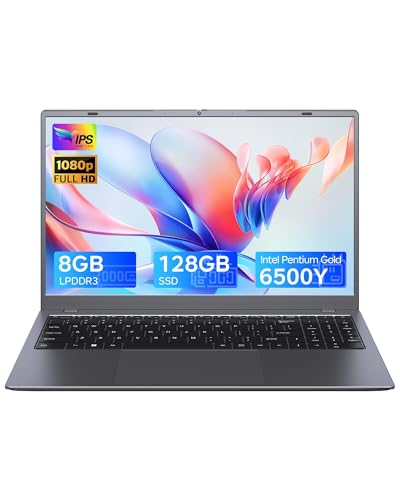
15.6 Inch Gray Laptop with Pentium Gold 6500Y 8GB 128GB

NIMO 15.6 inch FHD IPS Business Laptop Ryzen 5 6600H 32GB 2TB
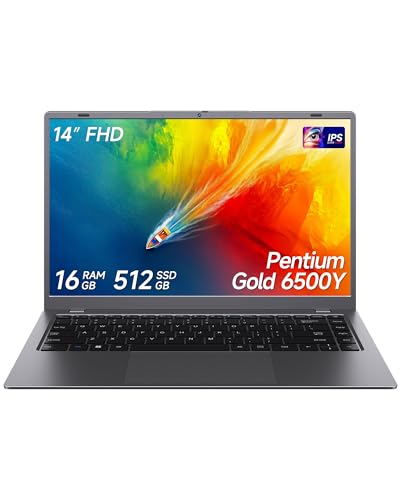
14 Inch Gray Laptop with Pentium Gold 6500Y 16GB 512GB
The Strengths Of Each Pick
The Pink Zrasu stands out before anyone even turns it on. The rose shell gives boutique owners, beauty studios, and creative shops a counter-friendly look that doesn’t disappear into a generic silver pile. Underneath the color sits a Pentium Gold 6500Y with a 3.4 GHz boost ceiling, paired with a comfortable 16GB of memory, which keeps browser tabs, point-of-sale tabs, and a video call running together without dipping into a crawl.
Wi-Fi 5 and Bluetooth 5.0 cover everyday peripherals, and the USB-C port lets someone dock a single cable to a hub at the desk. The full-HD display reads cleanly for spreadsheets and client emails, though buyers running design apps should know the integrated graphics handle light work, not heavy rendering.
Everyday Advantages
- Distinctive pink shell that suits boutique, salon, and studio environments
- 16GB of RAM comfortably handles email, browser stacks, and a meeting running side by side
- USB-C port supports a clean one-cable dock for a tidy front-desk setup
- Full-HD panel keeps spreadsheets and documents readable during long workdays
- Lightweight enough to carry between home, a pop-up shop, and a client site
Things To Consider
- Integrated graphics limit heavy video editing or large design workloads
- The standout color may not match a corporate office aesthetic
- Storage fills quickly for anyone archiving large media files locally
Who It Suits Best
Boutique owners, salon operators, and solo creatives who want a portable machine with personality and enough headroom for daily admin.
Where Another Pick Suits Better
The Lenovo ThinkCentre Tiny M70q Gen 5 16GB 512GB is a better fit for owners who leave the computer anchored behind a counter and need more storage and wired connectivity.
This Lenovo Tiny earns its place by disappearing behind a monitor while still handling the workload of a busy front office. The chassis tucks under a desk or mounts to the back of a display, freeing the counter for receipts, samples, or customer paperwork. Inside, a 10-core Intel i5-14400T with DDR5 memory tackles spreadsheets, accounting software, and browser-based dashboards without buckling.
Wi-Fi 6 keeps the connection stable in a crowded shared-office Wi-Fi setup, while the RJ-45 port gives the option to plug straight into the router for a wired link. Windows 11 Pro adds the BitLocker encryption and remote desktop features many small businesses ask for, which is the kind of detail that separates this from a casual home PC.
Points In Its Favor
- Compact chassis that mounts behind a monitor for a clean, uncluttered counter
- 10-core i5-14400T with DDR5 memory handles multiple business apps at once
- Windows 11 Pro supports BitLocker encryption and remote desktop access
- Wi-Fi 6 plus an RJ-45 port covers both modern and wired network setups
- DisplayPort and HDMI outputs support a dual-monitor workstation
Trade Offs
- Requires a separate monitor, keyboard, and mouse to be fully operational
- Not designed for travel or hot-desking between locations
Quick Facts
Right Fit For
Owners running a fixed front-office workstation with two monitors who value a clean desk and Windows Pro features.
Reach For A Different Pick When
The BOSGAME P6 Ryzen 9 6900HX Mini PC suits someone who needs stronger multi-threaded speed and three 4K displays side by side.
This M70q trim keeps the same processor, memory standard, and Windows 11 Pro feature set as the previous entry, but pares storage to 256GB for operators working mostly with cloud tools. Point-of-sale dashboards, web-based CRMs, and accounting portals do not demand much local space, and a thinner drive helps bring the total cost down. The 10-core i5-14400T and DDR5 memory carry the real workload.
Compared to the pink Zrasu laptop above, this ThinkCentre sacrifices mobility for a more anchored workstation approach. For anyone tethering to a monitor and a wired network at one desk all day, the trade reads as sensible.
Practical Advantages
- Same 10-core i5-14400T and DDR5 platform as the larger storage sibling
- Windows 11 Pro offers BitLocker and remote desktop without an upgrade fee
- Small form factor mounts behind a display for a zero-footprint office setup
- Wi-Fi 6 and Bluetooth handle wireless peripherals cleanly
Worth Noting
- 256GB fills quickly for anyone storing large local media or backups
- Requires separate display, keyboard, and mouse purchases to complete the station
- Not built for mobility between job sites or co-working spaces
Made For
Lean operations that lean heavily on cloud software and want a tidy, encrypted workstation at a lower entry cost.
Look Elsewhere When
The Lenovo ThinkCentre Tiny M70q Gen 5 32GB 1TB makes more sense for owners running heavier local databases or multi-app setups that demand storage and memory headroom.
This is the M70q I would point a founder toward if their day opens a customer database, a video call, an inventory sheet, and a browser full of tabs before the first coffee finishes. The 32GB of DDR5 memory gives the system genuine room to breathe, and the 1TB NVMe drive swallows product photos, contracts, and accounting exports without forcing an external drive onto the desk.
For a small business owner running heavier workflows locally, this configuration earns its keep. The chassis, ports, and Windows 11 Pro stack remain identical to the smaller siblings, so any owner who likes the M70q platform can scale up without learning a new machine.
A Strong Showing
- 32GB DDR5 handles inventory software, CRM tabs, and calls without slowdowns
- 1TB NVMe SSD stores large product catalogs and contract archives locally
- Wi-Fi 6 plus Bluetooth covers modern wireless office accessories
- DisplayPort and HDMI drive a dual-monitor setup for spreadsheet-heavy work
- Windows 11 Pro encryption and remote access stay available for security-minded owners
Honest Caveats
- Higher spec drives a noticeably higher price than the 256GB sibling
- Still requires external peripherals to complete the workstation
At A Glance
Whose Shelf It Belongs On
Data-heavy small businesses running inventory, accounting, and CRM tools in parallel who want breathing room for growth.
Swap It Out When
The BOSGAME P6 Ryzen 9 6900HX Mini PC fits owners who need triple 4K displays and faster multi-threaded throughput for creative or technical work.
The BOSGAME P6 brings genuine desktop-class muscle to a chassis that fits in a drawer. A Ryzen 9 6900HX (an H-series mobile chip rated for serious sustained performance, the kind usually found in gaming laptops) drives 24GB of DDR5 RAM running at 4800MT/s and a 1TB PCIe 4.0 SSD. For a business running dashboards on three 4K monitors, this kind of bandwidth matters.
Dual LAN ports make this a quiet hero in a small office that wants network segmentation or a failover link. Wi-Fi 6E support and Bluetooth 5.3 round out the wireless side, and the compact frame makes it a natural fit for an operations room where a small tower would clutter the desk.
Where It Delivers
- Ryzen 9 6900HX multi-threaded performance handles spreadsheets and rendering side by side
- Triple 4K display support suits trading, monitoring, or design workflows
- Dual LAN ports allow network separation or a backup wired link
- Wi-Fi 6E delivers fast wireless in modern office routers
- PCIe 4.0 SSD at 1TB handles large project files without external storage
Points To Keep In Mind
- Higher power draw than the smaller ThinkCentre Tiny picks
- Requires a separate display stack, keyboard, and mouse to get running
Feature Snapshot
Best Suited To
Owners running multi-monitor setups for operations, design, or technical work who want desktop-class muscle in a tiny box.
Consider Something Else When
The Lenovo ThinkCentre Tiny M70q Gen 5 16GB 512GB is a calmer fit for owners who prefer a quieter, Windows-Pro-focused daily driver without extra display demands.
The gray Zrasu 15.6 sits at the lean end of this list and exists for the solo operator whose computer mostly runs email, a browser, and a spreadsheet. The Pentium Gold 6500Y paired with 8GB of memory handles those jobs without complaint, and the full-HD screen keeps text readable through long client calls.
USB-C, Wi-Fi 5, and Bluetooth 5.0 cover the modern basics, and the 128GB SSD is enough for documents and a modest client archive. Anyone regularly processing large media files will need to plan around external storage from day one.
Real-World Strengths
- Lowest entry price on this list for budget-conscious owners
- Full-HD display reads clearly for documents and spreadsheets
- USB-C port allows a single-cable dock for tidy workstation setups
- Light enough to move between home, the office, and a client visit
A Few Limitations
- 8GB of memory can feel tight with many browser tabs and a meeting running together
- 128GB SSD fills quickly without cloud storage habits
- Integrated graphics limit any creative or design workloads
Perfect Match For
Solo operators on a tight budget who run mostly browser-based tools and need a portable daily driver.
Skip It When
The NIMO 15.6 inch FHD IPS Business Laptop Ryzen 5 6600H 32GB 2TB suits owners juggling large local files who want a much faster CPU and a much bigger SSD.
The NIMO is the most ambitious laptop on this list. A 6-core Ryzen 5 6600H with Radeon 660M graphics runs circles around the Pentium Gold options earlier in the lineup, and the 32GB of DDR5 RAM keeps dozens of tabs, design files, and remote sessions responsive at the same time. The 2TB SSD swallows years of project archives without blinking.
For a mobile owner who wants desktop muscle in a clamshell, the extras matter. A fingerprint reader speeds up login between meetings, the backlit keyboard helps late-night invoicing, and 100W Type-C charging means a single cable can power the laptop at the desk.
The Case For It
- Ryzen 5 6600H with Radeon 660M graphics handles creative work alongside admin tasks
- 32GB DDR5 RAM keeps demanding multitasking responsive
- 2TB SSD holds years of client files without external storage
- Fingerprint reader and backlit keyboard speed up daily routines
- 100W Type-C charging simplifies the desk with one cable
Room For Improvement
- Higher spec brings a heavier laptop than the basic Zrasu picks
- Battery life shortens under heavy multi-core workloads
Key Attributes
Who Should Grab It
Mobile owners juggling large local files, design work, and frequent travel who want a true desktop replacement in laptop form.
A Better Fit Elsewhere
The Lenovo ThinkCentre Tiny M70q Gen 5 32GB 1TB is the calmer fit for owners anchored to one workstation who prefer a tiny desktop over a laptop.
The 14-inch Zrasu closes the list as the most travel-friendly pick. The smaller frame slips into a tote or a backpack sleeve without forcing the owner to think about weight, which matters for consultants and visiting service providers. The 16GB of memory matches the larger 15.6-inch sibling, so the multitasking comfort stays intact.
Storage gets a real bump at 512GB, which is enough to carry a meaningful client archive on the road. USB-C, Wi-Fi 5, and Bluetooth 5.0 handle the modern office connection set without surprises.
Notable Upsides
- 14-inch form factor slips easily into a tote for client visits
- 16GB of memory keeps browser tabs and meetings responsive
- 512GB SSD carries a solid local client archive
- Full-HD display stays readable for documents and spreadsheets
- USB-C simplifies docking at home or at the office
Things To Watch
- Smaller screen means more scrolling through wide spreadsheets
- Integrated graphics limit any heavy creative workloads
Built With In Mind
Traveling consultants, mobile service providers, and field reps who carry the computer between locations every day.
Another Choice May Suit
The pink 15.6 inch Zrasu is the better fit for owners who prefer a larger screen and a distinctive color for a stationary boutique setup.
What To Weigh Before Choosing The Right Computer
Processing Power For Real Business Loads
The processor sets the ceiling for what a small business computer can handle at once. The Pentium Gold 6500Y in three of the Zrasu laptops is a dual-core chip aimed at light multitasking, which suits email, browser-based CRMs, and spreadsheets. The 10-core Intel i5-14400T in the Lenovo Tiny picks adds genuine multi-app muscle, while the Ryzen 5 6600H in the NIMO and the Ryzen 9 6900HX in the BOSGAME lean further toward creative and technical workloads. Matching the chip to the workflow saves money and prevents the constant drag of a slow machine during a busy morning.
Memory And Storage Headroom
Random-access memory (RAM) decides how many apps and tabs run smoothly side by side, while storage decides how much local archive fits without external drives. Eight gigabytes covers solo operators running one or two browser tabs, but 16GB is the safer floor for owners juggling meetings, dashboards, and a CRM at once. Storage below 256GB pushes an owner toward cloud subscriptions, while 512GB and up covers a healthy year of local archives. Picking slightly more than today’s need tends to age better than picking exactly today’s need.
Form Factor And Connectivity
A laptop travels; a mini desktop stays anchored. Owners who split time between home, a shop, and client visits gain from a 14-inch or 15.6-inch frame, while owners anchored to one workstation gain from a tiny desktop that hides behind a monitor. Ports matter quietly: USB-C supports a clean one-cable dock, RJ-45 gives a wired backup, and HDMI or DisplayPort covers a second monitor for spreadsheet-heavy work. Owners planning dual screens should confirm those outputs before committing.
Practical Notes That Help A Final Choice
Wrong Turns To Avoid
Going for the cheapest option on a list like this often means giving up the memory headroom that makes a computer feel responsive two years down the line. Another common slip is buying a laptop when the workflow stays at one desk, which wastes money on a battery and screen someone rarely leaves home with. Matching the form factor to the actual work week prevents both regrets.
When Paying More Pays Off
The jump from 8GB to 16GB of memory is usually the single most noticeable upgrade for a small business computer. The jump from 256GB to 512GB or 1TB of storage keeps owners from juggling external drives during the workweek. Spending up makes sense when the machine handles the busiest part of the day; spending less makes sense when the workflow stays light and cloud-based.
Frequently Asked Questions
How Much RAM Does A Small Business Computer Really Need?
Sixteen gigabytes is the comfortable floor for owners running a browser, a spreadsheet, and a meeting at the same time. Eight gigabytes still works for solo operators running one or two browser tabs, but the ceiling shows up fast in the second year.
Is A Mini Desktop Or A Laptop Better For A Small Business?
Mini desktops win for anchored workstations with a monitor, keyboard, and mouse already in place. Laptops win for owners who travel, visit clients, or split time between a shop and a home office.
What Storage Size Should A Small Business Computer Have?
A 256GB SSD covers owners who lean on cloud tools. A 512GB SSD suits most owners who keep contracts, invoices, and product photos locally. A 1TB or larger SSD makes sense for businesses archiving large media files or product catalogs on the machine itself.
Do Small Business Computers Need Windows 11 Pro?
Pro adds BitLocker encryption, remote desktop, and group policy controls that many small business owners rely on. Home covers the basics for a single owner, but Pro tends to earn its place once a second employee joins.
How Important Is Wi-Fi 6 For A Small Business Computer?
Wi-Fi 6 stays steadier in a crowded shared-office environment and pairs well with newer routers. For owners on older routers, Wi-Fi 5 still works fine and does not block a productive day.
Closing Remarks
The right computer for a small business is the one that disappears into the workday and only resurfaces when something breaks. Match the chip, memory, and form factor to the actual rhythm of the week, and the rest of the choice tends to fall into place.