Picking a computer for a teenager rarely comes down to raw specs alone. The honest read is this: a teen laptop has to handle a school essay, a video call, a stream, and the occasional game, without weighing down a backpack or dying halfway through a class period. I’ve spent time digging through current models at every price point, from budget-friendly Chromebooks and slim study laptops to legit gaming machines, and what follows is the shortlist that actually fits a teen’s day-to-day. Whether the priority is a screen that won’t fry their eyes, a battery that survives back-to-back periods, or a chassis that can take a backpack tumble, there’s a match below.
A Side-By-Side Look

Zrasu 15.6″ Pink Laptop Pentium Gold 16GB 256GB

Lenovo ThinkPad E595 15.6″ Ryzen 5 8GB 256GB

ASUS TUF Gaming F16 (2025) i5 RTX 5050 16GB

ZARSU 14″ FHD Business Laptop 8GB 256GB Silver

Acer Aspire 5 A515-55-56VK 15.6″ i5 8GB 256GB
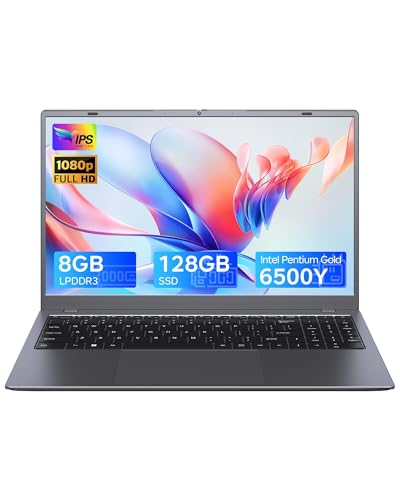
Zrasu 15.6″ Laptop Pentium Gold 8GB 128GB Gray
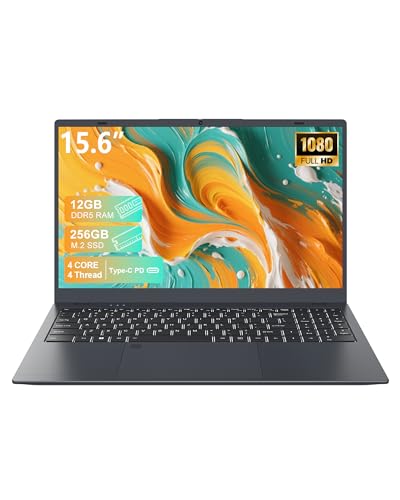
15.6″ FHD IPS Laptop N95 12GB DDR5 256GB
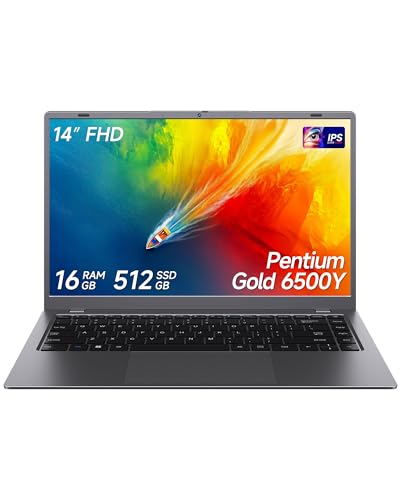
14″ Laptop Pentium Gold 16GB 512GB Gray

14″ Laptop Pentium J3710 8GB 256GB SSD
Inside Each Recommended Option
The Zrasu 15.6″ Pink Laptop leans hard into personality, and that’s exactly its appeal. A teen who wants a laptop that looks like theirs and not a beige office lease return will appreciate the bold pink finish paired with a generous 16GB of RAM, which keeps browser tabs, Google Docs, and a Zoom call running side by side without the dreaded fan spin-up.
The 1080P Full HD screen gives enough room to split two documents for note-taking, and USB-C plus Wi-Fi 5 keep the basics covered for school printers and home networks. It’s a study-first machine dressed up like a gift, and that balance lands well for most high schoolers.
Why It Works Well
- 16GB RAM is unusually generous at this tier, meaning a teen can keep dozens of tabs open during research without slowdowns.
- 1080P display makes long reading sessions easier on the eyes than 768P panels still common in budget laptops.
- The pink chassis stands out in a classroom full of gray slabs, and that styling matters to many teens.
- USB-C adds flexibility for newer chargers, docks, and external SSDs at a dorm desk.
Things To Consider
- The Pentium Gold chip handles schoolwork fine but won’t keep up with serious gaming or video editing.
- The plastic finish tends to show fingerprints, so a microfiber cloth becomes part of the routine.
- Wi-Fi 5 works on most home networks, though households with Wi-Fi 6 routers won’t see top speeds.
Who It Suits Best
Style-conscious teens who mostly write papers, browse, and stream, and want a generous 16GB of memory for heavy multitasking.
Skip It When
Gamers and creative editors will get more mileage out of the ASUS TUF Gaming F16 (2025) with its dedicated RTX 5050 graphics.
The ThinkPad E595 earns its reputation by being unkillable. Where the Zrasu Pink laptop leads with color, this one leads with a reinforced chassis, a spill-resistant keyboard, and that famous TrackPoint nub that long-time ThinkPad fans genuinely miss when it’s gone. For a teen who treats a backpack like a locker, that build matters more than a flashy spec sheet.
Inside, the AMD Ryzen 5 3500U quad-core pushes through typical classwork with ease, and the 15.6″ Full HD panel gives papers and spreadsheets the room they need. Windows 10 Pro adds enterprise-style controls that schools sometimes require for network access. It’s the kind of laptop that survives four high school years and still boots up clean for college.
A Few Strong Suits
- Legendary ThinkPad keyboard quality makes long essay sessions far less painful.
- Reinforced construction handles daily backpack abuse better than typical consumer laptops.
- Ryz
The ASUS TUF Gaming F16 (2025) sits in a different lane from the Zrasu Pink and the ThinkPad E595. This is the laptop for the teen whose Steam library is bigger than their homework folder, and who wants high frame rates without their laptop sounding like a hair dryer. The 16″ FHD+ panel running at 165Hz makes everything from FPS shooters to scrolling essays feel smooth, and the dedicated NVIDIA RTX 5050 graphics give it room to grow over the next several school years.
The Intel Core i5-13450HX and 16GB of DDR5 RAM handle modern titles at respectable settings, while Wi-Fi 6E keeps wireless lag low when the action moves online. Compared to the school-only picks above, this is overkill for essays and criminally underbought for gaming if you don’t go this dedicated.
Advantages To Know
- Dedicated RTX 5050 GPU delivers real gaming performance that integrated graphics simply can’t match.
- 165Hz refresh rate makes fast-paced games visibly smoother than standard 60Hz panels.
- 512GB PCIe Gen4 SSD loads large game files and project assets noticeably faster than older SATA drives.
- Wi-Fi 6E support future-proofs the wireless connection as home networks upgrade.
- 16″ 16:10 aspect ratio gives more vertical screen space for school documents and chat windows.
Trade Offs
- A 16-inch gaming chassis is heavier than a backpack-first laptop, so commuters should weigh that.
- Battery life takes a hit when gaming on the go, though it’s fine for classwork sessions.
- Higher performance brings more fan noise under load, which can be noticeable in quiet libraries.
Feature Snapshot
Made For
Teens who game seriously but still want a laptop that handles essays, video calls, and creative projects without compromise.
Consider Something Else When
Teens whose daily use is mostly writing papers and streaming will find the Acer Aspire 5 a lighter, less expensive fit.
The ZARSU 14″ FHD Business Laptop is the anti-glamour pick, and that’s a compliment. The 14-inch form factor lands in the sweet spot for backpacks, the silver finish reads mature enough for a college lecture hall, and the quad-core processor at 2.6GHz gives enough headroom for documents, research tabs, and a video call running at the same time.
For a teen who moves between classes, the library, and home, that smaller footprint pays off every day. Compared to the 15.6-inch ThinkPad E595 above, this one trades screen real estate for portability, which most commuting students will appreciate. Storage sits at a sensible 256GB SSD, enough for a year of school files before external backups become necessary.
Everyday Advantages
- 14-inch chassis slips into backpacks and small desk spaces more comfortably than 15.6-inch models.
- 256GB SSD keeps boot and load times fast for daily classwork.
- Quad-core processor manages multitasking across browsers and Office apps without bogging down.
- Muted silver finish looks appropriate in any classroom setting.
Worth Noting
- 8GB of RAM handles schoolwork fine but feels tight if a teen keeps dozens of tabs open.
- The 1080P screen is solid but not especially bright for outdoor or sunlit study spots.
Best Suited To
Teens who commute daily and want a lighter, more portable laptop that still handles classwork comfortably.
Look Elsewhere When
Students who keep massive project files locally will appreciate the extra storage of the 14″ Pentium Gold 6500Y 16GB 512GB model instead.
The Acer Aspire 5 A515-55-56VK is the dependable middle path that rarely disappoints. The 10th Gen Intel Core i5-1035G1 handles essays, browser research, and a Netflix stream with a steady hand, and the 15.6″ Full HD IPS display gives wide viewing angles that work well when a teen shares a screen with a study partner.
Features like Wi-Fi 6, a fingerprint reader, and a backlit keyboard push this above the bare-bones budget tier without inflating the price. Compared to the gaming-leaning ASUS TUF F16 above, this one trades graphics horsepower for a more travel-friendly weight, which most non-gaming students will find easier to live with.
Useful Highlights
- Wi-Fi 6 wireless future-proofs the connection for faster home and school networks.
- Backlit keyboard helps during late-night study sessions and dimly lit classrooms.
- Fingerprint reader adds quick, secure login without typing passwords all day.
- IPS display technology offers better color and viewing angles than basic TN panels.
Honest Caveats
- Integrated graphics won’t satisfy teens who want to play modern games at high settings.
- The chassis tends to flex slightly at the keyboard deck, common in this price range.
- 256GB SSD fills up fast with games and video projects, so external storage may become necessary.
Key Specs
Perfect Match For
Teens who need a versatile laptop for school, browsing, and streaming without paying for gaming power they won’t use.
A Better Fit Elsewhere
Teens who value a more compact, lighter chassis will find the ZARSU 14″ FHD Business Laptop easier to carry all day.
The Zrasu 15.6″ Laptop in gray is the cost-conscious cousin of the pink version above. Same Pentium Gold 6500Y processor, same 1080P Full HD screen, but trimmed to 8GB of RAM and 128GB of SSD storage. For a younger teen whose homework folder fits comfortably in the cloud, that trade-off is often the right call.
The gray finish reads more grown-up than the pink alternative, which some high schoolers prefer. Where this differs most from the Acer Aspire 5 above is in raw computing muscle and storage headroom; think of it as a stepping stone for a first laptop rather than a multi-year flagship.
Noteworthy Benefits
- Lower cost-of-entry makes it approachable for first-time laptop owners.
- 1080P Full HD display is a real upgrade over the 768P panels still found at this price.
- Gray finish suits teens who prefer a more subtle, mature look.
- USB-C port future-proofs charging and accessory connections.
Points To Note
- 128GB of storage fills up quickly with photos, videos, and games, requiring cloud or external backups.
- 8GB of RAM is fine for schoolwork but tight once many browser tabs accumulate.
The Right Fit
Younger teens and first-time laptop shoppers who mostly use cloud-based tools like Google Docs and Classroom.
Not Your Match When
Teens who handle large video projects locally will outgrow the 128GB SSD quickly and may prefer the Acer Aspire 5’s better balance of storage and speed.
The 15.6″ FHD IPS Laptop with the N95 processor is the surprise of the list. Where most budget-class laptops stick with DDR4 memory, this one ships with 12GB of DDR5 (DDR5 is the newer, faster generation of RAM), giving it noticeably better headroom for multitasking than its price suggests. Pair that with Wi-Fi 6 and Bluetooth 5.3, and the connectivity story is more current than several pricier rivals.
The N95 chip handles schoolwork with low power draw, so thermals stay calm in a backpack. Add the fingerprint reader, backlit keyboard, and 15.6″ IPS screen, and this lands as a quietly capable study machine. Compared to the Zrasu 8GB 128GB above, it gives up a bit of brand familiarity for newer memory and a richer feature set.
What Works In Its Favor
- 12GB of DDR5 RAM exceeds what most budget peers offer, future-proofing against heavier multitasking.
- Wi-Fi 6 and Bluetooth 5.3 cover the latest home network and accessory standards.
- Fingerprint reader and backlit keyboard add day-to-day convenience at this tier.
- IPS display delivers richer colors and wider viewing for shared study sessions.
Some Limits To Know
- The N95 processor is efficient but not a powerhouse for heavy gaming or video editing.
- 256GB SSD may require external storage within a school year for teens who keep large media libraries.
Quick Facts
Whose Shelf It Belongs On
Teens who run heavy browser sessions and like having the newest connectivity features without paying flagship prices.
Reach For A Different Pick When
Buyers who want a more established brand with widespread service options should consider the Lenovo ThinkPad E595 instead.
The 14″ Pentium Gold 6500Y laptop in gray addresses a pain point most teens eventually hit: running out of space. With 16GB of RAM and a generous 512GB SSD, this thing swallows a semester of recorded lectures, downloaded textbooks, and a Steam library without breaking a sweat. The 14-inch form factor keeps it backpack-friendly too.
It uses the same processor family as the Zrasu Pink laptop earlier in this list, but doubles the storage while trimming the chassis size slightly. Compared to the Acer Aspire 5 above, it trades a more established brand for raw storage and memory headroom, which students handling video projects will appreciate.
Standout Benefits
- 512GB SSD holds a full school year of projects, photos, and downloaded course materials.
- 16GB RAM supports heavy multitasking across browsers, video editors, and chat apps.
- 14-inch chassis balances screen size with portability better than bulkier 15.6-inch options.
- Full HD display makes long reading sessions easier on the eyes.
Points To Keep In Mind
- Pentium Gold chip handles schoolwork comfortably but won’t run modern games smoothly.
- Wi-Fi 5 is fine for most networks, though Wi-Fi 6 routers won’t deliver top speeds.
Who Will Love This
Teens managing video projects, music libraries, or multiple years of school files who want space to spare.
Swap It Out When
Gaming-focused teens will be better served by the ASUS TUF Gaming F16 (2025) with its dedicated RTX 5050 graphics.
The 14″ Laptop with the Pentium J3710 quad-core processor is the lightest-feeling option on this list, built for the youngest students or anyone whose needs center on documents, browsing, and basic homework. The compact chassis slips into smaller backpacks, and the 8GB RAM plus 256GB SSD pair is enough for elementary and middle school workloads without paying for power a younger teen won’t use.
Compared to the Zrasu Pink laptop at the top of this roundup, this one trades visual flair for a quieter, more conservative profile. For households outfitting a first laptop for a younger student, that’s often the right call.
The Practical Payoff
- 14-inch form factor is easier for smaller frames to handle and carry.
- Quad-core processor handles web-based learning platforms and documents reliably.
- 256GB SSD keeps boot times snappy for daily classwork.
- Wi-Fi and Bluetooth cover standard school and home connectivity needs.
Smaller Caveats
- The Pentium J3710 is an older chip and runs cooler but slower than newer options.
- Limited future headroom for heavier apps as a student progresses into high school.
Built With In Mind
Younger students doing web-based schoolwork who need a simple, portable starter laptop.
Where A Sibling Pick Shines
Teens handling more demanding classwork or multitasking will get stronger longevity from the Acer Aspire 5 A515-55-56VK.
What Matters Most Before Choosing Computers For Teenager
Processor and Memory for School Demands
The CPU (central processing unit, the brain of the laptop) and RAM (short-term memory that lets the laptop juggle multiple tasks) decide how a laptop feels day to day. For a teen who mostly uses Google Docs, a browser, and a video call, a Pentium Gold or N95 chip with 8GB of RAM keeps things moving. For teens running heavier software like Photoshop, Premiere, or modern games, an Intel Core i5 or AMD Ryzen 5 with 16GB of RAM is a smarter starting point.
Storage matters as much as speed. A 256GB SSD (solid-state drive, faster and more durable than older hard drives) is the practical minimum for school files, photos, and a small game library. Teens handling video projects or large music collections should look at 512GB to avoid constantly juggling files.
Display, Battery, and Build Quality
A 1080P Full HD screen makes a bigger difference than most shoppers expect. Lower-resolution panels strain eyes faster during long reading sessions, and the upgrade to Full HD is worth prioritizing over marginal processor gains. IPS display technology (which offers wider viewing angles and better color than older TN panels) is a bonus worth chasing if the price is close.
Battery life and weight go hand in hand. A heavier 15.6-inch laptop with all-day battery can be a better commuter companion than a lighter 14-inch model that dies mid-class. Build quality matters too; reinforced hinges, spill-resistant keyboards, and aluminum chassis parts tend to survive teen life longer than the cheapest plastic builds.
Matching the Laptop to the Teen
The honest read is this: match the laptop to the actual daily use, not the worst-case fantasy. A teen who streams and writes papers doesn’t need a gaming GPU, and a teen who games nightly will be frustrated by anything without a dedicated graphics card. Portability matters for commuters, screen size matters for creative work, and storage size matters for media-heavy students. Picking the right balance beats picking the most expensive option every time.
Key Considerations Across These Picks
Common Shopping Slip Ups
The most frequent mistake is buying more laptop than a teen will use, then resenting the bulk in a backpack. Another common slip is underestimating storage: cloud storage helps, but downloaded textbooks, recorded lectures, and a small game library can fill 128GB surprisingly fast. Watch for hidden costs too, like the difference between Wi-Fi 5 and Wi-Fi 6 if a household has just upgraded its router.
What Separates Premium From Basic
Higher-tier models earn their place through better processors, more RAM, faster storage, and dedicated graphics. The ASUS TUF Gaming F16 (2025) is the clearest example, with a dedicated RTX 5050 GPU that integrated graphics simply can’t match for gaming. For non-gamers, the upgrade to 16GB of RAM or a 512GB SSD tends to deliver more daily satisfaction than a slightly faster CPU.
Frequently Asked Questions
What specs matter most in a laptop for a teenager?
The processor and RAM matter most for daily responsiveness, while SSD storage matters for how much a teen can keep locally. A 1080P display and at least 8GB of RAM are the practical minimums for school use in 2026.
Is a gaming laptop worth it for a non-gamer teen?
Usually not. Gaming laptops are heavier, louder, and more expensive. A mainstream 15.6-inch laptop like the Acer Aspire 5 handles schoolwork far more comfortably for non-gaming teens.
How much storage does a teen laptop really need?
For cloud-first teens using Google Docs and streaming, 128GB can work short-term. Most students are happier with 256GB, and media-heavy teens benefit from 512GB to avoid constant file management.
Are 14-inch laptops too small for schoolwork?
Not for most students. A 14-inch Full HD display fits documents and split-screen research comfortably, and the smaller chassis is easier on back and shoulders during commutes.
How long should a teen laptop last?
A well-chosen laptop should serve a student through four years of high school comfortably. Picking a model with at least 16GB of RAM and an SSD helps extend that lifespan.
Closing Remarks
The right laptop for a teenager is the one that fits their actual day, not their imagined one. A study-first machine like the Acer Aspire 5 handles most high schoolers beautifully, while the ASUS TUF Gaming F16 (2025) earns its place for serious gamers. Lean into the use case, match the specs to the workload, and trust the trade-offs you accept. The picks above cover the spread most families actually face.