Picking a computer for a teenager means juggling homework, group chats, video calls, and the occasional gaming session, all without overspending or under-speccing. The right machine keeps up with schoolwork today and still feels fast two grades from now. I’ve narrowed down ten options that span budget Chromebooks, capable Windows laptops, and AI-ready powerhouses for older students juggling creative projects.
The Essentials At A Glance

NIMO 15.6″ Light-Gaming-Laptop Ryzen 7 16GB DDR5 512GB SSD
NIMO 17.3″ Light Gaming-AI-Laptop R7-8745HS 32GB 1TB SSD
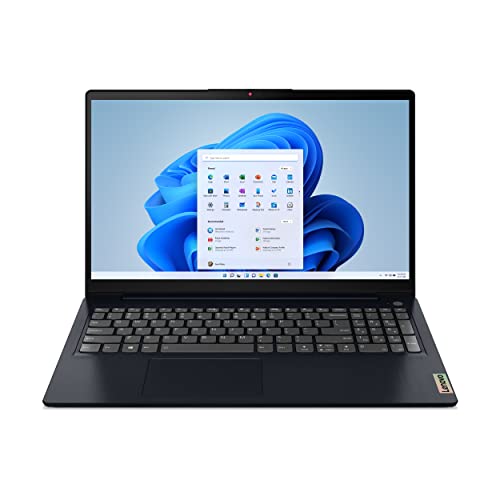
Lenovo IdeaPad 3 Laptop 15.6″ FHD Ryzen 5 8GB 512GB

HP 14″ Chromebook HD Touchscreen Celeron 4GB 32GB

NIMO 15.6 AI Creator Laptop R5-6600H 32GB 1TB SSD IPS

NIMO 15.6 FHD AI-Ready Laptop i5-12450H 32GB 1TB SSD

NIMO 15.6 AI Creator Laptop R5-6600H 16GB 512GB SSD IPS

NIMO 17.3 FHD AI-Ready Laptop R7 8745HS 32GB DDR5 1TB

NIMO 15.6 FHD AI Gaming Laptop R7-8745HS 32GB DDR5 1TB

NIMO 15.6 IPS FHD Gaming Laptop Ryzen 7 8745HS 32GB 1TB
A Breakdown Of The Leading Choices
This NIMO laptop sits in a sweet spot for households that want one machine to cover homework and casual gaming without overthinking the spec sheet. The Ryzen 7 chip and 16GB of DDR5 memory handle the typical teen workload: a browser stuffed with tabs, a Zoom call, a Google Doc, and maybe a game running in the background.
The 15.6-inch full HD display gives enough room for split-screen multitasking during study sessions. A 100W Type-C charging setup means a quick top-up during a study break, which is genuinely useful for students who forget to plug in overnight.
Noteworthy Benefits
- Ryzen 7 processor with 8 cores tackles heavier schoolwork like spreadsheets and basic editing software.
- 16GB of DDR5 memory keeps multiple browser tabs and apps responsive without the slowdowns common on 8GB machines.
- Radeon 680M integrated graphics (the graphics chip built into the processor) handle light gaming and creative tasks without a dedicated graphics card.
- Backlit keyboard supports late-night homework sessions in dim rooms.
- 512GB SSD (solid-state drive) gives quick boot times and enough local storage for school files and games.
Things To Consider
- Integrated graphics will not run demanding modern games at high settings, so esports titles and lighter games are the realistic ceiling.
- For most backpacks, the 15.6-inch form factor is portable but not as compact as the HP Chromebook in this list.
Feature Snapshot
Who It Suits Best
Teens who mix schoolwork with casual gaming and want a Windows machine that won’t feel outdated by senior year.
Where Another Pick Suits Better
Students doing serious video editing should look at the NIMO 17.3″ Light Gaming-AI-Laptop R7-8745HS 32GB 1TB SSD, which pairs the same chip family with much more memory and storage.
Stepping up from the first NIMO, this 17.3-inch model doubles the memory and storage, giving older students serious room to work. The Ryzen 7 8745HS at 54W delivers desktop-class headroom, which matters when rendering video clips or compiling code for a STEM class.
The bigger screen turns the laptop into a quasi-desktop replacement. For a teen with a dedicated desk space rather than a backpack-first lifestyle, this layout makes editing timelines and gaming more comfortable than squinting at a 15-inch panel.
Useful Strengths
- 32GB of RAM keeps heavy creative software like video editors and DAWs (digital audio workstations) running smoothly alongside a browser.
- 1TB SSD swallows large project files, game libraries, and a year of schoolwork without external storage.
- USB 4.0 port supports fast data transfer and modern docking stations for a clean desk setup.
- 17.3-inch display gives comfortable space for timeline editing, spreadsheets, and split-screen homework.
Worth Noting
- The larger chassis is heavier and less backpack-friendly than the 15.6-inch NIMO 15.6″ Light-Gaming-Laptop Ryzen 7 16GB DDR5 512GB SSD earlier in this list.
- Battery life tends to drain faster on 17-inch panels, so a charger habit is essentially required for long school days.
Made For
High school or college students running video editing, 3D modeling, or local AI tools who prefer a desk-first setup.
Consider Something Else When
Teens who travel daily and value a lighter carry should pick the NIMO 15.6 IPS FHD Gaming Laptop Ryzen 7 8745HS 32GB 1TB SSD instead.
The Lenovo IdeaPad 3 is the dependable mainstream option, the kind of laptop families buy when they want Windows, a recognized brand, and a reasonable price. For a younger teen whose computer life revolves around Google Docs, streaming, and the occasional school presentation, it covers the essentials without overcomplicating things.
The Abyss Blue finish gives it a slightly more grown-up look than silver or gray, which is a small detail but matters to image-conscious teens. With 8GB of RAM and a Ryzen 5 processor, expect smooth handling of typical school workflows, though heavier multitasking will show its limits.
Good Reasons To Consider
- Ryzen 5 5500U processor handles documents, browser tabs, and video calls with steady performance.
- 15.6-inch FHD display is a comfortable size for writing papers and watching content.
- Windows 11 Home comes preinstalled, so setup is straightforward for households already in the Windows ecosystem.
- Radeon 7 integrated graphics cover casual gaming and school-required creative software.
Trade Offs
- 8GB of RAM is the tight minimum today, and owners commonly find multitasking slows down when many browser tabs are open.
- Unlike the NIMO 15.6″ Light-Gaming-Laptop Ryzen 7 16GB DDR5 512GB SSD, this model lacks a backlit keyboard for dimly lit study areas.
- The plastic chassis tends to show scuffs over time, which is worth considering for a frequently carried device.
Quick Facts
Best Suited To
Middle and high school students with a standard school workload who want a familiar Windows laptop from a major brand.
A Better Fit Elsewhere
Teens who run heavier software like video editors should pick the NIMO 15.6 AI Creator Laptop R5-6600H 32GB 1TB SSD IPS for more memory and a faster CPU.
This HP Chromebook is the right shape of computer for younger students or households that want a simple, durable second machine. ChromeOS focuses on browser-based work: Google Docs, classroom portals, streaming, and light Android apps, all without the overhead of a full Windows install.
The touchscreen adds a friendly interaction model that works well for tablet-style apps and younger users navigating with taps. The 14-inch size lands in the comfortable middle ground for school bags.
Strong Points
- ChromeOS handles background updates and security automatically, so there’s less maintenance for parents to manage.
- Touchscreen simplifies navigation for younger students and adds flexibility for drawing or note-taking apps.
- Battery life is rated up to 10 hours, which covers a full school day on a single charge.
- Compact 14-inch chassis is genuinely backpack-friendly compared with the 17.3-inch models in this list.
Room For Improvement
- 32GB of flash storage fills up quickly, so Google Drive cloud storage becomes essential rather than optional.
- 4GB of RAM and a Celeron processor will struggle with heavy multitasking, and you may find the system bogs down with more than a handful of tabs open.
- Software support is limited to web apps and Android-style titles, so Windows-only school software won’t run.
Perfect Match For
Middle schoolers and households seeking a low-maintenance computer for schoolwork, research, and streaming.
Skip It When
Teens needing Windows software or heavier multitasking should pick the Lenovo IdeaPad 3 Laptop 15.6″ FHD Ryzen 5 8GB 512GB instead.
Where the IdeaPad 3 covers the basics, this NIMO Creator Laptop steps into serious productivity territory without jumping to a 17-inch chassis. The Ryzen 5 6600H pairs 6 cores and 12 threads (a thread being a single sequence of processing tasks the CPU can handle) with generous 32GB of memory, giving software like VS Code, Photoshop, and OBS plenty of breathing room.
The IPS panel (a screen technology known for wider viewing angles and better color than basic TN displays) matters more than it sounds for creative work and longer reading sessions. It holds color and clarity at off-center angles, which helps when sharing a screen during study groups.
Reasons It Performs
- 32GB of RAM keeps coding environments, design tools, and dozens of browser tabs responsive all at once.
- 1TB SSD provides ample space for project archives, game libraries, and school files.
- IPS FHD display gives accurate color and wider viewing angles for creative work.
- Ryzen 5 6600H boost speeds up to 4.5GHz help speed up compile times and rendering tasks.
Points To Note
- The 6600H trails the Ryzen 7 8745HS in single-core speed, which shows up in heavier rendering workloads compared to the NIMO 17.3 FHD AI-Ready Laptop R7 8745HS 32GB DDR5 1TB further down this list.
- No dedicated GPU means GPU-accelerated creative tools will run on integrated graphics.
Key Specs
Who Will Love This
Coding teens, design students, and content creators who need fast multitasking without jumping to a 17-inch laptop.
Not Your Match When
Gamers prioritizing frame rates should pick the NIMO 15.6 FHD AI Gaming Laptop R7-8745HS 32GB DDR5 1TB for the newer CPU and DDR5 memory.
This NIMO entry offers an Intel alternative to the AMD-heavy lineup earlier in the list. The 12th Gen Core i5-12450H brings 8 cores and 12 threads, which handles the typical student life of Zoom calls, browser research, and document editing without breaking a sweat.
For households already invested in Intel-compatible workflows or specific school software that prefers Intel chips, this is the natural pick. Windows 11 comes ready to go, which keeps setup simple for less tech-savvy families.
What It Does Well
- 32GB of RAM handles heavy multitasking scenarios like running a coding IDE (integrated development environment) alongside video conferencing.
- 1TB SSD offers generous room for project files, recordings, and a sizable game library.
- Intel i5-12450H boost speeds up to 4.4GHz deliver responsive single-core performance for everyday apps.
- Preinstalled Windows 11 Home keeps the setup process simple.
Soft Spots
- AMD-based picks like the NIMO 15.6 AI Creator Laptop R5-6600H 32GB 1TB SSD IPS tend to offer stronger integrated graphics for gaming and creative workloads.
- The plastic build, like many in this price tier, can show wear from daily backpack use over time.
Built With In Mind
Teens with Intel-specific school software or families who prefer the Windows + Intel combination for compatibility.
Look Elsewhere When
Students who game or run GPU-accelerated creative software will benefit more from the NIMO 15.6 IPS FHD Gaming Laptop Ryzen 7 8745HS 32GB 1TB.
This NIMO sits in the practical middle, offering the same Ryzen 5 6600H CPU and IPS display as the higher-memory Creator Laptop above, but with trimmed memory and storage to hit a friendlier price. For a teen with a manageable workload and a family that’s willing to lean on cloud storage, it covers the essentials without much compromise.
16GB of RAM is the modern sweet spot for Windows use today. Expect smooth handling of everyday apps, though heavy video editing projects will push it harder than its 32GB sibling.
A Favorable Mix
- Ryzen 5 6600H CPU delivers the same strong productivity performance as the larger-memory NIMO Creator variant.
- IPS panel gives the same color and viewing-angle quality as the higher-tier sibling.
- 512GB SSD hits the right balance between capacity and cost for a typical student.
- 15.6-inch form factor remains portable enough for daily school commutes.
Honest Caveats
- 16GB of RAM is the lower limit for comfortable multitasking today, and you may notice slowdowns when running many browser tabs plus creative apps.
- 512GB storage fills up faster than the 1TB options in this list, especially with game installs.
Right Fit For
Teens and families wanting Creator Laptop performance at a more approachable configuration, with cloud storage as a backup.
Reach For A Different Pick When
Heavy multitaskers should step up to the NIMO 15.6 AI Creator Laptop R5-6600H 32GB 1TB SSD IPS for breathing room.
This 17.3-inch NIMO pairs the powerful Ryzen 7 8745HS with 32GB of DDR5 memory, making it one of the more capable options for older teens running demanding software. The 8-core CPU handles video rendering, simulation work, and STEM applications with headroom to spare.
The 17.3-inch display is a clear win for editing timelines, CAD (computer-aided design) projects, and 3D modeling. It doubles as a comfortable media machine for streaming and group study sessions where everyone needs to see the screen.
Notable Gains
- Ryzen 7 8745HS at 54W offers desktop-class performance for video editing and AI workloads.
- 32GB DDR5 memory bandwidth (the rate at which data moves between RAM and the CPU) helps with heavy data processing tasks that older DDR4 systems struggle to match.
- 1TB SSD swallows large project archives and game libraries.
- 17.3-inch display gives more comfortable editing and viewing space than 15-inch alternatives.
A Few Limitations
- The larger 17.3-inch form factor makes daily backpack carry less practical than the 15.6-inch NIMO 15.6″ Light-Gaming-Laptop Ryzen 7 16GB DDR5 512GB SSD earlier in this list.
- Higher-performance components tend to consume more power, so owners commonly report the need to keep the charger handy for long sessions.
Feature Card
The Right Fit
High school seniors and college students doing video editing, 3D modeling, or other demanding coursework who prefer a desk-first setup.
Swap It Out When
Teens who want the same CPU power in a more portable form should pick the NIMO 15.6 FHD AI Gaming Laptop R7-8745HS 32GB DDR5 1TB.
This NIMO Gaming laptop compresses the 8745HS power into a more backpack-friendly 15.6-inch shell. The 32GB of DDR5 memory at 5600MHz (megatransfers per second, a measure of how quickly data moves to and from the RAM) gives it the bandwidth edge over older DDR4 systems, which matters in modern games and parallel workloads.
For a teen who finishes homework and switches straight into gaming or streaming, this is a single-machine solution. The Radeon 780M integrated graphics (RDNA 3 architecture, AMD’s latest integrated graphics design) handle modern titles at sensible settings, though truly demanding AAA games will still need lower resolution or detail tweaks.
Features That Help
- Ryzen 7 8745HS with 8 cores runs modern games and creative software at solid frame rates.
- 5600MHz DDR5 memory provides the bandwidth modern gaming and AI tools increasingly need.
- 1TB SSD holds a sizable library of games and school projects.
- 15.6-inch form factor balances screen space with portable daily carry.
Possible Compromises
- Integrated Radeon 780M graphics will not match a dedicated GPU in heavier AAA gaming scenarios, so depending on your game library, expectations should be set for medium settings.
- Gaming laptops tend to run warm under load, and this is no exception, which is worth knowing if it will live on a soft surface like a bed or carpet.
Whose Shelf It Belongs On
Teens who want one laptop for school, creative projects, and after-hours gaming without jumping to a 17-inch screen.
Where A Sibling Pick Shines
Students focused purely on heavy creative rendering should consider the NIMO 17.3 FHD AI-Ready Laptop R7 8745HS 32GB DDR5 1TB for a larger workspace.
Closing out the list, this NIMO laptop adds the extra ports and conveniences that power users notice. USB 4.0 support, a fingerprint reader, and 100W Type-C charging make it feel like a more grown-up machine than its spec sheet alone suggests.
The Ryzen 7 8745HS and 32GB of DDR5 RAM pair up with Radeon 780M integrated graphics, giving it the same core muscle as the Gaming variant just above, with a few productivity-focused extras layered on.
Where It Delivers
- USB 4.0 port supports high-speed docks, fast external SSDs, and modern accessories in a single cable.
- Fingerprint reader offers quick and secure logins for shared household computers.
- 100W Type-C charging simplifies cable management on a student’s desk.
- Backlit keyboard supports late-night study sessions.
- Radeon 780M graphics handle modern integrated gaming and creative workloads.
Smaller Caveats
- The fingerprint reader placement may take some adjustment for users accustomed to top-right corner sensors.
- The premium port selection adds slightly to the cost compared with the more basic NIMO 15.6 AI Creator Laptop R5-6600H 16GB 512GB SSD IPS, so make sure the extras matter to your teen.
Who Should Grab It
Teens who want modern connectivity and a fingerprint reader for fast logins, alongside solid all-around performance for school and play.
Another Choice May Suit
Families focused on tight budgets should pick the Lenovo IdeaPad 3 Laptop 15.6″ FHD Ryzen 5 8GB 512GB for a more affordable Windows option.
What To Weigh Before Picking A Computer For A Teen
Matching The Machine To The Schoolwork
Start with the heaviest software your teen actually uses, not the heaviest they might use. A student living in Google Docs and Zoom gets by comfortably on a Chromebook like the HP 14″ Chromebook HD Touchscreen Celeron 4GB 32GB. A teen running Python IDEs, Photoshop, or video editors needs the kind of memory and CPU headroom the NIMO Creator and Gaming laptops provide.
Operating System And App Compatibility
Chromebooks run ChromeOS, which is fast and simple but limited to web apps and Android titles. Windows laptops like the Lenovo IdeaPad 3 Laptop 15.6″ FHD Ryzen 5 8GB 512GB run the full range of school software, games, and creative tools. Check the specific software your teen’s school requires before committing to a platform.
Screen Size And Daily Portability
A 17.3-inch display is wonderful for editing and group study, but it adds weight to a backpack. For daily commuters, the 15.6-inch NIMO lineup and the 14-inch HP Chromebook travel more comfortably. A desk-first teen benefits from the larger panels.
Memory And Storage For The Next Few Years
16GB of RAM is the practical floor today for Windows, with 32GB giving meaningful headroom for multitasking and creative work. Storage of 512GB suits cloud-first users, while 1TB is the right call for teens with growing game libraries or media projects.
Smart Choices Across This Lineup
Pitfalls Shoppers Hit
The most common mistake is buying on CPU alone and overlooking memory. A laptop with a strong processor but only 8GB of RAM will feel sluggish within a year as browser tabs and apps grow. Another trap is assuming a Chromebook can run any school software. Verify the school’s required tools before choosing ChromeOS.
Where The Extra Money Goes
Spending more on a model like the NIMO 17.3 FHD AI-Ready Laptop R7 8745HS 32GB DDR5 1TB buys faster DDR5 memory, more storage, and a larger display. The CPU jump matters most for older teens doing video editing, coding, or AI-related coursework. For students with lighter workloads, that extra spend won’t translate into better daily use.
Frequently Asked Questions
How Much RAM Does A Teen Actually Need In 2026?
For most students, 16GB of RAM is the practical minimum, while 32GB gives meaningful headroom for multitasking and creative tools.
Are Chromebooks Good Enough For High School?
Chromebooks work well for students whose coursework runs through Google Docs and web portals, but Windows-only school software requires a Windows laptop.
Should I Get A 15-Inch Or 17-Inch Laptop?
A 15-inch laptop travels more comfortably in a backpack, while a 17-inch display offers more room for editing and group study sessions.
Is Integrated Graphics Enough For Teen Gaming?
Integrated Radeon graphics handle esports titles and many modern games at sensible settings, though demanding AAA titles need lower detail or resolution.
How Long Should A Teen Laptop Last?
With reasonable care and sensible specs, a well-chosen laptop should serve a student through three to four years of school before feeling slow.
Closing Remarks
The right computer for a teen is the one that matches the workload, fits the bag, and stays out of the way during homework. Whether that means a budget Chromebook for younger students or a Ryzen 7 powerhouse for older teens running creative projects, the picks above cover the realistic options without overpromising. Match the machine to the daily routine and the years of school ahead will feel a lot smoother.