Trading desks ask more from a computer than almost any other setup: simultaneous chart windows, ticking scanners, real-time data feeds, plus the spreadsheet or scripting app in the next tab. A laggy box costs time, and time in this corner of the market is rarely free. I pulled together ten options that genuinely handle those demands, ranging from compact mini PCs that disappear behind a monitor to a full tower that doubles as a workstation after hours.
The right pick depends on the shape of your workflow. Someone running a few charts and a brokerage platform on a 27-inch screen has very different needs from a power user juggling four displays, Python notebooks, and an order-routing terminal. I’ll walk through the strengths, the honest caveats, and which shopper each machine actually serves.
The Lineup, Simplified
CyberPowerPC Gamer Xtreme VR Gaming PC (RTX 4060)

Dell 27 All-in-One Desktop (Core 7 150U)

GEEKOM IT15 AI Mini PC (Ultra 9 285H)

Dell 27 All-in-One Desktop (Core 5 120U)
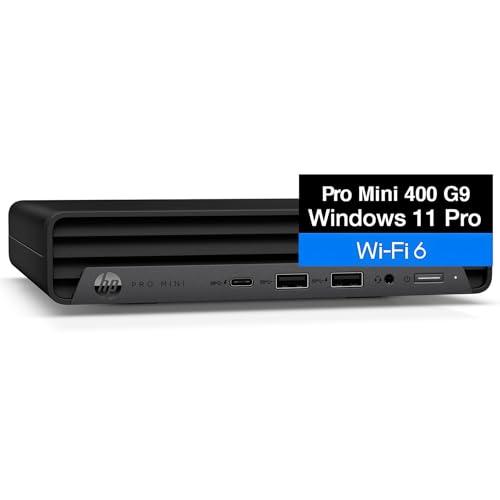
HP 2026 Mini PC Desktop (i5-12400T)

Dell Slim Desktop ECS1250 (i3 14100)

KAMRUI Mini Gaming PC Hyper H1 (Ryzen 7 7735HS)
GEEKOM AX8 Max Silent Mini PC (Ryzen 7 8745HS)
GEEKOM Mini PC IT13 MAX (Ultra 9 185H)

GEEKOM IT13 MAX AI Mini PC 2026 (Ultra 9 185H)
Why These Options Stand Out
The CyberPowerPC Gamer Xtreme VR is built around the kind of headroom that traders running dense chart packs notice immediately. An Intel Core i5-13400F at 2.5GHz handles the orchestration, while the RTX 4060 with 8GB of VRAM (video memory dedicated to graphics processing) takes the rendering load off the CPU when you’ve got four windows of candlesticks and a backtesting tool going at once.
Storage matters here, and the 1TB PCIe Gen4 SSD (a high-bandwidth solid-state drive using the fourth-generation PCIe interface) keeps boot and load times snappy. 16GB of DDR5 RAM is the floor I’d recommend for serious multi-window work. This is a tower, not a desk-hider, so plan for a spot with decent airflow and expect some fan noise under load.
Notable Upsides
- Dedicated RTX 4060 GPU keeps charts and tickers smooth, even with many browser tabs open.
- 1TB PCIe Gen4 SSD means long historical data sets load fast and the system boots in seconds.
- 16GB DDR5 RAM covers most retail trading setups with room to grow.
- WiFi-ready out of the box, which keeps cable clutter down on a home desk.
- Windows 11 Home comes preinstalled, so you’re trading on day one.
Points To Keep In Mind
- The mid-tower chassis takes noticeably more room than the mini PCs on this list.
- Owners commonly report fan noise ramps up during heavy multi-tasking.
Feature Snapshot
Built With In Mind
Active traders running four or more charts and a backtesting tool at the same time.
Reach For A Different Pick When
The Dell 27 All-in-One (Core 7 150U) suits you better if desk space and cable management matter more than raw GPU power.
The Dell 27 All-in-One packs the computer into the display, which is a real win if your trading setup lives on a corner desk or a kitchen-table-turned-workstation. An Intel Core 7 150U runs the show, paired with 16GB of memory. That combination handles a charting platform, a brokerage terminal, and a browser without breaking stride.
The 27-inch FHD IPS panel (Full High Definition with In-Plane Switching, a screen tech that keeps colors accurate at wide viewing angles) gives you a usable primary workspace without buying a second monitor. Compared to the CyberPowerPC tower above, this trades raw GPU muscle for a much cleaner footprint. For someone watching a few charts and a news feed, that trade usually pays off.
A Few Highlights
- Built-in 27-inch display removes the need to source and mount a separate monitor.
- Single power cable setup, which keeps the under-desk area tidy.
- 16GB RAM is generous for charting plus browser-based research workflows.
- All-in-one form factor travels well if your trading desk moves seasonally.
Trade Offs To Consider
- Integrated graphics cap how many live tickers you can run smoothly at once.
- Internal upgrades are limited compared to a traditional tower, so plan for external storage growth.
Whose Shelf It Belongs On
Retail traders and part-time investors who want a clean, single-cable setup for a single-screen workflow.
Look Elsewhere When
The GEEKOM IT15 AI Mini PC fits better if multi-display trading is the goal, since it supports quad 8K monitor arrays.
The GEEKOM IT15 is the heavy hitter of the mini-PC category on this list. An Intel Ultra 9 285H with 99 TOPS (tera operations per second, a measure of AI-accelerator throughput) drives the system, backed by 32GB of DDR5 and a 1TB SSD. TOPS is a useful number for anyone running AI-assisted charting or pattern-recognition tools locally.
The integrated Arc 140T GPU and quad 8K display support make this a serious multi-monitor trading machine despite its size. WiFi 7 keeps the wireless connection modern for those running a cable-light desk. This sits at a different price tier than the slim Dell below, but the screen real estate it unlocks is hard to replicate elsewhere.
Strong Points
- 32GB DDR5 RAM covers heavy multi-window trading with scripting tools running in parallel.
- Quad 8K display output lets you build a four-monitor desk without a tower.
- 99 TOPS AI throughput accelerates local AI-assisted chart tools and screeners.
- WiFi 7 future-proofs the wireless link for years of router upgrades.
Honest Caveats
- The Ultra 9 silicon pulls more power than lower-tier mini PCs, so cooling fans may ramp under sustained load.
- Compact chassis means storage expansion depends on internal access rather than drive bays.
Key Specs
Right Fit For
Power traders running four monitors plus AI-assisted screeners from a desktop that disappears behind the screens.
Swap It Out When
The HP 2026 Mini PC (i5-12400T) makes more sense for traders on tighter budgets who don’t need AI throughput.
The second Dell all-in-one in this roundup drops down a step in CPU power but keeps the clean single-cable philosophy. The Intel Core 5 120U and integrated graphics handle a charting platform, a brokerage window, and a research browser comfortably, which covers most retail traders’ day-to-day.
Think of this as the Core 7 150U’s quieter sibling. For a single-screen workflow, the performance gap is rarely felt unless you push heavy backtesting or AI tools. The narrow-border 27-inch display does a lot to make a small desk feel less cramped, especially when paired with a slim keyboard and mouse.
The Case For It
- All-in-one design frees up desk space and removes cable clutter.
- 27-inch narrow-border display maximizes usable screen area.
- Windows 11 Home comes preinstalled with broad trading-platform support.
A Few Limitations
- Lower-tier CPU means heavier backtests take longer to finish.
- Single primary display works against multi-monitor trading strategies.
Best Suited To
Casual and intermediate traders running a single-screen setup with a brokerage account and one charting window.
Consider Something Else When
The Dell Slim Desktop ECS1250 suits better if you already own a monitor and just want a compact tower on the desk.
The HP 2026 Mini PC focuses on a small footprint and a solid mid-range CPU. The Intel i5-12400T (the T suffix means a lower-power variant tuned for thermal efficiency) keeps heat and noise down, which matters in a bedroom or living-room trading setup. The 16GB of RAM and 256GB SSD form a workable base for charting software, a brokerage terminal, and a few browser tabs.
Storage is the obvious compromise at this size tier, so I’d plan on an external drive or a cloud workflow for historical data. For traders who already own their monitor and just want a quiet little box behind it, this is a sensible step up from the Dell Slim Desktop below in CPU power without taking on the size of the CyberPowerPC tower.
Reasons It Performs
- i5-12400T delivers six-core performance in a quiet, low-heat package.
- 16GB RAM keeps a charting platform and browser workflow responsive.
- Tiny chassis disappears behind a monitor for a clean desk.
Small Caveats
- 256GB SSD fills up quickly with historical tick data; external storage is likely necessary.
- Integrated graphics limit multi-display ambitions compared to the GEEKOM IT15.
Feature Snapshot
Who Will Love This
Quiet-desk traders who already own a quality monitor and want a low-noise mini PC to anchor the setup.
Where Another Pick Suits Better
The GEEKOM IT15 AI Mini PC makes more sense for traders who need AI throughput and quad-display output.
The Dell Slim Desktop ECS1250 leans into the small-tower format, giving you more internal room than a mini PC while staying narrow enough to tuck behind a monitor. An Intel Core i3 14100 handles the basics, paired with 8GB of DDR5 RAM and a 512GB SSD. WiFi 6 keeps the wireless path modern without needing a wired run to the router.
This sits below the HP mini PC in CPU class but doubles the storage, which often matters more to chart-data hoarders. The Intel UHD Graphics 730 is fine for dual-monitor setups via HDMI 2.1 and DisplayPort. Where the GEEKOM IT15 above goes wide, this one stays compact and friendly to a tight workspace.
Noteworthy Benefits
- 512GB SSD gives more room for cached data than many mini PCs at similar cost.
- WiFi 6 supports stable streaming of real-time market data.
- Slim tower form factor fits on a bookshelf or behind a stand.
- Windows 11 Home preinstalled, ready for trading apps.
Practical Considerations
- 8GB of RAM caps how many simultaneous windows stay snappy; a memory upgrade is likely.
- i3-class CPU struggles with heavy backtesting or scripting workloads.
Made For
Traders with tight desk space who already have a monitor and want a tidy tower with WiFi 6 built in.
Not Your Match When
The HP 2026 Mini PC fits better for those who prioritize CPU headroom over storage and want the i5-12400T.
The KAMRUI Hyper H1 stands out for one reason above all: triple 4K display output from a tiny box. An AMD Ryzen 7 7735HS with 8 cores and 16 threads drives the workload, and the integrated Radeon 680M graphics carry the visual load for three monitors simultaneously. That’s a big deal for traders running three-chart setups without buying a full tower.
24GB of LPDDR5 (low-power DDR5, soldered to the board for compactness) is generous at this size, and 512GB of SSD storage covers most daily data needs. The 2.5G LAN port (a 2.5-gigabit wired Ethernet connection, faster than standard gigabit) is a quiet perk for traders with wired network setups, since latency on market data feeds is rarely improved by WiFi alone.
Everyday Wins
- Triple 4K output covers most three-monitor trading desks without a tower.
- Ryzen 7 7735HS handles multiple charting platforms and backtesting scripts.
- 24GB LPDDR5 is generous memory headroom for a mini PC.
- 2.5G LAN offers a low-latency wired option for market data feeds.
- WiFi 6 and Bluetooth 5.2 cover modern wireless peripherals cleanly.
Things To Consider
- Storage is fixed at 512GB, so external expansion may be needed for long history files.
- Compact cooling means sustained heavy loads can warm the chassis.
Quick Facts
Perfect Match For
Traders who want three monitors driven by a tiny box without stepping up to a full-size tower.
Skip It When
The GEEKOM AX8 Max Silent Mini PC is the better pick if near-silent operation is a non-negotiable for your trading room.
The GEEKOM AX8 Max targets a specific trading room scenario: a desk where fan noise matters. Built around an AMD Ryzen 7 8745HS with silent-operation cooling, this mini PC delivers eight-core throughput in a chassis designed to stay quiet even under load. 16GB of DDR5 and a 1TB SSD cover the daily data and chart-caching needs.
Compared to the KAMRUI above, this trades triple-display support for a quieter environment and a slightly faster CPU. For traders who record voice notes, run podcasts in the background, or simply can’t stand a constant hum, that swap is worth considering.
The Value In It
- Silent cooling design keeps trading rooms free of distracting fan noise.
- 1TB SSD offers double the storage of many mini PCs at this size.
- Ryzen 7 8745HS handles backtesting scripts and charting platforms comfortably.
- Compact chassis fits behind a multi-monitor stand cleanly.
Things To Weigh
- Multi-display support is less ambitious than the KAMRUI’s triple-4K setup.
- 16GB of RAM is the floor for serious multi-window work, so upgrades could come sooner.
Best Suited To
Traders running noise-sensitive environments who value silent operation over maximum display count.
A Better Fit Elsewhere
The KAMRUI Hyper H1 suits better for traders who need three 4K monitors driven from a single box.
The GEEKOM IT13 MAX brings Intel’s Ultra 9 185H into a mini PC form factor, paired with 24GB of RAM and a 500GB SSD that’s explicitly marked as upgradeable. That upgrade path matters for traders whose data footprint grows month by month, since a swap to a larger SSD down the line is a realistic option.
This sits between the GEEKOM IT15 above and the Dell Slim Desktop ECS1250 below in both capability and footprint. The Ultra 9 silicon accelerates AI-assisted screeners and charting tools in a way the i3-class Dell cannot match.
What Earns Its Place
- Ultra 9 185H delivers flagship CPU performance in a compact box.
- 24GB RAM is plenty for parallel chart, browser, and scripting windows.
- Upgradeable SSD path protects the investment as data grows.
- Intel Arc graphics handle multi-monitor setups smoothly.
Possible Compromises
- 500GB starting storage is lighter than the GEEKOM AX8 Max above.
- Higher CPU power draws more energy under sustained loads.
Who Should Grab It
Traders who want flagship-class CPU power in a mini PC and value the option to upgrade storage later.
Where A Sibling Pick Shines
The GEEKOM IT15 AI Mini PC suits better if quad 8K display output is the priority.
The GEEKOM IT13 MAX AI edition layers an AI-focused framing onto the same Ultra 9 185H silicon as the previous entry, with 24GB of LPDDR5 and a 500GB SSD. The AI NPU (neural processing unit, a chip designed specifically to accelerate machine-learning workloads) makes local pattern-recognition screeners and AI-assisted chart tools noticeably faster than running them on a general-purpose CPU.
For traders experimenting with on-device AI workflows, this is one of the more accessible ways in. It’s also the most future-leaning pick in the GEEKOM lineup here, since AI toolchains in trading are likely to keep growing.
What Helps Most
- Dedicated AI NPU accelerates local machine-learning screeners.
- Ultra 9 185H gives flagship CPU power for parallel workflows.
- 24GB LPDDR5 supports heavy multitasking without slowdown.
- Compact chassis fits any multi-monitor trading setup.
What To Weigh Up
- Storage capacity at 500GB is moderate, so plan for growth if archiving tick data.
- AI tools still maturing, so the NPU’s value depends on the software you actually run.
Perfect Match For
Traders experimenting with AI-assisted charting and pattern recognition who want on-device acceleration.
Not Your Match When
The CyberPowerPC Gamer Xtreme VR fits better if you need a dedicated GPU for heavy backtesting workloads.
What Actually Matters In A Trading Computer
Display Real Estate Drives The Build
Traders live by their screens, and the number of monitors you intend to run should shape every other decision. A single 27-inch panel pairs well with a Dell All-in-One and saves desk space. A three-monitor spread pulls you toward the KAMRUI Hyper H1 or the GEEKOM IT15. Four screens at high resolution narrows the field to machines with serious display output, where the GEEKOM IT15’s quad 8K support becomes genuinely useful.
CPU And RAM Define How Smooth It Feels
The processor orchestrates how fast charts redraw, scanners refresh, and backtests complete. For retail trading, a current-gen i5, Ryzen 7, or better keeps things fluid. RAM is where most bottlenecks actually show up: 16GB is the comfortable minimum, 24GB and 32GB give breathing room for parallel browser tabs and scripting tools.
Storage And Speed In The Background
NVMe SSDs (Non-Volatile Memory Express solid-state drives, the current standard for fast internal storage) boot the system in seconds and keep chart history accessible. 256GB fills quickly with archived tick data, 512GB is workable, and 1TB removes the daily anxiety about drive space. External SSDs are a fine add-on when internal storage tops out.
Connectivity And Latency Considerations
Wired Ethernet still beats wireless on latency, and the KAMRUI’s 2.5G LAN is a real perk for serious data feeds. WiFi 6 and WiFi 7 keep wireless setups responsive for casual workflows. Bluetooth covers peripherals like wireless keyboards and headphones cleanly.
Smart Angles Across These Picks
Where Shoppers Go Wrong
The most common slip is buying a CPU-heavy box and skimping on RAM, which leaves the system sluggish the moment a few browser tabs join the trading platform. Another trap is undercounting storage: tick data and chart history balloon quickly, and a 256GB SSD fills up sooner than expected. Finally, ignoring display output is a quiet mistake, since integrated graphics often cap multi-monitor ambitions in ways that aren’t obvious from the CPU name alone.
What The Higher Tier Buys
Spending up gets you faster AI acceleration, more RAM for parallel tools, more display outputs, and quieter cooling. For traders running AI-assisted screeners or four-monitor setups, the upgrade directly changes daily workflow. For casual single-screen setups, the lower tier covers the job without the premium.
Frequently Asked Questions
How Much RAM Do I Need For Trading Software?
Sixteen gigabytes is the comfortable minimum for retail platforms plus a research browser. Traders running scripting tools or backtesting software should aim for 24GB or 32GB to avoid slowdowns when multiple tools run in parallel.
Do I Need A Dedicated Graphics Card For Trading?
Most retail platforms run fine on integrated graphics, especially single-screen workflows. A dedicated GPU helps when running four or more screens, heavy backtesting, or AI-assisted charting tools that lean on visual rendering.
Can A Mini PC Handle A Multi-Monitor Trading Setup?
Several mini PCs on this list handle multi-monitor setups well. The KAMRUI Hyper H1 drives triple 4K displays, and the GEEKOM IT15 supports quad 8K output. Mini PCs are a genuine option for traders who don’t want a tower on the desk.
What Storage Size Makes Sense For Trading?
Five hundred gigabytes handles active charts and recent history comfortably. One terabyte removes the daily worry about drive space. Anything below 500GB usually requires an external SSD or a cloud workflow for archived data.
Is An AI NPU Worth It For Trading?
An AI NPU accelerates local machine-learning screeners and pattern-recognition tools. For traders actively using AI charting software, the throughput difference is real. For everyone else, a strong CPU and ample RAM cover the workflow.
Closing Thoughts
The right trading computer is the one that matches your screen count, your software load, and your tolerance for noise and desk clutter. Towers like the CyberPowerPC Gamer Xtreme VR deliver raw headroom, all-in-ones like the Dell 27 simplify the setup, and mini PCs like the GEEKOM IT15 strike a balance between power and footprint. Pick the shape of computer that fits your trading style, then match the specs to your screen count and data appetite.