Virtual reality chews through CPU cycles and GPU headroom like nothing else on a desk. Pick a tower that’s underpowered and Half-Life: Alyx turns into a slideshow, Beat Saber stutters during a fast combo, and your headset’s refresh rate drops out when the scene gets busy. I keep that reality front and center as I work through this roundup, comparing each desktop against the workload VR actually throws at it: two high-refresh displays, persistent 90 Hz or 120 Hz rendering, and simultaneous hand-tracking and audio pipelines that never sleep.
The six machines below range from a tiny NUC kit built for premium VR back in its day, all the way to a current-generation RTX 5080 build that laughs at anything on the Meta Store. Pricing varies widely across the board, and so does upgrade room, so I’ve matched each pick to a specific kind of VR owner rather than pretending one rig rules them all.
The Main Contenders

MINISFORUM UM890 Pro Mini PC, AMD Ryzen 9 8945HS Mini Computer, 32GB DDR5, 1TB SSD

HP Pavilion Gaming PC VR Ready Desktop, Intel Core i5-9400F, GTX 1660 Ti
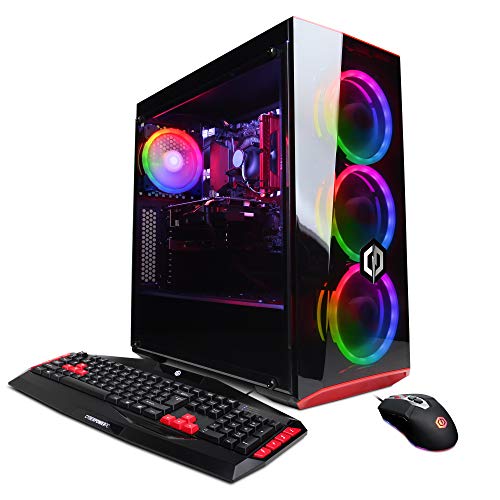
CyberpowerPC Gamer Xtreme VR Gaming PC, Intel i5-9400F, GTX 1660 6GB

Mini Gaming PC, Intel Core i9-9980HK, GTX 1650, 16GB DDR4, 512GB SSD

Ultra 50 V2 Gaming PC, RTX 5080 16GB, Ryzen 7 9800X3D, 32GB DDR5

Intel NUC 8 Performance-G Kit (NUC8i7HVK) – Core i7 100W
Why These Options Stand Out
I like the UM890 Pro because it does something most mini PCs quietly fail at: it puts a modern 8-core Ryzen 9 8945HS inside a chassis that fits on a bookshelf next to your headset case. The integrated Radeon 780M graphics (780M refers to AMD’s current-generation iGPU, which uses system memory rather than its own VRAM) handle lighter VR titles like Beat Saber and VRChat at native resolutions surprisingly well, especially when the headset caps at 90 Hz.
For most apartment dwellers, the quad-display output through HDMI, DisplayPort 1.4, and USB-C is more than enough to drive the headset plus a side monitor for desktop mirroring. Compared to the chunkier HP Pavilion Gaming PC in slot two, this thing gives up almost nothing in CPU horsepower while disappearing into the room.
Everyday Advantages
- Ryzen 9 8945HS hits boost clocks up to 5.2 GHz, giving VR runtimes and SteamVR compositor threads plenty of overhead.
- 32GB of DDR5-5600 RAM is the sweet spot for Quest Link and PC VR titles that stream texture data aggressively.
- Dual 2.5 GbE LAN ports let you hardwire the rig into a router for low-latency wireless streaming over Air Link.
- The 1TB PCIe 4.0 SSD keeps load times short and headset boot sequences snappy.
Things To Consider
- The Radeon 780M is shared-memory graphics; pushing high-refresh Index settings will tax it.
- Mini-PC thermals can throttle under sustained VR load, so owners commonly report placing it in an open spot rather than a closed cabinet.
Who It Suits Best
Urban VR enthusiasts running a Meta Quest 3 over Link or Air Link who want a tower that does not dominate the apartment.
Look Elsewhere When
Hardcore sim fans chasing 120 Hz on a Valve Index should consider the Ultra 50 V2 in slot five instead.
The Pavilion Gaming PC sits in that honest middle ground where first-time VR owners usually land. The 9th-gen Core i5-9400F lacks integrated graphics (the “F” suffix means the chip ships without a working iGPU), so it leans entirely on the GTX 1660 Ti for output. That dedicated card still meets the minimum bar for headsets like the original Rift S and entry-level Vive, and it keeps the price approachable.
Compared to the MINISFORUM UM890 Pro in slot one, this is a much larger mid-tower, but it brings a discrete GPU and easier future GPU swaps. The Pavilion feels like a sensible first VR rig: not flashy, not underbuilt, and forgiving if the owner learns the ropes before chasing high-end titles.
Why It Works Well
- The GTX 1660 Ti comfortably drives 90 Hz VR on titles like Superhot VR and Job Simulator without breaking a sweat.
- A 256GB SSD holds the OS and SteamVR base install, with room left for a handful of must-play titles.
- HP’s standard tower chassis leaves clearance for a future GPU upgrade down the line.
Worth Noting
- 8GB of system RAM is tight by 2026 standards; multitasking with Discord and browser tabs open can cause hitches.
- The 9400F’s six cores are starting to show their age in modern VR engines that lean on more threads.
- Storage fills up quickly with multiple VR installs at 20GB or more each.
Made For
First-time VR owners stepping into a tethered headset with a realistic, low-cost setup and room to grow.
Consider Something Else When
Gamers with deep Steam libraries and multi-game collections will be happier with the CyberpowerPC Gamer Xtreme VR’s larger 1TB HDD plus SSD pairing.
The Gamer Xtreme VR is the kind of tower that quietly handles VR’s storage appetite. Where many entry rigs ship with a single small SSD, this one pairs a 120GB boot drive with a roomy 1TB HDD. That matters in VR, where each title can easily eat 20 to 60 GB and your library piles up fast.
The GTX 1660 6GB is a step behind the GTX 1660 Ti in slot two but still clears the bar for 90 Hz on most headsets. The same Intel i5-9400F sits at the helm, and CyberpowerPC also ships the rig Wi-Fi ready, which simplifies placement in a living room far from an ethernet jack.
Bright Spots
- 1TB HDD plus SSD combo keeps a wide library of VR titles installed and ready to launch.
- Wi-Fi ready out of the box makes Air Link streaming easier in rooms without ethernet.
- The 6GB VRAM buffer helps in VRChat worlds with heavy avatar textures.
Small Caveats
- Only 8GB of DDR4 system memory, which feels thin for 2026-era multitasking.
- The HDD is a 5400-class drive in many configurations, so cold-launching older titles takes patience.
- The 9400F generation is showing its age in modern physics-heavy VR experiences.
Feature Snapshot
Right Fit For
Casual VR players who collect a wide variety of titles and prefer quick boot times without juggling installs.
Reach For A Different Pick When
Owners chasing high-refresh Index performance should look at the Ultra 50 V2 in slot five for more modern silicon.
This mini gaming PC is built around an 8-core, 16-thread Core i9-9980HK, the kind of mobile-derived chip that delivers desktop-class multitasking in a small chassis. The trade-off shows up in the GPU: a GTX 1650 with 4GB of VRAM is enough for 1080p flatscreen gaming but lands below the recommended bar for many modern VR titles.
Where this rig shines is the home-office-plus-VR lifestyle. The triple-display output through HDMI and USB-C makes it easy to run a headset, a productivity monitor, and a third screen for chat or streaming tools.
A Few Highlights
- Core i9-9980HK boosts to 5.0 GHz, leaving headroom for SteamVR background threads and creative apps.
- Wi-Fi 6E and Bluetooth 5.3 simplify wireless headset streaming and controller pairing.
- RGB lighting adds flair without enlarging the chassis.
- 512GB SSD is roomy enough for a working VR library.
Honest Caveats
- GTX 1650 VRAM (4GB) limits texture quality in demanding VRChat worlds and sim titles.
- The 9th-gen mobile platform is older; cooling is tight and owners commonly report fan noise under sustained VR load.
- The 1GbE LAN port may bottleneck Air Link if your network is faster than gigabit.
Best Suited To
Hybrid work-and-play users who want a single small box to drive a headset alongside an office monitor array.
Skip It When
Pure VR enthusiasts chasing high-fidelity titles should pivot to the Ultra 50 V2 in slot five for a current-generation GPU.
The Ultra 50 V2 is the build I would pick if VR were my main hobby and I wanted zero compromises. The RTX 5080 16GB GDDR7 GPU is current-generation and offers hardware-accelerated ray tracing, a feature that renders realistic lighting and reflections, paired with DLSS 4 multi-frame generation for high-refresh headsets. The Ryzen 7 9800X3D brings 3D V-Cache, AMD’s stacked-cache technology that speeds up game logic, which helps simulation-heavy titles like DCS World and iRacing in VR.
Compared to the entry towers above, this is a different category of machine: a full mid-tower with a beefy 850W Gold-rated PSU (an efficiency certification showing it converts at least 90% of wall power into clean DC power) and ARGB cooling. It is overkill for casual Beat Saber nights and exactly right for someone chasing the Index at 120 Hz or a Pimax at full field of view.
The Upside
- RTX 5080 GDDR7 handles current AAA VR titles at max settings with headroom for next year’s releases.
- Ryzen 7 9800X3D’s 3D V-Cache keeps frame times consistent in cache-hungry sims.
- 32GB of DDR5-6000 RAM future-proofs the build for Windows 11 and VR runtimes.
- 2TB Gen4 SSD stores a massive library without juggling installs.
- 850W Gold PSU handles transient GPU spikes without shutdowns.
Trade-Offs
- Full-tower footprint requires dedicated desk space and good cable management.
- ARGB fans and the GPU together generate noticeable noise under heavy load.
- The build is more power than casual Quest 3 users need.
Quick Facts
Perfect Match For
Demanding VR enthusiasts and sim pilots running a high-refresh headset who want a tower that will not age out next year.
Swap It Out When
Owners with tighter desks and lighter VR needs will find the MINISFORUM UM890 Pro in slot one far easier to live with.
The NUC 8 Performance-G Kit is the classic Intel experiment in packing VR-capable silicon into a tiny box. The 8th-gen Core i7-8809G pairs with Radeon RX Vega M GH graphics and 4GB of High Bandwidth Memory (HBM), a stacked-memory design that boosts graphics bandwidth over traditional GDDR. It was one of the first compact PCs to claim VR-ready status.
That said, this is a barebones kit: additional components are required. Shoppers must add RAM, storage, and an operating system before booting it up. For DIY-inclined owners, that flexibility is the whole appeal; for everyone else, it’s friction.
The Case For It
- Front and rear HDMI, two mini-DisplayPort, and twin Thunderbolt 3 ports support up to six displays.
- Compact footprint fits behind a monitor or inside an entertainment center.
- Integrated Wireless-AC plus Bluetooth 4.2 covers wireless headset streaming basics.
Where It May Fall Short
- Barebones kit means extra cost for RAM, SSD, and OS licenses.
- The 8th-gen CPU and Vega M GH graphics are well below 2026 VR recommended specs.
- Limited upgrade path since the CPU and GPU are soldered.
Who Should Grab It
Tinkerers and DIY enthusiasts hunting for a cheap stepping stone into PC VR tinkering.
A Better Fit Elsewhere
First-time VR owners who want a turnkey experience will be better served by the HP Pavilion Gaming PC in slot two.
Picking The Right VR Desktop For Your Setup
Choosing a VR-ready desktop comes down to matching the headset’s resolution and refresh rate to a GPU that can sustain it. A Quest 3 at 90 Hz over Link asks for less raw horsepower than a Valve Index at 120 Hz, and a Pimax at full field of view asks for much more. CPU matters too, especially in sim-heavy titles where physics, audio, and game logic compete for cores. For most people, a 6-core chip is the entry point, while 8-core Ryzen 7 or Ryzen 9 silicon gives clear headroom for multitasking.
RAM size shapes everyday smoothness. 16GB is the realistic floor for VR plus a browser and chat app, while 32GB feels luxurious and protects the build against future software growth. Storage is where most VR owners quietly get burned: each install eats 20GB or more, and a dual-drive setup or a single 1TB-plus SSD saves a lot of swapping. Networking matters for wireless VR. A wired 2.5 GbE LAN port or strong Wi-Fi 6E helps streaming stay smooth on Air Link or Virtual Desktop.
Finally, think about the room and the desk. Mini PCs vanish into a corner and run cool enough for living-room use, but their thermals throttle under long sessions. Full mid-towers stay cooler and offer painless GPU swaps later, at the cost of space and noise. The honest read is to buy a touch more power than the headset’s minimum spec today, because headset resolutions climb every generation and the rig you buy in 2026 should still feel responsive in 2028.
Practical Notes Across These Picks
Pitfalls Shoppers Hit
A common trap is buying on GPU name alone and ignoring the CPU. VR engines lean on the processor for physics and compositor threads, so a mismatched 9th-gen i5 paired with a newer GPU bottlenecks more than people expect. Another mistake is overlooking the headset cable and port situation: confirm HDMI version, DisplayPort, or USB-C compatibility before the tower arrives, because returns on full desktops are painful.
When Paying More Pays Off
Spending up on a build like the Ultra 50 V2 in slot five buys three things entry towers cannot match. Ray tracing hardware, a larger VRAM buffer for high-resolution texture streaming, and a modern platform with DDR5 and PCIe Gen4 storage that ages gracefully. For sim pilots and high-refresh Index owners, those upgrades translate directly into steadier frame times and longer useful life.
Frequently Asked Questions
Do I need a dedicated GPU for VR?
Yes. Integrated graphics on most CPUs fall short of the frame-rate and latency targets VR demands. Even older discrete cards like the GTX 1660 in slot three perform noticeably better than modern integrated solutions in head-to-head VR.
How much RAM is enough for a VR desktop?
16GB is the working minimum for 2026, especially if the headset streams over Link or Virtual Desktop. 32GB is a smarter target for anyone keeping browser tabs, Discord, and OBS open during play.
Can a mini PC really handle VR?
Some can. The MINISFORUM UM890 Pro in slot one is a good example, pairing a Ryzen 9 with Radeon 780M graphics for lighter headset workloads. Demanding headsets and high-refresh Index play still do better in a mid-tower.
Is Wi-Fi good enough for wireless VR?
Wi-Fi 6E on a clean 5 GHz or 6 GHz network works well for Quest 3 streaming. A wired ethernet connection is still the most consistent for Air Link and Virtual Desktop, especially in busy apartment buildings.
Should I buy now or wait for next-gen GPUs?
Availability and pricing shift constantly, so waiting helps only if no current build meets your VR needs. For most first-time VR owners, the mid-tier picks in this roundup are already plenty capable for today’s headset library.
The Takeaway
The right VR desktop is the one that matches your headset, your room, and the games you actually play. Compact picks like the UM890 Pro or the sinbun i9 mini suit small spaces and lighter libraries, mid-towers like the HP Pavilion and CyberpowerPC Gamer Xtreme deliver honest value for first-time owners, and the Ultra 50 V2 covers anyone chasing high-refresh sims without compromise. Pick the rig that fits your reality today, and your future headset upgrades will thank you.