I type my laptop password dozens of times a day, and I’ve come to resent every one of them. A built-in fingerprint reader turns that chore into a single tap, so I leaned into this roundup to find laptops, desktops, and all-in-ones that pair that convenience with solid real-world performance. Across the ten picks below, you’ll find ThinkPads built for spreadsheets, sleek all-in-ones for home offices, and student-friendly notebooks that don’t cut the wrong corners.
A Closer Look At The Lineup
Lenovo ThinkPad E16 Gen 2 16″ WUXGA Business Laptop (32GB, 1TB)
Lenovo ThinkPad E16 Gen 2 Business Laptop (16GB, 512GB)

Dell 16 Plus Touchscreen Laptop (Core 7, 16GB, 512GB)

Dell 27″ All-in-One Desktop (Core 7, 16GB)
Lenovo ThinkPad E16 Ryzen 7 16GB DDR5 512GB Laptop

Dell 27″ All-in-One Desktop (Core 5, Windows 11 Home)

Samsung Galaxy Book4 Business Laptop (16GB, 1TB)

NIMO 15.6″ IPS FHD Student Laptop (16GB, 1TB)

Dell Slim Desktop ECS1250 (Core i3, 8GB, 512GB)

ASUS VivoBook 15 Thin & Light Laptop (R7, 8GB, 512GB)
This ThinkPad earns the top slot for one reason: nothing about it feels stretched thin. The AMD Ryzen 7 7735HS is an 8-core, 16-thread processor with a 4.75GHz boost ceiling, and when you pair that with 32GB of DDR5 RAM, you stop noticing your browser tabs and start noticing how fast your spreadsheets crunch.
For analysts, consultants, and remote engineers running virtual machines or large data sets, the 1TB PCIe SSD keeps project libraries on the local drive without juggling external storage. The 16-inch WUXGA panel gives you enough real estate for side-by-side documents, the backlit keyboard helps during late-night deadline pushes, and the fingerprint reader tucked into the power button handles Windows Hello sign-ins in a single touch.
Features That Help
- 32GB DDR5 memory handles heavy multitasking without choking on dozens of browser tabs.
- 1TB PCIe SSD gives most professionals enough room to keep projects and archives on the local drive.
- AMD Ryzen 7 7735HS delivers 8-core performance that benefits data analysis and light content work.
- Backlit keyboard plus fingerprint reader makes late sessions and quick logins equally painless.
- WiFi 6E support (the latest Wi-Fi standard using the 6GHz band) helps in congested offices and apartments.
Things To Consider
- A 16-inch chassis weighs more than ultraportables, so daily commuter bags may feel the strain.
- Integrated Radeon 680M graphics cap serious gaming or GPU-heavy creative work.
- The configuration is customized by a third party, so warranty handling goes through the reseller.
Quick Facts
Who It Suits Best
Power users and analysts who run multiple virtual machines or large data sets will benefit most from the 32GB memory and 1TB storage combination.
Where Another Pick Suits Better
Road warriors and frequent flyers will find the lighter Samsung Galaxy Book4 Business Laptop easier to carry on long commutes.
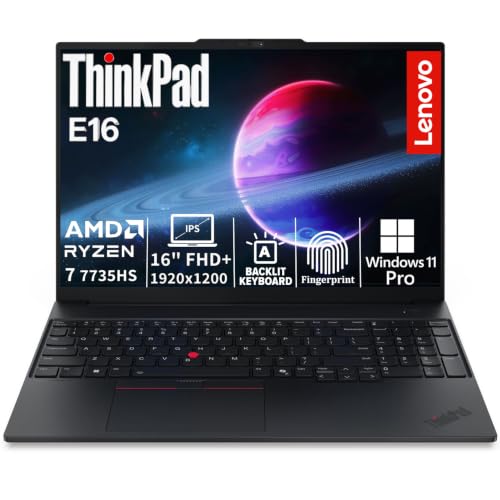
The same ThinkPad chassis as the top pick, but trimmed down to 16GB of DDR5 and a 512GB SSD for shoppers who’d rather not pay for headroom they won’t use. Office managers, project coordinators, and anyone running Teams, Outlook, and a few browser tabs will land right in the sweet spot this configuration targets.
The 16-inch FHD+ display offers a slightly taller canvas than standard FHD, which is genuinely useful when scrolling through long email threads. Like its bigger sibling, it ships with Windows 11 Pro, a fingerprint reader, and a backlit keyboard, so the everyday conveniences don’t fall away when you step down in memory and storage.
Points In Its Favor
- 16GB DDR5 is plenty for typical office multitasking without overspending on unused capacity.
- Ryzen 7 7735HS keeps the same 8-core performance profile as the higher-spec model.
- FHD+ panel adds vertical pixels that benefit document-heavy workflows.
Worth Noting
- 512GB fills up fast if you store large project files locally, so external storage may become necessary.
- Customization by a third-party reseller means the standard Lenovo warranty terms may differ.
- At 16 inches, it still weighs more than a true ultraportable.
Made For
Office professionals on a budget who want ThinkPad build quality without the premium configuration cost.
Consider Something Else When
Students who need longer warranty coverage should look at the NIMO 15.6″ IPS FHD Student Laptop’s two-year protection instead.
Dell’s 16 Plus is the touchscreen pick in this lineup, and that single feature changes how the laptop feels in everyday use. Pinch to zoom on a presentation, scroll through long PDFs with a finger swipe, or prop the panel flat for collaborative review sessions; the IPS display with wide viewing angles handles all of it without washing out.
An Intel Core 7 150U processor powers the system, paired with 16GB of DDR5 memory for responsive multitasking. The 512GB SSD is enough for working files but may require cloud storage for media libraries. Compared with the ThinkPads above, this Dell trades the AMD platform for Intel’s efficiency-focused Core 7 line, which often translates to better battery behavior on lighter workloads.
Key Advantages
- Touchscreen input adds flexibility for creative review and annotation tasks.
- Intel Core 7 150U delivers strong efficiency for daily productivity.
- FHD+ resolution on a 16-inch IPS panel offers sharp text and accurate colors.
Trade Offs
- Touchscreens tend to show fingerprints and may need regular wiping in shared spaces.
- Core 7 150U trails Ryzen 7 7735HS on heavy multithreaded work.
- 512GB storage may fill quickly with creative project files.
Quick Facts
Best Suited To
Creatives and presenters who frequently annotate documents or share visual work benefit most from the responsive touchscreen.
Not Your Match When
Heavy multitaskers running virtual machines will find the Lenovo ThinkPad E16 Gen 2 (32GB, 1TB) a better fit for their workload.
Switching gears from laptops to a desktop, the Dell 27-inch All-in-One packs the computer behind the screen and clears the cable clutter that usually drags across a desk. For a home office or a dedicated workstation nook, that single design choice is worth more than a spec sheet upgrade.
The FHD IPS display covers 99% of the sRGB color space (a standard range used for web and most photo work), which makes day-long screen sessions easier on the eyes. The Intel Core 7 150U processor and 16GB of RAM handle document work, video calls, and browser multitasking without complaint. A fingerprint reader rounds out the convenience, letting family members or coworkers log in with a tap rather than typing.
The Value In It
- All-in-one form factor eliminates the tower and cable mess for cleaner desks.
- 27-inch FHD IPS panel with 99% sRGB coverage supports accurate color for everyday creative work.
- Windows 11 Home comes preconfigured, so setup is mostly plug-and-play.
Room For Improvement
- All-in-ones are harder to upgrade later, since the components are integrated behind the display.
- FHD resolution on 27 inches may feel less sharp than higher-density panels for some users.
- Moving the unit between rooms is harder than carrying a laptop.
Right Fit For
Home office workers who want a tidy, dedicated workstation with minimal cable clutter will appreciate this design.
Look Elsewhere When
Anyone who needs portability should consider the Samsung Galaxy Book4 Business Laptop with its 15-hour battery instead.
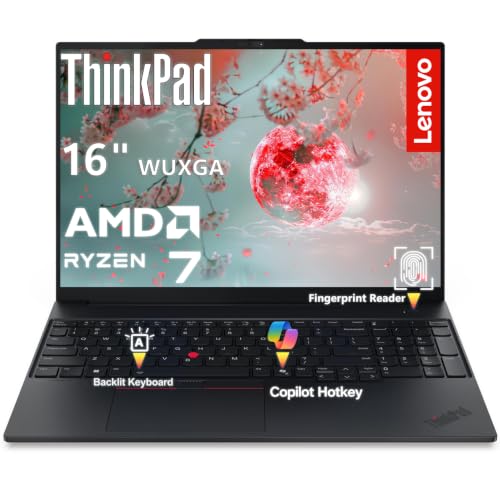
The third ThinkPad in this roundup drops the third-party customization and ships directly through Lenovo, which simplifies warranty support for shoppers who prefer going straight to the manufacturer. It uses the same Ryzen 7 7735HS platform as the other ThinkPads here, paired with a more conservative 16GB and 512GB combination that fits the average office workload.
For hybrid workers splitting time between a home desk and a corporate office, the 16-inch display provides enough room for real spreadsheet work, while the fingerprint reader keeps shared-machine logins secure. It’s essentially a stock ThinkPad E16 with biometrics baked in, and for many shoppers that’s exactly the right balance.
Useful Highlights
- Sold directly through Lenovo, simplifying warranty claims and support channels.
- Ryzen 7 7735HS with 16GB DDR5 covers daily office multitasking comfortably.
- Fingerprint reader enables fast, secure Windows Hello logins.
Points To Note
- 512GB storage limits how much local data you can keep without offloading to the cloud.
- 16-inch chassis is heavier than 14-inch ultraportables for daily commutes.
- Integrated Radeon graphics won’t satisfy serious gaming or rendering workloads.
Who Will Love This
Hybrid office workers who split time between home and corporate desks will appreciate the balance of screen size and reliable specs.
Swap It Out When
Families sharing a household computer will find the Dell 27″ All-in-One Desktop (Core 5) easier to set up in a common living space.
The second all-in-one on this list steps down to an Intel Core 5 120U processor, which trims the price while keeping the family-friendly design intact. For a shared kitchen PC, a student study station, or a household command center for calendars and email, this configuration handles the basics without wasted horsepower.
The same 27-inch FHD IPS display carries over, so the visual experience matches its Core 7 sibling. Where this model pulls back is on sustained multitasking, so anyone planning to run heavy creative applications alongside several browser tabs may want to size up.
Well-Handled Touches
- Core 5 120U strikes a fair efficiency-versus-cost balance for everyday computing.
- 27-inch IPS display with 99% sRGB makes shared viewing comfortable for multiple family members.
- All-in-one design cuts cable clutter in living areas.
Honest Caveats
- Less headroom than the Core 7 sibling for heavy multitasking or creative work.
- RAM and storage configurations are less flexible in all-in-one form factors.
- Moving the unit between rooms is harder than carrying a laptop, depending on your layout.
The Right Fit
Households looking for a shared family computer in a common living or study space will appreciate the approachable spec sheet.
Another Choice May Suit
Professionals handling heavier workloads should consider the Dell 27″ All-in-One with the Core 7 150U for more sustained performance.
The Galaxy Book4 is the most portable pick in this lineup, and the headline feature is the battery life: Samsung rates it for up to 15 hours, which covers a full workday plus a cross-country flight on a single charge. Frequent flyers and field consultants will feel the difference immediately.
The 15.6-inch FHD display and Intel 10-core 7-150U processor keep the system responsive, while 16GB of RAM and a 1TB SSD match the higher-storage Lenovo ThinkPad in capacity. Copilot AI integration adds Microsoft’s assistant features for tasks like summarizing documents or drafting quick emails. The fingerprint reader completes the modern Windows Hello experience.
What Stands Out
- Up to 15 hours of rated battery life covers long workdays and travel days.
- 1TB SSD offers generous local storage for media and project files.
- 15.6-inch chassis hits a portable middle ground between compact and roomy.
Factors To Consider
- 15.6 inches may feel small for users accustomed to 16-inch panels with extra workspace.
- Intel Core 7 150U prioritizes efficiency over heavy multithreaded performance.
- Glossy display finish tends to show smudges during travel use.
Feature Snapshot
Perfect Match For
Frequent travelers and commuters who need all-day battery life in a portable chassis benefit most from this configuration.
Reach For A Different Pick When
Users who prefer a touchscreen experience should consider the Dell 16 Plus Touchscreen Laptop instead.
Students and first-time computer owners have very different priorities than corporate buyers, and the NIMO 15.6-inch laptop speaks directly to them. The standout feature is the two-year manufacturer’s warranty, which doubles the typical coverage period and removes some of the anxiety that comes with buying a laptop on a tight budget.
Intel’s N150 processor (a 4-core chip that boosts up to 3.6GHz) handles note-taking apps, browser research, and streaming lectures without breaking a sweat. The 16GB RAM and 1TB SSD are generous for the category, and the 65W Type-C charging means a single cable can power the laptop and a phone. Wi-Fi 6 and Bluetooth 5.2 round out the modern connectivity.
The Upside
- Two-year warranty gives students and first-time owners extra peace of mind.
- 65W Type-C charging simplifies cable management for dorm rooms.
- Backlit keyboard helps during late-night study sessions.
Where It May Fall Short
- Intel N150 trails Core 7 and Ryzen 7 chips on demanding applications.
- Brand-recognition support network is smaller than Dell or Lenovo, depending on your region.
- 15.6-inch size is portable but heavier than a 13-inch ultraportable.
Built With In Mind
Students and first-time laptop owners who value warranty coverage and approachable specs over peak performance.
A Better Fit Elsewhere
Business travelers needing all-day battery life should consider the Samsung Galaxy Book4 Business Laptop with its 15-hour rating.
Tiny desks and apartment corners are exactly where the Dell Slim Desktop ECS1250 earns its keep. The compact chassis fits behind a monitor or tucks into a bookshelf, and the included Wi-Fi 6 support means no Ethernet cable is required for fast home networking.
Inside, an Intel Core i3 14100 processor and 8GB of DDR5 RAM handle everyday office tasks, web browsing, and light multitasking comfortably. Intel UHD Graphics 730 covers display output for productivity and streaming, and Windows 11 Home arrives preconfigured. For shoppers who already own a monitor and keyboard, this slim tower is an unobtrusive way to add biometrics to an existing setup.
Good Reasons To Consider
- Slim chassis fits into tight spaces where a traditional tower won’t.
- Wi-Fi 6 keeps the desk free of Ethernet cables.
- Onsite service adds convenience for troubleshooting.
Less-Strong Areas
- Core i3 14100 caps performance for demanding creative or rendering work.
- 8GB RAM may feel tight as browser tab counts grow over time.
- Requires a separate monitor, keyboard, and mouse to complete the setup.
Whose Shelf It Belongs On
Apartment dwellers and small-office operators with limited desk space benefit most from the slim tower footprint.
Where A Sibling Pick Shines
Anyone wanting an integrated display should consider the Dell 27″ All-in-One Desktop (Core 7) for a single-cable setup.
The ASUS VivoBook 15 closes out this roundup as the lightest, most portable option, wrapped in a slate gray chassis that feels closer to an ultraportable than a workhorse. The AMD Ryzen 7 3700U is a previous-generation chip, but for everyday browsing, document editing, and streaming, it still holds its own.
The 15.6-inch FHD display uses a slim-bezel design that keeps the overall footprint smaller than older 15.6-inch laptops. AMD Radeon Vega 10 graphics handle light photo work and casual games. The fingerprint reader slots into the touchpad area for Windows Hello sign-ins, and the ErgoLift hinge tilts the keyboard slightly for a more comfortable typing angle.
Why It Works Well
- Slim-bezel design keeps the 15.6-inch footprint compact for travel.
- Radeon Vega 10 graphics add light creative and casual gaming capability.
- ErgoLift hinge improves typing comfort during long sessions.
Some Limits To Know
- R7-3700U is a previous-generation processor that lags behind newer Ryzen and Core chips.
- 8GB DDR4 RAM is tighter than the 16GB configurations elsewhere in this list.
- Comes with Windows 10 Home, which may require an upgrade path to Windows 11.
Feature Card
Who Should Grab It
Everyday browsers and students who want a lightweight, fingerprint-equipped laptop for general use will find this fits the bill.
Skip It When
Power users running virtual machines or large data sets should step up to the Lenovo ThinkPad E16 Gen 2 with 32GB RAM.
What To Weigh Before Picking A Fingerprint-Equipped Computer
Biometric login is convenient, but it pays to think about a few specifics before committing. The sensor placement matters more than people expect: a reader built into the power button (as on most modern ThinkPads) feels invisible, while one tucked into the touchpad corner (as on the ASUS VivoBook) is functional but requires a deliberate motion. Reliability varies between manufacturers, and users commonly report occasional misreads on smaller sensors, especially with damp fingers.
Processor generation and memory sizing are the next two filters. The Ryzen 7 7735HS in three of the picks above is a current-generation chip with strong multithreaded performance, while older options like the R7-3700U in the ASUS VivoBook handle lighter workloads but age faster. For shoppers who keep a laptop four or five years, 16GB of RAM is the practical minimum, and 32GB pays off for analysts or developers. The 8GB configurations in the Dell Slim Desktop and ASUS VivoBook are workable today but may feel tight as browsers and apps continue to demand more memory.
Form factor is the final decision point. Laptops give portability, all-in-ones save desk space, and slim desktops fit behind existing monitors. Frequent travelers benefit most from laptops with all-day battery life (like the Samsung Galaxy Book4’s 15-hour rating), while home-based shoppers who already own peripherals may prefer the Dell Slim Desktop’s compact tower.
Key Considerations Across These Picks
Common Shopping Slip Ups
The biggest mistake is choosing a fingerprint-equipped laptop with poor everyday specs, then blaming the biometric login for slow performance. A sluggish fingerprint reader on a fast computer is a minor inconvenience; a fast reader on an underpowered machine still feels broken. Match the sensor to a processor and memory configuration that actually fits your workload.
Another trap is ignoring sensor placement. A reader built into the power button is seamless, while one on the touchpad corner requires intentional motion. Both work, but the daily experience differs noticeably. Shoppers also overlook warranty terms: custom-configured laptops from third-party resellers route service through the reseller, while manufacturer-direct sales keep support with the brand.
Where The Extra Money Goes
Stepping up from a Core i3 to a Core 7 or Ryzen 7 chip buys faster multi-core performance, which matters most for spreadsheet crunching, virtualization, and video calls with shared screens. More RAM keeps many browser tabs and applications open without slowdown, and a larger SSD removes the need for external storage in the first year or two of ownership.
Premium all-in-ones and slim desktops invest in display quality and chassis design rather than raw processor power. For shoppers who spend eight hours a day staring at the screen, the better panel and cleaner desk often justify the upgrade more than a small CPU bump would.
Frequently Asked Questions
Are fingerprint readers reliable on laptops and desktops? Modern fingerprint readers on Windows Hello-compatible machines are generally reliable for daily logins, though occasional misreads can happen with damp or dirty fingers.
Can a fingerprint reader replace a password entirely? Windows Hello lets you use a fingerprint as the primary sign-in method, though most setups still require a PIN as a backup for the rare misread or hardware change.
Do all-in-one desktops include fingerprint readers? Some do, but not all. The Dell 27″ all-in-ones in this roundup include biometric login, while many competitors do not, so it’s worth checking the specifications before buying.
Is a fingerprint reader safer than a password? Biometric logins are tied to physical presence, which adds a layer of security, though combining them with a strong PIN and multi-factor authentication on important accounts is still wise.
Do fingerprint sensors work with wet or gloved hands? Capacitive fingerprint sensors (the most common type in laptops) typically struggle with wet fingers and don’t read through gloves, so plan for occasional PIN use in those situations.
Bottom Line
A fingerprint reader turns login from a chore into a single tap, and the ten picks above show how that convenience pairs with different priorities, from heavy multitaskers to family desktops to lightweight travelers. Match the form factor and specs to your real daily routine, and the rest of the decision tends to take care of itself.