Running a homelab, hosting a small business network, or building out a personal compute cluster all starts with choosing the right hardware. I put together this roundup of machines that range from rack-mounted enterprise workhorses to compact desktops that hide behind a monitor, because the right fit depends entirely on what you’re trying to run. Whether you’re consolidating file storage, spinning up virtual machines, or just need a quiet box that doesn’t look like a server, there’s something here worth a look.
The Choices Worth Comparing

PCSP DL380 G10 2U Server 40-Core 256GB DDR4
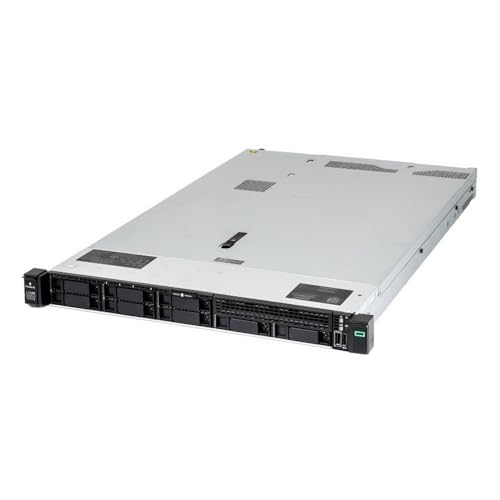
PCSP DL360 Gen10 1U 40-Core 512GB DDR4
PCSP DL380 G10 2U Server 40-Core 768GB DDR4

Apple 2024 Mac mini M4 10-Core 16GB 256GB

GEEKOM IT15 AI Mini PC Ultra 9 285H 32GB 1TB

Getorli Mini PC Ryzen 5 3501U 16GB 512GB
Huidun H50 Ryzen 3300U Mini PC 16GB 512GB
GEEKOM AX8 Max Mini PC Ryzen 7 8745HS 16GB 1TB

GEEKOM IT13 MAX Mini PC Ultra 9 185H 24GB 500GB

GEEKOM IT13 MAX AI Mini PC Ultra 9 185H 24GB LPDDR5
The DL380 G10 is a workhorse 2U rack server built around dual Intel Xeon Gold 6148 processors, giving you 40 cores and 80 threads of compute to spread across virtual machines, containers, or database work. With 256GB of DDR4 already populated, you can stand up a meaningful hypervisor cluster right out of the box without buying additional memory. The chassis holds eight 2.5-inch bays, all populated here with 1.2TB 10K SAS drives, so spinning up RAID arrays or carving out tiered storage happens fast.
For a small business running mixed workloads like file services, a few VMs, and backups, this platform has the headroom to absorb growth for a couple of years. The P408i-a RAID controller with 2GB cache handles the SAS drives well and supports modern RAID levels for redundancy. Networking is dual 10Gb SFP plus four 1GbE ports, enough to segment storage and management traffic cleanly.
Benefits That Matter
- 40 physical cores let you run multiple VMs or containers without contention
- Eight 2.5-inch bays ship populated, so storage is ready on day one
- Dual 10Gb SFP ports handle storage or backup traffic without bottlenecks
- P408i-a controller with battery-backed cache protects write performance
Things To Consider
- Renewed hardware may show cosmetic wear and lacks a fresh factory warranty
- 2U form factor demands rack space and proper airflow planning
- Power draw at full load is substantial, so circuit capacity matters
Who It Suits Best
Mid-sized shops consolidating compute onto a single reliable platform with room to grow.
Consider Something Else When
Office users without rack space should look at the GEEKOM IT15 AI Mini PC instead.
The DL360 Gen10 takes the same dual Xeon Gold 6148 compute as the DL380 above and squeezes it into a 1U chassis, which is a meaningful tradeoff for anyone with limited rack depth. You give up half the 2.5-inch bays, but you get back the ability to stack more compute into a smaller footprint, perfect for branch offices or edge deployments. The 512GB of DDR4 here is generous for virtualization hosts running dozens of mid-sized VMs.
This platform is also a strong fit for hosting services that lean on memory rather than disk I/O, such as caching layers, in-memory databases, or container orchestration clusters. The same P408i-a RAID controller and dual 10Gb SFP networking appear here, so performance characteristics mirror the bigger sibling. Storage bays ship as empty caddies, so factor drive purchases into your rollout plan.
Key Advantages
- 1U chassis fits shallow racks and dense compute deployments
- 512GB DDR4 supports memory-heavy workloads without immediate upgrades
- Identical 40-core Xeons match the larger DL380 for VM portability
Worth Noting
- Drive bays arrive empty, so storage cost is separate from the platform
- 1U cooling gets louder under sustained load, which matters in quiet offices
- No rail kit included, so budget for a compatible set if racking is planned
Made For
Networked compute clusters and memory-rich virtualization hosts with shallow racks.
Look Elsewhere When
Outright storage density matters more than compute per rack unit, where the PCSP DL380 G10 fits better.
This configuration of the DL380 G10 doubles down on memory, shipping with 768GB of DDR4 across the dual Xeon Gold 6148 platform. The 40 cores stay identical to the first pick, but the headroom for running dense virtualization, large analytics jobs, or development environments with many simultaneous containers jumps considerably. Eight populated 1.2TB 10K SAS bays give you the same storage baseline as the entry version.
For research groups, software teams, or growing businesses with multiple databases and application stacks, that extra memory translates directly into fewer “out of resources” warnings. The dual 10Gb SFP and quad 1GbE networking remains a strong point for separating storage, backup, and management VLANs. Like the other DL380 here, it arrives as renewed hardware with the usual caveats around cosmetic condition and warranty.
Useful Highlights
- 768GB DDR4 handles dense virtualization without memory overcommit
- Eight 10K SAS drives provide fast, redundant local storage out of the box
- Plenty of PCIe lanes for NICs, HBAs, or GPU cards later on
Trade Offs
- Renewed condition means no factory warranty from the original manufacturer
- Power and cooling costs climb with fully populated memory and disk
Key Product Details
Best Suited To
Engineering teams and growing businesses running many concurrent workloads per host.
A Better Fit Elsewhere
Smaller deployments that don’t need 768GB RAM should consider the Getorli Mini PC Ryzen 5 for a quieter, lighter alternative.
The Mac mini has always punched above its size, and the M4 generation continues that tradition with a 10-core CPU and 10-core GPU in a five-inch square enclosure. For a small studio or developer office that wants a quiet, energy-efficient box to act as a build server, file server, or light compute host, it slides right in next to a monitor and disappears. The unified memory architecture, where the CPU and GPU share the same 16GB pool, helps keep latency low across tasks.
It also works nicely as a personal server for macOS workflows: Time Machine backups, media libraries, Xcode build bots, or running containerized services through tools like OrbStack. Gigabit Ethernet gives you a wired backbone, though anyone needing faster network storage should look at higher-end Mac mini configurations. Apple Intelligence support makes it future-friendly for macOS features that lean on on-device AI.
Everyday Wins
- Five-inch chassis fits anywhere, even clamped behind a monitor
- Apple silicon runs cool and quiet under typical office loads
- Tight macOS integration with iPhone and iPad for seamless hand-off
Points To Note
- 256GB storage fills fast with project files and Time Machine backups
- RAM is fixed at purchase, so 16GB is the ceiling on this config
Who Will Love This
macOS households and small studios wanting a near-silent, low-power personal server.
Swap It Out When
Linux-based services or rack-friendly hardware matter, where the GEEKOM IT13 MAX AI Mini PC is a stronger match.
The GEEKOM IT15 leans into the Intel Core Ultra 9 285H, a processor built for AI-assisted workloads with a high TOPS rating that accelerates on-device inference. For offices running multi-display setups, conference rooms needing signage players, or retail environments driving digital displays, that combination of horsepower and quad-display support lands in a useful sweet spot. The integrated Arc graphics handle 8K output, so the box can drive a wall of screens without a discrete GPU.
32GB of DDR5 keeps multi-display desktops and parallel services responsive, and the 1TB SSD means you won’t fight storage pressure for a while. WiFi 7 covers the latest wireless backhaul for offices that have moved beyond wired drops. For fleets, GEEKOM also offers volume pricing, which is worth asking about if you’re rolling out a dozen or more units.
What Pays Off
- Quad 8K display support drives digital signage or trader desks without a GPU
- 99 TOPS NPU accelerates on-device AI features without cloud round-trips
- WiFi 7 future-proofs wireless backhaul for new office builds
Possible Compromises
- Compact chassis limits internal expansion, so external drives handle overflow
- Premium positioning means the price gap versus budget mini PCs is noticeable
Perfect Match For
Multi-display offices, signage fleets, and small studios running AI-assisted workflows.
Reach For A Different Pick When
You want a fanless, near-silent living-room box, where the GEEKOM AX8 Max Mini PC fits better.
The Getorli Mini PC is the kind of box I keep recommending to friends setting up a first home office or a small studio without burning through their budget. The Ryzen 5 3501U handles everyday tasks with four cores and eight threads, which is plenty for a lightweight file server, a Plex-style media hub, or a small business workstation. 16GB of RAM and a 512GB SSD cover the basics without making you hunt for upgrades right away.
Triple display support means you can drive a productivity setup without extra adapters, and WiFi 6 keeps wireless networking current. It’s not built for heavy AI workloads or dense virtualization, but that’s the trade-off at this price point, and the honest read is that most home users don’t need that.
Strong Points
- Ryzen 5 3501U gives responsive performance for typical office tasks
- Triple display output supports a real multi-monitor workstation
- WiFi 6 handles modern home networks without an external adapter
Small Caveats
- Integrated graphics limit creative or rendering workloads
- 512GB fills quickly with media libraries, so external storage may be needed
Feature Snapshot
Right Fit For
Home offices, students, and small studios seeking an affordable daily driver.
Not Your Match When
AI inference or heavy compile jobs are on the menu, where the GEEKOM IT15 AI Mini PC steps up cleanly.
The Huidun H50 ships with Windows 11 Pro already installed, which removes one of the most common friction points for first-time mini PC owners. The Ryzen 3300U processor is a quad-core part aimed at office and home theater use, so this is genuinely a plug-and-play box for someone who just wants a small computer to handle everyday tasks. The 16GB DDR4 and 512GB SSD give enough headroom for office apps, web browsing, and light media work.
With dual WiFi bands, you can pick the right network for the job, and the DisplayPort plus HDMI pair supports dual 4K monitors at 60Hz for productivity. The three-year warranty that comes with it is a meaningful upgrade over the typical one-year coverage, so for someone nervous about reliability, that adds real peace of mind.
What Makes Sense
- Windows 11 Pro preinstalled cuts setup time to nearly zero
- Three-year warranty offers longer coverage than most mini PCs
- Dual WiFi bands adapt to crowded home networks
Honest Caveats
- Ryzen 3300U is fine for daily work but not heavy compute
- USB 3.2 ports are useful but limited for storage expansion
Built With In Mind
First-time builders and home users wanting a no-fuss Windows desktop.
Skip It When
Multi-display signage or AI workloads are the goal, where the GEEKOM IT15 AI Mini PC is the better target.
The GEEKOM AX8 Max leans hard into the silent-operating pitch, which lands well for anyone running a workstation in a shared office or a recording-adjacent environment. The Ryzen 7 8745HS is an eight-core part that pulls real productivity work, so this is not a slow box hiding behind quiet marketing. With 16GB of DDR5 and a 1TB SSD, it has the storage and memory budget to keep up with creative workflows and developer toolchains.
For financial trading desks, creative studios, broadcast media production, and CAD-driven engineering, the AX8 Max brings desktop-class performance into a footprint that disappears behind a monitor. The 1TB SSD especially helps when dealing with large project files, footage, or simulation datasets.
Everyday Perks
- Silent operation suits shared offices and home studios
- Ryzen 7 8745HS handles creative and engineering workloads comfortably
- 1TB SSD ships with enough storage for sizable project files
A Few Limitations
- 16GB RAM is comfortable but may need upgrading for heavy multitasking
- No dedicated GPU, so GPU-bound rendering falls to integrated graphics
Quick Facts
Whose Shelf It Belongs On
Studios, traders, and engineers who need strong compute without fan noise.
Where A Sibling Pick Shines
Apple-centric workflows benefit more from the Apple 2024 Mac mini M4 in this list.
The IT13 MAX from GEEKOM leans on the Intel Core Ultra 9 185H, a 16-core processor with a dedicated NPU (neural processing unit, a chip dedicated to AI tasks) for accelerating on-device AI workloads. For video editors, 3D designers, or anyone running local AI models, the combination of CPU, integrated Arc graphics, and AI Boost NPU keeps things responsive without offloading to the cloud. 24GB of RAM is enough to multitask across editing timelines and preview windows without constant swapping.
The 500GB SSD is the weakest link here in raw capacity, but the chassis is upgradeable, so adding a second drive or larger SSD later is straightforward. Compared to the GEEKOM AX8 Max, this machine trades some storage for higher single-core and AI performance, which is the right call for many creative workflows.
What Earns Its Place
- 16-core Ultra 9 handles 4K edits and 3D scenes smoothly
- Dedicated NPU speeds up AI features in supported creative apps
- Upgradeable storage extends the platform’s useful life
Factors To Consider
- 500GB storage may feel tight for video and 3D project files
- Higher platform cost than the AX8 Max for similar RAM tiers
Best Suited To
Content creators and AI-curious developers who value local processing.
Another Choice May Suit
Multi-display signage or fleet deployments may find the GEEKOM IT15 AI Mini PC more aligned with their needs.
The IT13 MAX AI Mini PC is the bulk-deploy sibling of the previous pick, positioned for AI creative studios, film production houses, automotive R&D simulations, and enterprise server clusters that need compact, repeatable units. The Intel Core Ultra 9 185H with 16 cores delivers consistent compute across AI workflows, 3D rendering, and 4K media processing. 24GB of LPDDR5 keeps latency low across memory-intensive workloads.
What sets this listing apart is the volume pricing tier, which is worth exploring if you’re standardizing a fleet of similar machines. AI film production, medical imaging, and simulation clusters often need many identical boxes for distributed work, and that’s where this configuration earns its keep. For a single creative workstation, the standard IT13 MAX may be the more cost-effective route.
Positive Takeaways
- Bulk pricing tier supports fleet rollouts without per-unit negotiation
- LPDDR5 offers lower latency than standard DDR5 in tight workloads
- Ultra 9 185H covers AI, rendering, and compute simulation
Details To Watch
- Volume pricing requires direct quotes, which adds procurement steps
- 500GB SSD may be limiting for raw media-heavy workloads
Spec Overview
The Right Fit
Studios and IT teams deploying many identical AI-capable boxes in clusters.
Not Your Match When
A single home-office box is the goal, where the Getorli Mini PC Ryzen 5 is the more honest fit.
## What Matters Most Before Choosing Computers With Server### Form Factor Sets The CeilingThe first real decision is whether you need rack-mounted hardware, a compact desktop, or something in between. Rack servers like the PCSP DL380 and DL360 give you hot-swappable drives, redundant power, and serious compute density, but they demand rack space, cooling, and often louder fans. Mini PCs like the GEEKOM IT15 or Huidun H50 trade expansion for a footprint that disappears behind a monitor and runs cool enough to sit on a desk. Knowing whether your priority is density or discretion narrows the field fast.### Compute Profile Matters More Than Raw SpecsLook at what your workloads actually do before chasing core counts. A 40-core dual Xeon rig handles dozens of VMs easily, but it is overkill for a single file server. Conversely, a quad-core Ryzen mini PC will choke on simultaneous 4K video transcodes or AI inference. Memory size often matters as much as CPU choice, because virtualization and large databases reward generous RAM more than peak clock speed. Storage I/O is the third leg of the triangle, and SAS or NVMe drives shift the experience far more than people expect.### Networking And Expansion Round Out The BuildDual 10Gb SFP ports on the PCSP servers let you segment storage and management traffic cleanly, while WiFi 7 on the GEEKOM IT15 future-proofs wireless backhaul for newer offices. Expansion matters too: PCIe slots for HBAs, GPUs, or extra NICs extend the useful life of rack platforms, while mini PCs lean on external Thunderbolt or USB enclosures. Pick a platform that gives you room to grow into next year’s workload, not just this month’s.## Key Considerations Across These Picks### Pitfalls Shoppers HitA common trap is buying rack hardware without planning for noise and heat, which turns a server room into an office distraction fast. Another slip is underestimating memory needs and ending up with a host that overcommits RAM the moment a few VMs boot. Skipping rail kits or compatible drive caddies is also surprisingly common, and those accessories add to the total cost after the fact.### Where The Extra Money GoesHigher-tier models typically buy more cores, more memory bandwidth, and better expansion. The PCSP DL380 with 768GB of DDR4 costs more than the 256GB version for a clear reason: it removes memory as a constraint for dense virtualization. The GEEKOM IT15’s premium tier pays for the AI-ready NPU and quad 8K display support, which budget mini PCs simply cannot match. Spending up makes sense when those attributes match a real workload, not when they just look good on a spec sheet.## Frequently Asked Questions### What’s the difference between a rack server and a mini PC for server use?A rack server is built for continuous duty, hot-swappable drives, and dense multi-core compute, while a mini PC trades expansion and headroom for a quiet, compact footprint. Home offices and small studios often find a mini PC more practical, while growing businesses benefit from rack hardware.### Do I need dual processors for a small business server?Not always. A single modern multi-core CPU handles many small business workloads fine, but dual-processor platforms like the PCSP DL380 help when running multiple VMs or memory-heavy applications in parallel.### How much RAM do I really need?For a basic file and print server, 16GB is workable. For virtualization, 64GB is a practical floor, and 256GB or more pays off when running dozens of VMs. Memory is the easiest place to over-provision, which is why renewed rack platforms with large pre-populated RAM make sense for many shops.### Is renewed server hardware reliable?Renewed enterprise hardware from reputable sellers is commonly dependable because the platforms were engineered for long duty cycles. The trade-off is cosmetic wear and a shorter remaining service life, so it suits shops comfortable managing their own support.### Can I run Linux on these machines?Yes. The rack servers support standard Linux distributions, and the mini PCs run Linux as well as Windows. Drivers for the GEEKOM and Huidun platforms are typically well-supported by recent kernels.## The TakeawayThe right pick comes down to matching compute, form factor, and growth runway to your specific scenario. Rack servers deliver when density and headroom matter most; mini PCs shine when quiet operation and a small footprint take priority. Whichever direction fits, the platforms in this list are solid starting points for building something that grows with you.