PC gaming covers a wild stretch of territory. One evening you might be replaying a 20-year-old platformer through an emulator, the next you are grinding ranked matches or settling into a long open-world session. The right gamepad changes how each of those moments feels. I pulled together a list that spans the full range, from familiar Nintendo split pads to enthusiast-grade 8Bitdo controllers, plus a few retro-themed options for anyone running emulators or a Raspberry Pi build. The goal here is simple: match the controller to the games you actually play and the way you play them.
An Overview Of The Picks

Joy-Con (L)/(R) Pastel Purple/Pastel Green
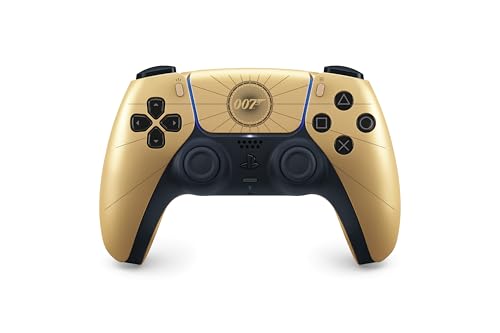
DualSense Wireless Controller 007 First Light Limited Edition

8Bitdo Ultimate 2C Wireless Controller (Green)

miadore 4 Pack Classic 64 Controller (Non PC USB)

Kamylorus Wired Controller for PS-5/PC

8Bitdo Ultimate 2 Wireless Controller (Purple)

8Bitdo Ultimate 2 Wireless Controller (Black)
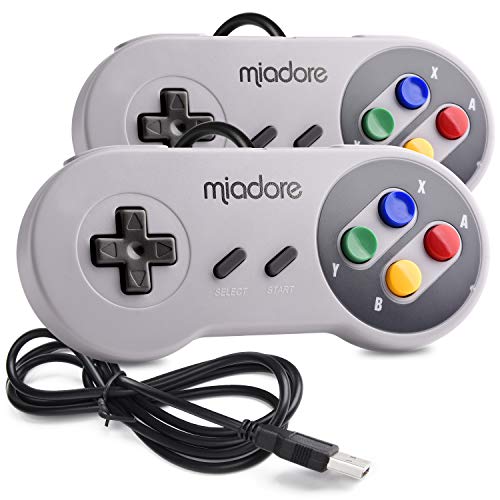
miadore 2 Pack SNES USB Controller

miadore 2 Pack USB Wired N64 Controller (Black/Gray)
miadore 2 Packs USB Retro N64 Controller
Taking A Closer Look At The Options
Nintendo’s split Joy-Con design stands out for one reason: each half works on its own. That makes them genuinely useful on PC for anything from local co-op platformers to handheld streaming setups. Each unit houses a single analog stick, four face buttons, and a shoulder trigger, and a black strap comes in the box so solo play feels more secure.
For most setups, owners pair them as a single two-piece gamepad in the PC’s Bluetooth menu. Because they are small, hands with larger grips may find the standard strap awkward during long sessions, but for short bursts and party games they feel surprisingly natural.
Benefits That Matter
- Two halves pull double duty: single-player with the strap, or split across two players for instant couch co-op.
- Bluetooth connection keeps the desk free of dongles and cables.
- Compact size makes them easy to toss into a travel bag for laptop gaming on the road.
- Pastel colorway adds a fresh visual break from the sea of black pads on the market.
Things To Consider
- Joy-Con analog sticks are not built like enthusiast sticks; expect some drift to show up over time depending on how heavily you use them.
- Some PC titles map poorly to the asymmetric stick layout, which can feel off in first-person shooters.
- Pairing on Windows sometimes takes a second attempt after a reboot, so a little patience helps.
Who It Suits Best
Anyone who wants one controller that doubles as a two-player kit for guests, or who plays a lot of indie and party titles on a laptop.
Skip It When
The 8Bitdo Ultimate 2C is a stronger fit for someone who mainly plays competitive PC shooters and cares more about stick precision than flexibility.
Sony’s DualSense already impressed PC players with its adaptive triggers and detailed haptics, and this limited-edition variant layers a gold-accented Bond theme on top. The core hardware matches the standard DualSense, so you still get tension-sensitive triggers, a refined touchpad, and a built-in microphone for quick voice chat.
For single-player campaigns that support rumble and trigger feedback, the experience tends to feel more cinematic than a generic pad. In fast competitive shooters, the heavier grip weight may feel like a small drawback during marathon sessions.
Why It Works Well
- Adaptive triggers translate in-game resistance into the trigger pull, which is great for racing and shooter games with bow mechanics.
- Haptic motors add subtle texture cues like footsteps or surface changes, helping immersion in story-driven titles.
- USB-C charging and Bluetooth keep cable clutter to a minimum.
- The themed finish makes it stand out on a crowded desk.
Worth Noting
- Adaptive triggers only activate in PC games that explicitly support them, so the effect is inconsistent across the library.
- Battery life tends to be shorter than simpler controllers because the rumble motors draw more power.
- Some owners notice the face plate picks up fingerprints faster than matte controllers do.
Feature Snapshot
Right Fit For
Single-player fans who enjoy cinematic adventures, narrative games, and slower-paced genres where the controller’s haptics add real value.
A Better Fit Elsewhere
The 8Bitdo Ultimate 2C is a stronger match for competitive players who prioritise polling rate and stick accuracy over trigger effects.
The Ultimate 2C is 8Bitdo’s take on a budget-friendly enthusiast pad. It skips the rechargeable battery in favour of AA cells, but trades that for genuine performance features: Hall-effect joysticks and triggers, a 1000 Hz polling rate over 2.4G and wired connections, and remappable L4/R4 bumpers for extra inputs. On Windows and Android, it behaves like a native XInput pad without extra software.
For competitive shooters and fighting games, the polling rate matters more than people expect: it simply feels tighter when micro-aiming. The Hall-effect sensors are also a quiet win because they avoid the stick-drift problem that plagues most analog sticks long-term.
Points In Its Favor
- Hall-effect sticks and triggers use magnets instead of physical contact, which dramatically reduces drift risk over time.
- 1000 Hz polling over 2.4G or USB keeps input lag in the single-millisecond range for competitive play.
- Remappable L4/R4 bumpers add two extra inputs without software tweaks.
- AA battery power means a fresh pair keeps you going for months without recharging.
Trade Offs
- No Bluetooth, so you are tied to the included 2.4G dongle or a wired cable.
- Plastic shell feels lighter than the Ultimate 2 Wireless, which some gamers prefer and others find less premium.
- Green colorway is bold; if you like a stealthier desk, it may clash.
Whose Shelf It Belongs On
PC players who main competitive shooters or fighting games and want stick precision without paying for the flagship model.
Reach For A Different Pick When
The 8Bitdo Ultimate 2 Wireless is a better match for anyone who wants Bluetooth freedom and a rechargeable battery for living-room couch play.
miadore’s four-pack is built around the classic Nintendo 64 layout: one analog control stick, an eight-way directional pad, and ten face buttons arranged in an M shape. The bundle ships in four colors, which is great for telling controllers apart during a chaotic night of Mario Kart 64 with friends.
An important caveat sits in the product title: this is the non-PC USB version, so it is wired for the original 64 console. That makes it the right pick for anyone still playing on real hardware, but PC users running emulators should look at the USB variants further down the list.
The Good Stuff
- Four controllers cover an entire couch co-op session without buying extras later.
- Upgraded joystick design aims to reduce the wobble common on older N64 pads.
- Color-coded shells help players grab the right one in dim lighting.
Honest Caveats
- No USB means this set cannot plug into a PC or Raspberry Pi without an adapter.
- The N64’s ten-button layout is busy; new players sometimes hit the wrong button for the first few hours.
Made For
Anyone with a working N64 console who wants a fresh set of controllers for multiplayer nights or replacement parts.
Where Another Pick Suits Better
The miadore 2 Pack USB Wired N64 Controller is the obvious alternative for PC and Pi users running emulators instead of original hardware.
The Kamylorus controller leans into the simplicity of a wired connection. It ships with a roughly 2.3-metre cable, which is long enough to reach a couch from a desktop PC tucked under a desk. For PS5 owners who also game on PC, the cross-platform compatibility is the main selling point: one pad covers both ecosystems.
Dual vibration motors handle rumble feedback, and the standard button layout mirrors a familiar PlayStation-style layout. Because there’s no battery, the unit stays light, which some players prefer for fast-paced action games.
Where It Excels
- Long 2.3 m cable is comfortable for couch setups and avoids the dongle or charging routine.
- Dual vibration motors provide standard rumble across supported PC titles.
- Plug-and-play USB means no pairing or firmware dance on Windows.
Points To Keep In Mind
- No wireless option means the cable can tug on the pad during energetic play, depending on your seating position.
- Build quality sits below premium controllers, so the shoulder buttons may feel a touch loose over time.
Technical Highlights
Best Suited To
Living-room PC setups or PS5 owners who want a single reliable pad that handles both without batteries.
Swap It Out When
The 8Bitdo Ultimate 2 Wireless is the better call for anyone who dislikes cable management or wants Bluetooth across multiple devices.
The Ultimate 2 Wireless is 8Bitdo’s flagship pad, and the purple shell gives it a slightly playful personality without going overboard. Inside, 8Bitdo pairs TMR joysticks (Tunneling Magnetoresistance sensors, a step up from standard Hall-effect designs for added precision) with its custom 8Speed wireless protocol that promises sub-1ms latency over a 2.4G connection and a 10-metre range.
For PC, Mac, iOS, Android, and Steam, the cross-platform support is genuinely broad. A trigger mode switch also lets you flip between linear Hall-effect triggers for analog input and a digital click for older games.
What Earns Its Place
- TMR joysticks offer higher sensitivity and longer-lasting precision than older Hall-effect designs.
- 8Speed wireless delivers sub-1ms latency, which is competitive with the best dedicated gamepads on the market.
- Trigger mode switch adapts the triggers on the fly between analog and digital response.
- Rechargeable battery plus charging dock option keeps the desk tidy.
Small Caveats
- Price sits above entry-level pads, which may feel steep for casual users.
- Software customisation requires the 8Bitdo Ultimate Software, which is optional but adds another step.
- Purple finish shows scuffs on lighter surfaces more than the black sibling.
Perfect Match For
Gamers who split time between PC, Mac, Steam, and mobile and want one premium pad that follows them across devices.
Consider Something Else When
The 8Bitdo Ultimate 2C is a smarter pick for anyone on a tighter budget who is willing to skip Bluetooth for that lower price.
The black variant shares the same internal hardware as the purple Ultimate 2: TMR joysticks, 8Speed wireless under 1ms, and a trigger mode switch between linear and digital response. The matte black finish gives it a more discreet look that fits a work desk during the day and a gaming setup at night.
For anyone who doesn’t want a flashy color distracting from the screen, this is the cleaner-looking sibling. Performance is identical, so the choice between this and the purple version is purely aesthetic.
Everyday Perks
- Matte black finish hides fingerprints and pairs well with most monitor setups.
- Hall-effect-style triggers resist wear and provide consistent actuation over time.
- Wide cross-platform support covers PC, Apple, Steam, and Android.
Areas To Watch
- Identical pricing to the purple model means color is the only differentiator at checkout.
- Joystick modules are not user-replaceable, so a hardware fault typically means a warranty claim.
Who Should Grab It
Multi-platform gamers who want a stealthy-looking flagship pad that performs identically to the more colorful sibling.
Not Your Match When
The miadore 2 Pack USB Wired N64 Controller is a better fit for retro-only players who don’t need modern wireless features at all.
This two-pack from miadore channels the 16-bit era with the familiar rectangular SNES-style layout: a diamond of four face buttons, a cross-shaped D-pad, and the shoulder buttons stretched along the top edge. The USB connection makes it a plug-and-play option for Windows, macOS, Linux, and Raspberry Pi setups running RetroPie.
Emulation fans will appreciate how naturally the D-pad handles platformers and top-down shooters, where modern analog sticks feel imprecise. The two-controller bundle makes it easy to drag a friend into a couch session of classic co-op titles.
Positive Points
- D-pad-first layout shines in platformers, fighting games, and retro shooters where d-pad precision matters.
- Plug-and-play USB works on Windows, Mac, Linux, and Raspberry Pi without drivers.
- Two controllers in one box covers local co-op straight away.
Some Limits To Know
- No analog sticks, so modern 3D titles feel awkward or unplayable.
- Emulator setup often requires manually mapping the buttons in the input menu.
- Cable length is fine for desk use but may feel short on a TV stand setup.
Made For
Retro gamers running emulators on a PC, Mac, or Raspberry Pi who want the most authentic feel for 16-bit titles.
Look Elsewhere When
The miadore 2 Pack USB Wired N64 Controller makes more sense for anyone whose retro focus leans toward N64-era games with analog sticks.
This dual-pack aims squarely at the N64 emulation crowd. The button layout sticks to the original: a single analog control stick, an eight-way D-pad, the C-cluster on the right, and the classic A/B triggers. The wired USB design avoids pairing headaches, and the standard USB HID (Human Interface Device, the universal plug-and-play protocol most controllers rely on) profile means the pads show up as native game controllers on Windows, macOS, and Linux without extra software.
For a Raspberry Pi running RetroPie, Recalbox, or Lakka, the plug-and-play experience is one of the smoother paths to couch play. Just keep in mind that mapping each emulator’s input is part of the standard setup dance.
A Few Highlights
- Faithful N64 button layout handles classics like GoldenEye and Mario Kart 64 without resorting to a modern pad.
- Standard USB HID profile eliminates driver installs on Windows, Mac, and Linux.
- Two-pack covers local multiplayer for party game nights on a Pi or emulator setup.
What To Weigh
- Not compatible with Android TV boxes, which catches some shoppers off guard.
- Emulator input mapping is required before games will recognise the buttons correctly.
- Plastic feels lighter than original N64 hardware, so the nostalgic weight is partly missing.
Who Will Love This
Anyone building a Raspberry Pi retro console or running N64 emulators on a PC and wants an authentic-feeling two-pad bundle.
Swap It Out When
The miadore SNES USB Controller is the stronger pick for players whose retro collection skews toward 16-bit platformers.
The second miadore N64 pair in this roundup carries a familiar layout, but the seller includes spare joystick modules in the box. That small detail addresses the most common longevity complaint about N64-style controllers: stick wear after heavy use.
For long-running setups like an arcade-style Pi console or a dedicated emulator machine that gets daily playtime, having replacement parts on hand extends the pad’s useful life considerably.
Reasons It Performs
- Replacement joystick parts are included, which reduces downtime when the original sticks wear out.
- Plug-and-play USB works across Windows, Mac, Raspberry Pi, and even the Switch in docked mode.
- Broad emulator support covers Project64, Mupen64Plus, and Sixtyforce out of the box.
Practical Considerations
- Setting up requires downloading the right emulator and mapping the inputs manually the first time.
- Cable is short enough that some users route an extension cable for couch setups.
Who Should Grab It
Retro gaming enthusiasts who treat their Pi or PC like an arcade machine and want spare parts ready before they need them.
Skip It When
The miadore 2 Pack USB Wired N64 Controller (Black/Gray) is the cleaner option for anyone who doesn’t need the bundled spare parts and prefers the slightly sleeker color scheme.
What To Weigh Before Choosing Your Next PC Gamepad
The right PC controller depends on three overlapping questions: what you play, where you play, and how much stick drift or battery fuss you’re willing to live with. Modern competitive titles benefit from Hall-effect sticks and a 1000 Hz polling rate because both reduce lag and stick wear. Story-driven single-player games lean toward adaptive triggers and detailed haptics, where immersion matters more than twitch response.
For retro gaming on emulators or a Raspberry Pi, the classic N64 or SNES layouts still shine because the original D-pads and analog sticks were designed for those games. Cross-platform households that bounce between PC, Mac, and Android should look at wireless options with broad device support, while dedicated living-room PC players often prefer a long wired cable for the simplicity and zero-latency connection.
Build quality also matters more than people expect. A controller with replaceable parts or solid Hall-effect sensors tends to outlast a budget pad with traditional potentiometer sticks, especially under daily use.
Polling Rate And Why It Matters
Polling rate is how often the controller reports its position to the PC, measured in hertz. A standard controller reports at 125 Hz, while enthusiast pads push 1000 Hz, meaning eight times more frequent updates. For competitive shooters and fighting games, this difference can feel like a tangible reduction in input lag. For casual or single-player gaming, the difference is usually subtle.
Hall-Effect Sticks Versus Traditional Analog
Traditional analog sticks use physical contact to read position, which wears down over time and can cause drift. Hall-effect sticks use magnets to detect movement, removing the physical contact point. The result is a stick that holds its calibration longer and resists drift, even after thousands of hours.
Wired Versus Wireless Trade-Offs
Wired controllers remove battery worries and deliver guaranteed input speed, but the cable can tug during couch play. Wireless options give freedom and a cleaner desk but introduce charging routines and, on cheaper controllers, occasional latency hiccups. The 2.4G wireless protocol used by premium pads typically outperforms Bluetooth for raw latency.
Things To Watch Before You Click Buy
Pitfalls Shoppers Hit
The most common mistake is buying a controller without checking PC compatibility. Some pads advertise console use but skip native Windows drivers, forcing manual mapping in every game. Another slip is ignoring stick technology: traditional potentiometer sticks may look identical to Hall-effect versions, but the longevity gap is significant. Finally, shoppers sometimes buy a multi-pack without confirming the connectors; the non-USB version of an N64 controller in this roundup, for example, is great for original hardware but useless for PC emulation.
When Paying More Pays Off
Higher-tier pads usually earn their price through stick technology, polling rate, and build materials. For anyone playing competitive multiplayer several nights a week, those differences add up to a more reliable setup. For weekend-only players who mainly enjoy single-player adventures, a mid-range pad typically delivers everything they need without overspending. The honest read is to match the price tag to how often the controller will actually leave the drawer.
Frequently Asked Questions
Are wireless PC controllers laggy compared to wired ones?
Modern wireless pads using a 2.4G dongle typically add under 1ms of latency, which is barely noticeable outside professional esports. Bluetooth controllers can introduce more delay, but most players never feel it during casual play.
What is stick drift and how do I avoid it?
Stick drift happens when an analog stick registers movement without being touched. Traditional potentiometer sticks wear down over time, while Hall-effect or TMR sensors use magnets to avoid the contact point entirely, dramatically reducing drift risk.
Can I use a console controller on a Windows PC?
Most modern console controllers work on Windows over Bluetooth or USB. Some features, like the DualSense’s adaptive triggers, only activate in PC games that explicitly support them.
Do I need an analog stick for retro gaming?
It depends on the era. 16-bit games and earlier usually work best with a D-pad, while N64, PlayStation, and later titles expect analog input. Many retro fans keep both pad styles on hand.
Is a Raspberry Pi compatible with USB controllers?
Yes. Most USB controllers using the standard HID profile plug into a Raspberry Pi running RetroPie, Recalbox, or Lakka with no extra drivers. Some emulation software still requires manual button mapping during the first setup.
The Takeaway
The best PC controller for you depends on the games you play and the space you play them in. Competitive multiplayer benefits from high polling rates and Hall-effect sticks. Story-driven adventures reward adaptive triggers and detailed haptics. Retro libraries deserve faithful classic layouts, ideally with spare parts in the box. Whichever direction you lean, the right pad makes every session feel a little more like your own.