A prebuilt desktop hits different when the parts list inside it matches the way the machine gets used. The shortlist below lines up gaming towers with current-gen GPUs against compact ThinkCentre units aimed at office desks, so someone chasing frame rates and a business owner buying a fleet-friendly box can both find a sensible starting point. Each pick carries an honest read on trade-offs: cooling capacity, upgrade headroom, storage ceilings, and whether the bundled peripherals are real peripherals or paperweights.
The Shortlist At A Glance

CYBERPOWERPC Gamer Master Gaming PC, RTX 4060, 16GB DDR5

Lenovo ThinkCentre Tiny M70q, i5-14400T, 16GB DDR5, 512GB SSD
Lenovo ThinkCentre Tiny M70q, i5-14400T, 16GB DDR5, 256GB SSD
Lenovo ThinkCentre Tiny M70q, i5-14400T, 32GB DDR5, 1TB SSD

Lenovo Legion Tower 5i, RTX 5070 Ti, 32GB, 1TB
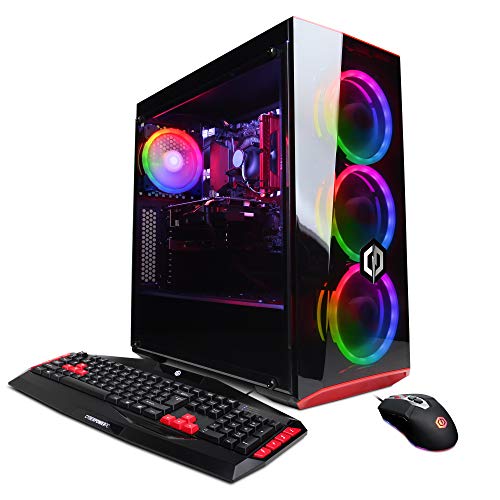
CyberpowerPC Gamer Xtreme VR Gaming PC, GTX 1660, 8GB DDR4
The Picks, Examined More Closely
The Gamer Master GMA2700A lands as the modern AM5 build in this shortlist, pairing an AMD Ryzen 5 7600 with NVIDIA’s RTX 4060 inside a tempered-glass tower. In plain terms, the Ryzen 5 7600 is a six-core, twelve-thread chip on a current socket, which means future CPU upgrades stay on the table without a full rebuild. The RTX 4060 sits in the sweet spot for 1080p gaming with ray tracing on, and it brings DLSS 3 frame generation along for the ride.
Daily owners tend to like the case details more than the spec sheet suggests. A tempered-glass side panel and addressable RGB lighting give the build presence on a desk, while the included keyboard and mouse mean it boots into Windows 11 Home with no extra shopping. For someone stepping into PC gaming from a console, the whole package is genuinely plug-and-play.
What Makes Sense
- AM5 platform leaves CPU upgrade paths open for later.
- RTX 4060 handles modern 1080p titles and ray tracing comfortably.
- 16GB DDR5 (the current generation of system memory, faster and more efficient than DDR4) covers gaming and light streaming.
- 500GB NVMe SSD (a fast solid-state drive that uses the motherboard’s PCIe lanes) loads Windows and game libraries quickly.
- Wi-Fi 802.11AC and gigabit Ethernet (1Gbps wired networking) keep networking flexible for a dorm or shared apartment.
Trade-Offs
- 500GB fills up fast once a few modern games install.
- 802.11AC Wi-Fi is older; Wi-Fi 6 or 6E is the smoother path for crowded networks.
- Bundled keyboard and mouse work, but heavy gaming will outgrow them quickly.
Made For
First-time PC builders who want a current-platform gaming rig with room to upgrade the CPU down the line.
Consider Something Else When
Raw frame-rate headroom matters more than platform longevity, in which case the Lenovo Legion Tower 5i makes more sense.
The ThinkCentre Tiny M70q with the Intel Core i5-14400T is the compact-office option in this roundup, and the 14400T is a low-power variant (the “T” suffix means reduced wattage and quieter thermals) designed for 24/7 operation in tight spaces. With 16GB of DDR5 and a 512GB NVMe SSD, it handles the day-to-day rhythm of spreadsheets, browser tabs, video calls, and document work without breaking a sweat. Wi-Fi 6, Bluetooth, and a mix of DisplayPort and HDMI outputs cover modern display and accessory setups.
The “Tiny” chassis earns its name. It mounts behind a monitor with a VESA bracket, parks under a reception counter, or sits flat in a cubicle shelf, and the small footprint means noise levels stay low because there’s less heat to dump. Windows 11 Pro adds features like BitLocker drive encryption and Remote Desktop, which matters for shops standardizing a fleet.
Positive Takeaways
- 10-core Intel i5-14400T balances multi-tasking with low heat output.
- Compact chassis fits behind displays or in shallow shelves.
- Wi-Fi 6 and Bluetooth handle modern wireless peripherals cleanly.
- Windows 11 Pro enables BitLocker and Remote Desktop out of the box.
- 3-year warranty support from Lenovo for office deployment.
Honest Caveats
- Integrated graphics (the GPU is built into the CPU) cap creative and gaming workloads.
- 512GB fills quickly with departmental file shares and email archives.
- Owners commonly report the tiny chassis needs occasional dust clearing to keep thermals stable.
Best Suited To
Small businesses, clinics, and remote workers who need a quiet, mountable desktop with Pro-grade Windows.
Reach For A Different Pick When
Storage ceiling is a deal-breaker; the 32GB, 1TB ThinkCentre configuration solves that exact problem.
The 256GB version of the M70q Gen 5 cuts the same chassis and CPU down to a smaller drive, keeping the 16GB DDR5 and Windows 11 Pro package intact. For shops running thin-client setups (where most apps live on a server and the desktop just displays them), or for kiosk and POS (point-of-sale) stations, the smaller SSD is rarely an issue. The i5-14400T still delivers the 10-core performance that makes browser-heavy workloads feel snappy.
It pairs well with external storage or a network drive, and the same VESA-friendly chassis means it disappears behind a screen. Compared to the 512GB sibling above, this one is the price-conscious choice for fleet rollouts where each unit is mostly a launchpad.
Well-Handled Touches
- Lower drive capacity keeps the upfront cost lean.
- Same i5-14400T performance as the larger-storage sibling.
- Compact, mountable chassis fits dense workstation layouts.
- Windows 11 Pro included.
Where It May Fall Short
- 256GB is tight for any local-first workflow.
- Same integrated graphics ceiling as the other M70q units.
Who Should Grab It
IT buyers and small studios standardizing on cloud-first or thin-client setups where local storage is minimal.
Where A Sibling Pick Shines
Anyone needing larger local storage should step up to the 1TB ThinkCentre M70q configuration.
The top-spec M70q on this list doubles the memory to 32GB of DDR5 and quadruples the storage of the budget sibling to a 1TB NVMe SSD. The same i5-14400T processor keeps thermals friendly, but the extra memory headroom matters for analysts running large spreadsheets, developers with multiple containers (lightweight isolated environments for running apps), or designers juggling browser tabs alongside design tools. The full 1TB means local project files and email archives stop being a daily concern.
Mounted behind a 4K display, this unit functions as a near-workstation for many office jobs, even though the form factor is barely larger than a paperback novel. For most desks where a full tower feels like overkill, this M70q setup is the right ceiling.
What Helps Most
- 32GB DDR5 smooths out heavy multi-tasking and large datasets.
- 1TB NVMe SSD handles large local project libraries.
- Same compact, quiet chassis as the other M70q units.
- 3-year warranty for business deployments.
Points To Keep In Mind
- Still leans on integrated graphics, so discrete GPU workloads are off the table.
- Tiny chassis limits internal expansion beyond the included drive.
Whose Shelf It Belongs On
Power users and small studios that need desktop-class RAM and storage in a mountable form factor.
Look Elsewhere When
Discrete graphics for rendering or gaming matter; the Lenovo Legion Tower 5i delivers that in a full tower.
The Legion Tower 5i steps up to NVIDIA’s RTX 5070 Ti, paired with the Intel Core Ultra 7 265F and 32GB of memory on a full tower platform. The RTX 5070 Ti is a current-generation high-end GPU (graphics processing unit) with substantial ray tracing (real-time simulation of light and shadow) and AI-assisted frame generation (a feature that uses AI to boost in-game frame rates), so 1440p and even 4K gaming become realistic targets. For streamers, the dedicated NVIDIA encoder (a hardware chip that offloads video encoding from the CPU) handles live broadcasts without crushing the CPU.
The full tower chassis leaves room for future GPU swaps, additional storage, and improved cooling. Compared with the CYBERPOWERPC Gamer Master above, this is the enthusiast ceiling for shoppers who want headroom for years of game releases.
Features That Help
- RTX 5070 Ti delivers high-refresh 1440p and entry-level 4K gaming.
- 32GB memory supports gaming, streaming, and content creation at once.
- 1TB SSD covers a sizable game library out of the box.
- Full tower chassis leaves room for GPU and storage upgrades.
Some Limits To Know
- Full tower footprint demands more floor space than the M70q units.
- Higher-tier GPU draws more power and runs warmer under load.
The Right Fit
Enthusiast gamers, streamers, and creators who want current-generation GPU muscle with upgrade headroom.
Swap It Out When
Budget matters more than frame rates; the CYBERPOWERPC Gamer Master GMA2700A makes more sense for 1080p builds.
The Gamer Xtreme VR (GXiVR8060A7) is the oldest build on this list, and that’s part of its appeal for shoppers who want a stepping-stone into PC gaming without overspending. The Intel Core i5-9400F paired with a GTX 1660 is enough for entry-level 1080p gaming and the basics of VR, while the dual-storage layout (a 120GB SSD for Windows plus a 1TB HDD for files) gives breathing room on a budget.
The honest read is that this rig dates quickly. The 9th-gen Intel platform sits two generations behind current chips, and DDR4 memory caps future upgrade paths. For someone learning the ropes or setting up a first gaming setup for a younger user, though, the price-to-play ratio still has merit.
Key Advantages
- Lower price bracket for first-time gaming setups.
- Dual-storage layout (small SSD for OS, large HDD for files) keeps costs down.
- GTX 1660 handles popular esports and older AAA titles at 1080p.
- Standard tower chassis allows for future part swaps.
Worth Bearing In Mind
- Older CPU platform limits future upgrades.
- 8GB DDR4 is the minimum for modern gaming; multitasking feels tight.
- 120GB SSD fills up fast once a few modern games install.
Perfect Match For
First-time PC owners, parents setting up a starter gaming rig, or anyone wanting a budget stepping-stone into the platform.
Skip It When
Long-term platform support matters; the CYBERPOWERPC Gamer Master’s AM5 build is the smarter long-haul choice.
Factors To Consider When Choosing Custom Pcs
Matching Hardware To Real Workloads
The CPU and GPU pairing inside a prebuilt determines what the machine can actually do, and matching those to the workload is more useful than chasing raw numbers. A 10-core low-power i5-14400T handles the rhythm of office apps and browser tabs with room to spare, while the same chip would feel sluggish inside video editing or 3D rendering workflows. For gaming, the GPU drives frame rates more than the CPU does at typical 1080p and 1440p targets.
Storage And Memory Trade-offs
Storage capacity and RAM are the easiest places for a prebuilt to feel cramped over time. Modern games eat 50 to 100GB each, so a 500GB NVMe SSD fills faster than expected, while office users with deep email archives or large project files run out of room even on 1TB. RAM matters most for anyone running virtual machines, large spreadsheets, or browser tabs by the dozen. The 32GB configurations on this list are forward-looking, while the 8GB DDR4 on the older Gamer Xtreme is borderline for current titles.
Form Factor And Office Reality
A full tower like the Legion 5i brings cooling headroom and easy upgrades, but it claims desk space. The ThinkCentre Tiny M70q line inverts that trade-off: the chassis mounts behind a display and runs quietly enough for shared offices, though internal expansion is limited. For home offices, reception counters, and dense workstation layouts, compact is often the right call. For gaming rooms and dedicated desks, the full tower earns its footprint.
Platform Longevity And Warranty
AM5 (the AMD CPU socket introduced with Ryzen 7000 and supported through future generations) and current Intel platforms extend the useful life of a prebuilt because future CPU upgrades drop in without a full rebuild. Older platforms like the one inside the Gamer Xtreme VR cap that ceiling. Warranty terms also matter, especially for fleet deployments, and the three-year coverage on the M70q line is a genuine office-friendly perk.
What These Picks Reveal Side By Side
Where Shoppers Go Wrong
The most common slip-up with prebuilts is choosing by GPU alone. A powerful RTX 5070 Ti on an older CPU creates a bottleneck (a situation where one component holds back the performance of another), and a fast modern CPU without enough RAM throttles multi-tasking. Storage is the other frequent miss: a 256GB SSD sounds adequate until Windows updates, applications, and a handful of games eat most of it. Reading the whole spec sheet, not just the headline GPU, avoids both traps.
Why Top Tier Costs More
The gap between the M70q Gen 5 and the Legion Tower 5i comes down to GPU class, memory ceiling, and chassis allowance. The RTX 5070 Ti is a major step up in graphics performance, and current-generation GPUs carry higher pricing. Full towers also include better cooling solutions, which protect components during long gaming sessions and extend their working life. Paying up buys frame-rate headroom, quieter thermals, and a longer useful lifespan before the next upgrade. For casual office work, the lower tiers deliver everything that’s needed without spending on performance that goes unused.