A family computer has to do a lot at once. One kid is on a video call, another is streaming a movie, and a parent needs to actually get some work done between permission slips and snack runs. I put this roundup together for households that want a shared machine everyone can use without fights, freezes, or a tower of mystery cables behind the couch. Across these ten picks you’ll find everything from simple all-in-ones that just work, to compact mini PCs that vanish behind a monitor, to higher-end machines for creative work or serious multitasking.
A Fast Comparison Of The Options

HP 24-inch All-in-One Desktop, AMD Athlon Silver, 8GB RAM, 256GB SSD (24-dd0010)
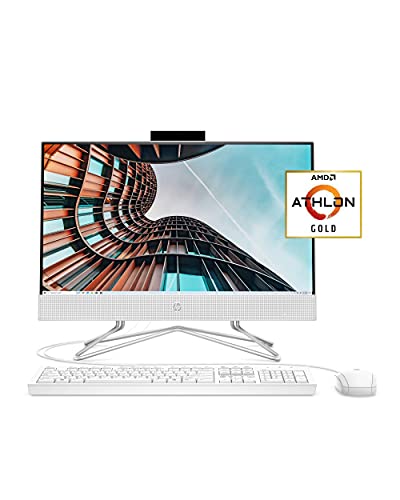
HP 22 All-in-One PC, AMD Athlon Gold 3150U, 4GB RAM, 256GB SSD (22-df0022)

GEEKOM IT15 AI Mini PC, Intel Ultra 9 285H, 32GB DDR5, 1TB SSD

Lenovo ThinkCentre Tiny M70q, i5-14400T, 16GB DDR5, 512GB NVMe SSD
Lenovo ThinkCentre Tiny M70q, i5-14400T, 16GB DDR5, 256GB NVMe SSD
Lenovo ThinkCentre Tiny M70q, i5-14400T, 32GB DDR5, 1TB NVMe SSD
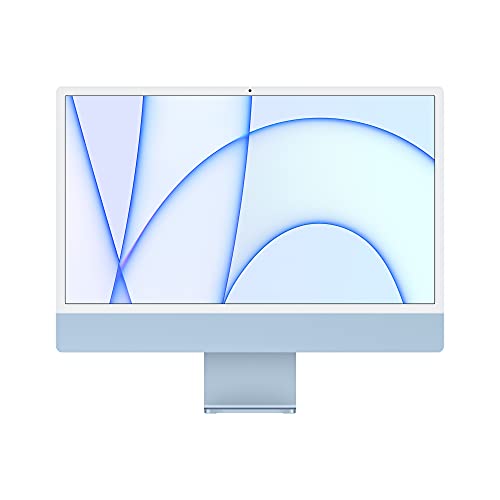
Apple 2021 iMac 24-inch, M1 Chip, 8GB RAM, 256GB SSD (Blue)
GEEKOM AX8 Max Silent Mini PC, Ryzen 7 8745HS, 16GB DDR5, 1TB SSD
GEEKOM Mini PC IT13 MAX, Ultra 9 185H, 24GB RAM, 500GB SSD

GEEKOM IT13 MAX AI Mini PC 2026, Intel Ultra 9 185H, 24GB LPDDR5, 500GB SSD
What Each Pick Brings To The Table
If your household wants one screen everyone shares, this HP all-in-one keeps the desk clean by building the computer straight into a 24-inch display. The white frame and adjustable tilt stand make it easy to move between a kitchen counter homework session and a den movie night, and the slim bezels give the panel a roomy feel without bulking up the footprint.
For a household juggling browser tabs, video calls, and a streaming service in the next room, the AMD Athlon Silver chip paired with 8GB of RAM handles light multitasking without drama. Wi-Fi connectivity, built-in speakers, and a privacy-sliding webcam round out the basics, so you’re not hunting for adapters the day you bring it home.
Positive Points
- Single-cable setup reduces clutter in shared rooms
- Slide-switch webcam offers simple privacy peace of mind
- 24-inch screen makes side-by-side documents comfortable
- Built-in speakers remove the need for extra desk gear
Things To Consider
- Storage tops out at 256GB, heavy photo libraries may push you toward cloud use
- Entry-level processor handles schoolwork fine but slows under heavy editing
Made For
Families with school-age kids who need a shared homework and streaming station in one tidy package.
Look Elsewhere When
Households with creative workloads should consider the GEEKOM IT15 AI Mini PC, which trades the built-in screen for far more horsepower.
This 21.5-inch all-in-one is the smaller sibling of the first HP on the list, and it’s aimed at households who’d rather not spend on power they won’t use. The full HD IPS panel is anti-glare, which helps when the computer sits near a window or a bright kitchen overhead, and dual front-facing speakers keep movie nights simple.
An HP True Vision HD privacy camera, dual microphones, and a wired keyboard and mouse ship in the box, so unboxing day goes straight from box to first login. The Athlon Gold chip is a step up from the entry Athlon Silver tier, but only modestly.
The Good Stuff
- Compact 21.5-inch frame fits tight desk nooks
- Anti-glare IPS display eases eye strain during long sessions
- Wired mouse and keyboard included out of the box
- Privacy camera adds a layer of household reassurance
Worth Noting
- 4GB RAM is the bottleneck for households running many tabs
- Smaller screen than its 24-inch sibling for split-screen work
- Light productivity only, not a creative workhorse
Best Suited To
Small households or single-room setups that need a clean, affordable shared PC for everyday browsing and schoolwork.
Consider Something Else When
Anyone running heavy multitasking should look at the HP 24-inch All-in-One, which doubles the memory to 8GB.
The IT15 is what happens when a workstation wants to live in a shoebox. The Intel Core Ultra 9 285H packs 16 cores with boost speeds up to 5.4GHz, paired with 32GB of DDR5 RAM, which is a serious step up from the HP all-in-ones above. For a family where one parent edits video while another kid renders a school project, this kind of headroom prevents the bottleneck feel.
The mini PC form factor means it tucks behind any monitor with a VESA mount or sits flat on a shelf, freeing up desk real estate in a busy kitchen command center. Quad 8K display support sounds like overkill until a household tries running a TV as a second monitor for homework dashboards.
Advantages To Know
- Intel Arc 140T graphics handle light creative workloads
- Wi-Fi 7 future-proofs the household network connection
- 1TB SSD swallows family photo libraries with room to spare
- 32GB DDR5 supports dozens of browser tabs without lag
Trade Offs
- Requires a separate monitor, keyboard, and mouse purchase
- Overkill for households whose needs end at email and streaming
- Fan noise under sustained loads may show up in quiet rooms
Who It Suits Best
Power-user households where someone is editing, coding, or running demanding software alongside everyday family use.
Skip It When
The Lenovo ThinkCentre Tiny M70q is a smarter match for families who want solid performance in the same compact shape but don’t need the Ultra 9 silicon.
Where the GEEKOM IT15 above is built for heavy lifting, the ThinkCentre Tiny M70q focuses on balance. The 10-core Intel i5-14400T splits performance and efficiency cores for smart multitasking, and the “Tiny” form factor lives up to its name, small enough to mount behind a monitor with a standard VESA plate.
Compared to the HP all-in-ones earlier, this one trades a built-in screen for raw computing muscle and a much smaller desktop footprint. Wi-Fi 6, Bluetooth, DisplayPort, HDMI, and a wired Ethernet port cover the connectivity checklist most households need for a printer, a webcam, and a second monitor.
Why It Works Well
- 512GB NVMe SSD balances storage against everyday price
- 16GB DDR5 is enough for most family multitasking patterns
- Compact case disappears behind a monitor or in a drawer
- Windows 11 Pro adds business-grade management features
Honest Caveats
- No display included, plan for monitor shopping separately
- Three-year warranty is solid but adds cost to the unit
Key Product Details
Perfect Match For
Families building a hybrid work and homework station who don’t mind buying a monitor separately.
Reach For A Different Pick When
The HP 24-inch All-in-One makes more sense for households that want a screen included and a simpler setup out of the box.
This is the same ThinkCentre Tiny M70q hardware as the previous entry, but with storage trimmed to 256GB. For households that lean hard on cloud storage, Google Drive, or a family NAS, that compromise often goes unnoticed, and the savings show up elsewhere in the build.
The 16GB of DDR5 RAM and the i5-14400T are the real workload carriers, and they don’t change between the two versions. If your family streams more than it downloads, edits documents more than it stores raw video, this makes practical sense over the 512GB sibling.
Practical Advantages
- Same 10-core CPU as the higher-storage version
- Compact size suits cluttered family desks
- Windows 11 Pro preinstalled
- Three-year warranty covers household accidents
Small Caveats
- 256GB fills up quickly with offline photos and videos
- External or cloud storage becomes a near-requirement
Whose Shelf It Belongs On
Cloud-first households and families who mostly use the computer as a window to online services.
Where A Sibling Pick Shines
The Lenovo ThinkCentre Tiny M70q with 512GB storage is the smarter pick for households that store large files locally.
Take the ThinkCentre Tiny M70q formula, double the RAM to 32GB, and quadruple the storage to 1TB, and you get the version of this machine built to age gracefully. For a family that wants to set up a computer and not think about it for five or six years, this configuration removes the usual upgrade pressure.
32GB of DDR5 RAM lets the system run virtual machines, heavy browser sessions, and creative apps at the same time without thrashing. The 1TB NVMe SSD keeps family photo archives, school projects, and downloaded games on the local drive, which still beats the cloud for instant access.
Reasons It Performs
- 32GB RAM is comfortable headroom for future software demands
- 1TB SSD swallows local media libraries without external drives
- Same compact footprint as the smaller siblings
- Wi-Fi 6 and Bluetooth cover modern wireless peripherals
A Few Limitations
- Higher cost than the 16GB versions, with diminishing returns for light users
- Still requires a separate monitor purchase
Core Details
The Right Fit
Families who want a “set it and forget it” family workstation that won’t feel slow in three years.
Not Your Match When
Light-use households should save money with the Lenovo ThinkCentre Tiny M70q 256GB version and use cloud storage.
Apple’s 24-inch iMac packs the M1 chip, the same silicon that made the MacBook Air famous, into a strikingly thin all-in-one. The 4.5K Retina display shows more pixels than the HP panels earlier, and the color-matched Magic Keyboard and Magic Mouse ship in the box.
For households already in the Apple ecosystem, the iMac hands off photos, notes, and FaceTime calls from iPhones and iPads without setup gymnastics. The blue finish is one of seven colorways, which matters in a home office where the computer sits in plain sight all day.
Bright Spots
- 4.5K Retina display is sharper than most family monitors
- M1 chip handles photo and video tasks efficiently
- Color-matched accessories feel considered, not afterthoughts
- Near-silent operation even under moderate workloads
Points To Keep In Mind
- 8GB unified memory is fine for everyday work, tight for pro apps
- 256GB SSD fills up fast with iPhone photo libraries
- Accessories and storage upgrades cost more than on Windows
Who Will Love This
Households with iPhones, iPads, and Apple TVs who want the whole ecosystem to just work together.
Swap It Out When
The HP 24-inch All-in-One is a better fit for Windows-only households who want similar simplicity at lower cost.
The AX8 Max is GEEKOM’s quiet-focused entry, and the AMD Ryzen 7 8745HS with 8 cores up to 4.9GHz gives it more muscle than the ThinkCentre M70q siblings in some workloads. The “Silent” marketing language here means a design tuned for low fan noise, which matters in a household where the computer sits in an open living area.
Compared to the GEEKOM IT15 from earlier, this machine trades the Ultra 9 silicon for a more balanced chip and a 1TB SSD at a friendlier everyday build. If your family doesn’t run heavy AI or rendering workloads but wants the small form factor, this lands in a sweet spot.
Useful Highlights
- Tuned for low-noise operation in shared rooms
- 16GB DDR5 supports typical family multitasking patterns
- 1TB SSD handles family media locally
- Compact case fits anywhere a paperback would
Possible Compromises
- No display, keyboard, or mouse included
- AMD Ryzen 7 trails the Intel Ultra 9 in some creative benchmarks
Feature Snapshot
Built With In Mind
Households that want a near-silent compact PC and don’t mind sourcing a monitor separately.
A Better Fit Elsewhere
The HP 24-inch All-in-One is the smarter pick for families who want everything in one panel without separate purchases.
The IT13 MAX sits one tier below the IT15 covered earlier but keeps the upgrade-friendly DNA that GEEKOM built its name on. The Intel Core Ultra 9 185H with 16 cores and 22 threads pushes past 5GHz when workloads demand it, and the 24GB of RAM is a generous middle ground between the 16GB ThinkCentre builds and the 32GB flagship.
The 500GB storage trim means households using external drives or NAS systems save a bit of cost, while still leaving room for active projects. For tinkering families who want to open the case later and swap components, this chassis is more accessible than sealed all-in-ones.
Everyday Advantages
- Ultra 9 185H handles creative apps and AI tasks
- 24GB RAM balances price and headroom
- Compact mini-PC size fits any setup
- Upgrade-friendly build for future tweaks
What To Weigh
- 500GB storage may need supplementing with external drives
- Requires separate monitor and accessories
Quick Technical Notes
Right Fit For
Tinkerers and growing households who want flagship performance with room to expand later.
Where Another Pick Suits Better
The Lenovo ThinkCentre Tiny M70q with 32GB and 1TB makes more sense for households that prioritize storage over peak CPU power.
GEEKOM positions this 2026 refresh of the IT13 MAX as an AI-ready flagship, and the Intel Ultra 9 185H with the integrated NPU is the reason. The neural processing unit handles on-device AI tasks, like background blur, transcription, and image enhancement, without leaning on the cloud, which is reassuring for families who prefer to keep data local.
The 24GB of LPDDR5 RAM is soldered for compactness rather than upgradeable, a tradeoff worth knowing up front. For households planning to use the machine as a creative hub, a coding workstation, or a media server, that combination of CPU, NPU, and compact case is hard to beat.
The Helpful Details
- Integrated AI engine speeds up modern workflows
- 24GB LPDDR5 keeps memory speeds high under load
- Ultra 9 185H flies through video editing and code compilation
- Tiny case tucks behind any monitor or TV
Things To Watch
- LPDDR5 is soldered, no future RAM upgrades possible
- 500GB SSD requires external storage for media-heavy households
- Costs more than all-in-one options with screens included
Who Should Grab It
Creative-heavy family setups that want flagship performance today and built-in AI headroom for tomorrow.
Another Choice May Suit
The GEEKOM IT15 AI Mini PC is the right call for households that want more storage and slightly newer silicon than this 2026 IT13 MAX refresh.
Picking The Right Family Computer Without Overpaying
Choosing between an all-in-one and a mini PC comes down to how your household actually uses desk space. All-in-ones like the HP 22 and HP 24 fold the screen and computer into one tidy package, which is perfect for kitchens, dining-room homework spots, and rental apartments where drilling into walls for a monitor mount isn’t realistic.
Mini PCs trade the built-in display for smaller footprints and more upgrade headroom. The Lenovo ThinkCentre Tiny M70q line and the GEEKOM family let you choose a monitor that fits your room, and they leave room to grow into creative or office work later.
RAM and storage matter more than most shoppers expect. 8GB is the floor for a comfortable family machine in 2026, and 16GB is the practical sweet spot. For storage, plan for at least 256GB if your family leans on cloud services, or 512GB to 1TB if you keep photos and projects local.
Connectivity covers more than Wi-Fi. Look for HDMI or DisplayPort for monitor hookup, multiple USB ports for peripherals, and Bluetooth for headphones and game controllers. Ethernet ports help households with unreliable Wi-Fi, especially in older homes with thick walls.
Key Considerations Across These Picks
Common Shopping Slip Ups
The most common mistake is buying more computer than a household will use. A family whose week is mostly email, streaming, and schoolwork doesn’t need the GEEKOM IT15, and paying extra for that headroom just sits unused. The opposite mistake shows up when shoppers pick a 4GB machine that struggles the moment two browsers open at once.
Storage is the other trap. SSDs feel fast at first, but a household with phone backups, school videos, and downloaded games fills 256GB surprisingly quickly. Planning for either cloud storage or a local external drive up front avoids a frustrating migration later.
What The Higher Tier Buys
Higher-tier models like the GEEKOM IT13 MAX and the IT15 buy two things at once: more cores for creative work, and more RAM for the multitasking patterns a family develops over time. The extra cost goes mostly into silicon that handles video calls while a kid streams a show in the next tab.
For most families, paying up makes sense when at least one person edits photos, works from home, or runs heavier software. For everyone else, the Lenovo ThinkCentre Tiny M70q or the HP 24-inch All-in-One covers the daily grind without paying for unused horsepower.
Frequently Asked Questions
How much storage does a family computer need in 2026?
Most families do well with 512GB of local storage, especially if you also use cloud backup. Households that store years of photos and videos locally should plan for 1TB or plan to add an external drive.
Is an all-in-one or a mini PC better for shared family use?
All-in-ones win on simplicity since the screen ships in the box, while mini PCs win on flexibility and upgradability. Pick an all-in-one if you want one tidy purchase, or a mini PC if you already have a monitor or want to pick your own display.
Do these family computers need a dedicated graphics card?
For schoolwork, streaming, and casual games, integrated graphics on chips like the Ryzen 7 8745HS or Intel Ultra 9 are enough. A dedicated GPU matters only for serious gaming or professional video work.
How long should a family desktop last before replacing it?
A well-specced machine with 16GB of RAM and an SSD typically feels responsive for five or six years. Models with 32GB of RAM, like the Lenovo ThinkCentre Tiny M70q 1TB version, often stretch that further.
Can a mini PC handle a family’s multiple users at once?
Modern mini PCs with 16GB or more of RAM handle multiple browser sessions and apps comfortably. The Lenovo ThinkCentre Tiny M70q and GEEKOM AX8 Max both manage shared-family workloads without strain.
The Takeaway
A family computer should match how your household actually uses the room it’s in. The HP all-in-ones are the easy, screen-included answer for tight spaces, while the Lenovo ThinkCentre Tiny M70q lineup and GEEKOM mini PCs give more breathing room for creative work and future upgrades. Match the machine to your busiest realistic day, not your most ambitious daydream, and you’ll end up with something everyone in the house can use comfortably for years.