A home computer should fit the way a household actually works: a kitchen counter here, a corner desk there, a shared family table on weekends. Some people need a quiet box for spreadsheets and schoolwork, while others want enough horsepower for 1440p gaming or 4K video edits. This list walks through ten options that cover those scenarios, from slim all-in-ones that hide behind a monitor to compact mini PCs that tuck behind a screen and forget they’re even there.
The Choices Worth Comparing

STORMCRAFT Sirius AI Gaming Desktop, Intel i5 14400F, Arc B570 10GB

HP 24-inch All-in-One Desktop, Athlon Silver 3050U, 8GB RAM, 256GB SSD
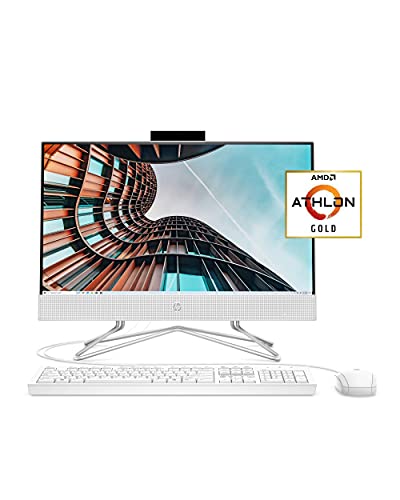
HP 22 All-in-One PC, Athlon Gold 3150U, 4GB RAM, 256GB SSD

GEEKOM IT15 AI Mini PC, Intel Ultra 9 285H, 32GB DDR5, 1TB SSD

Lenovo ThinkCentre Tiny M70q, i5-14400T, 16GB DDR5, 512GB SSD
Lenovo ThinkCentre Tiny M70q, i5-14400T, 16GB DDR5, 256GB SSD
Lenovo ThinkCentre Tiny M70q, i5-14400T, 32GB DDR5, 1TB SSD
GEEKOM AX8 Max Silent Mini PC, Ryzen 7 8745HS, 16GB DDR5, 1TB SSD
GEEKOM Mini PC IT13 MAX Ultra 9 185H, 24GB RAM, 500GB SSD

GEEKOM IT13 MAX AI Mini PC 2026, Intel Ultra 9 185H, 24GB LPDDR5
What Each Pick Brings To The Table
The STORMCRAFT Sirius lands on this list because it is the only traditional tower here built specifically for 1440p gaming rather than office work. It pairs a 14th-gen Intel Core i5-14400F with an Intel Arc B570 graphics card carrying 10GB of GDDR6 video memory, which is plenty for modern AAA titles at high settings. The 1TB NVMe SSD keeps load times tight, and the 16GB of DDR4 RGB memory gives a little visual flair in a dark room. Compared to the HP all-in-ones below, this is a full-sized desktop that expects desk real estate.
For most households, the honest read is that this is a gaming-first machine that can double as a school or work rig when needed. The Arc B570 handles 1440p gaming with room to spare, and the i5’s 10 cores keep streaming software running in the background without choking the gameplay.
Points In Its Favor
- 10GB GDDR6 graphics card handles 1440p gaming comfortably without pushing extreme frame targets.
- 1TB NVMe boot drive means Windows, a handful of large games, and creator apps all fit without an extra drive.
- RGB memory adds a touch of personality for setups where the tower sits in plain sight.
- Standard tower layout makes future GPU and storage upgrades straightforward for most owners.
Trade-Offs To Consider
- Takes up considerably more floor or desk space than the all-in-ones and Mini PCs on this list.
- Arc B570 driver support has historically been uneven for newly launched games, so check compatibility if you play the latest releases.
- Towers pull more dust through their fans over time, meaning periodic cleaning is part of ownership.
Key Attributes
Who It Suits Best
Gamers and streamers who want a single tower that can handle 1440p titles, voice chat, and OBS-style recording software at the same time.
Where Another Pick Suits Better
Households tight on space or noise tolerance will find the GEEKOM AX8 Max Silent Mini PC far easier to live with day to day.
The HP 24-inch All-in-One is built for households that want one clean screen-and-PC unit on a kitchen counter or shared desk. The Athlon Silver 3050U is an entry-level chip, so it handles browsing, email, and homework, but it is not going to thrill anyone editing 4K video. 8GB of RAM keeps things responsive for several browser tabs at once, and the 256GB SSD boots Windows quickly.
Compared to the gaming tower above, this is the opposite end of the spectrum: a tidy all-in-one where the computer hides inside the monitor. The adjustable tilt stand and slim white chassis make it look at home in a dining area or shared study.
The Practical Payoff
- 24-inch micro-edge display keeps cables to a single power cord, freeing up desk space.
- 8GB of RAM handles typical family routines: schoolwork, streaming, and video calls without drama.
- White finish blends into bright rooms better than a black tower would.
- Slide-switch privacy cover on the camera is a small but useful touch for families.
Honest Caveats
- Athlon Silver 3050U is firmly entry-level, so heavy multitasking or large spreadsheets may feel sluggish.
- 256GB of storage fills up quickly with photos and school projects, so an external drive is likely down the road.
- Upgrading RAM or storage after purchase is rarely practical on all-in-ones.
Right Fit For
Families and remote learners who mostly browse, stream, and write papers and prefer one tidy screen over a separate tower and monitor.
Consider Something Else When
Anyone who edits video or needs a faster CPU for school software should look at the STORMCRAFT Sirius AI Gaming Desktop for genuine headroom.
The HP 22 is the smaller sibling of the 24-inch all-in-one above, trading screen size and memory for a more compact footprint. The 21.5-inch anti-glare IPS panel is Full HD, which is sharp enough for schoolwork and video calls, and the Athlon Gold 3150U is a modest step up from the entry-level Silver chip. 4GB of RAM is the main bottleneck, so heavy multitasking will hit a ceiling quickly.
For tight dorms, small bedrooms, or a one-person home office, this machine keeps the desk uncluttered. Unlike the tower pick at number one, it slips into spaces a full-sized rig simply cannot.
Where It Helps
- Full HD IPS display with anti-glare coating is comfortable for long reading sessions and homework.
- All-in-one format means no extra cables or a separate tower competing for floor space.
- Wired mouse and keyboard are included, so setup is essentially plug and play.
- Athlon Gold 3150U handles light productivity and streaming without breaking a sweat.
Points To Keep In Mind
- 4GB of RAM is the most limiting spec on this machine; expect slowdowns with more than a handful of browser tabs.
- 21.5-inch screen can feel small for split-window workflows or media editing.
- Like most all-in-ones, internal upgrades are limited, so what you buy is largely what you keep.
Best Suited To
Students, casual users, and anyone furnishing a small desk or dorm who wants a tidy screen-plus-PC in one piece.
Skip It When
Anyone who routinely keeps dozens of tabs open will be happier with the 8GB RAM in the HP 24-inch All-in-One Desktop just above.
The GEEKOM IT15 is the most ambitious Mini PC on this list, packing an Intel Core Ultra 9 285H with 32GB of DDR5 RAM and a 1TB SSD into a tiny chassis. The Arc 140T integrated GPU and 99 TOPS NPU (a measure of AI-accelerated compute) make it well-suited for AI-driven workflows, code compilation, and heavy multitasking. WiFi 7 keeps networking future-proof for years to come.
For households running a serious home office or a creator studio without wanting a full tower, this is the closest thing to workstation muscle in Mini PC form. Compare that to the GEEKOM AX8 Max below, which leans quieter and lower-power rather than outright speed.
What Helps Most
- 32GB DDR5 handles large spreadsheets, browser tab stacks, and editing software without compromise.
- 1TB SSD covers most home users’ full storage needs out of the box.
- WiFi 7 is the newest wireless standard, offering faster throughput for those with compatible routers.
- Compact Mini PC form factor keeps the desk clean while delivering desktop-class performance.
Things To Weigh Up
- High-performance Mini PCs run warm, so airflow around the unit matters more than for entry-level all-in-ones.
- Integrated graphics mean it is not a substitute for a discrete GPU in gaming-heavy homes.
- Mini PC power supplies and ports vary, so check that your monitors and peripherals match.
Quick Technical Notes
Who Should Grab It
Power users, remote engineers, and home creators who want flagship-class compute in a box small enough to mount behind a monitor.
Not Your Match When
Casual households looking for a quiet living-room web machine will find the GEEKOM AX8 Max Silent Mini PC easier to live with day to day.
The Lenovo ThinkCentre Tiny M70q is a business-grade Mini PC that quietly disappears behind a monitor or under a desk. The 10-core i5-14400T is a low-power variant (the “T” suffix indicates lower TDP and quieter thermals), so it sips electricity compared to a full tower. With 16GB of DDR5 and a 512GB NVMe SSD, it covers the productivity needs of most remote workers.
Windows 11 Pro comes preinstalled, which adds features like BitLocker drive encryption and Remote Desktop. Compared to the HP all-in-ones above, this separates the screen from the computer, so shoppers can pair it with any monitor they prefer.
A Strong Showing
- Low-power i5-14400T keeps thermals and fan noise down during long work sessions.
- 16GB DDR5 and 512GB SSD is a balanced spec for office productivity and study work.
- Business-class chassis with solid build quality and a compact footprint.
- WiFi 6 and Bluetooth cover most home networks and peripherals out of the box.
Small Caveats
- Integrated graphics only, so gaming and GPU-heavy creative work are off the table.
- DisplayPort and HDMI outputs are present, but monitors and cables are sold separately.
- The included Windows 11 Pro license adds value, but switching to a different OS is not as simple as a clean tower.
Made For
Remote workers, hybrid employees, and students who want a near-silent Mini PC with business-grade reliability on the home desk.
Look Elsewhere When
Households that want a screen bundled in should choose the HP 24-inch All-in-One Desktop instead.
This is the lean-storage variant of the M70q reviewed just above, swapping the 512GB SSD for a smaller 256GB drive. The processor, RAM, and chassis are identical, so performance for everyday work is the same. The lower storage makes the most sense for households that rely heavily on cloud services, streaming, and remote file storage rather than local files.
Compared to the 1TB-equipped M70q further down the list, this one keeps the same quiet operation and compact shape, but expects you to live mostly online. In our view, that is a fair trade for shoppers who rarely save large files locally.
What Stands Out
- Same proven i5-14400T and 16GB DDR5 pairing as the higher-storage sibling for solid daily performance.
- Quieter and cooler than many full-sized desktops thanks to the low-power chip.
- Compact chassis fits behind a monitor with a VESA mount or on a small shelf.
- WiFi 6 and Bluetooth keep wireless accessories simple to pair.
Factors To Consider
- 256GB is tight for users with large photo libraries or local game installs.
- DisplayPort and HDMI handle monitors, but no display ships in the box.
- Integrated graphics rule out modern gaming at anything beyond very casual settings.
The Right Fit
Cloud-first home offices and families who stream rather than download and want a quiet Mini PC without paying for storage they will not use.
Swap It Out When
Anyone storing large media libraries or working from home with big project files should step up to the 1TB-equipped Lenovo ThinkCentre Tiny M70q.
The fully-loaded M70q pairs the same i5-14400T with 32GB of DDR5 RAM and a 1TB NVMe SSD, which is the most balanced configuration in this trio of Mini PCs. Doubling the RAM versus its siblings is meaningful for users running virtual machines, large datasets, or dozens of browser tabs at once. Storage is generous enough that most home users will not need an external drive.
For most households juggling work, study, and side projects on a single machine, this hits the sweet spot. Compared to the 16GB variants above, you trade a little value-per-dollar for genuine headroom that lasts longer.
Practical Pluses
- 32GB DDR5 keeps multitasking smooth even with demanding productivity apps open.
- 1TB NVMe SSD covers operating system, software, and a sizeable local media library.
- Low-power i5-14400T keeps the fan profile quiet in a home office.
- Same compact chassis as the other M70q picks, so it fits the same spots.
Worth Bearing In Mind
- Higher RAM and storage push this configuration into a more premium tier than its siblings.
- No discrete GPU, so creative work that needs GPU acceleration still demands a different machine.
- Monitors and peripherals must be sourced separately for the full setup.
Feature Snapshot
Whose Shelf It Belongs On
Power users and remote professionals who want quiet Mini PC operation with enough RAM and storage to skip external drives for years.
Another Choice May Suit
Shoppers chasing a smaller price tag will find the 16GB, 512GB Lenovo ThinkCentre Tiny M70q is plenty for lighter workloads.
The GEEKOM AX8 Max is the quietest entry in this roundup, designed to sit unobtrusively on a desk or behind a monitor. The AMD Ryzen 7 8745HS is an 8-core chip with strong multi-threaded performance, while 16GB of DDR5 RAM and a 1TB SSD handle productivity, light creator work, and everyday entertainment without compromise.
Compared to the louder STORMCRAFT tower at number one, this Mini PC trades raw gaming muscle for near-silent operation. For bedrooms or shared spaces where fan noise matters, that is a meaningful upgrade in livability.
Notable Upsides
- Silent operation makes it a strong fit for bedrooms and shared living spaces.
- 8-core Ryzen 7 chip handles productivity apps, browser stacks, and light creative work comfortably.
- 1TB SSD gives ample storage for documents, photos, and a modest media library.
- Compact Mini PC form keeps cable clutter to a minimum.
Some Limits To Know
- Integrated Radeon graphics limit gaming to lighter or older titles at modest settings.
- No bundled display, so a monitor must be purchased or repurposed separately.
- Mini PC port layouts vary, so check that your preferred peripherals and displays are supported.
Perfect Match For
Noise-sensitive households and shared spaces that want strong everyday performance without the whir of a traditional cooling fan.
A Better Fit Elsewhere
Gamers who want modern titles at high settings should pick the STORMCRAFT Sirius AI Gaming Desktop instead.
The GEEKOM IT13 MAX brings an Intel Core Ultra 9 185H into a compact Mini PC, pairing it with 24GB of RAM and a 500GB SSD. The processor’s 16 cores and 22 threads give this machine genuine creator-class performance in a box the size of a paperback book. The 500GB SSD is upgradeable down the line, which gives shoppers flexibility as storage needs grow.
For most home studios, this hits a useful middle ground between the leaner M70q models above and the top-spec IT15 at number four. In most home setups, it handles photo editing, 4K video timelines, and code compilation without breaking a sweat.
Strong Points
- Intel Core Ultra 9 185H brings 16 cores to a Mini PC footprint, which is rare at this size.
- 24GB RAM strikes a balance for creator workloads without overshooting budget.
- Upgradeable SSD path means the storage can grow as projects accumulate.
- Compact chassis fits behind monitors or on shelves where a tower would not.
Potential Compromises
- 500GB is a starting point; large media libraries will need an external or upgraded drive.
- Integrated graphics limit heavy 3D or GPU-accelerated workflows.
- Premium Mini PCs run warm, so airflow around the chassis is worth planning for.
Built With In Mind
Home creators, freelance editors, and developers who want workstation-grade CPU power in a small box and prefer a flexible storage path.
Reach For A Different Pick When
Shoppers who want even more RAM and storage out of the box should consider the GEEKOM IT15 AI Mini PC reviewed above.
The 2026 GEEKOM IT13 MAX refresh carries the same Intel Core Ultra 9 185H chip as the previous Mini PC, but uses soldered LPDDR5 memory instead of upgradeable DDR5. That trade means slightly tighter RAM but lower power draw and a thinner overall package. 500GB of SSD storage is the starting point, with expansion available through external drives.
This is the model to pick when AI-assisted workflows, long compile jobs, or future-facing software will live on the home desk. The NPU inside the Ultra 9 chip helps with on-device AI tasks, keeping more processing local rather than in the cloud.
Useful Highlights
- Soldered LPDDR5 memory draws less power, helping thermals stay comfortable in tight spaces.
- Intel Core Ultra 9 185H delivers creator-class CPU performance in a Mini PC.
- On-device NPU accelerates AI workloads without sending data off the home network.
- Compact design suits modern desks where a tower would feel out of place.
Where It May Fall Short
- LPDDR5 is soldered, so upgrading RAM later is not an option.
- 500GB is modest for users with large local media libraries.
- Premium positioning means shoppers pay for specs they may not fully use for basic home tasks.
Core Features
Who Will Love This
Forward-looking households running AI-assisted productivity, video editing, or development work who want a small but capable home workstation.
Where A Sibling Pick Shines
Shoppers who want user-upgradeable RAM should pick the GEEKOM Mini PC IT13 MAX Ultra 9 185H with standard DDR5 instead.
What To Weigh Before Choosing A Home Desktop
The right home desktop depends on where it will live, what it will run, and how long you expect it to last. Form factor matters first: an all-in-one reduces cable clutter to a single power cord, while a Mini PC keeps the screen flexible and the computer upgradeable. Towers offer the most expansion headroom but demand dedicated desk or floor space.
CPU choice shapes day-to-day responsiveness. Entry-level chips like the Athlon Silver and Athlon Gold handle browsers and schoolwork, while Intel Core i5 and AMD Ryzen 7 chips stretch into multitasking, light editing, and heavier productivity. For 1440p gaming or serious creator work, a discrete GPU and a higher-tier CPU become meaningful rather than optional.
Memory and storage deserve a clear look too. 4GB of RAM feels cramped with multiple tabs and apps, while 16GB is a comfortable baseline for most households. 32GB is a forward-looking choice for creators and remote workers. SSD storage over 256GB is worth aiming for, since operating systems, browsers, and photo libraries fill smaller drives surprisingly fast. The Mini PCs in this list split nicely between lean 256GB configurations for cloud-first homes and 1TB options for shoppers keeping large files local.
Key Considerations Across These Picks
Where Shoppers Go Wrong
A common mistake is choosing a desktop based on the biggest screen or the lowest price without checking the processor and RAM behind it. All-in-ones with 4GB of RAM often feel sluggish within a year, and entry-level CPUs can bottleneck productivity software that looks lightweight on paper. Another trap is forgetting that Mini PCs do not include monitors, so the total cost rises when a display, keyboard, and mouse are factored in.
Where The Extra Money Goes
Higher-tier configurations in this list usually buy faster CPUs, more RAM, larger SSDs, and newer wireless standards like WiFi 7. For most home users, paying up for RAM and storage pays off over time, since those are the specs that age slowest and run out first. Faster chips and discrete GPUs matter most for gaming, AI workloads, and video editing, where the upgrade translates directly into shorter wait times and smoother playback.
Frequently Asked Questions
Is An All-In-One Or Mini PC Better For A Home Desk?
All-in-ones keep the desk to a single screen with one power cord, which is ideal for shared family spaces. Mini PCs separate the screen from the computer, giving shoppers more flexibility to choose or upgrade their monitor later. For households that expect to swap displays in a few years, a Mini PC tends to age more gracefully.
How Much RAM Do Most Home Users Actually Need?
8GB covers browsing, email, and schoolwork comfortably, while 16GB is the sweet spot for households that juggle productivity software, video calls, and multiple tabs. 32GB is more than most casual users need today, but it future-proofs a machine for creator tools and heavier multitasking.
Can Mini PCs Handle Modern Gaming?
Mini PCs with integrated graphics are limited to lighter or older titles at modest settings. For modern AAA games at 1440p or higher, a dedicated GPU remains important, which is why the STORMCRAFT tower on this list still earns its place. Some Mini PCs can pair with external GPU enclosures, though that adds cost and complexity.
Do These Desktops Come With Windows Preinstalled?
The HP all-in-ones and Lenovo ThinkCentre M70q models ship with Windows, which simplifies setup. Most GEEKOM Mini PCs on this list also include a Windows license, though configurations can vary. Monitors, keyboards, and mice are typically sold separately for Mini PCs.
How Long Should A Home Desktop Last?
A well-specced Mini PC or all-in-one typically feels current for four to six years with normal use. Choosing 16GB of RAM and at least 512GB of SSD storage tends to extend that lifespan, since those are the specs most likely to run out first. Towers offer the longest usable life because their internal components are easier to swap as needs change.
Closing Remarks
The best home desktop is the one that fits the space you have, the work you do, and the lifespan you expect. All-in-ones suit tidy shared spaces, Mini PCs give the most flexibility per square inch, and a tower still earns its footprint when gaming or GPU-heavy work is in the mix. Match the form factor to the room, then pick the processor, RAM, and storage that match the workload, and the right choice tends to make itself.