Music production chews through CPU cycles like nothing else. A busy session pulls a DAW (digital audio workstation), dozens of plugins, sample libraries, and often a video call or two. I put together this roundup for home studios and bedroom producers who want a machine that keeps up without sounding like a jet engine, and I leaned on specs, thermal design notes, and port counts to match each pick to the right workflow.
A Side-By-Side Look

HP 2026 Pro Tower Business Desktop PC

HP Envy Desktop i7-9700, 16GB, 1TB HDD + 512GB SSD
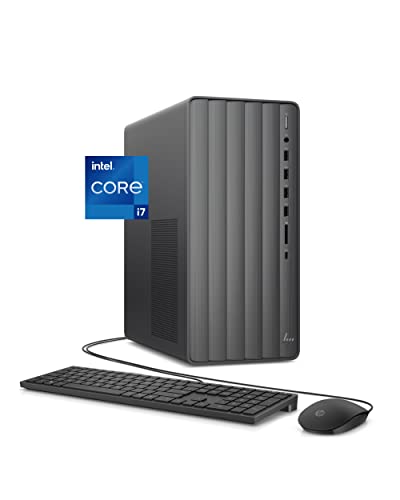
HP Envy Desktop i7-12700, 16GB, 512GB SSD + 1TB HDD
HP ProDesk 600 G6 SFF, i5-10400F, 16GB, 256GB SSD

GEEKOM A5 2027 Edition Mini PC, Ryzen 7 7730U

GEEKOM A6 Mini PC, Ryzen 7 6800H, 16GB DDR5

HP 2026 Desktop Computer, i5-12500, 16GB, 1TB SSD
HP Desktop Tower, i5-12500, 8GB, 256GB SSD

GEEKOM IT13 MAX AI Mini PC 2026, Intel Ultra 9 185H
Taking A Closer Look At The Options
HP’s 2026 Pro Tower leans on a 13th Gen Intel Core i3-13100, a quad-core chip with eight threads and turbo headroom up to 4.5GHz. For a hobbyist running a lean DAW with light plugin counts, that headroom is more useful than the spec sheet suggests, because audio work is mostly single-thread sensitive.
The tower form factor leaves room for aftermarket audio interfaces and a dedicated GPU later. In a small bedroom studio where noise matters, you may find the basic cooling profile quieter than gaming towers, though serious sample-library work will eventually bump against its limits.
Real-World Strengths
- Quad-core i3-13100 with 4.5GHz turbo handles modest sessions smoothly
- Tower chassis allows easy storage or interface upgrades down the line
- Business-class build tends to run cool and steady under typical loads
- Widely compatible with Windows-based DAWs from Ableton to Reaper
Trade Offs
- Integrated graphics limit heavy visual plugin use, like Serum’s animated GUI
- Storage configuration may require an SSD upgrade for large sample libraries
- Not built for dozens of simultaneously running virtual instruments
Right Fit For
Beginners and hobbyists producing electronic sketches, beats, or podcast audio on a tight setup who mostly work with software instruments rather than sample-heavy orchestral libraries.
Consider Something Else When
Producers juggling multi-monitor video editing alongside their DAW should look at the GEEKOM IT13 MAX AI Mini PC, which has more threads and an AI accelerator built in.
The Envy TE01-0020 pairs an 8th Gen-style i7-9700 with 16GB of RAM and a hybrid 1TB HDD plus 512GB SSD storage layout. Compared to the Pro Tower above, this one clearly targets a step-up studio with bigger projects, thanks to dedicated thermal vents and a brushed-metal chassis that doubles as office-friendly decor.
Dual storage splits the load nicely: the SSD boots your DAW and projects fast, while the HDD holds recorded sessions and sample archives. Owners of older Envy units commonly report the HDD being the slow point over time, so plan for backups.
Reasons It Performs
- i7-9700 with eight physical cores handles parallel synth routing well
- Hybrid 1TB HDD and 512GB SSD lets producers separate sessions from samples
- Brushed thermal vent design supports cooler, quieter sustained operation
- 16GB RAM fits most stock DAW template sizes without buffer tweaks
Some Limits To Know
- No hyperthreading on the 9700 limits heavy plugin-heavy mastering chains
- HDD models are commonly reported to develop vibration noise after years of use
- Lacks newer Wi-Fi 6 or USB-C front ports on some configurations
Who Should Grab It
Producers running 30 to 60 track sessions with a mix of recorded audio and software instruments who want generous disk space without buying an external drive.
Where Another Pick Suits Better
Streamers who mix audio production with broadcast capture will get more from the HP Envy Desktop i7-12700 below, which adds hyperthreading and a more modern platform.
The TE01-3022 steps up to a 12th Gen Intel Core i7-12700, a chip with hybrid performance and efficiency cores that distribute power intelligently across your DAW, plugins, and browser. That alone is a meaningful upgrade over the older i7-9700 in the previous Envy, and producers who track live instruments tend to notice the headroom immediately.
With 16GB of RAM, a 512GB SSD for projects, and a 1TB SATA drive for samples, this pre-built tower covers most home studio workflows. The wired keyboard and mouse bundle keeps setup simple for a producer moving from a laptop.
Strong Points
- 12-core hybrid CPU excels at running many plugins and a video stream at once
- Windows 11 Pro supports low-latency audio tuning tools out of the box
- Dual storage combines fast project saves with roomy sample archives
- Integrated UHD 770 graphics cover 4K reference video without a discrete GPU
Points To Note
- 16GB RAM fills up fast when loading orchestral sample libraries in Kontakt
- Pre-built warranty support varies by region for music-specific issues
Feature Card
Whose Shelf It Belongs On
Mid-level producers working on film scores, podcast edits, or rock mixes who want a Windows 11 Pro rig that won’t bottleneck a dozen tracks.
A Better Fit Elsewhere
Producers needing serious quiet should consider the GEEKOM A6 Mini PC, which pairs a 45W sustained CPU with a much smaller acoustic footprint.
The ProDesk 600 G6 SFF uses a small-form-factor chassis, which is a real advantage if your studio lives on a standing desk or a narrow shelf. Inside sits an i5-10400F, a 6-core, 12-thread chip with hyperthreading, plus 16GB of DDR4 RAM. The “F” suffix means no integrated graphics, so a discrete GPU is required for any visual workload.
For audio work specifically, that graphics caveat barely matters: most DAWs render on the CPU. What does matter is the quiet cooling profile and the compact footprint, both of which suit a near-field monitor setup where space and acoustic reflection matter.
The Helpful Details
- Small-form-factor chassis fits under monitors or beside speakers
- Hyperthreaded 6-core CPU supports multi-mic tracking sessions
- 16GB RAM is upgradable for producers pushing template sizes
- Business-grade reliability focus tends to mean longer service life
Practical Considerations
- 256GB SSD fills quickly with stems and instrument libraries
- No integrated graphics rules out video editing without a discrete GPU
- SFF chassis can run warmer under sustained multi-core loads
Built With In Mind
Engineers working from a one-bedroom studio who want a quiet, compact PC that disappears under the desk without giving up 16-thread CPU muscle.
Skip It When
You need serious sample-library capacity out of the box: the HP 2026 Desktop with its 1TB SSD is a more spacious pick for the same general price band.
The GEEKOM A5 2027 is a mini PC built around AMD’s Ryzen 7 7730U, an 8-core, 16-thread mobile chip with integrated Radeon Vega 8 graphics. For studio use, the small chassis is the headline: you can tuck it behind a monitor or even velcro it under a desk.
It’s worth understanding what a 15W-class mobile chip means for audio. It runs cool and quiet, which producers tend to love, but it won’t sustain the multi-core throughput of a 45W desktop CPU under heavy plugin chains. For songwriting, beat-making, and podcast editing, it’s a strong fit.
The Case For It
- Mini PC chassis keeps desk space free for MIDI controllers and mixers
- 8-core Ryzen handles multiple soft synths and light mastering chains
- NVMe SSD delivers fast project load times for tight studio sessions
- Wi-Fi and Bluetooth built in for wireless MIDI and audio gear
Where It Is Less Suited
- Mobile 15W CPU throttles under sustained, fully loaded sessions
- Limited internal expansion means external SSDs for big libraries
- Integrated graphics limit any 4K video scoring workflow
Feature Card
Best Suited To
Producers in apartments or dorm rooms who want a near-silent PC that slips behind a monitor and handles everyday tracking and mixing without heat or hum.
Not Your Match When
Heavy template composers should look at the GEEKOM A6 Mini PC, which trades a slightly larger chassis for sustained 45W performance.
The A6 is the GEEKOM I keep coming back to for serious audio work. Its AMD Ryzen 7 6800H is a 45W mobile chip, a meaningful step up from the 15W U-series in the A5 above. For producers who run long plugin chains during mixdown, the difference shows up as fewer dropouts and a higher usable buffer size.
You also get 16GB of DDR5, a faster memory standard that helps when many large sample libraries stream at once, plus a 1TB PCIe 4.0 SSD. The chassis is still small enough for a tidy desk, but it dissipates more heat, so airflow around the unit matters.
What Makes Sense
- 45W sustained CPU output avoids thermal throttling on long sessions
- DDR5 RAM and PCIe 4.0 SSD keep sample streaming smooth
- 1TB of fast storage holds medium-sized libraries without extras
- Compact form factor still fits a near-field monitor setup
Factors To Consider
- Runs warmer than the A5, so leave clearance around vents
- Higher acoustic output than lower-wattage mini PCs
- RAM upgrades require opening the chassis
Made For
Mix engineers and producers running heavy orchestral templates, convolution reverbs, and real-time effect chains who want compact form without throttling.
Another Choice May Suit
Producers chasing AI-driven mastering and cutting-edge CPU silicon should pivot to the GEEKOM IT13 MAX, which adds a dedicated NPU (neural processing unit) for modern plugin workflows.
The HP 2026 desktop pairs a 12th Gen Intel Core i5-12500, a 6-core, 12-thread chip with turbo to 4.6GHz, with 16GB of RAM and a generous 1TB SSD. For sample-heavy producers, the single large SSD is a real plus compared to the smaller drives in earlier picks, because sample libraries perform dramatically better on contiguous SSD storage.
Compared to the i3 Pro Tower at the start of this list, the i5-12500 adds two extra cores and hyperthreading, which helps during mixing. It is a sweet spot CPU for most non-pro home studios.
Bright Spots
- 1TB SSD holds large sample libraries without external drives
- 12-thread CPU accelerates real-time effect rendering
- 4.6GHz turbo keeps individual plugin instances snappy
- Plain tower design fits any studio aesthetic
A Few Limitations
- No dedicated GPU limits scoring-to-video workflows
- 16GB RAM is the ceiling without an aftermarket upgrade
Feature Card
Perfect Match For
Sample-library lovers working from home who want one spacious drive instead of juggling partitions and external SSDs.
Look Elsewhere When
Compact desks and silent operation matter more than SSD size, in which case the GEEKOM A5 Mini PC is a more desk-friendly fit.
HP’s complete-setup tower pairs the same 6-core i5-12500 with 8GB of RAM and a 256GB PCIe SSD, then throws in a wired keyboard, mouse, Wi-Fi, and Bluetooth. For someone unboxing their first studio PC, that “everything in one box” angle removes the friction of buying peripherals separately.
The 8GB RAM is the obvious trade-off: it handles a DAW and a few plugins, but it will choke on a serious orchestral template. Anyone growing into the hobby will likely want to plan an upgrade.
Practical Advantages
- Includes keyboard, mouse, Wi-Fi, and Bluetooth for out-of-box readiness
- Same 12-thread i5-12500 as the pricier 2026 HP desktop above
- Windows 11 Home pre-installed for straightforward DAW setup
- Tower design supports future storage and memory upgrades
Where It May Fall Short
- 8GB RAM fills up fast with sample-based instruments
- 256GB SSD is small for serious library work
- No dedicated GPU for visual scoring or video workflows
Who Will Love This
First-time producers who want one purchase that unboxes, boots, and starts recording without a shopping list of extras.
Reach For A Different Pick When
You already own peripherals and need more RAM out of the box: the HP 2026 Desktop with 16GB and 1TB SSD is the smarter spend.
The IT13 MAX is GEEKOM’s flagship mini PC, built around Intel’s Core Ultra 9 185H, a 16-core chip with a built-in NPU (neural processing unit). For producers experimenting with AI-powered plugins, stem separation, and intelligent mastering tools, that NPU matters more than raw clock speed.
You also get 24GB of LPDDR5 and a 500GB SSD, which is generous for a mini PC. It is the most future-leaning pick here, aimed at producers who want their hardware to stay relevant as AI-assisted plugins mature.
Well-Handled Touches
- 16-core Ultra 9 185H chews through mixdowns and stem processing
- Integrated NPU accelerates AI-driven audio plugins
- 24GB LPDDR5 supports large project templates without swaps
- Mini PC form factor still fits a tidy studio desk
Things To Weigh
- 500GB SSD is modest given the premium positioning
- LPDDR5 is soldered, so no future RAM upgrades
- High-performance chips run warm under sustained loads
Feature Card
Who It Suits Best
Professional composers and AI-savvy producers who want a compact box that stays relevant as neural audio plugins become standard in DAWs.
Where A Sibling Pick Shines
Producers without an AI workflow get more per-core value from the GEEKOM A6 Mini PC, which costs less and focuses purely on CPU throughput.
What Matters Most Before Choosing Desktop Computers For Music Production
CPU Cores And Clock Speed
Music production is split between single-thread and multi-thread workloads. A single soft synth needs one fast core, while a 40-track mixdown with reverbs spread across each channel needs many cores. Look for a chip with at least 6 modern cores and a turbo speed above 4GHz. Intel’s “K” or “F” suffixes and AMD’s “H” or “HX” suffixes typically signal higher-performance tiers.
RAM And Storage Configuration
16GB is a sensible floor for most producers, with 32GB the right target for sample-heavy work. Storage matters more than people expect: sample libraries stream from disk, so an NVMe (Non-Volatile Memory Express) SSD, a faster SSD interface than older SATA standards, will load instruments in seconds rather than minutes. Hybrid SSD plus HDD layouts work, but the SSD should hold active projects.
Noise, Cooling, And Form Factor
Studio spaces amplify fan noise through near-field monitors. Mini PCs and tower desktops with larger heatsinks tend to run quieter than small pre-built SFF units. Acoustic treatment and mic placement matter more than chasing a silent chip, but a quieter chassis removes one annoyance from your recording chain.
Connectivity And Expansion
Audio interfaces, MIDI controllers, and external drives all want ports. Look for multiple USB-A and USB-C jacks, front-panel headphone outputs for convenience, and at least one PCIe slot if you plan to add an audio interface card or capture card later.
Key Considerations Across These Picks
Pitfalls Shoppers Hit
The most common mistake is buying on clock speed alone and ignoring core count, then struggling when their mixdown saturates a single thread. Another is underestimating sample-library storage, which fills a small SSD within months. Always budget external storage for a growing library.
What The Higher Tier Buys
Stepping up to a Ryzen 7 6800H or Core Ultra 9 pays off in sustained multi-core throughput, quieter thermals, and room for AI-driven plugins. For producers earning from their craft, that extra cost buys time saved on every mixdown, which compounds across a year of projects.
Frequently Asked Questions
How Much RAM Do I Really Need For Music Production?
16GB handles most home studios comfortably. 32GB becomes worth it once you load large orchestral libraries or run several software instruments simultaneously.
Is A Mini PC Powerful Enough For Serious Audio Work?
Modern mini PCs with 45W H-series chips rival mid-tower desktops for audio tasks. The GEEKOM A6 and IT13 MAX are good examples, though sustained cooling still matters in a tightly packed desk setup.
Do I Need A Dedicated GPU For Music Production?
Most DAWs run on the CPU, so integrated graphics are fine for audio. A discrete GPU helps if you score to video or run heavy visual plugins, but it is not essential for pure music production.
Can These Desktops Handle AI Plugins Like Stem Separation?
The Intel Core Ultra 9 185H in the IT13 MAX includes a neural accelerator that handles AI plugins efficiently. Other picks rely on CPU or GPU processing for AI tasks, which works but runs warmer.
Should I Choose SSD Or HDD Storage?
SSDs are essential for sample libraries and project files. HDDs are fine for backup archives of completed sessions, but never rely on one as your active project drive.
Closing Remarks
Pick the desktop that matches your session size, not the largest one you can fit in the budget. A focused producer running 20 tracks will find more joy in a quiet GEEKOM A5 than an oversized tower they never stress. Match cores to your template count, storage to your library size, and ports to your gear, and the rest is just careful gain staging.