Editing 4K timelines, layering color grades, and pushing through hour-long exports demand a desktop that won’t buckle mid-render. I’ve spent years watching creators get burned by underspecced machines that look fine in marketing photos but choke the moment you stack three effects. The picks below match different editing workflows, from weekend hobbyists cutting travel reels to studio operators wrangling multicam projects. What follows is a curated look at ten desktop computers for video editing that actually hold up when the pressure rises.
The Picks In Brief

STORMCRAFT Sirius AI Gaming Desktop, Intel i5 14400F, Arc B570

Ultra 50 V3 RTX 5080 Gaming PC, Ryzen 7 9800X3D

GEEKOM IT15 AI Mini PC, Intel Ultra 9 285H

MINISFORUM AI X1 Pro-370 Mini PC, Ryzen AI 9 HX 370

MINISFORUM M1 Pro Mini PC, Core Ultra 5 125H
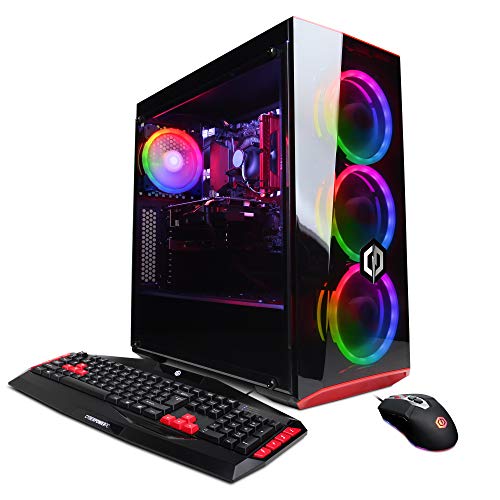
CyberpowerPC Gamer Xtreme VR Gaming PC, GTX 1660
GEEKOM AX8 Max Silent Mini PC, Ryzen 7 8745HS
GEEKOM IT13 MAX Mini PC, Ultra 9 185H

MINISFORUM X1-255 Mini PC, Ryzen 7 255 Barebone

GEEKOM IT13 MAX AI Mini PC 2026, Ultra 9 185H
The Details Behind The Selections
The STORMCRAFT Sirius AI Gaming Desktop lands as a pragmatic starting point for editors stepping up from a laptop. It pairs a 10-core Intel i5-14400F with Intel’s Arc B570 graphics card carrying 10GB of GDDR6 memory, and you also get 16GB of DDR4 RGB memory plus a 1TB NVMe SSD for fast project loading. For most editors cutting 1080p timelines with light effects, that combination keeps playback smooth and exports reasonable.
RGB memory modules add a touch of flair to a chassis that otherwise focuses on function. Owners commonly report the system handles streaming and editing side by side without falling apart, though you’ll want to keep effects layers moderate.
Noteworthy Benefits
- 10-core processor keeps multi-track timelines responsive during editing sessions
- Arc B570’s 10GB GDDR6 VRAM handles 1440p color work without choking
- 1TB NVMe SSD shortens boot and project-open times compared with older SATA drives
- DDR4 RGB memory adds visual flair to creator-focused desk setups
Points To Keep In Mind
- DDR4 memory is one generation behind newer DDR5-equipped picks in this list
- Heavy 4K multicam work may push the system closer to its limits
- Cleaning dust from the RGB-equipped interior requires opening the side panel periodically
Made For
Solo creators cutting 1080p and 1440p projects who want a balanced first serious editing rig.
Skip It When
The Ultra 50 V3 RTX 5080 Gaming PC suits you better when daily 4K multicam work is the baseline expectation.
The Ultra 50 V3 RTX 5080 Gaming PC sits at the high end of this roundup, built around AMD’s Ryzen 7 9800X3D processor with boost speeds up to 5.2GHz and an RTX 5080 graphics card with 16GB of GDDR7 video memory. Stack on 32GB of DDR5 memory running at 6000MHz and a 2TB Gen4 NVMe SSD, and you have a machine that breezes through timelines most desktops find punishing. An 850W Gold-rated PSU and ARGB cooling fans round out the chassis.
For studio editors handling color grading, motion tracking, and VFX-heavy timelines, this is the kind of headroom that translates into fewer dropped frames. The trade-off is a larger tower footprint compared with the mini PCs further down this list, so plan desk space accordingly.
A Favorable Mix
- GDDR7 video memory accelerates scrubbing through 4K timelines with multiple effects layers
- 32GB DDR5 at 6000MHz sustains heavy multitasking between Premiere, After Effects, and Photoshop
- 2TB Gen4 SSD holds substantial raw footage libraries without constant external drive juggling
- 850W Gold PSU leaves wattage headroom for future GPU upgrades
- Ryzen 7 9800X3D’s 3D V-Cache helps with cache-heavy editing tasks
Trade-Offs To Consider
- Full tower case demands more desk space than the mini PC alternatives
- ARGB fans and high airflow mean periodic dust filter cleaning every few months
Key Specs
Right Fit For
Pro editors and small studios running daily 4K timelines with motion graphics and color work.
Swap It Out When
The GEEKOM IT15 AI Mini PC fits you better if a compact desk footprint matters more than maximum GPU power.
The GEEKOM IT15 AI Mini PC packs an Intel Core Ultra 9 285H processor with 99 TOPS of AI throughput, paired with 32GB of DDR5 memory and a 1TB SSD inside a chassis barely larger than a paperback. Integrated Arc 140T graphics handle display duties, and WiFi 7 covers fast wireless transfers for editors who shuttle files to and from NAS drives.
The appeal is obvious if your editing desk doubles as a home office or living space. You get modern AI silicon for noise reduction and auto-reframe features without surrendering shelf room. The catch shows up in heavy GPU-bound renders where integrated graphics trail discrete cards.
Reasons It Performs
- Tiny footprint fits on shelves or behind monitors where towers won’t go
- 99 TOPS of AI throughput accelerates AI-powered editing tools like auto-reframe and denoise
- WiFi 7 keeps large file transfers snappy on modern mesh networks
- 32GB DDR5 handles most editing multitasking without breaking a sweat
Honest Caveats
- Integrated Arc 140T graphics trail discrete GPUs in raw render times
- Mini chassis means limited internal expansion beyond the included SSD
Who It Suits Best
Editors with minimalist studio setups who prioritize desk space and AI-assisted workflows over maximum render speed.
Consider Something Else When
The Ultra 50 V3 RTX 5080 Gaming PC serves you better when 4K export times matter more than footprint.
The MINISFORUM AI X1 Pro-370 Mini PC leans into connectivity, which is the kind of feature creators quietly appreciate when their cable count climbs. Inside sits AMD’s Ryzen AI 9 HX 370 with 12 cores and 24 threads, paired with 32GB of DDR5 memory and a 1TB SSD. Output options include HDMI, DisplayPort, and dual USB4 ports, plus twin RJ45 jacks for editors running separate production and management networks.
The integrated Radeon 890M graphics chip handles everyday editing, and the system’s AI NPU (a dedicated neural processing unit that offloads AI tasks from the main CPU) supports Copilot features and creative AI tools. You trade raw GPU muscle for connectivity and compactness, but multi-display setups thrive here.
Strengths Worth Knowing
- Dual USB4 ports let you connect high-speed external storage or docks for footage drives
- Twin RJ45 ports separate editing network traffic from office traffic cleanly
- 12-core Ryzen AI 9 handles proxy workflows and AI tooling without slowdown
- WiFi 7 and Bluetooth 5.4 cover modern wireless peripherals and fast transfers
Worth Noting
- Integrated Radeon 890M trails discrete cards on heavy GPU exports
- Premium port density usually carries a price tag to match
Feature Snapshot
Best Suited To
Multi-display editors who need a connectivity-rich compact workstation for hybrid office and studio work.
Reach For A Different Pick When
The GEEKOM AX8 Max Silent Mini PC makes more sense when quiet operation outweighs port density.
The MINISFORUM M1 Pro Mini PC brings Intel’s Core Ultra 5 125H with 14 cores and 18 threads to a compact chassis, paired with 32GB of DDR5 memory at 5600MHz that can run up to 6400MHz. Integrated Arc graphics handle display workloads, while an Oculink port opens the door to external GPU enclosures when heavier rendering demands arrive. HDMI, DisplayPort, and dual USB4 outputs round out the display options.
For editors starting out who don’t want to commit to a full tower, this is a reasonable stepping stone. The Oculink expandability is unusual at this size, and owners commonly report it works with popular eGPU (external graphics unit) docks for occasional render-heavy jobs.
Everyday Advantages
- Oculink port enables external GPU upgrades without replacing the whole machine
- 14-core processor manages proxy generation and timeline scrubbing smoothly
- Compact form factor slips into small editing nooks without dominating the desk
- 32GB DDR5 with overclocking headroom extends useful life
Things To Consider
- Integrated Arc graphics trail discrete options for sustained renders
- External GPU enclosures add cost and desk clutter when needed
Whose Shelf It Belongs On
Mid-tier editors with growth in mind who want a compact base they can expand later with an external GPU.
A Better Fit Elsewhere
The STORMCRAFT Sirius AI Gaming Desktop makes more sense if you prefer an all-in-one tower over an expandable mini PC.
The CyberpowerPC Gamer Xtreme VR Gaming PC dates back a few generations, pairing an Intel Core i5-9400F at 2.9GHz with an NVIDIA GTX 1660 graphics card carrying 6GB of VRAM. Storage comes via a small 120GB SSD for the operating system paired with a 1TB HDD for bulk files, and 8GB of DDR4 memory covers basic multitasking. WiFi readiness and Windows 10 Home come built in.
This is the kind of machine you pick up for learning editing basics without a big upfront spend. The GTX 1660 still handles 1080p timelines reasonably, though the 8GB of RAM will feel tight if you run multiple editing apps simultaneously.
What Earns Its Place
- Accessible entry price point for editors building their first machine
- 1TB HDD provides ample raw footage storage out of the box
- GTX 1660 handles 1080p editing without requiring immediate GPU upgrades
- Traditional tower offers room for future component swaps
Practical Considerations
- 8GB DDR4 memory feels cramped for modern editing software multitasking
- Older CPU architecture trails newer chips in render times
- 120GB SSD fills up fast once editing apps and project caches install
- Dust accumulation in the HDD bay calls for occasional cleaning sessions
Perfect Match For
Beginners learning editing software who need a forgiving starting rig on a tight budget.
Look Elsewhere When
The STORMCRAFT Sirius AI Gaming Desktop suits you better when you want newer architecture without a major price jump.
The GEEKOM AX8 Max Silent Mini PC uses AMD’s Ryzen 7 8745HS processor with 8 cores, paired with 16GB of DDR5 memory and a 1TB SSD. The “silent” in the name matters: this mini PC is designed for low-noise operation, which makes it a natural fit for bedroom offices and shared spaces where a whirring tower becomes background friction.
16GB of RAM is the floor for comfortable editing today, so expect to manage your open apps carefully during heavier sessions. The compact, quiet design wins points for creators who record voiceovers in the same room as their workstation.
Benefits That Matter
- Low-noise operation keeps your recording environment clean for voiceovers
- 8-core Ryzen 7 chip handles 1080p editing with reasonable responsiveness
- 1TB SSD gives projects fast load times without needing external storage immediately
- Tiny footprint suits minimalist desks and tight editing nooks
Less Ideal Details
- 16GB memory is on the lighter side for running multiple editing apps at once
- Integrated graphics limit heavy 4K work compared with discrete GPU picks
Feature Snapshot
Who Should Grab It
Creators recording in the same room as their workstation who need quiet, compact performance.
Not Your Match When
The MINISFORUM AI X1 Pro-370 Mini PC fits better when you need 32GB of memory and dense connectivity.
The GEEKOM IT13 MAX Mini PC uses Intel’s Core Ultra 9 185H processor with 16 cores and 22 threads, paired with 24GB of RAM and a 500GB SSD that’s marked as upgradeable. The headline here is straightforward: you get flagship-tier CPU silicon in a chassis that fits almost anywhere, and you can add storage when your project libraries grow.
The 500GB starting storage feels modest for editors with large raw footage archives, so factoring in an external drive or SSD upgrade is wise. For most 1080p and lighter 4K workflows, the 16-core processor carries more weight than the storage limitation.
Everyday Wins
- 16-core Ultra 9 processor handles demanding creative workloads
- Upgradeable storage path means you can grow capacity as projects accumulate
- Compact chassis slips into cramped studio setups
- 24GB RAM sits comfortably between baseline and heavy multitasking
A Few Limitations
- 500GB starting SSD fills up quickly with raw footage libraries
- Integrated graphics limit GPU-accelerated render acceleration
Built With In Mind
Growing editing workflows that need CPU muscle today and storage flexibility tomorrow.
Where Another Pick Suits Better
The GEEKOM IT15 AI Mini PC makes more sense when you want 32GB of RAM and a full 1TB SSD out of the box.
The MINISFORUM X1-255 Mini PC arrives as a barebones kit built around AMD’s Ryzen 7 255 with 8 cores and 16 threads. You supply the RAM and storage, which is the trade-off for getting the chassis and processor at a lower starting cost. HDMI 2.1, DisplayPort 2.0, dual USB4 ports, and a 2.5G RJ45 jack cover modern connectivity, and an Oculink port supports external expansion when render demands spike.
The barebones approach rewards tinkerers who already own compatible DDR5 memory and SSDs, or who want to pick exact component tiers. For most editors, the pre-built picks higher in this list save setup time.
Bright Spots
- Barebones pricing lets you allocate budget toward higher-spec RAM and storage
- Oculink port supports external GPU enclosures for occasional heavy renders
- HDMI 2.1 and DisplayPort 2.0 handle high-refresh reference monitors cleanly
- 2.5G wired networking moves large footage files quickly to NAS storage
Potential Compromises
- No RAM or storage included means additional purchases and setup time
- Integrated graphics fall behind discrete GPUs for sustained rendering
Feature Snapshot
Who Will Love This
Builders and tinkerers who want to pick exact RAM and storage tiers and don’t mind assembly time.
Another Choice May Suit
The GEEKOM IT13 MAX Mini PC fits better when you want a fully assembled system ready to edit out of the box.
The GEEKOM IT13 MAX AI Mini PC 2026 carries the same Intel Core Ultra 9 185H processor as its sibling above, paired with 24GB of LPDDR5 memory and a 500GB SSD. LPDDR5 is a low-power variant of DDR5 that draws less energy but typically isn’t user-upgradeable, so the configuration you buy is what you’ll keep. The chassis stays compact and quiet, and the system’s NPU supports AI-assisted editing features without taxing the main CPU.
For solo content creators running a YouTube channel or freelance editing business, this lands as a dependable everyday workhorse. Storage may feel tight for large archive work without an external drive alongside it.
The Case For It
- 16-core Ultra 9 processor handles most editing workloads with headroom to spare
- NPU acceleration speeds up AI-driven tools like auto-captioning and denoise
- Compact form factor disappears behind monitors or on shelves
- Quiet operation suits home studios and shared spaces
Where It May Fall Short
- LPDDR5 memory is soldered and not user-upgradeable
- 500GB SSD fills up quickly with raw footage archives
The Right Fit
Solo content creators running a steady editing workflow who want quiet, AI-capable compact performance.
Skip It When
The MINISFORUM X1-255 Mini PC makes more sense when user-upgradeable memory matters more than an out-of-the-box build.
What To Weigh Before Picking Your Next Editing Desktop
The first real decision is GPU versus CPU priority. Discrete graphics cards from NVIDIA and AMD accelerate timeline scrubbing and export encoding through dedicated hardware that takes load off the main processor. Integrated graphics save space and cost but trail noticeably when timelines stack effects, transitions, and color grades.
Memory sits right behind GPU on the priority list. 32GB of DDR5 is the comfortable floor for modern editing software running alongside a browser and asset browsers, with 16GB as the absolute minimum for solo 1080p workflows. Storage rounds out the trio: NVMe SSDs (Non-Volatile Memory Express drives, the fastest common consumer SSD interface) cut project load times dramatically compared with older SATA drives and spinning hard disks.
Your physical workspace matters more than specs sheets suggest. A mini PC slips behind a monitor on a small desk, while a full tower demands floor or wide shelf space and benefits from intentional airflow around the case. Noise tolerance is the quieter variable: silent or low-decibel designs protect voiceover recording environments.
Key Considerations Across These Picks
Traps First Timers Fall Into
Chasing the highest processor core count without checking GPU-accelerated export support leaves render times longer than expected. Many modern editing apps lean on GPU encoder chips for export, so a balanced mid-range CPU with a stronger GPU often beats a flagship CPU with weak graphics. Another common slip is underestimating storage, since raw 4K footage fills 500GB faster than most newcomers anticipate. Plan for an external SSD or NAS expansion from the start.
Where The Extra Money Goes
Spending up in this category typically buys three things: faster export encoding through newer GPU encoder chips, more headroom for simultaneous apps, and quieter thermals from better cooling designs. The jump from integrated graphics to a discrete RTX-class card is usually where render times drop most noticeably, and DDR5 memory over DDR4 extends a machine’s useful lifespan as software requirements climb. For daily professional work, the upgrade pays back in saved hours per week.
Frequently Asked Questions
How much RAM do desktop computers for video editing really need?
16GB handles solo 1080p editing with one app open, while 32GB covers multicam 4K work and running editing software alongside browsers and asset tools. Studios handling complex timelines often benefit from 64GB, but most solo creators find 32GB hits the sweet spot today.
Do integrated graphics work for video editing?
Integrated graphics manage basic 1080p timelines and light effects, but they slow down during heavy color grading, GPU-accelerated effects, and 4K exports. For sustained professional work, a discrete GPU delivers noticeably faster renders and smoother playback.
Is a mini PC powerful enough for video editing?
Modern mini PCs with 12-core or 16-core processors handle 1080p and lighter 4K editing surprisingly well. Heavy GPU-bound tasks like complex exports benefit from full towers with discrete graphics, but compact machines now cover most solo creator workflows.
How important is storage speed for editing?
Storage speed affects project load times, cache performance, and how quickly scrubbing through timelines responds. NVMe SSDs dramatically outperform older SATA drives and spinning hard disks for active project files, even if you keep archives on slower bulk storage.
Should I buy a pre-built or barebones system?
Pre-built systems save setup time and arrive with tested component compatibility, which suits most editors. Barebones kits reward those comfortable selecting their own RAM and storage and often cost less for equivalent CPU power, though they require assembly and basic troubleshooting.
Closing Remarks
The right editing desktop depends on what your actual workflow demands, not what spec sheets promise. Match the machine to your most common project: 1080p timelines run fine on compact mini PCs, while 4K multicam work still benefits from discrete GPU muscle in a roomy tower. Start with your project type, then prioritize GPU, memory, and storage in that order. Your editing time is worth protecting with a machine that won’t bottleneck when deadlines tighten.