A home office lives or dies on the machine under your monitor. I’ve helped friends set up kitchen-table desks, converted dining rooms, and tucked towers behind couches, and the right desktop turns “I can probably get through this” into “I actually want to sit down and work.” This list pulls together six machines built for the daily grind, from tidy all-in-ones to compact powerhouses.
The Main Contenders

Lenovo IdeaCentre 24 All-in-One 23.8″ Desktop (N100, 8GB, 512GB)

HP 24-inch All-in-One Desktop (Athlon Silver 3050U, 8GB, 256GB)

Lenovo ThinkCentre Tiny M70q (i5-14400T, 16GB DDR5, 512GB)
Lenovo ThinkCentre Tiny M70q (i5-14400T, 16GB DDR5, 256GB)
Lenovo ThinkCentre Tiny M70q (i5-14400T, 32GB DDR5, 1TB)
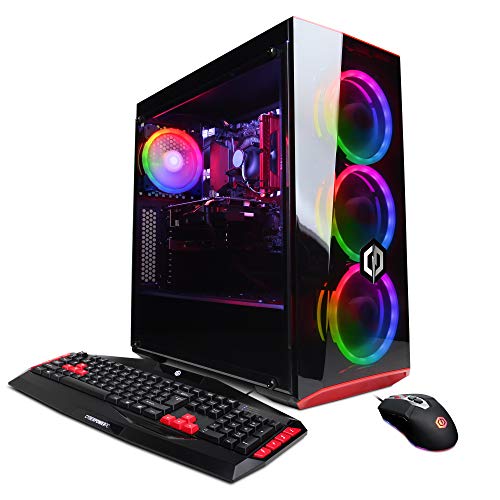
CyberpowerPC Gamer Xtreme VR Gaming PC (i5-9400F, GTX 1660)
More Details On Our Top Picks
For someone setting up a desk in a corner of the living room, the Lenovo IdeaCentre 24 keeps the cable mess honest. The Intel N100 is a quad-core chip designed for low power draw, which is why this all-in-one can stay cool and quiet while you churn through email, browser tabs, and a spreadsheet at the same time.
It pairs that processor with 8GB of DDR4-3200 RAM and a 512GB PCIe SSD, a combo that handles modern office apps without the spinning-wheel pauses older hard drives used to bring. The 23.8-inch panel folds the entire PC behind the screen, so there’s no tower to find a home for. Compared to the HP all-in-one below, the IdeaCentre leans newer on connectivity.
Key Advantages
- All-in-one form factor means a single power cable and zero tower footprint, great for tight desks.
- 512GB PCIe SSD boots Windows and launches apps in seconds, a real day-to-day quality-of-life win.
- WiFi 6 (a faster wireless standard than older WiFi 5) plus Bluetooth 5.2 keeps wireless mice, headsets, and printers stable.
- USB-C at 10Gbps (gigabits per second, a measure of data transfer speed) future-proofs docking and fast external SSDs.
Trade Offs To Consider
- The N100 is efficient but not a multitasking beast: heavy Excel models or dozens of tabs may feel it.
- RAM is soldered in many all-in-one designs, so upgrading later is often off the table.
- Built-in speakers and mics are usually basic, so external audio helps for serious call work.
Key Specs
Right Fit For
Anyone furnishing a clean, minimalist home office who wants one cable, one screen, and one machine.
A Better Fit Elsewhere
Power users running virtual machines should look at the Lenovo ThinkCentre Tiny M70q (16GB / 512GB) instead, which pairs the same 512GB storage with far more CPU headroom.
The HP 24-dd0010 is built around the daily video call. The AMD Athlon Silver 3050U is a dual-core chip tuned for low power use, paired with 8GB of RAM and a 256GB SSD, which is enough for Office, Chrome, and Zoom running side by side without drama.
The three-sided micro-edge display (a screen with very thin borders on three sides) makes the 24-inch panel feel bigger than its measurements suggest, and the adjustable tilt stand means you can angle the screen for long sessions. A physical privacy slider on the webcam is a thoughtful touch for anyone who’s tired of tape over their laptop camera. Compared to the Lenovo IdeaCentre above, this HP ships with slightly less storage but a more ergonomic stand.
Noteworthy Benefits
- Webcam with a slide-cover privacy switch is rare at this tier and reassuring for shared spaces.
- Adjustable tilt stand supports healthier posture during long working days.
- 256GB SSD is modest but adequate for cloud-first users who lean on OneDrive or Google Drive.
Worth Bearing In Mind
- The 3050U is an entry-level chip, so heavy spreadsheets or photo edits will push it harder than the IdeaCentre’s N100.
- Storage fills up quickly if you keep large media libraries locally.
- Some owners report the included mouse and keyboard are functional but feel cheap, worth budgeting for upgrades.
Feature Snapshot
Made For
Remote workers who spend most of the day on calls and want a tidy, all-in-one setup with a privacy-friendly camera.
Look Elsewhere When
Local-heavy file workflows benefit from the Lenovo IdeaCentre 24’s 512GB drive and newer connectivity.
The ThinkCentre Tiny M70q is what I’d recommend to a friend who runs a real business from a spare bedroom. The Intel i5-14400T is a 10-core, 16-thread processor (meaning it can handle 16 separate instruction streams at once for smoother multitasking) that crushes everyday work and steps up comfortably for heavier loads like code compiles or large data wrangling.
Inside the diminutive case sits 16GB of DDR5 RAM (the latest generation of system memory, faster than DDR4) and a 512GB NVMe SSD, plus WiFi 6, Bluetooth, and both DisplayPort and HDMI for dual-monitor setups. The “tiny” form factor mounts behind a monitor or sits flat on a shelf, disappearing into the workspace. This is the first M70q in the list; the next two variants trade storage capacity against the same processing foundation.
Strengths Worth Knowing
- 10-core CPU with DDR5 RAM gives serious headroom for multitasking, virtual meetings, and dev work.
- Dual display outputs (HDMI + DisplayPort, two common monitor connection standards) make a clean two-monitor desk simple to wire.
- Compact chassis fits behind monitors or under shelves, preserving desk real estate.
- Comes with Windows 11 Pro, which adds business features like BitLocker drive encryption (a built-in tool that scrambles your drive’s data so only authorized users can read it) and Remote Desktop.
- Three-year warranty coverage reduces long-term risk for self-employed professionals.
Points To Keep In Mind
- The “T” suffix on the CPU means lower power draw, not peak performance: expect modest benchmarks versus non-T chips.
- No dedicated GPU, so this isn’t the box for video editing or modeling.
- Small chassis means thermals can climb under sustained loads, so airflow around the unit matters.
At A Glance
Who It Suits Best
Professionals running dozens of browser tabs, spreadsheets, and conferencing tools at once, plus anyone using Windows 11 Pro features like Remote Desktop.
Skip It When
Heavy local media libraries push you toward the Lenovo ThinkCentre Tiny M70q (32GB / 1TB), which doubles RAM and storage.
This variant of the ThinkCentre Tiny M70q keeps the same 10-core i5-14400T processor and 16GB of DDR5 RAM as the previous pick, but swaps the 512GB SSD for a 256GB NVMe drive. For someone who lives in the cloud, that’s not a downgrade, it’s a sensible trim.
Think of it as the same engine with a smaller trunk. Files live on OneDrive, Google Drive, or a network share, and the local SSD just holds the operating system and current projects. You get the full Windows 11 Pro feature set and the same compact footprint as the 512GB sibling, so cable management and dual-monitor setups carry over unchanged.
Features That Help
- Same 10-core CPU and DDR5 memory as the larger-storage sibling, so performance doesn’t suffer.
- 256GB SSD still leaves room for Windows 11 plus current projects, and boots the system in seconds.
- Cloud-first shoppers pay for performance instead of unused local space.
Small Caveats
- Local storage fills quickly with photos, videos, or large datasets.
- No dedicated GPU limits creative workloads, same as its sibling.
- The M70q’s small chassis can run warm under sustained loads, so don’t bury it in a closed cabinet.
Best Suited To
Cloud-first professionals and remote staff who rarely keep large files locally and want to spend on speed instead of storage.
Consider Something Else When
Locally stored media libraries or VM-heavy workflows deserve the Lenovo ThinkCentre Tiny M70q (32GB / 1TB) further down this list.
This is the M70q turned up to eleven. The same i5-14400T 10-core chip anchors the build, but it now sits beside 32GB of DDR5 RAM and a 1TB NVMe SSD. For someone running virtual machines, large IDE sessions, or data analysis scripts, that extra memory headroom is the difference between smooth and stuttering.
The 1TB drive means you can keep sizable project archives, raw photo libraries, or local database snapshots without leaning on external drives. Windows 11 Pro, dual display outputs, and the same tiny chassis carry over, so you still get a workstation-class experience from something smaller than a hardcover book. Among the three M70q variants in this roundup, this one is the clear pick when workloads scale up.
A Few Highlights
- 32GB DDR5 handles dozens of browser tabs, large spreadsheets, and multiple VMs without breaking a sweat.
- 1TB NVMe SSD keeps sizable projects and archives local.
- Windows 11 Pro unlocks Remote Desktop, BitLocker, and group policy features (administrative rules that control settings across an organization) for power users.
- Three-year warranty backs a more serious investment.
Where It May Fall Short
- Costs more than the smaller-storage M70q variants for storage most casual users won’t fully use.
- Still no discrete GPU, so 3D and GPU-accelerated workloads are off the table.
- The compact case demands decent airflow; tucking it into a sealed hutch can shorten component life.
Feature Rundown
Whose Shelf It Belongs On
Power users running virtual machines, developers compiling large projects, or analysts juggling multi-gigabyte datasets who still want a tiny footprint.
Reach For A Different Pick When
Gaming or GPU-accelerated creative work points to the CyberpowerPC Gamer Xtreme VR, which adds a dedicated graphics card.
The CyberpowerPC Gamer Xtreme VR earns its spot because it does two jobs at once. The NVIDIA GeForce GTX 1660 with 6GB of VRAM (video memory dedicated to graphics rendering) is a dedicated GPU, meaning it handles visual work that the integrated chips in the all-in-ones above simply can’t. That makes this tower a fit for video editing, light 3D work, and VR, in addition to spreadsheets and email.
The Intel Core i5-9400F is an older six-core chip (note the “F” suffix, meaning it has no integrated graphics, which is fine because the GTX 1660 handles display output), and you get 8GB of DDR4 RAM alongside a 120GB boot SSD and a 1TB HDD for bulk storage. It’s a bigger mid-tower, so plan for real desk space, but for someone whose work day ends in game lobbies, the trade-off is worth it.
Benefits That Matter
- GTX 1660 GPU opens the door to video editing, CAD (computer-aided design software for technical drawing), and VR, unlike the integrated-graphics picks above.
- Dual storage combo (120GB SSD + 1TB HDD) keeps the operating system snappy while archiving big files cheaply.
- Mid-tower design leaves room for future upgrades like more RAM or a stronger GPU.
Potential Compromises
- The 9400F lacks integrated graphics, so a failing GPU means no display at all until it’s replaced.
- 120GB boot SSD fills up fast once Windows updates and a few apps install, owners commonly report reinstalling to a larger SSD.
- The tower takes up noticeably more space than the all-in-ones or tiny M70q builds.
Quick Facts
Who Should Grab It
Hybrid workers who game, edit video, or experiment with VR after hours and want one machine that does both.
Where Another Pick Suits Better
Pure productivity users who don’t game should pick the Lenovo ThinkCentre Tiny M70q (16GB / 512GB), which is quieter, smaller, and Windows 11 Pro ready.
What To Weigh Before Picking A Home Office Desktop
Processor Choice Sets The Ceiling
The CPU (central processing unit, the brain of the computer) decides how many things you can run at once without slowdown. For email, browsers, and Office, an Intel N100 or Athlon Silver is plenty. Step up to an i5 with multiple cores when you add video calls, large spreadsheets, or light creative work. Anything above 8 cores is overkill for most remote roles, but a comfort for developers and analysts.
RAM And Storage Decide Daily Smoothness
DDR5 RAM is the newer memory standard, faster and more efficient than DDR4, and it helps when you keep dozens of tabs open. Eight gigabytes is the modern floor for office work; sixteen covers almost everyone; thirty-two is the right call for virtual machines and large datasets. SSD storage (a solid-state drive, which has no moving parts and is far faster than a traditional hard drive) matters more than total capacity for day-to-day feel: a smaller SSD with Windows on it boots faster than a bigger hard drive ever will.
Form Factor Changes The Whole Desk
An all-in-one collapses the PC into the monitor, ideal for tight spaces and clean looks. A tiny desktop like the ThinkCentre M70q hides behind a display and still offers strong performance. A mid-tower takes more room but tends to be quieter, easier to upgrade, and the only way to get a dedicated GPU without compromise.
Ports, Audio, And The Webcam Question
Count the monitors, USB devices, and audio peripherals you need before buying. Built-in webcams in all-in-ones save desk clutter but vary in quality; a separate webcam is a small upgrade that pays off in call clarity. Built-in speakers are fine for system sounds, not so much for music or calls, so plan for headphones or external speakers.
Key Considerations Across These Picks
Common Shopping Slip Ups
Buying on CPU alone is the easiest mistake. A fast chip paired with 8GB of RAM and a hard drive still feels sluggish. Match the processor to memory and storage, not in isolation. Another trap is ignoring the desk: a tower that doesn’t fit under the monitor arm ends up eating floor space you’ll resent every morning. Finally, an all-in-one with an underpowered webcam leaves you reaching for an external one anyway, so check the camera specs if video calls dominate your day.
Why Top Tier Costs More
Moving from the IdeaCentre to the 32GB ThinkCentre mostly buys you memory and storage, but those scale linearly with how heavy your workload is. The CyberpowerPC’s price reflects a dedicated GPU, which is genuinely expensive silicon and a different category of machine. Higher tiers also tend to include longer warranties and Windows 11 Pro, which adds features like BitLocker and Remote Desktop. You pay for headroom, and the honest read is whether your workday actually uses it.
Frequently Asked Questions
Is An All-In-One Or A Tower Better For Working From Home?
All-in-ones win for clean, minimalist desks and quick setup. Towers win for upgradability, cooling, and any work that needs a dedicated GPU. Most remote roles with browser-and-Office workloads are perfectly served by an all-in-one.
How Much RAM Do I Really Need For Remote Work?
8GB covers email, Office, and a few browser tabs. 16GB is the sweet spot for video calls layered on top of everything else. 32GB only matters for developers, analysts, or anyone running virtual machines.
Do I Need A Dedicated GPU For Home Office Work?
Not for spreadsheets, email, or video calls. A dedicated GPU matters once you edit video, work in CAD, run VR, or game after hours. For everyone else, integrated graphics are fine and save money.
Are Tiny Desktops Like The ThinkCentre M70q Easy To Upgrade?
They’re compact but usually allow RAM and storage swaps. CPU and GPU upgrades are generally off the table in tiny form factors. If you want long-term expandability, a mid-tower is the safer bet.
What Is Windows 11 Pro And Do I Need It?
Windows 11 Pro adds business features like BitLocker encryption, Remote Desktop, and group policy controls. Most home offices do fine with the standard version. Self-employed professionals handling sensitive client data benefit from Pro’s security extras.
Wrap Up
The best desktop is the one that fits your actual day: a tidy all-in-one for the kitchen-table office, a tiny workstation for the corner desk, or a GPU-equipped tower for the hybrid work-and-play routine. Match the CPU, RAM, and storage to your heaviest real task, leave room for one growth spurt, and the right machine tends to make itself obvious.