Running a second screen shouldn’t feel like juggling. The right setup keeps spreadsheets open on one side and a video call running on the other, with no stutter, no fuss, and no spaghetti of cables. I pulled together a mix of compact mini PCs that drive dual displays with ease, all-in-one towers that keep the desk tidy, and a conferencing monitor that pairs cleanly with either style. Whether you split work between home and office, build spreadsheets for a living, or just want room to breathe, there’s a match below.
A Snapshot Of The Selections
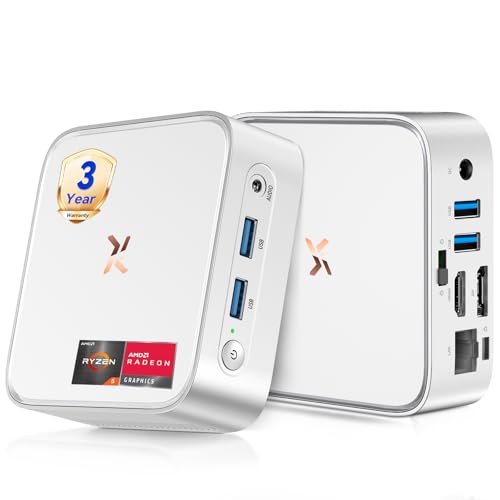
Huidun H80 Mini PC Ryzen 5 3500U 16GB 512GB Silver

Getorli Mini PC Ryzen 5 3501U Triple Display WiFi 6

Dell 23.8″ All-in-One Core Ultra 7 16GB 1TB Touchscreen
Dell 23.8″ All-in-One Core Ultra 7 64GB 2TB Touchscreen
Dell 23.8″ All-in-One Core Ultra 7 32GB 1TB Touchscreen
Dell 23.8″ All-in-One Core Ultra 7 32GB 2TB Touchscreen
Dell 23.8″ All-in-One Core Ultra 7 64GB 1TB Touchscreen
Dell 23.8″ All-in-One Core Ultra 7 64GB 4TB Touchscreen

origimagic C4 SE Mini PC Ryzen 5 3500U 8GB 256GB
ViewSonic VG2441V 24″ 1080p IPS Webcam Monitor
The Details Behind The Selections
The Huidun H80 is the kind of small box you forget is on your desk. It tucks behind a monitor arm or sits under a stack of papers, yet it carries an AMD Ryzen 5 3500U with Radeon Vega 8 graphics, a chip most laptops lean on for real productivity work.
With HDMI and DisplayPort outputs side by side, running two external monitors at 4K 60Hz is straightforward. For a kitchen-office nook or a small apartment setup, that footprint is the selling point.
Everyday Wins
- Ryzen 5 3500U with Vega 8 graphics handles spreadsheets, browser stacks, and light photo edits without breaking a sweat
- Dual 4K 60Hz output through HDMI and DisplayPort keeps both panels sharp
- 16GB of RAM is enough to keep dozens of tabs open on each monitor
- 512GB NVMe SSD boots Windows 11 Pro quickly and stores a generous work library
- WiFi and Bluetooth are built in, so a clean desk needs only power and video cables
Things To Consider
- The integrated Vega 8 graphics will struggle with sustained 3D workloads or modern gaming
- Owners commonly report that the small chassis needs decent ventilation in warm rooms
Feature Snapshot
Right Fit For
Home-office workers and remote staff who want a quiet, compact box that drives two 4K displays without dominating the desk.
A Better Fit Elsewhere
The Dell 23.8″ All-in-One (16GB/1TB) suits shoppers who’d rather skip the box entirely and let the screen and PC share one stand.
The Getorli Mini PC leans hard into the multi-monitor life. Where the Huidun handles two screens comfortably, this one stretches to three, which is unusual at this size class.
WiFi 6 brings faster wireless for crowded networks, and the Ryzen 5 3501U keeps pace with browser-heavy days. For a stock trader setup, a live-stream control room, or a small editing bay, the third panel is the hook.
Where It Excels
- Triple-display support from a single mini PC frees up desk real estate
- 16GB DDR4 RAM is matched to the 512GB PCIe 3.0 NVMe SSD for balanced responsiveness
- WiFi 6 handles congested office networks more cleanly than older radios
Worth Noting
- Three screens at full resolution will tax the integrated graphics during heavy tasks
- Internal storage fills quickly with media files; expansion depends on the specific configuration
- The 3501U sits a hair behind the 3500U in some workloads, which matters for sustained tasks
Who It Suits Best
Power users running chat, dashboards, and creative apps side by side, anyone whose workflow already demands a third panel.
Where Another Pick Suits Better
The Huidun H80 Mini PC is a cleaner two-screen pick for shoppers who don’t need the third output.
All-in-one desktops cut the cable clutter to almost nothing. The Dell 23.8″ puts the screen, the PC, the speakers, and the wireless peripherals on a single stand, leaving room for one extra monitor on the side.
An Intel Core Ultra 7 Series 3 chip with a dedicated NPU (neural processing unit, a chip built to accelerate AI tasks like background blur and on-device assistants) brings real muscle to multi-monitor life. Pair that with 16GB DDR5 RAM and a 1TB PCIe SSD, and most office jobs feel instant.
Key Advantages
- Touchscreen FHD display is genuinely useful for signing documents and quick navigation
- Core Ultra 7 with NPU accelerates AI features in Windows 11 Pro and supported apps
- WiFi 6E and Bluetooth 5.3 keep wireless peripherals stable and quick
- Included wireless keyboard and mouse mean a single power cable is all you need
Trade Offs
- The built-in 23.8-inch screen is the primary display, so you can’t replace it without swapping the whole unit
- Owners commonly note that the stand takes more desk depth than a separate monitor setup
Made For
Anyone who wants a clean front-office look with one tidy tower-screen and a second monitor off to the side.
Skip It When
The Getorli Mini PC is a smarter pick for shoppers who want to keep their existing monitors and skip the touchscreen.
Same chassis, very different interior. The 64GB/2TB version of this Dell AIO exists for the people who never want to think about closing a tab.
For analysts working across a stock feed, a spreadsheet, and a chat window on three panels, the memory headroom changes how the machine behaves. The 2TB SSD also holds large project archives without leaning on external drives.
Practical Advantages
- 64GB DDR5 RAM keeps dozens of browser tabs, dashboards, and Office files resident at once
- 2TB PCIe SSD swallows raw project files, local backups, and media libraries
- Core Ultra 7 NPU handles on-device AI features without slowing down other apps
Points To Note
- The premium configuration is overkill for someone who only needs email and a browser
- The all-in-one form factor still ties upgrades to the screen’s lifecycle
Best Suited To
Data analysts, video editors, and creators running heavy apps across two or three monitors every day.
Look Elsewhere When
The Dell 23.8″ All-in-One (32GB/1TB) is a more measured choice for typical office workloads.
This is the middle child of the Dell AIO family, and it tends to be the smartest buy. 32GB of DDR5 RAM is plenty for two-monitor workflows, and 1TB covers typical office storage without bloat.
For a small business replacing aging desktops, the configuration lands in the zone where the machine feels responsive without overspending on headroom nobody uses.
Noteworthy Benefits
- 32GB DDR5 hits the practical sweet spot for two-monitor office work
- 1TB SSD is enough for project files and a sizeable media library
- Core Ultra 7 NPU keeps AI features snappy without leaning on the cloud
Honest Caveats
- Some buyers find 1TB tight when storing 4K video or large datasets
- External storage becomes necessary as the library grows
Right Fit For
Office teams and freelancers who want a balanced AIO that handles dual monitors without paying for unused headroom.
Swap It Out When
The Dell 23.8″ All-in-One (32GB/2TB) makes more sense for project-heavy professionals with larger file collections.
Same 32GB RAM, but the storage doubles to 2TB. For photographers, video editors, and anyone with a sprawling project folder, that headroom matters more than people expect.
The form factor is identical to the 1TB sibling, so desk footprint doesn’t change. If you already know your files outgrow 1TB quickly, this is the configuration to step up to.
Advantages To Know
- 2TB PCIe SSD keeps large media libraries local without external drives
- 32GB DDR5 RAM handles typical dual-monitor creative workflows
- Touchscreen and wireless peripherals come bundled, no extras to buy
Small Caveats
- The 2TB upgrade is meaningful only if your files actually need it
- All-in-one serviceability is limited compared to a traditional tower
Who Should Grab It
Creative professionals with growing local file collections who want a tidy dual-monitor setup.
Not Your Match When
The Dell 23.8″ All-in-One (32GB/1TB) is the better call for shoppers whose storage needs stay modest.
The inverse of the previous Dell: 64GB RAM with a more modest 1TB SSD. This is the configuration for tab collectors and people who never close anything.
For researchers with reference PDFs, journalists with live feeds, and coders running IDEs, memory matters more than local storage. Cloud storage and external drives pick up the rest.
A Strong Showing
- 64GB DDR5 lets dozens of apps stay resident without sluggishness
- Core Ultra 7 NPU accelerates AI tasks that older chips leave to the CPU
- All-in-one form factor keeps the cable count to one power cord
Things To Weigh
- 1TB SSD requires careful file management for media-heavy users
- The internal configuration can’t be upgraded after purchase
Perfect Match For
Tab-heavy multitaskers, developers, and researchers who live in dozens of open windows at once.
Consider Something Else When
The Dell 23.8″ All-in-One (64GB/4TB) is worth the stretch for anyone who needs both memory and storage.
The top-shelf configuration of the Dell AIO family. 64GB RAM handles any workload you’d reasonably throw at a 23.8-inch screen, and 4TB of SSD storage swallows multi-year project archives.
For media professionals, working analysts, and serious hobbyists with growing libraries, this is the configuration that removes storage from the worry list entirely.
Where It Helps
- 4TB PCIe SSD means years of project files stay local
- 64GB DDR5 RAM supports heavy multitasking across two or three panels
- Core Ultra 7 NPU accelerates on-device AI features in supported apps
Practical Considerations
- The price premium is real, and most shoppers don’t need both 64GB and 4TB
- All-in-one chassis means repairs are tied to professional service rather than DIY upgrades
Who Will Love This
Media pros and analysts who want maximum internal capacity without resorting to external drives.
Reach For A Different Pick When
The Dell 23.8″ All-in-One (32GB/2TB) is a sensible step down for shoppers who don’t need the full memory allotment.
The origimagic C4 SE Mini PC trims the spec sheet down to the essentials. Same Ryzen 5 3500U as the Huidun, but paired with 8GB of RAM and a 256GB SSD for shoppers watching the budget.
For a basic home-office desk, a student setup, or a light dual-monitor workstation, that combo covers the daily load. Heavier multitasking will feel the 8GB ceiling quickly.
The Practical Payoff
- Ryzen 5 3500U gives genuine quad-core performance in a small box
- Integrated Radeon Vega 8 graphics handle dual-display output cleanly
- NVMe SSD keeps boot and app launch snappy
Room For Improvement
- 8GB RAM fills up fast with modern browsers running on two screens
- 256GB storage is tight for media libraries; expect to add external drives
- Owners commonly report that the chassis runs warm under sustained load
Quick Facts
Built With In Mind
Students, light home-office workers, and anyone setting up a basic dual-monitor workstation on a budget.
A Better Fit Elsewhere
The Huidun H80 Mini PC is the stronger step up if 16GB of RAM matters to your daily workflow.
Every mini PC needs a monitor, and the ViewSonic VG2441V pulls extra duty. Built-in 5MP IR webcam, microphone, speakers, and Windows Hello support remove a stack of accessories from the desk.
For video-call-heavy workers, this panel is the missing piece that turns a quiet mini PC into a complete home-office station.
Strong Points
- Built-in 5MP IR webcam supports Windows Hello facial login
- IPS panel gives wide viewing angles for sharing screens during calls
- USB-C, HDMI, and DisplayPort inputs cover most PC connections
- Adjustable ergonomic stand supports height, tilt, and swivel changes
Some Limits To Know
- 1080p resolution is comfortable but not high-DPI; text is sharper on QHD panels
- The built-in microphone is convenient but dedicated mics still sound better
- Privacy shutter on the webcam is handy, but adds a moving part to maintain
Key Product Details
Whose Shelf It Belongs On
Remote workers and hybrid employees who want a second monitor with conferencing features baked in.
Another Choice May Suit When
The Dell 23.8″ All-in-One (16GB/1TB) is a better fit for shoppers who’d rather have the screen and PC integrated.
Matching A Dual-Monitor Setup To Your Workspace
Dual-monitor setups live or die on three specs: the processor, the display outputs, and the cable plan. A modern AMD Ryzen 5 or Intel Core Ultra chip handles two screens comfortably, while weaker CPUs start to drag when both panels are busy with video calls and spreadsheets.
Mini PCs are the quiet champions here. A box like the Huidun H80 hides behind the monitor and runs two 4K displays through HDMI and DisplayPort. All-in-one desktops like the Dell 23.8″ fold the screen and PC into one unit, then offer a second panel through traditional video outputs.
Look closely at RAM. 16GB covers most office work, but 32GB and above give breathing room for tab-heavy browsers and creative apps. Storage matters less than people assume, since cloud drives and external SSDs handle overflow.
Finally, match the monitor to the work. A 1080p IPS panel like the ViewSonic VG2441V is a clean fit for general office use, and built-in webcams remove accessory clutter.
What To Double-Check Before Clicking Buy
The biggest misstep in this category is assuming any modern PC handles dual monitors. Older chips and budget boards sometimes ship with a single display output or share bandwidth between ports. Check the spec sheet for two independent video outputs and confirm both run at the resolution you want.
A second common slip is ignoring the cable plan. HDMI, DisplayPort, and USB-C each behave differently, and adapters can drop your refresh rate or resolution. Match the cable to the monitor’s native input, and skip the bargain-bin adapters when running 4K panels.
Storage is the third trap. A 256GB SSD fills up faster than most shoppers expect once Windows updates, browser caches, and project files pile up. Stepping up to 512GB or larger saves the hassle of adding external drives later.
Frequently Asked Questions
Do mini PCs support two monitors? Most modern mini PCs include HDMI plus DisplayPort or USB-C video outputs, so dual monitors are standard. Confirm the specific model lists two independent video outputs before you buy.
Is 16GB of RAM enough for dual monitors? For office work, browsers, and email across two screens, 16GB handles the load. For heavy multitasking, creative apps, or dozens of tabs, 32GB or more keeps things smooth.
Can an all-in-one desktop drive a second monitor? Yes. Most all-in-one desktops include at least one external video output, typically HDMI or USB-C. The built-in screen serves as the primary display, with the second panel connected through the external port.
Do I need a dedicated graphics card for dual monitors? Integrated graphics on modern Ryzen and Core Ultra chips handle two displays fine for productivity work. Dedicated GPUs become important for gaming, 3D rendering, or video editing across multiple high-resolution panels.
What monitor size pairs well with a second screen? A 24-inch primary with a 24-inch secondary is the classic office pairing. Many shoppers match sizes for a symmetrical look, though a larger primary with a smaller secondary works just as well.
Closing Remarks
The right desktop computer for dual monitors depends on the desk, the workload, and how much cable clutter you can tolerate. Mini PCs keep things compact, all-in-ones keep the front of the desk clean, and a smart monitor choice ties the whole setup together. Match the configuration to the way you actually work, and the second screen earns its place on day one.