A monitor arm quietly does the heavy lifting on a desk. It lifts the screen off the surface, frees up the area underneath, and lets me tilt or swivel the display into a position that actually agrees with my neck. After watching my own neck protest for years, I started caring a lot more about monitor mounts, and this roundup is the result of that obsession.
I focused on three things while putting this list together. Real ergonomics (height range, tilt, swivel, articulation), solid VESA compatibility so a swap-out isn’t painful later, and clamp designs that don’t punish your desktop. Some of these mounts carry ultrawide panels, others hold lighter displays with surgical precision. A couple aren’t full mounts at all, but the kind of accessory that makes an existing mount safer or more useful.
The picks below split naturally into single-arm, dual-arm, triple-arm, freestanding, and accessory categories. There’s a wide spectrum of weight capacities, screen sizes, and mount styles, and I tried to anchor each recommendation to the desk setup it actually fits.
A Closer Look At The Lineup

Bedycoon Mac Mini M4 VESA Mount Bracket

ZANOLY Steel Monitor Mount Reinforcement Plate
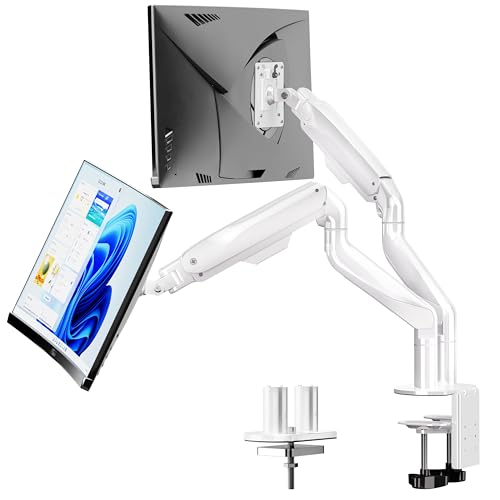
BIZUM Dual Monitor Stand for 17-42 inch Screens

ARES WING Single Gaming Monitor Arm

VIVO STAND-V001O Mechanical Single Monitor Stand

VIVO STAND-V001Q Premium Aluminum Gas Spring Monitor Mount

Rfiver Triple Monitor Mount 17-32 inch VESA

VIVO STAND-V001R Freestanding Touch Screen Desk Stand

Rfiver Single Monitor Arm Desk Mount 17-34 inch

Rfiver Dual Monitor Stand 17-34 inch 22 lbs
What Each Pick Brings To The Table
This Bedycoon bracket isn’t a monitor arm in the traditional sense. It’s a metal cradle that attaches a Mac Mini M4 or M4 Pro to the back of a VESA-compatible display, the underside of a desk, or a wall. For shoppers who already own a monitor arm and want their Mac Mini tucked behind the screen, this is the small piece that makes the whole tidy-desk fantasy actually work.
The fit is specific: the bracket accommodates Mac Mini units up to 12.8 cm long and 5.2 cm thick. That tight tolerance means anyone running an older M1 or M2 Mac Mini needs to look elsewhere. The metal frame also doubles as an anti-scratch buffer, which matters when you’re sliding a several-hundred-dollar mini PC against aluminum or laminate.
The Helpful Details
- Confirmed fit for Mac Mini M4 and M4 Pro (mid-2024 models only)
- Versatile mounting: VESA plate, under-desk, or wall
- Anti-scratch padding protects the Mac Mini finish during install
- Built-in remote holder keeps an Apple Remote within reach
- Metal bracket feels rigid enough to stay put behind a heavy display
Things To Consider
- Strictly limited to the M4 generation, so M1 and M2 owners get nothing here
- Doesn’t include a monitor arm, just the Mac Mini cradle
- Some desk setups may not have clearance behind the display for the bracket
Right Fit For
Shoppers who already own a VESA mount and want their Mac Mini M4 tucked cleanly behind the display without any visible hardware.
Look Elsewhere When
The VIVO STAND-V001R makes more sense if you don’t actually own a Mac Mini M4 and just need a freestanding base for a regular monitor.
Owners of glass or thin desks hit a wall the moment they try to clamp a heavy monitor arm. The C-clamp just digs in, or worse, cracks the surface. The ZANOLY Reinforcement Plate is the unglamorous-but-genius solution: a flat steel plate that spreads the clamp load across a wider footprint.
It works with any standard C-clamp monitor mount, so it slots into the rest of this list without friction. It also makes sense on IKEA-style tabletops and any desk surface where clamping pressure is a real concern.
What Pays Off
- Steel build handles clamp pressure without flexing
- Broad footprint protects glass and thin tabletops from cracking
- Universal fit with most C-clamp monitor arms
Worth Noting
- It’s an accessory, not a mount on its own
- Adds a small amount of desk height under the clamp
- Looks utilitarian next to more polished arms
Quick Facts
Best Suited To
Anyone with a glass or hollow-core desk who wants to use any C-clamp arm without risking the surface.
Swap It Out When
The VIVO STAND-V001R is the better match for shoppers who want a freestanding base with no clamping at all.
The BIZUM dual monitor stand reads like it was designed for the kind of desk where the screens total 60+ pounds and the user expects them to stay put. It supports two 17 to 42 inch displays, flat or curved, at up to 33.1 lbs per arm. For ultrawide or stacked productivity setups, that headroom is the whole point.
The aviation-aluminum construction and dual C-clamp base give it a planted feel. VESA 75x75mm or 100x100mm compatibility covers the vast majority of monitors you’ll see in 2026. Where the Bedycoon mount earlier was an accessory, this one carries real weight.
Strengths Worth Knowing
- Aviation-grade aluminum arms feel stiff under load
- 33.1 lb per arm supports heavier ultrawide panels
- VESA 75×75 and 100×100 covers most modern monitors
- Dual C-clamp base distributes pressure across the desk edge
Minor Gripes
- Size and clamp depth demand a sturdier desk
- White finish shows dust and fingerprints more readily than black
- Bulkier footprint than a single-monitor arm
Whose Shelf It Belongs On
Power users running dual 32 inch or ultrawide monitors who need genuine weight capacity, not a slimline arm that flexes.
Not Your Match When
The Rfiver Dual Monitor Stand fits better for shoppers who need similar dual-arm flexibility on a more compact 17-34 inch screen range.
The ARES WING arm is built around the gaming display market, and the spec sheet makes that obvious. It accepts 24 to 57 inch screens and up to 60 lbs, which covers just about every ultrawide and super-ultrawide panel shipping today. A 60 lb capacity is rare in this category and worth paying attention to for big curved screens.
The aesthetic leans e-sports: streamlined shape, white finish, bold contours. In a battlestation-style setup, that visual language fits. In a quiet office, it might feel louder than necessary.
Where It Excels
- 60 lb capacity carries massive ultrawide panels with room to spare
- 57 inch max screen size covers the largest consumer gaming displays
- Aesthetic matches modern gaming setups
Points To Keep In Mind
- Capacity is overkill for typical 27 inch office monitors
- Single-arm design doesn’t help anyone running two screens
Feature Snapshot
Perfect Match For
Gamers with a single 32 to 49 inch curved display who want one arm to hold it all without wobble.
A Better Fit Elsewhere
The BIZUM Dual Monitor Stand suits shoppers who want to run two monitors instead of one giant panel.
The VIVO STAND-V001O is a mechanical-spring arm, which is the older style compared to the gas-spring designs from VIVO’s own lineup. It accepts 17 to 32 inch screens between 4.4 and 19.8 lbs with standard VESA 75×75 or 100×100 patterns. Think of it as the dependable sedan of monitor arms: not flashy, but it does the job year after year.
The trade-off is that mechanical arms require manual tension adjustment rather than tool-free positioning. For someone who sets their screen once and rarely moves it, that’s fine. For someone who constantly re-tilts, a gas-spring design elsewhere on this list is friendlier.
Positive Points
- Universal 17 to 32 inch screen support covers the common range
- Mechanical spring is known for long-term durability
- VESA 75×75 and 100×100 fits virtually any standard monitor
- Articulating arm allows portrait and landscape positioning
Trade Offs
- Mechanical spring needs manual tension tuning per monitor weight
- Arm extension goes past the desk edge in some setups
- Lower weight cap rules out heavier 32 inch panels
Who Should Grab It
Shoppers who mount once and forget, and want a mechanical arm that’s been in the wild long enough to prove itself.
Consider Something Else When
The VIVO STAND-V001Q gas-spring mount is friendlier for daily height adjustments across the day.
The VIVO STAND-V001Q is the gas-spring sibling to the mechanical V001O above. A gas-spring arm uses an internal pressurized cylinder to counterbalance the monitor, so moving the screen up, down, or sideways feels effortless. That matters in offices where the screen height changes between sitting and standing work.
Fit range is similar (17 to 32 inch screens, 2.2 to 20 lbs, VESA 75×75 or 100×100), and the arm tilts 90 degrees and swivels 90 degrees. Premium aluminum construction gives it a slightly more refined feel than budget gas-spring arms.
Reasons It Performs
- Toolless monitor placement makes daily adjustments painless
- Counter-balanced gas spring holds position without drift
- Aluminum body feels solid compared to plastic gas-spring arms
- Portrait and landscape orientation both supported
A Few Limitations
- 20 lb cap excludes heavier ultrawide displays
- Gas cylinders can lose pressure over many years
- Requires a clamp-friendly desk edge for mounting
Made For
Office professionals who reposition their screen through the day and want a smooth, premium feel under the hand.
Reach For A Different Pick When
The ARES WING Single Gaming Monitor Arm is the better call for anyone running a 40+ inch curved display over 20 lbs.
The Rfiver Triple Monitor Mount is for serious desk real estate. Three 17 to 32 inch displays, each weighing between 4.4 and 19.8 lbs, suspended from one central pole and bracket system. That’s the kind of setup traders, streamers, and content creators rely on, and it takes a specific kind of arm to keep it all stable.
VESA 75×75 and 100×100 compatibility covers the standard panel set. Compared to the dual-arm BIZUM earlier, this one trades per-arm weight capacity for a third screen, so it’s better for lighter panels than heavy ultrawides.
Notable Gains
- Triple-display configuration from a single mount footprint
- VESA 75×75 and 100×100 fits the common panel standard
- Per-arm weight range handles typical 24 to 32 inch monitors
- Frees up significant desk space below the screens
Honest Caveats
- 19.8 lb per arm is below BIZUM’s dual-arm 33.1 lb capacity
- Triple-arm design adds desk-edge space requirements
- Three cables need routing for a tidy result
Feature Card
Who It Suits Best
Traders, editors, or anyone else whose workflow actually uses three screens at once, not as decoration.
Skip It When
The Rfiver Dual Monitor Stand is the cleaner fit for anyone running only two monitors at a desk.
Freestanding monitor stands solve a real problem: clamped arms can’t be used on glass desks, rented desks, or any surface where drilling or clamping is off-limits. The VIVO STAND-V001R drops a heavy base on the desk and rises a single 17 to 32 inch display up to 12 inches of vertical adjustment on a pneumatic arm.
It supports 4.4 to 22 lbs, slightly higher than VIVO’s clamped cousin. The rotating base is genuinely useful for touch screens and shared viewing. For shoppers in shared spaces, this is the no-commitment option.
A Strong Showing
- Pneumatic arm offers smooth height adjustment without tools
- Freestanding base means no desk clamp or grommet required
- Rotating base is ideal for touch screens and shared viewing
- 22 lb capacity supports slightly heavier panels than clamped cousins
Room For Improvement
- Takes up desk footprint rather than mounting over it
- Portrait orientation tops out at 22 inch screens
- Pneumatic cylinders can lose pressure over time
Built With In Mind
Renters, glass-desk owners, or anyone whose workspace forbids clamping who still wants ergonomic height control.
Where Another Pick Suits Better
The ZANOLY Reinforcement Plate plus a clamp arm is a smarter call for shoppers who want the clamp feel without the glass-cracking worry.
The Rfiver Single Monitor Arm covers the sweet spot of single-monitor setups. It fits 17 to 34 inch flat or curved displays, supports 4.4 to 22 lbs per arm, and uses the standard VESA 75×75 or 100×100 patterns. That’s the everyday-office range most people actually live in.
Full-motion adjustability means the screen tilts, swivels, rotates, and slides without much resistance. Compared to the VIVO mechanical arm earlier, this is a more flexible design for people who actually move their monitor around the day.
Bright Spots
- 17 to 34 inch range covers everything most home offices use
- 22 lb capacity handles standard 32 inch panels with room to spare
- VESA 75×75 and 100×100 fits mainstream monitors
- Full-motion design suits active ergonomic setups
Possible Compromises
- Single-arm design doesn’t scale to two-screen users
- 22 lb ceiling rules out heavier ultrawide panels
The Right Fit
Single-monitor home office users who want flexible positioning for a 27 to 32 inch display without overspending.
Not Your Match When
The Rfiver Dual Monitor Stand is the right call for shoppers running two screens side by side.
The Rfiver Dual Monitor Stand mirrors the single-arm version’s screen range but adds a second arm for two-display setups. It accepts 17 to 34 inch screens, holds 4.4 to 22 lbs per arm, and works with the standard VESA 75×75 or 100×100 patterns. For shoppers who need two screens but not three, it lands in the middle of this list comfortably.
Per-arm capacity is identical to the single-arm Rfiver above, so anyone moving up from one screen to two gets a consistent feel. Compared to the heavier-duty BIZUM dual arm earlier, this one trades ultrawide headroom for the 34 inch upper screen size.
Noteworthy Benefits
- Two-arm configuration covers the most common productivity setup
- 17 to 34 inch range per arm fits most modern displays
- VESA 75×75 and 100×100 ensures broad compatibility
- Full-motion adjustment supports ergonomic sitting and standing positions
Some Limits To Know
- 22 lb per arm is below BIZUM’s 33.1 lb heavy-duty option
- Dual-arm footprint needs more desk-edge real estate than a single arm
- Cable management is on the user, not the mount
Who Will Love This
Anyone running two standard 27 to 32 inch monitors for work who doesn’t need to push into ultrawide territory.
Where A Sibling Pick Shines
The BIZUM Dual Monitor Stand handles heavier 32 inch ultrawides where this Rfiver’s per-arm capacity tops out.
Picking The Right Mount For Your Workspace
Choosing between these mounts gets easier once a few key numbers are pinned down. The screen size and weight matter most, then the VESA pattern, then how the arm attaches to the desk.
Screen Size And Weight Capacity
The weight rating on a monitor arm is the single most important spec. A 27 inch monitor often weighs 10 to 15 lbs, a 32 inch panel can hit 20 lbs, and an ultrawide can easily push past 25. Under-speccing is the most common reason mounts sag over time. For shoppers running lighter 24 inch screens, a 19.8 lb arm is plenty. For heavier 32 inch panels or ultrawides, a 33 lb or 60 lb arm is the safer bet.
VESA Patterns Explained
VESA is the standard four-hole mounting pattern on the back of monitors. The two most common sizes are 75x75mm and 100x100mm. Both are covered by every monitor mount on this list. If a monitor has a non-standard pattern, an adapter plate is usually required. Most modern displays already include the right VESA holes, but it’s worth a quick check on the back of the panel before buying.
Clamp, Grommet, Or Freestanding
Clamp mounts grip the desk edge, grommet mounts pass through a hole in the desk, and freestanding stands sit on top. Clamps need a sturdy edge to grip. Grommet mounts look cleaner but require a hole. Freestanding stands like the VIVO STAND-V001R work on any surface, including glass, but take up desk space rather than freeing it.
Adjustment And Ergonomics
A mount’s real value is in how easily the screen moves. Gas-spring arms reposition with one finger. Mechanical-spring arms need manual tuning. Full-motion arms tilt, swivel, and rotate, while fixed arms only raise and lower. For standing-desk transitions, gas-spring is worth the step up.
Common Shopping Slip Ups And Where Premium Pays Off
Mistakes Worth Dodging
The most common mistake is buying an arm rated below the monitor’s actual weight. Manufacturers often list “max capacity” as the absolute ceiling, so operating right at the limit leaves no margin. Another is ignoring the desk-edge thickness required by a clamp. Many desks today have thinner edges than older ones, and a clamp that won’t fit is a clamp that’s going back.
Why Top Tier Costs More
Higher-tier mounts earn their price through better materials (aluminum vs. plastic), smoother mechanisms (gas spring vs. mechanical), and longer warranties. For shoppers who reposition their screen many times a day, the smoother feel is worth the step up. For shoppers who set the screen once and leave it, a budget mechanical arm is a reasonable compromise.
Frequently Asked Questions
What Is VESA Compatibility?
VESA is the standard four-hole mounting pattern on the back of monitors. The two most common patterns are 75x75mm and 100x100mm. Most mounts on this list support both, which covers the vast majority of modern monitors.
Can I Use A Monitor Mount On A Glass Desk?
Standard clamp mounts can crack or chip glass, so a reinforcement plate like the ZANOLY option is the safer path. Alternatively, a freestanding mount like the VIVO STAND-V001R sits on top of the desk with no clamping at all.
How Much Weight Can A Monitor Arm Hold?
It depends on the model. Standard arms in this list hold between 19.8 and 22 lbs per arm. Heavy-duty dual arms like the BIZUM hold 33.1 lbs per arm. Gaming arms like the ARES WING reach 60 lbs.
Do I Need A Gas Spring Or Mechanical Arm?
Gas-spring arms move with one finger and reposition easily throughout the day. Mechanical arms are sturdier long-term but require manual tuning. For users who adjust height often, gas spring wins. For users who set it once, mechanical is fine.
Will These Mounts Work With Ultrawide Monitors?
Some will. The ARES WING arm supports up to 57 inch screens and 60 lbs, and the BIZUM dual arm supports up to 42 inch displays at 33.1 lbs per arm. Standard 22 lb arms are not ideal for heavier ultrawides.
Final Verdict
A good monitor mount turns a desk from a static surface into an adjustable workspace. For most shoppers running a single 27 to 32 inch screen, the Rfiver Single Monitor Arm is the everyday sweet spot. Dual-screen users get the most from the Rfiver Dual Monitor Stand, while gamers running heavy ultrawides should look toward the ARES WING. Glass-desk owners and renters will find the VIVO STAND-V001R saves the day. Pick the arm that matches the screen, and the desk will quietly do the rest.