A reliable desktop doesn’t have to cost a tower’s worth of money. Mini PCs have quietly become the most interesting corner of the budget computing world, packing real multi-core processors, fast solid-state storage, and modern wireless connectivity into boxes small enough to hide behind a monitor. For remote workers, students, casual creators, and anyone tired of a sluggish family laptop, a well-chosen mini PC under $500 can genuinely replace a full-size desktop.
I pulled together ten current options worth a closer look, mixing everyday office picks with machines that lean into heavier multitasking and even some light gaming. The goal is honest trade-off clarity: enough horsepower to feel snappy today, with specs that won’t feel embarrassing in two years.
The Essentials At A Glance
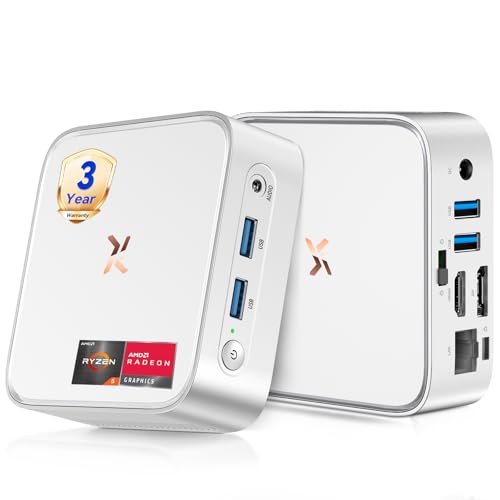
Huidun 2026 H80 Mini PC Ryzen 5 3500U 16GB 512GB (Silver)

Getorli Mini PC Ryzen 5 3501U 16GB 512GB WiFi 6

KAMRUI Hyper H2 Mini PC i7-14650HX 32GB 1TB

GEEKOM NEW IT12 Mini PC i3-12300HE 16GB 256GB
Huidun H50 Mini PC Ryzen 3300U 16GB 512GB

KAMRUI Mini PC Ryzen 7 7735HS 16GB LPDDR5 512GB
KAMRUI Mini PC Ryzen 7530U 16GB 1TB
KAMRUI Hyper H2 Mini PC i5-14450HX 32GB 1TB

C4 SE Mini PC Ryzen 5 3500U 8GB 256GB

KAMRUI Hyper H1 Mini Gaming PC Ryzen 7 7735HS 24GB
The Picks, Examined More Closely
The H80 is the kind of machine that quietly disappears behind your monitor and just gets on with the job. A quad-core, eight-thread Ryzen 5 3500U with Radeon Vega 8 graphics pushes the burst clock up to 3.7 GHz, which translates to smooth spreadsheets, snappy browser tabs, and competent 4K video playback.
Out of the box you get Windows 11 Pro, 16GB of RAM, and a 512GB SSD (a solid-state drive, meaning no moving parts and faster boot times than a traditional hard disk). For most desks, that’s a ready-to-go setup with no immediate upgrade anxiety.
Everyday Advantages
- Ryzen 5 3500U comfortably handles office suites, dozens of browser tabs, and 4K streaming side by side.
- HDMI plus DisplayPort outputs support a dual-monitor workspace for anyone running spreadsheets next to email.
- 16GB of RAM is the practical sweet spot for 2026 software, so multitasking doesn’t bog down.
- Wi-Fi and Bluetooth built in keep cable clutter to a minimum on a clean desk.
Points To Keep In Mind
- The integrated Vega 8 graphics handle light games fine but are not built for sustained AAA gaming sessions.
- The compact chassis can run warm under continuous heavy loads, so airflow around the unit matters.
Feature Snapshot
Best Suited To
Remote workers, students, and family households that need a reliable daily-driver PC with enough muscle for occasional creative work.
Consider Something Else When
Anyone who regularly renders video or runs many virtual machines will want the KAMRUI Hyper H2 i7-14650HX instead for the extra cores.
Where the Huidun H80 leans on dual displays, this Getorli pushes into triple-monitor territory. The Ryzen 5 3501U is closely related to the 3500U but pairs with Wi-Fi 6, the newest generation of wireless networking, which means faster and more stable connections on crowded home networks.
It’s a tidy choice for anyone whose work revolves around multiple windows spread across three panels: traders, editors, customer-support agents, and the rest of us who just like seeing everything at once.
Key Advantages
- Triple-display support turns a small box into a real productivity command center.
- Wi-Fi 6 delivers steadier throughput when a dozen devices share the same router.
- Same generous 16GB and 512GB pairing as the Huidun, so day-to-day feel is familiar.
Things To Consider
- Three monitors at native resolution may demand a slightly heavier GPU than this integrated graphics offers for video-heavy workflows.
- Storage expansion is possible, but you’ll want to confirm the M.2 slot is accessible before opening the case.
Whose Shelf It Belongs On
Power users with multi-monitor desks, especially anyone working in spreadsheets, dashboards, or chat-heavy customer roles.
Look Elsewhere When
Gamers chasing higher frame rates should jump to the KAMRUI Hyper H1 Mini Gaming PC for its Radeon 680M graphics.
This is the mini PC for people who keep saying “real computers don’t come in small boxes.” The Core i7-14650HX belongs to Intel’s HX family, a line of high-power processors typically found in gaming laptops, with sixteen cores and twenty-four threads that can boost to 5.2 GHz. Compared with the Ryzen 5 chips earlier in this list, that’s a serious step up.
Paired with 32GB of memory and a 1TB PCIe 4.0 SSD (the latest generation of NVMe storage, doubling bandwidth over PCIe 3.0), it stays composed under video edits, large datasets, and serious multitasking. The trade-off is heat and fan noise under load, which is the price of squeezing desktop-class silicon into a tiny enclosure.
The Upside
- Sixteen-core HX chip handles sustained heavy workloads that would humble most mini PCs.
- 32GB RAM future-proofs the system for memory-hungry creative software.
- 1TB PCIe 4.0 SSD keeps read and write speeds high enough for direct 4K editing.
Honest Caveats
- Fan noise ramps up under sustained load, something to consider for quiet offices.
- Power draw is higher than Ryzen 5 alternatives, so running costs add up over time.
Quick Facts
Who Should Grab It
Content creators, developers compiling large projects, and analysts working with big spreadsheets who need real workstation grunt.
Reach For A Different Pick When
Casual users who mostly browse and stream will find the KAMRUI Ryzen 7 7735HS a quieter, cooler alternative with still-plenty of power.
GEEKOM has built a reputation for tightly engineered mini PCs, and the IT12 is a textbook example. The i3-12300HE is an unusual chip: a hybrid efficiency-mobile processor that outperforms some older i5 parts in benchmarks, with eight cores and twelve threads ready for modern workloads.
The 256GB SSD is on the lighter side, so this is a machine for people whose lives live in the cloud or on a network drive. For a clean, minimalist desk with little footprint and quiet operation, it earns its place.
Notable Gains
- Compact chassis vanishes into a small workspace or behind a VESA-compatible monitor mount.
- Eight-core i3 punches above its name in real benchmarks, edging past older i5 mobile chips.
- UHD graphics with AV1 decoding (a modern video format that streams efficiently) handle streaming playback smoothly.
Some Limits To Know
- 256GB of storage fills up quickly with local files, so external or network storage becomes essential.
- Higher-end creative software may eventually feel the squeeze of the modest SSD.
Built With In Mind
Minimalists, remote workers tied to cloud apps, and anyone furnishing a tidy home office with limited desk space.
Swap It Out When
Users with large local media collections should look at the KAMRUI Ryzen 7530U with its roomier 1TB SSD.
The H50 is the slightly calmer sibling of the H80, swapping the Ryzen 5 3500U for a Ryzen 3 3300U while keeping the same generous 16GB and 512GB pairing. For standard office work, browser-heavy workflows, and Linux-based setups, the difference in everyday feel is modest.
What makes this one stand out is the three-year warranty that ships with the unit. For business buyers outfitting a small office or a school computer lab, that longer coverage window can matter more than the last few percentage points of processor speed.
Well-Handled Touches
- Three-year warranty outpaces the typical one-year coverage found on most mini PCs in this bracket.
- Windows 11 Pro is preinstalled and supports Linux and Ubuntu for users who prefer open-source systems.
- HDMI plus DisplayPort dual outputs handle a standard two-monitor setup cleanly.
Worth Noting
- The Ryzen 3 3300U is a step behind the 3500U in multi-threaded tasks, so heavy workloads will feel it.
- For users planning to keep the machine five-plus years, the warranty is a real perk worth highlighting to procurement teams.
The Right Fit
Small businesses, schools, and any office where long-term reliability and warranty support matter as much as raw speed.
A Better Fit Elsewhere
Anyone regularly running demanding creative software should pick the Huidun H80 instead for the stronger Ryzen 5 silicon.
Stepping up from the Ryzen 5 options earlier in the list, this KAMRUI brings an eight-core, sixteen-thread Ryzen 7 7735HS with a 4.75 GHz boost clock. For users who felt the Ryzen 5 chips were “good enough, mostly,” this is where headroom starts to matter.
The LPDDR5 memory (the newest generation of laptop-grade RAM, soldered for efficiency rather than upgradability) runs faster than the DDR4 in many rivals, which helps during heavy multitasking. There’s a catch: that speed comes at the cost of user-replaceable RAM, so this is a system to spec correctly at purchase.
What Pays Off
- Eight cores and sixteen threads keep large browser sessions and parallel apps feeling responsive.
- LPDDR5 memory offers noticeably snappier feel when juggling dozens of browser tabs.
- The HS suffix means better sustained performance than typical U-series chips during longer tasks.
Practical Considerations
- RAM is soldered and not user-upgradable, so picking the right capacity at checkout matters.
- More capable silicon means higher surface temperatures during gaming or rendering.
Feature Card
Who Will Love This
Power users and hobbyist creators who want one of the strongest CPU options in the mini-PC category at this price point.
Not Your Match When
Gamers wanting integrated graphics muscle should consider the KAMRUI Hyper H1, which pairs the same chip with the Radeon 680M GPU and more memory.
Storage anxiety is real, and the Ryzen 7530U version of the KAMRUI addresses it directly: a full 1TB SSD, double the typical allocation in this price range. For households juggling photo libraries, downloaded videos, or a Steam backlog, that breathing room matters day to day.
The 7530U sits in the comfortable middle of AMD’s mobile line, similar in feel to the Ryzen 5 3500U but with refinements to power efficiency. It’s the kind of machine that works fine today and will still feel responsive in three.
Real Benefits
- 1TB SSD means fewer decisions about what to keep and what to offload.
- Ryzen 7530U balances everyday performance with low power draw, helping keep heat and noise modest.
- 16GB of memory matches most of the higher-priced competitors on this list.
Factors To Consider
- Raw CPU performance trails the Ryzen 7 7735HS in heavier creative workflows.
- Larger storage drives can ship with slower NAND (the underlying flash memory) than premium alternatives, so verify transfer speed expectations.
Perfect Match For
Families and creators with growing local media collections who want a roomy, balanced machine out of the box.
Where Another Pick Suits Better
Anyone pushing hard CPU-bound workloads should consider the KAMRUI Ryzen 7 7735HS for the extra cores.
For tab-hoarders and power users who treat their browser like an operating system, 32GB of RAM is the new sanity threshold. The i5-14450HX sibling to the earlier i7 model delivers that, alongside a 1TB PCIe 4.0 SSD, with a slightly trimmed core count.
It’s a strong middle-ground: enough cores for most professional software, more memory than almost anyone in this bracket offers, and storage headroom for serious local projects. Worth a close look from anyone who’s been burned by running out of RAM at the worst possible moment.
Features That Help
- 32GB of RAM handles extreme browser workloads, IDEs (software development environments), and virtual machines without paging (swapping data to the slower SSD when RAM fills up).
- HX-class chip keeps performance steady during longer, sustained workloads.
- 1TB fast SSD means project files load without bottlenecks.
Worth Bearing In Mind
- Fewer cores than the i7-14650HX sibling, so heavily parallel tasks may finish slightly slower.
- Higher capacity configurations often run warmer due to denser memory chips.
Made For
Developers, analysts, and researchers who need generous memory and storage more than maximum core counts.
Skip It When
Casual users will find more value in the simpler Ryzen 5 options like the Huidun H80, with money left for a better monitor.
The C4 SE from origimagic trims the spec sheet to its essentials: the same proven Ryzen 5 3500U found in the Huidun H80, but paired with 8GB of RAM and a 256GB SSD. For users whose computers mostly handle email, video calls, and a web browser, that’s plenty.
The reduced memory and storage are the obvious trade-offs, but the processor still punches well above its weight, and the integrated Radeon Vega 8 graphics handle 4K streaming just fine. This is a starter box, not a compromise box.
The Case For It
- Same capable Ryzen 5 3500U as higher-priced competitors in this list.
- Lower cost leaves room in the budget for a better monitor, keyboard, or peripherals.
- Auto Power On and Wake-on-LAN (remote boot features for IT and home-server use) features make it useful as a small home server or media box.
Things To Weigh
- 8GB of RAM is the modern minimum, so heavy multitaskers will feel the limit quickly.
- 256GB of storage demands more cloud or external drive reliance than the roomier options.
Right Fit For
Light users, senior family members, first-time PC owners, and anyone setting up a secondary workstation on a tight budget.
Another Choice May Suit
Shoppers wanting the same processor with more headroom should pick the Huidun H80 with its 16GB and 512GB configuration.
The Hyper H1 closes out this roundup on a high note, combining the Ryzen 7 7735HS with Radeon 680M integrated graphics. That GPU is the strongest integrated option AMD offers in this class, capable of real 1080p gaming in many modern titles at sensible settings.
Add 24GB of fast LPDDR5 RAM at 5500MT/s, triple 4K display support, and 2.5G wired networking (faster than the typical gigabit Ethernet port), and you’ve got a compact box that can moonlight as a gaming PC, a media server, and a productivity machine. It’s the most versatile pick on this list.
Noteworthy Benefits
- Radeon 680M graphics deliver playable frame rates in many modern games at 1080p.
- Triple 4K display output turns the box into a serious content-creation or trading setup.
- 2.5G LAN plus Wi-Fi 6 cover both wired and wireless high-throughput needs.
Potential Sticking Points
- AAA gaming at max settings still demands a dedicated GPU, which no mini PC in this price range offers.
- High specs in a small chassis mean sustained gaming sessions will heat up the room.
Made For
Casual and mid-range gamers, streamers, and hybrid users who want one machine for work and entertainment.
Look Elsewhere When
Pure office users can save money with the Huidun H80 and skip the gaming-focused silicon and extra RAM.
What To Weigh Before Picking A Mini PC Under $500
Processor Generation And Core Count
A modern quad-core chip handles everyday office work with room to spare, but eight cores unlock smoother multitasking and longer-term headroom. For most people reading this list, anything from a Ryzen 5 3500U upward is comfortable; Ryzen 7 7735HS or Intel HX-class chips are worth it when software stacks grow heavy. The honest read: a slightly older generation with more cores usually beats a newer chip with fewer threads for real-world productivity.
Memory And Storage Reality
Sixteen gigabytes of RAM is the practical sweet spot in 2026. Eight gigabytes feels limiting once you keep more than a couple of dozen browser tabs alive, while 32GB only matters for developers, analysts, and creators running heavy applications. Storage is similar: a 512GB SSD handles most households comfortably, but anyone storing local video, photos, or game libraries will appreciate the 1TB configurations like the KAMRUI Ryzen 7530U.
Connectivity That Matches Your Setup
Count your monitors before you buy. Dual-display support covers most desks, but triple-display productivity setups need explicit support. Wi-Fi 6 has become common enough to expect, and 2.5G wired networking is a real perk for anyone moving large files on a home network. Bluetooth saves a USB port for keyboards, mice, and headphones.
Size, Noise, And Thermals
Mini PCs trade chassis space for cooling capacity. The smaller the box, the more likely the fan is to ramp up under load. For quiet offices or bedroom setups, look for chips with lower TDP (Thermal Design Power, the wattage a chip is designed to consume under load), like the Ryzen 5 3500U. For heavier workloads, expect some fan noise and keep a few inches of clearance around the unit.
Key Considerations Across These Picks
Common Shopping Slip Ups
The most common regret I see with budget mini PCs is underestimating storage. A 256GB SSD sounds roomy until operating system updates, applications, and media files pile up. Equally common is choosing a chip with too few cores for software that will grow more demanding over the next three years. Spec a little above today’s need; the machine will feel newer for longer.
What The Higher Tier Buys
Stepping up to Ryzen 7 or Intel HX-class chips buys sustained performance under load. That’s the difference between a machine that stays snappy through year three and one that starts feeling sluggish when you keep more browser tabs or applications open at once. Higher tiers also bring faster memory standards, more storage, and sometimes better wireless and wired connectivity, all of which compound into a noticeably smoother daily experience for users who push their machines hard.
Frequently Asked Questions
Are Mini PCs Powerful Enough For Office Work?
Yes. A modern Ryzen 5 or Intel i3-based mini PC handles documents, spreadsheets, video calls, and dozens of browser tabs with the same ease as most full-size office desktops. The Huidun H80 and GEEKOM IT12 are good examples of that comfortable middle ground.
Can A Budget Mini PC Handle Light Gaming?
Several can, especially those with Radeon Vega 8 or Radeon 680M integrated graphics. The KAMRUI Hyper H1 is the strongest gaming-oriented pick on this list. For AAA gaming at high settings, a dedicated GPU remains necessary.
How Long Will A Mini PC Under $500 Stay Relevant?
Realistically three to five years for everyday tasks, depending on workload. Choosing 16GB of RAM and a recent-generation processor like the Ryzen 7 7735HS or Intel HX series buys the longest useful life.
Is Windows 11 Pro Necessary Over Home?
For most home users, Windows 11 Home is sufficient. Windows 11 Pro adds features like BitLocker encryption and Remote Desktop, which matter for business deployments and security-conscious shoppers, like the Huidun H80 and H50.
Do Mini PCs Need Much Maintenance?
Not really. The solid-state drives have no moving parts, so failure rates are low. The main task is keeping the vents clear of dust every year or so, especially in homes with pets or smokers.
The Takeaway
A mini PC under $500 in 2026 can genuinely replace a traditional desktop for most people. The Huidun H80 stands out as the most balanced everyday pick, the KAMRUI Hyper H2 i7-14650HX earns its place for heavy workloads, and the Hyper H1 rounds things out for casual gaming and entertainment. Match the machine to the way you actually use a computer, not the spec sheet that looks flashiest, and the experience will stay solid for years to come.