I’ve spent years setting up home offices, small studios, and student desks, and the shift toward small-form-factor machines has changed what a “desktop” looks like. The right pick in this category can free up desk space, run a triple-monitor trading setup, or push high-frame-rate games at 1440p without a hulking tower. The wrong one leaves you bottlenecked on RAM or stuck with a chassis that runs hot under load. I put this list together to help match real-world workflows to the right hardware tier, from entry-level home PCs to AI-ready workstations.
How The Shortlist Stacks Up

STORMCRAFT Sirius AI Gaming Desktop, Intel i5 14400F, Arc B570 10GB
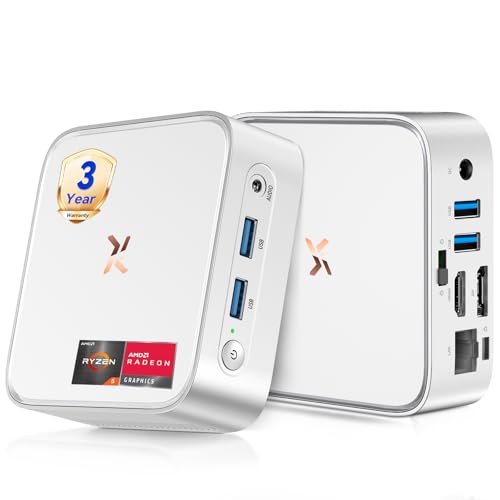
Huidun H80 Mini PC Ryzen 5 3500U, 16GB RAM, 512GB SSD

GEEKOM IT15 AI Mini PC, Intel Ultra 9 285H, 32GB DDR5, 1TB SSD
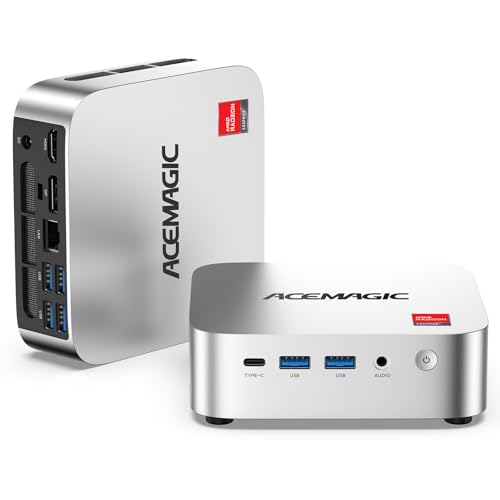
ACEMAGIC K1 Mini PC AMD Ryzen R2544, 8GB DDR4, 256GB SSD

ACEMAGIC K1 Mini PC Windows 11 Pro, Ryzen R2544, 8GB DDR4

ACEMAGIC Mini PC, Ryzen 7330U, 16GB DDR4, Triple 4K

HP EliteDesk 800 G5 SFF, Intel Core i5, 32GB DDR4, 1TB SSD
GEEKOM AX8 Max Silent Mini PC, Ryzen 7 8745HS, 16GB DDR5
GEEKOM IT13 MAX Mini PC, Ultra 9 185H, 24GB RAM, 500GB SSD

GEEKOM IT13 MAX AI Mini PC, Ultra 9 185H, 24GB LPDDR5
Inside Each Recommended Option
The STORMCRAFT Sirius sits in a category most mini PCs in this list don’t touch: real gaming-grade graphics in a recognizable tower. The Intel Arc B570 with 10GB of GDDR6 video memory is the kind of allocation that handles 1440p textures without choking, and the 14th-gen Core i5 14400F (a CPU without integrated graphics, paired here with the Arc card) keeps frame pacing steady in modern shooters.
For a gamer with a 1440p monitor and a Steam library to feed, the value case writes itself. Where the Huidun H80 below is built for spreadsheets, this is built for ray tracing and high refresh rates. The trade-off shows up in the chassis footprint: it’s a true mid-tower, not a palm-sized box, so it wants a real desk rather than a monitor arm.
Bright Spots
- Intel Arc B570 with 10GB GDDR6, real headroom for 1440p gaming
- 14th-gen i5 14400F, 10 cores and 16 threads keep streaming software responsive
- 16GB DDR4 RGB memory, enough for game plus browser plus chat without a swap
- 1TB NVMe SSD, faster level loads and generous install space for a Steam backlog
- VR-ready label, a headset-friendly GPU bandwidth ceiling
Things To Consider
- Mid-tower size; not a fit for cramped studio desks that favor the GEEKOM or Huidun mini builds
- Intel’s Arc driver maturity is a watch-item: some titles historically need a fresh driver drop
- RGB memory and case lighting add a small bit of noise ownership; owners commonly report a learning curve on tuning the lighting software
Feature Snapshot
Made For
Mid-range PC gamers targeting 1440p who want a turnkey tower without building one themselves.
Consider Something Else When
The Huidun H80 Mini PC suits shoppers who need a silent 4K office machine rather than a gaming rig.
The Huidun H80 is the kind of small box that disappears behind a monitor, yet the AMD Ryzen 5 3500U inside handles real office work. With Radeon Vega graphics integrated into the chip, this little unit pushes a 4K display at 60Hz through HDMI or DisplayPort, which makes it a serious candidate for a dual-monitor home setup.
The 16GB of RAM is generous for this class, and the 512GB SSD keeps boot times and project loads snappy. Compared to the STORMCRAFT tower above, the H80 gives up gaming grunt for a footprint that fits on a shelf. It’s a better pick for the work-from-home crowd than any of the gaming-flavored options on this list.
The Case For It
- Ryzen 5 3500U with Radeon Vega 8 integrated graphics for 4K@60Hz output
- 16GB RAM, comfortably above the 8GB baseline for Windows 11 Pro multitasking
- Compact silver chassis that mounts behind most VESA-compatible monitors
- HDMI plus DisplayPort plus USB 3.2, flexible dual-monitor wiring out of the box
Trade Offs
- Integrated graphics cap modern 3D gaming well below 1080p on demanding titles
- 256GB-class storage on the smaller sibling; this 512GB config is a wiser pick but still tight for video libraries
- Fan noise rises under sustained load, owners commonly note it during long compile jobs
Right Fit For
Remote workers, students, and small-business owners who want a tidy 4K dual-monitor setup without a tower.
Look Elsewhere When
The ACEMAGIC K1 with Ryzen R2544 is a more economical pick for shoppers who don’t need 16GB of RAM out of the gate.
The GEEKOM IT15 is what happens when a mini PC is built for boardrooms, not bedrooms. The Intel Core Ultra 9 285H is a 16-core chip with a neural processing unit (NPU) rated for 99 TOPS, which is shorthand for on-device AI acceleration that runs without sending data to the cloud. Pair that with 32GB of DDR5 and you have headroom for dense spreadsheets, code compilation, and AI-assisted workflows.
The catch, where the Huidun H80 stays friendly, is that this is enterprise-class hardware aimed at fleet deployments. For a digital signage network, a financial trading floor, or a multi-monitor reception desk, the IT15’s quad-display 8K capability and WiFi 7 are genuinely useful. For a casual home user, much of that power sits idle.
The Value In It
- Intel Core Ultra 9 285H with 99 TOPS NPU for local AI workloads
- 32GB DDR5 memory, the sweet spot for virtualization and large datasets
- Quad 8K-capable display outputs, real estate for a four-monitor trading or operations desk
- WiFi 7 connectivity, the latest wireless standard for low-latency network setups
Where It May Fall Short
- Premium pricing reflects enterprise positioning rather than home-PC value
- Arc 140T integrated graphics don’t match the STORMCRAFT’s discrete GPU for gaming
- Software stack that takes advantage of 99 TOPS NPU is still emerging in 2026
Best Suited To
IT decision-makers and operations teams deploying multi-display workstations across offices, retail floors, or clinics.
A Better Fit Elsewhere
Shoppers wanting AI acceleration in a smaller package should consider the GEEKOM IT13 MAX below, which trims cost while keeping the Ultra 9 silicon.
Entry-level doesn’t have to mean underpowered, and the ACEMAGIC K1 with the AMD Ryzen R2544 is a case in point. The embedded Ryzen chip runs four cores and eight threads, with a boost clock up to 3.7GHz, so it handles web apps, document editing, and 4K video playback with the same ease as much pricier silicon from a generation ago.
Where this machine earns its place on the list is at the kitchen counter, the kid’s homework station, or a reception desk where the workload is email, browser tabs, and the occasional stream. It’s the most affordable ticket in this roundup to a true x86 Windows 11 Pro experience, though the 8GB of RAM is the kind of figure that asks a careful look at how many browser tabs you keep open.
Positive Points
- Ryzen R2544 with integrated Radeon graphics, 4K video decode and light photo work
- 256GB SSD, faster than the spinning drives still found in budget towers
- Compact K1 chassis, fits beside a monitor without a dedicated shelf
A Few Limitations
- 8GB DDR4 is the floor for Windows 11; multitasking power users will feel the squeeze
- 256GB storage fills up fast with Windows updates and a photo library
- No discrete graphics option, so this is firmly a productivity box
Spec Overview
Who It Suits Best
First-time desktop shoppers, light home users, and small businesses equipping a single-task reception or POS station.
Swap It Out When
Shoppers who want 16GB of RAM out of the box for serious multitasking should pick the ACEMAGIC Mini PC with the Ryzen 7330U.
This sibling to the K1 above swaps Windows 11 Home for Windows 11 Pro, which is a meaningful distinction for anyone managing a small network. BitLocker device encryption, Remote Desktop hosting, and Group Policy editing all live in the Pro tier, and the R2544 chip with 8GB of RAM runs them comfortably for a single user or a kiosk.
The honest read is that this is the same silicon as the prior ACEMAGIC K1, with a different OS skin. Where it earns its slot is for a shop owner who wants Pro features without paying the GEEKOM IT15’s enterprise price.
Features That Help
- Windows 11 Pro pre-installed, no upgrade license needed for BitLocker or RDP
- Quad-core, eight-thread Ryzen R2544 holds up under document and spreadsheet load
- Dual memory slots for a future RAM bump, helpful on a tight storage tier
Honest Caveats
- 8GB of RAM is again the bottleneck if you keep many browser tabs and Excel sheets open at once
- 256GB SSD fills quickly for a Pro machine used for project files
Whose Shelf It Belongs On
Small-business owners and IT hands who want Pro-tier Windows features on a small-form-factor budget.
Not Your Match When
The HP EliteDesk 800 G5 below is a better fit for offices that need a tower-style chassis with a bundled keyboard and mouse.
The ACEMAGIC Mini PC with the AMD Ryzen 7330U is the sleeper hit of this roundup. The 7330U is a power-efficient chip that draws just 28 watts, so the cooling system runs quiet, but it still boosts up to 4.3GHz when a workload spikes. For a triple-4K trading or content creation desk, that’s the kind of ratio that matters.
Sixteen gigabytes of DDR4 and three independent 4K display outputs make this the most practical multitasking box on the list. The catch, where the STORMCRAFT’s discrete GPU takes the win, is that the integrated Radeon graphics aren’t a serious gaming GPU. For spreadsheets, video calls, and creative apps, this is a strong, quiet fit.
Reasons It Performs
- Ryzen 7330U at 28W TDP, low heat and quiet fans under sustained load
- 16GB DDR4, real multitasking headroom for browsers plus Office plus chat
- Triple 4K display support, native multi-monitor productivity without a docking station
Soft Spots
- 256GB storage is again a tight allocation for media-heavy users
- Integrated graphics rule out AAA gaming at high settings
Core Details
Perfect Match For
Trading desks, financial analysts, and content creators who need a quiet, cool-running machine driving multiple 4K panels.
Reach For A Different Pick When
Gamers who need real GPU horsepower should move up to the STORMCRAFT Sirius tower.
The HP EliteDesk 800 G5 in small form factor (SFF) is a familiar sight in corporate offices, and the 32GB RAM plus 1TB SSD configuration makes it a turnkey replacement for aging office towers. The included keyboard and mouse, plus Windows 11 and built-in WiFi, mean a small business can plug in a monitor and have a working desk in minutes.
For shoppers comparing this to the GEEKOM IT15 above, the honest trade-off is silicon age versus storage size. The EliteDesk’s Core i5 holds up well for office suites, but it’s a previous-generation chip without an NPU. Where this machine wins is the 1TB SSD, a generous allotment for a workstation-class refurb.
Good Reasons To Consider
- 32GB DDR4, double the RAM of most mini PCs in this roundup at a similar spend
- 1TB SSD, ample local storage for documents, project files, and archived media
- SFF chassis with DisplayPort, fits a corporate monitor setup without adapters
- Bundled keyboard and mouse, no extra accessory run
Points To Note
- Refurbished enterprise hardware: cosmetic wear is widely reported and varies unit to unit
- Previous-generation Intel Core i5 architecture trails the GEEKOM Ultra 9 silicon in single-threaded speed
Who Should Grab It
Offices replacing aging Dell or HP towers who want a known quantity with plenty of RAM and storage out of the box.
Skip It When
The GEEKOM AX8 Max below is a better fit for studios wanting modern Ryzen 7 silicon in a smaller enclosure.
The GEEKOM AX8 Max leans into the “silent” part of its name without giving up the silicon. The AMD Ryzen 7 8745HS is an eight-core, 16-thread mobile chip that pushes up to 4.9GHz under load, and it’s paired with DDR5 memory, which is faster and more power-efficient than the DDR4 used in the ACEMAGIC line above.
For a recording booth, a quiet home editing suite, or any space where a tower’s hum is unwelcome, this is the right shape of machine. Compared to the HP EliteDesk, the AX8 trades expandability for silence, and the lack of a discrete GPU keeps the cooling minimal.
What It Does Well
- Ryzen 7 8745HS with eight cores, real performance in a quiet thermal envelope
- 16GB DDR5, faster memory bandwidth than the DDR4-equipped picks above
- 1TB SSD, generous primary storage for a creator’s working set
- Whisper-quiet cooling, fit for recording and broadcast environments
Where It Is Less Suited
- No discrete GPU option, so high-frame-rate gaming isn’t the use case
- Soldered or limited RAM expansion on some GEEKOM mini lines, worth checking before purchase
Who Will Love This
Audio editors, podcast studios, and content creators who need strong CPU performance without fan noise on the recording.
Another Choice May Suit
The GEEKOM IT13 MAX is a better pick for shoppers who want Intel’s AI Boost NPU for on-device AI tasks.
The GEEKOM IT13 MAX with Intel’s Core Ultra 9 185H is a flagship-class chip in a mini PC body, with 16 cores and 22 threads boosting up to 5.1GHz. The 24GB of RAM is a useful middle ground between the IT15’s 32GB and the ACEMAGIC line’s 16GB, and the 500GB SSD is upgradeable down the road.
For a video editor running 4K timelines, or a developer compiling large projects, the IT13 MAX puts workstation-class silicon on a small desk. The Intel Arc graphics plus the AI Boost NPU accelerate creative apps and local AI inference. Where it trails the GEEKOM IT15 is memory ceiling; for some workloads, 32GB is the difference-maker.
Strong Points
- Intel Core Ultra 9 185H, 16 cores and 22 threads with AI Boost NPU
- 24GB RAM and a 500GB SSD that owners can swap for larger storage
- Compact mini PC form factor with desktop-class CPU performance
A Few Limitations
- 500GB base storage requires an immediate upgrade for video editors with active projects
- Intel Arc integrated graphics won’t match a discrete GPU for AAA gaming
At A Glance
Built With In Mind
Video editors, AI tinkerers, and developers who want workstation power without a full tower on the floor.
Where A Sibling Pick Shines
Shoppers who want the maximum memory headroom should consider the GEEKOM IT15 with 32GB of DDR5.
The GEEKOM IT13 MAX AI is positioned as a flagship AI workstation, and the silicon backs that up. Intel’s Core Ultra 9 185H with 16 cores, the AI Boost NPU, and 24GB of LPDDR5 (a faster, lower-power RAM standard) deliver workstation-class throughput in a mini PC shell. For film production, automotive simulation, or medical imaging, this is the kind of box that earns its slot on the spec sheet.
For most home users, the IT13 MAX is overkill, and the ACEMAGIC K1 or Huidun H80 cover daily work at a fraction of the cost. Where this machine earns its place is in a high-compute deployment where the AI NPU and fast LPDDR5 memory meaningfully accelerate a real workflow.
Notable Upsides
- Intel Core Ultra 9 185H, flagship-class performance with AI acceleration
- 24GB LPDDR5, faster and more efficient than standard DDR4/DDR5 modules
- Compact form factor, fits a creative studio or lab bench where towers are unwelcome
Points To Keep In Mind
- 500GB base storage is tight for raw video and large simulation datasets
- Premium positioning; budget shoppers get more value from the ACEMAGIC Ryzen 7330U model
The Right Fit
AI creative studios, medical imaging teams, and R&D groups who need workstation compute in a small chassis.
Reach For A Different Pick When
Shoppers wanting balanced home use should consider the Huidun H80, which delivers everyday 4K office work at lower spend.
Choosing The Right Desktop Windows Computer For Your Setup
Picking a desktop in 2026 is less about chasing a single number and more about matching the silicon to the workload. A 4K home office has very different demands from a 1440p gaming rig or a multi-display trading desk, and the right pick threads the needle between power, noise, footprint, and budget.
CPU Cores And Real Workloads
For browser-heavy office work, a 4-core, 8-thread chip like the Ryzen R2544 in the ACEMAGIC K1 is plenty. For 4K video editing, AI workloads, or compiling large codebases, the 16-core Intel Core Ultra 9 in the GEEKOM IT15 and IT13 MAX earns its premium. TDP (thermal design power) also matters: a 28W chip like the Ryzen 7330U runs cooler and quieter than a 148W part.
Memory And Storage Headroom
8GB of RAM is the floor for Windows 11 in 2026, and 16GB is the practical minimum for comfortable multitasking. For creative work, 24GB or 32GB is the sweet spot. Storage is similar: a 256GB SSD fills up fast, and 512GB or 1TB is the realistic baseline for a working machine with a photo or project library.
Discrete GPU Versus Integrated Graphics
If the workload is spreadsheets, browsers, and 4K video, integrated Radeon or Arc graphics are enough. The moment a shopper wants serious 1440p gaming or GPU-accelerated AI training, a discrete GPU matters, and the STORMCRAFT Sirius with its Arc B570 is the only tower in this list that delivers that.
Form Factor And Connectivity
Mini PCs like the GEEKOM and ACEMAGIC line disappear behind a monitor but limit expandability. Small form factor towers like the HP EliteDesk 800 G5 add room for a discrete GPU or extra storage later. Ports matter too: HDMI, DisplayPort, USB 3.2, and the latest WiFi 7 (in the GEEKOM IT15) change how a desk gets wired.
Key Considerations Across These Picks
Common Shopping Slip Ups
The most frequent mistake I see is underestimating RAM, then hitting a wall when too many browser tabs and Office files are open at once. In 2026, 8GB is tight, 16GB is comfortable, and 32GB is the right answer for any creative or development workload. A second slip is buying a mini PC expecting discrete gaming performance; integrated graphics handle 4K video and light creative work, but they aren’t gaming GPUs. The STORMCRAFT Sirius is the only pick in this roundup with a real gaming-class discrete GPU.
What The Higher Tier Buys
The leap from the ACEMAGIC K1’s Ryzen R2544 to the GEEKOM IT15’s Core Ultra 9 285H brings more cores, an AI-acceleration NPU, faster DDR5 memory, WiFi 7, and 8K multi-display support. That pays off for 4K video editing, AI inference, and dense multi-monitor setups. For email and browser work, the lower tier is the smarter spend, and the money saved covers a better monitor or a comfortable chair.
Frequently Asked Questions
Are mini PCs powerful enough for everyday use in 2026?
Yes, mini PCs with chips like the AMD Ryzen 7330U or Intel Core Ultra 9 185H handle 4K office work, video calls, light creative apps, and even local AI tasks. A discrete GPU is the missing piece for high-end gaming, which the STORMCRAFT Sirius covers in a tower form factor.
What is the difference between DDR4 and DDR5 RAM in these desktops?
DDR5 is faster and more power-efficient than DDR4, and it’s what the GEEKOM IT15 and IT13 MAX use. For everyday office work, DDR4 is still fine, but DDR5 earns its slot in creative and AI workloads where memory bandwidth matters.
Can a mini PC drive multiple 4K monitors?
Several picks here support triple 4K displays, including the ACEMAGIC Ryzen 7330U model with HDMI and LAN outputs. The GEEKOM IT15 goes further, supporting quad 8K displays, which is real estate aimed at trading floors and operations centers.
Is Windows 11 Pro necessary for a home user?
For most home users, Windows 11 Home is enough. Pro adds BitLocker encryption, Remote Desktop hosting, and Group Policy, which matter for small businesses and IT-managed setups, like the ACEMAGIC K1 Windows 11 Pro config on this list.
How much storage do I really need in a desktop in 2026?
A 256GB SSD fills up fast with Windows updates and a modest photo library, so 512GB is a practical minimum and 1TB is more comfortable. The HP EliteDesk 800 G5 with 1TB is a strong example for offices that store a lot of local project files.
Closing Remarks
The right desktop in 2026 depends on whether the workload is email and 4K video, multi-monitor trading, 1440p gaming, or AI-accelerated creative work. Match the silicon, memory, and storage tier to the task, and the rest is chassis preference: a quiet mini PC for the home office, a tower for the gaming corner, or a flagship mini workstation for the studio.