AutoCAD rewards raw CPU speed and dependable memory, but the wrong box turns every pan and zoom into a stutter. I picked these eight desktops because each one gives drafting work what it actually needs: a strong processor, modern DDR5 memory, and an SSD that keeps file loads snappy. Some are workstations with ISV certifications, others are quiet mini PCs that handle 2D plans without complaint.
The Essentials At A Glance

HP Z2 SFF G9 Workstation Desktop (i5-14500)

Dell Pro Slim Desktop (i5-14500, 16GB DDR5)

ACEMAGIC K1 Mini PC (Ryzen 7 7730U)
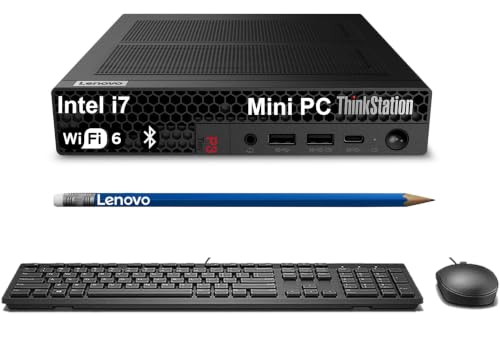
Lenovo ThinkStation P3 Tiny (i7-14700 vPro)

HP Z2 SFF G1i Workstation (Ultra 5 235)

HP OmniDesk AI PC (Ultra 7 265, 64GB)

Beelink EQ14 Mini PC (Intel N150)
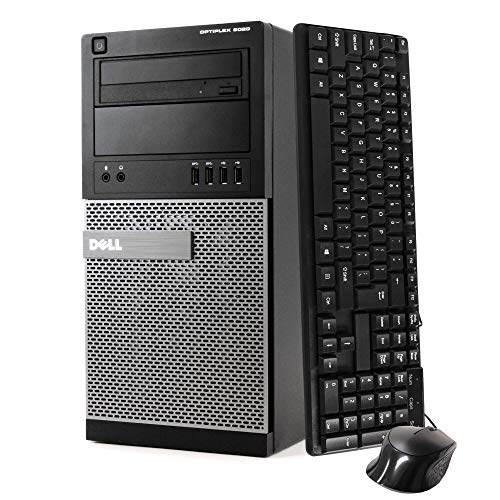
Dell Optiplex 9020 Renewed (i7-4770)
What Each Pick Brings To The Table
The HP Z2 SFF G9 sits in the small-form-factor workstation category, meaning it shrinks a full W680 chipset build into a chassis that fits behind a monitor or under a drafting table. The Core i5-14500 brings 14 cores, with 6 performance cores (the high-speed cores that handle single-threaded drafting tasks) that hit 5.0GHz, which is the kind of clock speed that makes AutoCAD regens feel quick. Paired with 16GB of DDR5 memory, it handles a typical sheet set without breaking a sweat.
Unlike the ACEMAGIC mini PC I’ll cover later, this is a true workstation: it carries ISV certifications (vendor-tested driver and stability guarantees) for AutoCAD and similar tools, so the manufacturer has validated the platform for these workloads. For a sole-proprietor architect or a small firm, that stamp of approval matters.
Well-Handled Touches
- 14-core i5-14500 keeps daily drafting responsive under typical workloads
- DDR5 memory runs cooler and faster than older DDR4, which helps during long render sessions
- Small-form-factor chassis leaves desk space free for a wide drawing tablet
- Workstation-class chipset offers more PCIe lanes (data pathways to the CPU) for future GPU upgrades
Things To Consider
- 512GB SSD fills up fast once you archive years of project files
- No discrete GPU listed, so 3D modeling in AutoCAD or Revit will rely on integrated graphics
- 16GB is workable but tight for users running large assemblies alongside browser tabs
Key Specs
Right Fit For
Solo architects and small firm drafters who run AutoCAD daily and want a validated workstation without a tower footprint.
Look Elsewhere When
Users pushing heavy 3D assemblies or renders should consider the HP OmniDesk AI PC for its 20-core Ultra 7 and 64GB of RAM.
The Dell Pro Slim, built on a next-generation Optiplex 7020 platform, takes the same 14-core i5-14500 silicon and stuffs it into an office-friendly small-form-factor chassis. Compared to the HP Z2 SFF G9 above, this leans more toward general business productivity than certified workstation status, but for 2D drafting it absolutely delivers. The inclusion of DisplayPort, HDMI, and an RJ-45 ethernet jack covers the three connections most drafters actually use.
Windows 11 Pro is preinstalled, which matters for firms tied to group policy management or BitLocker encryption. In most office floors, this box drops into an existing fleet without IT friction.
Everyday Perks
- Six performance cores handle AutoCAD’s single-threaded regen commands comfortably
- 16GB DDR5 keeps multiple Xrefs (external drawing references) loaded without swapping
- Wired keyboard and mouse included, so it’s office-ready out of the box
- Multiple display outputs support a dual-monitor drafting setup
Worth Noting
- 256GB SSD is on the small side for someone archiving completed projects locally
- No workstation chipset or ISV certification, so 3D-heavy AutoCAD workflows may feel less validated
- The slim case restricts future GPU additions for users who later move into 3D modeling
Feature Snapshot
Best Suited To
Office-based 2D drafters and administrative staff who need a dependable, manageable workstation for AutoCAD plan work.
Skip It When
Power users running heavy 3D assemblies will find more headroom in the Lenovo ThinkStation P3 Tiny’s i7-14700 vPro chip.
The ACEMAGIC K1 is a mini PC that trades the Dell Pro Slim’s office polish for a much smaller footprint and an AMD twist. The Ryzen 7 7730U packs 8 cores with a boost up to 4.5GHz, and paired with 16GB of RAM and a generous 1TB SSD, it covers the basics of 2D AutoCAD work in a chassis you can Velcro to the back of a monitor. Where the HP Z2 G9 above leans into workstation validation, this one prioritizes a tidy desk.
For a freelancer drafting from a home office, the integrated Radeon graphics handle light 3D viewports without complaint. You may find heavier point-cloud work chugging, but everyday plan sets stay smooth.
Strengths Worth Knowing
- 8-core Ryzen CPU punches above its weight for the size and class
- 1TB SSD stores years of project archives without needing an external drive
- Mini-PC form factor disappears behind any monitor with a VESA mount (standard monitor mounting plate)
- Pre-installed Windows 11 Pro skips the setup fuss for non-technical users
Trade Offs
- No discrete GPU option, so dense 3D models will lean on integrated Radeon graphics
- Limited internal expansion means memory and storage upgrades require specific module compatibility
- Compact cooling can lead to fan noise under sustained drafting loads
Technical Highlights
Made For
Freelancers and home-office drafters running 2D plans who value a clean desk and quiet operation.
A Better Fit Elsewhere
For certified AutoCAD reliability with a small footprint, the HP Z2 SFF G9 provides stronger workstation credentials.
The Lenovo ThinkStation P3 Tiny is the smallest workstation in Lenovo’s lineup, weighing around 3 pounds while still carrying an i7-14700 vPro chip. vPro adds remote-management features (IT can repair or secure the box even when powered down) that make it appealing for managed offices. The IST customization allows configurations up to 64GB of RAM and 2TB of storage, which is unusual for a chassis this size.
Where the ACEMAGIC K1 above focuses on portability and quiet, this tiny workstation is built for sustained workloads and supports 8K displays. It’s an honest fit for a draftsperson who occasionally steps into 3D modeling without dedicating a full tower to the desk.
Where It Delivers
- i7-14700 vPro offers strong multi-core throughput for 3D rendering alongside drafting
- Tiny form factor frees up desk space while still supporting full workstation duty
- Configurable RAM up to 64GB future-proofs against heavier project files
- vPro enables remote diagnostics for IT-managed environments
Honest Caveats
- Customization options mean pricing varies; verify the exact RAM and SSD before ordering
- Compact cooling can ramp fan speed during long renders
- The reseller customization may affect direct manufacturer warranty support depending on region
Who Will Love This
Engineers and BIM (Building Information Modeling) drafters who need workstation-class performance without a tower and work in IT-managed offices.
Swap It Out When
Users who want pre-configured certainty with strong single-core speed should consider the HP Z2 SFF G1i instead.
The HP Z2 SFF G1i steps up from the older G9 reviewed earlier by adopting Intel’s newer Core Ultra 5 235, paired with 32GB of DDR5 and a 1TB SSD. That memory doubling makes a real difference for drafters who keep AutoCAD, a browser full of reference tabs, and a PDF viewer open simultaneously. The Ultra 5 chip uses a hybrid architecture combining performance and efficiency cores for balanced workloads.
Like its G9 sibling, this carries ISV certifications for AutoCAD and similar design tools. For someone building a workstation today and wanting it to remain comfortable three years from now, the newer platform gives more runway.
Key Advantages
- 32GB DDR5 headroom handles large assemblies and multitasking without stuttering
- 1TB SSD stores substantial project archives locally
- Newer Core Ultra platform extends useful lifespan into future AutoCAD releases
- ISV-certified for design software, reducing compatibility surprises
Points To Note
- Small-form-factor limits future GPU upgrades compared to a full tower
- Newer platform means slightly higher cost than the older G9 for similar core counts
- Integrated graphics cap heavy 3D visualization without a discrete GPU add-in
Feature Rundown
Perfect Match For
Design professionals planning to keep their workstation for three or more years and wanting a certified platform with breathing room.
Reach For A Different Pick When
Those on tighter budgets who can run AutoCAD on 16GB will find better value in the Dell Pro Slim.
The HP OmniDesk AI PC is the heavyweight in this roundup, packing a 20-core Intel Core Ultra 7 265, 64GB of DDR5 RAM, and a 2TB Gen4 NVMe SSD. For context, Gen4 NVMe drives push sequential read speeds around 7,000 MB/s, roughly twice the speed of older Gen3 drives. That storage speed matters when you’re opening massive drawing files or swapping between BIM models. WiFi 6E and Bluetooth 5.3 round out a modern connectivity suite, and a 10Gbps USB-C port handles fast external drives for project handoffs.
Where the Z2 G1i above is a comfortable daily driver, this OmniDesk is built for users who push AutoCAD into architectural-scale assemblies or run parallel simulation tools. In most studios, the headroom here is genuinely future-proof.
Reasons It Performs
- 20-core Ultra 7 265 chews through 3D regenerations and parallel renders
- 64GB DDR5 removes memory as a bottleneck for huge assemblies
- 2TB Gen4 SSD cuts load times on large project files noticeably
- 10Gbps USB-C enables fast backups without slowing the workflow
Where It May Fall Short
- Higher cost reflects the spec sheet; smaller studios may not use the full capacity
- Reseller customization from Empowered PC means verifying warranty terms before purchase
- Full power draw under sustained loads may require a robust power outlet circuit
Whose Shelf It Belongs On
Architecture and engineering firms running large BIM assemblies, point clouds, or parallel simulation workloads alongside AutoCAD.
Where Another Pick Suits Better
Solo drafters running standard 2D plan sets will find the Lenovo ThinkStation P3 Tiny more than sufficient at lower cost.
The Beelink EQ14 is the smallest and most affordable desktop on this list, running an Intel N150 with 4 cores and 4 threads at up to 3.6GHz. The N150 is an entry-level chip, designed for streaming, office work, and light productivity rather than heavy CAD. Where the ACEMAGIC K1 above offers 8 cores of Ryzen muscle, this Beelink focuses on absolute size and cost efficiency.
For light 2D drafting of floor plans, simple schematics, or student work, this handles the basics. You may find it struggles with assemblies or 3D viewports, so managing expectations matters here.
Real Benefits
- Compact N-series chip keeps power draw low and the chassis tiny
- 500GB SSD gives a reasonable amount of storage for entry-level projects
- Quiet operation suits bedroom or studio environments
- Dual M.2 SSD slots (compact internal SSD form factor) support up to 4TB of internal storage expansion
Things To Consider
- 4-core CPU limits how many drawing operations can run in parallel
- Integrated graphics restrict 3D modeling to very simple viewports
- 16GB RAM is fixed, so upgrading memory later isn’t an option
Who Should Grab It
Students, hobbyists, and hobby-level drafters who mostly work on 2D plans and want a discreet, quiet starter box.
Not Your Match When
Professional drafters handling production work should step up to the ACEMAGIC K1 or HP Z2 SFF G9 for stronger CPUs.
The Dell Optiplex 9020 is a refurbished mini tower from several generations back, running an i7-4770 at 3.4GHz with 32GB of RAM and a 1TB SSD. Windows 11 Pro is preinstalled, and a DVD-RW drive is included for legacy media. This isn’t a modern workstation, but the 32GB RAM is generous for the cost, and the tower form factor leaves room for expansion.
For a backup drafting station, an office secondary workstation, or a learner who needs real memory headroom on a tight budget, this works. Depending on your drawing file sizes, the older CPU will show its age on regenerations and 3D work.
Practical Advantages
- 32GB RAM handles multiple large Xrefs comfortably
- 1TB SSD gives ample room for project archives at low cost
- Tower chassis supports future GPU or storage upgrades that mini PCs cannot
- WiFi included, so no extra adapter needed for wireless networks
Softer Spots
- Older i7-4770 CPU shows its age on heavy regenerations and 3D operations
- Refurbished condition means cosmetic wear varies unit to unit
- Shorter warranty window than new machines, so plan accordingly
The Right Fit
Backup workstations, home-learning setups, or shops needing a low-cost second seat for AutoCAD plan work.
Consider Something Else When
Users needing daily production performance should choose the HP Z2 SFF G9 or Lenovo P3 Tiny for newer silicon.
What Matters Most Before Choosing Desktops For Autocad
CPU Cores And Clock Speed
AutoCAD’s drafting engine leans heavily on a small number of high-speed cores. A chip with 6 strong performance cores clocked above 4.5GHz generally feels snappier than a 16-core chip with weaker per-core speed. For users also running Revit or Inventor, more cores help with rendering and simulation, but the everyday drafting experience still depends on that single-thread throughput.
Memory Headroom
16GB of DDR5 is workable for small to mid-size drawings, but once you load multiple Xrefs, palettes, and a browser, things get tight. 32GB is the comfortable zone for most professional drafters, and 64GB becomes relevant when assemblies push into the thousands of components. Memory speed matters less than capacity for AutoCAD specifically, but DDR5’s bandwidth advantage helps when juggling many programs.
Storage Speed And Capacity
SSDs are non-negotiable here. A modern NVMe drive (a fast SSD that plugs directly into the motherboard’s PCIe lanes) loads large drawings several times faster than a spinning hard drive. Capacity matters because DWG files, project backups, and reference libraries add up: 512GB fills quickly, 1TB is comfortable, and 2TB suits users archiving years of work.
GPU Considerations
For pure 2D drafting, integrated graphics are usually enough. Once you orbit through 3D models, work with point clouds, or render scenes, a discrete GPU (a separate, dedicated graphics card) becomes valuable. Some of the picks above rely on integrated graphics, which keeps size and cost down, but limits 3D headroom.
Key Considerations Across These Picks
Pitfalls Shoppers Hit
The most common mistake is buying a flashy CPU but pairing it with only 8GB of RAM, which bottlenecks AutoCAD almost immediately. Another is overlooking form factor: a tiny mini PC is great for a clean desk, but limits future GPU upgrades, while a full tower takes more space but grows with your needs. Finally, refurbished boxes can save real money but verify warranty terms and the seller’s return policy before committing.
Where The Extra Money Goes
Stepping up from an entry-level mini PC to a certified workstation like the HP Z2 SFF G9 or G1i brings ISV-validated stability, stronger cooling for sustained workloads, and better long-term driver support. The HP OmniDesk AI PC adds core count, memory, and storage headroom that pays off when projects grow into large assemblies. The upgrade is worth it for anyone running AutoCAD daily across multiple years.
Frequently Asked Questions
Does AutoCAD Need A Dedicated GPU?
For 2D drafting, integrated graphics are typically sufficient and a dedicated GPU is not required. For 3D modeling, point clouds, or rendering, a discrete GPU noticeably improves viewport fluidity.
How Much RAM Is Enough For AutoCAD?
16GB handles small to mid-size drawings, while 32GB is comfortable for most professional work. 64GB becomes valuable for very large assemblies or users running multiple design programs simultaneously.
Are Mini PCs Good For AutoCAD?
Mini PCs with 8-core processors like the ACEMAGIC K1 handle 2D drafting well. Entry-level chips like the Intel N150 manage basic plan work but struggle with complex 3D operations.
What Is An ISV Certification?
ISV certification means the manufacturer has tested and validated the workstation with specific professional software like AutoCAD. It signals better driver stability and reduces the chance of compatibility surprises.
Should I Buy A Refurbished Desktop For AutoCAD?
A refurbished box can be a sensible backup or secondary workstation at lower cost. For daily production work, a new workstation with current warranty support is the safer long-term choice.
Wrap Up
AutoCAD rewards machines with strong single-thread CPU speed, modern DDR5 memory, and a fast SSD. The HP Z2 SFF G9 hits that balance for most professional drafters, while the OmniDesk AI PC serves users pushing into heavier 3D territory. Match the workstation to your typical drawing size and project complexity, and the rest falls into place.