Game development asks a lot from a workstation. Long compile times, hungry engines like Unreal and Unity, and the need to keep a browser, art tools, and a chat client open at once mean a weak CPU or skimpy RAM will hold you back fast. I put together this list for indie devs, students, and small studios who need real horsepower without sorting through a thousand generic towers. Every pick here pairs a serious CPU with a dedicated GPU and enough memory to keep your scenes responsive.
The Shortlist At A Glance

Empowered PC LAN Gamer 8.1L Mini ITX Desktop RTX 5060 Ti

HP Z2 SFF G1i Workstation Desktop, Intel Ultra 5 235

HP Z600 Dual Xeon Workstation 24GB RAM (Renewed)
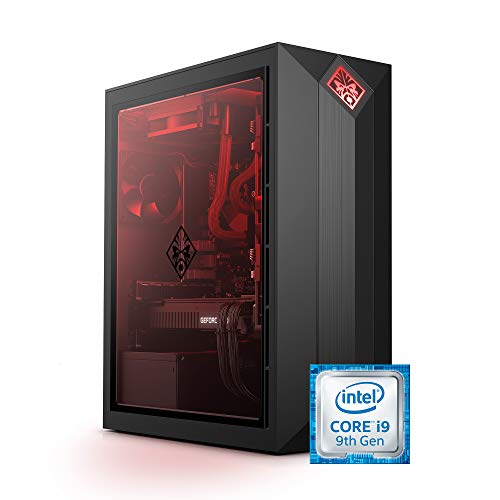
Omen by HP Obelisk Gaming Desktop RTX 2080 SUPER

MSI Aegis R2 AI Gaming Desktop RTX 5070 Ti
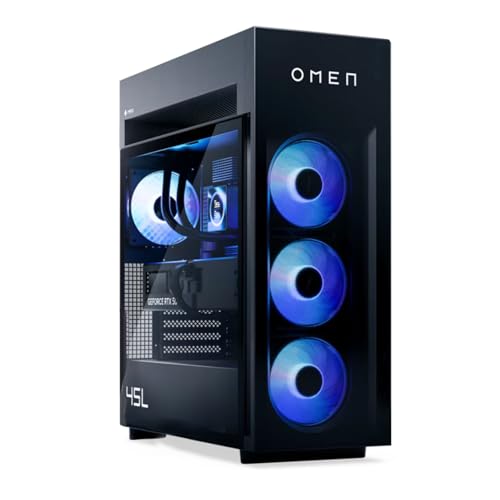
HP OMEN MAX 45L RTX 5090 Ryzen 9 9900X3D

HP EliteDesk 800 G2 Desktop i7 32GB 1TB SSD (Renewed)
What Each Pick Brings To The Table
An 8.1-liter Mini ITX chassis is a real talking point here, because most game dev workstations lean toward mid-towers. The Empowered PC LAN Gamer squeezes a 20-core Intel Core Ultra 7 265KF, 32GB of DDR5 RAM, and an RTX 5060 Ti into a footprint that fits next to a monitor stand without dominating a desk.
For solo developers working from a home office or shared studio, that balance matters. The 2TB Gen4 NVMe SSD keeps project files and asset libraries on the same fast drive, and Windows 11 Pro arrives pre-installed so you can jump straight into Unity or Unreal without a setup day.
What Pays Off
- The 20-core CPU chews through parallel build tasks, which is the slowest part of compiling large Unreal projects.
- DDR5 at 32GB is the comfortable floor for running an editor, browser documentation, and a Slack-style chat at once.
- Internal Wi-Fi 6E (the latest Wi-Fi standard, faster and more responsive than Wi-Fi 6) means no extra adapter clutter.
- The 2TB drive covers project files, source control, and a Steam library without juggling external storage.
- The included RGB keyboard and mouse remove a small but real setup cost.
Things To Consider
- Small form factor builds run hotter under sustained load, so a clear vent path matters in tight desks.
- 8GB of VRAM (video memory on the GPU) is workable for indie 3D work but tight for heavy 4K texture pipelines.
Who It Suits Best
Indie developers and remote contractors who need real performance in a compact box that travels between coworking spaces.
Look Elsewhere When
Large studios running multi-monitor 4K viewports will get more headroom from the HP OMEN MAX 45L RTX 5090 Ryzen 9 9900X3D in this list.
The HP Z2 SFF G1i skips the gamer aesthetic and leans into workstation credibility. Built around a W880 chipset with an Intel Ultra 5 235 and 16GB of DDR5, it sits in the same family that handles 3D modeling and simulation work in design firms.
Game studios that also do contract engineering work, or developers whose projects touch ISV-certified tools (meaning the software vendor has officially tested and approved the hardware), get a real reason to pick this over a generic tower. The compact SFF chassis fits in an office cubicle or a shared studio rack without fans drowning out conversations.
What Helps Most
- ISV certifications translate to fewer driver surprises in tools like AutoCAD when used alongside game engines.
- MIL-STD 810H testing (a U.S. military durability standard covering drops, vibration, and temperature) suggests the chassis handles transport between offices better than a typical consumer tower.
- The Z2 line has a documented upgrade path for memory and storage when project demands grow.
Points To Keep In Mind
- 16GB of RAM is the minimum I’d recommend for modern game dev, and a second stick will be needed for heavier scenes.
- 512GB of SSD fills quickly once Unreal cache files and versioned source control enter the mix.
- The Intel Ultra 5 is solid, but multi-threaded compile jobs run slower than on the Ultra 7 in the Empowered PC LAN Gamer.
Made For
Studios that cross between engineering simulation and game work, and value certified hardware over raw benchmark numbers.
Skip It When
Pure indie game development without certified toolchains is better served by the MSI Aegis R2 AI Gaming Desktop RTX 5070 Ti on this list.
The HP Z600 is a different kind of beast. Two Xeon X5570 quad-core processors sit behind a brushed-metal full tower, with a 256GB SSD paired against a 4TB HDD for archival storage. This is a refurbished workstation that punches above its weight in core count.
For developers maintaining older engines, working on legacy game codebases, or compiling server-side tools that love raw thread count, the Z600’s dual-socket design still earns its keep. The Quadro NVS 310 graphics card is meant for multi-monitor office setups rather than rendering, so plan accordingly if your workflow needs modern shader work.
Benefits That Matter
- Eight physical cores across two Xeons handle parallel batch jobs that newer consumer chips sometimes choke on.
- The 4TB mechanical drive is a built-in archive shelf for backups and archived project builds.
- The full tower chassis leaves room for additional drives and capture cards down the road.
Trade Offs
- The Xeon X5570 architecture is older, and per-core performance lags behind any modern Core Ultra or Ryzen chip.
- The Quadro NVS 310 is a display-output card, not a development GPU for shader iteration or ray tracing.
- Renewed workstations carry inconsistent cosmetic and wear conditions, so inspection on arrival matters.
- Power draw runs higher than modern equivalents, which shows up on longer studio electricity bills.
Best Suited To
Developers maintaining older engines, running dedicated servers, or handling batch processing where thread count matters more than single-core speed.
Reach For A Different Pick When
Anyone targeting current-gen shader pipelines and real-time ray tracing will find the MSI Aegis R2 AI Gaming Desktop RTX 5070 Ti far more capable.
The Omen Obelisk 875-1023 leans on parts that were flagships a few years ago. The Core i9-9900K is an 8-core, 16-thread chip that still compiles code respectably, and the RTX 2080 SUPER supports real-time ray tracing and DLSS, two features that change how a developer validates lighting and frame rates.
Where this tower makes sense is the price-to-power math. A working game dev machine with HyperX 32GB RAM and a 1TB SSD for less than current-gen flagships leaves room in the budget for software licenses, art subscriptions, and a decent monitor.
Reasons It Performs
- Real-time ray tracing support means you can validate lighting features during development, not just at the end.
- 32GB of HyperX RAM handles mid-size scenes without paging out to disk.
- The i9-9900K still overclocks well for developers comfortable in the BIOS.
Honest Caveats
- The RTX 2080 SUPER’s 8GB of VRAM is tight for modern 4K texture work and high-resolution shadow maps.
- Windows 10 Home means a Windows 11 Pro upgrade is likely for studios needing BitLocker (full-disk encryption) or remote desktop policies.
Who Should Grab It
Hobbyist developers and students who want a competent dev box without paying for the newest silicon.
A Better Fit Elsewhere
Working professionals targeting Unreal 5 with heavy Nanite scenes will want the HP OMEN MAX 45L RTX 5090 Ryzen 9 9900X3D instead.
MSI’s Aegis R2 AI lands in the middle of this list for a reason. It pairs an Intel Core Ultra 9 285 with an RTX 5070 Ti and 32GB of DDR5, and ships with Windows 11 Home on a 2TB NVMe drive. The “AI” tag isn’t marketing fluff; the chip includes dedicated neural accelerators that speed up on-device AI tasks.
For small studios experimenting with AI-assisted asset generation, voice synthesis, or NPC behavior trees that lean on local models, those accelerators translate to faster iteration loops. Air cooling keeps the chassis quiet enough for a shared office.
Real Benefits
- The RTX 5070 Ti delivers modern shader cores and frame generation that the older RTX 2080 SUPER in the Omen Obelisk lacks.
- DDR5 memory bandwidth helps when scrubbing through dense animation timelines.
- Front-panel USB Type-C simplifies headset and external SSD hookups.
- VR-ready certification covers headset-based playtesting for VR titles.
Worth Noting
- Windows 11 Home lacks some enterprise management tools that studios with locked-down policies rely on.
- Air cooling is quiet but caps sustained boost clocks compared to liquid-cooled towers.
Who Will Love This
Indie studios and small teams working across AI features, traditional rendering, and VR playtesting on a single rig.
Swap It Out When
Studios needing the absolute highest VRAM ceiling should look at the HP OMEN MAX 45L RTX 5090 Ryzen 9 9900X3D.
The OMEN MAX 45L is the heavyweight of this lineup. A Ryzen 9 9900X3D with 3D V-Cache (an extra layer of fast cache stacked on the processor die that speeds up game and simulation workloads) pairs with an RTX 5090 carrying 32GB of GDDR7, and 32GB of DDR5 keeps everything fed. The 45L full tower leaves thermal headroom for sustained all-core loads.
This is the machine for studios working on dense 3D scenes, large open worlds, or any project where compile time, shader compile, and bake times directly affect deadlines. For most hobbyists it’s overkill, but for professional game dev it earns its keep.
Noteworthy Benefits
- 32GB of VRAM on the RTX 5090 leaves headroom for 4K textures, dense shadow maps, and large render targets.
- 3D V-Cache accelerates the data-hungry parts of engine subsystems and physics simulation.
- The 45L chassis accepts future GPU upgrades without case swaps.
- Boost clocks up to 5.5GHz shorten iteration loops in CPU-bound editor work.
- A 1TB NVMe boot drive keeps the OS responsive even with massive project folders on network storage.
Practical Considerations
- The full tower demands dedicated floor or shelf space.
- Premium components pull more power, so a robust outlet circuit is worth checking.
The Right Fit
Professional studios and senior developers whose render and compile bottlenecks directly affect project timelines.
Where Another Pick Suits Better
Students and indie devs on tighter budgets should consider the Omen by HP Obelisk Gaming Desktop RTX 2080 SUPER instead.
The EliteDesk 800 G2 is the entry point in this roundup. A Core i7-6700 with 32GB of DDR4 RAM and a 1TB SSD, refreshed and running Windows 11 Pro. There’s no dedicated GPU listed, which means this tower is best understood as a learning platform rather than a game runtime machine.
For students writing their first scripts, experimenting with Unity in 2D, or working through beginner Unreal tutorials, the EliteDesk handles the editor side without drama. The catch shows up the moment you try to run a 3D viewport at high quality or test a built game.
Why It Works Well
- 32GB of DDR4 RAM is generous for the price and keeps the editor responsive across multiple browser tabs.
- Windows 11 Pro offers BitLocker and remote desktop tools out of the box.
- Refurbished pricing keeps upfront cost low for budget-conscious learners.
- The small form factor fits on a dorm desk or shared workspace.
A Few Limitations
- The Core i7-6700 is a 6th-generation chip, and modern engines expect more cores for parallel compile tasks.
- No dedicated GPU means integrated graphics carry every viewport and playtest.
- Refurbished units vary in cosmetic condition and warranty terms.
Built With In Mind
Students and self-taught developers working through tutorials and 2D game projects before investing in dedicated hardware.
Not Your Match When
Anyone targeting modern 3D pipelines should step up to the Empowered PC LAN Gamer 8.1L Mini ITX Desktop RTX 5060 Ti for actual GPU acceleration.
Factors To Consider When Choosing Desktops For Game Development
CPU Core Count And Architecture
Game engines like Unreal and Unity scale compile and light-bake jobs across cores. A modern 8-core chip is a comfortable baseline, while 12 or more cores shorten build times significantly for larger projects. Older architectures, even with high core counts, can fall behind newer chips in single-threaded editor responsiveness, so balance matters.
GPU And VRAM Headroom
A dedicated GPU isn’t optional for 3D work. Real-time viewports, shader iteration, and playtesting all lean on GPU silicon. RTX-class cards add ray tracing support that matters when validating lighting features, and 8GB of VRAM is the practical minimum for mid-size scenes, with 16GB or more giving real breathing room.
Memory And Storage
32GB of RAM has become the working baseline for running an editor, browser, and asset tools together. Storage matters too: an NVMe SSD for the OS and active project, plus a secondary drive for archives, keeps the fast lane clear.
Form Factor And Expansion
Small form factor builds save desk space but limit thermal headroom and future GPU upgrades. Full towers like the OMEN MAX 45L accept longer cards and additional drives, which matters for studios planning multi-year hardware lifecycles.
Key Considerations Across These Picks
Common Buying Slip Ups
One trap I see often is shoppers chasing the largest VRAM number without checking that the GPU architecture supports the features their engine actually uses. An older card with 16GB of VRAM can still bottleneck shader compile times compared to a newer card with 8GB. Another mistake is underestimating storage: project files, version control history, and baked lighting add up fast, and a 512GB boot drive fills sooner than expected.
Where The Extra Money Goes
Higher-tier models like the HP OMEN MAX 45L buy more than raw speed. They buy thermal headroom for sustained loads, modern architecture that supports the latest engine features, and chassis room for future upgrades. For solo hobbyists, that upgrade rarely pays back. For working studios billing against deadlines, it usually does.
Frequently Asked Questions
How much RAM do I really need for game development?
For most modern engines, 32GB is the comfortable starting point, with 16GB being workable only for 2D or very simple 3D scenes. Heavy open-world projects benefit from 64GB, especially when running profilers and editor tools alongside the engine.
Do I need a dedicated GPU, or is integrated graphics enough?
Integrated graphics handle basic code editing and lightweight 2D engines. For 3D viewports, real-time lighting, shader iteration, and playtesting, a dedicated GPU is essentially required. Cards in the RTX 50-series or RTX 40-series range cover most indie-to-mid-studio needs.
Is a refurbished workstation worth considering?
Refurbished workstations like the HP Z600 and EliteDesk 800 G2 offer strong core counts and storage at low prices. The trade-off is older architecture, no recent GPU, and variable cosmetic condition. They’re solid picks for learning or batch work, less ideal for modern 3D pipelines.
What is 3D V-Cache and why does it matter?
3D V-Cache stacks an extra layer of cache memory on top of the processor die, expanding the total cache available to the chip. For game development, this speeds up data-hungry workloads like physics simulation and engine subsystems that benefit from low-latency memory access.
Should I pick a small form factor or a full tower?
Small form factor builds like the Empowered PC LAN Gamer save space and travel well, but thermal headroom is tighter. Full towers like the HP OMEN MAX 45L accept longer GPUs and additional drives, which pays off for studios planning long-term upgrades.
The Takeaway
Game development rewards balanced hardware more than any single extreme spec. Match the CPU to your engine’s threading profile, give the GPU enough VRAM for your scenes, and leave room to grow. The picks above cover students on tight budgets, indie developers who need portability, and professional studios chasing the shortest path from idea to playable build.