Photoshop rewards machines with fast storage, generous memory, and steady multi-core performance. Whether I’m retouching portraits, compositing layered illustrations, or pushing a dozen smart filters through a massive file, the hardware underneath quietly shapes how long I sit waiting. Below, I look at seven options that suit different setups, budgets, and editing styles, so picking a desktop feels like a confident call rather than a coin flip.
The Leading Options At A Glance

Acer Aspire Desktop i5-14400 32GB DDR5 1TB SSD

Synerlogic Photoshop Quick Reference Keyboard Shortcut Sticker
Acer Aspire TC-895-UA92 Desktop i5-10400 12GB DDR4 512GB SSD

Apple 2024 Mac mini M4 Pro 12-core CPU 24GB 512GB
HP 27″ Touchscreen All-in-One Ultra 7 64GB DDR5 2TB SSD

Beelink EQ14 Mini PC Intel N150 16GB 500GB SSD

Nuc 11 i7-1165G7 32GB 1TB SSD Mini PC
Why These Options Stand Out
This Aspire lands in the middle of the pack, and that’s actually a strength. The 10-core Intel Core i5-14400 (Intel’s mid-range chip, mixing performance and efficiency cores) chews through layered PSDs without flinching, and 32GB of DDR5 RAM (next-generation memory that moves data faster than the older DDR4 standard) keeps a heavy Photoshop session with a couple of browsers and a reference app open at the same time.
The 1TB SSD plus a small docking-station SSD gives me enough breathing room for project files, brushes, and raw exports, which matters more than people expect once a few months of client work pile up. Compared to the budget Acer tower later in this list, this one trades the older platform for markedly better multitasking headroom.
The Practical Payoff
- 10-core CPU handles brush lag and content-aware fills smoothly.
- 32GB DDR5 RAM future-proofs against heavier plugin pipelines.
- Combined 1.16TB of storage across two SSDs keeps active projects local.
- Wi-Fi 6E (the latest wireless standard, faster than Wi-Fi 6) cuts waiting when syncing cloud libraries.
- Keyboard and mouse are in the box, so I can start editing the same day.
Things To Weigh
- Integrated Intel UHD graphics means GPU-heavy 3D and video features lean on the CPU.
- Owners commonly report the included mouse wears in quickly under heavy daily clicking.
- Mid-tower size needs a real spot on or under a desk.
Feature Snapshot
Who It Suits Best
Working editors running mid-sized PSDs and a busy desktop will feel right at home with this Acer Aspire tower.
A Better Fit Elsewhere
Anyone leaning hard on GPU-accelerated filters and Apple-side workflows should look at the Apple 2024 Mac mini M4 Pro 12-core CPU 24GB 512GB instead.
A sticker sounds trivial, but for anyone learning Photoshop the friction of forgetting a shortcut is real. This Synerlogic reference overlays the most-used commands directly onto the keys of a MacBook or Windows PC, which means I’m not alt-tabbing into a help menu when I’m mid-edit.
It pairs naturally with any of the desktops on this list. A new Acer Aspire buyer unboxing their machine gets an immediate productivity lift from muscle memory that builds faster with visual cues at the fingertips.
Practical Pluses
- Shortcuts stay visible while editing, reducing reliance on menus.
- Works across both Windows and Mac layouts in one product.
- Helps beginners build muscle memory without constant Googling.
- Sticker format keeps costs low while the speed gains stack up.
Honest Caveats
- Stickers can wear at the edges over years of typing, depending on hand oil and cleaning habits.
- Not a shortcut to learning concepts, only key positions.
- Mac and Windows layouts differ enough that some users may want the matching variant.
Made For
Photoshop learners and students trying to internalize shortcuts while working on any of the desktops in this roundup.
Look Elsewhere When
Anyone whose priority is raw compute horsepower for huge compositions will be better served by the Acer Aspire Desktop i5-14400 32GB DDR5 1TB SSD.
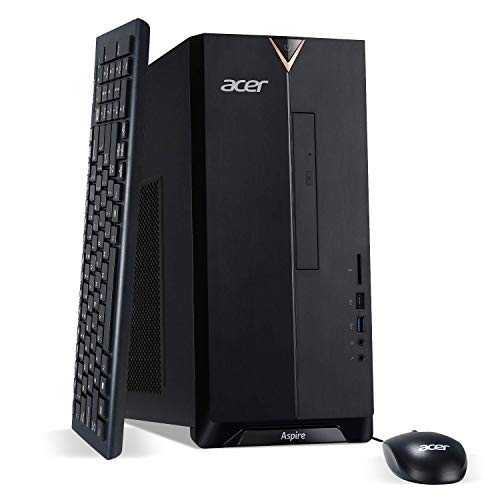
The older Aspire TC-895 still earns a spot for entry-level Photoshop work. Its 10th-generation Intel Core i5-10400 (six cores, a generation behind modern chips but still capable for everyday editing) paired with 12GB of DDR4 RAM and a 512GB NVMe SSD (a fast solid-state drive using the NVMe protocol, much quicker than older SATA SSDs) covers the basics of layer work, smart object manipulation, and brush-heavy retouching without breaking a sweat.
I like it as a starter unit for someone moving from a laptop into a proper editing station. The DVD writer is niche, but the dual-band Wi-Fi 6 (a fast wireless standard) and front USB-C port keep file transfers quick. For a one-person studio just starting out, this Acer punches above its tier.
A Few Strong Suits
- 512GB NVMe SSD keeps Photoshop launches and file opens snappy.
- Six-core CPU handles standard layer stacks without choking.
- Front USB-C and five USB 3.2 ports make plugging in card readers easy.
- Compact mid-tower footprint fits small home-office corners.
Trade Offs
- 12GB of RAM fills up fast when adding multiple apps to a Photoshop session.
- DDR4 is older memory generation, so multitasking headroom is tighter than the newer Acer Aspire i5-14400.
- No dedicated GPU means heavy 3D or neural filters rely on slower integrated graphics.
Quick Facts
Right Fit For
Students, hobbyists, and budget-conscious editors running everyday Photoshop projects on a tight setup.
Skip It When
A studio handling giant multi-layered composites will get more out of the Nuc 11 i7-1165G7 32GB 1TB SSD Mini PC.
The 2024 Mac mini with the M4 Pro chip is small enough to disappear behind a monitor, yet it ships with a 12-core CPU and 16-core GPU. For Photoshop on macOS, that combo is the real draw, since Adobe’s Mac build leans heavily on Apple’s Metal graphics framework (Apple’s low-level graphics API for hardware-accelerated rendering) and the unified memory architecture (a design where CPU and GPU share a single pool of RAM, cutting latency) keeps both the document and the system fed.
24GB of unified memory is enough for most working PSDs, and the 512GB SSD keeps launch times tight. Compared to the Acer Aspire i5-14400 earlier, this is a different beast: silent, energy-efficient, and tuned for Apple’s software stack. For dedicated Mac-based photo and design studios, it’s a top-tier workstation in a five-inch square box.
Notable Upsides
- 12-core M4 Pro handles enormous PSDs and Adobe filters briskly.
- Silent, fan-tuned operation suits shared studios and bedrooms.
- Unified memory architecture removes the CPU/GPU memory bottleneck.
- Tiny chassis fits anywhere, ideal for clean desk setups.
- Tight macOS integration with iPhone and iPad reference workflows.
Points To Note
- 512GB internal storage fills up quickly with layered PSDs and camera raws, so external drives are likely.
- No keyboard, mouse, or display in the box.
- Mac-only workflows lock out anyone needing Windows-exclusive plugins.
Key Product Details
Perfect Match For
Mac-only studios and pros who want pro-grade Photoshop performance in a near-silent, desk-friendly box.
Consider Something Else When
Windows-only pipeline users should grab the HP 27″ Touchscreen All-in-One Ultra 7 64GB DDR5 2TB SSD for a similarly polished experience.
This HP all-in-one folds the computer into a 27-inch FHD IPS touchscreen, which is a less common format in Photoshop circles. The 12-core Intel Core Ultra 7-155U handles modern workloads well, and 64GB of DDR5 RAM is more headroom than most working studios will tap out.
The 2TB SSD is the quiet hero, holding years of PSDs, brushes, and reference photos without forcing external storage. Adjustable height and an integrated HD webcam make this a sensible desk centerpiece, and Windows 11 Pro means tighter enterprise management. For someone who values one-cable simplicity and a clean back-of-desk look, this is a thoughtful alternative to a tower plus separate monitor setup.
Where It Excels
- 27-inch IPS touchscreen for direct canvas interaction.
- 64GB DDR5 RAM handles multitasking and heavy layer stacks.
- 2TB SSD eliminates near-term storage anxiety.
- Adjustable stand supports long editing sessions.
- Wi-Fi 6 and integrated webcam for hybrid review workflows.
Some Limits To Know
- 27-inch FHD resolution is workable, but 4K panels show finer detail for retouching.
- All-in-ones are harder to upgrade than a traditional tower.
- Touch input is useful for masking but not a replacement for a tablet.
Who Should Grab It
Studio editors who want one tidy setup with a big touchscreen, generous memory, and minimal cable clutter.
Swap It Out When
Anyone planning to add a high-end color-graded monitor will prefer the Acer Aspire Desktop i5-14400 32GB DDR5 1TB SSD for monitor flexibility.
The Beelink EQ14 leans into the small-form-factor idea with an Intel Twin Lake N150 chip (a budget-friendly 4-core, 4-thread processor from Intel’s low-power lineup). It runs up to 3.6GHz, ships with 16GB of DDR4 RAM, and includes a 500GB PCIe NVMe SSD that supports faster expansion up to 2TB.
This is a sensible secondary edit station: I could dock it behind a reference monitor for color checking, or set it up as a dedicated batch-export box. It’s not a Photoshop heavyweight, but the dual M.2 SSD slots and quiet operation suit a tidy home office where space matters more than raw speed.
Bright Spots
- Tiny chassis fits behind a monitor or in a closed hutch.
- 16GB DDR4 handles light to medium Photoshop tasks smoothly.
- Dual M.2 SSD slots support up to 4TB of internal storage.
- USB 3.0 ports allow further expansion via external drives.
Practical Considerations
- Quad-core N150 is slower than the i5-class chips elsewhere in this list.
- No dedicated GPU restricts neural-filter responsiveness.
- Best paired with simple PSDs rather than high-res composites.
At A Glance
Best Suited To
Home users wanting a quiet, compact PC for everyday Photoshop work and small studio export jobs.
Not Your Match When
Pros working on hundred-layer compositions should consider the Apple 2024 Mac mini M4 Pro 12-core CPU 24GB 512GB for headroom.
The Nuc 11 packs an 11th-generation Intel Core i7-1165G7 chip (a 4-core, 8-thread mobile-class processor that boosts up to 4.7GHz) with 32GB of RAM and a 1TB PCIe SSD inside a tiny NUC (Next Unit of Computing, Intel’s line of compact barebones-style desktops). For Photoshop, that means real muscle in a footprint barely larger than a paperback.
Wi-Fi 6 and Bluetooth support wireless reference tablets and peripherals, and Windows 11 Pro comes pre-installed for tighter admin control. I’ve recommended NUCs for years to designers running studios out of small apartments, and this configuration is no exception: it’s small enough to VESA-mount (attach to the back of a monitor using standard mounting holes) yet powerful enough to drive a serious retouching workflow.
Where It Helps
- 11th-gen i7 with 12MB cache tackles heavy brushes and large PSDs smoothly.
- 32GB of RAM keeps Lightroom, Bridge, and Photoshop running side by side.
- 1TB PCIe SSD balances speed and capacity for working files.
- Compact chassis mounts behind a display for clean setups.
- Wi-Fi 6 plus Bluetooth simplifies wireless peripherals.
Where It Is Less Suited
- Integrated graphics limit GPU-heavy plugins compared to discrete GPU options.
- Limited internal expansion beyond the included SSD slot.
- Higher thermals under sustained export jobs mean placement matters for airflow.
Whose Shelf It Belongs On
Working photographers and retouchers running a lean, monitor-mounted desktop with serious Photoshop demands.
Reach For A Different Pick When
A laptop-replacement workflow that values built-in Apple software integration points back to the Apple 2024 Mac mini M4 Pro 12-core CPU 24GB 512GB.
What To Weigh Before Choosing Desktops For Photoshop
Photoshop rewards balanced hardware, not single-stat bragging rights. The CPU matters most for opening files, applying filters, and exporting. RAM, ideally 16GB minimum, decides how many layers and how many open apps you can juggle without slowdown. Storage type changes everything about feel: an SSD, especially NVMe, makes the difference between a snappy workspace and one that drags while saving.
If your work focuses on standard photo retouching or social-media design, a six-core chip with 12GB to 16GB of RAM covers the basics. For compositing, illustration, or heavy plugin use, lean toward eight or more cores and 32GB of RAM. A dedicated GPU is helpful for 3D and neural filters, though integrated graphics remain workable for most daily edits.
Screen real estate, color accuracy, and a reliable graphics tablet matter as much as the box itself. A color-accurate external monitor and a calibrated tablet can transform how Photoshop feels, even on modest hardware. Choose a machine that pairs well with the peripherals you already own or plan to buy.
Key Considerations Across These Picks
Mistakes Worth Dodging
Overspending on a tower with a top-tier GPU while skimping on RAM is a common trap. Photoshop caches heavily in system memory, and an undersized RAM pool will throttle big projects more than a slower CPU will. Equally, picking a small SSD with no expansion plan leads to constant file juggling and slow cloud sync. Plan storage with at least 30% headroom for caches and active projects.
The Upgrade Payoff
Higher tiers tend to bring faster multi-core CPUs, more RAM, and bigger SSDs. For working editors handling raw photos from high-resolution cameras or layered composites, that combination cuts wait times on every save, export, and filter. The honest read is this: if a single project routinely spans dozens of layers and frequent exports, the upgrade pays for itself in saved hours. For casual social-media and schoolwork use, the savings often matter more than the speed.
Frequently Asked Questions
How much RAM do I need for Photoshop in 2026? For everyday retouching, 16GB is workable, but 32GB offers the kind of breathing room that makes large files painless and multitasking fluid.
Is an integrated graphics chip enough for Photoshop? Integrated graphics handle brushes, layers, and most filters fine, though GPU-heavy 3D and neural filters benefit from a dedicated graphics card.
Should I prioritize CPU or GPU for Photoshop? The CPU matters more for most Photoshop work, since filters and exports are largely CPU-driven, while a dedicated GPU helps mainly with 3D, video, and certain neural filters.
Do I need an SSD for Photoshop? An SSD is practically required in 2026, and an NVMe SSD keeps file opens, saves, and exports dramatically faster than older spinning drives.
Can a mini PC handle Photoshop well? A modern mini PC with 16GB or more of RAM and a recent multi-core chip can handle standard Photoshop work comfortably, especially for daily retouching tasks.
Closing Remarks
The best desktop for Photoshop is the one that matches my real workload, not the loudest spec sheet. Start with your typical file size and the apps running alongside Photoshop, then size RAM and storage around that picture. From the budget-friendly Acer TC-895 to the quietly powerful Mac mini M4 Pro and the tidy Nuc 11, this list covers a range of practical paths. Pick the one that fits your desk, your files, and the way you actually edit, and the rest tends to fall into place.