Building a Sims 4 setup that actually keeps up with sprawling households is mostly about matching the right CPU and graphics muscle to the kind of game you want to play. A plain office tower can stumble once a household grows past eight Sims, while a dedicated gaming rig chews through packs, mods, and 4K worlds without breaking a sweat. I’ve rounded up five solid options across budget, mid-range, and performance tiers so casual builders and serious storytellers alike can find a fit.
How The Shortlist Stacks Up
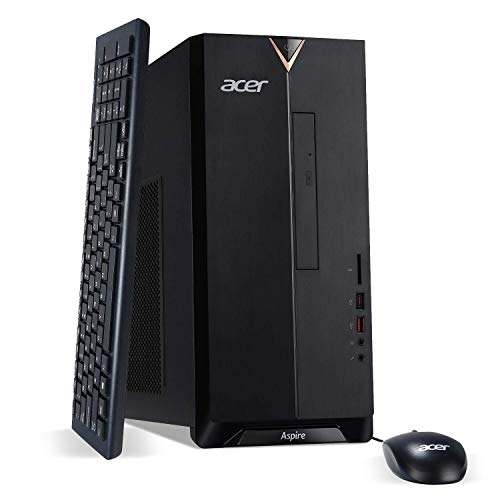
acer Aspire TC-885-UA91 Desktop, 9th Gen Intel Core i3-9100, 8GB DDR4, 512GB SSD

Dell Optiplex 3050 SFF Desktop PC, Intel i5-6500, 16GB DDR4, 256GB SSD

HP ProDesk 400 G2 Mini Desktop PC, Intel i5-6500T, 8GB DDR4, 256GB SSD

Skytech Gaming Crystal PC, Ryzen 7 5700, RTX 5060, 32GB DDR4, 1TB NVMe

STGAubron Gaming PC Desktop, Xeon E5, RX 550 4GB, 16GB RAM, 512GB SSD
The Picks, Examined More Closely
The Acer Aspire TC-885-UA91 leans on a 9th generation Intel Core i3-9100 chip, which boosts up to 4.2GHz when a Sim needs a quick task processed. The integrated UHD Graphics 630 (graphics built into the CPU rather than a separate card) is the limiting factor for Sims 4, since the engine leans on the GPU for rendering. With 8GB of DDR4 RAM, small households run fine, though loading screens can stretch once you stack expansion packs.
Storage is a quiet win here. The 512GB SSD (solid-state drive, much faster than a traditional spinning hard drive) boots Windows and loads the base game quickly, leaving room for a handful of packs without juggling files. The tower’s port selection is generous for the price, including USB Type-C, multiple HDMI outputs, and even a built-in DVD writer, which some legacy Simmers still appreciate for old install discs.
Noteworthy Benefits
- The 512GB SSD holds the base game plus most popular packs without immediate upgrades.
- Four-core i3 reaches 4.2GHz on burst, keeping small Sim households responsive.
- USB Type-C, dual HDMI, and VGA make multi-monitor desk setups easy.
- Included keyboard and mouse keep the out-of-pocket cost minimal.
Trade Offs
- Integrated graphics cap visual settings; large households may stutter on higher detail.
- No dedicated GPU slot in the budget tier means heavier mod lists push the limits.
- Windows 10 Home ships installed, so Windows 11 upgraders need a manual update path.
At A Glance
Best Suited To
New Simmers who play small households with the base game and a few packs, and who don’t need fancy visual settings turned all the way up.
Look Elsewhere When
Households running mods and expansion packs should look at the Skytech Gaming Crystal PC for the GPU headroom.
The Dell Optiplex 3050 SFF (small form factor, meaning a compact desktop case that fits tighter spaces) is a business-class machine that translates well to Sims 4. Its 6th generation Intel i5-6500 quad-core reaches 3.6GHz, giving Sims and their household routines enough room to breathe. The 16GB of DDR4 is the real differentiator, since Sims 4 with mods often wants more than 8GB to stay smooth.
Being a renewed unit means previous office use, but functionally, that just translates to a worn exterior and a fresh SSD inside. DisplayPort and HDMI outputs support 4K monitors, so Simmers running dual screens for their gallery and main view can plug straight in without adapters. Owners commonly report that the SFF case runs cool and quiet under load.
The Value In It
- 16GB RAM handles mod lists, custom content, and larger households comfortably.
- Quad-core i5 keeps Sim AI routines responsive during busy morning rush hours.
- Compact SFF chassis fits shallow desks and small media centers.
- 4K-capable DisplayPort output suits multi-monitor Sim setups.
Worth Noting
- Integrated graphics limit visual fidelity; heavier CC loads benefit from a dedicated GPU.
- 256GB SSD fills up fast with packs and gallery downloads, so external storage helps.
- Renewed units may show cosmetic wear from prior business cycles.
Made For
Simmers who run modded households and want extra RAM without paying for a brand-new tower.
Swap It Out When
Players chasing high graphics settings should pick the Skytech Gaming Crystal PC for its dedicated RTX 5060 graphics card.
The HP ProDesk 400 G2 Mini takes the “fits-anywhere” approach, shrinking a full desktop into a chassis barely larger than a paperback book. Inside, the i5-6500T is a low-power variant running at 2.5GHz, trading peak speed for cooler, quieter operation. For Sims 4, the smaller clock rate means patience during heavy moments, but lighter households and base-game saves feel steady enough.
Bluetooth 4.0 and Wi-Fi make cable management simple, letting the mini sit behind a monitor or on a shelf. Owners commonly mention using a VESA mount (a flat mounting bracket that attaches the PC to the back of a compatible monitor) to clear desk space entirely. The 256GB SSD is tight once expansion packs accumulate, so pairing it with a small external drive is common.
Everyday Wins
- Tiny chassis disappears behind monitors or on shelves, ideal for cramped desks.
- Low-power i5 runs cool and quiet, so late-night play sessions don’t drown out TV audio.
- Bluetooth 4.0 supports wireless keyboards and headsets cleanly.
- VESA mount compatibility keeps the workspace visually clean.
Points To Keep In Mind
- 2.5GHz clock speed trails full-power i5 chips under heavy Sim loads.
- 8GB RAM leaves little headroom for mod-heavy households.
- Integrated graphics cap resolution and detail settings.
Perfect Match For
Simmers with limited desk space who play modestly sized households and value quiet operation over raw speed.
A Better Fit Elsewhere
Those running bigger households with mods will find the Dell Optiplex 3050 SFF a smarter upgrade thanks to its 16GB of RAM.
The Skytech Gaming Crystal is the most ambitious desktop in this lineup. Its AMD Ryzen 7 5700 (an 8-core processor that handles many tasks simultaneously) reaches 4.6GHz on boost, and the NVIDIA RTX 5060 (a dedicated graphics card with 8GB of GDDR7 memory, the latest fast video memory standard) chews through Sims 4 packs, mods, and custom content without breaking stride. For Simmers stacking every expansion and dozens of mods, this is the kind of headroom that finally drops loading screens to a few seconds.
The 1TB NVMe SSD (a storage drive connected via a very fast interface, much quicker than SATA SSDs) is roomy enough for every pack plus a gallery backlog of downloaded households. 32GB of DDR4-3200 RAM (faster-rated memory modules, with the 3200 number indicating speed in megatransfers per second) means background apps, browsers, and streaming software coexist with the game without stutter. The 650W Gold-rated PSU (power supply unit, rated 80 Plus Gold for high energy efficiency) leaves clearance for future GPU upgrades down the road.
Everyday Perks
- RTX 5060 graphics card runs Sims 4 on high settings with packs and mods comfortably.
- 32GB of fast DDR4-3200 RAM future-proofs against heavier CC and streaming overlays.
- 1TB NVMe SSD boots Windows and loads saves in seconds, with room for every expansion.
- Eight-core Ryzen CPU handles multitasking for builders who run streaming or Discord on the side.
Less Ideal Details
- Gaming tower footprint is larger than the mini or SFF alternatives on this list.
- Higher power draw means more heat and fan noise under sustained load.
- Costs more than the budget and mid-range options, so light players won’t see the value.
Feature Snapshot
Built With In Mind
Power Simmers running every pack, dozens of mods, and maybe streaming or video capture on the side.
Where Another Pick Suits Better
Casual players with small households will find the Acer Aspire TC-885-UA91 a more sensible, less expensive match.
The STGAubron Gaming PC pairs a server-grade Intel Xeon E5 processor with an AMD Radeon RX 550 graphics card carrying 4GB of VRAM (video memory, dedicated to graphics processing). For Sims 4 specifically, the dedicated GPU is the headline feature: even modest Radeon cards deliver noticeably smoother play than integrated alternatives. The 16GB of RAM and 512GB SSD round out a setup that handles the base game plus a healthy pack collection.
The Xeon E5 has older roots in workstation hardware, so single-core clock speeds sit lower than consumer i5 or Ryzen chips. That means tasks like Sim AI and live mode calculations take small hits compared to newer CPUs, though the trade-off keeps the cost approachable. Owners commonly note this tower as a smart entry point for casual gaming and home-office crossover work.
The Helpful Details
- Dedicated RX 550 GPU lifts Sims 4 above integrated-graphics performance.
- 16GB of RAM supports light modding and everyday multitasking.
- 512GB SSD gives ample room for packs without immediate upgrades.
- Tower form factor allows easier future part swaps.
Things To Consider
- Older Xeon architecture lags newer chips in single-core responsiveness.
- RX 550 sits in the entry-level GPU tier, so maxed settings stay out of reach.
- Less brand recognition means driver support and warranty service vary.
Right Fit For
First-time gaming PC shoppers who want a dedicated graphics card without stepping into premium price territory.
Not Your Match When
Simmers stacking every pack and mods will get more from the Skytech Gaming Crystal PC’s RTX 5060 graphics.
Matching Specs To Your Sims 4 Playstyle
Sims 4 itself isn’t the most demanding modern game, but packs, mods, and custom content stack up fast. The minimum target for smooth play sits around a recent quad-core CPU, 8GB of RAM, and a dedicated GPU. Integrated graphics can technically run the base game, but visual stutter becomes noticeable once households grow or weather effects kick in.
RAM matters more than most shoppers expect. Mods, custom hair, and skin details all load into memory, so 16GB is the sweet spot for anyone running a modded setup. Storage is the other quiet factor: expansion packs add up quickly, and a 512GB SSD prevents constant file juggling.
For shoppers on a tight budget, a renewed business desktop like the Dell Optiplex 3050 offers strong CPU and RAM value. Mid-range players chasing longevity should aim for a dedicated GPU and at least 16GB of RAM. Power Simmers building massive households with every pack installed want a current-generation graphics card and 32GB of headroom.
Smart Shopping Notes For Sims 4 Setups
Pitfalls Shoppers Hit
A common stumble is buying an office tower with no dedicated GPU, then wondering why visual settings feel limited. Sims 4 leans on the graphics card more than many casual titles, so integrated-only machines cap your ceiling early. Another trap is underestimating storage: a full pack collection plus saved households and downloaded gallery content can easily exceed 200GB, so 256GB SSDs fill up fast. Finally, refurbished business PCs sometimes ship with older CPU generations, so double-check the model year before committing.
The Upgrade Payoff
Stepping up to a desktop with a dedicated NVIDIA or AMD graphics card buys smoother frame pacing, higher texture detail, and the headroom to layer mods without freezes. More RAM keeps multitasking clean, so Discord, browsers, and the game coexist without hitches. Faster NVMe SSDs shorten load times dramatically, which matters once a save file crosses the 5MB mark. Higher-tier builds also tend to ship with better cooling, so fan noise during long play sessions stays manageable.
Key Considerations Across These Picks
Mistakes Worth Dodging
Don’t pick a tower based on CPU speed alone, since Sims 4 leans on GPU and RAM more than raw clock rate. Avoid settling for 256GB of storage when expansion packs and gallery downloads pile up quickly. Renewed business machines save money, but inspect warranty terms and seller reputation before clicking purchase.
Where The Extra Money Goes
Higher-tier gaming desktops like the Skytech Crystal pair an RTX-class GPU with 32GB of RAM, which translates into smoother play with mods and packs. The 1TB NVMe SSD removes storage anxiety entirely. A 650W Gold-rated PSU (power supply unit) keeps efficiency high and gives upgrade room for a future graphics card swap.
Frequently Asked Questions
Do I need a dedicated graphics card for Sims 4?
The base game runs on integrated graphics, but packs and mods strain integrated chips quickly. A dedicated GPU like the RX 550 or RTX 5060 makes a clear difference in frame pacing and visual settings.
How much RAM is enough for Sims 4 with mods?
8GB handles the base game, but mod-heavy households benefit from 16GB or more. Custom content, skin details, and hair mods all consume memory, so erring upward prevents mid-play stutter.
Are renewed business desktops reliable for gaming?
Many renewed units perform like new because they were used in office cycles rather than gaming stress. Look for sellers that include warranty coverage and verify the exact CPU model before purchase.
Will Sims 4 run well on a mini or small form factor PC?
It depends on the CPU and cooling profile. The HP ProDesk Mini handles small households fine, though heavier packs and mods strain its lower-power chip. Compact cases also leave less upgrade room, so future-proofing is limited.
Do I need an SSD for Sims 4?
An SSD shortens loading times noticeably and makes the game feel snappier overall. A traditional hard drive works, but the difference in world load speed is hard to ignore once you’ve played on an SSD.
The Takeaway
The right desktop for Sims 4 comes down to how big your households grow and how much modded content you stack. Budget shoppers will find honest value in the Acer Aspire, modders will appreciate the Dell Optiplex’s 16GB of RAM, and pack-and-mod maximalists will feel the Skytech Crystal’s RTX 5060 do the heavy lifting. Pick the profile that mirrors your playstyle, and the game stays fun long after the last expansion lands in your library.