Choosing a video editing rig feels heavier than choosing almost any other tool. Color grades, multicam timelines, and 4K exports punish weak hardware in obvious ways, and the wrong desktop will waste hours of your week on previews alone. I put this roundup together for creators who actually cut footage and want a system that handles timelines, effects, and exports without flinching. Whether you work from a home studio or a small office, the goal is the same: a desktop that keeps up with your edits instead of slowing them down.
A Fast Comparison Of The Options

STORMCRAFT Sirius AI Gaming Desktop Intel i5 14400F Arc B570 16GB

Ultra 50 V3 RTX 5080 Ryzen 7 9800X3D 32GB DDR5

GEEKOM IT15 AI Mini PC Intel Ultra 9 285H 32GB DDR5

MINISFORUM AI X1 Pro-370 Mini PC Ryzen AI 9 HX 370 32GB

MINISFORUM M1 Pro Mini PC Core Ultra 5 125H 32GB DDR5
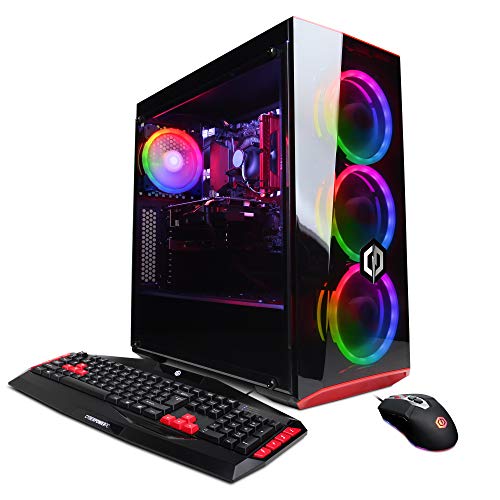
CyberpowerPC Gamer Xtreme VR Gaming PC GTX 1660
GEEKOM AX8 Max Silent Mini PC Ryzen 7 8745HS 16GB
GEEKOM Mini PC IT13 MAX Ultra 9 185H 24GB

MINISFORUM X1-255 Mini PC Ryzen 7 255 Barebone

GEEKOM IT13 MAX AI Mini PC 2026 Ultra 9 185H 24GB
The Details Behind The Selections
The STORMCRAFT Sirius AI lands in that sweet spot where first-time video editors usually shop. It pairs a 14th-gen Intel i5 14400F with 10 cores and 16 threads, which means your timeline preview window stays responsive even when you’re stacking color corrections and transitions. The 1TB NVMe SSD is a quiet hero here, letting 4K source files open without that dreaded spinning beachball that older systems still produce.
For hobbyists cutting family videos, YouTube essays, or short social clips, this rig covers the basics without breaking the budget. The 16GB DDR4 RGB memory looks fun and keeps multitasking smooth if you bounce between Premiere Pro, Chrome, and a music app at the same time. You may find the Arc B570 adequate for 1080p timelines but tight on heavy 4K multicam work, which is honest given the price point.
Useful Strengths
- 10-core i5 handles modern editing software without choking on preview playback
- 1TB NVMe SSD keeps project files and scratch disks fast
- 10GB VRAM on the Arc B570 helps with GPU-accelerated effects in Premiere and DaVinci
- Compact mid-tower design fits on most desks without dominating the space
Trade-Offs Worth Considering
- 16GB RAM can bottleneck projects with heavy effects or layered timelines; upgrades are likely down the road
- The Arc B570 is a capable card but lags behind NVIDIA options for some CUDA-accelerated plugins
Best Suited To
Beginners cutting 1080p and light 4K projects who want a ready-to-edit system without paying workstation prices.
Look Elsewhere When
You regularly grade 4K multicam footage, in which case the Ultra 50 V3 RTX 5080 will serve you better.
The Ultra 50 V3 sits at the top of this roundup, and it earns that placement through sheer hardware muscle. An AMD Ryzen 7 9800X3D with 8 cores and a 5.2GHz boost clock chews through export queues, while the RTX 5080 with 16GB GDDR7 handles real-time playback of dense timelines. For editors working in 4K and 8K, this is the kind of headroom that turns a frustrating render into a quick coffee break.
Unlike the STORMCRAFT Sirius above, which targets hobbyists, this build speaks directly to professional post houses and serious freelancers. The 32GB DDR5 at 6000MHz keeps multiple layers and adjustment clips moving without stutter, and the 2TB Gen4 SSD gives you room for active projects and media caches. The 850W Gold PSU is a practical anchor, ensuring stable power delivery for sustained rendering sessions that push the GPU hard.
Everyday Wins
- RTX 5080 with 16GB GDDR7 handles 4K and 8K timelines in real time
- 2TB Gen4 SSD offers generous scratch disk space for active projects
- 32GB DDR5 at 6000MHz keeps heavy multicam and color work responsive
- 850W Gold PSU supports sustained rendering loads without thermal throttling
Honest Caveats
- This is a full-size tower, so clearance under desks and cable management deserve planning
- Owners commonly report ARGB fan software requiring manual setup out of the box
Key Attributes
Who Will Love This
Professional editors handling commercial 4K and 8K projects who need reliable, consistent performance on deadline.
Swap It Out When
Your workspace can’t fit a full tower, in which case the GEEKOM IT15 AI Mini PC offers comparable CPU performance in a fraction of the space.
The GEEKOM IT15 challenges the assumption that serious editing demands a hulking tower. Inside its small shell sits an Intel Ultra 9 285H with 99 TOPS of AI compute, 16 cores, and integrated Arc 140T graphics that punch well above the system’s weight class. For editors working from a small apartment, a bedroom studio, or a hot-desk rotation, this thing disappears into the background while still moving timelines.
Compared to the Ultra 50 V3 above, the IT15 trades raw GPU muscle for a near-silent, palm-sized form factor that mounts behind a monitor with VESA. Wi-Fi 7 support means fast network transfers from NAS storage, and quad display output makes multi-monitor editing bays realistic. You may find the integrated Arc graphics fine for 1080p work but want a discrete GPU for heavy 4K color grading.
Strengths Worth Knowing
- 99 TOPS NPU accelerates AI features in DaVinci Resolve and newer Premiere tools
- 32GB DDR5 handles layered timelines without paging out to disk
- Quad 8K display output supports complex multi-monitor setups
- Wi-Fi 7 delivers fast transfers from network-attached storage
Practical Considerations
- Integrated Arc 140T graphics cap heavy GPU-accelerated effects compared to a discrete RTX card
- Mini PC thermals mean sustained renders may throttle slightly in warm rooms
Perfect Match For
Freelancers running small studios from tight spaces who prioritize portability and quiet operation.
Skip It When
Your work relies on heavy GPU rendering, in which case the Ultra 50 V3 RTX 5080 is the better fit.
The MINISFORUM AI X1 Pro-370 is a Mini PC that grew up. Its AMD Ryzen AI 9 HX 370 brings 12 cores, 24 threads, and a 5.1GHz boost, paired with Radeon 890M graphics that hold their own for 1080p and light 4K work. The dual 2.5G RJ45 ports are a nice touch for editors who shuttle massive files between NAS devices, and dual USB4 outputs open up fast external storage arrays.
Where the IT15 above leans on integrated graphics, this model gives you a more balanced spread of CPU and GPU power in the same compact envelope. Editors running a dual-monitor grading suite will appreciate the HDMI plus dual USB4 outputs that drive three displays without adapters. Wi-Fi 7 and Bluetooth 5.4 round out a connectivity suite that feels modern and forward-looking.
The Practical Payoff
- 12-core Ryzen AI 9 HX 370 chews through exports and previews
- Dual 2.5G Ethernet ports enable fast NAS transfers for large media libraries
- Triple display output supports full editing bays with timeline, preview, and scopes
- 1TB SSD provides room for active projects and cache files
Points To Keep In Mind
- Integrated Radeon 890M graphics are limited for heavy GPU effects compared to discrete GPUs
- Mini PC chassis means user upgrades are minimal beyond external storage
Feature Snapshot
The Right Fit
Editors running multi-monitor setups in tight spaces who need modern connectivity and quiet operation.
Reach For A Different Pick When
You need Oculink support for external GPU expansion, where the MINISFORUM M1 Pro is a stronger match.
The MINISFORUM M1 Pro brings an unusual perk to the Mini PC space: an Oculink port. That’s a dedicated PCIe lane for connecting an external GPU enclosure, which means this little box can scale up into a legitimate 4K editing workstation without replacing the whole unit. The Intel Core Ultra 5 125H with 14 cores and Arc graphics gives you solid baseline performance for everyday timelines.
Compared to the larger Ultra 50 V3 tower, the M1 Pro offers an upgrade path that budget towers simply can’t match. Editors who start with 1080p work and plan to grow into 4K will appreciate the future-proofing this represents. The dual USB4 ports and HDMI plus DisplayPort cover most multi-monitor needs, and 32GB DDR5 keeps the system responsive during multitasking.
Practical Pluses
- Oculink port enables external GPU expansion for future-proofing
- 14-core Core Ultra 5 handles daily editing and office tasks smoothly
- Quad display output via USB4, HDMI, and DP for flexible monitor setups
- 2.5G Ethernet port supports fast network transfers from studio NAS
Points To Note
- Integrated Arc graphics need an external GPU for serious 4K work
- Oculink enclosures add cost and desk footprint beyond the Mini PC itself
Who Should Grab It
Editors planning to expand into heavier GPU work later who want a compact starting point that grows with them.
A Better Fit Elsewhere
You want out-of-the-box 4K editing with no add-ons, where the GEEKOM IT15 AI Mini PC is the stronger direct fit.
The CyberpowerPC Gamer Xtreme is the old guard of this list, and it earns its place by being genuinely affordable. Inside sits an Intel i5-9400F and a GTX 1660 6GB, paired with 8GB DDR4. That’s modest by 2026 standards, but for someone cutting 1080p YouTube content or learning Premiere Pro for the first time, the system handles the job without demanding a small business loan.
The 120GB SSD boot drive keeps Windows responsive, while the 1TB HDD offers bulk storage for footage archives. It’s a balanced approach for new editors who don’t yet know how big their media libraries will grow. You may find this system tight for 4K timelines or modern AI-driven effects, which is honest given where it sits in the price spectrum.
A Few Strong Suits
- Lowest entry cost in the roundup, ideal for first-time editors
- GTX 1660 still supports GPU acceleration in most current editing software
- 1TB HDD gives ample room for growing footage libraries
- Mid-tower case leaves room for future component upgrades
Some Limits To Know
- 8GB RAM will limit timeline complexity and multitasking significantly
- i5-9400F is now several generations old and slower than current options
Made For
Students and hobbyists learning video editing who want a functional starter rig at the lowest practical cost.
Where Another Pick Suits Better
You want longer relevance and stronger specs, in which case the STORMCRAFT Sirius AI offers better long-term value.
The GEEKOM AX8 Max lives up to its Silent label with a fan profile tuned for low-noise operation, which is a real gift for editors working in shared offices or recording voiceover in the same room. The Ryzen 7 8745HS brings 8 cores and a 4.9GHz boost, while 16GB DDR5 and a 1TB SSD cover most everyday editing needs for 1080p timelines.
This is a Mini PC that prioritizes being heard less than being seen. Compared to the louder Ultra 50 V3 tower, the AX8 Max trades raw GPU muscle for a near-silent desk presence that won’t bleed into your audio work. Editors who mix their own sound or run long rendering sessions will appreciate the reduced acoustic footprint. The integrated graphics mean heavy 4K work is still a stretch, but that’s a fair trade for the silence.
Notable Upsides
- Silent operation ideal for audio-sensitive editing environments
- 8-core Ryzen 7 handles 1080p timelines with ease
- 1TB SSD gives quick boot and project load times
- Compact form factor mounts out of sight behind monitors
Worth Bearing In Mind
- 16GB RAM may need upgrading for complex multicam projects
- Integrated graphics limit heavy GPU-accelerated effects work
Built With In Mind
Editors who record audio in the same room as their workstation and need quiet operation above all else.
Consider Something Else When
You regularly work on multicam 4K projects, where the GEEKOM IT13 MAX AI Mini PC 2026 brings more memory and an NPU.
The GEEKOM IT13 MAX is the Mini PC version of a quiet powerhouse. An Intel Core Ultra 9 185H with 16 cores, 22 threads, and a 5.1GHz boost brings serious multitasking to a small chassis. The AI Boost NPU accelerates features in DaVinci Resolve’s neural engine and Adobe’s Sensei tools, so AI-driven tasks like scene detection and voice isolation run faster than on traditional CPUs alone.
Where the AX8 Max above focuses on silence, this model leans into AI-assisted workflows that newer editing tools increasingly rely on. The 500GB SSD is modest but upgradeable, and 24GB RAM covers most timelines without breaking a sweat. 8K media support opens the door to working with high-resolution footage from modern mirrorless cameras without immediate proxy requirements.
What Pays Off
- AI Boost NPU accelerates neural network features in modern editing software
- 16-core CPU handles complex timelines and heavy multitasking
- 8K media support for high-resolution source footage
- Upgradeable SSD slot lets you expand storage as needs grow
Less Ideal Details
- 500GB base SSD is small for active 4K or 8K media libraries
- Integrated graphics mean heavy GPU effects still rely on CPU
Right Fit For
Creators adopting AI-driven editing features who want a compact system that handles modern neural tools well.
Another Choice May Suit
You need more storage out of the box, where the MINISFORUM X1-255 Barebone offers flexible drive configurations.
The MINISFORUM X1-255 ships as a barebones unit, which is a deliberate choice for editors who want to choose their own RAM and storage. The Ryzen 7 255 with 8 cores and 16 threads delivers responsive performance for everyday 1080p work and light 4K tasks. The inclusion of an Oculink port means you can bolt on an external GPU later if timelines get heavier.
This pick trades convenience for flexibility, which is exactly what some creators want. Tinkerers who enjoy selecting specific SSD brands and RAM speeds get a clean canvas, while the Oculink support preserves a path to more graphics horsepower down the road. The HDMI 2.1 plus dual USB4 video outputs make multi-monitor editing bays a realistic setup, and Wi-Fi 7 ensures fast network transfers from studio storage.
Features That Help
- Barebones design lets you choose RAM and SSD to match your workflow
- Oculink port enables external GPU expansion for future 4K work
- Quad video output supports complex multi-monitor editing setups
- Compact Mini PC form factor fits small studio spaces
A Few Limitations
- Barebones means RAM and storage must be purchased and installed separately
- Integrated graphics need an external GPU for serious editing workloads
Whose Shelf It Belongs On
DIY-minded editors who enjoy customizing their hardware and want control over every component choice.
Not Your Match When
You want a turnkey out-of-box experience, where the GEEKOM IT13 MAX AI Mini PC 2026 arrives fully configured.
The GEEKOM IT13 MAX AI Mini PC 2026 edition is the flagship of the Mini PC lineup here, pairing an Intel Core Ultra 9 185H with 16 cores and an integrated AI Boost NPU. The 24GB LPDDR5 keeps the system responsive even under the load of multiple preview windows and background renders. For professionals seeking desktop-class power without the tower footprint, this model stands out.
Compared to its sibling IT13 MAX above, this 2026 refresh brings updated firmware and a slightly refined thermal profile that helps with sustained editing sessions. Film production teams, AI creative studios, and medical imaging workstations all fit the target audience. You may find the integrated Arc graphics handle 4K timelines but cap out on heavy GPU effects, which is a fair trade given the compact size and quiet operation.
The Helpful Details
- Flagship Intel Ultra 9 185H brings 16 cores to a Mini PC form factor
- AI Boost NPU accelerates modern AI-driven editing features
- 24GB LPDDR5 handles multitasking across editing and rendering apps
- Compact chassis fits studio desks without dominating space
Possible Compromises
- Integrated Arc graphics limit heavy GPU-accelerated effects compared to discrete GPUs
- 500GB SSD may need supplementing for large media libraries
Quick Technical Notes
Who It Suits Best
Professional creators who want flagship CPU performance and AI features in a quiet, compact form factor.
Where A Sibling Pick Shines
You need heavy GPU rendering on a regular basis, where the Ultra 50 V3 RTX 5080 tower is the stronger choice.
What Matters Most Before Choosing Desktops For Video Editing
CPU And GPU: Where The Work Actually Happens
A video editing desktop splits its workload between the CPU (central processor) and the GPU (graphics card), and understanding that balance saves hours of frustration. The CPU handles timeline decoding, export encoding, and effect calculations, while the GPU accelerates real-time preview playback, color grading, and AI-driven features. Editors working with 1080p footage can lean on integrated graphics and still feel productive, but 4K multicam work demands a discrete GPU with at least 8GB of VRAM. NPU (neural processing unit) acceleration is increasingly relevant for AI tools in DaVinci Resolve and Adobe Premiere, so a system with a modern NPU pays off as software evolves.
RAM, Storage, And The Scratch Disk Reality
RAM keeps your timeline responsive when you stack adjustment layers, transitions, and color nodes. 16GB is the practical floor for 1080p work, but 32GB gives breathing room for 4K projects and avoids the swap-file slowdowns that show up mid-render. Storage matters just as much: a fast NVMe SSD (solid-state drive) for your project files and cache dramatically shortens export times, while a secondary HDD or NAS handles archival footage. Editors who skip the scratch disk setup often wonder why their system feels slower than it should, and storage tiering is usually the reason.
Form Factor And Real Workspace Constraints
Tower desktops offer the best performance per dollar and easy upgrade paths, but they demand desk space and ventilation. Mini PCs trade raw power for compact size, fitting behind monitors and disappearing from the editing environment entirely. If your work happens in a bedroom, shared office, or traveling setup, the Mini PC form factor removes friction. Towers remain the right call for studios with dedicated rooms and predictable cooling needs.
Ports, Displays, And Daily Workflow
Video editors live by their display real estate, and a desktop’s port layout dictates how many monitors you can run. HDMI 2.1 and USB4 outputs support modern high-resolution panels, while Thunderbolt-style connections enable fast external storage arrays. Networking matters too: 2.5G Ethernet ports speed up NAS transfers for media libraries, and Wi-Fi 7 keeps wireless workflows responsive. Matching these specs to your actual monitor and storage setup prevents the bottleneck where a great desktop still feels slow because your external drive can’t keep up.
Smart Buying Advice For Video Editing Desktops
Where Shoppers Go Wrong
The most common mistake I see is buying a desktop with a powerful GPU but only 8GB of RAM, which immediately throttles the entire editing experience. Another trap is assuming integrated graphics handle modern timelines just because a CPU looks fast on paper. Storage is the third silent killer: a small SSD plus no scratch disk strategy will leave your export times far slower than the hardware suggests. Match components to your actual footage resolution, and budget RAM and storage before chasing GPU tiers.
What The Higher Tier Buys
Stepping up to a flagship desktop like the Ultra 50 V3 RTX 5080 brings tangible time savings: faster renders, real-time 4K playback, and headroom for AI-driven features. The jump from 16GB to 32GB of DDR5 alone removes swap-file stutters during heavy projects. Higher tiers also tend to ship with larger NVMe drives and beefier PSUs, which means fewer near-term upgrades. For professionals billing by the hour, the time recovered across months of editing often justifies the step up; for hobbyists, mid-range options deliver more than enough muscle without overspending.
Frequently Asked Questions
How Much RAM Do I Need For Video Editing?
16GB handles 1080p projects comfortably, but 32GB is the practical sweet spot for 4K timelines and multitasking across editing, browser, and communication apps.
Is A Mini PC Powerful Enough For Video Editing?
Modern Mini PCs with Ryzen AI 9 or Intel Ultra 9 processors handle 1080p and light 4K editing well, especially when paired with fast external storage, though heavy GPU effects still benefit from a discrete graphics card.
Do I Need A Dedicated GPU For Video Editing?
For 1080p work, integrated graphics can suffice, but 4K timelines, color grading, and GPU-accelerated effects in software like DaVinci Resolve benefit substantially from a discrete GPU with at least 8GB of VRAM.
What Storage Setup Works Best For Video Editing?
A fast NVMe SSD for active projects and media cache, paired with a secondary HDD or NAS for archival footage, delivers the best balance of speed and capacity for editing workflows.
Are NPU-Accelerated Features Worth Prioritizing?
NPUs matter most if you use AI-driven tools like scene detection, voice isolation, or auto-color in modern editors, and they’re increasingly relevant as software evolves toward neural-network-based features.
The Takeaway
The right desktop for video editing is the one that matches your footage resolution, workspace, and tolerance for render times. Hobbyists cutting 1080p clips get plenty of mileage from a mid-range Mini PC or the STORMCRAFT Sirius, while professionals handling 4K and 8K timelines will feel the difference a flagship tower like the Ultra 50 V3 RTX 5080 brings. Match the hardware to your real workflow, and the rest takes care of itself.