Modern desktops and laptops almost never ship with optical drives anymore, but plenty of software, movies, backups, and legacy archives still live on discs. An external DVD writer bridges that gap without forcing a hardware overhaul. I put this list together for anyone who still burns the occasional CD, rips old DVD collections, or installs older disc-based software on a current machine.
The Shortlist At A Glance
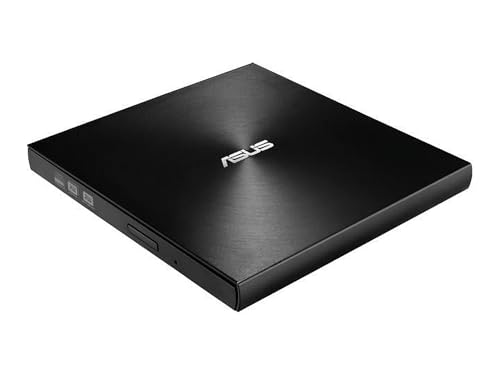
ASUS ZenDrive Ultra Slim USB 2.0 External 8X DVD Drive

ASUS SDRW-08D2S-U LITE External Slim DVDRW 8X

BENEWY External CD/DVD Drive for Laptop

ROOFULL External CD DVD Drive 8 in 1

LG Electronics GP60NB50 Ultra Slim Portable DVD+/-RW Drive

QDSYLQ External CD/DVD Drive USB 3.0
More Details On Our Top Picks
The ASUS ZenDrive U7M is the kind of slim writer I reach for when an archive job matters more than raw speed. It ships with M-DISC support, which means the laser etches data into a rock-like layer rather than dye that fades over time. For anyone preserving family photos or tax documents, that long-term thinking matters far more than burning a DVD 30 seconds faster.
Where the earlier SDRW-08D2S-U relies on plain DVD media, this ZenDrive leans hard into archival use. The concentric-circle finish on the lid gives it a slightly more refined feel than the typical black slab. It is one of the few external writers still positioned around genuine data preservation rather than just casual burning.
A Strong Showing
- M-DISC support rated for lifetimes measured in centuries, useful for photo archives and legal records.
- USB 2.0 keeps the connection broadly compatible with older desktops, kiosks, and thin clients.
- Includes Nero BackItUp software for Android, which adds a phone-to-disc backup path.
- Cable management is tidy because the writer pulls enough power from a single USB port on most machines.
Honest Caveats
- USB 2.0 caps transfer speed, so burning full DVD-Video discs feels slower than USB 3.0 competitors.
- The included Nero software suite can feel dated, and some users prefer a clean third-party install like ImgBurn.
Key Product Details
Who Should Grab It
Anyone building a long-term disc archive on a modern PC or Mac, especially photographers, archivists, and small office operators.
Swap It Out When
The LG Electronics GP60NB50 suits travelers better, since it pairs a slim chassis with similar M-DISC endurance for road-friendly setups.
The SDRW-08D2S-U Lite is the no-frills sibling to the ZenDrive above, and it earns its place by doing the basics well. The diamond-cut pattern on the lid is a small design touch that helps it disappear next to a dark laptop. It runs at 8X for both DVD reading and writing, which is the same speed the ZenDrive uses, so daily burn times look similar.
What it skips is the archival focus, so it leans on standard DVD and CD media instead of M-DISC. I think of this one as a starter option for someone who burns the occasional music CD or installs older software. It pairs nicely with the BENEWY unit if you want a backup drive on a desk.
Where It Excels
- Drag-and-burn workflow with bundled ASUS software keeps things simple.
- Disc encryption with password protection adds a layer of security for sensitive backups.
- Slim 13mm-ish profile slips easily into a laptop sleeve.
- USB 2.0 Type-A cable is included, so there are no extra accessory buys.
Points To Note
- No M-DISC support, so this is not the right pick for permanent archives.
- USB 2.0 throughput limits how quickly large disc images transfer during burning.
- The glossy finish tends to pick up fingerprints in regular travel bags.
Right Fit For
Students, casual users, and home offices that need a low-cost writer for software installs and the occasional data CD.
Look Elsewhere When
Creators backing up large RAW photo sets should consider the ASUS ZenDrive Ultra Slim for its M-DISC layer.
The BENEWY writer shows up most useful on the road, where I might pull a DVD from a client and need to read it on a modern USB-C laptop. It pairs a USB 3.0 data path with a USB-C connector option, which sidesteps the usual dongle headache. Plug-and-play behavior means most Windows and macOS machines recognize it without extra drivers.
Unlike the two ASUS picks above, this one uses a slimmer plastic shell that feels lighter in a backpack. Trade-off time: the lighter build slightly raises the chance of small bumps during travel. For hotel-room rips or a quick software install, it is a sensible carry.
What Helps Most
- Dual USB-A and USB-C cable support covers both legacy and modern laptops.
- USB 3.0 reduces burn time on full DVD images compared to USB 2.0 drives.
- Lightweight housing barely registers in a laptop bag.
- Reads and writes CD and DVD media without extra software on most systems.
Practical Considerations
- Plastic chassis is more prone to scuffs than the metal-feel ASUS writers.
- Bundled software is minimal, so heavy users install a third-party burning app.
- The drive can run warm during long ripping sessions, so leave ventilation space.
Quick Facts
Best Suited To
Hybrid workers and students who bounce between USB-A desktops and USB-C laptops during the week.
Where Another Pick Suits Better
Office users who want fewer cables should look at the ROOFULL External CD DVD Drive 8 in 1, which adds a built-in USB hub.
ROOFULL took a different angle with this 8-in-1 unit, and it is the only pick here that doubles as a desk accessory. It combines an optical drive with four USB ports and two SD/TF card slots, which matters on a thin laptop that sacrificed ports for weight. For anyone editing photos off an SD card while burning a DVD, fewer dongles is a real win.
Compared with the BENEWY writer above, this one is heavier and meant to live on a desk rather than a backpack. Owners commonly treat it as a permanent dock next to a monitor, which makes the optical drive feel like a bonus rather than the main event. That framing helps set expectations.
Positive Points
- Built-in 4-port USB hub reduces the need for a separate dock.
- SD and TF card slots read camera media without an external reader.
- Consolidates three peripherals into one footprint, saving desk space.
- Reads and burns both CDs and DVDs in a single tray-load unit.
Less Ideal Details
- Larger chassis makes it less travel-friendly than the slim ASUS or BENEWY picks.
- Hub and drive share bus power, so high-draw USB devices can starve the laser during long burns.
- Some users report the tray mechanism feeling lighter than on premium drives.
Whose Shelf It Belongs On
Photographers, hobbyists, and remote workers running a single-laptop setup who want fewer accessories on the desk.
Not Your Match When
Frequent flyers should grab the BENEWY External CD/DVD Drive instead, since that one is lighter and bus-powered for travel.
The LG GP60NB50 has been a quiet workhorse for years, and it earns a spot because of its cross-platform compatibility. Windows, Linux, macOS, plus Surface Pro 3 and 4 are all in the supported list, which covers setups the other picks miss. The 0.75 MB buffer memory is small by SSD standards, but it is standard for optical drives.
What I appreciate here is that LG includes M-DISC support in a drive this thin. That puts it close to the ASUS ZenDrive on archival capability while weighing a bit less. It is the kind of unit that disappears into a laptop sleeve and only comes out when an actual disc shows up.
A Few Strong Suits
- M-DISC compatibility for long-term archival in a slim chassis.
- Wide OS support including Linux, which most generic external drives skip.
- 24X CD read and write speed for fast audio CD ripping.
- Compact housing slides into most laptop bags without bulging.
Things To Consider
- No USB-C cable in the box, so modern laptop owners need an adapter.
- Older USB 2.0 interface slows full-DVD burns compared to USB 3.0 rivals.
Feature Snapshot
Built With In Mind
Linux tinkerers, Surface Pro owners, and mixed-platform households that need a slim, broadly compatible writer.
Skip It When
Travelers on USB-C-only laptops should look at the BENEWY External CD/DVD Drive, which ships native USB-C support.
The QDSYLQ writer leans into the longest compatibility list of the bunch, with explicit support for Windows 11, 10, 8, 7, XP, Vista, Linux, and macOS. For anyone holding onto an older Windows XP or Vista machine for legacy software, that broad list is often the deciding factor. The USB 3.0 interface keeps burn times competitive with newer laptops.
It runs in the same general category as the BENEWY pick, but trades the dual-cable convenience for a longer OS support sheet. Owners commonly report that it works straight out of the box on machines as old as a ThinkPad T420. For a workshop bench PC or a retro-build, that is the headline feature.
Strengths Worth Knowing
- OS support stretches back to Windows XP and Vista for legacy machines.
- USB 3.0 path reduces wait time on full DVD and data disc burns.
- Slim profile matches the rest of the picks and travels cleanly.
- Plug-and-play setup means no driver hunting on most supported systems.
Worth Bearing In Mind
- Brand carries less recognition than ASUS or LG, so warranty support varies.
- No bundled burning software, so users must supply their own.
- Plastic shell feels budget next to the metal-accented ASUS options.
Made For
Workshop benches, retro-PC hobbyists, and small offices still running older Windows installs that need disc access.
Reach For A Different Pick When
Anyone focused on archival longevity should pick the ASUS ZenDrive Ultra Slim, since M-DISC support gives it a clear edge.
Picking The Right External Optical Drive For Your Setup
External disc drives look interchangeable at first glance, but the differences show up in daily use. Start with connection type: USB-A still rules on older desktops, while USB-C dominates modern thin laptops. Some drives ship with both cables, others force a dongle, and that decision alone can change how often the drive gets used.
Next, think about media support. M-DISC compatibility is a quiet hero for anyone archiving photos, tax records, or business documents, since standard DVD dye can fade within a decade. Plain DVD+/-RW is fine for software installs and movie rips, but skip M-DISC entirely if the goal is short-term use.
Speed matters less than people expect. An 8X DVD writer is the practical ceiling, and jumping to USB 3.0 only saves a minute or two on a full disc. The bigger payoff from USB 3.0 is faster ripping of scratched discs, where the higher bandwidth helps the error-correction logic recover data.
Finally, look at extra features through a practical lens. A built-in USB hub is helpful on a desk, but it adds bulk to a travel bag. A slim writer with one cable is a better travel companion. Match the drive to the bag it will live in, and the choice usually makes itself.
Key Considerations Across These Picks
Where Shoppers Go Wrong
Picking a drive solely on read speed misses the real story. Burn quality, error correction, and media compatibility affect whether a disc still reads in five years. Skipping the bundled software check is another common slip, since some drives include basic burning apps while others expect a third-party install. Finally, ignoring cable type leads to frustration when a USB-C-only laptop meets a USB-A drive, so confirm the cable situation before checkout.
Where The Extra Money Goes
Higher-tier models in this category tend to add M-DISC archival support, broader OS compatibility, and sturdier housings. The ASUS ZenDrive and LG GP60NB50 both justify a slight premium for M-DISC if long-term storage matters. Cheaper drives cut costs with plastic shells, no bundled software, and shorter compatibility lists, which is fine for casual use but limiting for archives or legacy systems. Pay more when you need the durability and OS reach, and save when a basic writer gets the job done.
Frequently Asked Questions
Do external DVD drives work with modern laptops?
Yes. Most modern laptops connect to external optical drives through USB-A or USB-C, and the drives in this list all support plug-and-play on current Windows and macOS systems without extra drivers.
What is M-DISC support?
M-DISC is a special archival DVD format that uses a rock-like recording layer instead of organic dye. Discs burned with M-DISC are rated to last several centuries under proper storage, which is why archival drives like the ASUS ZenDrive include it.
Can these drives burn Blu-ray discs?
No. The picks in this list handle DVD and CD media only. For Blu-ray burning, a dedicated external Blu-ray writer with appropriate software is required.
Is USB 3.0 important on an external DVD drive?
USB 3.0 shortens full-disc burn times slightly and speeds up data recovery from scratched discs. It is helpful but not essential, since 8X DVD is the practical ceiling regardless of interface.
Will these drives work on Linux or older Windows versions?
Some do. The LG GP60NB50 and QDSYLQ drive both list Linux and older Windows support, which makes them good fits for mixed-vintage setups where a newer-only drive would not be recognized.
The Takeaway
External optical drives solve a specific problem, and the right one depends on whether the priority is archival longevity, travel convenience, or a multi-port desk setup. Match the drive to the laptop or desktop it will pair with, and the rest of the decision usually falls into place.