A great display desk mount turns a cluttered workspace into a calm one. I think about it the same way I think about a good chair: you stop noticing it after a few days, and your neck stops complaining after a few weeks. Most shoppers I talk to land on this category for the same reasons, whether they work from home, edit video, or run a trading setup. Lifting a screen off the desk surface frees up square inches for notebooks, keyboards, and the small things that always seem to disappear.
The picks below cover single, dual, and triple configurations, plus free-standing and clamp-on bases. I’ll walk through the strengths and trade-offs of each, then share what to weigh before committing.
A Quick View Of The Lineup

HUANUO FlowLift Pro Monitor Arm 13–32″

Suptek Dual Monitor Stand Free-Standing ML6802

HUANUO FlowLift Dual Monitor Stand 13–32″

AX WABER Single Monitor Desk Stand AX05TB01

MOUNTUP Single Monitor Desk Mount 4.4–19.8 lbs

MOUNTUP Triple Monitor Stand Mount Up to 27″

MOUNTUP Triple Monitor Mount 17–32″

HUANUO Triple Monitor Mount 17–32″
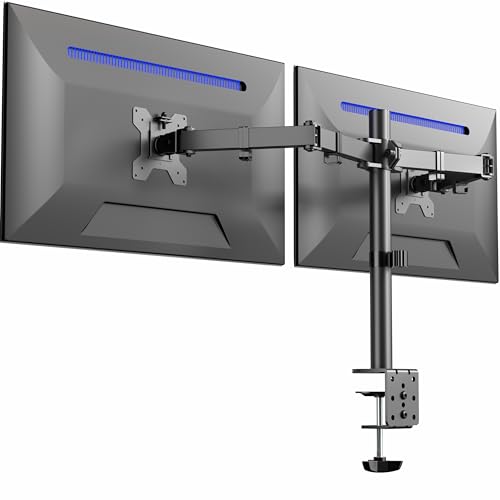
VIVO Dual Monitor Desk Mount STAND-V032

MOUNTUP Dual Monitor Stand 17–32″
Taking A Closer Look At The Options
The HUANUO FlowLift Pro is the kind of arm I picture when someone says “I just want a clean single-screen setup.” It uses a mechanical spring (the brand calls it MechaSpring) instead of a gas strut, which means the floating motion stays consistent whether the room is warm or chilly. For a home office where the monitor moves several times a day, that consistency matters more than people expect.
The mount fits screens between 13 and 32 inches, which covers basically everything short of a 4K TV. The VESA plate (VESA is the standard bolt pattern on the back of monitors, either 75×75mm or 100×100mm) snaps into place without tools, and the C-clamp or grommet base lets it grip most wood desks between roughly 0.6 and 3.5 inches thick. Compared to the Suptek dual setup further down, this one trades the second screen for better single-arm feel.
Useful Highlights
- Mechanical spring keeps the height drift-free through long workdays.
- Supports up to 19.8 lbs on flat panels, so 27-inch productivity displays sit securely.
- Tool-free VESA plate reduces setup to a screwdriver-free experience.
- Tilt, swivel, and rotation give genuine portrait-mode flexibility for reading long documents.
Things To Consider
- Recommended for wood desks only, so glass or steel surfaces need a different approach.
- Curved monitor weight cap drops to 15.4 lbs, which rules out some 32-inch curved panels.
- Cable management is minimal, so plan on your own ties for a tidy look.
Feature Card
Made For
Remote workers running one 24- to 27-inch display who want a tidy floating monitor and easy height adjustments.
Skip It When
The Suptek Dual LED LCD Monitor Stand suits renters on glass desks better, since it uses a free-standing base with no clamp needed.
Not every desk wants a clamp biting into its edge. The Suptek ML6802 sits on a weighted base, which makes it the right answer for glass tops, narrow desks, and anyone who moves their workstation around. I like this style for renters because there’s no permanent mark to explain later.
It’s built for two screens up to 32 inches and 22 lbs each, and the 31.5-inch center pole gives it real vertical range. Compared to the AX WABER stand further down, this one trades the smaller footprint for a much taller mounting height, which helps when you want both screens sitting at eye level rather than chest level.
A Favorable Mix
- Free-standing design leaves the desk edge untouched and uncluttered.
- Handles two 32-inch panels at 22 lbs each, which suits most office displays.
- Tall pole gives genuine stacked-screen or above-eye-level placement.
- Built-in cable channel keeps cords running down one tidy line.
Worth Noting
- The base footprint eats desk space, which matters on smaller surfaces.
- Two heavy monitors at full extension create a top-heavy feel that some users find unsettling.
- Vertical array means screens move together, not independently.
Who It Suits Best
Apartment dwellers and shared-office workers on glass or rented desks who run dual monitors and want zero clamping.
Consider Something Else When
The AX WABER Single Monitor Desk Stand is a better fit for solo-display setups where desk real estate matters more than height.
The HUANUO FlowLift Dual is the practical middle ground for anyone running a productivity setup with two side-by-side panels. Each arm holds up to 19.8 lbs, so a pair of 27-inch 1440p displays sit comfortably without sag. I think about it the same way I think about a reliable sedan: nothing flashy, but it does the daily work without complaint.
It uses the same VESA 75×75 or 100×100mm mounting pattern as the single-arm version, and the C-clamp plus grommet base gives you two ways to attach to most desks. Compared to the VIVO Dual Monitor Desk Mount coming later, this one leans toward lighter office displays rather than heavier studio panels.
Standout Benefits
- Each arm carries up to 19.8 lbs, which covers mainstream 27-inch productivity displays.
- Full-motion articulation means each screen tilts and swivels independently.
- C-clamp and grommet options suit both edge-mount and through-hole desk setups.
- Spring-tensioned arms hold position through long sessions without drift.
Trade Offs
- The center crossbar takes up rear desk space, which can interfere with shallow ledges.
- Two independent arms need periodic tension re-checks after the first month of use.
Quick Facts
Best Suited To
Programmers and editors juggling code on one screen, references on the other, who want both displays at consistent eye height.
Look Elsewhere When
The MOUNTUP Dual Monitor Stand fits shoppers who plan to mix different screen sizes in their pair, since its weight range accommodates smaller side panels more comfortably.
The AX WABER stand takes the freestanding approach and applies it to a single-monitor setup. It’s a useful middle ground for someone who wants the height lift of a mount without committing to a clamp. The base sits firmly under the monitor, and the arm does the rest.
It fits 13- to 32-inch screens with VESA 75×75 or 100×100mm mounting holes, and the height adjustment runs along the pole. Compared to the HUANUO FlowLift Pro, this option trades clamping stability for portability, which can matter in coworking setups.
Useful Strengths
- Free-standing base means zero damage to the desk surface.
- Supports a wide size range from 13 up to 32 inches.
- Tilt, swivel, and rotation cover the usual ergonomic adjustments.
- Easy to reposition when the workspace layout changes.
Points To Note
- Single monitor only, so dual-screen users will need a different solution.
- Base depth can crowd shallow desks or interfere with keyboard trays.
- Weight capacity isn’t published for this model, so verify your monitor’s weight before committing.
Who Will Love This
Anyone working in a coworking space or rotating between desks who wants monitor height without permanent mounting.
Reach For A Different Pick When
The HUANUO FlowLift Pro Monitor Arm is the right call for wood desks where clamping is welcome and a more permanent arm is preferred.
The MOUNTUP single mount earns its spot through one underrated feature: a tension system rated for over 20,000 adjustment cycles before leaving the factory. For a shopper who plans to keep their setup for years, that kind of testing signals the brand expects the arm to last, not just survive the first month.
It supports 4.4 to 19.8 lbs of monitor weight on screens up to 32 inches, with a hex-key tension adjustment for fine-tuning after mounting. The C-clamp and grommet base covers the two most common wood-desk installations. Compared to the AX WABER freestander, this one assumes you’re okay with a clamp and want a more stable mount in return.
Where It Excels
- Tension system tested through 20,000+ cycles signals long-term durability.
- C-clamp and grommet base included for two installation styles.
- Full-motion articulation gives portrait-mode and side-sharing flexibility.
- Hex-key tuning lets heavier monitors (15+ lbs) sit at the right balance point.
Small Caveats
- Pre-set to mid-tension, so plan a quick adjustment after mounting heavier screens.
- Cable management isn’t bundled, so add ties for a clean look.
Perfect Match For
Career professionals who sit at the same desk daily for years and want an arm built for repeated repositioning.
Swap It Out When
The AX WABER Single Monitor Desk Stand is a smarter pick for renters who can’t or won’t clamp their desk surface.
Three-screen setups are usually about workflow density, and the MOUNTUP Triple Monitor Stand keeps the architecture clean. It fits flat or curved screens up to 27 inches across each arm, with 4.4 to 19.8 lbs of capacity per arm. For traders, streamers, and developers running parallel dashboards, this kind of width-to-depth ratio is hard to replicate with separate stands.
The C-clamp works on desks between 0.39 and 3.15 inches thick, and the grommet mount handles through-hole installations. Compared to the larger MOUNTUP triple mount reviewed in the next section, this one tops out at 27-inch panels, so it’s the better choice for compact triple arrays.
The Case For It
- Holds three monitors with consistent alignment across the array.
- Each arm supports up to 19.8 lbs, which covers mainstream 24- and 27-inch displays.
- Compatible with VESA 75×75 and 100×100mm patterns for broad monitor compatibility.
- Clamp and grommet bases support both edge and through-desk mounting.
Honest Caveats
- Maximum screen size is 27 inches, so larger panels need the next MOUNTUP option.
- Three arms mean triple the cable routing, which requires planning.
Right Fit For
Stock traders, video editors, and streamers running three mid-size displays who want them aligned and adjustable from one base.
Not Your Match When
The MOUNTUP Triple Monitor Mount for 17–32 inch screens suits anyone whose panels exceed 27 inches and need the larger arm geometry.
This is the upgraded triple mount from MOUNTUP, and it expands the size range to 32 inches per arm while keeping the same per-arm weight capacity. For users running three 32-inch panels, this is the geometry that actually fits. Each arm still carries 4.4 to 19.8 lbs, which aligns with the typical 32-inch office display.
It uses the same VESA 75×75 and 100×100mm patterns as the smaller triple mount and supports both clamp and grommet bases. Compared to the HUANUO Triple Monitor Mount, this one leans toward heavier productivity panels rather than gaming refresh rates.
What Earns Its Place
- Handles three 32-inch screens, which most triple mounts in this category cannot.
- Compatible with major brands like ASUS, Acer, Samsung, LG, HP, MSI, Dell, and Lenovo.
- Each arm carries up to 19.8 lbs for stable long-session positioning.
- Customizable orientation lets you mix landscape and portrait panels if needed.
Points To Keep In Mind
- Larger panels at full extension create meaningful leverage, so a sturdy desk is essential.
- Weight distribution across three arms needs a careful balance pass during setup.
Built With In Mind
Power users and creative professionals running three 27- to 32-inch displays who need real-screen real estate without splitting the array across separate mounts.
A Better Fit Elsewhere
The HUANUO Triple Monitor Mount is the right pick for gamers focused on refresh rate and tighter arm geometry for three identical screens.
The HUANUO triple mount is positioned for the gaming side of the multi-monitor world. Each arm supports screens up to 32 inches and between 4.4 and 17.6 lbs, with full swivel, tilt, and rotation. For sim racing, flight sims, and wide-FPS setups, this is the geometry that pulls the side screens in close enough to feel like a wraparound cockpit.
It includes both clamp and grommet mounting kits and uses VESA 75×75 or 100×100mm patterns. Compared to the MOUNTUP triple mount, this one prioritizes panel articulation over raw weight capacity.
Key Advantages
- Full swivel, tilt, and rotation give the curved-array feel sim rigs want.
- Each arm fits up to a 32-inch panel for genuine wraparound builds.
- Clamp and grommet mounting kits included in the box.
- Standard VESA 75×75 and 100×100mm patterns cover most gaming monitors.
Worth Bearing In Mind
- Weight cap tops out at 17.6 lbs per arm, so heavier studio displays won’t work.
- Three independent arms mean three tension adjustments to dial in.
Whose Shelf It Belongs On
Gamers and sim enthusiasts building a triple-screen wraparound where the side panels angle inward toward the player.
Where Another Pick Suits Better
The MOUNTUP Triple Monitor Mount for 17–32 inch screens is the right call for productivity users who need higher per-arm weight capacity for heavier 32-inch panels.
The VIVO STAND-V032 is built for heavier displays. With a 22 lbs per arm capacity, it can hold studio monitors and color-graded reference screens that lighter mounts can’t. For designers and video editors running calibrated displays, this matters: the panel needs to hold position exactly where it’s set.
It supports two 13- to 32-inch screens with VESA 75×75 or 100×100mm mounting holes, with ±90° tilt, 180° swivel, and full 360° rotation. The drill-free clamp option is a thoughtful touch for installers who can’t modify their desk. Compared to the Suptek dual stand, this one trades free-standing flexibility for higher per-arm capacity.
The Good Stuff
- 22 lbs per arm supports studio-grade and color-accurate displays.
- Full ±90° tilt, 180° swivel, and 360° rotation cover every ergonomic angle.
- Portrait and landscape orientations supported on both arms.
- Drill-free clamp option protects desks where drilling isn’t an option.
Practical Considerations
- Higher weight capacity comes with a heavier overall stand that takes effort to reposition.
- Setup precision matters more since heavier monitors magnify small imbalances.
Technical Reference
Who Should Grab It
Creative professionals running calibrated studio displays who need rock-solid positioning across long editing sessions.
Another Choice May Suit
The Suptek Dual LED LCD Monitor Stand fits shoppers prioritizing a free-standing base over high per-arm weight capacity.
The MOUNTUP Dual Monitor Stand closes out the list as the practical pick for mixed-size setups. It handles flat and curved screens from 17 to 32 inches at 4.4 to 17.6 lbs per arm, which is the sweet spot for a productivity pair where one panel is the main display and the other is a slightly smaller reference. That kind of mismatched pair is common, and not every mount accommodates it gracefully.
The C-clamp and grommet base give two installation paths, and the arms share the same VESA 75×75 and 100×100mm patterns as the rest of the lineup. Compared to the HUANUO FlowLift Dual, this one trades a slightly lower weight ceiling for better fit across uneven panel sizes.
Reasons It Performs
- Compatible with flat and curved panels from 17 to 32 inches.
- Handles mismatched screen sizes without forcing both arms to the same tension.
- C-clamp and grommet base suit both edge-mount and through-hole desks.
- Standard VESA patterns cover the bulk of consumer and prosumer monitors.
Where It Is Less Suited
- Per-arm capacity tops out at 17.6 lbs, so heavy 32-inch studio displays won’t work.
- Two-arm articulation requires periodic re-tensioning after the first few weeks of use.
The Right Fit
Productivity users running two screens of different sizes who want consistent height without overspending on heavy-duty capacity.
Skip It When
The VIVO Dual Monitor Desk Mount suits creative professionals carrying heavier calibrated displays that exceed 17.6 lbs per arm.
Picking The Right Display Desk Mounts For Your Setup
Match The Mount To Your Desk Surface
The first fork in the road is the desk itself. Wood, composite, and laminate surfaces take a C-clamp or grommet mount cleanly, with clamp ranges typically running from about 0.4 to 3.5 inches thick. Glass desks rule out most clamps unless you add a protective pad, which is why free-standing options like the Suptek ML6802 earn their keep in those environments.
Decide Between Free-Standing And Clamped
Free-standing bases trade desk-edge stability for portability and zero damage. Clamped mounts give a firmer feel, especially with heavier displays at full extension. Run through how often you actually reposition your monitors. A clamp becomes annoying fast for anyone who moves weekly, while a freestander feels redundant on a permanent setup.
Match Screen Size And Weight Together
A 32-inch monitor at the heavy end of its class can weigh 17 to 22 lbs with the stand removed. The mount’s per-arm weight limit needs headroom beyond that number, not a match. For curved panels, expect a tighter weight ceiling than flat screens, since the geometry shifts the load differently.
Think About Articulation You Actually Use
Tilt, swivel, and rotation matter most for collaboration and content review. If your screen sits at one height and never moves, a basic riser may do the job. For shared screens, frequent portrait-mode reading, or trading setups that pivot, full-motion arms pay back the cost quickly.
Plan For Cable Management Before Mounting
A floating monitor with dangling cables undermines the whole clean-desk goal. Most mounts bundle minimal cable clips, so plan on adding Velcro straps or a cable tray underneath. Running cables through the arm channels before final tightening saves rework.
Key Considerations Across These Picks
Where Shoppers Go Wrong
The most common slip is buying a mount by screen size alone and forgetting weight. A 32-inch panel can weigh 12 lbs or 22 lbs depending on the model, and that difference decides whether the arm holds position or drifts slowly through the day. Always cross-check your monitor’s actual weight against the mount’s per-arm capacity before ordering.
Another pitfall is choosing a clamped mount for a desk that can’t accept one. Glass tops, thick edges, and shared-office furniture often rule out clamping entirely. Free-standing bases solve this, but they need desk depth to sit securely without tipping.
When Paying More Pays Off
Higher-tier mounts usually cost more for one of three reasons: heavier per-arm weight capacity, tested cycle life, or richer cable management. For a single 24-inch monitor at a fixed desk, the extra spend rarely shows. For triple-screen arrays, calibrated studio displays, or arms that get repositioned dozens of times a week, the upgrade shows up within the first month of daily use.
Frequently Asked Questions
What size monitor works with most display desk mounts?
Most mounts in this category support 13 to 32 inches per arm, which covers the bulk of consumer and office displays. Triple-mount arms often cap at 27 inches per arm for geometry reasons, while dedicated dual mounts can stretch to 32 inches per arm. Always check both the size range and the weight range before committing.
Can a display desk mount hold a curved monitor?
Most modern mounts handle curved screens, but with a lower per-arm weight ceiling than flat panels of the same size. Curved geometry shifts the load center forward, which is why manufacturers typically rate curved compatibility 4 to 5 lbs below their flat-screen limit. Verify the curved rating specifically before mounting.
Will mounting a monitor damage my desk?
Clamp mounts can leave compression marks on soft wood surfaces over time, though these usually fade. Grommet mounts require drilling a hole through the desk, which is permanent. For renters or shared spaces, a free-standing base is the only zero-impact option, and it sacrifices some stability for that benefit.
How much weight can a typical display desk mount hold?
Single-arm mounts typically hold 4.4 to 19.8 lbs, while dual and triple arms usually sit in the same per-arm range. Heavy-duty dual mounts like the VIVO STAND-V032 stretch to 22 lbs per arm for studio displays. The per-arm number matters more than the total, since each arm carries its own load independently.
Do display desk mounts support portrait orientation?
Full-motion mounts with rotation in the joint can pivot 90° into portrait mode, which is useful for reading long documents, coding, or editing vertical video. Cheaper riser-style mounts skip this articulation. If portrait matters, look for explicit rotation in the spec sheet rather than just tilt and swivel.
The Takeaway
A display desk mount is one of the few upgrades that pays back daily, in posture, in desk space, and in the small satisfaction of a clean workspace. Start with your desk surface and your monitor’s actual weight, then narrow by screen count and the kind of motion your work demands. The right mount tends to disappear into the routine, which is the highest compliment a piece of hardware can earn.