I spend a lot of time in timelines and color suites, and the wrong machine turns a deadline into a crisis. Video editors juggling 4K multicam, colorists scrubbing through RAW frames, and motion designers running particle sims all need different things from a workstation, which is why this list swings from compact mini PCs to full-tower performance rigs. The picks below cover creators who prioritize portability, hobbyists starting their first channel, and professionals who need render times measured in seconds rather than minutes.
A Fast Comparison Of The Options

Ultra 50 V3 – RTX 5080 16GB GDDR7 | Ryzen 7 9800X3D
CYBERPOWERPC Gamer Xtreme VR (i5-12400F, RTX 3050)

BOSGAME E2 Plus Mini PC (Ryzen 5 3501U)

GEEKOM IT12 Mini PC (i3-12300HE, 16GB)

Skytech O11 Vision Gaming PC (RTX 5070 Ti)
CyberpowerPC Gamer Xtreme VR (GTX 1660)

BOSGAME P3 Lite Mini PC (Ryzen 7 6800H, 32GB)

BOSGAME P3 Plus Mini PC (Ryzen 7 7840HS)
CYBERPOWERPC Gamer Xtreme VR (i7-12700F, RTX 3060 12GB)
Dell Inspiron 3880 (i5 10th Gen, 12GB)
Taking A Closer Look At The Options
The Ultra 50 V3 is the rig I’d park next to a calibrated reference monitor and never apologize for. It pairs an AMD Ryzen 7 9800X3D, which uses a stacked cache design that keeps frame caches hot, with an NVIDIA RTX 5080 pushing 16GB of GDDR7, the newest graphics memory standard for higher bandwidth. Together those parts handle 4K timelines with multicam and grade layers without breaking a sweat.
For editors running DaVinci Resolve or Premiere Pro who want fluid scrubbing through heavy timelines, the 32GB of DDR5 at 6000MHz keeps playback responsive when you stack adjustment layers. The 2TB Gen4 SSD leaves room for raw footage and project caches side by side. Compared to the CYBERPOWERPC Gamer Xtreme VR below, this is a different class entirely.
Standout Benefits
- 3D V-Cache CPU design speeds up scrubbing through dense timelines and cache-heavy effects work
- GDDR7 graphics memory offers real headroom for RAW playback and GPU-accelerated exports
- 2TB Gen4 NVMe SSD holds project files, caches, and source footage without juggling drives
- 32GB DDR5 at 6000MHz keeps Premiere and Resolve responsive under heavy load
- 850W Gold-rated PSU leaves room for future GPU upgrades without swapping power supplies
Points To Keep In Mind
- Full-tower footprint demands dedicated desk space, which can crowd smaller edit bays
- ARGB fans and high-end airflow can run audible under sustained render loads in quiet rooms
Feature Snapshot
Who Will Love This
Colorists and editors handling 4K multicam projects who need fluid playback without dropped frames will find this machine genuinely freeing.
Reach For A Different Pick When
Studio editors working in shared, noise-sensitive spaces may prefer the GEEKOM IT12 Mini PC for its quiet, compact footprint.
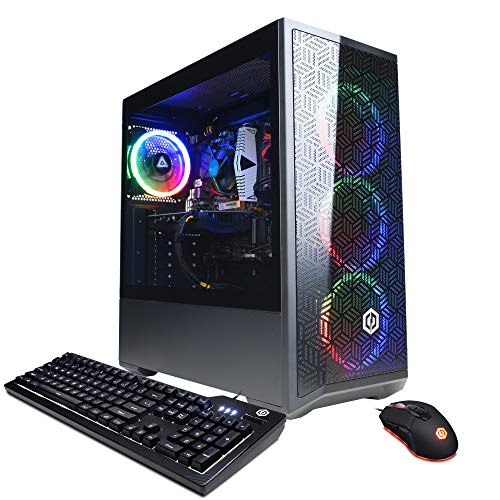
CYBERPOWERPC’s Gamer Xtreme VR is the kind of box I’d recommend to a first-time YouTuber cutting 1080p talking-head footage. The Intel Core i5-12400F runs six performance cores that chew through basic timeline work without thermal complaints, and the GeForce RTX 3050 brings NVENC, NVIDIA’s dedicated video encoder chip, which speeds up H.264 exports considerably.
With 16GB of DDR4 and a 500GB NVMe SSD, you have enough breathing space for a current project without juggling external drives. Windows 11 Home comes pre-installed, so you can install Premiere Pro or DaVinci Resolve and start cutting the same day. Compared to the Ultra 50 V3 above, this is a clear step down in GPU power, but the price-to-performance ratio for hobbyists is strong.
Everyday Advantages
- NVENC encoder dramatically shortens H.264 and H.265 export times
- Six-core processor handles multicam 1080p edits without choking
- 16GB DDR4 supports modest multitasking across editing software and chat apps
- 500GB NVMe boot drive keeps project launches snappy
Room For Improvement
- Only 8GB of VRAM limits heavy timeline work and complex color grading
- Stock cooling tends to run warm during long exports, so owners often add case airflow
- Wi-Fi module is functional but not the latest standard for fast asset transfers
Right Fit For
Hobbyist YouTubers and content creators cutting 1080p footage who want a reliable starter rig without overspending.
Look Elsewhere When
Creators working with 4K timelines or heavy color grading will find more breathing room with the Ultra 50 V3 reviewed above.
The BOSGAME E2 Plus Mini PC is the machine I’d Velcro behind a secondary monitor for quick social cuts. Its AMD Ryzen 5 3501U is a mobile-class chip with four cores, perfectly adequate for cutting short-form clips, stitching vlog segments, and exporting 1080p reels. The 8GB of RAM keeps Premiere’s basic timeline running, though heavy grades will push it.
The 256GB SSD is modest, so most editors will plug in an external drive or upgrade later. Where this little box shines is footprint: it disappears behind a display. If you bounce between client locations or work from a kitchen table, that matters. Compared to the Gamer Xtreme VR above, it trades real editing muscle for a tiny living-room-friendly profile.
Notable Gains
- Compact chassis frees up desk space for reference monitors and audio gear
- Low power draw makes it ideal for always-on download stations or proxy servers
- Mobile-class Ryzen chip runs cool enough for fanless-adjacent quiet operation
Honest Caveats
- 8GB RAM limits multi-app workflows, so background browser tabs can stall playback
- Integrated graphics struggle with heavy effects or color grading beyond basic corrections
- 256GB internal storage fills fast with raw clips, requiring external drives
Quick Facts
Built With In Mind
Freelancers and remote editors needing a portable secondary rig for quick client revisions and social cuts on the road.
Not Your Match When
Editors running multicam 4K timelines will feel the limits of 8GB RAM and benefit more from the BOSGAME P3 Lite below.
GEEKOM’s IT12 is the box I’d plant in a podcast studio where fan noise is verboten. The Intel i3-12300HE is a hybrid mobile chip with performance and efficiency cores that sip power, while the full metal chassis helps dissipate heat without spinning up to loud RPMs. USB4 output means you can drive an 8K display or a high-refresh editing monitor from a single port.
With 16GB of RAM and a 512GB SSD, this mini PC out-specs the BOSGAME E2 Plus above in raw memory while staying similarly compact. For editors cutting talking-head content, simple documentary edits, or color grading within Resolve’s free tier, the IT12 quietly handles the workload. The three-year coverage is a nice safety net for office deployments.
A Strong Showing
- USB4 port enables single-cable docking with high-resolution monitors
- Full-metal chassis stays cool under sustained workloads with minimal fan ramp
- 16GB RAM supports Resolve’s free version and Premiere Pro without choking
- 8K UHD output future-proofs the rig for next-gen reference displays
Things To Consider
- i3-class processor slows on heavy multicam timelines with stacked adjustment layers
- Integrated graphics limit GPU-accelerated effects, so expect longer render times
- Upgrade path is limited compared to traditional tower workstations
Whose Shelf It Belongs On
Studio editors in noise-sensitive environments like audio suites and shared offices who need a tidy, silent workstation.
A Better Fit Elsewhere
Motion designers running After Effects compositions will get more from the BOSGAME P3 Plus Mini PC reviewed later in this list.
The Skytech O11 Vision is the build I’d recommend to a post house running DaVinci Resolve all day. The Ryzen 7 9850X3D is the newer sibling of AMD’s stacked-cache CPUs, paired with an RTX 5070 Ti carrying 16GB of VRAM. The 360mm AIO liquid cooler, a closed-loop system that pumps coolant across the CPU, keeps thermals in check during marathon renders.
32GB of DDR5 RAM at 5600MHz and a 2TB Gen4 NVMe SSD round out a creator-focused spec sheet. The O11 case shows off the components through tempered glass, which doubles as conversation starter in client-facing studios. Compared to the Ultra 50 V3 above, the GPU tier shifts and the cooling solution is more aggressive, though real-world workflow gains depend on the specific export workload.
Useful Touches
- 360mm AIO liquid cooling extends CPU lifespan under continuous render loads
- RTX 5070 Ti’s 16GB VRAM handles RAW codecs and layered timelines comfortably
- 2TB Gen4 SSD leaves room for proxy caches alongside source media
- Tempered glass O11 case showcases internals for studio presentation
Trade Offs
- Premium cooling and case materials push the price tier higher than mid-range builds
- Wi-Fi 5 is older than Wi-Fi 6/6E standards used on newer motherboards
- ARGB lighting customization requires software tweaking for tasteful looks
Feature Overview
Made For
Professional colorists and VFX artists pushing timelines with RAW codecs, node-based compositing, and heavy export queues.
Skip It When
Hobbyist editors on tighter budgets should consider the CYBERPOWERPC Gamer Xtreme VR with the i5-12400F above for a similar workflow entry point.
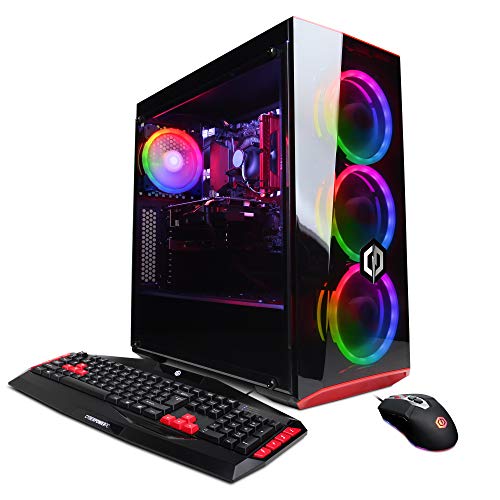
The older CyberpowerPC Gamer Xtreme VR with the GTX 1660 is a curious survivor on this list, but a useful one for students. The Intel i5-9400F is a six-core CPU without integrated graphics, paired with NVIDIA’s GTX 1660 6GB. The 120GB SSD acts as a fast boot drive, and a 1TB HDD handles project storage. Windows 10 Home ships pre-installed.
This rig cuts 1080p timelines in Premiere and Resolve with patience, though 4K work is out of reach. For someone learning editing fundamentals on a tight budget, it’s a serviceable starting point. Compared to the newer CYBERPOWERPC Gamer Xtreme VR above, the GPU is two generations older, but the dual-drive storage layout is a thoughtful touch for media libraries.
The Upside
- 1TB HDD complements 120GB SSD for separating system files from media
- Six-core i5 processor handles basic multicam edits without significant slowdown
- Accessible price point makes it realistic for student creators
Small Caveats
- GTX 1660 lacks modern encoder hardware, so exports rely more on CPU and take longer
- 120GB SSD fills quickly with modern software, leaving little room for active projects
- Older platform limits future CPU upgrade paths
Best Suited To
Student editors and first-time creators cutting 1080p content who want a familiar desktop setup without significant investment.
Consider Something Else When
Anyone planning to grow into 4K work should skip ahead to the CYBERPOWERPC Gamer Xtreme VR with the i7-12700F reviewed later in this roundup.
BOSGAME’s P3 Lite is the mini PC I’d hand to a freelancer who travels between client sites. The Ryzen 7 6800H brings eight cores and 16 threads, paired with 32GB of DDR5 RAM that crushes the limits of the smaller BOSGAME E2 Plus reviewed earlier. The 1TB NVMe SSD means you can load a full project, proxies, and assets without juggling external drives.
Radeon 680M integrated graphics handle 4K media playback smoothly and support casual color grading. For Resolve and Premiere work that leans on CPU more than GPU, this little box punches well above its size. Compared to the Skytech O11 Vision above, you sacrifice discrete GPU power, but you gain a backpack-friendly chassis that fits in a camera bag.
Well-Handled Touches
- 32GB DDR5 RAM handles timelines with stacked adjustment layers comfortably
- 1TB NVMe SSD holds project files, proxies, and source clips together
- Eight-core Ryzen 7 6800H keeps playback fluid on multicam 1080p timelines
- Compact form factor simplifies travel between client offices
Points To Note
- Integrated Radeon graphics limit GPU-accelerated effects and noise reduction
- Mini PC chassis can run warm under sustained export loads without proper ventilation
- Fewer expansion ports than a full tower for capture cards and extra storage
Tech Snapshot
Perfect Match For
Freelance editors and remote creators who need serious RAM and storage in a portable, client-friendly package.
Swap It Out When
VFX artists requiring dedicated GPU power should step up to the Skytech O11 Vision’s RTX 5070 Ti reviewed above.
The BOSGAME P3 Plus steps into Zen 4 territory with the Ryzen 7 7840HS, AMD’s newer architecture that boosts instructions per clock over the previous generation. With eight cores reaching up to 5.1GHz and Radeon 780M graphics, this little machine handles After Effects compositions, light 3D work, and Premiere timelines with surprising ease for its size.
16GB of DDR5 and a 1TB NVMe SSD provide a balanced foundation for indie creators who don’t want to babysit storage. The P3 Plus sits between the GEEKOM IT12 above and the BOSGAME P3 Lite in capability, hitting a sweet spot for motion designers who need CPU muscle but don’t require a full discrete GPU.
A Few Strong Suits
- Zen 4 architecture brings faster single-core performance for snappier UI response
- Radeon 780M graphics accelerate basic GPU effects and color work
- 1TB SSD leaves room for project assets and After Effects caches
- 5.1GHz boost clock speeds up previews and scrubbing in timeline-based apps
Where It May Fall Short
- 16GB RAM can feel tight when running After Effects and Premiere simultaneously
- Integrated graphics still trail discrete GPUs for heavy compositing
- Compact cooling may throttle during marathon batch exports
Who Should Grab It
Indie motion designers and content creators who run After Effects and Premiere but don’t need a full tower GPU setup.
Another Choice May Suit
Editors prioritizing raw RAM capacity will find the BOSGAME P3 Lite with 32GB a better fit for layered timelines.
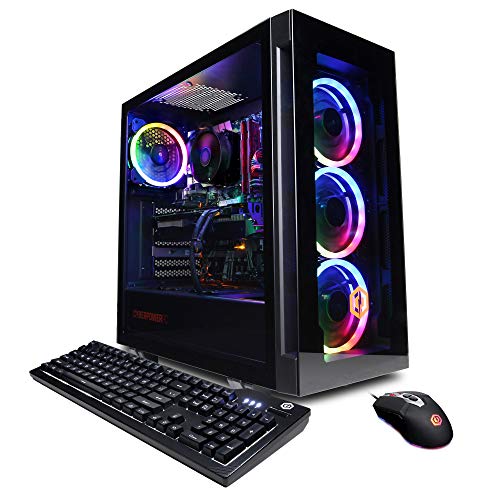
This Gamer Xtreme VR is the sweet spot I’d suggest for mid-tier studios running multicam workflows. The Intel i7-12700F mixes eight performance cores with four efficiency cores, totaling 12 cores that intelligently shift between editing and background tasks. The GeForce RTX 3060 brings 12GB of VRAM, which is more than the RTX 3050 in the smaller Gamer Xtreme above, and that extra VRAM matters when grading 4K footage.
The 1TB NVMe SSD, tempered glass side panel, and custom RGB lighting make this a tidy mid-range package. With six USB 3.1 ports plus two USB 2.0, there’s room for capture cards, external drives, and color-grading panels. Compared to the Ultra 50 V3 reviewed first, this trades flagship GPU power for a more approachable budget tier.
The Value In It
- 12GB VRAM handles 4K timelines and moderate grading without constant cache clearing
- 12-core hybrid CPU balances active editing with background encoding tasks
- 1TB NVMe SSD stores projects and source footage on a single fast drive
- Tempered glass panel and RGB lighting add aesthetic appeal for studio setups
Less Ideal Details
- RTX 3060 trails newer GPUs in AI-based noise reduction and upscaling
- Wi-Fi 5 is functional but slower than Wi-Fi 6 standards for large transfers
- Custom RGB lighting software can be finicky to configure across platforms
Feature Rundown
Who It Suits Best
Mid-tier studios and creators handling multicam 4K projects who need VRAM headroom without flagship pricing.
Where Another Pick Suits Better
Pro colorists needing the latest AI-accelerated tools will benefit more from the Ultra 50 V3’s RTX 5080 reviewed above.
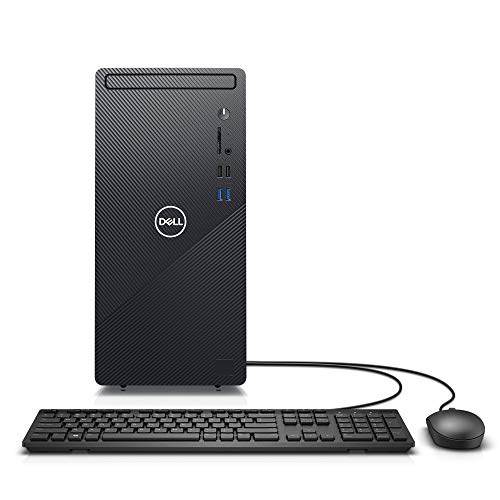
The Dell Inspiron 3880 is the conservative pick I’d recommend to a corporate communications team producing internal videos. It runs a 10th-gen Intel Core i5 with 12GB of DDR4 memory and a 512GB SSD, enough for 1080p talking-head edits, training videos, and social clips. Windows 10 Pro ships pre-installed, which matters for shops with strict IT policies.
The two-year on-site warranty is the headline feature for office deployments: Dell sends a technician to your location rather than requiring a ship-back repair. Compared to the CYBERPOWERPC builds above, this is a less flashy box, but it’s predictable and supported, which counts for a lot in a corporate environment.
Benefits That Matter
- Two-year on-site warranty reduces downtime for office-based production teams
- Windows 10 Pro supports enterprise networking and policy management tools
- 512GB SSD balances capacity for active projects with reasonable boot speed
Things To Weigh
- 10th-gen Intel CPU is dated compared to newer 12th and 13th gen options
- No dedicated GPU limits hardware-accelerated effects and encoding
- 12GB RAM fills quickly with modern editing software and browser tabs
Made For
Corporate communications teams and office producers who value warranty support and IT compatibility over raw speed.
Consider Something Else When
Creative professionals needing GPU acceleration should look at the CYBERPOWERPC Gamer Xtreme VR with the RTX 3060 reviewed above.
Picking The Right Editing PC for Your Workflow
CPU core count matters more than clock speed for most editing tasks, since export pipelines spread work across multiple cores. For 4K timelines with stacked effects, an 8-core chip is the practical floor; for 1080p cuts, a 6-core chip still serves well. VRAM, the dedicated memory on your graphics card, deserves attention too: 8GB handles 1080p comfortably, 12GB supports 4K, and 16GB opens room for RAW codecs and complex grades. Storage speed affects how fast timelines load: NVMe SSDs read several times faster than SATA SSDs, which matters when scrubbing through high-bitrate footage.
RAM capacity is the most underrated spec. 16GB is the realistic minimum for Premiere Pro or DaVinci Resolve today, and 32GB gives breathing room for multitasking across editing, browsing, and communication apps. If you regularly run After Effects alongside your editor, lean toward 32GB. Cooling is another consideration, since sustained exports push components harder than gaming, and thermal throttling can extend render times noticeably.
Port selection affects how you connect reference monitors, color-grading panels, and capture cards. USB4 and Thunderbolt connections enable single-cable docks for laptop workflows, while multiple DisplayPort outputs matter for multi-monitor editing suites. Finally, consider your upgrade path: tower builds typically accept new GPUs and storage over time, while mini PCs trade that flexibility for footprint and quiet operation.
Key Considerations Across These Picks
Wrong Turns To Avoid
Many first-time editing PC shoppers fixate on CPU clock speed and overlook GPU VRAM, then discover their timelines choke on heavy grades. Others chase raw core counts without considering whether their software actually uses multiple cores efficiently; some plugins and codecs are still single-threaded. Skimping on storage speed is a common misstep too, since a slow boot drive makes everything feel sluggish regardless of how powerful the rest of the system is. Match the spec priorities to your actual workflow rather than buying the most aggressive numbers across the board.
Where The Extra Money Goes
Higher-tier editing PCs invest in dedicated GPU power, faster NVMe storage, and robust cooling that keeps components running at full speed during long renders. The jump from integrated graphics to a discrete GPU with 12GB or 16GB of VRAM translates directly into faster exports and smoother playback. Premium cooling solutions, like 360mm AIO liquid coolers, prevent thermal throttling during marathon sessions. For freelancers billing hourly, faster export times quickly pay back the upgrade cost in saved labor.
Frequently Asked Questions
How much RAM do I need for video editing in 2026?
16GB covers basic 1080p editing in Premiere Pro or DaVinci Resolve, while 32GB is the practical target for 4K timelines and multitasking across editing apps. Going higher than 32GB only pays off in After Effects-heavy workflows or 8K work.
Is a dedicated graphics card necessary for editing software?
GPU acceleration in modern editors speeds up scrubbing, effects, and exports considerably, so a discrete card is helpful for anything beyond basic 1080p cuts. Integrated graphics can handle simple timelines but will struggle with RAW codecs and color grading.
What is the difference between DDR4 and DDR5 memory?
DDR5 is the newer memory standard offering higher bandwidth and improved power efficiency compared to DDR4, which translates to smoother multitasking and faster cache access. For new builds in 2026, DDR5 is the practical choice.
Can I use a mini PC for serious video editing?
Mini PCs with 32GB of RAM and modern Ryzen processors handle 1080p and light 4K editing well, especially for cuts that lean on CPU rather than GPU. Heavy color grading and effects work still benefit from discrete GPU power.
How important is storage speed for editing workflows?
Fast NVMe SSDs dramatically reduce timeline loading and export times compared to mechanical drives. For 4K and RAW workflows, a Gen4 NVMe SSD is the practical minimum, and project caches benefit from being on the fastest storage available.
Final Verdict
The right editing PC depends on what you actually cut and where you work. Travel-heavy freelancers will appreciate the BOSGAME P3 Lite’s compact muscle, while studio colorists should invest in the Ultra 50 V3’s flagship GPU and stacked-cache CPU. Hobbyists can find plenty of headroom in the CYBERPOWERPC Gamer Xtreme VR builds without overspending. Match the machine to your codec, timeline complexity, and physical workspace, and the rest takes care of itself.