A household desktop has to play many roles in a single week, from homework hub on Tuesday to a Friday movie screen to Sunday budget spreadsheets. The picks below are all-in-ones, meaning the computer lives inside the monitor, so cable clutter stays minimal and a small desk still looks tidy. I focused on machines that handle everyday tasks smoothly without forcing a household to choose between price and usability. Each one is a realistic fit for a shared family space, and I’ve called out where the trade-offs land.
The Picks In Brief

HP 24-inch All-in-One Desktop Computer with AMD Athlon Silver 3050U, 8 GB RAM, 256 GB SSD, Windows 10 Home (24-dd0010, White)
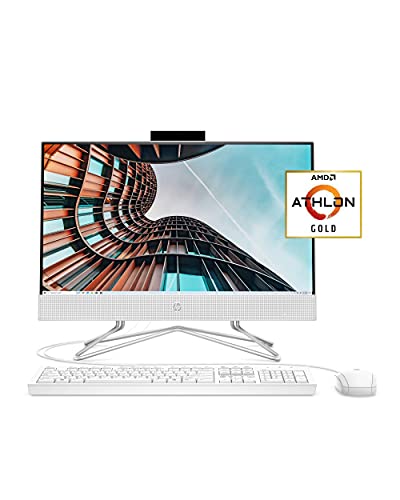
HP 22 All-in-One PC with AMD Athlon Gold 3150U, 4 GB RAM, 256 GB SSD, Full HD 21.5-inch Anti-Glare Display, Windows 10 Home (22-df0022)

Apple 2024 iMac All-in-One Desktop Computer with M4 Chip, 10-Core CPU and GPU, 24-inch Retina Display, 24GB Unified Memory, 512GB SSD (Silver)
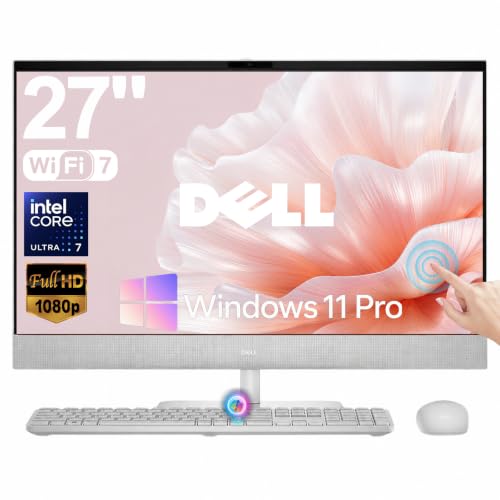
Dell 27-inch All-in-One Desktop Computer Touchscreen with Intel Ultra 7 355 and Wi-Fi 7
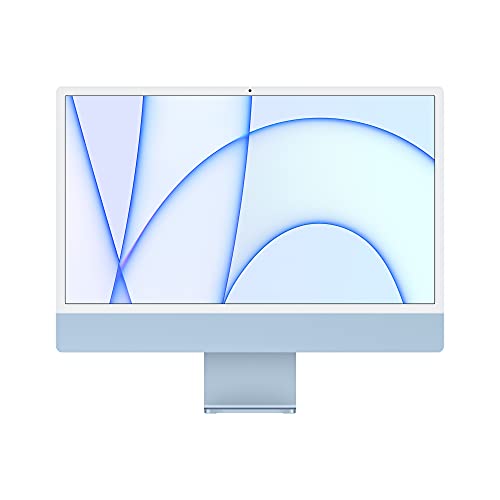
Apple 2021 iMac All-in-One Desktop with M1 Chip, 8-Core CPU and GPU, 24-inch Retina Display, 8GB RAM, 256GB SSD (Blue)
Last-gen iMac at lower cost
The Strengths Of Each Pick
This HP all-in-one tucks every component behind a 24-inch panel, which means the only cable leaving the back is the power cord. For a household where the dining table doubles as a workspace, that single-cord setup matters more than a faster chip.
An adjustable tilt stand makes it easy to angle the screen toward a child at homework time, then swing it back for a parent video call. The 8 GB of RAM and 256 GB solid-state drive give the Athlon Silver 3050U room to keep a browser, a streaming service, and a school document open at the same time.
Where It Excels
- Three-sided thin bezels give more room for the actual picture, so a worksheet feels less cramped than on chunkier displays.
- The privacy camera shutter is a small detail that families with younger kids genuinely appreciate.
- Built-in Wi-Fi removes the need for an Ethernet run, which keeps the kitchen-counter setup flexible.
- 256 GB of SSD storage keeps boot times short, even when the household piles on browser tabs.
Honest Caveats
- The Athlon Silver chip handles office work fine but slows down when multiple people try to edit large photos at once.
- 8 GB of memory is workable today, and may feel tight a few years out as software demands climb.
- Windows 10 Home ships on this unit, so households wanting Windows 11 features need to factor an upgrade path.
Feature Snapshot
Made For
Families who need a single shared hub for homework, recipes, and streaming in a tight space.
Where Another Pick Suits Better
Households wanting a bigger touchscreen canvas should look at the Dell 27-inch All-in-One Desktop Computer Touchscreen instead.
The HP 22 trims an inch and a half off the larger HP 24-dd0010, and that small difference can decide whether the desk fits a lamp as well. The 21.5-inch Full HD panel uses an anti-glare coating, which is genuinely useful in a bright kitchen.
An Athlon Gold 3150U sits at the heart of this unit, paired with 4 GB of memory and a 256 GB SSD. For a single user handling email and recipes, that is plenty. The wired keyboard and mouse in the box keep initial setup to a single power cable and a USB plug.
Useful Touches
- The anti-glare display keeps reflections manageable near a window.
- HP’s True Vision HD privacy camera tucks behind a physical shutter when not in use.
- Dual front-facing speakers save desk space and skip a separate audio rig.
- A wired mouse and keyboard ship in the box, so there’s nothing extra to source.
Things To Weigh
- 4 GB of RAM is the tightest spec on this list, and modern browsers will feel the squeeze with many tabs open.
- The smaller screen is harder on the eyes for extended reading or shared viewing.
- Wired peripherals mean a few more cables around the desk than a wireless setup would leave.
Who It Suits Best
Single parents and renters who want a tidy footprint in a kitchen nook or studio apartment.
Swap It Out When
The HP 24-inch All-in-One Desktop with 8 GB RAM makes more sense for households where multiple people share the machine daily.
The 2024 iMac leans on Apple’s M4 chip with a 10-core CPU and 10-core GPU, which translates to noticeable speed gains over the older M1 generation. For a household that already lives in the Apple ecosystem, the iPhone and iPad hand-offs feel nearly seamless.
The 24-inch Retina display remains the visual centerpiece, with sharp text that holds up for hours of reading. Twenty-four gigabytes of unified memory (RAM that the CPU and GPU share) is generous headroom for video calls, photo edits, and a school report running together.
What Works In Its Favor
- The 24-inch Retina panel renders text and photos with a clarity that family members notice immediately.
- 24 GB of unified memory lets the household keep dozens of browser tabs and a video call running without slowdown.
- The thin all-in-one chassis leaves the desk looking clean, even in a small room.
- macOS continuity features tie an iPhone or iPad into the desktop with very little setup.
Small Caveats
- macOS may feel unfamiliar to households fully bought into Windows software for school.
- Apple’s ecosystem tends to lock households into pricier accessories over time.
- The 24-inch screen, while sharp, gives less canvas than the Dell 27-inch touchscreen for shared work.
Quick Facts
Best Suited To
Households already invested in iPhones and iPads who want a centerpiece desktop that ties everything together.
A Better Fit Elsewhere
Budget-focused shoppers should consider the Apple 2021 iMac with M1 chip for a more accessible entry point.
The Dell 27 stands out for two reasons: a 27-inch touchscreen and an Intel Core Ultra 7 355 processor with built-in AI acceleration (a neural processing unit, or NPU, which speeds up background AI tasks without taxing the main CPU). The bigger panel turns a shared family desk into something closer to a small studio.
Wi-Fi 7 support means the network connection is ready for the next generation of home routers, which helps households streaming 4K content. Compared to the smaller HP 22, this Dell treats the whole household as the user, not just one person.
Everyday Wins
- The 27-inch touchscreen lets kids tap through homework apps without needing a mouse.
- Intel’s Ultra 7 chip and dedicated NPU handle modern AI features in Windows without choking the main processor.
- Wi-Fi 7 keeps the network future-proof for households upgrading their router soon.
- The larger display makes shared movie nights feel closer to a small TV experience.
Points To Keep In Mind
- A 27-inch touchscreen demands a deeper desk than the smaller all-in-ones in this list.
- Higher specs push the price up noticeably compared with the HP options above.
- Touchscreens tend to need periodic screen cleaning since fingers leave more residue than a non-touch panel.
Spec Overview
Whose Shelf It Belongs On
Families running a household office alongside schoolwork who want a large, interactive panel as the centerpiece.
Consider Something Else When
Tight spaces should look at the HP 22 All-in-One PC instead, since the smaller footprint is easier to place.
The 2021 iMac marked Apple’s first desktop with the M1 chip, and the performance still holds up for everyday family use. Compared to the newer M4 model, this iMac asks a household to accept a step down in chip speed in exchange for a lower entry price.
The 24-inch Retina display is identical in size and quality to the M4 version, which means the picture experience stays excellent. Eight gigabytes of unified memory is enough for typical family workloads, though it tightens up under heavier multitasking.
Practical Advantages
- The M1 chip still handles browsing, streaming, and school documents without hesitation.
- The color-matched accessories ship in the box, so there’s nothing extra to add.
- The same thin chassis as the newer iMac keeps the desk tidy.
- macOS updates continue to support this model, extending its useful life.
Some Limits To Know
- 8 GB of memory is workable for light family use, but limits heavier multitasking.
- 256 GB of storage fills up fast with family photos and school projects.
- The M1 chip trails the M4 in newer software features designed for newer Apple silicon.
The Right Fit
First-time Apple households who want the iMac look and feel without paying for the newest chip generation.
Look Elsewhere When
Power users who want more headroom should consider the Apple 2024 iMac with M4 chip and 24 GB of memory instead.
What To Weigh Before Choosing A Family Desktop
Screen Size And Shared Use
A 21.5-inch panel works for a single parent working at a kitchen nook, while a 24-inch screen gives families the room to split tasks on the same display. Larger 27-inch touchscreens, like the Dell’s, turn the desktop into a small studio where multiple people can lean in at once.
Pick a screen that matches the room and the way the household actually uses it, since bigger screens also demand deeper desks and stronger lighting to avoid glare.
Memory, Storage, And How Long The Machine Will Last
RAM keeps the system responsive when many browser tabs, school apps, and video calls run at once, and 8 GB is the practical floor for a busy household. SSD storage, the kind that uses flash memory rather than a spinning disk, boots the system in seconds and keeps apps snappy even when the drive fills up.
For families storing years of photos and videos, 512 GB or more buys breathing room before external storage becomes necessary.
Software And Ecosystem
Windows machines keep things flexible for school software that often targets that platform, while macOS ties neatly into iPhones and iPads for households already in the Apple world. Touch-friendly Windows apps lean toward the Dell, while content creators tend to favor the iMac lineup.
Choosing the right operating system (OS) early saves the family from learning curves and incompatible software down the road.
Connectivity And Future-Proofing
Wi-Fi 6 or 7 keeps the desktop in step with modern routers, and built-in Bluetooth helps wireless headphones and keyboards stay paired without fuss. USB-C ports (a small, reversible connector for charging and data) make it easier to plug in new phones and tablets without hunting for adapters.
Planning for tomorrow’s standards helps the family desktop feel current three or four years from now.
Key Considerations Across These Picks
Pitfalls Shoppers Hit
The most common mistake is buying on screen size alone and ignoring memory, since 4 GB feels fine on day one and frustrating by month six. Another trap is skipping a measure of the desk depth, because a 27-inch touchscreen can hang off the back edge of a smaller table.
Families sometimes assume a family desktop will replace a laptop for travel, when in reality these all-in-ones are meant to stay put.
What Separates Premium From Basic
The jump from a basic Athlon-based HP to the M4 iMac brings a sharper display, more memory, and a chip that handles creative apps. Wi-Fi 7, dedicated NPUs, and 24 GB of unified memory all add real headroom that households notice when video calls run alongside homework apps.
Higher-tier machines age more gracefully, so a family that plans to keep a desktop for five or more years benefits most from the extra headroom.
Frequently Asked Questions
What size desktop screen works best for a family?
A 24-inch screen fits most households and balances desk space with screen real estate. Larger 27-inch panels work well in dedicated home offices where multiple people share the view.
How much RAM does a family desktop really need?
8 GB is the practical floor for households that keep several browser tabs and a streaming app open at once. Families editing photos or running video calls should consider 16 GB or more to avoid slowdowns.
Are all-in-one desktops good for kids?
All-in-ones keep cables to a minimum, which is helpful in shared spaces and around younger children. The built-in cameras and speakers also remove the need for extra accessories that could clutter a desk.
Should a family choose Windows or macOS?
Windows covers the widest range of school and productivity software, which makes it a safe default for many households. macOS makes more sense when the family already uses iPhones and iPads and values continuity between devices.
How long should a family desktop last?
A well-chosen all-in-one should serve a household comfortably for four to six years, especially with enough RAM and SSD storage. Planning for slightly more memory than needed today helps the machine stay useful as software demands grow.
Wrap Up
The right family desktop comes down to how the household actually uses the shared screen, from homework and streaming to occasional creative work. All-in-ones keep things tidy, and the differences between these picks come down to memory, screen size, and whether the family is invested in the Apple ecosystem. Match the machine to the room and the people in it, and the rest tends to fall into place.