A family desktop lives a harder life than most electronics. One kid is doing homework while another streams a show, and someone else is paying bills. The picks below cover real household patterns: shared homework stations, living-room command centers, garage offices, and tight desks where every inch matters. I focused on machines that handle routine multitasking without drama, not just raw specs.
A Quick View Of The Lineup
A Quick View Of The Lineup
HP Pro Tower 290 G9 Desktop Computer, i3-13100, 16GB RAM, 512GB SSD
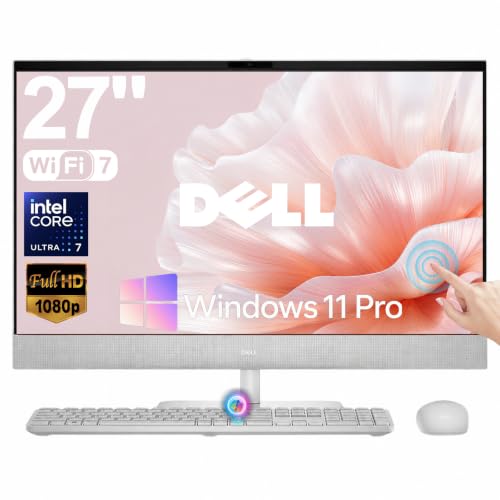
Dell 27″ All-in-One Desktop Touchscreen Intel Ultra 7 355 Wi-Fi 7

HP Pavilion Desktop Tower, i7-11700F, 64GB RAM, 1TB SSD
HP ProDesk 600 G6 SFF Desktop PC, i5-10400F, 16GB RAM, 256GB SSD

Dell Slim Desktop, Core Ultra 5-225, 16GB DDR5, 512GB SSD

HP 2026 Desktop Computer, i5-12500, 16GB RAM, 1TB SSD
The Strengths Of Each Pick
Most shared homework desks end up running two screens, one for a textbook or spreadsheet and one for a video call or browser. The HP Pro Tower 290 G9 leans into that reality by shipping with both HDMI (a digital display port) and VGA (an older analog port) built in, so older classroom monitors and a newer flat-panel can sit side by side without buying an adapter.
Inside, the 13th Gen Intel Core i3-13100, a four-core chip aimed squarely at office work, handles documents, browsers, and streaming video without choking. 16GB of RAM is the comfortable floor for a household where several programs stay open at once. Windows 11 Pro comes preinstalled, which means plug it in, sign in, and the kids can start typing.
Everyday Perks
- Two display outputs let a family member hook up an extra monitor for side-by-side work, no adapter shopping required.
- 512GB SSD is roughly room for years of school papers, photos, and a modest game library before anyone has to think about storage.
- Wi-Fi and an Ethernet port (RJ-45) are both included, which helps in homes where the router sits across the room.
- The wired keyboard and mouse in the box means zero extra accessory purchases on day one.
- Windows 11 Pro adds useful family controls and remote desktop, handy for helping a student from another room.
Things To Consider
- There is no built-in optical drive, so families still using DVD textbooks or old software discs will need an external reader.
- The Core i3 is plenty for schoolwork but can feel stretched when everyone tries to edit video or play modern 3D games at once.
Feature Snapshot
Made For
A family setting up a shared homework station with two monitors, where the priority is reliable everyday work over heavy gaming or video editing.
Look Elsewhere When
Creators or serious multitaskers who run demanding software should consider the HP Pavilion Desktop Tower with its i7 chip and 64GB of RAM.
The whole point of an all-in-one is fewer boxes. The Dell 27-inch AiO folds the computer, the display, and the speakers into a single panel that looks at home in a kitchen nook or a den. Add a touchscreen and Wi-Fi 7 (the latest, fastest wireless standard) and it doubles as a family message board, recipe station, and homework desk without an inch of separate tower clutter.
The Intel Core Ultra 7 355 includes a dedicated NPU, a small chip built to handle AI tasks like background blur on video calls or smart search without taxing the main processor. For a household that lives on video meetings and cloud tools, that headroom tends to age well.
What Helps Most
- The 27-inch touchscreen is genuinely useful for tapping through school presentations, signing PDFs, or letting a younger child draw without a separate tablet.
- Wi-Fi 7 future-proofs the home network connection for households upgrading routers over the next few years.
- The dedicated AI accelerator (NPU) keeps video calls smooth even when background effects and noise cancellation are running.
- One cable, one panel, very little desk footprint, which matters in shared living spaces.
Honest Caveats
- All-in-ones are harder to upgrade later; RAM and storage tend to be fixed at purchase.
- A 27-inch screen is large for a small desk and may dominate a tight kitchen corner.
- If the panel fails, the whole machine is out of commission, unlike a tower where you can swap monitors.
Built With In Mind
Households that want a single clean centerpiece in the living area and value a touchscreen for everyday interaction.
Swap It Out When
Shoppers who want maximum upgradability and a smaller desk footprint should consider the HP ProDesk 600 G6 SFF Desktop PC instead.
The HP Pavilion Desktop Tower is the muscle car of the bunch. An 11th Gen Intel Core i7-11700F, an eight-core chip originally aimed at gaming rigs, sits behind a generous 64GB of RAM and a full 1TB SSD. For most families that is overkill on paper, but for households with a teen editing video, a parent running spreadsheets, and a sibling on a Zoom call, headroom like this is what keeps everyone happy at once.
The “F” suffix means the chip ships without integrated graphics, so this tower is built to pair with a dedicated graphics card. That is great for future upgrades, but stock configurations may need an add-in card for serious gaming.
What Earns Its Place
- Eight cores and 64GB of RAM handle video editing, large spreadsheets, and dozens of browser tabs without breaking a sweat.
- A 1TB SSD gives roughly twenty times the storage of a typical entry-level laptop, room for years of family photos and projects.
- The Pavilion tower chassis is easy to open, which helps when adding a graphics card or extra storage down the road.
- Compared with the HP Pro Tower 290 G9 above, this is a noticeable jump in multitasking headroom for the same tower footprint.
Points To Note
- The “F” chip lacks integrated graphics, so a discrete GPU is needed for any gaming or GPU-accelerated work.
- This is a larger tower than the Pro Tower 290 G9 and demands more under-desk real estate.
Quick Facts
Best Suited To
Families with at least one member doing creative work, data analysis, or moderate gaming, who want headroom that lasts several years.
Consider Something Else When
Households only need a screen, a browser, and homework should save desk space with the Dell 27″ All-in-One Desktop Touchscreen instead.
“SFF” stands for small form factor, and HP meant it. The ProDesk 600 G6 SFF is roughly half the volume of a standard mid-tower, which means it slips behind a monitor, slides into a cabinet, or hides under a small writing desk in a hallway. The Intel Core i5-10400F is a six-core chip with plenty of speed for documents, video calls, and light photo work.
For families in apartments, dorms, or homes where the “computer desk” is really the kitchen table, the compact shell is the headline feature. The trade-off shows up in storage: 256GB fills up faster than most shoppers expect once photos and school projects pile in.
Strong Points
- Compact chassis fits almost anywhere a shoebox would, ideal for cramped study nooks.
- Six-core i5 handles schoolwork, browsing, and light creative apps without complaint.
- 16GB of RAM matches the comfortable baseline for a household of light multitaskers.
- HP ProDesk business machines tend to have good build quality and reliable fans for long homework sessions.
Trade Offs
- 256GB SSD is on the lean side; families with lots of photos may need an external drive within a year.
- The “F” chip again lacks integrated graphics, so a dedicated GPU is required for any serious gaming or rendering.
- Small form factor cases sometimes run warmer than full towers, so airflow around the unit matters.
Whose Shelf It Belongs On
A household tight on space that still wants a real desktop tower rather than an all-in-one or a laptop.
Reach For A Different Pick When
Anyone needing much more storage and a larger thermal headroom should look at the HP 2026 Desktop Computer with its 1TB SSD.
The Dell Slim Desktop is the freshest silicon in this roundup. The Intel Core Ultra 5-225 belongs to the newest Core Ultra generation, with an NPU that handles AI tasks locally. DDR5 RAM is the latest memory standard, faster and more efficient than the DDR4 in older towers, and Wi-Fi 6 keeps the wireless connection solid for most home networks.
The slim chassis fits where a full tower would feel intrusive, on a side table, a bookshelf, or a shared family desk. For most households, the honest read is that this machine will outlast an older i5 tower by a comfortable margin, and the bundled wired keyboard keeps initial setup costs down.
What It Does Well
- Newest-gen Core Ultra chip with a built-in NPU extends the machine’s useful life as AI features spread through Windows and apps.
- DDR5 memory runs cooler and faster than older DDR4, helpful in a slim chassis.
- DisplayPort output supports up to a 4K monitor or several FHD screens through daisy-chaining, a setup where one monitor links to the next.
- Compact, modern shell that looks more like a living-room component than a beige office box.
Small Caveats
- Slim cases have limited room for aftermarket GPUs, so dedicated graphics upgrades are constrained.
- Integrated Intel UHD graphics are fine for schoolwork and streaming but not for modern 3D gaming.
Technical Highlights
Perfect Match For
Families that want the longest possible runway from a single purchase and prefer a slim, modern-looking chassis on the desk.
Not Your Match When
Power users who need eight cores and 64GB of RAM should choose the HP Pavilion Desktop Tower with its i7-11700F instead.
The HP 2026 Desktop lands squarely in the middle of the family use case. The 12th Gen Intel Core i5-12500 is a six-core chip with Turbo Boost up to 4.6GHz, which is the speed the processor can briefly spike to when one core needs extra power. That is more than enough headroom for a household juggling video classes, work-from-home calls, and weekend streaming.
The biggest practical win is the 1TB SSD. Compared with the 256GB ProDesk above, that is room for years of family photos, school projects, and a Steam library without an external drive. You may find this is the sweet spot for most families that do not need a dedicated GPU.
Useful Touches
- 1TB SSD is generous for a household, removing the “where do we save this” conversation for a long time.
- Six-core i5 with Turbo Boost handles sudden bursts of activity, like opening twenty browser tabs at once.
- Comes with Windows 11 Home ready to go, no extra setup required.
- Compared with the Pro Tower 290 G9 above, the bigger SSD and newer chip give it a longer useful life.
Worth Bearing In Mind
- Integrated graphics only, so modern 3D gaming or GPU-heavy work is off the table without a discrete card.
- A mid-tower chassis takes more desk or floor space than the Dell Slim Desktop.
Who Should Grab It
Families who want a balanced, no-fuss machine that handles school, work, and entertainment without paying for performance they will not use.
A Better Fit Elsewhere
Anyone who wants a clean, single-panel setup with a touchscreen should consider the Dell 27″ All-in-One Desktop Touchscreen instead.
What Matters Most Before Choosing Family Desktop Pcs
Processor And RAM Floor For A Household
A modern family desktop lives on a six-core chip and 16GB of RAM as the minimum. Anything less starts to feel tight the first time a Zoom call, a streaming tab, and a homework document open at once. For most homes, an Intel Core i5 from the 12th generation or newer, or a Core Ultra 5, covers the realistic load.
Storage is the second quiet decision. A 256GB SSD fills up faster than most people expect once a few thousand family photos land on it. A 512GB or 1TB SSD is the more comfortable range for a multi-person household, and the speed difference between SSD and older spinning drives is night and day for boot times.
Form Factor And Desk Reality
A full mid-tower offers the easiest upgrades and best cooling, but it eats floor space. A small form factor (SFF) tower slips behind a monitor or under a desk, but it tends to run a touch warmer and limits future GPU choices. An all-in-one trades upgradability for a clean single-cable setup that fits a kitchen or den. The honest match comes from measuring the actual spot where the machine will live.
Ports, Monitors, And Peripherals
Two display outputs let a household stretch the workspace across monitors, which is genuinely useful for side-by-side homework. Look for HDMI, DisplayPort, or VGA depending on the monitors already in the house. USB-A and USB-C ports, plus a wired keyboard and mouse in the box, save an extra trip to the store on day one.
Key Considerations Across These Picks
Pitfalls Shoppers Hit
The most common slip is underestimating storage. A 256GB SSD is tempting on a budget, but a single school year of photos and projects can eat a third of it. Plan for at least 512GB unless the household is comfortable managing an external drive.
A second trap is buying an “F” suffix Intel chip expecting gaming performance. The “F” simply means no integrated graphics, so the machine relies entirely on a separate graphics card. Without one, modern 3D games and many creative apps will not run well.
What The Higher Tier Buys
Stepping up to an eight-core i7 or 64GB of RAM is mostly about headroom and longevity. A heavier multitasker can edit video while another family member is on a call without the system breaking a sweat, and the extra RAM means the machine stays smooth even four or five years from now.
For most families, the upgrade pays off only if someone in the house actually runs demanding software. For pure homework, streaming, and browsing, the i5 tier already covers the realistic load.
Frequently Asked Questions
How Much RAM Does A Family Desktop Really Need?
16GB is the comfortable baseline for a household where several programs stay open at once. 32GB or 64GB helps only if someone edits video or runs large spreadsheets regularly.
Do These Desktops Come With A Monitor?
None of the picks in this list bundle a monitor. The HP Pro Tower 290 G9 and the Dell Slim Desktop both include a wired keyboard and mouse, but the display is sold separately in every case here.
Is An All-In-One Or A Tower Better For Kids?
Towers are easier to repair and upgrade over time, which matters when a child grows into heavier software. All-in-ones win on clutter and a single clean setup, especially in a shared living space.
Can These Machines Handle School Video Calls?
Yes. Every pick in this roundup has at least a six-core processor and 16GB of RAM, which is well above what mainstream video call apps require, even with background blur enabled.
How Long Should A Family Desktop Last?
With an i5-class chip from the 12th generation or newer and an SSD, a reasonable expectation is five to seven years of comfortable use for schoolwork, browsing, and streaming.
Wrap Up
The honest match depends on the household. A cramped apartment leans toward the Dell Slim or the HP ProDesk SFF. A living-room command center points at the Dell 27-inch AiO. A household with a creator or a serious multitasker earns the HP Pavilion Tower. For most families doing everyday work, the HP 2026 with its 1TB SSD lands in the comfortable middle and stays useful for years.