Picking a rig that can push modern games and run a broadcast at the same time is genuinely tricky. Frames drop, encoders choke, and suddenly your chat is watching you freeze mid-fight. I pulled together nine desktops that balance CPU muscle, GPU headroom, and the quiet thermals long sessions demand, so your audience sees a clean stream while you keep playing at full speed.
The Lineup, Simplified

Ultra 50 V3 RTX 5080 Ryzen 7 9800X3D Gaming PC

CYBERPOWERPC Gamer Master Gaming PC (GMA2700A)

Horizon Autherium Dragon RGB I9 RTX Gaming PC

CyberpowerPC Gamer Xtreme VR (GXiVR8060A10)
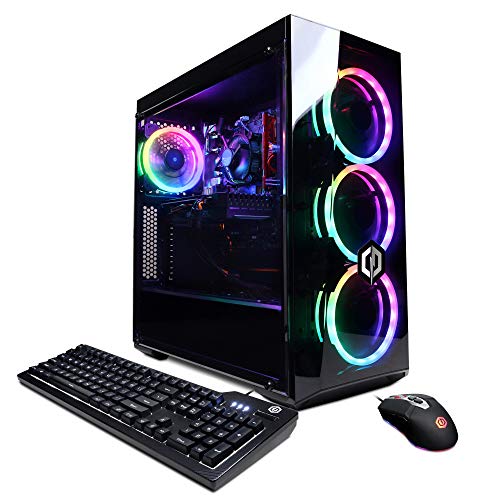
CyberpowerPC Gamer Xtreme VR (GXiVR8060A9)

Lenovo Legion Tower 5i RTX 5070 Ti
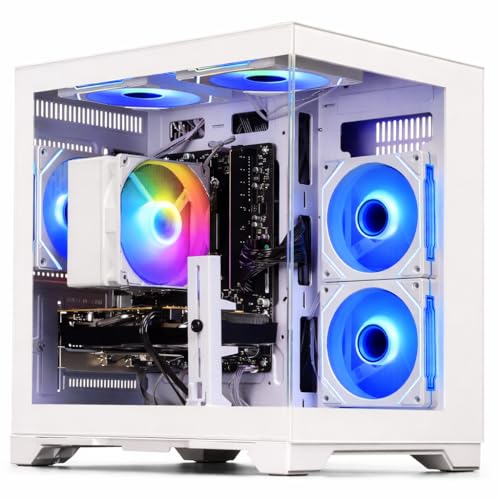
WIWB Gaming PC Ryzen 5 4500 RX 6500XT

WIWB Gaming PC Ryzen 7 4700LE RX 6500XT

ASUS ROG G700 (2025) Gaming Desktop
Meet The Standout Selections
The Ultra 50 V3 lands at the top because it pairs the newest GeForce RTX 5080 16GB GDDR7 graphics with AMD’s Ryzen 7 9800X3D, a CPU built on 3D V-Cache (extra fast memory stacked on the processor die for lower latency in games). That combination is the sweet spot for streamers who want 1440p or 4K gaming without dropping frames while OBS (Open Broadcaster Software, the most common streaming/recording app) chews through encoding in the background.
Backing that up sits 32GB of DDR5 at 6000MHz, a 2TB Gen4 NVMe solid-state drive, and an 850W Gold-rated power supply. The Gold rating means the PSU runs at roughly 90% efficiency under typical loads, so less power is wasted as heat. ARGB fans handle airflow while Wi-Fi and Bluetooth keep cable clutter down, and Windows 11 comes pre-installed. For anyone broadcasting daily, this is the desktop that lets you push the settings slider all the way right.
A Few Highlights
- RTX 5080 16GB GDDR7 handles 4K gaming with ray tracing (a lighting technique that simulates real-world light bounce for cinematic visuals) enabled while streaming
- Ryzen 7 9800X3D’s 3D V-Cache keeps frame times stable in CPU-heavy titles like simulation and strategy games
- 2TB Gen4 SSD holds dozens of modern game installs, so you rotate libraries without juggling storage
- 850W Gold PSU leaves thermal headroom for future GPU upgrades without a full rebuild
- 32GB DDR5 at 6000MHz is enough memory headroom to run game, OBS, chat bot, and browser dashboard side by side
Trade Offs
- Top-tier components place this well above mainstream budgets, so the jump over the CYBERPOWERPC Gamer Master is significant
- ARGB lighting and glass aesthetics mean owners commonly want extra intake fans to keep thermals tidy in warm rooms
- Newer RTX 5080 drivers occasionally need day-one patches for specific titles
Feature Snapshot
Whose Setup It Belongs On
Hardcore streamers running 1440p or 4K with ray tracing, and creators who want the absolute fastest single-thread gaming CPU available.
Look Elsewhere When
Your wallet points you toward the CYBERPOWERPC Gamer Master, which covers the mainstream 1080p streaming audience for far less.
CYBERPOWERPC’s Gamer Master GMA2700A is the most sensible mainstream pick on this list. The Ryzen 5 7600 is a six-core, twelve-thread AM5 chip (the latest AMD processor socket platform) that runs cool and pairs neatly with the RTX 4060 8GB. For 1080p gaming and streaming, that combination hits a comfortable frame rate without the cost of the flagship RTX 5080 in the Ultra 50 V3.
The case shows off its innards through a tempered-glass side panel with custom RGB lighting, and a seven-color gaming mouse ships in the box. Six USB 3.1 ports and two USB 2.0 ports cover most streaming rigs, and 7.1 channel audio means you can hook up a surround headset or speaker setup without an extra sound card.
Where It Delivers
- Ryzen 5 7600 with six cores keeps OBS encoding smooth while you play
- RTX 4060 8GB supports DLSS (an AI upscaling tool that boosts frame rates by rendering at lower resolution then sharpening the image)
- Tempered glass and RGB lighting make it a showcase piece for on-camera streaming setups
Worth Noting
- 500GB SSD fills up fast with modern AAA installs, so external storage becomes necessary
- 16GB RAM is the modern minimum, and heavy browser-tab streamers may want 32GB
Made For
New streamers entering the scene who want a turnkey 1080p setup with style and don’t need 4K horsepower.
Skip It When
You already know you want 4K capture quality, in which case the Lenovo Legion Tower 5i or Ultra 50 V3 serves you better.
The Horizon Autherium Dragon is built for users who treat their PC like a workstation first and a gaming rig second. A factory-overclocked Core i9 that boosts up to 5.4GHz sits next to a 360mm AIO liquid cooler (an all-in-one closed-loop water cooler with a 360mm radiator), keeping thermals in check during long rendering jobs or marathon streams.
The standout figure here is 64GB of RAM, which dwarfs the 32GB in the Ultra 50 V3 and the 16GB in the CYBERPOWERPC Gamer Master. Pair that with 5TB of combined SSD and HDD storage and an RTX 5070 OC 12GB, and you have a machine that handles game capture, video editing, and live broadcast simultaneously without breaking stride.
A Favorable Mix
- 64GB RAM is double the mainstream tier, giving streamers room for heavy multitasking
- 5TB total storage (1TB NVMe plus 4TB HDD) keeps raw recordings and game installs separate
- 360mm AIO cooler pulls heat away from the overclocked Core i9 under sustained loads
- Windows 11 Pro adds BitLocker drive encryption (a built-in tool that scrambles your drive’s data) for creators handling client footage
Things To Consider
- Extra RAM and storage drive the price well above simpler picks like the WIWB Ryzen 5 4500
- Pre-overclocked systems leave less thermal headroom, so case airflow deserves attention in warm rooms
Quick Facts
Right Fit For
Content creators editing broadcast replays, running multiple capture sources, and live-streaming for six hours straight.
Not Your Match When
You mostly play at 1080p and don’t edit video, where the CYBERPOWERPC Gamer Master delivers everything you need for less.
The Gamer Xtreme VR GXiVR8060A10 targets users who want to play older or lighter titles at 1080p without overspending. The Intel i5-10400F is a six-core, twelve-thread chip that lacks integrated graphics (the “F” suffix), which is fine here because the GTX 1660 Super 6GB handles rendering. Compared to the CYBERPOWERPC Gamer Master above, this is a clear step down in both CPU and GPU generation, but it remains a serviceable starter PC.
8GB of DDR4 and a 500GB NVMe SSD are slim by today’s standards, so the realistic expectation is 1080p on medium-to-high settings rather than ultra. VR works on lighter titles, though streaming while VR gaming tends to push this hardware hard, and you may find the experience tight.
Advantages To Know
- GTX 1660 Super 6GB remains capable for 1080p esports and indie titles
- i5-10400F’s six cores handle game plus chat apps without crashing
- 500GB NVMe boot drive keeps Windows snappy despite the older platform
Small Caveats
- 8GB DDR4 will bottleneck streaming workloads that open multiple browser tabs
- No ray tracing and limited DLSS support on the GTX 1660 Super
- Wi-Fi is the older 802.11AC standard rather than Wi-Fi 6 (the newest, fastest wireless standard)
Best Suited To
Casual gamers building a first desktop without stretching into the four-figure price range.
Swap It Out When
You plan to stream regularly, where the CYBERPOWERPC Gamer Master’s newer Ryzen chip and RTX 4060 deliver a noticeably smoother experience.
The GXiVR8060A9 is essentially the same hardware recipe as the previous pick, just listed under a different ASIN. The i5-10400F and GTX 1660 Super 6GB combo is a known quantity in the budget gaming space, and CyberpowerPC ships it ready to go with Windows 10 Home, a keyboard, and a mouse in the box.
For anyone stepping into PC gaming for the first time, this desktop is approachable. The setup is genuinely plug-and-play, and the components are mature enough that driver issues are rare. Just set expectations around 1080p, and consider RAM upgrades if you plan to add streaming to the routine.
A Few Strong Suits
- Mature component choices mean fewer driver surprises out of the box
- Includes keyboard and mouse, so total cost of ownership stays lower
- Tempered glass and RGB lighting match the visual style of more expensive rigs
Points To Note
- 8GB DDR4 is a near-term upgrade priority for any streaming workload
- 500GB SSD fills quickly with even a modest game library
Who Should Grab It
First-time PC shoppers who want a working gaming system on day one without configuring parts themselves.
A Better Fit Elsewhere
Buyers who already know they want streaming should look at the WIWB Ryzen 7 4700LE build for a more modern CPU and better multitasking headroom.
Lenovo’s Legion Tower 5i leans hard into thermal engineering. The Intel Core Ultra 7 265F and RTX 5070 Ti pairing sits inside a chassis designed around Legion Coldfront cooling, which routes air through dedicated channels rather than relying on a few generic fans. For streamers who run three-hour broadcasts, that translates into quieter operation and less thermal throttling (when a CPU or GPU automatically slows itself down to avoid overheating) over time.
32GB of memory and a 1TB SSD cover the mainstream creator workload, and a three-month PC Game Pass trial sweetens the bundle. Real-time ray tracing and DLSS from the RTX 5070 Ti bring cinematic visuals to 1440p gaming, and the build leaves room for storage expansion if your library grows.
Reasons It Performs
- Coldfront cooling keeps the system quieter during long streaming sessions
- RTX 5070 Ti handles 1440p ultra settings with ray tracing on
- Core Ultra 7 265F brings modern efficiency cores (smaller, power-saving CPU cores that handle background tasks) for balanced workloads
- Three-month PC Game Pass trial offers immediate value at launch
Trade-Offs To Consider
- 1TB SSD may need supplementing for creators storing large raw footage
- The Legion chassis is larger than compact options like the WIWB builds, so plan desk space
Perfect Match For
Streamers who broadcast frequently, value quiet thermals, and want a balance between 1440p gaming horsepower and creator-friendly specs.
Consider Something Else When
You prioritize pure flagship GPU performance, where the Ultra 50 V3 with its RTX 5080 pulls ahead.
WIWB’s Ryzen 5 4500 build is a sensible entry point for 1080p esports. The six-core, twelve-thread Ryzen chip keeps the system responsive during gameplay and light multitasking, while the Radeon RX 6500 XT 4GB focuses on delivering high frame rates in lighter competitive titles like Fortnite and Valorant.
This is not a streaming powerhouse, and the 4GB of VRAM (video memory, the dedicated RAM on a graphics card used to store image data) limits texture quality in heavier games. For the target audience, though, it covers the essential experience: smooth 1080p at high refresh rates without breaking the budget.
Well-Handled Touches
- Ryzen 5 4500’s six cores handle game plus chat applications smoothly
- RX 6500 XT pushes high frame rates in competitive esports titles
- Compact form factor fits on a smaller desk or in a tight apartment setup
Honest Caveats
- 4GB VRAM constrains settings in modern AAA releases, so texture options stay low
- Limited upgrade path compared to the more standardized CYBERPOWERPC builds
The Right Fit
Esports and indie fans chasing high frame rates at 1080p without needing cinematic visuals.
Reach For A Different Pick When
You want modern ray tracing or DLSS support, where the CYBERPOWERPC Gamer Master’s RTX 4060 is a meaningful upgrade.
The Ryzen 7 4700LE version of the WIWB build adds two extra cores and four extra threads over its sibling pick, bringing the total to eight cores and sixteen threads. Boost clocks reach 4.2GHz, which keeps daily productivity responsive even when the system is juggling browser tabs, Discord, and game launchers in the background.
Graphics still lean on the RX 6500 XT 4GB, so the same VRAM ceiling applies. Think of this as the smarter buy for someone who multitasks heavily but doesn’t need flagship frame rates in demanding AAA releases.
Strong Points
- Eight-core Ryzen 7 handles background apps without slowing gameplay
- 4.2GHz boost speeds keep single-threaded tasks snappy
- Same compact chassis as the Ryzen 5 sibling, easy to place
Points To Keep In Mind
- 4GB VRAM remains the main bottleneck for modern game textures
- Less brand-name recognition than the Lenovo or ASUS options on this list
Built With In Mind
Daily multitaskers on a tight budget who want a CPU that won’t choke during long work-and-play sessions.
Another Choice May Suit
If you need stronger graphics, the CYBERPOWERPC Gamer Master’s RTX 4060 trades some CPU cores for a much faster GPU.
ASUS’s ROG G700 leans into the showcase side of streaming. A dual-glass chassis shows off the internals, and the Aura Sync RGB (ASUS’s lighting control system that syncs colors and effects across compatible components) ties fans, strips, and the ROG logo into one cohesive light show that looks great on camera. For creators who film their setup, that’s a real asset.
Inside, the Intel Core Ultra 7 265F pairs with an RTX 5070, 1TB of PCIe 4.0 NVMe storage, and 32GB of DDR5 RAM. The configuration handles 1440p gaming with ray tracing and stays cool under load. Windows 11 Home comes pre-installed.
Where It Excels
- Dual-glass chassis and Aura Sync RGB create a strong on-camera look
- RTX 5070 with DLSS support delivers high frame rates at 1440p
- Core Ultra 7 265F brings efficient modern cores for streaming multitasking
- 32GB DDR5 is comfortable headroom for creator workflows
Things That May Matter
- Glass panels collect dust and fingerprints, so plan for regular cleaning
- RTX 5070 sits one tier below the RTX 5070 Ti in the Lenovo Legion Tower 5i and the RTX 5080 in the Ultra 50 V3
Feature Card
Who Will Love This
Twitch and YouTube creators who want their PC to look as polished as their stream overlay.
A Better Fit Elsewhere
You prioritize raw benchmark numbers over aesthetics, where the Ultra 50 V3’s RTX 5080 leads the category.
Picking A Rig That Keeps Up With Gameplay And Broadcasts
Match GPU And CPU To Your Target Resolution
The single biggest decision is what resolution you want to broadcast at. 1080p streamers can lean on RTX 4060 or RX 6500 XT class cards without breaking a sweat, while 1440p creators benefit from RTX 5070 or 5070 Ti silicon. For 4K capture quality, the RTX 5080 in the Ultra 50 V3 is the ceiling here.
CPU choice matters more than most shoppers expect. Encoders like NVENC (NVIDIA’s built-in hardware encoder that offloads video compression from the CPU to the GPU) and x264 (a CPU-based video encoder known for quality at lower bitrates) handle encoding, but your processor still juggles game logic, chat, and overlay tools. Six cores is the practical floor, and eight gives you breathing room.
Storage, Memory, And Thermals Matter Too
A fast NVMe SSD cuts load screens and boot times, while a secondary HDD handles bulk recordings without bloating your boot drive. 32GB of RAM is the comfortable minimum for streaming plus multitasking; 16GB works but tightens fast. Lastly, look at the cooling solution: an AIO liquid cooler like the 360mm unit in the Horizon Autherium or the Coldfront system in the Legion Tower 5i keeps long sessions quiet and stable.
Key Considerations Across These Picks
Pitfalls Shoppers Hit
Focusing purely on GPU model names is a common trap. An RTX 4060 paired with 8GB of RAM and a weak power supply bottlenecks the whole system, so match components across the board. Another miss is ignoring VRAM. The 4GB RX 6500 XT handles esports well, but pushing textures in modern AAA releases exposes that limit quickly.
Where The Extra Money Goes
Stepping from the CYBERPOWERPC Gamer Master to the Ultra 50 V3 or Horizon Autherium buys you real headroom: faster frame rates at higher resolutions, more cores and RAM for multitasking, and storage that holds a full library. For most streamers, the Legion Tower 5i or ROG G700 hits the comfortable middle where price and performance meet.
Frequently Asked Questions
How Much RAM Do I Need For Streaming?
32GB is the comfortable minimum for running a game, OBS, and chat tools simultaneously. 16GB works for lighter workflows but tightens when browsers open many tabs.
Do I Need A Separate Capture Card?
Most modern GPUs handle software capture through OBS without an external card. A capture card helps only when running dual-PC setups or recording from a console.
Is An AIO Liquid Cooler Better Than Air Cooling?
AIO coolers manage sustained loads more quietly and pull heat away faster from overclocked chips. Air coolers are simpler to maintain and less prone to pump failure.
Can These PCs Handle VR Gaming?
The Lenovo Legion Tower 5i and Ultra 50 V3 handle modern VR headsets smoothly. Lighter builds like the WIWB Ryzen 5 cover basic VR but may struggle on demanding titles.
How Important Is PSU Wattage?
The PSU powers every component. An 850W Gold unit like the one in the Ultra 50 V3 leaves headroom for GPU upgrades and keeps efficiency high under load.
Closing Remarks
Your ideal rig comes down to the resolution you stream at, the games you play, and how much multitasking you actually do. The Ultra 50 V3 anchors the high end, the CYBERPOWERPC Gamer Master covers the mainstream, and the WIWB builds offer honest entry points. Pick the one that matches your daily routine, and the rest falls into place.