Building a gaming PC means choosing parts that work together, and most newcomers start with one big question: what actually moves the needle. I’ve spent enough time around DIY rigs and prebuilt towers to know the answer isn’t just raw power, but how each piece fits your budget, your case, and the games you actually play. This list rounds up CPUs, GPUs, motherboards, and complete builds so you can match the hardware to the experience you want without second-guessing every spec.
A Fast Comparison Of The Options

ASUS ROG Strix G16 (2025) Gaming Laptop

AMD Ryzen 5 9600X 6-Core Desktop Processor

AMD Ryzen 7 5700G 8-Core Desktop Processor

PowerColor Red Devil RX 9070 XT 16GB

ASUS ROG Strix B850-G Gaming WiFi mATX

Intel Core Ultra 5 250K Plus Processor

ASUS TUF Gaming X870-PLUS WiFi

ASUS ROG Strix X870E-E Gaming WiFi

ASUS X870 MAX Gaming WiFi7 W
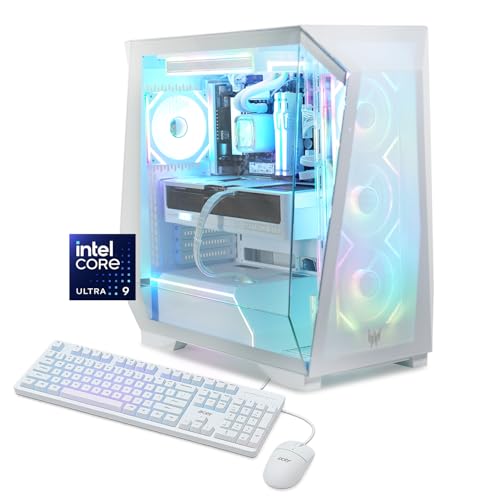
Acer Predator Orion 6000 Gaming Desktop
The Picks, Examined More Closely
The ROG Strix G16 is the rare gaming laptop that doesn’t feel like a compromise. It pairs an Intel Core Ultra 9 275HX, NVIDIA’s GeForce RTX 5080 laptop GPU, 32GB of DDR5 memory, and a 1TB SSD, all wrapped around a 16-inch ROG Nebula display running at 240Hz with a 3ms response time. That 2.5K panel makes competitive shooters feel genuinely fluid, and the 16:10 aspect ratio gives you a bit more vertical real estate for spreadsheets or chat windows.
For someone who games in multiple locations or travels between home and a dorm, the G16 removes the entire desktop build from the equation. Compared to the Acer Predator Orion 6000 later in this list, you trade raw cooling headroom for portability, but Wi-Fi 7 and a high-refresh screen mean latency stays low and motion stays sharp when the action gets serious.
Everyday Advantages
- The 240Hz Nebula display translates to smoother tracking in shooters and a noticeably cleaner cursor in design tools.
- 32GB of DDR5 is plenty for modern games plus a browser full of tabs, Discord, and a streaming tool.
- 1TB of PCIe 4.0 SSD storage means big open-world titles load quickly and you don’t need an external drive right away.
- RTX 5080 laptop graphics handle ray tracing and DLSS-class upscaling for current AAA releases at native 2.5K.
- Wi-Fi 7 keeps wireless latency in check on supported routers, a real perk for online play.
Worth Noting
- High-end gaming laptops run hot under sustained load, so a cooling pad or elevated desk helps during long sessions.
- Upgrading RAM or storage later is possible but more involved than on a desktop tower.
- Battery life is modest when gaming unplugged, which is typical of the category.
Key Advantages
Who It Suits Best
Competitive players and traveling creatives who want desktop-class performance in a portable 16-inch chassis.
Consider Something Else When
The Acer Predator Orion 6000 is the better fit if you need a full tower with stronger sustained thermals and easier long-term upgrades.
The Ryzen 5 9600X brings AMD’s Zen 5 architecture to a price point most mid-range builders can actually afford. With 6 cores, 12 threads, and a 5.4 GHz max boost, it handles today’s top competitive games with frames to spare, especially when paired with a strong GPU like the PowerColor Red Devil RX 9070 XT reviewed below. It’s unlocked, so there’s headroom to tune if you enjoy tweaking.
For someone building a 1440p gaming rig without overpaying for cores they won’t use, the 9600X is a measured choice. Unlike the Ryzen 7 5700G, this chip does not include integrated graphics, so a discrete GPU is mandatory, which most gamers plan for anyway.
Practical Advantages
- Zen 5 cores deliver strong single-thread performance, which is what most games still lean on.
- 5.4 GHz max boost helps in CPU-bound esports titles like Counter-Strike 2 or Valorant.
- Unlocked multiplier invites light overclocking on B850 or X870 boards for enthusiasts.
Trade Offs
- No integrated graphics means a system won’t POST without a separate GPU installed.
- Pairing it with a flagship RTX 5080 leaves some GPU headroom on the table for purely CPU-limited titles.
Right Fit For
Mid-range builders targeting 1440p gaming who want Zen 5 efficiency without paying for extra cores they won’t fully use.
Look Elsewhere When
The Intel Core Ultra 5 250K Plus makes more sense for those who prefer the Intel ecosystem or want LGA 1851 motherboard flexibility.
The Ryzen 7 5700G sits in a unique spot: 8 cores, 16 threads, and Radeon graphics built right onto the chip. That means you can assemble a working desktop, boot into Windows, and play lighter games at 1080p without buying a graphics card at all. It’s the most flexible option on this list for tight budgets or temporary builds.
For someone testing a PC before committing to a GPU, or building a family computer that doubles as a casual gaming machine, the 5700G is a clever starting point. Pairing it later with something like the PowerColor Red Devil RX 9070 XT turns it into a serious gaming rig, so the upgrade path stays open.
Real-World Strengths
- Integrated Radeon graphics let you game at 1080p on popular titles without a discrete GPU.
- 8 cores and 16 threads handle productivity tasks, streaming, and multitasking comfortably.
- AM4 platform support means affordable motherboards and broad cooler compatibility.
Minor Gripes
- Built-in Radeon graphics aren’t intended for demanding AAA titles at high settings.
Best Suited To
First-time builders and budget-focused shoppers who want a working gaming-capable system before adding a dedicated GPU.
Not Your Match When
The Ryzen 5 9600X is a better fit for builders already planning to buy a modern GPU and wanting the newest Zen 5 platform.
The PowerColor Red Devil Spectral White is a flagship-class Radeon RX 9070 XT with 16GB of GDDR6 memory, dressed in a white shroud that fits the increasingly popular light-themed PC aesthetic. It targets 4K gaming and high-refresh 1440p, with three 8-pin power connectors and a 900W minimum system recommendation that tells you this card expects serious airflow around it.
For builders chasing top-tier rasterization performance in a Spectral White case, this is a strong centerpiece. The 340mm length is generous, so measuring your case clearance matters, and unlike the laptop GPU in the ROG Strix G16 above, this card delivers sustained desktop performance with proper cooling.
Notable Gains
- 16GB GDDR6 handles modern AAA textures and high-resolution texture packs without choking.
- Triple DisplayPort 2.1a plus HDMI 2.1 supports multiple high-refresh monitors simultaneously.
- RDNA 4 architecture brings improved ray tracing and better efficiency than previous Radeon generations.
- The Spectral White finish matches modern white-themed builds better than typical dark shrouds.
Practical Considerations
- Three 8-pin connectors and a 900W PSU recommendation raise the bar for supporting hardware.
- 340mm length requires verifying case clearance before purchase.
Made For
Enthusiast builders running 4K or high-refresh 1440p monitors who want a flagship Radeon card with a clean white aesthetic.
Skip It When
The ASUS TUF Gaming X870-PLUS WiFi is a smarter foundation if you’re still choosing a motherboard to anchor the rest of your build.
The ROG Strix B850-G Gaming WiFi is a microATX board built for compact AM5 builds that still want ROG polish. It brings 14+2+1 power stages, four M.2 slots, DDR5 support, PCIe 5.0 readiness, Wi-Fi 7, 2.5G LAN, and a front-panel USB 20Gbps Type-C port. For a small-form-factor case, that’s an unusually generous feature set.
For a builder who wants the Ryzen 5 9600X or Ryzen 7 5700G in a tight chassis without losing modern connectivity, this board delivers. Compared to the larger ROG Strix X870E-E later in this list, the B850-G trades raw expansion for footprint, which is exactly the trade small-case builders want.
Key Advantages
- Four M.2 slots give you room for multiple NVMe drives in a small build.
- Wi-Fi 7 and 2.5G LAN handle fast networking without needing extra cards.
- PCIe 5.0 readiness future-proofs the GPU slot for next-generation cards.
Points To Note
- mATX limits PCIe slot count compared to full ATX boards like the TUF X870-PLUS.
- VRM cooling is solid for the class but may need case airflow in dense SFF builds.
Who Should Grab It
Small-form-factor builders running Ryzen 9000 CPUs who want ROG features without committing to a full tower.
A Better Fit Elsewhere
The ASUS TUF Gaming X870-PLUS WiFi is the stronger choice for builders prioritizing a full ATX layout with extra expansion slots.
The Intel Core Ultra 5 250K Plus splits its 18 cores into 6 performance cores and 12 efficiency cores, pushing up to 5.3 GHz on the P-cores when a game needs raw speed. It supports PCIe 5.0 and 4.0, DDR5 memory, and runs on the new LGA 1851 socket paired with Intel 800-series chipset motherboards. For mainstream gaming builds, this chip is a sensible anchor.
For someone committed to Intel’s roadmap and planning around 800-series boards, the 250K Plus brings modern connectivity without paying flagship pricing. The Ryzen 5 9600X above still holds its own in single-thread-heavy scenarios, but the hybrid core design here gives Intel a multitasking edge.
The Case For It
- 18 cores split between performance and efficiency workloads help streaming and gaming at the same time.
- 5.3 GHz max boost keeps frame times tight in CPU-bound competitive games.
- LGA 1851 platform introduces PCIe 5.0 and DDR5 to Intel’s mid-range.
A Few Limitations
- Requires an Intel 800-series motherboard, which adds to total build cost.
- 125W base power means a solid cooler is essential for sustained loads.
Built With In Mind
Builders committed to the Intel ecosystem who want hybrid core multitasking for gaming and streaming.
Reach For A Different Pick When
The Ryzen 5 9600X is the better match for AM5 enthusiasts who value Zen 5 single-thread performance and a wide cooler selection.
The TUF Gaming X870-PLUS WiFi takes the same AM5 platform and stretches it into a full ATX board built for durability. You get 16+2+1 80A SPS power stages, DDR5 support, PCIe 5.0 readiness, four M.2 slots, dual USB4 ports at 40Gbps, Wi-Fi 7, and 2.5Gb LAN. For most builders who want one board to anchor a multi-year rig, that’s a serious checklist.
For someone running a Ryzen 7 5700G today and planning a Ryzen 9000 upgrade later, the X870 platform makes that transition painless. Compared to the smaller ROG Strix B850-G, this board trades compactness for more slots and stronger power delivery for sustained overclocks.
Positive Takeaways
- 16+2+1 80A power stages handle flagship Ryzen 9000 CPUs with headroom.
- Dual USB4 at 40Gbps opens up fast external storage and docking setups.
- Four M.2 slots support a large game library without spinning rust.
Points To Keep In Mind
- Full ATX footprint demands a mid-tower or larger case for proper fit.
Quick Facts
The Right Fit
Long-term AM5 builders who want a durable ATX platform with flagship-class power delivery and modern connectivity.
Swap It Out When
The ASUS X870 MAX Gaming WiFi7 W is a smarter pick if you’re building a white-themed showcase rig and want matching aesthetics.
The ROG Strix X870E-E Gaming WiFi is the enthusiast-tier sibling of the TUF board above, and it shows. With 18+2+2 power stages, Dynamic OC Switcher, Core Flex, DDR5 AEMP, Wi-Fi 7, five M.2 slots, PCIe 5.0, Q-Release Slim, USB4, and AI-driven overclocking and networking, this board is built for the builder who wants every option on the table.
For someone pairing a Ryzen 9-class CPU with a top-tier GPU like the PowerColor Red Devil RX 9070 XT, the X870E-E gives the power delivery to match. It’s overkill for entry builds, but enthusiasts chasing tuning headroom will appreciate the depth.
The Good Stuff
- Five M.2 slots let you build a fully NVMe-based storage array.
- Dynamic OC Switcher and Core Flex provide granular tuning for power users.
- AI Overclocking and AI Networking II simplify tuning for less experienced builders.
Trade-Offs To Consider
- The feature set carries a price tag that doesn’t fit modest budgets.
- Full ATX layout and 18-stage VRMs add bulk that demands a roomy case.
Whose Shelf It Belongs On
Enthusiast builders running flagship Ryzen CPUs who want every modern feature and tuning option on one board.
Another Choice May Suit
The ASUS TUF Gaming X870-PLUS WiFi is a more grounded option for builders who want the AM5 platform without the top-tier extras.
The X870 MAX Gaming WiFi7 W leans into the white-build trend with an 8-layer white PCB and 12+2+1 80A DrMOS power stages. It still carries DDR5, PCIe 5.0 x16 with Q-Release, three M.2 slots (one at PCIe 5.0), Wi-Fi 7, USB4 Type-C, 2.5Gb LAN, BIOS FlashBack, and Aura Sync RGB. For builders obsessing over a clean, bright interior, this board finally matches the rest of the white-component ecosystem.
For someone matching it with the PowerColor Red Devil Spectral White RX 9070 XT, the visual consistency ties a build together. The ROG Strix X870E-E above is more feature-dense, but the MAX W delivers the same connectivity in a cleaner-looking package.
Why It Works Well
- White PCB pairs with white GPUs, RAM, and cases for a cohesive aesthetic.
- USB4 Type-C provides fast external storage and display options.
- BIOS FlashBack makes firmware updates painless even without a CPU installed.
Honest Caveats
- Three M.2 slots is fewer than the ROG Strix X870E-E’s five.
Perfect Match For
Showcase builders prioritizing a clean white aesthetic without giving up PCIe 5.0 and Wi-Fi 7 connectivity.
Where A Sibling Pick Shines
The ROG Strix X870E-E is the better choice if maximum M.2 slots and tuning depth matter more than color matching.
The Predator Orion 6000 arrives fully assembled with an Intel Core Ultra 9 285K, an NVIDIA GeForce RTX 5080, 32GB of DDR5, a 1TB Gen 4 SSD, and Wi-Fi 7, all running Windows 11 Home. For someone who wants flagship gaming performance today without sourcing parts, this is the most direct path on the list.
For shoppers who’d rather skip the build process, the Orion 6000 handles thermals and assembly in one box. Compared to the ROG Strix G16 laptop, you trade portability for sustained cooling and easier long-term upgrades, which matters for serious AAA gaming sessions.
Features That Help
- RTX 5080 graphics drive high-refresh 4K and ray-traced AAA at strong settings.
- 32GB of DDR5 handles modern games plus background apps and chat tools.
- Prebuilt assembly removes compatibility guesswork for first-time owners.
A Few Limitations
- Prebuilt chassis layouts can limit future part swaps compared to open-standard DIY cases.
- Factory configurations sometimes use proprietary components that complicate repairs.
Feature Snapshot
Who Will Love This
First-time gaming PC shoppers who want flagship performance without the time investment of a DIY build.
Not Your Match When
The DIY route with the AMD Ryzen 5 9600X and ASUS TUF Gaming X870-PLUS WiFi is the smarter path for hands-on builders who want component choice.
What To Weigh Before Choosing Gaming Computer Components
Gaming computer components define how a system feels in practice, not just what it scores on a spec sheet. The CPU sets the floor for frame pacing, the GPU sets the ceiling for visual fidelity, and the motherboard decides how easily the rest of the build grows over time.
Matching CPU To Resolution
Most gamers at 1080p lean on the CPU more than they realize, since the GPU finishes its work quickly and the processor ends up handling draw calls, physics, and game logic. A Ryzen 5 9600X or Intel Core Ultra 5 250K Plus handles 1080p esports comfortably. At 1440p and 4K, GPU load rises and a balanced CPU keeps the system from bottlenecking.
GPU Memory And Power Planning
Cards like the PowerColor Red Devil RX 9070 XT ask for serious power and clearance, with three 8-pin connectors and a 900W minimum system recommendation. Builders should verify PSU headroom and case length before committing. A flagship GPU in a cramped case can throttle, which defeats the point of paying for top-end silicon.
Platform Longevity
AM5 motherboards like the ASUS TUF X870-PLUS or ROG Strix X870E-E support current Ryzen 7000 and 9000 CPUs, which means a future CPU swap won’t require a new board. LGA 1851 boards paired with the Intel Core Ultra 5 250K Plus follow the same idea. Picking a modern platform now saves money when upgrade time comes around.
Key Considerations Across These Picks
Mistakes Worth Dodging
A common slip is pairing a flagship GPU with a weak CPU, which leaves graphics horsepower waiting on the processor. The reverse is just as wasteful: a high-end chip feeding into an entry-level card. Match tiers, measure case clearance for long GPUs, and confirm PSU wattage before checkout.
What The Higher Tier Buys
Premium motherboards like the ROG Strix X870E-E add AI tuning, extra M.2 slots, and stronger power stages that matter when overclocking or running flagship Ryzen CPUs. Prebuilt systems like the Predator Orion 6000 bundle that engineering into one box. Spending more usually buys headroom for future upgrades, not just better numbers today.
Frequently Asked Questions
What CPU should I pair with a high-end GPU?
A balanced mid-range chip like the Ryzen 5 9600X or Intel Core Ultra 5 250K Plus pairs well with flagship graphics for most resolutions. Going beyond that CPU tier helps mainly at 1080p or in heavily CPU-bound simulation games.
Is integrated graphics enough for casual gaming?
The Ryzen 7 5700G’s Radeon graphics can handle many popular titles at 1080p with reasonable settings. For demanding AAA or competitive shooters, a discrete GPU like the PowerColor Red Devil RX 9070 XT delivers a much smoother experience.
Do I need a new motherboard for Ryzen 9000?
Yes, Ryzen 9000 CPUs require an AM5 motherboard such as the ASUS TUF X870-PLUS or ROG Strix X870E-E. Older AM4 boards won’t work, even if they share a chipset family name.
How important is PSU wattage for a gaming GPU?
Wattage matters more with flagship cards. The RX 9070 XT recommends a 900W minimum system, so builders should size the PSU to match the GPU plus CPU, leaving some headroom for transient spikes.
Should I build or buy a prebuilt gaming PC?
Builders who enjoy the process save money per component and customize every choice. Prebuilts like the Predator Orion 6000 trade flexibility for convenience, arriving fully assembled and tested for shoppers who’d rather skip the build steps.
The Takeaway
The right gaming components depend less on chasing benchmarks and more on matching parts to the games you play, the resolution you target, and the case you own. A balanced Ryzen 5 9600X with a strong GPU and an AM5 board covers most gaming needs, while laptops and prebuilts fill the gaps for portability and convenience. Pick the tier that fits your habits now, and leave room to grow into the next one.