A thousand dollars sits at that sweet spot where casual setups leave you underpowered and boutique builds leave you over budget. Most shoppers I talk to want clean 1440p performance, enough headroom for the next few big releases, and a tower or monitor that doesn’t feel disposable a year in. The list ahead mixes ready-to-run desktops, one compact alternative, and a stack of KTC panels at sizes and refresh rates worth knowing about. Together they cover a realistic path from entry-level play to high-refresh competitive setups, all within reach of a four-figure budget.
A Side-By-Side Look

Horizon Autherium Dragon RGB I9 RTX Gaming PC

GEEKOM GT13 MAX Professional Mini PC

KTC H27T27S 27 Inch QHD 144Hz Gaming Monitor

KTC 32 Inch 2K 120Hz IPS Monitor

KTC H32D6 32 Inch QHD 120Hz White Monitor

KTC 24 Inch QHD 100Hz Zero-Frame Monitor

Lenovo Legion Tower 5i RTX 5070 Ti Gaming PC

ASUS ROG G700 (2025) Gaming Desktop PC
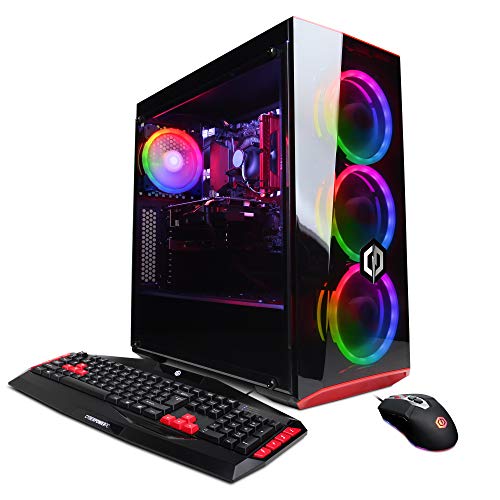
CyberpowerPC Gamer Xtreme VR Gaming PC

KTC 27 Inch QHD 100Hz OC 120Hz Home Office Monitor
The Details Behind The Selections
Right out of the box this Horizon tower targets shoppers who want near-flagship parts without building a PC themselves. The unlocked Core i9 paired with a factory-overclocked RTX 5070 OC, 64GB of RAM, and 5TB of mixed NVMe plus HDD storage is genuinely generous at this price tier, and the 360mm AIO liquid cooler (an all-in-one liquid CPU cooler with a 360mm radiator) keeps the chip comfortable under long sessions.
Compared with the Lenovo Legion Tower 5i further down the list, this Horizon leans into RGB-heavy styling and pre-applied overclocks, which means less tinkering for newcomers. It ships with Windows 11 Pro, supports fast Wi-Fi, and is described as VR-ready. For anyone stepping into demanding 1440p or VR titles, the headroom here is hard to match for the spend.
Positive Points
- Unlocked Core i9 with a 360mm AIO keeps thermals in check during marathon gaming sessions.
- RTX 5070 OC and 64GB of RAM remove obvious bottlenecks for modern 1440p and VR workloads.
- 5TB of mixed storage (1TB NVMe plus 4TB HDD) means you can keep a sizable library installed at once.
- Windows 11 Pro arrives preinstalled, saving an afternoon of setup.
- Aggressive RGB styling and factory overclocking deliver a tuned feel without DIY effort.
Points To Keep In Mind
- Factory overclocks can shorten headroom for further tuning and may run warmer than stock profiles.
- The RGB-heavy chassis needs dust attention on the intake filters over time, which is a routine but worth-mentioning chore.
- It’s a heavier tower, so plan desk space before it arrives.
Feature Snapshot
Who It Suits Best
Hardcore gamers who want plug-and-play performance, streamers running heavy secondary tasks, and anyone curious about VR without building a rig from parts.
Where Another Pick Suits Better
The Lenovo Legion Tower 5i is a smarter pick for shoppers who prefer a more reserved chassis and a mainstream brand warranty over a heavily stylized tower.
The GEEKOM GT13 MAX sits in a different lane than the towers above. It’s a tiny Intel Core Ultra 9 185H machine with 16GB of DDR5 RAM, a 1TB SSD, Intel Arc integrated graphics (a GPU built into the CPU rather than a discrete card), Wi-Fi 7, dual 2.5G LAN ports, and an SD card slot. For shoppers who’d rather stash a PC behind a monitor than under a desk, the footprint is the headline.
Compared with the Horizon and Lenovo towers, raw gaming performance is more modest since there’s no discrete GPU, but the AI Boost NPU (a neural processing unit that handles on-device AI tasks efficiently) and modern I/O make it a strong candidate for office productivity, light gaming, and AI tinkering. For 1080p esports and older titles it does the job, and the connectivity is excellent for a multi-monitor workflow.
Well-Handled Touches
- Tiny chassis fits behind a monitor or on a small shelf where towers cannot.
- Wi-Fi 7 and dual 2.5G wired networking cover fast home and small-office setups.
- Intel AI Boost NPU handles supported AI workloads without leaning on the CPU.
- SD card slot is convenient for creators who pull media from cameras and drones.
- 16GB of DDR5 memory keeps general multitasking responsive.
Trade Offs
- Integrated Arc graphics limit modern 3D gaming to lighter titles and esports.
- Compact thermals can throttle sustained heavy workloads in tight, poorly ventilated spots.
Right Fit For
Hybrid professionals who need a quiet, compact PC for productivity and lighter gaming, plus anyone exploring on-device AI tasks on a tight desk.
Look Elsewhere When
The Horizon Autherium Dragon is the stronger fit when modern AAA gaming or VR is the priority and desk space isn’t a constraint.
This 27-inch KTC leans into the sweet spot many competitive gamers chase. A QHD (2560×1440) panel running at 144Hz pairs naturally with mid-tier GPUs like the RTX 5070, and FreeSync plus G-SYNC compatibility (variable refresh rate technologies that prevent screen tearing) keep fast motion clean. Eye-care features and HDR10 support (a high-dynamic-range standard that expands contrast and color) round out the everyday appeal.
Compared with the larger 32-inch KTC models further down the list, this 27-incher fits more desks and keeps pixel density high, which is what makes 1440p text and UI look crisp. Tilt adjustment and VESA mount compatibility (a standard mounting pattern that fits most monitor arms) give owners flexibility for ergonomics. It’s the kind of display that pairs cleanly with either the Horizon tower or the Lenovo Legion below.
What Works In Its Favor
- 144Hz refresh at 1440p is a real sweet spot for mid-range GPUs.
- FreeSync and G-SYNC compatibility reduce tearing in fast scenes.
- VESA mount support opens the door to monitor arms for cleaner desks.
Minor Gripes
- 144Hz is great but sits below the 240Hz ceiling competitive players may want for esports.
- HDR10 support is present though not class-leading for movie-grade brightness.
Best Suited To
Mid-range gaming rigs pushing 1440p, and shoppers building a single strong display rather than a multi-monitor array.
Swap It Out When
The KTC 27 Inch QHD 100Hz (OC 120Hz) is a more wallet-friendly pick when 144Hz isn’t a must and the budget should stretch to other components.
Stepping up to a 32-inch IPS panel changes the feel of a desk entirely. KTC’s 2K 120Hz model gives you the extra screen real estate for spreadsheets, timelines, and open-world games without pushing into 4K territory where mid-tier GPUs have to struggle. The thin bezels (the borders around the display) make it easy to pair two of these side by side for an ultrawide-style workspace.
Compared with the 27-inch KTC above, this monitor trades some pixel density for more breathing room. For shoppers splitting time between office apps and gaming, the IPS panel’s color accuracy and wide viewing angles are practical benefits, and 120Hz keeps general use smoother than a typical 60Hz office display.
Advantages To Know
- 32-inch IPS panel is comfortable for both work and gaming on the same screen.
- 120Hz refresh makes everyday navigation noticeably smoother.
- Thin bezels support multi-monitor setups without a chunky gap.
- IPS color and viewing angles help creators working with photos or video.
Honest Caveats
- At 32 inches, 2K resolution means slightly lower pixel density than a 27-inch 1440p panel.
- You’ll want a deeper desk since 32-inch monitors crowd shallow surfaces.
Who Will Love This
Remote workers who game on the same display, and anyone wanting one large screen instead of a multi-monitor stack.
Skip It When
The KTC 27 Inch QHD 144Hz Gaming Monitor is the stronger match for tight desks where pixel density and competitive refresh rates matter more than screen size.
The H32D6 delivers the same 32-inch QHD IPS panel as its black sibling but in a clean white finish that pops on bright desks. Adaptive Sync (a variable refresh rate feature that keeps gameplay smooth across frame changes), HDR10, and HDMI plus DisplayPort inputs cover the core connectivity, and the tilt-adjustable stand is VESA compatible for those who prefer a monitor arm.
Compared with the standard 32-inch KTC, this white variant doesn’t change the underlying image quality but does change how a setup looks. For minimal desks, light wood furniture, or rooms with white walls, that visual difference is meaningful. The spec sheet here is essentially the H32D6’s party trick.
Where It Excels
- White finish blends into bright or minimalist setups where black bezels feel heavy.
- Adaptive Sync keeps gameplay fluid without manual tweaking.
- HDR10 support adds punch to games and movies on compatible titles.
- VESA compatibility offers ergonomic flexibility beyond the included stand.
Points To Note
- White enclosures show dust and smudges more readily than black, so wiping the bezel becomes part of routine care.
- Same 120Hz ceiling as the standard model, so hardcore competitive players may still want a faster panel.
Perfect Match For
Style-conscious shoppers who want a clean, modern look on a bright desk without sacrificing the gaming fundamentals.
A Better Fit Elsewhere
The KTC H27T27S is the better choice when competitive 144Hz refresh is more important than the larger 32-inch canvas.
Not every gamer has a deep desk, and this 24-inch KTC earns its keep on compact surfaces. The zero-frame design (near-edge-to-edge glass with minimal bezel) keeps the panel looking modern, and the 100Hz refresh is a real upgrade over the 60Hz displays many people replace. FreeSync and G-SYNC compatibility handle frame pacing in supported games.
Compared with the 27-inch KTC above, this 24-incher prioritizes pixel density and desk footprint over screen area. For shoppers building a second screen alongside a larger primary, or those running an older GPU that doesn’t push past 100fps at 1440p, the smaller panel is a thoughtful match.
Notable Upsides
- Compact 24-inch size fits shallow desks and small rooms.
- Zero-frame design looks clean and supports tight multi-monitor layouts.
- FreeSync and G-SYNC compatibility reduces tearing in fast scenes.
- Higher pixel density than the 32-inch 2K panels, so text stays sharp.
Where It May Fall Short
- 100Hz is solid but trails the 144Hz ceiling of the larger 27-inch KTC.
- Smaller screen reduces the cinematic feel in open-world and story-driven games.
Made For
Shoppers in small apartments, dorms, or anyone adding a sharp secondary screen to a primary display.
Reach For A Different Pick When
The KTC 32 Inch 2K 120Hz IPS Monitor fits better when you have the desk depth and want one large primary screen for work and play.
The Lenovo Legion Tower 5i is the more polished alternative to the Horizon tower at the top of this list. Inside, an Intel Core Ultra 7 265F pairs with an NVIDIA RTX 5070 Ti, 32GB of memory, and a 1TB SSD. Legion Coldfront cooling is Lenovo’s branded thermal system designed to keep noise and heat manageable, and the bundle includes three months of PC Game Pass for sampling modern releases out of the box.
Where the Horizon leans into stylized RGB and a factory overclock, the Legion favors a more understated chassis and Lenovo’s mainstream support network. For shoppers who want a recognized brand name and a quieter-looking tower, this is a thoughtful middle ground between boutique builders and bargain-bin prebuilts.
Where It Helps
- RTX 5070 Ti graphics handle modern AAA titles with ray tracing (a rendering technique that simulates realistic lighting) at high settings.
- 32GB of memory is comfortable for gaming plus heavy multitasking.
- Legion Coldfront cooling aims for quieter operation under load.
- Three months of PC Game Pass adds immediate value for new releases.
Things To Consider
- The Core Ultra 7 265F lacks integrated graphics, so a failing discrete GPU means no fallback display output.
- 1TB storage is the only listed capacity, so plan on adding storage if your library grows.
Feature Snapshot
Who Should Grab It
Shoppers who want a recognizable brand, a quieter tower, and the safety net of mainstream warranty support.
Not Your Match When
The Horizon Autherium Dragon RGB I9 RTX Gaming PC fits better when raw RAM, dual-drive storage, and aggressive factory tuning matter more than brand polish.
The ASUS ROG G700 (2025) is the most personality-forward tower in this roundup. The dual-glass panel chassis showcases the ROG Slash and Fearless Eye logo, and Aura Sync RGB lighting (ASUS’s system for syncing colors across compatible components) ties fans and accents into a coordinated look. Inside sits an Intel Core Ultra 7 265F, an RTX 5070, 32GB of DDR5, and a 1TB M.2 NVMe PCIe 4.0 SSD (a compact, fast solid-state drive using the PCIe 4.0 bus).
Compared with the Lenovo Legion Tower 5i above, the G700 trades a slightly weaker GPU for a more dramatic chassis and ASUS’s RGB ecosystem. For shoppers who care about how the build looks on stream or under the desk, that trade is real. For pure raw performance, the Legion’s 5070 Ti has a clearer edge.
Key Advantages
- Distinctive dual-glass chassis makes components visible for showcase builds.
- Aura Sync RGB integrates with other ASUS peripherals and lighting.
- 32GB DDR5 and a PCIe 4.0 NVMe SSD keep the platform responsive.
- RTX 5070 handles 1440p gaming comfortably on modern titles.
A Few Limitations
- Glass panels need frequent dusting to keep the interior looking sharp.
- RTX 5070 sits a step below the Lenovo’s RTX 5070 Ti in raw power.
Built With In Mind
Style-focused builders who want their tower to double as a desk centerpiece and value the ROG ecosystem.
Where A Sibling Pick Shines
The Lenovo Legion Tower 5i is the smarter choice when GPU muscle outranks chassis flair in your priorities.
The CyberpowerPC Gamer Xtreme VR sits at the entry-level end of this roundup. It pairs a 9th-gen Intel Core i5-9400F with an NVIDIA GTX 1660 6GB, 8GB of DDR4, and a 120GB SSD alongside a 1TB HDD. Windows 10 Home comes preinstalled, and the system is described as Wi-Fi ready. It’s the kind of build that gets a first-time gamer into PC gaming without breaking the bank.
Compared with the towers above, this CyberpowerPC is older and less powerful, but the trade-off shows up in price. For esports titles, indie games, and many older releases, the GTX 1660 still does the job at 1080p. The honest read is that this is a stepping-stone build, not a long-term flagship.
The Case For It
- Affordable entry into PC gaming with a known configuration.
- 120GB SSD plus 1TB HDD balances speed and capacity.
- Wi-Fi ready for cable-free home networking.
Trade-Offs To Consider
- Older platform means shorter upgrade runway and no support for the latest CPUs.
- 8GB of RAM and a GTX 1660 limit modern AAA performance to lower settings.
- 120GB SSD fills up quickly with modern game installs, so users commonly report adding more storage early on.
Quick Technical Notes
Whose Shelf It Belongs On
First-time PC gamers, students, or anyone building a secondary rig for lighter titles and esports.
Consider Something Else When
The Horizon Autherium Dragon is the obvious step up when modern AAA gaming and VR matter more than the lowest possible entry cost.
Closing the list is a versatile 27-inch QHD panel that runs at 100Hz natively and can be overclocked to 120Hz. The IPS screen covers a wide color range, supports HDR10, and uses narrow bezels for a modern look. It leans toward the “do it all” category: comfortable for spreadsheets, generous for movies, and capable for weekend gaming.
Compared with the higher-refresh KTC H27T27S earlier in the list, this monitor trades 144Hz for a friendlier everyday profile. For shoppers who split time evenly between work and play, that balance tends to feel more useful than chasing the highest possible refresh rate. Depending on your work patterns, this may be the more honest pick.
Everyday Perks
- 27-inch QHD with 100Hz base and 120Hz overclock is a comfortable middle ground.
- IPS panel with HDR10 supports a wide color range for both work and entertainment.
- Narrow bezels look modern and suit a tidy desk setup.
Some Limits To Know
- Overclocking to 120Hz varies by unit, so a few shoppers may not hit the full ceiling.
- 100Hz is solid but trails the 144Hz options for serious competitive play.
The Right Fit
Hybrid users who want one display for documents, video, and casual gaming without paying for high-refresh esports specs.
Where Another Pick Suits Better
The KTC H27T27S is the stronger choice for shoppers who prioritize higher refresh rates over the everyday-balance profile.
Smart Shopping Notes For A Four-Figure Gaming Build
GPU Pairing With Your Monitor
The RTX 5070 and 5070 Ti cards in this list pair naturally with 1440p displays. A 27-inch 144Hz monitor like the KTC H27T27S hits the sweet spot because the GPU can drive most modern games at 60+ fps (frames per second) at 1440p, leaving the high refresh headroom for esports and lighter titles. Mismatching a flagship GPU with a 60Hz panel wastes potential, while pairing a budget GPU with a 240Hz screen leaves refresh unused.
Storage That Won’t Bite Back
Modern games regularly exceed 50GB each. The Horizon’s 1TB SSD plus 4TB HDD combo is the most generous in the roundup, while the Lenovo and ASUS rely on a single 1TB SSD that fills up faster than shoppers expect. For long-term ownership, an external drive or a planned NVMe upgrade keeps a system feeling fresh without reinstalls.
Cooling And Noise
Prebuilt towers like the Lenovo Legion and ASUS ROG lean on branded cooling systems (Legion Coldfront and Aura Sync respectively) to manage heat and fan noise. In most mid-sized home setups, these stay acceptably quiet, but tightly enclosed desks or warm rooms can push thermals up. Owners commonly report that adding case airflow or repositioning the tower improves comfort during long sessions.
Upgrade Headroom
Mid-range desktops like the CyberpowerPC Gamer Xtreme reach upgrade limits faster because the platform is older and RAM sits at 8GB. Newer builds using DDR5 and modern Intel Core Ultra CPUs stretch further, since both RAM and storage can usually grow without replacing the motherboard. Planning the upgrade path early saves money later.
Picking The Right Tier For Your Budget
Mistakes Worth Dodging
The most common slip-up is buying a flashy tower and pairing it with a 60Hz office monitor, which wastes most of the GPU’s potential. Another trap is chasing the largest SSD number without checking whether the system has open M.2 slots (small internal slots on the motherboard that accept fast NVMe SSDs) for later expansion. Skimping on RAM is a third classic mistake, since 8GB fills up fast when a game, browser, and voice chat all run at once.
Where The Extra Money Goes
Stepping from the CyberpowerPC Gamer Xtreme to the Lenovo Legion Tower 5i or Horizon Autherium Dragon buys a more capable GPU, more RAM, and a newer CPU platform that supports future upgrades. The ASUS ROG G700 adds RGB styling and a glass chassis for shoppers who care about looks as much as frames. For most people, the middle tier is where the value sits, with the premium tier paying off only when ray tracing or VR is part of the plan.
Frequently Asked Questions
Is $1000 Enough For A Modern Gaming PC?
For 1080p and entry 1440p gaming, yes. Prebuilt systems like the Lenovo Legion Tower 5i and Horizon Autherium Dragon handle current AAA titles at high settings without taxing their GPUs. Hardcore 4K gaming is a different category and usually demands a higher budget.
Should I Buy A Prebuilt Or Build My Own?
Prebuilts like the ones in this roundup save time, ship with warranties, and avoid compatibility headaches. Building your own offers more control over parts and potential cost savings, but it requires patience and comfort with hardware.
What Monitor Refresh Rate Matters Most?
For casual gaming, 100Hz to 120Hz feels meaningfully smoother than 60Hz. Competitive players chasing the edge benefit from 144Hz and beyond, while creative work usually cares more about color accuracy and panel size than raw refresh rate.
Do I Need An SSD For Gaming?
A solid-state drive is effectively required in 2026. Games load dramatically faster from an SSD than a mechanical hard drive, and modern operating systems expect one. The KTC monitors and the prebuilt towers in this list all include SSD storage.
Are Mini PCs Realistic For Gaming?
A mini PC like the GEEKOM GT13 MAX handles esports, indie titles, and older AAA games well, especially when paired with a 100Hz or 120Hz monitor. For demanding modern 3D titles at high settings, a discrete GPU in a larger tower remains the better fit.
Closing Remarks
For most shoppers landing near the $1000 mark, the smartest move is balancing GPU muscle with a 27-inch 1440p display, leaving room for storage growth and a cooler-running chassis. The Horizon and Lenovo towers lead the performance conversation, the ASUS ROG G700 brings style, and the CyberpowerPC keeps the door open for first-time builders. Pick the build that matches the games on your list, and let the monitor follow from there.