Walking into PC gaming for the first time can feel overwhelming. Spec sheets read like alphabet soup, and most desktops aimed at enthusiasts assume you already know the difference between DDR5 and GDDR6. I put this list together for newcomers who want a machine that runs today’s popular titles smoothly out of the box, without forcing a crash course in hardware first.
The picks below span laptops and prebuilt desktops across different price tiers, plus a small accessory that solves a real desk-space headache. I’ve grouped them by what matters most to someone taking their first steps into PC gaming: approachable specs, real-world playability, and honest trade-offs.
The Choices Worth Comparing

KAIGERR Gaming Laptop 1TB SSD 16GB RAM AMD Ryzen 7

CYBERPOWERPC Gamer Master Gaming PC Ryzen 5 RTX 4060

Horizon Autherium Dragon RGB I9 Gaming PC RTX 5070
CyberPowerPC Gamer Xtreme VR Gaming PC i5-13400F RTX 4060

HP Pavilion Gaming 15-inch Laptop Ryzen 5 GTX 1650

EUREKA ERGONOMIC Height Adjustable PC Stand with Wheels

CyberpowerPC Gamer Xtreme VR PC i5-10400F GTX 1660 Super
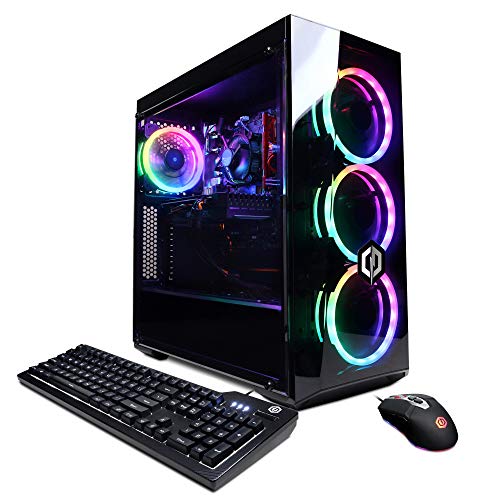
CyberpowerPC Gamer Xtreme VR Gaming PC i5-10400F GXiVR8060A9

Acer Nitro V Gaming Laptop i7-13620H RTX 4050 165Hz
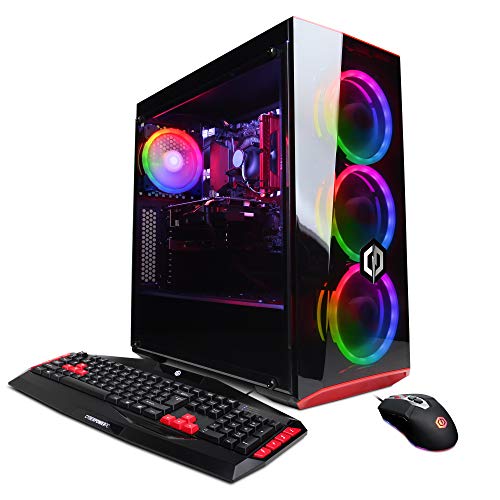
CyberpowerPC Gamer Xtreme VR Gaming PC i5-9400F GTX 1660
Why These Options Stand Out
For someone who games in a dorm or shared space, a 15.6-inch gaming laptop can be the easiest way to skip the desktop setup entirely. The KAIGERR pairs an AMD Ryzen 7 5825U, an 8-core, 16-thread chip that boosts up to 4.5GHz, with Radeon RX Vega 8 integrated graphics (graphics built into the processor rather than on a separate card). Wi-Fi 6 keeps wireless connections stable in apartment buildings crowded with neighboring routers.
You get 16GB of RAM, which is a comfortable floor for modern games, and a roomy 1TB NVMe SSD that loads levels quickly. The trade-off is real: integrated graphics handle esports and indie titles far better than the latest AAA releases. Owners commonly find this machine shines for schoolwork first and gaming second.
Everyday Advantages
- Ryzen 7 with 8 cores handles multitasking, so game-launching browsers and Discord calls don’t choke the system.
- 1TB NVMe SSD holds a sizable game library without forcing constant uninstalls.
- 15.6-inch form factor moves easily between a desk, a couch, and a backpack.
- Wi-Fi 6 maintains steady connections in dense networks.
Worth Noting
- Vega 8 integrated graphics won’t deliver high frame rates in demanding 3D titles.
- The chassis tends to run warm under sustained load, so a flat hard surface helps cooling.
- Battery life drops sharply during gameplay, which is normal for gaming laptops but worth knowing.
Quick Facts
Made For
First-time laptop gamers who mostly play esports titles, indie games, or older AAA releases and want one machine for school and play.
Consider Something Else When
Someone planning to play current AAA games at high settings should look at the Acer Nitro V Gaming Laptop i7-13620H RTX 4050 165Hz for genuine dedicated graphics.
Where the KAIGERR laptop leans on integrated graphics, the Gamer Master takes a different route: a real dedicated GPU. The Ryzen 5 7600 is a 6-core, 12-thread Zen 4 chip on the modern AM5 platform, paired with an NVIDIA GeForce RTX 4060 carrying 8GB of VRAM (graphics memory dedicated to the GPU). That pairing handles most 2024 and 2025 releases at 1080p with respectable frame rates.
16GB of DDR5 RAM is the sweet spot for entry-level builds, and the 500GB Gen4 NVMe SSD keeps boot times snappy. The case has a tempered glass side panel and customizable RGB lighting, which gives beginners a feel for the hobby without needing to assemble anything. Compared to the older CyberpowerPC Gamer Xtreme VR Gaming PC i5-10400F GTX 1660 Super later in this list, this is a clear generational step up.
What It Does Well
- RTX 4060 delivers solid 1080p performance in modern games, including ray tracing (a lighting technique that simulates how light behaves in real life) at modest settings.
- DDR5 memory and AM5 motherboard leave room for future CPU upgrades.
- Tempered glass and RGB lighting let beginners show off their build without tinkering.
Trade Offs
- 500GB of storage fills up quickly on modern titles, each of which can demand 50GB or more.
- The bundled peripherals are functional but unremarkable.
- Stock cooling can run loud under extended gaming sessions.
Best Suited To
Newcomers ready to commit to a desktop tower for 1080p gaming in esports and modern releases.
Skip It When
Portability matters more than raw power, in which case the Acer Nitro V Gaming Laptop i7-13620H RTX 4050 165Hz is the stronger travel companion.
The Horizon Autherium Dragon RGB sits at the top of this list, but it’s the most expensive pick by a wide margin. A Core i9 unlocked chip pushes up to 5.4GHz, paired with an NVIDIA GeForce RTX 5070 OC graphics card, 64GB of RAM, and a 5TB storage configuration combining a 1TB NVMe drive with a 4TB hard disk. A 360mm AIO liquid cooler handles thermals (an all-in-one liquid cooler that mounts to the CPU like a radiator to move heat away more efficiently than basic fans).
For a beginner, this machine is overkill in the best possible way. Windows 11 Pro is preinstalled, and the case ships with RGB lighting ready to configure. The honest read: most newcomers will not push an i9 and an RTX 5070 in their first year. But if budget is flexible and the goal is years of headroom, this is the build that grows with you.
The Helpful Details
- RTX 5070 OC handles current AAA releases at high settings and supports advanced features like DLSS (Nvidia’s AI-based frame-boosting technology).
- 64GB of RAM is double what most competing prebuilts offer, future-proofing multitasking for years.
- 5TB of mixed storage separates fast game installs from bulk media libraries.
- 360mm AIO keeps thermals in check during marathon sessions.
Honest Caveats
- The price sits well above what a beginner typically needs to start.
- High-end parts draw more power, so an outlet on a grounded circuit is wise.
- The size and weight of a fully loaded tower require a sturdy desk or floor placement.
Feature Snapshot
Perfect Match For
First-time buyers with a generous budget who want a build that won’t need replacement or upgrades for several years.
Look Elsewhere When
The CYBERPOWERPC Gamer Master Gaming PC Ryzen 5 RTX 4060 makes more sense for newcomers wanting modern parts without overspending.
Intel’s 13th-generation Core i5-13400F brings 10 cores (6 performance, 4 efficiency) to the table, paired here with the same RTX 4060 graphics card found in the AMD-based Gamer Master above. The “F” suffix means the chip has no integrated graphics, so the dedicated GPU handles everything display-related. In short: you won’t notice any difference in gaming, but you do get the efficiency cores helping with background tasks.
This build ships with 16GB of DDR5 memory and a generous 1TB PCIe Gen4 NVMe SSD, which solves the storage-crowding problem that plagues the 500GB Gamer Master. The trade-off appears in upgradability: 13th-gen Intel platforms are near the end of their socket life, so swapping the CPU later is harder than on AMD’s AM5 platform used in the Gamer Master.
Features That Help
- RTX 4060 paired with 16GB DDR5 delivers reliable 1080p frame rates in modern releases.
- 1TB SSD doubles the storage of comparable AMD builds at this tier.
- Wi-Fi ready out of the box, no extra adapter needed.
- 10-core CPU handles streaming or recording on top of gaming.
Points To Note
- The Intel platform offers fewer future CPU upgrade paths than AMD’s AM5.
- Stock case fans can struggle with extended sessions in warm rooms.
- Preinstalled bloatware (factory-installed software you didn’t ask for) sometimes slows first boot until removed.
Whose Shelf It Belongs On
Mainstream 1080p gamers who want a balanced Intel-based tower with extra storage from day one.
Swap It Out When
Anyone planning to upgrade their CPU down the road should consider the CYBERPOWERPC Gamer Master Gaming PC Ryzen 5 RTX 4060 instead for its longer-lived AM5 socket.
The HP Pavilion Gaming 15 is the most established budget laptop on this list, and that maturity shows. An AMD Ryzen 5 4600H handles everyday workloads, while a dedicated NVIDIA GeForce GTX 1650 graphics card takes over for gaming. 8GB of RAM is the realistic floor for modern games, and the 512GB NVMe M.2 SSD (a compact solid-state drive that plugs directly into the motherboard) keeps load times short.
Where the KAIGERR relies on integrated Vega graphics, the Pavilion brings a true entry-level GPU to the table. That means smoother frame rates in games like Valorant, CS2, and lighter indie titles, even though it falls short of the RTX 4050 in the Acer Nitro V further down. For casual play and schoolwork in one device, the Pavilion strikes a familiar balance.
Reasons It Performs
- Dedicated GTX 1650 outperforms integrated graphics in most modern titles.
- 512GB SSD holds roughly 8 to 12 modern games before juggling installs.
- HP’s build quality feels sturdy in everyday carry.
- 15.6-inch display sits in the comfortable middle ground for productivity.
Some Limits To Know
- 8GB of RAM is tight for AAA games; owners commonly add more down the road.
- GTX 1650 struggles with newer releases beyond medium settings.
- Display brightness tends to look dim outdoors or near sunny windows.
Right Fit For
Casual players who want a recognizable brand laptop that handles school and lighter games without much fuss.
A Better Fit Elsewhere
Buyers wanting more graphics horsepower in a laptop should look at the Acer Nitro V Gaming Laptop i7-13620H RTX 4050 165Hz, which jumps two generations ahead.
The EUREKA ERGONOMIC PC Stand is the only non-computer in this list, and that’s deliberate. A first gaming PC often arrives in a cardboard box the size of a small suitcase, and the question of where to put it becomes real fast. This rolling stand solves that with a 2-tier steel design that supports full-size ATX cases and adjusts through 6 height gears ranging from about 23 to 33 inches.
For newcomers, keeping the tower off the floor has real benefits: less dust intake, easier access to ports, and a cleaner desk appearance. Wheels let you roll the whole setup out for cleaning without lifting. Pair it with any of the desktops above and you’ve handled the placement question before it becomes a frustration.
The Practical Payoff
- 6-gear manual height adjustment fits ATX towers of different sizes.
- Wheels make moving the tower for cleaning or cable work painless.
- Steel frame handles the weight of full-size desktops without flex.
- 2-tier design leaves room for accessories or a printer below.
Points To Keep In Mind
- Assembly takes 15 to 30 minutes and requires basic tools.
- Wheels can roll on their own on slick floors; adding a small wedge under one wheel helps.
- Doesn’t include cable management beyond basic routing space.
Built With In Mind
First-time desktop owners working with limited floor space who want their tower accessible and elevated.
Not Your Match When
Laptop-only users won’t get much use from this; the Acer Nitro V Gaming Laptop i7-13620H RTX 4050 165Hz is a complete package on its own.
The Gamer Xtreme VR with the i5-10400F and GTX 1660 Super is one of the older builds on this list, but it still earns a spot. The GTX 1660 Super was a standout 1080p card in its day and continues to handle esports titles, indie releases, and AAA games from a few years back at high settings. 8GB of DDR4 RAM and a 500GB NVMe SSD round out the core spec sheet.
The catch is generational distance. The 10th-generation Intel platform and DDR4 memory (an older memory standard that the latest parts have moved beyond) make this a final-form build rather than a stepping stone. For a newcomer on a strict budget who plans to play a curated list of games, that’s often a fair trade. Windows 10 Home comes preinstalled, which is worth knowing if you specifically want Windows 11.
Practical Advantages
- GTX 1660 Super still handles popular esports titles at high frame rates.
- Wi-Fi ready and a keyboard-mouse bundle included out of the box.
- Lower cost than newer RTX-equipped towers for similar 1080p results in older games.
Practical Considerations
- 8GB of RAM will feel cramped in modern AAA titles; an upgrade is likely.
- 10th-gen Intel platform has limited future CPU upgrade paths.
- 500GB SSD fills up quickly with modern installs.
Feature Rundown
Who Should Grab It
Budget-focused newcomers who mainly play esports, indie, or back-catalog titles and don’t mind planning an upgrade within a year.
Reach For A Different Pick When
Anyone hoping for several years of headroom should pick the CYBERPOWERPC Gamer Master Gaming PC Ryzen 5 RTX 4060 for its newer platform.
This sibling of the previous Gamer Xtreme VR carries nearly identical specs: the same i5-10400F processor (6 cores, 12 threads), GTX 1660 Super graphics, 8GB of DDR4 RAM, and a 500GB NVMe SSD. The main difference is the model number (GXiVR8060A9 versus A10), and listings vary slightly on accessories included.
For a beginner, the practical read is straightforward: treat both as the same class of machine. If one listing is in stock while the other is not, choosing either gets you a working 1080p starter. Owners commonly report that this generation runs quietly and stays cool, though the older platform limits future upgrades.
Standout Benefits
- GTX 1660 Super with 6GB of VRAM handles 1080p gaming comfortably.
- Wi-Fi ready with no extra hardware required.
- Quieter cooling profile than some newer high-power builds.
Less Ideal Details
- 500GB storage is small by today’s standards.
- 8GB RAM limits multitasking while gaming.
- Older Intel socket reduces room for future CPU upgrades.
Who Will Love This
Newcomers who want a low-fuss prebuilt to play a focused library of older or lighter titles.
Where Another Pick Suits Better
Anyone planning to play modern AAA releases should jump to the CyberPowerPC Gamer Xtreme VR Gaming PC i5-13400F RTX 4060 for a real generational upgrade.
The Acer Nitro V closes the gap between budget gaming laptops and serious performance machines. An Intel Core i7-13620H (10 cores, 16 threads) drives the system, while an NVIDIA GeForce RTX 4050 laptop GPU brings dedicated ray tracing and DLSS support. The 15.6-inch FHD IPS display runs at 165Hz, a refresh rate (how many times per second the screen redraws) that makes fast-paced games feel noticeably smoother.
16GB of DDR5 RAM and a 1TB Gen4 SSD round out a spec sheet that punches well above the KAIGERR and HP Pavilion earlier in this list. Compared to the Gamer Master desktop, you give up raw upgradability but gain a machine that follows you to class, work, or a friend’s place. Wi-Fi 6 and a backlit keyboard add finishing touches that matter for daily use.
Positive Takeaways
- RTX 4050 supports DLSS frame generation (an AI feature that renders extra frames to boost perceived smoothness) for higher effective frame rates.
- 165Hz IPS display delivers visibly smoother motion than 60Hz panels.
- 1TB Gen4 SSD holds a large library without constant uninstalls.
- Backlit keyboard helps in dim dorm rooms and late-night sessions.
Things To Consider
- Battery life drops fast during gaming, which is standard for the category.
- Cooling fans ramp up under load and can be audible in quiet rooms.
- The plastic chassis feels sturdy but not premium next to metal-clad competitors.
Spec Overview
Who It Suits Best
Gamers who split time between a desk and the road, especially students and frequent travelers wanting modern specs in a laptop.
Where A Sibling Pick Shines
Buyers who plan to leave their setup in one room should consider the CYBERPOWERPC Gamer Master Gaming PC Ryzen 5 RTX 4060 for better long-term value.
This is the oldest entry in the lineup, and it shows. The Intel i5-9400F is a 9th-generation 6-core chip without hyperthreading (the ability for each core to handle two tasks at once for better multitasking), paired with an NVIDIA GeForce GTX 1660 6GB graphics card. Storage is split between a small 120GB SSD for the operating system and a 1TB HDD for bulk files.
For absolute beginners playing a small set of older titles, this can still deliver a workable 1080p experience, especially in esports games. The trade-off is older hardware that’s harder to upgrade, plus the inconvenience of managing two drives. Windows 10 Home ships preinstalled. If you’re price-sensitive and patient, it’s a starting point.
What Helps Most
- GTX 1660 6GB keeps 1080p esports running smoothly.
- 1TB HDD provides room for large game installs.
- Lower cost among the desktops in this roundup.
Details To Watch
- 120GB SSD fills up fast once Windows and a few games are installed.
- No hyperthreading limits multitasking while gaming.
- 9th-gen Intel platform offers essentially no future CPU upgrade path.
Made For
Budget newcomers willing to manage older hardware in exchange for a lower entry price.
Consider Something Else When
Anyone with a slightly higher budget will get more years of service from the CYBERPOWERPC Gamer Master Gaming PC Ryzen 5 RTX 4060.
What To Weigh Before Picking Your First Gaming Setup
A first gaming computer is less about chasing the highest numbers and more about matching your actual habits. The biggest decision is form factor: laptops like the KAIGERR or Acer Nitro V trade raw performance for portability, while desktops like the Gamer Master or Horizon Autherium give you stronger graphics and easier upgrades.
Graphics Card Does The Heavy Lifting
For most beginners, the GPU matters more than the CPU. An RTX 4060 handles today’s popular games at 1080p with room to spare, while older GTX 1650 or 1660-class cards keep costs down for esports and indie play. Integrated graphics like Vega 8 will work for very light titles but struggle with modern 3D releases. Match the GPU to the games you actually want to play, not the ones with the flashiest trailers.
RAM And Storage Set The Floor
16GB of RAM is the realistic minimum for modern gaming, and 8GB will feel cramped within months. Storage matters even more than newcomers expect: a single AAA game can demand 50 to 100GB. Look for at least a 500GB SSD, and plan to add a secondary drive later if your library grows quickly. NVMe SSDs (fast solid-state drives that connect directly to the motherboard) load games several times faster than older hard drives.
Consider Your Space And Setup
A desktop tower needs a place to live, which is where the EUREKA PC stand comes in. Cooling and dust control are easier when the case sits off the floor. For laptops, weight and charger bulk affect portability, and a cooling pad helps during long sessions. Whichever form factor you pick, leave room for a decent headset and a mousepad.
Plan For Growth Or Stay Lean
Some beginners want a machine that grows with them over the next four or five years; others want the cheapest working option today. The AM5 platform in the CYBERPOWERPC Gamer Master gives AMD users a longer upgrade runway than older Intel sockets. Older towers like the i5-9400F build save money now but lock you in. Honest budgeting here saves frustration later.
Smart Angles To Keep In Mind
Where Shoppers Go Wrong
A common slip is buying the cheapest tower with a flashy GPU and ignoring RAM or storage. An RTX 4060 paired with 8GB of RAM and a 120GB SSD will bottleneck quickly. Another trap is chasing a high core-count CPU while ignoring the GPU, which does most of the work in gaming. Always read the full spec sheet and prioritize the parts that match your play style, not just the headline number.
When Paying More Pays Off
Higher-tier gaming computers earn their keep in three places: a stronger GPU that handles new releases for years instead of months, more RAM that keeps multitasking smooth, and faster storage that shrinks load times across a large library. A build like the Horizon Autherium makes sense if you want one purchase to last through multiple game generations, while the budget picks here serve people who plan a deliberate upgrade path.
Frequently Asked Questions
Do beginners need a dedicated graphics card?
For modern 3D games, yes. Integrated graphics like Vega 8 can handle esports and indie titles, but a dedicated GPU like the RTX 4050 or GTX 1660 Super is the path to smooth frame rates in current releases. If you mainly play older or lighter games, integrated graphics keep costs down.
How much RAM is enough for a first gaming PC?
16GB is the realistic sweet spot for modern gaming and lets you keep a browser or Discord open in the background. 8GB works for light esports and indie titles but feels tight in newer AAA releases. Upgrading from 8GB to 16GB later is usually straightforward on desktops.
Should a beginner choose a laptop or a desktop?
Laptops like the Acer Nitro V or KAIGERR win on portability and simple setup, which suits students and frequent movers. Desktops like the CYBERPOWERPC Gamer Master win on graphics performance, cooling, and upgradability for the same money. Your living situation and travel habits usually make the call for you.
Is Windows 11 required for gaming?
Most current games run on Windows 11, and new releases increasingly target it. Some older prebuilts still ship with Windows 10, which works fine for current titles but may receive less support as time passes. Upgrading from Windows 10 to 11 is free on supported hardware.
What accessories should I plan for?
A decent mouse, a mousepad with enough surface for low DPI (dots per inch, the unit measuring mouse sensitivity) aiming, and a headset with a microphone cover the basics. If you picked a desktop, a stand like the EUREKA PC Stand keeps the tower elevated and mobile. Monitor choice matters too: pair your computer with a display that supports its GPU’s capability.
Bottom Line
The right first gaming computer depends less on spec sheets and more on the games you actually want to play and where you want to play them. Pick the form factor that fits your space, match the GPU to your favorite genres, and leave a little room for the library to grow. The picks above are built to make that first step a smooth one.