Most gaming rigs worth their salt start north of a grand, so finding something honest under $500 means picking your trade-offs carefully. I put this list together for first-time builders, students moving out of a shared console, and anyone who just wants to play popular titles without selling a kidney. The picks lean hard into value, mixing full-sized desktops with surprising specs against compact mini PCs that punch above their size.
How The Shortlist Stacks Up
CyberPowerPC Gamer Xtreme VR Gaming PC RTX 4060 16GB DDR5

CyberPowerPC Gamer Xtreme VR Gaming PC GTX 1660 Super
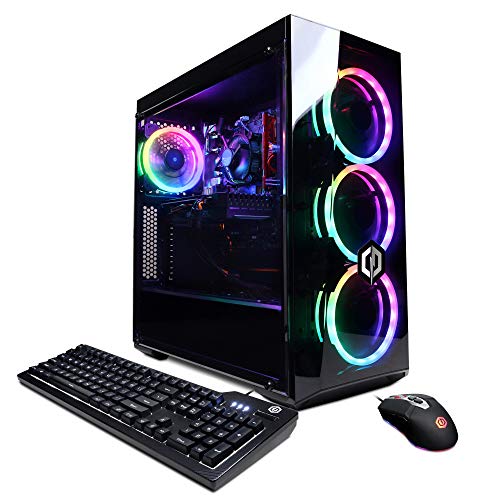
CyberPowerPC Gamer Xtreme VR Gaming PC GTX 1660 Super

BOSGAME E2 Plus Mini PC AMD Ryzen 5 3501U

ASUS ROG G700 (2025) Gaming Desktop RTX 5070

BOSGAME P3 Lite Mini PC AMD Ryzen 7 6800H

BOSGAME P3 Plus Mini PC AMD Ryzen 7 7840HS
More Details On Our Top Picks
This build feels like the most balanced desktop on the list for someone stepping into current-generation PC gaming. The 13th-gen Intel Core i5-13400F pairs with an RTX 4060 graphics card, and that pairing matters because the RTX 4060 brings DLSS 3 support, which uses AI upscaling to push frame rates without obvious image loss. For a student dorm or shared apartment, the 1TB PCIe Gen4 SSD means fast game loads and enough room for a dozen large titles.
The 16GB of DDR5 RAM is the new standard, and frankly it is the right amount for most modern games on the RTX 4060. WiFi is built in, so you can drop it on a desk and be online without adapters. Compared to the older GTX 1660 Super towers later on this list, this one trades raw budget for a much longer runway of playable settings.
Notable Gains
- RTX 4060 GPU unlocks DLSS 3 and ray tracing at playable frame rates in most 2024-era games.
- 16GB DDR5 RAM keeps multitasking smooth when you alt-tab between Discord, a browser, and a game.
- 1TB PCIe Gen4 SSD boots Windows 11 Home in seconds and swallows a deep game library.
- WiFi built in, so no extra dongle clutter on a small desk.
- Windows 11 Home preinstalled removes the hassle of sourcing a license.
Things To Consider
- The mid-tower chassis takes up real desk space, so small apartment dwellers may struggle with placement.
- CPU cooling is stock-level; expect fan noise to climb during long sessions of demanding games.
Quick Facts
Who It Suits Best
This is the desktop I would point a mainstream PC gamer toward, the kind of person who wants 1080p or 1440p play on a real GPU without overspending.
Skip It When
Grab the BOSGAME E2 Plus Mini PC instead if desk space is at a premium and you mostly play older or indie titles.
For a first gaming PC that needs to handle esports staples and a long backlog of indie titles, this older CyberPowerPC build still has legs. The 10th-gen Intel i5-10400F runs at a 2.9GHz base clock, which is plenty for games that lean on the GPU. The GTX 1660 Super 6GB card sits a step below the RTX series, but it handles popular competitive games at high frame rates on a 1080p monitor.
You only get 8GB of DDR4 RAM and a 500GB NVMe SSD, which is enough storage for a starter library but tight if you collect big open-world games. WiFi is included and Windows 10 Home is preinstalled. Against the RTX 4060 tower above, this one gives up ray tracing and DLSS, but it lands in a friendlier budget tier.
Good Reasons To Consider
- GTX 1660 Super pushes high frame rates in esports titles like Valorant and CS2 at 1080p.
- 500GB NVMe SSD loads Windows and games faster than a spinning hard drive ever could.
- WiFi onboard means a single-cable setup on most desks.
Worth Noting
- 8GB DDR4 RAM is the bottleneck for modern open-world games; you may want to add memory later.
- No dedicated ray tracing or DLSS support means visual settings will look softer in newer AAA releases.
- Older platform may feel dated sooner than the 13th-gen build in the first slot.
Made For
Competitive multiplayer players and newcomers who want a no-frills path into PC gaming on a tight budget.
Consider Something Else When
The CyberPowerPC Gamer Xtreme VR Gaming PC RTX 4060 16GB DDR5 is a better fit for shoppers who care about ray tracing and longer-term visual headroom.
This third entry is essentially the same recipe as the previous CyberPowerPC tower, swapping only the model suffix, which makes it a parallel option for shoppers who find one listing out of stock. The i5-10400F and GTX 1660 Super pairing is a known quantity, and owners commonly report smooth 1080p performance in lighter competitive titles.
8GB DDR4 and a 500GB NVMe SSD keep the configuration compact, and WiFi plus Windows 10 Home round out a familiar plug-and-play experience. For a parent buying a starter PC for a teenager, this is the kind of predictable spec sheet that removes guesswork.
What Makes Sense
- Proven CPU and GPU pairing with years of community driver support.
- 500GB NVMe storage gives quick boot times even on a modest budget.
Trade Offs
- Specs mirror the older GXiVR8060A10 in slot two, so the choice between them usually comes down to availability and listing price.
- 8GB RAM limits multitasking when streaming or running heavy mods.
- Stock cooler tends to run warm under sustained load; you may want to improve case airflow later.
Feature Snapshot
Best Suited To
Casual gamers who primarily play esports, retro, and indie games on a 1080p monitor.
Look Elsewhere When
Pick the BOSGAME P3 Plus Mini PC AMD Ryzen 7 7840HS if you want a smaller form factor with stronger integrated graphics for the same kind of 1080p play.
Stepping away from full-sized towers, the BOSGAME E2 Plus Mini PC is the smallest machine on this list and the most forgiving on space. The AMD Ryzen 5 3501U is a mobile-style chip with 4 cores and 8 threads, which means it is built more for everyday work and streaming than for heavy gaming. Still, paired with Radeon Vega graphics, it handles older esports titles at modest settings.
With 8GB RAM and a 256GB SSD, the storage is the obvious compromise, so a cloud library or external drive makes sense for anyone with a growing game collection. Compared to the CyberPowerPC desktops earlier in this guide, the E2 Plus is essentially a desk-friendly productivity box that happens to play games in its downtime.
Positive Takeaways
- Tiny footprint fits on a small shelf, behind a monitor, or in a dorm setup.
- Low power draw keeps electricity cost low, which matters for always-on home offices.
- Quiet operation makes it easy to share a bedroom or study space.
Points To Keep In Mind
- 256GB SSD fills up fast if you keep a handful of modern games installed.
- Integrated graphics limit you to lighter or older titles; AAA releases will not run smoothly.
Who Should Grab It
Students and remote workers who mostly need a productivity PC with a side of casual gaming.
A Better Fit Elsewhere
Pick the BOSGAME P3 Plus Mini PC AMD Ryzen 7 7840HS if you want a similarly compact shape but with much stronger integrated graphics for newer games.
The ASUS ROG G700 sits at the top of this list in terms of raw ambition. It ships with an Intel Core Ultra 7 265F processor and an NVIDIA GeForce RTX 5070 graphics card, which together push performance well beyond what most budget towers manage. 32GB of DDR5 RAM and a 1TB M.2 NVMe PCIe 4 SSD mean storage and memory are not the limiting factors here.
The dual-glass chassis with Aura Sync RGB lighting is built for enthusiasts who care about how a rig looks on the desk. In a small living room setup, the G700 also handles creative workloads, not just games. Relative to the CyberPowerPC RTX 4060 build in the first slot, this one is a generational leap, but it also pushes past the strict sub-$500 ceiling for many shoppers.
What Helps Most
- RTX 5070 GPU brings the newest DLSS features and strong ray tracing to modern games.
- 32GB DDR5 RAM removes memory as a bottleneck for heavy multitasking or creative work.
- 1TB PCIe 4 SSD keeps load times short across a sizeable library.
Honest Caveats
- Listed pricing often lands above the under-$500 target, so it requires patience to catch a deal.
- Full-tower chassis demands a dedicated desk footprint.
- Glass panels and RGB add visual flair but also dust exposure over time.
The Right Fit
Enthusiasts who want flagship-class performance now and a platform that will not feel tired in three years.
Reach For A Different Pick When
The CyberPowerPC Gamer Xtreme VR Gaming PC RTX 4060 16GB DDR5 is the smarter choice if the budget truly has to stay under $500 without compromise.
With an AMD Ryzen 7 6800H, 8 cores and 16 threads, and Radeon 680M integrated graphics, the BOSGAME P3 Lite sits in a sweet spot for a mini PC. The 6800H is a laptop-derived chip that punches above its weight, and Radeon 680M handles 4K media playback and casual gaming with surprising smoothness. 32GB of DDR5 RAM is generous for the form factor.
The 1TB NVMe SSD means you do not have to worry about storage as you would on the smaller E2 Plus. For a content creator running virtual machines or a household with several family members sharing one machine, that RAM ceiling is a quiet superpower. Against the older GXiVR8060A10 tower in slot two, the P3 Lite is dramatically smaller and surprisingly capable.
Useful Highlights
- 32GB DDR5 RAM makes heavy multitasking and light content work feel effortless.
- Radeon 680M graphics handle modern indie and lighter competitive games at 1080p.
- 1TB NVMe SSD keeps a sizeable library local without external drives.
A Few Limitations
- Integrated Radeon graphics still trail a dedicated RTX card for AAA releases.
- Compact chassis can run warm during extended gaming sessions; consider placement with open airflow.
Who Will Love This
Remote workers, students, and hobbyists who need a compact machine for both productivity and casual play.
Swap It Out When
The BOSGAME P3 Plus Mini PC AMD Ryzen 7 7840HS is worth grabbing instead if you want slightly stronger integrated graphics for newer games.
Closing out the list, the BOSGAME P3 Plus Mini PC is the most gaming-forward mini PC on this page. The AMD Ryzen 7 7840HS uses the Zen 4 architecture, hits up to 5.1GHz, and pairs with Radeon 780M integrated graphics, which is currently the strongest integrated GPU AMD offers. That is a meaningful upgrade over the Radeon 680M in the previous slot.
16GB DDR5 RAM is enough for current titles, and the 1TB NVMe SSD gives you real storage headroom. For a console replacement living room setup, this little box hides behind a TV and runs modern games at 1080p. Compared to the older CyberPowerPC towers in slots two and three, the P3 Plus trades raw GPU power for a much smaller footprint.
Benefits That Matter
- Radeon 780M graphics handle many current games at 1080p with sensible settings.
- Zen 4 Ryzen 7 7840HS gives desktop-class responsiveness in productivity apps.
- Compact size makes it easy to relocate between desk and living room.
- 1TB SSD keeps game installs local.
Possible Compromises
- 16GB RAM is workable but limits heavy multitasking compared to the 32GB P3 Lite.
- No dedicated GPU means high-end AAA ray tracing settings are off the table.
Perfect Match For
Living-room gamers and small-space dwellers who want a quiet, compact box that still plays modern titles.
Another Choice May Suit
Pick the CyberPowerPC Gamer Xtreme VR Gaming PC RTX 4060 16GB DDR5 if dedicated graphics matter more than desk footprint.
What Matters Most Before Choosing a Budget Gaming PC
Under $500, every dollar pulls weight, so focus on the parts that change how games feel day to day. The GPU matters most for frame rates and visual settings, while the CPU keeps the system responsive when you alt-tab out of a match. RAM around 16GB is the comfortable minimum today, and a fast SSD keeps load screens short.
For shoppers who want a true desktop tower, expect a mid-size case that needs real desk space and decent airflow. Mini PC shoppers save room but trade raw GPU power, since most compact machines lean on integrated graphics. Cooling and noise also rise with the GPU class, so check reviews about fan behavior before committing.
Match the machine to the games you actually play. Esports and indie titles run on anything from this list, while modern AAA releases need a dedicated RTX card like the 4060. If you mostly stream or work, prioritize RAM and a quiet CPU; if you play for hours, prioritize GPU and thermals.
Common Shopping Slip Ups in This Category
Buyers chasing the lowest sticker often end up with 8GB RAM and a small SSD, which fills up within months. Watch the storage number and plan for headroom, or budget for an external drive. Another mistake is treating integrated graphics like a dedicated GPU; a Ryzen 7 mini PC plays indie and esports titles well but will not match an RTX 4060 in demanding games.
When Paying More Pays Off
Stepping up to an RTX-class GPU is the single biggest visual upgrade in this category, because it unlocks ray tracing and DLSS frame generation. More RAM, 32GB rather than 16GB, also pays off if you keep dozens of browser tabs open or run virtual machines alongside games. Spending more on a larger SSD removes the daily pain of reinstalling games to free space. For shoppers who want longevity, those three upgrades stretch a system across several more years of comfortable play.
Frequently Asked Questions
Can a sub-$500 gaming PC handle modern AAA games? Yes, with caveats. A dedicated RTX 4060 setup handles most current titles at 1080p on medium to high settings, while integrated graphics are limited to lighter and older games.
Is a mini PC good enough for gaming? Mini PCs with modern Ryzen chips and Radeon integrated graphics handle esports and indie titles surprisingly well. For heavier AAA releases, a dedicated GPU tower is the safer pick.
How much RAM do I really need for gaming? 16GB is the comfortable floor for modern gaming. 32GB helps if you multitask heavily or stream while playing.
Do I need a dedicated graphics card? For competitive multiplayer and indie games, integrated graphics often suffice. For ray tracing, high-refresh 1440p, or current AAA releases, a dedicated GPU is necessary.
Is an SSD important for a gaming PC? Yes. A fast NVMe SSD dramatically shortens boot and load times compared to a traditional hard drive, which directly affects the daily gaming experience.
Closing Remarks
The right pick depends on whether you want a real GPU in a tower or a small box with clever integrated graphics. For most shoppers, the CyberPowerPC RTX 4060 build offers the best blend of current-gen visuals and everyday speed. If desk space rules your setup, the BOSGAME mini PCs bring real gaming capability to a surprisingly tiny footprint.