Setting up a proper gaming rig at the thousand-dollar mark means balancing CPU muscle, GPU grunt, and storage room without burning the whole budget on one component. Most shoppers land here because they want genuine 1080p and 1440p play, not just a glorified office box with a sticker on it. The eight picks below cover compact mini PCs, traditional mid-towers, and a few value-flavored builds that still pull serious frame rates.
A Quick View Of The Lineup

GMKtec Gaming Mini PC AMD Ryzen 7 H 255 32GB DDR5 1TB SSD
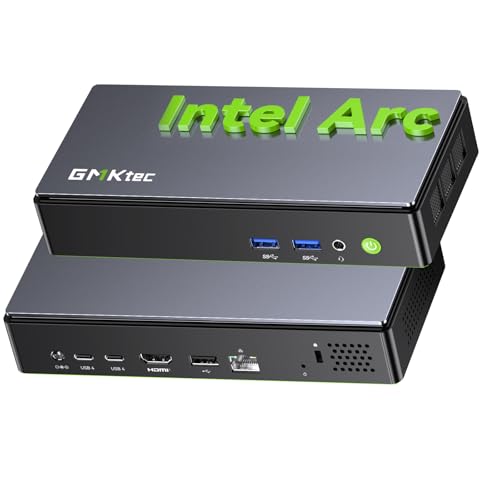
GMKtec K13 Mini PC Intel Ultra 7 256V LPDDR5

CyberpowerPC Gamer Xtreme VR Gaming PC
GMKtec K11 AMD Ryzen 9 8945HS 32GB DDR5 2TB SSD

GMKtec K8 Plus Gaming Mini PC AMD Ryzen 7 8845HS

Lenovo Legion Tower 5i RTX 5070 Ti Gaming PC

ASUS ROG G700 (2025) Gaming Desktop RTX 5070

GMKtec M8 Mini PC Ryzen 5 PRO 6650H 16GB
A Breakdown Of The Leading Choices
The GMKtec Gaming Mini PC sits in a category I pay close attention to: tiny boxes that don’t feel like a compromise. Built around the Ryzen 7 H 255 (an upgrade path from the older 8745HS), this little machine ships with eight cores and sixteen threads, with boost speeds up to 4.9 GHz. Pair that with the Radeon 780M integrated graphics and you’ve got a system that handles esports titles at high frame rates and many AAA games at sensible settings without breaking a sweat.
For anyone working with limited desk space, a dorm, or a clean minimal setup, the form factor alone is a reason to look twice. Compared to the CyberpowerPC tower coming up later, this is the opposite approach: no fans whirring loudly in the corner, no chunky chassis hogging floor space. It’s the kind of PC I’d recommend to a student or a parent setting up a shared family station.
Standout Benefits
- Octa-core Ryzen 7 H 255 with boost to 4.9 GHz for fast game loads and smooth multitasking while streaming or running chat apps on the side.
- 32GB of DDR5 means you can keep a browser full of tabs, Discord, and a game running without hitting memory pressure.
- The 1TB SSD leaves room for a sizeable game library, which matters more than people expect on modern installs.
- Radeon 780M iGPU delivers playable frame rates at 1080p in popular esports and lighter AAA titles.
- Mini-PC size makes it easy to mount behind a monitor or tuck into an entertainment center.
Things To Consider
- Integrated graphics cap how far you can push the latest AAA releases without dropping settings hard.
- Compact cases tend to run warmer under sustained load, so airflow around the unit matters more than with a tower.
Quick Facts
Who It Suits Best
Esports players, students, and remote workers who want a clean small-footprint setup and play mostly competitive or moderately demanding titles.
Consider Something Else When
Gamers chasing 1440p ultra settings on heavy AAA releases should look at the Lenovo Legion Tower 5i instead, since its RTX 5070 Ti handles those loads far more comfortably.
The K13 leans hard into the Intel Core Ultra 7 256V, a chip built on TSMC’s N3B process with a 47 TOPS NPU (neural processing unit, a dedicated AI engine that offloads AI workloads from the main CPU and GPU) alongside the integrated graphics. For most shoppers that translates to a system ready for the wave of AI-driven tools arriving in 2026, plus enough general throughput to feel snappy in everyday gaming and productivity. SK Hynix LPDDR5 at 8533 MT/s keeps memory bandwidth high enough that the integrated GPU isn’t starved.
Where the GMKtec Gaming Mini PC above focuses on compact esports play, this K13 leans toward creators and tinkerers. Think video editors who also want to game after hours, or anyone running local AI tools that benefit from a strong NPU. It feels like a forward-looking purchase rather than a stopgap, which I find refreshing in a category often dominated by older silicon.
The Upside
- 47 TOPS NPU handles on-device AI workloads like background removal and transcription without taxing the main CPU.
- LPDDR5 at 8533 MT/s feeds the integrated graphics generously, helping push playable frame rates in many modern titles.
- Intel Core Ultra 7 256V with boost up to 4.8 GHz keeps single-threaded game performance competitive with mid-range dedicated rigs.
- Compact chassis fits anywhere a small console would, freeing up desk space for monitors and accessories.
Worth Noting
- Integrated graphics still trail behind dedicated GPUs in raw AAA performance, which matters for the newest heavy hitters.
- LPDDR5 is soldered, so memory upgrades aren’t an option later on.
- Some users may find driver maturity for the Ultra platform varies while software catches up to the new chip.
Who Will Love This
Hybrid users splitting time between creative work, AI experimentation, and mid-range gaming appreciate the NPU headroom without giving up playable frame rates.
A Better Fit Elsewhere
Dedicated gamers who prioritize raw frame rates over AI acceleration will get more from the ASUS ROG G700, whose RTX 5070 GPU handles ray tracing and high refresh rates with less compromise.
The CyberpowerPC Gamer Xtreme VR is the kind of pre-built I’d hand to someone who wants a familiar mid-tower and not a learning curve. You get a 10th-gen Intel Core i5-10400F at 2.9 GHz, an Nvidia GeForce GTX 1660 Super with 6GB of VRAM (video memory dedicated to graphics), 8GB of DDR4, and a 500GB NVMe SSD. That’s an honest starter kit for 1080p gaming on a budget. WiFi is built in and Windows 10 Home ships preinstalled, which lowers the friction for first-time builders.
Compared to the GMKtec mini PCs in this list, this is the more traditional PC experience: a proper case with room to grow, swappable parts, and standard cooling. For shoppers new to gaming desktops, that’s a real comfort. You won’t find the absolute newest silicon here, but the platform still handles popular esports and lighter AAA games comfortably at 1080p.
Everyday Advantages
- GTX 1660 Super with 6GB VRAM gives consistent 1080p frame rates in esports and many single-player titles.
- Mid-tower design supports future upgrades like extra RAM or a more powerful GPU down the line.
- WiFi ready out of the box means one less accessory to buy or configure.
- NVMe boot drive keeps Windows snappy and game loads quick.
Honest Caveats
- 8GB of RAM is light for modern titles and may need a RAM upgrade to feel comfortable in heavier games.
- Older 10th-gen Intel platform lacks the efficiency and AI features of newer chips.
- 500GB fills up fast once modern game installs land, so storage planning is important from day one.
Right Fit For
First-time gaming PC owners on a tighter budget who want a turnkey tower that’s easy to upgrade later without paying for premium parts they don’t yet need.
Swap It Out When
Shoppers willing to spend a bit more for newer internals and stronger 1440p performance should consider the GMKtec K11, which pairs a current Ryzen 9 with 2TB of storage.
Of all the mini PCs in this roundup, the K11 is the one I’d call a true multitasker. The AMD Ryzen 9 8945HS brings eight cores and sixteen threads with boost speeds up to 5.4 GHz, while the 35W TDP (thermal design power, the heat output the cooling system needs to handle) can be pushed to 70W for heavier sustained loads. Pair that with 32GB of dual-channel DDR5 and a 2TB PCIe 4.0 SSD, and you have a small box that behaves like a workstation in most everyday tasks.
The honest read is that this thing excels when you push it. Streamers who run OBS, gameplay, and a chat window all at once will appreciate the headroom. For shoppers eyeing the GMKtec Gaming Mini PC earlier in this list, the K11 is what you graduate to when 1TB and a Ryzen 7 start feeling tight. Storage alone (2TB) is a serious upgrade for anyone juggling large modern game installs.
Benefits That Matter
- Ryzen 9 8945HS with 8 cores and boost to 5.4 GHz crushes single-threaded game logic and heavy compile tasks alike.
- 32GB of dual-channel DDR5 eliminates memory bottlenecks when streaming or rendering on the side.
- 2TB PCIe 4.0 SSD leaves room for sizable game libraries plus project files without an immediate storage upgrade.
- Configurable TDP up to 70W gives sustained performance when the workload asks for it.
A Few Limitations
- Higher TDP modes generate more heat, which in compact cases can mean fan noise under prolonged stress.
- Still uses integrated graphics, so the latest AAA titles at max settings remain a stretch.
Best Suited To
Power users who run multiple heavy applications alongside gaming, including streamers, content creators, and anyone who treats their PC like a productivity hub.
Look Elsewhere When
Gamers whose top priority is raw frame rates in AAA games will find the Lenovo Legion Tower 5i’s RTX 5070 Ti a more honest fit, since the GPU matters more than CPU cores for that use case.
The K8 Plus sits comfortably in the middle of the GMKtec mini-PC lineup. You get the Ryzen 7 8845HS with eight cores, sixteen threads, and a boost up to 5.1 GHz, along with a 16MB L3 cache (a pool of fast memory shared across all cores that speeds up frequently accessed data) for snappy game logic. Unlike the older 8745HS, this chip includes a dedicated NPU, which is a quiet win for AI-accelerated software showing up across creative apps. TDP ranges from 35 to 54W, balancing efficiency with extra headroom when needed.
Where the K11 above is the overbuilt option, the K8 Plus is the balanced daily driver. I find this category of mini PC particularly good for students and remote workers who game in the evenings without wanting a giant tower humming in the background. The 32GB of dual-channel DDR5 helps the integrated Radeon graphics stretch further than it would on smaller memory configs.
Notable Upsides
- Ryzen 7 8845HS with dedicated NPU adds AI capability without inflating the price like top-tier chips do.
- 32GB of dual-channel DDR5 maximizes bandwidth for the integrated GPU.
- Boost up to 5.1 GHz keeps single-threaded game performance competitive with mid-range laptops and desktops.
- TDP range of 35 to 54W gives flexibility between quiet operation and higher sustained loads.
Points To Keep In Mind
- 512GB SSD fills quickly for gamers with large modern libraries, so external storage or upgrades are likely.
- Integrated graphics still trail behind dedicated GPUs in the newest AAA releases.
Made For
Students, hybrid workers, and casual gamers who want a quiet capable mini PC that handles daily tasks, light content work, and most modern games at sensible settings.
Reach For A Different Pick When
Shoppers planning to install dozens of large modern games should consider the GMKtec K11, whose 2TB SSD saves the headache of juggling storage from day one.
The Lenovo Legion Tower 5i is the first true dedicated-GPU rig on this list, and that alone makes it the obvious answer for shoppers chasing strong 1440p frame rates. The Intel Core Ultra 7 265F pairs with an RTX 5070 Ti, which brings real-time ray tracing (a rendering technique that simulates how light bounces in real environments for more realistic shadows and reflections) and DLSS (Deep Learning Super Sampling, an AI-driven upscaling tech that renders games at lower resolution and sharpens them up to look near-native) into play. Toss in 32GB of memory and 1TB of storage, and you’ve got a tower that feels ready for current and upcoming AAA titles.
Legion Coldfront cooling is Lenovo’s marketing name for its airflow and fan curve setup, designed to keep things cool and quiet during long sessions. Compared to the GMKtec K11 above, this trades compact minimalism for raw graphical horsepower. For shoppers with a dedicated desk and a real monitor, that trade feels fair.
Strong Points
- RTX 5070 Ti delivers real-time ray tracing and DLSS for high-frame-rate 1440p gaming in modern AAA releases.
- Intel Core Ultra 7 265F keeps CPU bottlenecks out of the way for GPU-bound titles.
- 32GB memory handles gaming plus streaming, voice chat, and browser overhead without breaking a sweat.
- Coldfront cooling helps keep noise down even during extended play.
- Includes 3 months of PC Game Pass, a nice starter library for new owners.
Where It May Fall Short
- Full tower footprint demands more desk or floor space than mini-PC options.
- 1TB storage can feel tight for users keeping many modern AAA titles installed simultaneously.
Who Should Grab It
Gamers targeting high-refresh 1440p monitors who want real-time ray tracing in modern AAA games and don’t mind a proper mid-tower under the desk.
Not Your Match When
Shoppers committed to a small-footprint setup will get more satisfaction from the ASUS ROG G700’s similar internals in a chassis designed to be seen, or from a GMKtec mini PC if the desk is genuinely tight.
The ASUS ROG G700 leans into the visual side of PC gaming. A dual-glass panel chassis shows off the internals, with the iconic ROG Slash and Fearless Eye logo complemented by Aura Sync RGB lighting, ASUS’s ecosystem for syncing colors across compatible components. Underneath, the Intel Core Ultra 7 265F and RTX 5070 form a balanced 1440p platform with 1TB of NVMe PCIe 4 storage and 32GB of DDR5. Windows 11 Home ships installed, which keeps setup simple.
Where the Lenovo Legion Tower 5i above prioritizes raw cooling and quiet operation, the G700 is for the shopper who treats the PC as a piece of the room. That’s not a small thing. A tower that lives next to a display all day should probably look like it belongs there. For streamers with cameras catching the background, that glass-and-RGB treatment pays for itself.
Strengths Worth Knowing
- RTX 5070 with DLSS handles modern AAA games at high settings and competitive frame rates.
- 32GB DDR5 keeps multitasking and streaming workflows running smoothly.
- Dual-glass panel and Aura Sync RGB make this a display piece for streamers and showcase setups.
- 1TB NVMe PCIe 4 SSD gives fast load times across a healthy game library.
Smaller Caveats
- Glass panels and RGB add cost without raising raw performance over a similarly specced plain case.
- RTX 5070 is a step behind the Lenovo Tower 5i’s RTX 5070 Ti in pure GPU horsepower.
Perfect Match For
Streamers and showcase-build enthusiasts who care about the visual identity of their setup as much as the frame rates it produces.
Where Another Pick Suits Better
Gamers focused purely on 1440p performance without caring about chassis aesthetics will get more value per dollar from the Lenovo Legion Tower 5i’s RTX 5070 Ti configuration.
The M8 is the small form factor pick that punches into workstation territory. The AMD Ryzen 5 PRO 6650H brings six cores and twelve threads with a turbo speed up to 4.5 GHz, paired with the Radeon 660M integrated graphics sporting 12 cores. What makes this little box unusual is the port layout: OCuLink (a high-bandwidth external connector for adding a dedicated graphics enclosure), dual 2.5G LAN for fast networking, USB-C 4.0, HDMI 2.1, and DisplayPort 2.1, all on a metal-cased chassis.
Compared to the GMKtec K8 Plus earlier in the list, the M8 trades raw CPU power for display and connectivity flexibility, including support for triple 8K output. For productivity users running multi-monitor setups who also want light gaming in the evening, that’s a meaningful trade. I’ve seen this kind of setup thrive in trading desks and content studios where every cable matters.
Advantages To Know
- Triple 8K display support via HDMI 2.1 and DisplayPort 2.1 suits serious multi-monitor productivity.
- OCuLink port opens the door to an external GPU enclosure for users who want to upgrade later.
- Dual 2.5G LAN ports help with fast networking, NAS (network-attached storage) access, or segmented traffic.
- Metal chassis aids heat dissipation and feels sturdier than typical plastic mini-PC enclosures.
- 16GB LPDDR5 at 6400 MT/s keeps the integrated GPU well-fed.
Less Ideal Details
- 16GB RAM is soldered and can’t be upgraded, which limits long-term headroom for heavier workloads.
- Radeon 660M trails newer integrated GPUs in modern AAA performance.
Feature Snapshot
Whose Shelf It Belongs On
Productivity-first users with multi-monitor setups who also want casual gaming and a path to expand graphics performance later via an OCuLink enclosure.
Skip It When
Gamers focused primarily on frame rates should look at the GMKtec K11 or Lenovo Legion Tower 5i, which offer stronger CPU or GPU muscle in the same price bracket.
Factors To Consider When Choosing Gaming Desktops For 1000
Match the GPU to Your Monitor First
The single biggest decision at this budget is whether to lean on integrated graphics or commit to a dedicated GPU. A mini PC with a strong Ryzen or Core Ultra chip handles 1080p esports and many AAA games at modest settings, which works perfectly for 1080p high-refresh monitors. A dedicated RTX 5070 or RTX 5070 Ti is what unlocks 1440p high-refresh play with ray tracing, but it pushes you toward a full tower. Picking the monitor first, then matching the GPU, prevents the common mistake of overspending on a CPU you don’t fully use.
Storage Often Sneaks Up on Shoppers
Modern game installs regularly land between 50GB and 150GB each, which means a 500GB or 1TB drive fills faster than people expect. Pick a system with at least 1TB if you keep more than a few recent titles installed. The K11’s 2TB is the kind of capacity that lets you stop juggling and just play.
Memory Bandwidth Matters for Mini PCs
Mini PCs lean on integrated graphics, and integrated graphics live and die by memory bandwidth. Dual-channel DDR5 at 5600 MT/s or higher, or LPDDR5 at 6400 MT/s and up, materially changes frame rates. Single-channel configs bottleneck the GPU in ways the CPU spec sheet alone won’t reveal.
Key Considerations Across These Picks
Pitfalls Shoppers Hit
The most common mistake is chasing the highest CPU clock speed while ignoring the GPU. In gaming, frame rates usually track the GPU more than the CPU, so a balanced build beats a top-end processor paired with weak graphics. Another trap is treating integrated graphics specs like they equal dedicated GPU performance. They don’t. An RTX 5070 will outpace any current integrated solution in raw frame rates, even if the integrated chip looks impressive on paper.
Where The Extra Money Goes
Spending up in this category usually buys one of three things: a stronger GPU for higher frame rates and ray tracing, larger or faster storage to fit a growing library, or better thermals that keep the system quiet under sustained load. The Lenovo Legion Tower 5i and ASUS ROG G700 spend up on GPU and chassis, while the GMKtec K11 spends up on CPU and storage. Choosing which of those upgrades matters most to you keeps the budget honest.
Frequently Asked Questions
Is 1000 Enough for a Real Gaming PC in 2026?
Yes, but it requires trade-offs. Around this budget, you can choose a compact mini PC with strong integrated graphics for 1080p, or a full tower with a dedicated GPU like the RTX 5070 Ti for 1440p. Decide based on whether you value desk space or raw frame rates more.
Mini PC or Mid-Tower for Gaming?
Mini PCs win on space, noise footprint, and portability. Mid-towers win on GPU options, cooling headroom, and future upgrade paths. Both approaches are valid, depending on whether your setup is a clean minimal desk or a dedicated gaming corner.
How Much Storage Do I Need?
For most gamers keeping a working library of 5 to 10 modern titles, 1TB is the practical minimum. 2TB, like on the GMKtec K11, removes the need to constantly uninstall and reinstall games to make room.
Do I Need DDR5 Memory?
For modern platforms, yes. DDR5 provides the bandwidth that current Ryzen, Core Ultra, and RTX-class systems are designed around. DDR4 systems still work, but they cap future upgrade flexibility because newer CPUs are DDR5-only.
Can These Systems Handle Streaming?
The systems with 32GB of RAM and modern multi-core CPUs handle streaming comfortably alongside gaming. The CyberpowerPC Gamer Xtreme with 8GB of RAM is the one that would feel tight if streaming were a daily habit.
Closing Remarks
The right pick depends less on raw numbers and more on how your desk is set up and which games you actually play. For tight spaces and esports-heavy libraries, the GMKtec mini PCs earn their place. For shoppers who want ray tracing at 1440p, the Lenovo Legion Tower 5i and ASUS ROG G700 are the honest answers. The CyberpowerPC Gamer Xtreme is the practical choice when the budget is the priority. Pick the build that matches the games and the room, and the rest tends to fall into place.