Sims 4 looks deceptively simple, but anyone who’s packed a neighborhood with mods or the latest expansion packs knows how quickly a modest system starts to buckle. Add heavy custom content and a few hours of live play, and suddenly load times stretch out and frame pacing gets choppy. A desktop with the right CPU, graphics, and memory headroom makes that grind disappear, so the game just plays. That’s exactly the gap these picks aim to fill.
A Quick View Of The Lineup

SKYESEV Gaming Desktop Ryzen 5 5600 RTX 3050
HP Pavilion Gaming Desktop TG01-0040
suevery Pre-Built Gaming PC RTX 3050 Ryzen 5
WIWB Gaming PC Ryzen 5 4500 RX 6500 XT

STGAubron Gaming PC Xeon E5 RX 550
A Closer Look At Each Pick
Sims 4 thrives when both the CPU and GPU keep up, and the SKYESEV Gaming Desktop pairs an AMD Ryzen 5 5600 with a GeForce RTX 3050 carrying 6GB of GDDR6 memory. That combination matters because the CPU handles simulation logic while the GPU renders lots, lighting, and any custom content overlays in real time. With six cores and twelve threads running up to 4.4GHz, multitasking between the game, a browser full of wikis, and Discord stays responsive during long play sessions.
The build also includes 32GB of DDR4 RAM, which clears the way for heavy mod folders and large households without constant disk caching. A 1TB M.2 NVMe SSD keeps load screens short and gives plenty of room for expansions, gallery saves, and recorded clips. WiFi is built in, so placement near a router isn’t required, and the ARGB fan hints at a case designed for decent airflow. For someone running a packed neighborhood on the latest expansion packs, this is the well-rounded option.
The Value In It
- Ryzen 5 5600 delivers strong single-core performance, which Sims 4 leans on for smooth simulation ticks.
- 32GB of DDR4 leaves generous headroom for mod-heavy saves and parallel apps like browsers and chat.
- 1TB NVMe storage cuts neighborhood load times and stores years of gallery downloads.
- RTX 3050 with 6GB handles the base game plus expansions and modest custom content without strain.
- Built-in WiFi and ARGB cooling suggest a tidy, well-ventilated case that stays quiet under load.
Worth Noting
- The RTX 3050 is a 1080p-focused card, so 1440p or 4K Sims play will start to push it.
- Brand of the GPU may vary, which matters to shoppers who care about specific board partners.
- ARGB lighting requires software setup, and owners commonly report a small learning curve on first boot.
Key Specs
Who Will Love This
Modders and expansion-pack enthusiasts who run heavy households and want quiet, fast gameplay without tinkering.
A Better Fit Elsewhere
Shoppers on a tighter budget should consider the STGAubron Gaming PC, which keeps entry-level Sims play affordable.
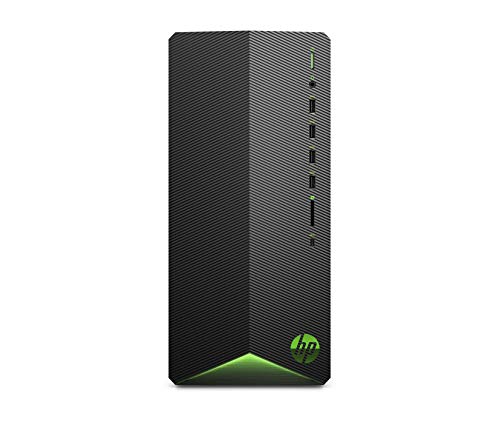
The HP Pavilion Gaming Desktop TG01-0040 leans into a smaller tower footprint that fits cleanly under a desk or beside a monitor arm. Inside, an AMD Ryzen 5 3500 with six cores and twelve threads powers the simulation side of Sims 4, while an AMD Radeon RX 5500 with 4GB of VRAM renders the visuals. For a student apartment or a shared family PC station, the compact shell makes ownership easier.
What sets it apart is HP’s reputation for accessible service and a chassis that stays cool under extended sessions. 8GB of RAM and a 512GB SSD are modest by today’s standards, but they cover a clean base-game install plus a handful of expansions. For someone stepping into PC gaming without the bulk of a full tower, this is a low-fuss place to start.
Everyday Wins
- Compact tower fits tighter desks and shared rooms without dominating floor space.
- Ryzen 5 3500 handles base-game Sims 4 households at stable frame rates.
- RX 5500 graphics card pushes clean 1080p visuals for the core game.
- HP’s service network makes repairs and warranty claims straightforward.
Points To Note
- 8GB of RAM can bottleneck larger mod lists, so expansion-heavy players may need an upgrade.
- RX 5500 trails newer cards when heavy custom content is layered in.
- 512GB SSD fills quickly once several expansion packs and saves are installed.
Right Fit For
Students and apartment dwellers who want a small, recognizable-brand tower for casual Sims play.
Consider Something Else When
Heavier modders should pick the SKYESEV Gaming Desktop for its 32GB RAM and newer RTX 3050 graphics.
The suevery Pre-Built Gaming PC packs an AMD Ryzen 5 with six cores, six threads, and a 32MB Level 3 cache into a ready-to-run tower. Combined with a GeForce RTX 3050 carrying 6GB of memory, the system aims straight at mainstream 1080p play. The 32MB cache is a quiet but meaningful detail because Sims 4 constantly references household data, and that buffer helps the CPU stay responsive during packed neighborhoods.
Clock speeds of 3.6GHz base and 4.1GHz boost keep the simulation logic humming, while the GPU handles lighting and lot details smoothly. For shoppers who split time between Sims, video editing, and graphic design work, this build offers the hardware acceleration those tasks benefit from. Out of the box, it leans toward expansion-pack players who want flexibility without picking parts.
Real-World Strengths
- 32MB Level 3 cache keeps simulation logic snappy during complex households.
- RTX 3050 graphics handle expansions and modest custom content at 1080p.
- Six-core Ryzen 5 balances gaming with creative apps like video editing and design tools.
- Pre-built form factor skips the assembly learning curve entirely.
Trade Offs
- Six-thread CPU trails twelve-thread rivals on heavy parallel workloads.
- No WiFi listed, so placement may depend on Ethernet access unless an adapter is added.
- Cooling solution may run warmer under continuous sessions, which owners commonly note.
Key Specs
Made For
Expansion-pack Sims players who also tinker with creative software and want a balanced, ready-to-go rig.
Look Elsewhere When
Mod-heavy users chasing maximum memory headroom should step up to the SKYESEV Gaming Desktop with 32GB of RAM.
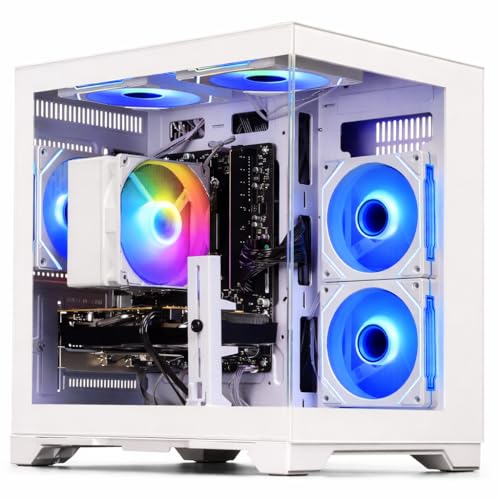
The WIWB Gaming PC anchors itself around a Radeon RX 6500 XT with 4GB of VRAM, paired with an AMD Ryzen 5 4500 running six cores and twelve threads. The RX 6500 XT is a newer-generation card tuned for smooth 1080p output, which matters when Sims 4 lots get visually busy with packs like Seasons or Cottage Living. Frame pacing tends to stay steady even when lighting effects multiply on screen.
For couch PC setups connected to a living-room display or a 60Hz monitor, the visual delivery feels consistent. The Ryzen 5 4500 handles the simulation thread with enough overhead to keep multitasking between the game and a browser running. Where this build shines is accessibility: it gives modern graphics architecture to shoppers who want dependable 1080p without overspending on higher tiers.
Benefits That Matter
- RX 6500 XT delivers modern 1080p graphics that stay smooth during visually busy lots.
- Twelve-thread Ryzen 5 4500 keeps simulation logic responsive across multitasking.
- Newer architecture translates to longer driver support and quieter operation.
- Fit-for-purpose build for Sims players who don’t chase top-tier frame rates.
Room For Improvement
- 4GB VRAM can feel tight once heavy custom hair or skin overlays are loaded.
- Storage capacity and RAM aren’t detailed in the source listing, so verification before purchasing matters.
- RX 6500 XT is a 1080p card, so pushing higher resolutions isn’t realistic.
Feature Snapshot
Best Suited To
Living-room and casual Sims players who want modern graphics architecture without overshooting their budget.
Skip It When
Mod collectors and expansion-pack completists should pick the suevery Pre-Built Gaming PC for its larger CPU cache and more mature RTX 3050.
The STGAubron Gaming PC takes a pragmatic route with an Intel Xeon E5 processor paired with an AMD Radeon RX 550 carrying 4GB of memory. It’s framed as a multipurpose starter that covers gaming, study work, photo editing, streaming, and day trading on top of Sims 4. For a first-time PC shopper or a family setup where the same tower handles homework and gaming, that flexibility is genuinely useful.
With 16GB of RAM and a 512GB SSD, the system has enough breathing room for clean base-game installs plus a few expansion packs. The Xeon E5 is a server-derived chip, which means single-core speed isn’t its strong suit, but multi-threaded tasks get reasonable handling. For entry-level Sims play without heavy mods, this is a sensible, low-cost starting point.
Useful Highlights
- 16GB of RAM gives headroom for entry-level Sims 4 plus light multitasking.
- 512GB SSD keeps load times reasonable and stores a handful of expansions.
- RX 550 graphics deliver stable 1080p output for the base game.
- Versatile build covers study, creative apps, and casual gaming on one tower.
Less-Strong Areas
- RX 550 trails newer cards once heavy custom content or many expansions are loaded.
- Xeon E5’s single-core performance lags behind modern Ryzen chips for simulation logic.
- Owners commonly note the stock cooling can run warmer during extended sessions.
The Right Fit
First-time Sims players, students, and home offices who want a flexible starter PC without overspending.
Reach For A Different Pick When
Anyone planning a long Sims 4 journey with packs and mods should consider the HP Pavilion Gaming Desktop for its newer Ryzen chip and HP service network.
Picking The Right Specs For Sims 4
Sims 4 rewards balanced hardware more than raw power. A modern six-core processor keeps the simulation logic responsive, while a graphics card with at least 4GB of VRAM renders lots smoothly at 1080p. Pairing those with 16GB of RAM covers most players, though heavy modders benefit from 32GB.
Storage matters more than people expect. An NVMe SSD (a fast solid-state drive that connects directly to the motherboard for quicker data transfer) cuts neighborhood load times dramatically, and 512GB is a practical floor once expansion packs enter the mix. Shoppers planning gallery downloads or recorded clips should aim for 1TB to avoid constant file management.
For graphics, an RX 5500 or RTX 3050 handles the base game and expansions comfortably. Heavier custom content pushes those cards, but Sims 4 isn’t a punishing title, so mid-range hardware often delivers the experience most players actually want.
Important Considerations Before You Commit
A pre-built tower skips the assembly stage entirely, which is a real perk for shoppers who don’t want to source parts or troubleshoot drivers. The trade-off is upgrade flexibility, since some pre-builts use proprietary components (parts made specifically for one manufacturer that don’t follow standard sizing). Checking the case size, power supply wattage, and motherboard layout before planning future upgrades saves headaches later.
Common Buying Mistakes To Avoid
Chasing the highest specs on paper often overshoots actual Sims 4 needs. The game leans on balanced hardware, so pairing a strong CPU with a weak GPU (or vice versa) wastes budget. Equally, ignoring RAM capacity leaves mod folders crawling, since 8GB fills up quickly once Sims 4 plus a few packs are running.
Storage gets overlooked too. A 256GB drive fills up fast, and Sims 4’s expansion packs, saves, and gallery content add up over time. Aim for at least 512GB, ideally 1TB, to avoid constant cleanup.
Why Higher-Tier Builds Cost More
Stepping up to a tower with 32GB of RAM and an RTX-class graphics card usually means faster simulation logic, smoother visuals under heavy mods, and longer usable lifespan before another upgrade. The extra cost covers newer CPU architectures, better cooling systems, and storage that won’t bottleneck load times. For players planning to keep their setup running several years, those gains tend to justify the spend. Casual base-game players, on the other hand, can comfortably stay at the entry tier and still enjoy a smooth experience.
Frequently Asked Questions
Does Sims 4 need a dedicated graphics card?
Yes, a discrete GPU like the RTX 3050 or RX 5500 makes a noticeable difference in render speed and visual smoothness, especially when expansion packs add lighting and environmental effects.
How much RAM is enough for Sims 4 with mods?
16GB covers light modding, but 32GB is the comfortable target once custom content folders grow large or several expansions run together.
Is an SSD really necessary for Sims 4?
An SSD, particularly an NVMe drive, dramatically shortens neighborhood load times. A spinning hard drive works, but waits stretch into minutes for big saves.
Can these desktops handle other games too?
Yes, every pick on this list covers mainstream 1080p gaming beyond Sims 4, including lighter competitive titles and creative software workloads.
Do pre-built desktops come with Windows pre-installed?
Most do, though it’s worth confirming before purchasing, since some listings ship without an operating system and require a separate install.
Final Verdict
The right desktop for Sims 4 comes down to how deep you plan to go with mods and expansions. Shoppers chasing a balanced, future-friendly build will appreciate the SKYESEV Gaming Desktop, while budget-focused players will find the STGAubron Gaming PC a sensible starting point. Either way, prioritizing a six-core CPU, at least 16GB of RAM, and an SSD sets the foundation for years of smooth play.