Shopping for a prebuilt gaming rig has gotten complicated fast. CPU generations overlap, GPU names blur together, and every spec sheet reads like a different language. This roundup walks through five gaming desktops built for distinct players, from tight-budget 1080p setups to serious 1440p and 4K builds. Whether you care most about frame rates, quiet thermals, or just getting something that boots up and runs, there’s a configuration on this list worth a closer look.
The Shortlist At A Glance

STORMCRAFT Sirius Gaming Desktop Intel i5 14400F Arc B570

Ultra 50 V3 Gaming PC RTX 5080 Ryzen 7 9800X3D

HP OmniDesk Desktop Ryzen 5 Radeon 740M 64GB
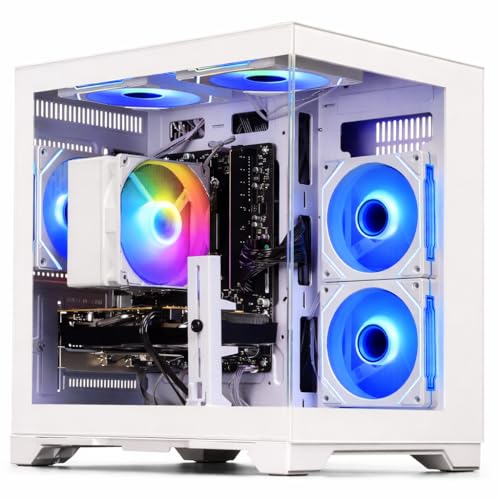
WIWB Gaming PC Ryzen 5 4500 RX 6500XT 4GB

WIWB Gaming PC Ryzen 7 4700LE RX 6500XT 4GB
The Picks, Examined More Closely
The STORMCRAFT Sirius sits in that comfortable middle ground where most PC gamers actually land: solid 1440p performance without the high-end tax. An Intel Core i5 14400F, which is a 10-core, 16-thread CPU, handles modern titles with help from the Arc B570 graphics card packing 10GB of GDDR6 video memory. That’s a generous VRAM buffer (video RAM, the dedicated memory your graphics card uses for textures and frame data) for an entry-tier GPU, and it pays off when you push higher resolutions.
The build also brings 16GB of DDR4 RGB memory and a 1TB NVMe SSD (a fast solid-state drive connected over the NVMe interface, much quicker than older SATA drives) for short boot and load times. For someone setting up a first serious rig, this lands as a thoughtful starting point with room to grow.
Where It Excels
- 1440p-ready graphics with 10GB GDDR6 buffer for higher texture settings.
- 10-core, 16-thread CPU handles streaming and background tabs without choking.
- 1TB NVMe SSD keeps install queues manageable and load times snappy.
- RGB memory adds visible flair for showcase builds.
- VR-ready configuration out of the box for headset owners.
Things To Consider
- Arc B570 drivers have historically lagged on day-one game support, so new releases may need patching.
- DDR4 instead of DDR5 means slower memory bandwidth than the Ultra 50 V3 below.
Who Will Love This
Mid-range gamers stepping up from console gaming or older hardware who want smooth 1440p performance.
A Better Fit Elsewhere
Hardcore enthusiasts chasing 4K ultra settings should reach for the Ultra 50 V3 instead.
The Ultra 50 V3 is the kind of build that resets expectations. At its core sits the AMD Ryzen 7 9800X3D, a processor famous for its stacked 3D V-Cache (an extra layer of CPU cache that dramatically speeds up game data access) and gaming-tuned performance, paired with the RTX 5080 graphics card carrying 16GB of GDDR7 memory. Together, they push high frame rates at 1440p and stay composed at 4K on demanding titles.
Supporting cast matters here too: 32GB of DDR5 at 6000MHz, a 2TB Gen4 SSD, an 850W Gold-rated PSU (a power supply unit certified for higher efficiency, wasting less energy as heat), and ARGB case fans for a clean showcase look. Compared to the STORMCRAFT Sirius reviewed above, this is a different class entirely, more headroom for streaming, mod-heavy games, and future titles.
Real-World Strengths
- Ryzen 7 9800X3D delivers class-leading gaming frame rates.
- 32GB DDR5-6000 supports heavy multitasking and content creation.
- 2TB Gen4 SSD accommodates massive modern game libraries.
- 850W Gold PSU leaves upgrade room for future GPU swaps.
Trade Offs
- Premium component stack pushes this into enthusiast territory, so the investment is meaningful.
- High-performance parts generate more heat, meaning case airflow deserves attention during setup.
- ARGB fans add visual flair but require software control for customization.
Key Product Details
Right Fit For
Enthusiasts and streamers running 4K monitors or high-refresh 1440p panels who want years of headroom.
Look Elsewhere When
Budget-focused shoppers playing mostly esports titles should consider the WIWB Ryzen 5 4500 build instead.
The HP OmniDesk reads as a productivity machine first, gaming rig second, and that balance is its quiet advantage. An AMD Ryzen 5 processor with 8 cores drives multitasking across spreadsheets, browsers, and creative apps, while integrated Radeon 740M graphics handle light gaming and display output across up to four monitors.
The real headline is 64GB of DDR5 memory and a combined 3TB of storage, made up of a 2TB SSD and a 1TB HDD. That’s a workstation-tier memory configuration in a tower aimed at the home office. Compared to the STORMCRAFT Sirius and Ultra 50 V3, this build swaps dedicated GPU power for RAM and storage capacity, and that trade makes sense for the right kind of user.
Noteworthy Benefits
- 64GB DDR5 supports heavy browser tabs, VMs, and creative workflows.
- Quad-monitor support suits trading desks, coding setups, and stock monitoring.
- Wi-Fi 6 and Bluetooth 5.4 mean clean wireless connectivity out of the box.
- Included wireless keyboard and mouse reduce setup friction.
Worth Bearing In Mind
- Radeon 740M is integrated graphics, so demanding 3D titles will struggle compared to the WIWB builds below.
- 1TB HDD adds bulk storage but is slower than the SSD, so keep games on the 2TB drive.
Best Suited To
Remote workers, students, and hybrid users who game casually and value massive multitasking headroom.
Swap It Out When
Dedicated gamers focused on frame rates should grab the STORMCRAFT Sirius for proper GPU power.
Not every gaming desktop needs flagship silicon, and the WIWB Ryzen 5 4500 build leans into that reality. The AMD Ryzen 5 4500 is a 6-core, 12-thread CPU that handles esports and indie titles without complaint, paired with the Radeon RX 6500 XT graphics card carrying 4GB of GDDR6 memory aimed squarely at 1080p gaming.
For someone stepping into PC gaming for the first time, or anyone running a 1080p monitor on a tighter budget, this delivers the playable frame rates that matter most in games like Valorant, Fortnite, and Apex Legends. It’s a different profile than the STORMCRAFT Sirius reviewed earlier, trading resolution headroom for a friendlier entry point.
Advantages To Know
- 1080p-optimized GPU delivers high frame rates in popular esports titles.
- 6-core, 12-thread CPU handles everyday multitasking beyond gaming.
- Entry-level pricing keeps the barrier to PC gaming low.
Some Limits To Know
- 4GB VRAM limits texture quality at higher resolutions.
- Not built for 1440p or 4K, so monitor choice matters.
- Less headroom for future demanding titles, which may shorten relevance.
Made For
First-time PC gamers and casual players running a 1080p monitor who want dependable frame rates.
Reach For A Different Pick When
Players planning to upgrade to a 1440p display soon should consider the STORMCRAFT Sirius for more graphics memory.
The second WIWB build on this list is a thoughtful step up from its Ryzen 5 sibling, swapping the 6-core chip for an 8-core Ryzen 7 4700LE processor. That extra core count (8 cores, 16 threads) makes a real difference when streaming, recording, or running a Discord call alongside gameplay. The Radeon RX 6500 XT graphics card stays the same, keeping the 1080p focus intact.
Where the WIWB Ryzen 5 4500 build above prioritizes raw entry-level affordability, this configuration leans into smoother multitasking for the same resolution target. For a college dorm or shared apartment setup, it’s a sensible middle ground between casual and competitive gaming.
Positive Takeaways
- 8-core, 16-thread CPU handles streaming and background apps comfortably.
- Boost speeds up to 4.2GHz keep games responsive.
- Same dependable RX 6500 XT for 1080p esports frame rates.
Factors To Consider
- Still limited to 1080p by the 4GB GPU buffer.
- The “LE” suffix denotes a slightly lower-tier variant within the Ryzen 7 family, so expectations should match accordingly.
- Smaller chassis options from this brand may limit future expansion, depending on the case shipped.
The Right Fit
Esports and indie gamers who stream or multitask heavily and want extra CPU cores without overspending.
Where A Sibling Pick Shines
Shoppers who prefer a more established name and integrated productivity should check the HP OmniDesk instead.
What Matters Most Before Choosing Gaming Desktops
GPU First, CPU Second The graphics card drives frame rates more than any other component in a gaming build. Match the GPU tier to your monitor resolution: 1080p panels pair well with entry GPUs like the RX 6500 XT, while 1440p and 4K displays demand RTX 5080-class hardware. A strong CPU with a weak GPU creates a frustrating bottleneck in reverse, leaving processing power untapped.
Memory and Storage Configuration Modern games regularly exceed 60GB each, so 1TB fills faster than people expect. A 2TB drive, whether SSD or paired with an HDD like the HP OmniDesk offers, keeps your library manageable without constant uninstalls. RAM matters too: 16GB handles current titles, but 32GB buys breathing room for streaming and mods.
Resolution and Refresh Rate Pairing A 240Hz monitor paired with a budget GPU wastes its potential, while a 60Hz panel paired with an RTX 5080 leaves performance on the table. Match your display to your GPU target, and the experience improves immediately.
Build Quality and Cooling Prebuilt desktops vary widely in airflow and component sourcing. Higher-tier builds like the Ultra 50 V3 tend to use branded PSUs and case fans, which supports long-term reliability. Entry builds may run warmer under sustained load, so consider ambient room temperature during summer months.
Key Considerations Across These Picks
Where Shoppers Go Wrong
A common trap is chasing CPU core count without checking GPU capability. An 8-core Ryzen 7 paired with a 4GB RX 6500 XT still struggles at 1440p, no matter how strong the processor is. Match the bottleneck to your actual use case, whether that’s 1080p esports or 4K single-player. Another mistake is ignoring the PSU tier, since undersized power supplies cause instability when GPUs spike under load.
Where The Extra Money Goes
Stepping from a Budget Friendly build to the Premium Pick tier buys meaningful jumps in graphics memory (16GB GDDR7 versus 4GB GDDR6), newer DDR5 RAM, and higher-efficiency power supplies. For someone gaming on a 1080p monitor today, the upgrade may feel excessive. For anyone planning a 1440p or 4K monitor within the next year or two, the headroom pays off quickly in longevity.
Frequently Asked Questions
How much RAM do I actually need for gaming in 2026? 16GB handles most current titles comfortably, though 32GB offers smoother multitasking when streaming or running background apps. Entry builds at 16GB remain playable for years to come.
Is an integrated graphics option like the HP OmniDesk’s Radeon 740M enough for casual gaming? It handles esports titles at lower settings and older games at 1080p. For modern AAA releases, a dedicated GPU makes a substantial difference.
Do prebuilt gaming desktops come with Windows preinstalled? Most configurations on this list ship with Windows 11 ready to go. Check the listing specifics to confirm before purchase, since a few budget builders ship without an OS.
Can I upgrade these builds later? Generally yes for RAM, storage, and sometimes GPU. CPU upgrades depend on the motherboard socket and chipset, which are rarely listed upfront. Higher-end builds like the Ultra 50 V3 leave more PSU and case room for future swaps.
What’s the difference between GDDR6 and GDDR7 memory? Both are types of dedicated video memory on the graphics card, but GDDR7 is newer and faster, moving data to and from the GPU at higher bandwidth. That extra speed helps at higher resolutions and with ray tracing.
Wrap Up
Each of these gaming desktops serves a different kind of player, from the WIWB Ryzen 5 4500 build for 1080p newcomers to the Ultra 50 V3 for 4K enthusiasts. The honest read is that the “right” pick depends less on raw specs and more on your monitor, your games, and how long you want the build to last. Match the configuration to your actual habits, and the rest tends to fall into place.