A solid RTX 3050 laptop used to mean heavy, loud, and short on battery. That’s changed a lot. The current crop handles today’s popular titles, runs cool enough for a dorm desk, and slips into a backpack without screaming for attention. I pulled together four picks that balance screen quality, thermals, and real-world stamina, so you can skip the spec rabbit hole and find a rig that fits your routine.
The Shortlist At A Glance

MSI Thin A15 Gaming Laptop 15.6″ FHD 144Hz RTX 3050

MSI Katana 15 HX Gaming Laptop QHD 165Hz RTX 5060
HP Victus 15.6″ FHD 144Hz Gaming Laptop RTX 3050 1TB
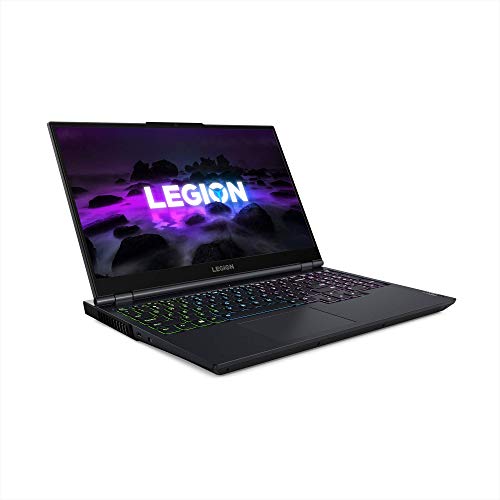
Lenovo Legion 5 Gaming Laptop RTX 3050Ti Phantom Blue
The Picks, Examined More Closely
Carrying a gaming laptop to class or the office used to feel like hauling a brick. The MSI Thin A15 trims that fat, slipping into a backpack without much complaint. The Ryzen 5-7535HS keeps everyday apps responsive, and pairing it with 16GB of DDR5 means multitasking stays smooth when Discord, Chrome, and a game are all open at once.
The RTX 3050 handles popular esports and mid-tier AAA titles at sensible settings, which suits anyone gaming on breaks rather than chasing benchmark records. You may notice the chassis gets warm during marathon sessions, so a flat desk helps the Cooler Boost fans do their job. Compared to the heavier picks later in this list, this one trades raw power for genuine portability.
Points In Its Favor
- 144Hz refresh keeps motion crisp in shooters and racing games where every frame counts.
- DDR5 memory and a 512GB SSD mean fast boot times and room for a solid starter library.
- Thin-and-light chassis travels comfortably between home, campus, and a friend’s couch.
- Cooler Boost thermals help the CPU and GPU stay steady during long play sessions.
Trade Offs
- Storage fills up quickly if a Steam backlog is your main hobby, so external drives or cloud saves help.
- Fan noise ramps up under load, which is noticeable in quiet rooms or late-night streams.
Who It Suits Best
Students and commuters who want a backpack-friendly RTX 3050 laptop that handles classes and evening gaming without drama.
A Better Fit Elsewhere
Hardcore players chasing QHD resolution should look at the MSI Katana 15 HX Gaming Laptop for a sharper screen and stronger GPU headroom.
This is the laptop for anyone who’s tired of squinting at a 1080p screen and wondering what they’re missing. The MSI Katana 15 HX steps things up with a QHD (1440p) panel at 165Hz, which means noticeably sharper detail and smoother motion than the standard FHD options earlier on this list. The Intel Core i7-14650HX is a powerhouse for both gaming and creator workloads.
The RTX 5060 GPU brings ray tracing and DLSS 4 into play, helping newer titles run at higher settings without melting the chassis. You may find the keyboard’s 4-zone RGB a fun touch for late-night sessions, and the highlighted WASD keys help when reaction time matters. The trade-off is weight; this is more “occasional travel” than “daily commute” territory compared to the MSI Thin A15.
Advantages To Know
- 100% DCI-P3 wide color gamut makes games and edited video look accurate and rich.
- 1TB NVMe SSD holds a sizable library without an immediate upgrade.
- Cooler Boost 5 with shared-pipe design keeps thermals stable during heavy CPU plus GPU loads.
- Wi-Fi 6E support future-proofs your home network connection for years to come.
Honest Caveats
- Higher resolution demands more from the GPU, so battery life drops fast during unplugged play.
- The chassis runs heavier than the Thin A15, so a dedicated laptop bag is wise.
Key Product Details
Made For
Competitive players and aspiring streamers who want sharper visuals and future-ready GPU performance in one package.
Swap It Out When
Shoppers focused on lighter builds and longer unplugged sessions will find the MSI Thin A15 Gaming Laptop a friendlier daily carry.
Running out of storage mid-download is a special kind of frustration. The HP Victus sidesteps that headache with a full 1TB PCIe SSD, giving plenty of room for a hefty Steam, Epic, or Xbox library without juggling folders from day one. The Intel Core i5-12450H handles esports and popular AAA titles well when paired with the RTX 3050.
That said, this Victus ships with Windows 11 Pro, which adds business-friendly features for anyone juggling work and play on the same machine. The 144Hz display keeps fast action readable, and the backlit keyboard helps in dim rooms. It’s a heavier build than the MSI Thin A15, so plan on a sturdy backpack rather than a messenger bag.
What Earns Its Place
- 1TB SSD means fewer immediate upgrades and faster load times than smaller drives.
- Wi-Fi 6 keeps wireless latency low for online matches and downloads.
- 16GB of RAM supports modern multitasking, from voice chat to browser tabs.
- Windows 11 Pro adds useful management features for hybrid work setups.
Points To Note
- Color accuracy is more functional than vivid, so creative work may need an external monitor.
- The chassis is bulkier than ultrabook-style gaming picks on this list, depending on your bag size.
Perfect Match For
Game hoarders and hybrid workers who need storage headroom and Pro features without stepping into a workstation-class price bracket.
Not Your Match When
Players who want a sharper screen and next-gen GPU features should consider the MSI Katana 15 HX Gaming Laptop instead.
Few gaming laptops nail the keyboard as well as the Lenovo Legion line. The Legion 5 pairs the AMD Ryzen 7 5800H, a true 8-core workhorse, with the RTX 3050Ti for solid 1080p gaming and plenty of muscle for video calls, streaming, and creative work. The TrueStrike keyboard with 4-zone RGB backlight feels responsive, and the key travel is comfortable for long sessions.
The 15.6″ FHD IPS display keeps colors accurate for general use, and Nahimic Audio adds depth to the built-in 2W speakers. You may find the Phantom Blue chassis a refreshing change from typical black or gray gaming laptops. The RTX 3050Ti edges past the standard 3050 in supported titles, making this a smart pick when you want extra headroom without overspending.
What Pays Off
- 8-core Ryzen 7 processor handles multithreaded workloads like video encoding smoothly.
- RTX 3050Ti delivers a modest step up over the base 3050 in supported games.
- TrueStrike keyboard with 4-zone RGB is well-suited to long typing and gaming stints.
- Nahimic Audio tuning gives built-in speakers more presence than generic laptop output.
Things To Weigh
- 512GB storage fills up faster than the HP Victus’s 1TB, depending on your library size.
- It’s an older generation platform, so newer Wi-Fi and connectivity standards may lag behind newer picks.
Best Suited To
Gamers who type as much as they play and want a balanced CPU-plus-GPU setup with a comfortable keyboard for daily use.
Consider Something Else When
Shoppers who need a bigger SSD out of the box should look at the HP Victus 15.6″ FHD 144Hz Gaming Laptop for double the storage headroom.
What Really Matters In An RTX 3050 Laptop
The GPU grabs headlines, but the screen and thermals decide whether gaming feels good day after day. A 144Hz or higher refresh rate turns frantic shooters from mushy to readable, while a higher-resolution QHD panel rewards slower, more cinematic games. If you mostly play competitive titles, prioritize refresh rate; if you favor story-driven games, prioritize resolution.
CPU choice matters more than people expect. AMD’s Ryzen 5-7535HS and Ryzen 7 5800H, along with Intel’s Core i5-12450H and i7-14650HX, all handle mainstream gaming well. The Ryzen 7 and Core i7 stand out for streamers and content creators who run extra software in the background. For pure gaming on a budget, the Ryzen 5 and Core i5 still feel snappy.
Storage and RAM shape long-term satisfaction. 16GB of RAM is the comfortable minimum today, and 512GB works only if you rotate your library or lean on external drives. A 1TB drive costs little extra and saves headaches later. Finally, thermals matter: a laptop that throttles under load drops frames right when matches get tense, so fan design and shared heat-pipe layouts like Cooler Boost 5 are worth weighing.
Practical Notes Before You Click
Mistakes Worth Dodging
Chasing the biggest spec sheet can backfire. A heavier laptop with a faster GPU but weak thermals delivers worse real-world frame rates than a cooler-running mid-tier option. Also, ignore storage anxiety by default: a 512GB drive plus a cheap external SSD usually beats a single 1TB drive locked to one machine. Lastly, check the keyboard layout before checkout, since some gaming laptops omit a numpad or shift key sizes in ways that affect daily typing.
What The Higher Tier Buys
Stepping up to a QHD panel with 100% DCI-P3 color and a current-generation GPU like the RTX 5060 buys sharper visuals, longer driver support, and access to DLSS 4 frame generation. The MSI Katana 15 HX sits in that tier and rewards anyone who edits photos or streams alongside gaming. For casual play, the extra cost may not justify the upgrade; for hobbyists who want their laptop to last four or five years, it usually does.
Frequently Asked Questions
Is the RTX 3050 still good for gaming in 2026?
The RTX 3050 handles esports titles and many modern AAA games at 1080p with medium to high settings. Newer RTX 50-series cards offer more headroom, but the 3050 remains a sensible entry point for casual and competitive play.
How much RAM do I actually need?
16GB is the comfortable minimum for modern gaming and multitasking. Anything less tends to bottleneck when a game, browser, and chat app run together.
Does screen resolution matter on a 3050 laptop?
Yes, especially at QHD. A 1080p panel lets the GPU push higher frame rates, while a QHD display taxes the same GPU more. Match resolution to your priorities: speed versus sharpness.
Are these laptops good for school or work?
All four picks handle productivity apps, web browsing, and video calls with ease. The MSI Thin A15 stands out for portability, while the HP Victus and Lenovo Legion 5 add features that help hybrid work.
What does DLSS do?
DLSS uses AI to render games at a lower resolution and upscale them, boosting frame rates with minimal visual loss. It’s especially valuable on RTX 3050 and 5060 hardware.
The Takeaway
The right RTX 3050 laptop depends on where you game and what you carry. The MSI Thin A15 is the easy backpack companion, the MSI Katana 15 HX rewards anyone chasing sharper visuals, the HP Victus solves storage headaches, and the Lenovo Legion 5 balances a strong CPU with a comfortable keyboard. Match the pick to your routine, and you’ll spend less time tinkering and more time playing.