Running two PCs from one keyboard and mouse sounds like a small thing until you actually try it. Add a second monitor, a laptop dock, or a streaming rig, and suddenly the right KVM switch decides whether your desk feels calm or chaotic. I’ve put together nine KVM switches that handle the kind of multi-computer setups people actually live with, from quiet dual-monitor home offices to triple-display editing bays. Whether you’re a developer hopping between a workstation and a test box or a creative trying to share one keyboard across a desktop and a MacBook, the picks below cover the configurations worth your attention right now.
A Side-By-Side Look

TESmart 8K DP KVM Switch Dual Monitor 4K@144Hz
AOOCOO 3-Monitor 4-Computer KVM Switch 8K
Ouluoa USB-C KVM Dock Dual HDMI 4K@60Hz

Reyoten USB-C KVM Switch 4 Computers Dual Monitor

Reyoten HDMI Dual Monitor KVM 3 Computers

TESmart USB-C MST KVM Switch Triple Monitor 4K@60Hz
PVBCTCSID 8K DisplayPort KVM Switch 4 PCs

Reyoten Dual USB-C Laptop KVM Switch

Reyoten 6-Computer Dual Monitor KVM 4K@60Hz
The Picks, Examined More Closely
This is the unit you reach for when refresh rate matters as much as pixel count. Two DisplayPort 1.4 inputs per computer feed a matched pair of outputs, and the switch happily drives both screens at 4K@144Hz for gaming rigs, or pushes 8K@60Hz on a single display when the workload shifts toward color grading. EDID emulators (small chips that tell each connected PC exactly what the monitor can do) sit on every input, so Windows stops “forgetting” your display arrangement every time you tab across. G-Sync, FreeSync, FEC (forward error correction), and DSC (display stream compression) all run in the background to keep frames clean.
For most dual-PC battlestations or editing desks, this is the most future-proof option here. A 1G ethernet port and four USB 3.0 ports mean your keyboard, mouse, webcam, and stream deck can follow the active PC without a separate hub.
Bright Spots
- 8K@60Hz and 4K@144Hz dual-output headroom covers both creative and gaming demands
- EDID emulation per input stops monitors from resyncing every switch
- Gigabit network and four USB 3.0 ports keep peripherals on the active PC
- Hotkey switching feels instant once a monitor layout is saved
- All required input cables ship in the box
Honest Caveats
- Two-PC ceiling, so a third workstation means looking at later picks
- DisplayPort-only means HDMI monitors need active adapters
At A Glance
Whose Desk It Belongs On
Two-PC power users who want one keyboard and mouse to drive a gaming tower and a workstation without touching cables.
Look Elsewhere When
You need to share more than two PCs, in which case the Reyoten 6-Computer Dual Monitor KVM gives you far more headroom.
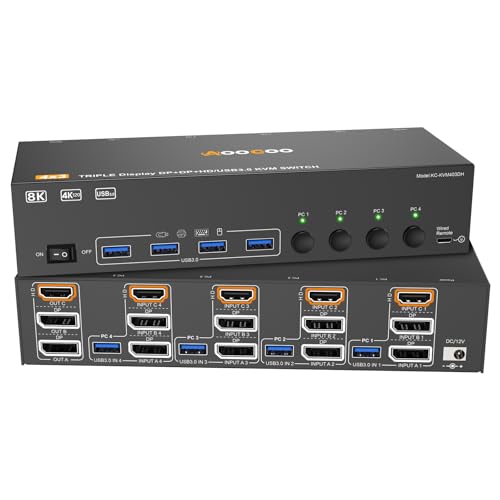
Compared to the TESmart at pick one, this AOOCOO trades dual-monitor purity for sheer port count: four computers sharing three monitors and four USB 3.0 peripherals. The mix of two DisplayPort 1.4 inputs plus an HDMI 2.1 input means mixed video outputs across your fleet finally cooperate. For traders, sysadmins, or anyone running four rigs under one desk, that capacity alone earns its place.
You do need every connected PC to support multi-display output for the three-screen layout to light up. The wired remote keeps switching tactile, and the included USB 3.0 cables save a separate shopping trip.
Everyday Wins
- Four PCs in one box, the highest machine count here short of pick nine
- Three-monitor extended desktop supports serious multitasking layouts
- HDMI 2.1 plus DisplayPort 1.4 inputs handle mixed video standards
- Wired remote makes switch placement flexible under a desk
Points To Keep In Mind
- Each host must support multi-display natively or the third screen stays dark
- The box runs warm in densely cabled setups, so airflow around the unit matters
Best Suited To
Power users juggling four PCs across three monitors, from finance desks to developer workstations.
Swap It Out When
Two monitors are plenty and you want cleaner cabling, in which case the Reyoten HDMI Dual Monitor KVM 3 Computers is a tighter fit.
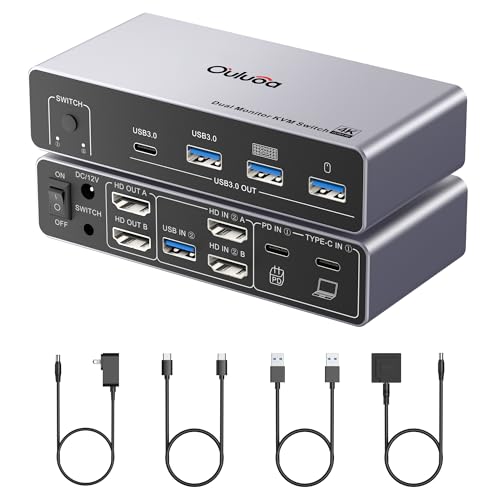
Where picks one and two focus on desktop towers, this Ouluoa speaks directly to the hybrid-worker crowd: one desktop, one laptop, one set of monitors. Plug the laptop in over USB-C and the unit pushes 100W of charging passthrough back upstream, so a single cable handles video, data, and power. The dock expands to two HDMI displays at 4K@60Hz, plus three USB 3.0 ports and a USB-C port for accessories.
In a home office where a work laptop meets a personal desktop, this is the cleanest wiring on the list. macOS users should note that USB-C from a Mac only supports SST (single-stream transport, which mirrors rather than extends) display mode, so the second screen mirrors instead of extending.
Standout Benefits
- 100W passthrough charging removes the laptop brick from the desk
- USB-C input pairs naturally with modern laptops
- Three USB 3.0 plus one USB-C handle most accessory loads
- Wired remote and cables included for immediate setup
Trade-Offs To Consider
- macOS USB-C ports cap at SST, so the second display mirrors
- Only two-machine capacity, with no room for a third workstation
Made For
Hybrid workers splitting time between a work laptop and a home desktop, especially anyone tired of separate chargers.
Consider Something Else When
You need a third or fourth machine in the mix, where the Reyoten USB-C KVM Switch 4 Computers fits far better.
This is the most forgiving switch on the list for messy, real-world hardware. The Reyoten 4-port KVM accepts a USB-C laptop alongside desktops wired over DisplayPort plus USB-C, or DisplayPort plus HDMI plus USB 3.0, or pure HDMI plus HDMI. You don’t need every host to match. One-touch switching moves between a MacBook and three workstations, sharing two 4K@60Hz monitors and a stack of USB 3.0 peripherals.
For an editor hopping between a personal Mac and a render box, or a developer testing on three operating systems, the mixed-port flexibility is the selling point. Owners commonly mention that labeling the cables upfront saves confusion later.
Positive Takeaways
- Mixed video inputs let laptops and desktops coexist without adapters
- Four-machine sharing covers most home and small-studio setups
- Dual 4K@60Hz output is more than enough for productivity displays
- One-touch button switch keeps operation tactile and predictable
Where It May Fall Short
- More cable types in play means more labeling discipline at install
- Triple-monitor output isn’t supported, unlike pick two
Perfect Match For
Anyone running a USB-C laptop alongside multiple desktops, especially mixed-platform creative studios.
Skip It When
Triple-monitor output is non-negotiable, in which case the AOOCOO 3-Monitor 4-Computer KVM Switch handles that exact brief.
Not every setup needs DisplayPort gymnastics. This Reyoten keeps everything on HDMI, accepting three computers over four USB 3.0 ports and two HDMI cables. Resolutions up to 4K@60Hz (and 2K at higher refresh for esports) make it a clean fit for general productivity, classroom AV carts, or office hot-desking.
Wireless peripherals work alongside wired keyboards and mice, which matters for the growing number of offices standardizing on Bluetooth setups. For most triple-PC home offices, this is the path of least resistance.
Everyday Advantages
- Pure HDMI inputs mean no adapter drawers for typical monitor setups
- Three-PC sharing covers common personal-plus-work-plus-test rigs
- Wireless keyboard and mouse compatibility removes one cable per workstation
- Plug-and-play recognition keeps the first-time setup brief
Small Caveats
- No DisplayPort path, so DP-only monitors require active HDMI adapters
- Doesn’t ship with HDMI cables, so budget for them separately
Quick Facts
Right Fit For
Home and small-office setups running three HDMI-only computers who want plug-and-play simplicity.
A Better Fit Elsewhere
High-refresh gaming is the priority, where the TESmart 8K DP KVM Switch Dual Monitor pushes far beyond 4K@60Hz.
Where most KVM switches stop at two screens, this TESmart drives three 4K@60Hz displays from two computers. MST (multi-stream transport, a DisplayPort feature that daisy-chains multiple monitors through one cable) plus EDID emulation keeps the layout stable across switchovers. A 60W laptop charge upstream, plus a shared gigabit LAN port, makes it function as a real docking station rather than just a video switcher.
For a video professional whose MacBook drives a triple-display editing bay, the convenience is hard to overstate. Two computers is the ceiling, but most people at this display count don’t need more.
Practical Advantages
- Triple 4K@60Hz output for serious editing or trading layouts
- 60W upstream charging trims the laptop power brick
- MST and EDID emulation prevent the dreaded monitor re-detection lag
- Shared gigabit LAN keeps both PCs on the same wired network
A Few Limitations
- Two-PC ceiling, so adding a third workstation means another unit
- MST depends on OS support, so older Linux distros occasionally hiccup
Who Should Grab It
Creators and analysts running triple-monitor layouts from a laptop-driven workstation.
Not Your Match When
You mainly need four-machine capacity, where the Reyoten 6-Computer Dual Monitor KVM gives that flexibility.
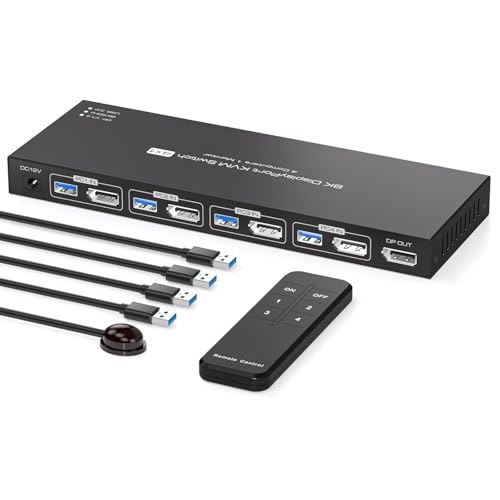
Not every desk needs a wall of monitors. This PVBCTCSID unit accepts four computers over DisplayPort, routing them to a single 8K-capable monitor and four USB 3.0 peripherals. Resolution support reaches 8K@60Hz and 4K@144Hz, so even a solo screen can pull serious detail for grading or simulation work. A wired controller plus the front-panel button handles switching.
For lab benches, IT closets, or anyone whose main monitor rotates between four workstations, this is a tidy solution. Extended and copy display modes are both supported.
Where It Excels
- Highest PC count available without stepping up to dual-monitor territory
- 8K@60Hz and 4K@144Hz ceiling on a single display
- Compact footprint suits dense racks or under-desk mounting
- Extended and mirrored display modes both work
Practical Considerations
- DisplayPort-only inputs mean HDMI machines need adapters
- Single-monitor output rules out dual-screen workflows
Built With In Mind
IT technicians, lab managers, and anyone cycling four PCs through one premium monitor.
Reach For A Different Pick When
Dual screens matter to your workflow, in which case the Reyoten HDMI Dual Monitor KVM 3 Computers keeps things simple.
Designed for the dual-laptop life, this Reyoten accepts two USB-C laptops and routes them to two HDMI monitors. Copy mode mirrors the primary display onto the secondary, which is handy for presentations or paired-screen recording setups. Programmers, designers, and content creators who keep a personal and a work laptop side by side get the cleanest cable run on this list.
Where pick three targets the desktop-plus-laptop mix, this unit leans fully into the two-laptop world. The trade-off is no support for tower desktops with discrete GPUs.
Why It Works Well
- USB-C native inputs match modern laptop outputs perfectly
- Copy mode supports mirrored presentations and dual recording
- Single keyboard and mouse across two laptops removes desk clutter
- Compact housing travels well between home and office setups
Things To Weigh
- HDMI monitor outputs require HDMI-equipped displays
- Desktop towers with discrete GPUs aren’t the target audience
Feature Snapshot
Who Will Love This
Programmers and designers running a personal and work laptop side by side who want one clean desk.
Where A Sibling Pick Shines
A desktop tower needs to share the desk too, where the Ouluoa USB-C KVM Dock adds a true desktop input.
The capacity king of the list, this Reyoten drives six computers through two monitors using two DisplayPort 1.4 and one HDMI 2.1 input scheme. Four USB 3.0 peripherals follow the active host, and the metal chassis is built for the heat load of constant switching. For lab benches, control rooms, and IT staging areas where many machines funnel into one workstation, the PC count alone justifies the footprint.
Most home users won’t need six inputs, but for the setups that do, no other unit here gets close. Cabling discipline becomes critical with this many hosts in play.
What It Does Well
- Six-PC capacity, the highest count on this list
- Mixed DisplayPort and HDMI inputs handle varied video outputs
- Metal chassis dissipates heat under constant switching
- 4K@60Hz dual-output keeps productivity visuals sharp
Honest Caveats
- Cable management gets serious with six hosts in play
- Overkill for typical home or single-desk workflows
Whose Desk It Belongs On
IT managers, lab operators, and small studios running four to six machines through one operator station.
Skip It When
Two or three machines are plenty, in which case the Reyoten HDMI Dual Monitor KVM 3 Computers keeps the desk simpler.
What Matters Most Before Choosing High Quality Kvm Switches
Match The Video Path First
Before anything else, look at the ports on the back of your monitors and your computers. HDMI, DisplayPort, and USB-C each behave differently through a KVM, and mismatches usually mean active adapters that add cost and complexity. If your monitors are 4K@60Hz HDMI panels, an HDMI-only switch like the Reyoten 3-Computer unit keeps the wiring clean. If you push 4K@144Hz for gaming or grading, a DisplayPort 1.4 path is the safer bet.
Count Your Real Computer Load
Most shoppers underestimate how many machines they’ll add in two years. A two-port switch solves today’s setup but forces a replacement when a third workstation appears. The four- and six-port options cost a little more now and pay off the first time you add a test box or a streaming PC.
Plan For Peripheral Sharing
USB 3.0 ports on the KVM determine how cleanly your keyboard, mouse, webcam, and storage follow the active PC. Four ports is the practical minimum for most desks. Webcams especially benefit from USB 3.0 bandwidth, which older USB 2.0 KVMs can’t sustain at 4K capture.
Watch For EDID And Refresh Quirks
EDID emulation (a chip that mimics the monitor’s identity card so each PC always sees a stable display) prevents the annoying “monitor rearrangement” problem after every switch. G-Sync and FreeSync support matter for gamers, while DSC (display stream compression) is what lets 8K signals travel over a single cable without dropping chroma or refresh. These features rarely make headlines, but they decide whether your day-to-day switching feels invisible or irritating.
Key Considerations Across These Picks
Common Buying Slip Ups
The most frequent mistake I see is buying a KVM based on PC count alone, then discovering the host machines don’t support multi-display output. Three screens through one switch requires every connected computer to natively drive multiple displays, otherwise the third panel stays dark. Cable quality matters too: passive HDMI cables over six meters start dropping signal at 4K, which forces frustrating debugging later.
When Paying More Pays Off
Higher-tier models earn their keep through EDID emulation, display stream compression, and USB 3.0 peripheral bandwidth. A budget switch that “works” tends to lose its monitor arrangement every time you switch, which adds up to real lost minutes across a workday. For setups running higher refresh rates or more than two computers, the smoother switching and stable display metadata usually justify the step up within a single season of use.
Frequently Asked Questions
Do KVM switches reduce input lag for gaming?
Most modern DisplayPort 1.4 KVMs add only a frame or two of latency, which is imperceptible in competitive titles. Look for switches that explicitly mention G-Sync and FreeSync passthrough, like the TESmart 8K unit, for the cleanest gaming experience.
Can a KVM switch charge my laptop through USB-C?
A few do, including the Ouluoa dock-style switch, which passes up to 100W upstream to a connected laptop. Most traditional KVMs don’t carry charging, so verify the wattage rating before assuming your laptop will stay topped up.
How many monitors can a single KVM really drive?
Two is the most common configuration, with a few specialty switches like the AOOCOO 4-computer and TESmart MST units pushing three. Anything beyond three typically requires multiple switches or specialty hardware and isn’t realistic for most desks.
Will a KVM work with wireless keyboards and mice?
Most modern KVMs handle Bluetooth and RF receivers through their USB ports without issue. Reyoten’s 3-computer HDMI switch is one example that explicitly supports wireless peripherals, which matters for offices standardizing on Bluetooth gear.
Do I need to power down my PCs to change KVM connections?
No, hot-plug switching is standard on every unit in this roundup. That said, powering everything off for the initial cabling is cleaner and reduces the chance of mislabeled inputs the first time you press the switch button.
Closing Remarks
The right KVM switch is the one that matches your actual computer count, video path, and peripheral needs without overpaying for capacity you’ll never use. Start with the ports on your monitors, count the machines you’ll realistically run in the next two years, and pick the switch that lines up with both.