A computer for an older adult should feel welcoming from the first plug-in: a readable display, a forgiving keyboard, and software that doesn’t fight back. Many shoppers ask which machines handle video calls with grandchildren, photo albums, online banking, and streaming without frustrating slowdowns. This roundup narrows nine solid choices worth comparing, from all-in-one designs that hide cable clutter to compact boxes that slide behind a monitor. Each pick leans toward either simplicity, screen real estate, or room to grow, so matching the right model to the person matters more than chasing raw speed.
The Choices Worth Comparing

Lenovo IdeaCentre 24 N100 8GB 512GB SSD All-in-One

Apple 2024 Mac mini M4 16GB 256GB SSD
Apple 2024 Mac mini M4 16GB 512GB SSD

Apple 2024 iMac M4 24-inch 16GB 256GB Pink
HP 2025 22-inch FHD All-in-One 8GB 128GB
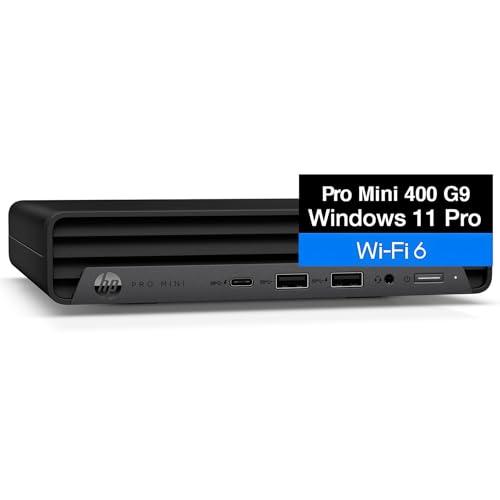
HP 2026 Mini PC i5-12400T 16GB 256GB
Apple 2024 Mac mini M4 Pro 24GB 512GB

HP 17 Laptop 17.3-inch i3 8GB 256GB Silver
HP Desktop Tower i5-12500 8GB 256GB Bundle
The Picks, Examined More Closely
A 23.8-inch all-in-one like this one tucks the computer behind the screen, which removes a tower from the desk and cuts cable clutter to a single power cord. The included display is large enough for comfortable reading, and the Intel N100 quad-core chip, paired with 8GB of DDR4 RAM, is well-matched to everyday tasks like email, web browsing, video calls, and light document editing.
The 512GB PCIe SSD gives plenty of headroom for a lifetime of family photos without forcing an external drive. For someone who wants a “set it and forget it” workstation, this is a forgiving first machine.
Everyday Advantages
- 23.8-inch integrated display removes the need to buy a separate monitor.
- 512GB SSD holds decades of family photos and documents without slowing down.
- WiFi 6 and Bluetooth 5.2 keep wireless mice, keyboards, and printers hassle-free.
- HDMI-out allows a second display for those who like a dual-screen workflow.
- All-in-one form factor leaves desk space open for notebooks, glasses, or a lamp.
Things To Consider
- Webcam, speakers, and microphone quality aren’t specified, so a headset may be worth adding for clear video calls.
- The N100 chip is efficient but not built for heavy photo or video editing work.
Key Specs
Built With In Mind
Older adults who want one tidy setup for email, photos, and video calls without separate components.
Consider Something Else When
Someone who travels between rooms should instead look at the HP 17 Laptop, which folds flat and carries easily.
The Mac mini sits in a five-by-five-inch enclosure, small enough to perch next to a monitor or disappear behind one on a VESA mount. The M4 chip with a 10-core CPU and 10-core GPU delivers noticeably snappy performance for browsing, streaming, and FaceTime. macOS tends to feel calm and predictable, which often suits someone moving away from a cluttered Windows desktop.
With 16GB of unified memory (a shared pool the chip uses freely across tasks) and 256GB of SSD storage, this is the lightest of the Mac mini trio but still enough for everyday documents and photo libraries. Shoppers should plan to pair it with their own display, keyboard, and mouse.
The Case For It
- Tiny chassis slips into any desk corner or behind a monitor.
- M4 chip handles video calls and streaming without fan noise becoming distracting.
- macOS pairs smoothly with iPhone for shared photos, messages, and calls.
- Front and rear ports keep cables tidy for everyday accessories.
Honest Caveats
- 256GB fills up quickly with photo and video libraries.
- Monitor, keyboard, and mouse are sold separately, raising the total cost.
- Switching from Windows takes adjustment for some long-time PC shoppers.
The Right Fit
Apple-curious shoppers moving from an aging Windows tower who want a quiet, low-maintenance desktop.
Where Another Pick Suits Better
Those who already own a favorite monitor and prefer staying in Windows will find the HP 2026 Mini PC a more familiar alternative.
This Mac mini doubles the storage of the prior pick without changing the size or weight. Doubling SSD space from 256GB to 512GB gives breathing room for years of iPhone photo backups, which matters once a household starts sharing pictures across devices. The M4 chip and 16GB of unified memory stay the same, so performance stays calm and quiet.
For someone whose main worry is “running out of room,” this middle tier of the Mac mini lineup addresses that directly without stepping up to the pricier Pro model.
The Good Stuff
- 512GB storage comfortably holds years of iCloud and local photo libraries.
- Compact size suits small writing desks and bedside setups.
- macOS screen-reader and zoom features are deeply integrated out of the box.
- Same quiet thermals as the smaller sibling, with no noticeable fan noise during normal use.
Points To Note
- Display and accessories still need to be bought separately.
- No touchscreen option for those who prefer tapping to clicking.
Who Will Love This
Family historians and photo keepers who want a long-lived desktop with comfortable storage headroom.
Look Elsewhere When
Someone who wants the screen included should compare the Apple 2024 iMac M4 24-inch in this roundup instead.
The 24-inch iMac folds the computer behind a vibrant Retina display in an unusually thin chassis. Apple’s M4 chip with an 8-core CPU and 8-core GPU is plenty for browsing, mail, photos, and streaming, while 16GB of unified memory keeps multiple apps open without stutter. The pink finish adds a warm accent to a study or sunroom without dominating the room.
Compared to the Lenovo IdeaCentre 24 reviewed earlier, this iMac leans further toward visual polish and a tighter Apple ecosystem. Where Lenovo prioritizes generous storage out of the box, Apple keeps storage at a baseline that may push photo-heavy shoppers toward iCloud or an external drive.
Where It Excels
- 24-inch Retina display is sharp, color-accurate, and easy on aging eyes.
- All-in-one design with color-matched keyboard and mouse included.
- macOS accessibility tools for vision and hearing are mature and dependable.
- Whisper-quiet operation even during video calls.
Trade Offs
- 256GB storage is modest for households with large photo libraries.
- Limited port selection compared to tower PCs, depending on configuration.
- Pricing climbs quickly if you configure higher storage at checkout.
Best Suited To
Style-conscious households who want a centerpiece computer that’s already screen-and-speaker ready.
Skip It When
Storage-hungry shoppers should consider the HP Desktop Tower i5-12500 instead, which offers easier internal expansion.
This 22-inch all-in-one shrinks the desk footprint further while still bundling a display, webcam, and speakers into one tidy package. The 13th Gen Intel N100 quad-core processor and 8GB of DDR5 RAM (the newer memory standard that handles multitasking more efficiently than DDR4) cover web, mail, and streaming comfortably. With Windows 11 Pro preinstalled, the operating system lands in a familiar place for anyone who’s used Windows before.
The catch sits in storage: 128GB fills quickly if a household keeps large photo albums locally. Most owners pair this machine with cloud storage or a small external drive, which is a fair trade for the lower ticket price.
Reasons It Performs
- Compact 22-inch full-HD display suits smaller desks and apartments.
- Built-in webcam simplifies video calls without hunting for add-on cameras.
- HDMI and Type-C ports allow a second screen if eyesight needs a boost.
- Wi-Fi and Bluetooth keep wireless printers and accessories simple to add.
A Few Limitations
- 128GB of internal storage is tight for photo and video collections.
- The N100 chip isn’t designed for heavy multitasking or creative apps.
- Keyboard and mouse quality varies, so some may prefer aftermarket options.
Quick Facts
Whose Shelf It Belongs On
Budget-minded shoppers furnishing a small apartment, guest room, or spare bedroom office.
A Better Fit Elsewhere
Anyone storing large photo libraries locally will get more breathing room from the Lenovo IdeaCentre 24’s 512GB drive.
HP’s Mini PC line crams a six-core Intel i5-12400T processor and 16GB of RAM into a chassis barely larger than a paperback book. Compared to the all-in-ones above, this is a more traditional “bring your own monitor” setup, but the extra horsepower is real. Multitasking across browser tabs, video calls, and documents feels noticeably smoother.
For households that already own a good monitor, this little box delivers workstation-class responsiveness without the footprint. The 256GB NVMe SSD (a fast storage type that plugs directly into the motherboard) keeps boot and app-launch times brief.
Useful Highlights
- Six-core i5 processor handles multitasking more confidently than N100-class chips.
- 16GB RAM keeps many browser tabs open without slowdown.
- Tiny chassis mounts behind a monitor or sits on a shelf out of sight.
- NVMe SSD delivers quick startups and app launches.
Softer Spots
- Display, keyboard, and mouse must be supplied separately.
- 256GB storage can feel tight over time without an external drive.
- Some shoppers find mini PCs less intuitive than all-in-ones for first-time use.
Perfect Match For
Tech-comfortable adults who already own a quality monitor and want more responsive multitasking.
Another Choice May Suit
First-time computer shoppers will find the Lenovo IdeaCentre 24’s all-in-one design more forgiving on day one.
The Mac mini M4 Pro steps up to a 12-core CPU and 16-core GPU, with 24GB of unified memory and 512GB of SSD storage. For someone editing family videos, organizing large photo libraries, or dabbling in music production, that headroom shows up immediately. Apps open faster, and large exports finish noticeably sooner than on the standard M4 Mac mini reviewed earlier.
The catch is the entry cost climbs steeply once you add a display and accessories. For pure email-and-Facebook households, the standard M4 Mac mini delivers plenty; this Pro version earns its keep when the workflow grows.
A Favorable Mix
- M4 Pro chip tackles photo and video editing without breaking a sweat.
- 24GB unified memory is generous for many browser tabs and apps side by side.
- 512GB storage is a comfortable baseline for media-rich households.
- Same compact five-by-five-inch chassis as the smaller Mac minis.
Worth Bearing In Mind
- Higher price tag may be hard to justify for light everyday use.
- Display and accessories still require separate purchases.
- Power users may eventually want external storage for very large media files.
Made For
Hobbyists and creatives editing photos, podcasts, or home videos on a compact desktop.
Reach For A Different Pick When
Light-use households will find the standard Apple 2024 Mac mini M4 16GB 256GB a more sensible fit.
Although technically a laptop, the HP 17 earns a place on this list because some older adults prefer moving a single machine between the kitchen table, the living room recliner, and the bedroom. The 17.3-inch HD+ display (1600 x 900 resolution, slightly sharper than standard HD) offers desktop-class screen real estate, and the 11th Gen Intel Core i3-1125G4 chip with 8GB of RAM handles browsing and video calls competently.
Compared to the all-in-ones and mini PCs in this roundup, the trade-off is portability versus raw ergonomics: a laptop keyboard isn’t ideal for long typing sessions, and the screen tilts but doesn’t raise to standing eye level.
Noteworthy Benefits
- Large 17.3-inch screen is comfortable for aging eyes.
- Folds flat and carries easily between rooms or to family gatherings.
- Built-in webcam, microphone, and Wi-Fi keep video calls plug-and-play.
- HDMI port allows connection to a larger monitor when at a desk.
Potential Drawbacks
- Laptop ergonomics aren’t ideal for long, stationary sessions.
- i3 processor is slower than the i5 chips found in mini PCs.
- Battery-powered use means charging routines become part of ownership.
Feature Snapshot
Who Should Grab It
Active adults who want a computer they can carry to the kitchen table, porch, or family visits.
Swap It Out When
Someone who mostly sits at a desk will get a more ergonomic setup from the Lenovo IdeaCentre 24 all-in-one.
For shoppers who grew up with a beige tower humming in the corner, this HP desktop leans into that familiar silhouette. The Intel i5-12500 is a six-core processor that handles browser tabs, video calls, and document work with calm confidence, and the bundle includes a keyboard, mouse, Wi-Fi, and Bluetooth right out of the box.
Unlike the all-in-ones reviewed earlier, this setup requires a separate monitor, but that flexibility also makes it easier to upgrade the display over time without replacing the whole computer.
The Helpful Details
- Six-core i5 processor delivers responsive multitasking across everyday apps.
- Bundled keyboard and mouse remove extra shopping trips on day one.
- Built-in Wi-Fi and Bluetooth cut down on accessory adapters.
- Tower design makes future storage or memory upgrades more approachable.
- Windows 11 Home preinstalled, so the start screen feels familiar to long-time PC shoppers.
Less Ideal Details
- Display not included, so total cost climbs once a monitor is added.
- Tower occupies floor or shelf space, which some small homes find awkward.
- 256GB storage fills up without an external drive for photo collectors.
Right Fit For
Traditional PC shoppers who want a sturdy tower that grows with them over several years.
Not Your Match When
Anyone short on desk space should compare the HP 2026 Mini PC, which delivers similar horsepower in a smaller box.
Picking The Right Fit For Everyday Comfort
Start With The Screen
A readable display reduces eye strain more than any other spec. 22 to 24 inches is the sweet spot for most reading and video calls, and full-HD resolution (1920 x 1080) keeps text crisp. Shoppers should also consider height adjustability, since a screen at eye level prevents neck fatigue during long sessions. All-in-ones like the Lenovo IdeaCentre 24 and the Apple iMac M4 solve this elegantly by combining screen and computer into one chassis, while mini PCs let shoppers reuse a monitor they already trust.
Memory And Storage Run The Daily Feel
8GB of RAM is the minimum comfortable baseline for browsing and video calls. 16GB feels noticeably smoother when many browser tabs and apps stay open simultaneously, which is why the HP Mini PC and the Mac mini M4 Pro stand out for multitaskers. Storage under 256GB tends to fill quickly once a household starts saving photos and documents locally, so 512GB SSDs are a safer target unless the plan is to lean on cloud storage from day one.
Operating System And Ecosystem
Windows 11 remains the most familiar environment for many older adults, and macOS offers a calmer, more curated experience that pairs tightly with iPhones. Anyone deep in the Apple ecosystem already may find the Mac mini or iMac easier to integrate with existing photos, messages, and contacts. Windows shoppers who want fewer cables should still consider all-in-ones like the HP 22-inch or Lenovo IdeaCentre for simplicity.
Ports, Audio, And Accessories
A built-in webcam, microphone, and speakers make video calls easier on day one. Shoppers should look for at least one HDMI or DisplayPort output if a second monitor is planned, plus USB-A ports for legacy accessories like printers and USB sticks. Wireless keyboards and mice with larger printed keys are a small upgrade that helps anyone with dexterity or vision concerns.
Smart Choices Before Checking Out
Common Shopping Slip Ups
Many first-time buyers focus on processor speed and overlook the screen size, only to find the text uncomfortably small. Others pick a 128GB or 256GB SSD without checking how a household’s photo library is likely to grow, then hit storage limits within a year. A simple workaround: budget for an external drive or cloud subscription alongside the computer, and prioritize a 24-inch full-HD display over a faster chip.
What The Higher Tier Buys
Stepping up from a standard M4 Mac mini to the M4 Pro, or from an N100-class chip to an i5, buys more comfortable headroom for photo editing, large spreadsheets, and many browser tabs running at once. Premium picks also tend to ship with more RAM and storage, which delays the moment any household feels the machine slowing down. The honest read is this: for someone whose routine is email, video calls, and streaming, a mid-tier pick handles everything comfortably, and the premium tier pays off mainly for creative hobbies or very heavy multitasking.