Anyone working late from a home office knows the frustration of squinting at unlabeled keys in dim light, or typing so loudly that the people sleeping nearby start to grumble. A backlit keyboard paired with a comfortable mouse solves both problems at once, and a wireless combo keeps the desk clean. I’ve narrowed down seven solid combinations that span gaming rigs, ergonomic workstations, multi-device setups, and quiet shared spaces, so you can stop researching and start typing.
An Overview Of The Picks

Logitech G502 Hero and G213 RGB Gaming Keyboard Combo
MEETION Wireless Bluetooth Keyboard and Mouse Combo

Sablute KM81 Wireless Mechanical Keyboard and Mouse
SABLUTE MA41 Ergonomic Wave Keyboard and Mouse Combo

seenda COE64-3 Pro Wireless Bluetooth Keyboard and Mouse

SABLUTE Ergonomic Wave Keyboard and Mouse Combo
SABLUTE Ergonomic Full Size Wave Keyboard and Mouse Combo
A Closer Look At Each Pick
Most combos on this list are wireless, which makes the wired nature of the G502 Hero and G213 pair feel like a deliberate choice rather than a limitation. Logitech G built this duo for desktop gamers who want a keyboard and mouse locked into the machine, free of dongles and battery swaps. The G213 Prodigy keyboard features tactile keys tuned for gaming-grade actuation, while the G502 mouse carries a HERO 25K sensor that tracks one-to-one up to 25,600 dpi, a spec competitive players tend to take seriously.
For anyone running marathon ranked sessions, the wired connection sidesteps wireless interference and battery anxiety. Compared to the silent MEETION combo in pick 2, this Logitech G set is louder and far more programmable, so casual office users may want to keep scrolling.
Where It Excels
- LIGHTSYNC RGB syncs both peripherals and other compatible Logitech G gear across roughly 16.8 million colors.
- Eleven programmable buttons on the mouse give MMO and FPS players room for custom macros.
- Five 3.6g removable weights let you tune the mouse feel from light to hefty.
- The keyboard’s spill-resistant body handles the occasional coffee splash during a clutch round.
- Wired connection means zero input lag and no charging routine.
Things To Consider
- Cable management becomes a real concern with a wired mouse in a small desk.
- Mechanical-style tactile keys generate more noise than the membrane builds elsewhere on this list.
- Advanced RGB customization requires the Logitech G HUB software to be installed.
Key Specs
Who It Suits Best
Competitive and hobbyist PC gamers who want a tactile, customizable wired setup and already lean toward the Logitech G ecosystem.
Where Another Pick Suits Better
Remote workers in shared spaces will get more mileage from the silent MEETION Wireless Bluetooth Keyboard and Mouse Combo, which trades RGB flair for whisper-quiet operation.
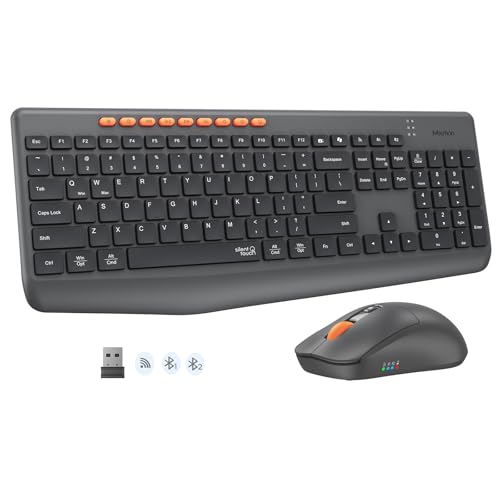
Anyone juggling a laptop, a tablet, and a phone throughout the day will appreciate this MEETION combo’s dual-mode design, which pairs via Bluetooth or a 2.4 GHz wireless dongle and reportedly holds a stable connection up to roughly 33 feet. The keyboard and mouse both lean into a silent key and click profile, so the typing stays close to a whisper even during a long late-night work push.
This is the kind of practical, no-fuss gear that earns a permanent spot on a productivity desk. Compared to the Logitech G gaming pair at pick 1, there’s no RGB theater here, but for shared apartments or co-working spaces, the trade is well worth it.
Where It Delivers
- Three-device pairing through Bluetooth and 2.4G wireless simplifies multi-screen workflows.
- Silent switches and clicks make it polite for late-night work or shared rooms.
- Wireless setup keeps the desk free of cable clutter.
- Full-size layout gives a number pad for spreadsheet and accounting tasks.
Worth Noting
- It is not a mechanical build, so typists who love crisp tactile feedback may miss the bump.
- Bluetooth mode draws more battery than the 2.4G dongle, so heavy multi-device hoppers will charge more often.
Who Will Love This
Remote workers, students, and anyone bouncing between a laptop and a tablet who needs a quiet, cable-free setup.
Consider Something Else When
Competitive gamers wanting lighting effects and macros should look at the Logitech G502 Hero and G213 RGB Gaming Keyboard Combo, which is purpose-built for that crowd.
The KM81 leans into a modern-retro aesthetic with round keycaps, ABS construction, and an electroplated trim that reads more art piece than office tool. Underneath the visual flair sit linear red switches, which deliver a smooth, light keystroke well suited to long typing sessions without the loud click of a blue switch.
Where the MEETION combo in pick 2 keeps things understated, the KM81 wants to be seen. The customizable backlighting offers 17 modes and 7 colors with up to 108 lighting effects, so anyone who treats their desk like a personal gallery will feel right at home.
A Favorable Mix
- Linear red mechanical switches give a smooth, low-resistance feel that’s easy on fingers during long reports.
- 108 lighting effects across 17 modes let you tune the visual mood from calm to bold.
- Wireless mechanical builds are still relatively rare, so this combo covers a niche.
- The electroplated trim and round keycaps add character to a plain desk.
Trade Offs
- Linear switches offer no tactile bump, so touch-typists who rely on feedback may need an adjustment period.
- ABS keycaps tend to develop a shine faster than PBT alternatives under heavy daily use.
Key Specs
Made For
Writers, students, and home-office workers who want mechanical feel without the clicky noise, and who care about how their gear looks on camera.
Skip It When
Ergonomics-first shoppers handling marathon typing days will get more wrist support from the SABLUTE MA41 Ergonomic Wave Keyboard and Mouse Combo in pick 4.
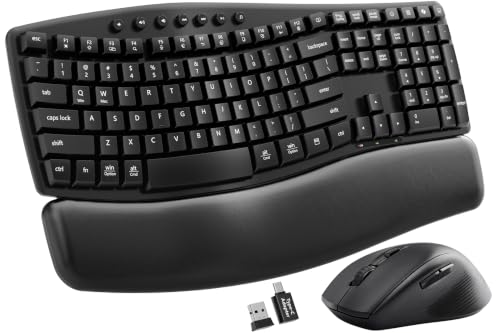
Ergonomic wave layouts split the keys into a curved contour that follows the natural arc of the fingers, and the MA41 adds two adjustable tilt angles to dial in hand position. A soft leather palm rest sits in front of the keys, which is a noticeable upgrade over the hard plastic rests found on most budget boards.
The advertised near-silent 30 dB typing profile makes this a friend to anyone sharing a room. Where the Sablute KM81 in pick 3 leans into visual flair, the MA41 is purely about hand and ear comfort during a full workday.
What Works In Its Favor
- Wave-shaped key layout encourages a more natural wrist angle during long sessions.
- Cushioned leather wrist rest reduces pressure that hard plastic rests tend to cause.
- Dual-system switch supports both Windows and Mac workflows.
- Around 30 dB typing output keeps late-night work quiet enough for shared bedrooms.
Minor Gripes
- The wave layout takes a few days of muscle memory adjustment if you’re coming from a flat keyboard.
- Leather-style palm rests can feel warmer than mesh alternatives in non-air-conditioned spaces.
Feature Snapshot
Best Suited To
Home-office workers, business teams, and anyone with wrist fatigue who types for hours and needs a quiet, contoured board.
A Better Fit Elsewhere
Design-conscious shoppers chasing lighting drama should look at the Sablute KM81 Wireless Mechanical Keyboard and Mouse in pick 3, which delivers personality without ergonomic wave keys.
The seenda COE64-3 Pro trims the bulk with a roughly 0.18-inch slim metal keyboard frame that slips easily onto a small desk or a shared hot desk. Two typing angles, around 5.5° and 9°, let you pick a tilt without sacrificing the flat profile, and seven backlight colors across three brightness levels keep the keys legible from a darkened couch.
Multi-device pairing across three gadgets positions this combo for anyone toggling between a work laptop, a personal laptop, and a tablet. The full-size layout preserves the number pad that data entry work demands, a feature the more compact ergonomic boards in picks 4 and 6 sometimes trim down.
Everyday Advantages
- Slim metal frame keeps the desk footprint compact and tidy.
- Number pad stays intact for spreadsheets and accounting workflows.
- Three-device pairing supports a clean laptop-plus-tablet workflow.
- Three brightness levels on seven colors give control over late-night glare.
Points To Note
- Slim frames can flex slightly under heavy-handed typing in edge cases.
- The metal finish may show fingerprints more readily than plastic shells.
Quick Facts
Whose Shelf It Belongs On
Data-entry pros, accountants, and remote workers who want a slim, multi-device keyboard that keeps the number pad.
Reach For A Different Pick When
Wrist-pain sufferers should pick the SABLUTE MA41 Ergonomic Wave Keyboard and Mouse Combo in pick 4 for its contoured keys and leather palm rest.
The standout spec on this SABLUTE set is the 4000 mAh rechargeable battery, roughly double the capacity of typical backlit keyboards, paired with a faux lambskin palm rest that’s marketed as sweat-proof and easy to wipe clean. The wave-key layout matches the MA41 in pick 4, but the larger battery and refined finish push this combo toward the premium comfort tier.
For anyone logging eight-hour remote-work days, fewer charging breaks and a softer wrist surface make a real difference. The matte finish helps the board disappear into a calm desk, unlike the RGB-forward aesthetic of the KM81 in pick 3.
What Helps Most
- 4000 mAh battery roughly doubles the runtime of standard backlit keyboards.
- Faux lambskin palm rest is durable, sweat-resistant, and easy to wipe clean.
- Matte finish keeps the keyboard looking refined without fingerprint smudges.
- Cross-platform support covers Windows, Mac, and Chrome OS.
Softer Spots
- The larger battery adds slight weight compared to slimmer boards like the seenda COE64-3 Pro.
- Faux leather rests can feel slippery to users used to fabric or memory foam surfaces.
Perfect Match For
Remote workers and freelancers logging long hours who want an ergonomic layout, a soft palm surface, and fewer charging interruptions.
Swap It Out When
Compact-desk dwellers might prefer the slimmer seenda COE64-3 Pro Wireless Bluetooth Keyboard and Mouse in pick 5, which saves footprint over battery size.
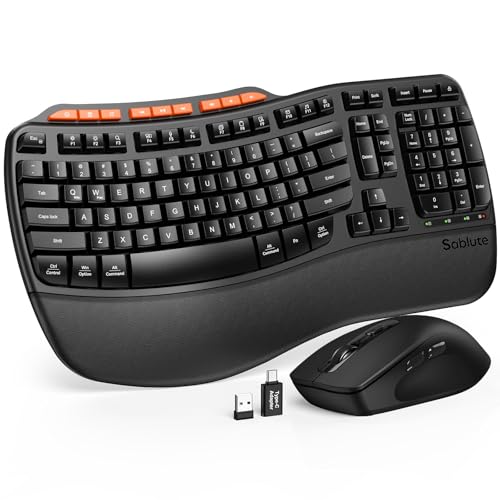
This SABLUTE entry rounds out the list by pairing a wave-shaped key layout with a leatherette wrist rest and adjustable tilt angles at the front and rear of the board. The natural-typing geometry reduces awkward finger travel across rows, and the sweat-resistant wrist rest is easier to wipe down than fabric alternatives.
It sits between the more premium 4000 mAh model in pick 6 and the quieter MA41 in pick 4, aiming for shoppers who want ergonomic comfort without paying for the larger battery. The honest read is that this is a sensible all-rounder for cross-platform home offices.
Where It Helps
- Wave keys follow the natural finger curve to reduce strain over long typing stretches.
- Leatherette wrist rest is more durable and easier to clean than traditional fabric pads.
- Front and rear tilt adjustments let you angle the board to match your chair height.
- Cross-platform compatibility covers the major desktop operating systems.
A Few Limitations
- Backlight and battery details are less documented than the larger SABLUTE model in pick 6.
- Wave layouts still require an adjustment period for typists used to flat boards.
Feature Card
The Right Fit
Cross-platform home-office users who want ergonomic geometry, a tidy full-size layout, and a comfortable wrist rest without chasing top-tier battery specs.
Look Elsewhere When
Shoppers prioritizing battery longevity should reach for the SABLUTE Ergonomic Wave Keyboard and Mouse Combo in pick 6, which doubles down on runtime.
What To Weigh Before Choosing An Illuminated Combo
A backlit keyboard only earns its keep when the lighting actually helps you type. Look for adjustable brightness levels rather than a single on-off setting, since a single mode tends to be either too dim in a bright room or glaring in pitch black. Multiple lighting zones or per-key illumination, like the LIGHTSYNC RGB on the Logitech G set, give you more control over visual fatigue and battery draw, but they also raise the cost.
Connectivity is the next fork in the road. Bluetooth pairing across three devices, as on the MEETION and seenda combos, is a quiet productivity win for anyone juggling a laptop and a tablet. A 2.4 GHz dongle tends to offer lower latency for gaming, which is exactly why the Logitech G502 pair leans wired for the most part. Match the connection type to your actual use case rather than buying the flashiest option.
Switch type and form factor determine how the keyboard feels after hour three. Mechanical linear switches, like the red switches in the Sablute KM81, are smooth and quiet. Tactile mechanical keys give a bump but generate more noise, and membrane keyboards stay quiet but feel mushy. Ergonomic wave layouts, such as those on the SABLUTE MA41 and the final two picks, spread the keys along a curve that supports a more natural wrist angle, which matters once a workday stretches past five hours.
Mouse ergonomics often get overlooked in a combo, but a flat symmetrical shell can wear out your wrist faster than the keyboard does. The ergonomic wave boards on this list ship with contoured mice designed to complement the keyboard layout, while gaming-focused sets like the Logitech G502 lean toward a right-handed sculpted shell with tunable weights. Try to gauge grip style, palm versus claw, before committing, since claw grip users usually prefer smaller, lighter mice.
Key Considerations Across These Picks
Pitfalls Shoppers Hit
Chasing the brightest lighting often backfires. High-intensity RGB looks great in product photos but can wash out the key legends on cheaper keycap materials, especially ABS plastic, which is why the KM81 in pick 3 can develop a shine faster than PBT boards. Pick a brightness level that keeps the legends legible rather than one that turns the keyboard into a light show.
Ignoring the mouse half of the combo is another common slip. The keyboard gets all the attention because of the backlighting, but a poorly shaped mouse will cause more daily discomfort than a flat keyboard ever will. Spend as much time reading about the mouse as the keys, especially if you log long sessions.
Where The Extra Money Goes
Higher-tier combos in this category tend to invest in battery capacity, premium palm rest materials, and refined finishes rather than more lighting effects. The SABLUTE set in pick 6 uses a 4000 mAh battery and a faux lambskin rest that holds up to sweat and wipes clean, two upgrades that quietly improve daily ownership more than an extra RGB mode would. When the upgrade cost goes toward fewer charging breaks and softer wrist support, the extra spend tends to pay off for full-time remote workers and heavy typists.
Frequently Asked Questions
Do backlit keyboards drain battery faster?
Yes, running the backlight at higher brightness draws more power than typing on an unlit board. Most combos on this list include adjustable levels so you can dim the lights when working near a window and brighten them at night, which extends the time between charges.
Are wireless keyboard and mouse combos good for gaming?
Low-latency 2.4 GHz dongles, like the one on the MEETION combo in pick 2, work well for casual play, but competitive FPS players often prefer wired setups such as the Logitech G502 and G213 pair in pick 1 to eliminate any chance of wireless interference.
What is an ergonomic wave layout?
A wave layout splits the keys into a curved contour that follows the natural angle of your fingers, reducing sideways wrist movement. The SABLUTE MA41 in pick 4 and the two SABLUTE entries toward the end of the list use this design for longer, more comfortable typing sessions.
Can one combo work with both Mac and Windows?
Several combos on this list, including the SABLUTE MA41 in pick 4 and the SABLUTE wave boards in picks 6 and 7, support a dual-system toggle that switches the key mapping between operating systems without re-pairing.
How do I clean a leather or leatherette palm rest?
A slightly damp microfiber cloth works well for routine wiping, and a mild soap solution handles stickier buildup. Avoid soaking the rest, since water can creep into the seams and degrade the cushion underneath over time.
Final Verdict
The right illuminated combo depends on what you do most at your desk. Competitive gamers will appreciate the wired reliability and programmable buttons of the Logitech G502 and G213 pair, while remote workers in shared rooms will get more daily use out of the silent MEETION set or one of the SABLUTE ergonomic wave boards. Match the connection type, switch feel, and ergonomic shape to your workload, and the backlight becomes the cherry on top rather than the whole reason to buy.