Working from a MacBook all day means typing on glass feels rough after a few hours, and reaching for the trackpad during long editing sessions slows everything down. Adding a proper keyboard and mouse combo gives back your speed, your posture, and a bit of desk sanity. I’ve narrowed down six options that pair well with macOS, ranging from budget wired sets to premium wireless setups built specifically for Apple layouts.
The Main Contenders

Macally Backlit Keyboard and Mouse Combo

Logitech MX Keys S Combo Mac Wireless Keyboard and Mouse
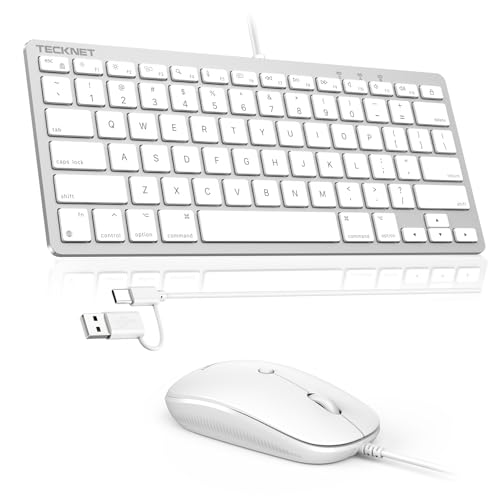
TECKNET USB Wired Keyboard and Mouse for Mac

Macally USB Wired Keyboard and Mouse Combo

seenda SKM64-2 Bluetooth Keyboard and Mouse Combo

Logitech Pebble 2 Silent Wireless Keyboard and Mouse Combo
Taking A Closer Look At The Options
Plug-and-play simplicity defines this Macally combo. The 107-key layout includes a dedicated number pad and 16 macOS shortcut keys, so Spotlight, Mission Control, and brightness controls land exactly where an Apple user expects them.
White LED backlighting runs through three brightness levels, which is enough for dim home offices without turning the keyboard into a flashlight. The slim wired body keeps the desk footprint narrow, while the included mouse offers adjustable DPI (dots per inch, a measure of how sensitive the cursor is to movement) for switching between spreadsheet work and pixel-precise edits.
Practical Pluses
- Three-level backlighting makes late-night sessions easier on the eyes
- Wired USB connection means zero battery anxiety during long workdays
- Full number pad helps anyone managing budgets, inventory, or data entry
- Adjustable DPI mouse tracks accurately across both small and large displays
Things To Consider
- The wired cable can clutter a clean standing-desk setup
- Backlit keys drain visual attention in very bright rooms
Built With In Mind
Home office users and small business owners running spreadsheets or accounting tools who want a no-fuss wired setup.
Skip It When
You want wireless freedom, in which case the Logitech MX Keys S Combo Mac offers a cleaner cable-free experience.
The MX Keys S leans into the Apple aesthetic with a Space Grey finish and a Mac-specific key layout, so there’s no re-learning where Option or Command live. Wireless connectivity through Logitech’s receiver or Bluetooth keeps the desk minimal, and the keyboard pairs with multiple Apple devices for quick switching.
Backlit keys adjust automatically based on room lighting, which feels intuitive once you start using it. The companion mouse offers fluid precision tracking on nearly any surface, including glass desks. Programmable macOS shortcuts through the Logi Options+ app let you remap keys for Final Cut, Logic, or whichever creative tool you live in.
Notable Upsides
- Dedicated Mac layout removes the guesswork from modifier keys
- Auto-adjusting backlighting feels thoughtful rather than gimmicky
- Multi-device switching helps anyone bouncing between a MacBook and an iPad
- Programmable shortcuts save time for creative professionals
Honest Caveats
- Higher price point than wired budget combos
- Requires charging every few weeks depending on backlight usage
Feature Snapshot
Who Should Grab It
Creative professionals and heavy typists who want wireless freedom, premium feel, and macOS-native shortcuts.
Consider Something Else When
Budget matters most and you can live with a wired connection, since the Macally Backlit Keyboard and Mouse Combo delivers similar key count at a lower tier.
TECKNET designed this combo with modern MacBooks in mind. The keyboard ships with both USB-A and USB-C ports, which means it plugs straight into newer MacBook Air and Pro models without needing a dongle, and the slim profile fits easily on smaller desks.
The mouse uses an ergonomic low-profile shape that feels comfortable during extended browsing or editing sessions. Because the set is wired only, there’s no pairing drama, no lost receiver, and no batteries to swap. For anyone running macOS exclusively, the macOS-only compatibility is a feature, not a limitation.
Practical Advantages
- Built-in USB-C port removes the need for adapters with modern MacBooks
- Slim, ergonomic shape reduces wrist strain on long sessions
- No batteries or pairing steps, just plug in and type
- Compact layout frees up desk space for notebooks and coffee cups
Points To Keep In Mind
- macOS-only, so this is not the set for someone switching to a Windows PC
- Wired cable limits placement flexibility
Best Suited To
Modern MacBook owners who want a clean wired setup with native USB-C support and no fuss.
Reach For A Different Pick When
You need wireless freedom or cross-platform compatibility, in which case the seenda SKM64-2 Bluetooth Keyboard and Mouse Combo pairs nicely across Apple devices.
Desk space is precious, and this Macally combo trims the fat with a 78-key layout that skips the number pad. The slim scissor-switch keys feel close to typing on a MacBook, so muscle memory transfers easily.
Thirteen shortcut keys cover the macOS essentials like Spotlight and screen capture. The cross-platform design works with both Mac and PC, which helps anyone running a mixed environment. The mouse keeps a low-profile shape that fits in laptop bags alongside the keyboard.
Reasons It Performs
- Compact 78-key layout fits small desks and laptop stands
- Scissor-switch keys match the MacBook typing feel
- Cross-platform support works across Mac and PC setups
- Thirteen shortcut keys cover core macOS commands
Trade Offs
- No number pad hurts anyone managing heavy data entry
- Wired-only design means cable management is necessary
Quick Facts
Whose Shelf It Belongs On
Students, frequent travellers, and anyone working from a small desk who values a compact wired combo.
A Better Fit Elsewhere
You crunch numbers all day and need a number pad, since the Macally Backlit Keyboard and Mouse Combo offers a fuller layout.
The seenda combo runs entirely over Bluetooth 4.0 or above, which means no dongles and no USB ports to spare. Three Bluetooth channels let the keyboard and mouse hop between a MacBook, an iPad, and an iPhone with a quick shortcut.
Compatibility spans macOS 10.12 and later, plus iPadOS and iOS, which makes this a strong choice for Apple-centric households. The slim keyboard layout keeps the typing surface compact while still offering a familiar Apple key arrangement.
Positive Takeaways
- Three-device Bluetooth pairing simplifies multi-Apple workflows
- No dongles required, freeing up MacBook ports
- Slim Apple-style layout feels familiar from the first keystroke
- Wide Apple ecosystem compatibility out of the box
A Few Limitations
- Battery-powered, so charging or replacements come into play
- Not fully compatible with Windows systems
Right Fit For
Apple households bouncing between MacBook, iPad, and iPhone throughout the day.
Look Elsewhere When
You want cross-platform flexibility, since the Logitech Pebble 2 Silent Wireless Keyboard and Mouse Combo handles multiple operating systems more gracefully.
The Pebble 2 keeps things quiet and slim. Silent switches on both the keyboard and mouse reduce click and keystroke noise, which matters in shared offices, libraries, or late-night sessions in the same room as a sleeping partner.
Recycled plastic construction keeps the weight light enough to toss in a laptop bag. Multi-device pairing lets the set hop between a MacBook and other devices, and the compact shape fits neatly on café tables without crowding your coffee.
Notable Gains
- Silent clicks and keystrokes suit shared spaces and quiet environments
- Lightweight build travels well in laptop bags
- Multi-device pairing handles MacBook plus other devices easily
- Minimalist design complements modern Apple hardware aesthetics
Softer Spots
- Slim key profile may feel shallow for heavy typists used to mechanical switches
- Compact size omits a number pad for data-heavy work
Feature Card
Who Will Love This
Remote workers, students, and café regulars who value quiet operation and portability over a full-size layout.
Swap It Out When
Silent keys aren’t a priority and you want a premium Mac-tuned typing experience, since the Logitech MX Keys S Combo Mac delivers a more substantial feel.
What To Weigh Before Choosing Your Mac Keyboard and Mouse Combo
Wired versus wireless is the first fork in the road. Wired combos like the Macally and TECKNET sets never need charging and connect instantly, which helps anyone who values reliability over aesthetics. Wireless combos like the Logitech MX Keys S and seenda free up desk space and travel more easily, but they ask for occasional recharging or battery swaps.
Mac-specific key layouts matter more than shoppers expect. A keyboard built for Windows forces muscle memory to relearn Command, Option, and shortcut positions. Look for combos that specifically mention a Mac layout or macOS shortcut keys to avoid friction on day one.
Connection type influences daily convenience. USB-A still works fine on older iMacs, while USB-C suits newer MacBook Air and Pro models. Bluetooth-only options like the seenda keep ports free but require Bluetooth 4.0 or above on the host device. Multi-device pairing helps anyone bouncing between a MacBook and an iPad throughout the day.
Mouse ergonomics and DPI deserve attention too. Adjustable DPI helps when moving between high-resolution external displays and standard laptop screens. Slim mouse profiles travel better but may feel small for larger hands during long sessions.
Key Considerations Across These Picks
Common Shopping Slip Ups
The biggest mistake is buying a Windows-layout keyboard and expecting Mac shortcuts to land where they should. Confirm the listing specifically mentions a Mac key layout before committing. Another frequent trap is ignoring connection type, since a USB-A-only keyboard creates an adapter headache with modern MacBooks. Buyers also tend to overlook mouse hand size; a slim mouse that feels fine for fifteen minutes can cramp larger hands by hour three.
Where The Extra Money Goes
Premium combos like the Logitech MX Keys S invest in refined key switches, auto-adjusting backlighting, and software customisation through companion apps. Mid-tier picks offer solid builds with fewer programmable shortcuts. Budget wired combos focus on essential Mac layouts and plug-and-play simplicity without the extras. The upgrade is worth it for anyone who types eight hours a day and notices the difference in key travel and software flexibility.
Frequently Asked Questions
Do Mac keyboard and mouse combos work with iPad and iPhone?
Several combos on this list, including the seenda SKM64-2, support iPadOS and iOS alongside macOS. Bluetooth-based models tend to offer the widest cross-device support.
Is wired or wireless better for a MacBook setup?
Wired combos deliver consistent power and instant connection with no battery concerns. Wireless combos offer cleaner desks and easier portability. Pick based on where you use the MacBook most often.
Will any of these combos work with a MacBook that only has USB-C ports?
The TECKNET combo includes a built-in USB-C port for direct connection. Wireless options like the Logitech MX Keys S and seenda connect over Bluetooth without needing a USB port at all.
How important is DPI adjustment on the included mouse?
DPI adjustment matters when switching between a MacBook’s built-in display and a large external monitor. Higher DPI settings let the cursor travel farther with less hand movement, which feels smoother on big screens.
Do Mac-specific keyboards offer real advantages over generic ones?
Mac-specific keyboards place Command, Option, and function shortcuts where Apple users expect them. They reduce the learning curve and prevent accidental mis-keying during the first weeks of use.
Closing Remarks
The right keyboard and mouse combo turns a MacBook from a portable tool into a proper workstation, and the six picks here cover the most common paths: budget wired reliability, premium wireless refinement, compact travel setups, and multi-device flexibility. Match the combo to your daily habits, and the upgrade pays off within a week.